Coworking Digital Presence Careers & Recruitment Website Template
Desks is a hub-and-spoke landing page template built for coworking job boards. It leads with an interactive hiring-cost calculator above the fold and organizes every section around a single comparison axis, cost, speed, quality, and reach. The Bold Brutalist design and Monochrome Steel palette make the template feel as deliberate and no-nonsense as the industry it serves.
by Rocket studio
Quick summary
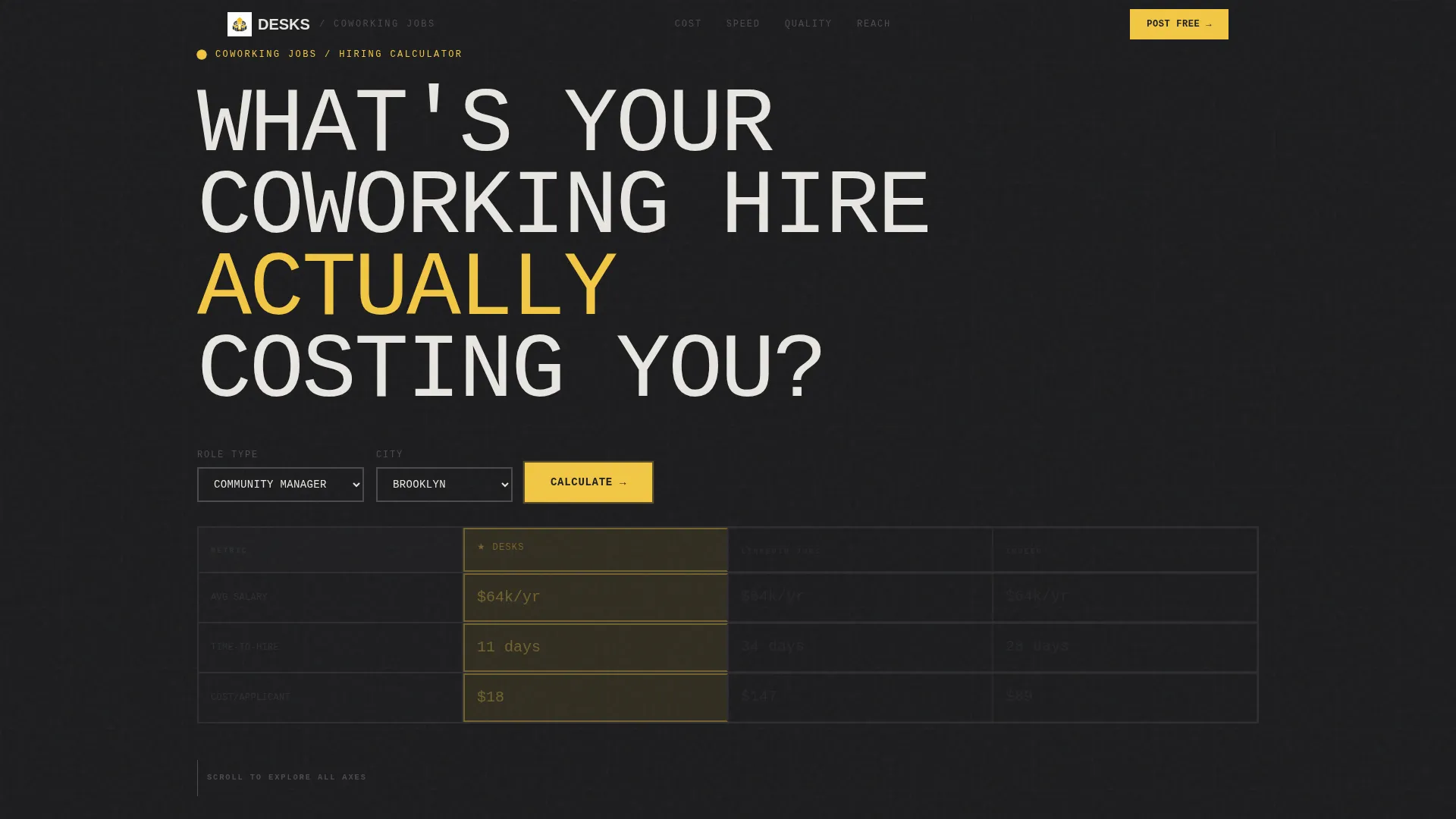
Desks is a single-page, anchor-nav landing page template purpose-built for coworking job boards. The page opens with a hiring-cost calculator that replaces the traditional hero image. A sticky left-rail nav drives visitors through four comparison spokes, COST, SPEED, QUALITY, and REACH, each closing with a repeat call to action. The Bold Brutalist visual identity reinforces the template's direct, data-first personality.
Who this template is for
This template is designed for operators running or building a niche job board inside the coworking industry. It speaks directly to both the platform owner publishing the board and the employers who will post on it.
- Coworking founders and operations directors hiring community managers, space designers, front-desk staff, and operations leads
- Job board creators who need to prove their platform outperforms generalist boards on cost and hire quality
- Franchise owners and multi-location workspace operators filling roles quickly across cities
What problem this template solves
Generalist job boards make coworking employers pay full price for broad reach they do not need. At the same time, a new niche job board has to quickly earn trust from skeptical hiring managers who have never heard of it. This template solves both sides of that problem at once.
- It shows hiring cost comparisons in real time, so employers see the math before they commit
- It replaces brand-trust rhetoric with structured proof across four measurable dimensions
- It removes friction from posting by asking for only three fields and no account creation
What you get with this template
You get a fully structured, single-page landing page with every section pre-built and ready to customize. The layout is organized as a hub-and-spoke flow with a sticky anchor navigation rail on the left.
- An above-the-fold hiring calculator with role-type dropdown and city input that outputs a live comparison table
- Four spoke sections (COST, SPEED, QUALITY, REACH) each with their own micro-comparison and a repeat call-to-action block
- A pinned floating call-to-action button that appears after the visitor scrolls past 40 percent of the page
Feature list
This template is organized around a specific set of built-in components described below.
Hiring Cost Calculator Hero
The page opens with a functional calculator that asks one question: "What's your coworking hire actually costing you?" Visitors select a role type from a dropdown (Community Manager, Space Designer, Ops Lead, or Front Desk) and enter a city. The tool returns an instant comparison table showing average salary, time-to-hire, and cost-per-applicant across three channels. Competitor columns display in grayed steel while the primary column pulses in safety-sign yellow.
Hub-and-Spoke Anchor Navigation
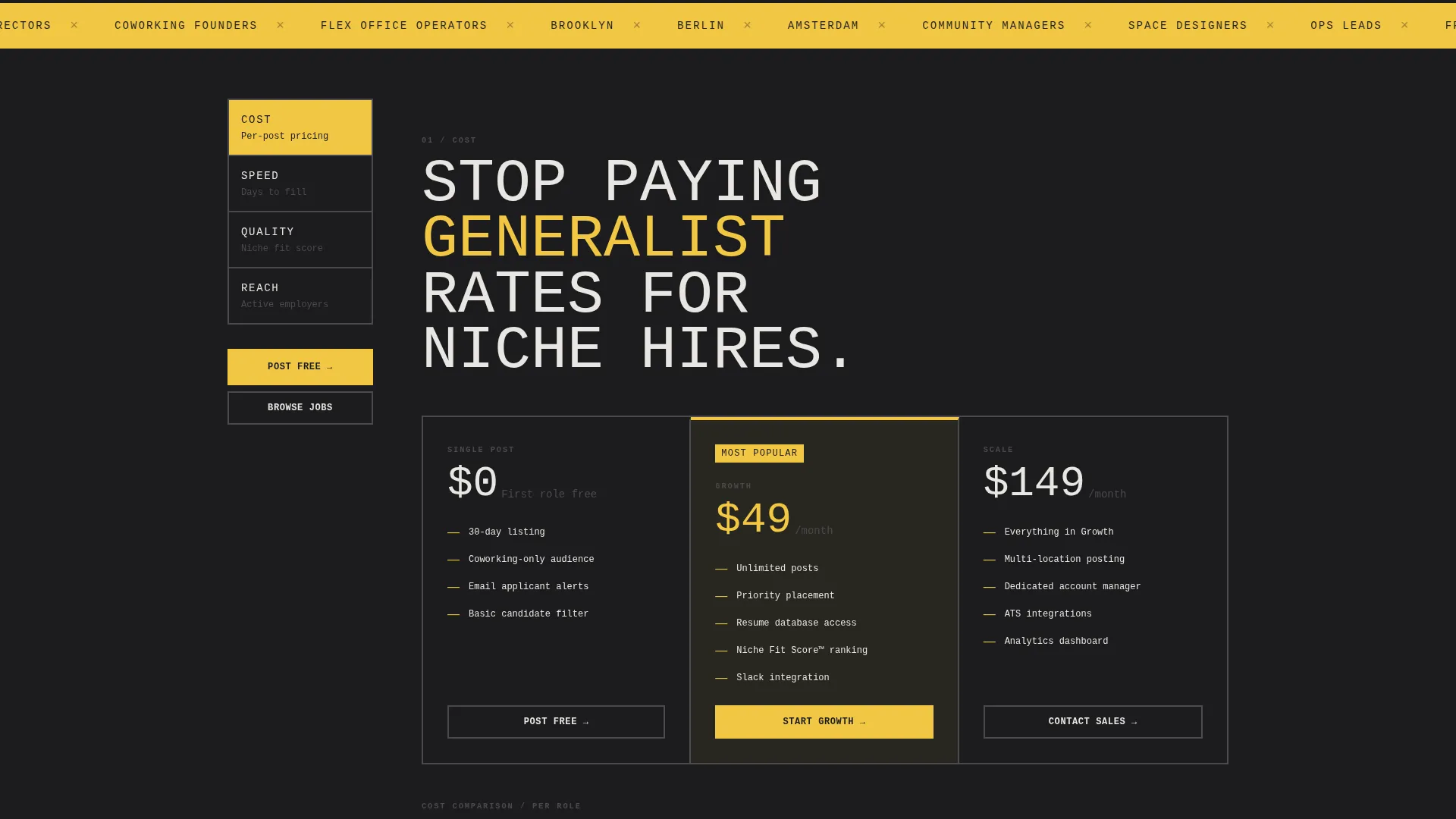
A sticky left-rail navigation uses bold, brutalist block labels, COST, SPEED, QUALITY, REACH, to anchor each spoke section. Visitors can jump directly to any comparison axis without scrolling through the full page. Active nav states highlight in yellow to match the primary accent color.
Per-Spoke Micro-Comparisons
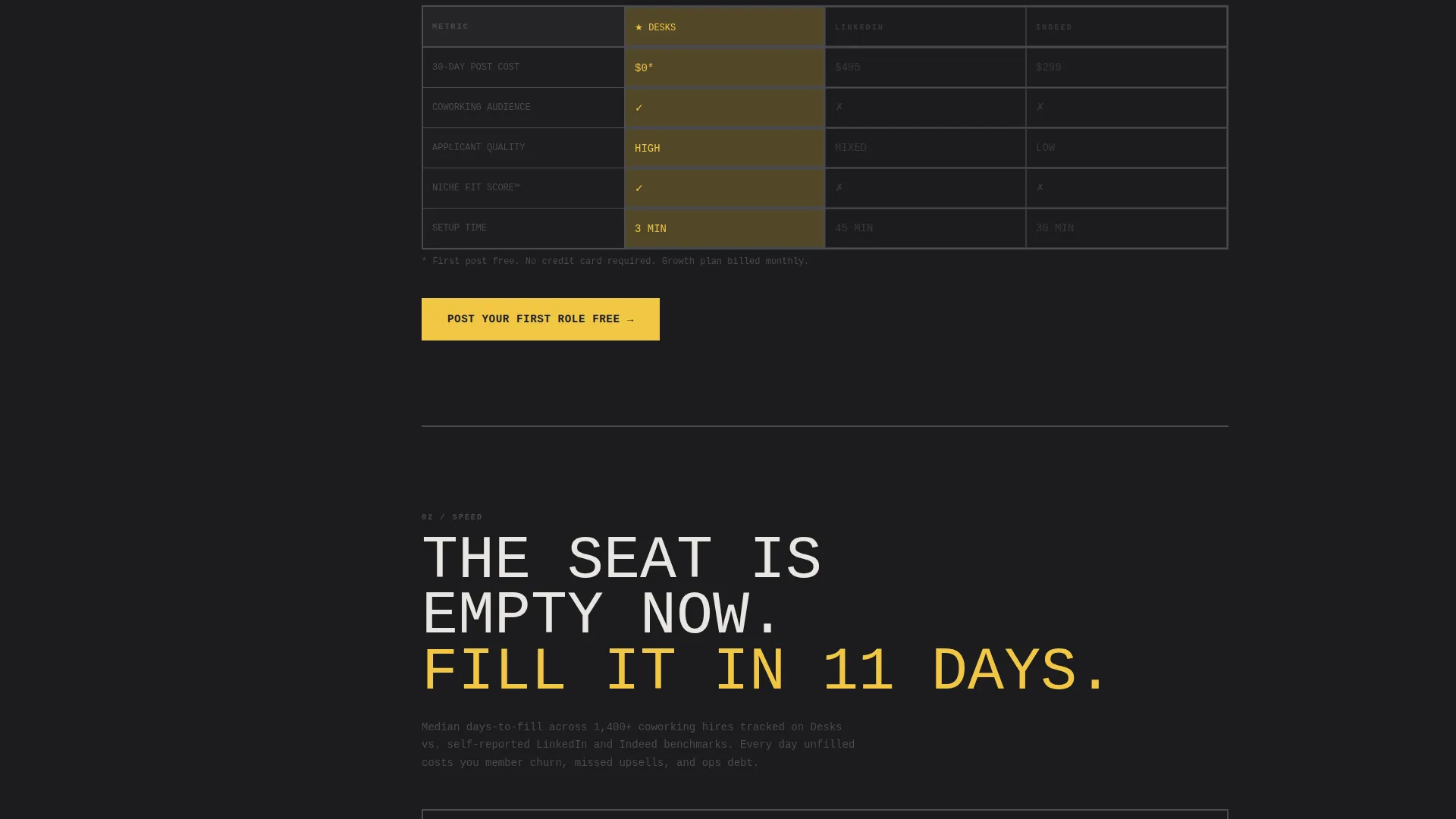
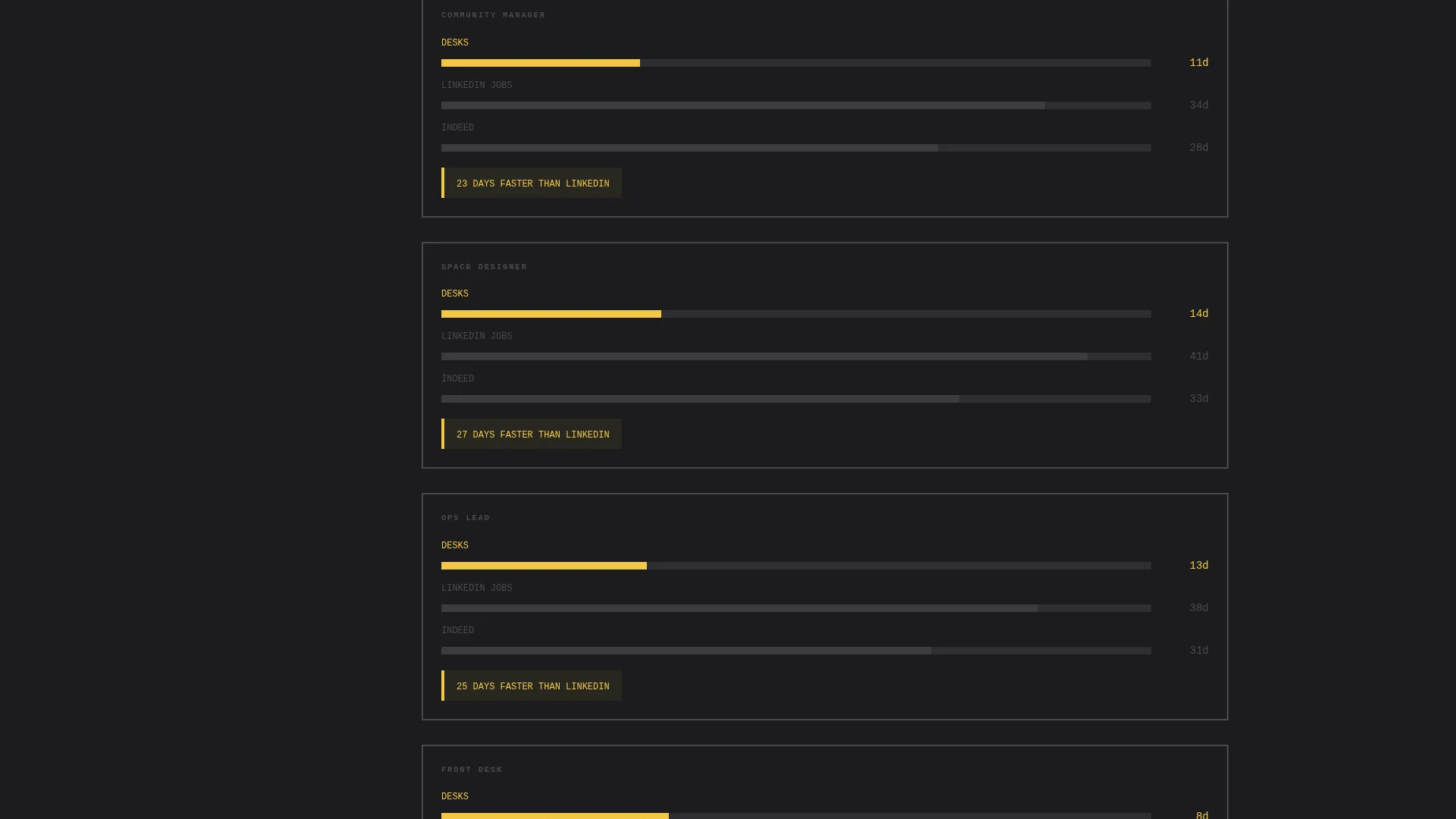
Each of the four spoke sections contains its own standalone comparison. COST breaks down per-post pricing versus subscription. SPEED displays median days-to-fill as a horizontal bar chart. QUALITY introduces a "Niche Fit Score" metric unique to the Desks board. REACH maps active coworking employers by city.
Persistent Call-to-Action System
The primary call to action, "Post Your First Role Free", appears in yellow on charcoal at the close of every spoke section. After a visitor scrolls past 40 percent of the page, a pinned floating button anchors itself to the bottom-right corner. A secondary path labeled "See Who's Hiring Near You" lets hiring managers browse live listings before committing.
Friction-Free Post Form
The posting form captures only three fields: company name, role title, and location. No account creation is required. The reduced form length is a direct continuation of the trust already built by the calculator and comparison sections above it.
Page sections overview
| Section | Purpose |
|---|---|
| Calculator Hero | Captures attention with an instant hiring-cost comparison tool |
| COST Spoke | Compares per-post pricing versus subscription models |
| SPEED Spoke | Shows median days-to-fill via horizontal bar chart |
| QUALITY Spoke | Introduces the Niche Fit Score metric for coworking roles |
| REACH Spoke | Maps active coworking employers across cities |
| Post Role Form | Collects company name, role title, and location in three fields |
Design & branding system
The visual identity follows a Bold Brutalist theme built on a Monochrome Steel color system. The palette was chosen to evoke a converted warehouse space where raw materials are the aesthetic, not an afterthought.
- Core colors: slab charcoal (#1C1C1E), exposed-beam gray (#4A4A4D), poured-concrete off-white (#E8E6E1), and safety-sign yellow (#F2C744) reserved for calls to action and active navigation states
- Typography is oversized and mono-spaced where possible, set edge-to-edge with intentional disregard for conventional breathing room
- No stock photography and no hero image; the calculator tool serves as the full visual centerpiece above the fold
Mobile & speed optimization
The template is structured to remain fully functional and readable on smaller screens, with the hub-and-spoke layout adapting to a vertically stacked flow.
- The sticky left-rail anchor navigation collapses gracefully on mobile without losing section-jump functionality
- The calculator inputs, comparison table, and bar charts are all built to reflow within narrow viewports
- The pinned floating call-to-action button remains visible on mobile after the 40-percent scroll trigger
How this template helps you convert
This template is designed around the idea that proof converts better than persuasion. Every structural decision reinforces a single path from curiosity to action.
- The calculator above the fold delivers a personalized cost comparison before the visitor reads a single marketing claim, establishing credibility immediately.
- Each spoke section deepens one axis of the comparison and closes with a direct call to action, so there are multiple natural conversion points across the scroll journey.
- The three-field post form at the end removes the last remaining barrier by eliminating account creation, making "Post Your First Role Free" a genuinely low-commitment next step.
Other information about this template
This template is part of a broader set of niche-vertical landing page templates designed for digital operators in the coworking and flexible workspace industry.
- The template style is Hub and Spoke with Anchor Navigation, a layout well suited to comparison-first landing pages where multiple proof dimensions need equal visual weight
- The creative direction is Calculator and Tool First, meaning the interactive element is the primary trust-builder rather than copy or imagery
- The page direction is Comparison and Versus, optimized for buyers who are actively evaluating channel alternatives before posting a role
- This template is categorized under Technology and the Coworking Digital Presence subcategory, making it a strong fit for operators building digital infrastructure around shared workspace communities
Theme
Bold Brutalist
Creative direction
Calculator/Tool First
Color system
Monochrome Steel
Style
Hub & Spoke (Anchor Nav)
Direction
Comparison/Versus
Page Sections
Hiring Cost Calculator Hero
Hub-and-spoke Anchor Navigation
Four Spoke Comparison Sections
Persistent Floating Call to Action
Friction-free Three-field Post Form
Secondary Browse Path
Related questions
Who is this landing page template designed for?
Can I use this template without technical experience?
What makes the calculator section different from a standard hero banner?
How does the post form keep friction low?
Does the template include a way for employers to browse before posting?



