Advanced Restaurant Software Cost Estimator Website Template
Reserve is a split-screen restaurant landing page template built for scheduling platforms targeting front-of-house teams. It leads with a live No-Show Cost Calculator, escalates through industry-data sections, and closes with a friction-free free trial sign-up. The monochrome steel palette and Dashboard Pro theme make every section feel like a command center, not a brochure.
by Rocket studio
Quick summary
Reserve is a single-page landing page template designed for restaurant appointment scheduling platforms. It opens with an interactive No-Show Cost Calculator, moves through industry-report-style data sections, and ends with a low-friction free trial offer. The split-screen layout, monochrome steel palette, and signal-green accents create the focused, functional feel of a professional kitchen floor plan.
Who this template is for
This template is built for teams selling or marketing restaurant scheduling software. The audience ranges from solo operators to multi-unit groups, but the template speaks directly to the people managing the floor.
- Front-of-house managers who juggle a ringing phone and a reservation screen at the same time
- Independent restaurateurs running 50 to 100-seat dining rooms who lose time every night to no-shows
- Multi-unit operators who need cover counts visible across several locations before each pre-shift meeting
What problem this template solves
Restaurant operators lose real revenue to no-shows, double bookings, and fragmented reservation tools. A generic software landing page does not make that cost feel urgent. This template turns the problem into something a visitor can measure themselves, before they read a single feature bullet.
- No-shows feel abstract until a visitor inputs their own cover count and check size into the calculator
- Operators running multiple locations have no single view of nightly covers across all sites
- Busy floor managers will not read long copy; they need data that makes the case instantly
What you get with this template
You get a fully structured, section-led landing page built around a clear conversion path. Every section is purposeful, from the calculator header to the bottom-bar call to action.
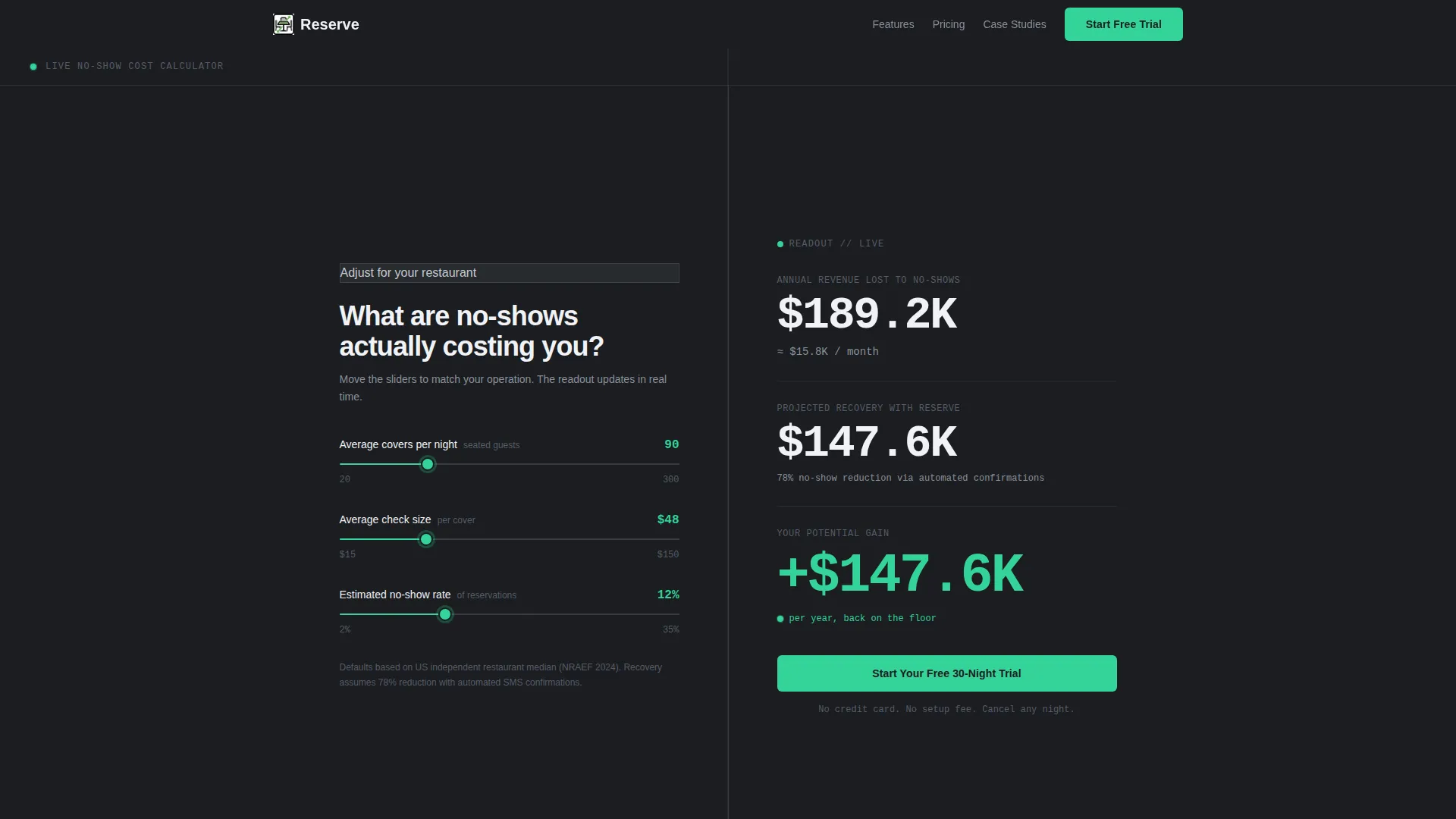
- A live No-Show Cost Calculator with three adjustable sliders and a real-time results panel
- Industry-report-style content sections pairing oversized statistics with matching product screen visuals
- A dual conversion path: a primary free trial sign-up and a secondary PDF lead-capture form
Feature list
This template delivers six purpose-built components drawn directly from the design brief.
Live No-Show Cost Calculator
The header splits 50/50 between a three-slider input panel and a live results dashboard. Visitors adjust average nightly covers, average check size, and estimated no-show percentage. The right panel updates in real time, showing annual revenue lost, projected recovery with automated confirmations, and a bold delta figure in signal-green.
Industry-Report Data Sections
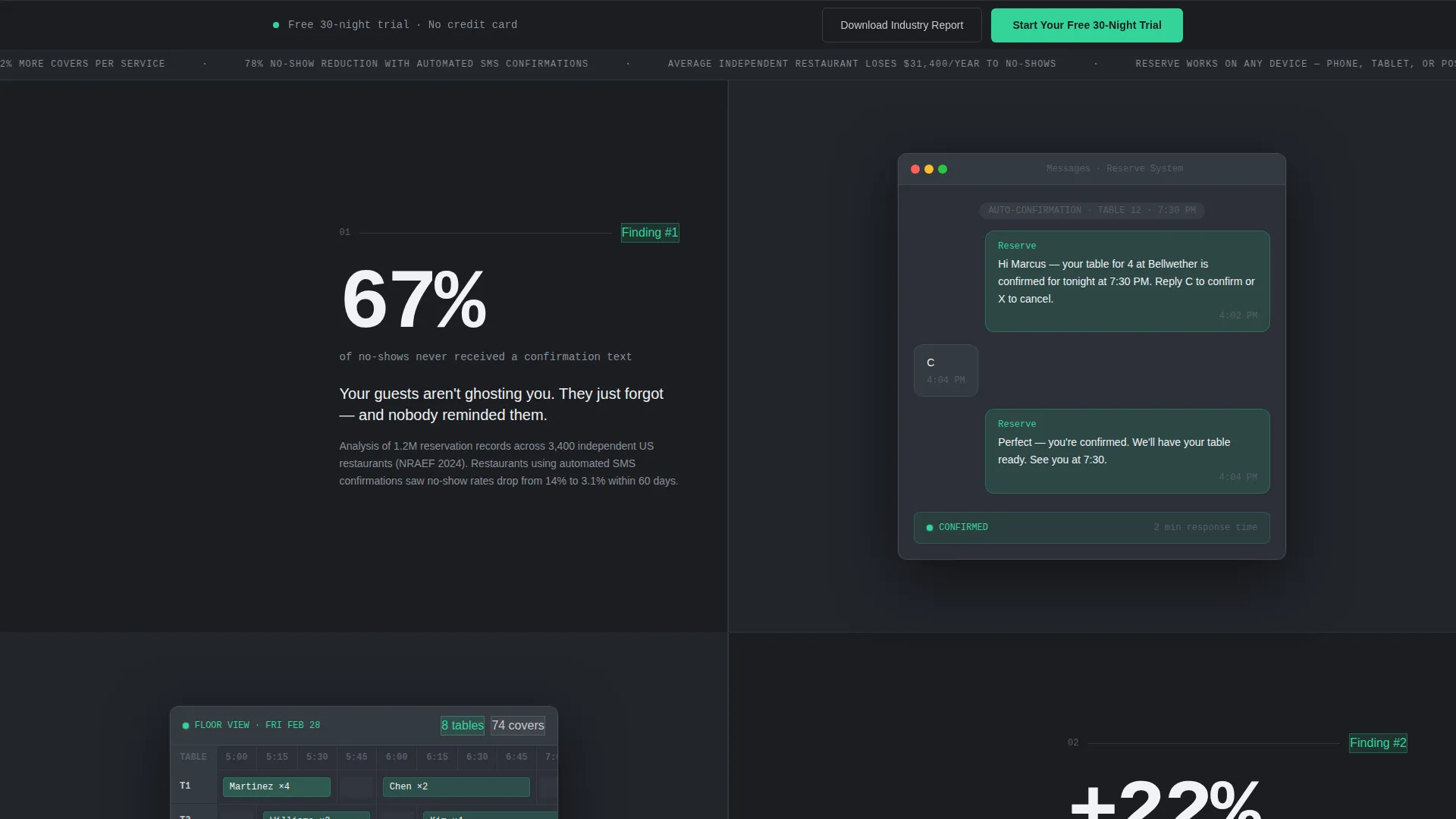
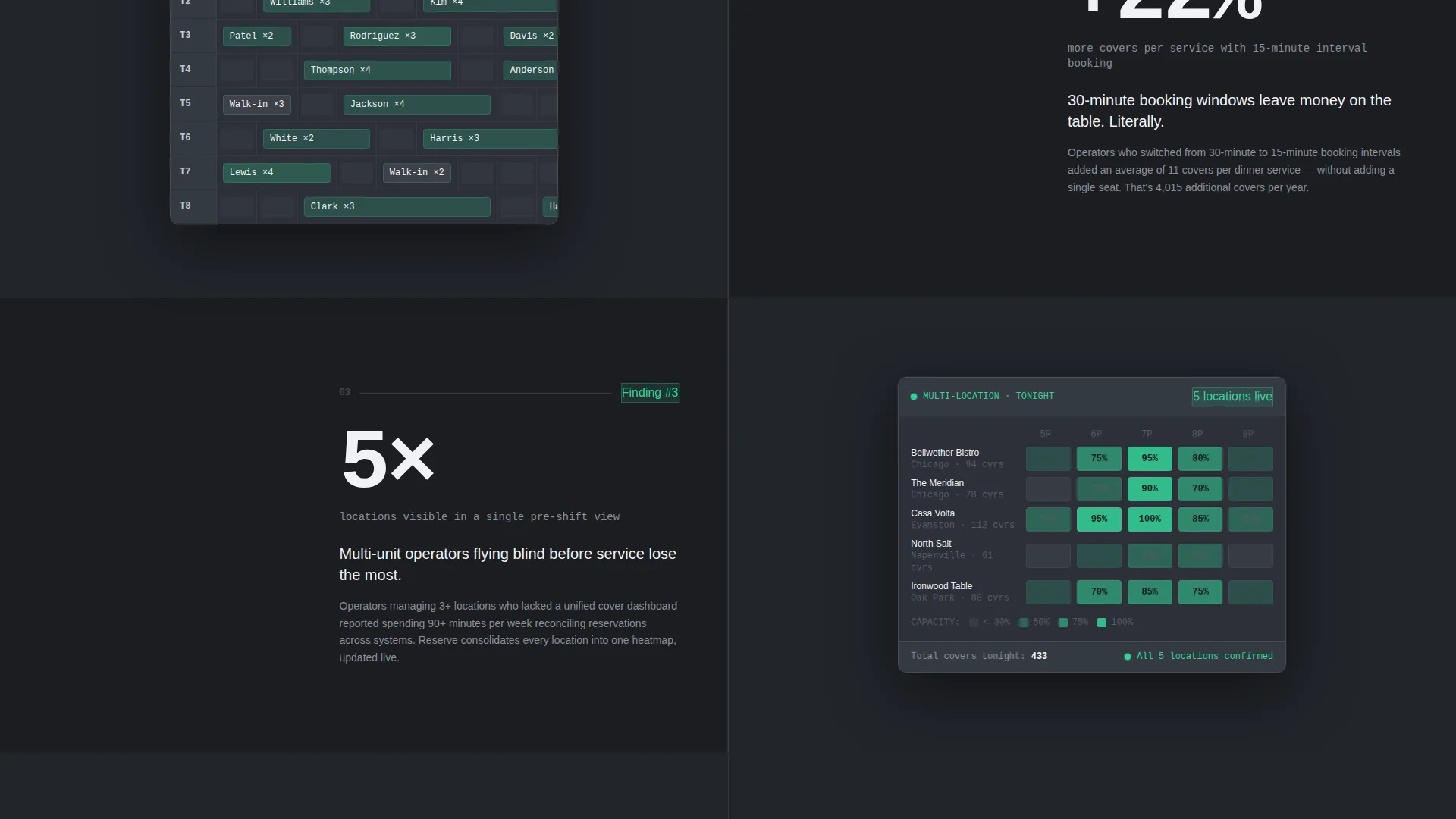
Each scrollable section presents a single industry statistic in oversized type on the left panel. The right panel displays the corresponding product screen, such as the SMS confirmation flow or the interval booking grid. Evidence builds from problem to proof to product, section by section.
Freemium Trial Sign-Up Form
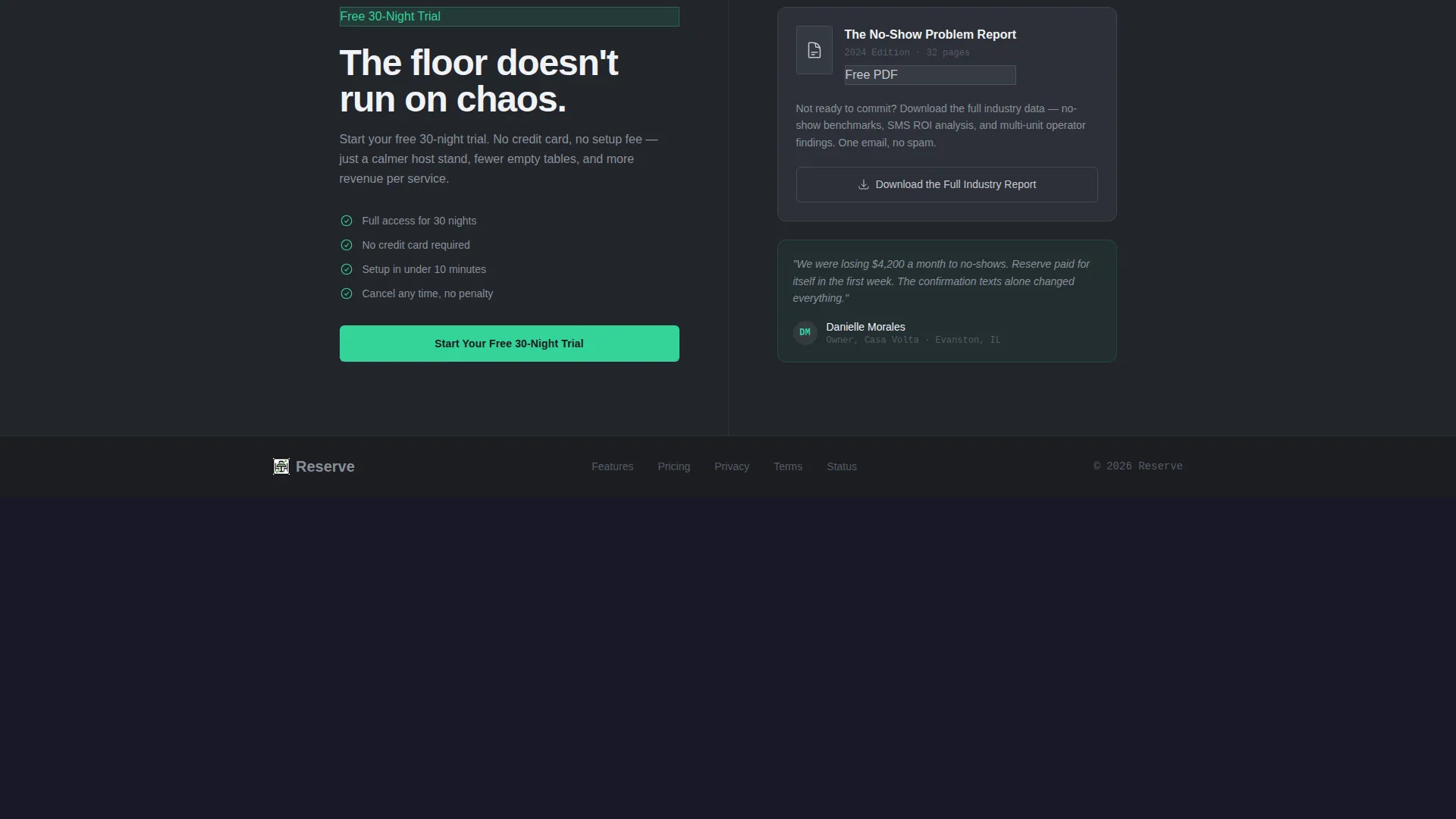
The primary call to action is "Start Your Free 30-Night Trial." The form captures three fields: restaurant name, nightly cover count via dropdown, and work email. No credit card is required, keeping the barrier to entry as low as possible.
PDF Lead-Capture Gate
A secondary conversion path offers a downloadable industry report for visitors not ready to commit. It captures only an email address, giving the platform a way to nurture leads who engage with the calculator but do not sign up immediately.
Sticky Bottom-Bar Call to Action
After the second scroll, a slim bottom bar appears and stays pinned for the remainder of the page. It carries the primary trial call to action, keeping the offer visible without interrupting the data narrative.
Monospaced POS-Style Data Display
The calculator results panel uses a monospaced font that echoes a point-of-sale terminal screen. Numbers animate fluidly as sliders move. This typographic choice reinforces the operational, data-first tone of the entire template.
Page sections overview
| Section | Purpose |
|---|---|
| No-Show Calculator | Interactive header that quantifies revenue lost to no-shows in real time |
| Trial Sign-Up call to action | First conversion prompt embedded inside the calculator results panel |
| Industry Stat: Confirmations | Data section pairing the SMS confirmation statistic with the product flow screen |
| Industry Stat: Interval Booking | Data section pairing the 15-minute interval finding with the booking grid visual |
| Multi-Location Heatmap Section | Data section pairing cover-count visibility with the multi-location heatmap screen |
| Sticky Bottom Bar | Persistent trial call to action that appears after the second scroll |
| PDF Lead Capture | Secondary conversion path offering a downloadable report for email capture |
Design & branding system
The visual identity follows a Dashboard Pro theme using a Monochrome Steel color system. Every surface is matte and functional, referencing the aesthetic of a professional kitchen pass rather than a consumer app.
- Core palette: forge-black (#1B1D21), brushed gunmetal (#3A3F47), stainless-counter silver (#C5C9D0), with signal-green (#34D399) used exclusively for live-data indicators and primary buttons
- Typography: a monospaced font in the calculator results panel for a point-of-sale terminal feel; oversized type in the industry-report sections for instant scannability
- Visual tone: no decorative elements, no gradients, no unnecessary color; every design decision is deliberate and operational
Mobile & speed optimization
The split-screen layout is designed to restack cleanly on smaller screens. The data-led structure keeps each section self-contained, which makes it straightforward to adapt to narrower viewports.
- Each 50/50 split section can reflow to a single-column stacked layout on mobile without losing the stat-then-visual narrative order
- The slim sticky bottom bar is sized to remain usable on touch screens without blocking content
- Slider inputs in the calculator are built for touch interaction, allowing mobile visitors to adjust values without precision clicking
How this template helps you convert
The conversion strategy is built into the structure itself. The calculator does the persuading; the call to action simply opens the door.
- The No-Show Cost Calculator makes the revenue problem personal before any product claim is made, giving visitors a concrete reason to keep reading and a number they remember when they reach the sign-up form.
- The escalating industry-report sections move visitors from problem awareness to product proof in a logical sequence, reducing the need for trust-building copy and letting verified data carry the argument.
- The dual conversion path captures both ready-to-commit operators via the free trial form and research-phase leads via the PDF gate, so the page works for visitors at different stages of the buying decision.
Other information about this template
This template is categorized under Technology, specifically within the Restaurant Software subcategory. The niche focus is restaurant appointment scheduling, and the design direction is tuned for platforms targeting operators who think in covers, sections, and service windows rather than generic appointment slots.
- The template style is Split Screen (50/50), making it well suited to layouts that pair data or statistics with product visuals side by side
- The creative direction is Industry Report, meaning the page earns trust through data presentation rather than testimonial-led or feature-list-led persuasion
- The landing-page direction is Freemium/Trial, so the sign-up flow is optimized for zero-friction entry with no credit card requirement
- The header concept is Calculator/Estimator, a format that works especially well for software targeting buyers who respond to quantified business impact over abstract feature descriptions
Theme
Dashboard Pro
Creative direction
Industry Report
Color system
Monochrome Steel
Style
Split Screen (50/50)
Direction
Freemium/Trial
Page Sections
Live No-show Cost Calculator
Industry-report Data Sections
Freemium Trial Sign-up Flow
PDF Lead-capture Gate
Sticky Bottom-bar Call to Action
Monospaced Pos-style Readout
Related questions
Who is this landing page template designed for?
Can I customize the calculator defaults?
Does the template include a lead capture option beyond the free trial?
How many fields does the sign-up form include?
What does the sticky bottom bar do?



