Micro-SaaS & Developer Tools Professional Website Template
The Catalyst Data Command keyword research tool landing page template is a high-intensity, split-screen single-page design built for SEO professionals who need to move fast. It opens with a live keyword input cockpit, escalates through data-heavy proof sections, and drives visitors toward a single clear action: running their first free search inside the app.
by Rocket studio
Quick summary
Catalyst is a keyword research tool landing page template built around a mission-control aesthetic. The split-screen layout puts a live keyword input field on the left and a competitor gap matrix on the right, so visitors experience the product before they read a single headline. Every section is engineered to deliver keyword data, surface actionable insights, and move the visitor toward one click.
Who this template is for
This template is built for teams and individuals who treat keyword research as a core business function, not an afterthought. If your workflow demands speed, clarity, and proof, this layout speaks your language.
- SEO managers handling thirty or more client accounts who need a fast, scalable way to present keyword tracking results and organic strategy to clients
- Indie bloggers and content creators hunting low-competition long tail keywords before the next algorithm shift wipes out their rankings
- Growth leads at early-stage startups who need to conduct keyword research and show organic viability data to a board that only reads dashboards
What problem this template solves
Most keyword research tool landing pages fail because they describe features instead of demonstrating them. Visitors arrive skeptical, skim three bullet points, and leave without converting. The product's actual power, real search volume numbers, keyword difficulty scores, and competitor gap maps, never gets in front of them in a convincing way.
This template solves that gap directly:
- It replaces passive description with interactive proof: a live keyword input field returns plausible sample data instantly, so the visitor understands the tool's value before scrolling
- It removes friction from the conversion path by eliminating forms and routing the primary call to action directly into the app's search experience
- It structures the scroll journey to escalate proof progressively, from workflow comparison to waterfall expansion to metric-lift testimonials, so trust builds naturally with each section
What you get with this template
You get a fully structured, single-page layout that functions as a working demonstration of your keyword research tool. The template makes it easy to present complex keyword data in a clear, high-trust visual environment.
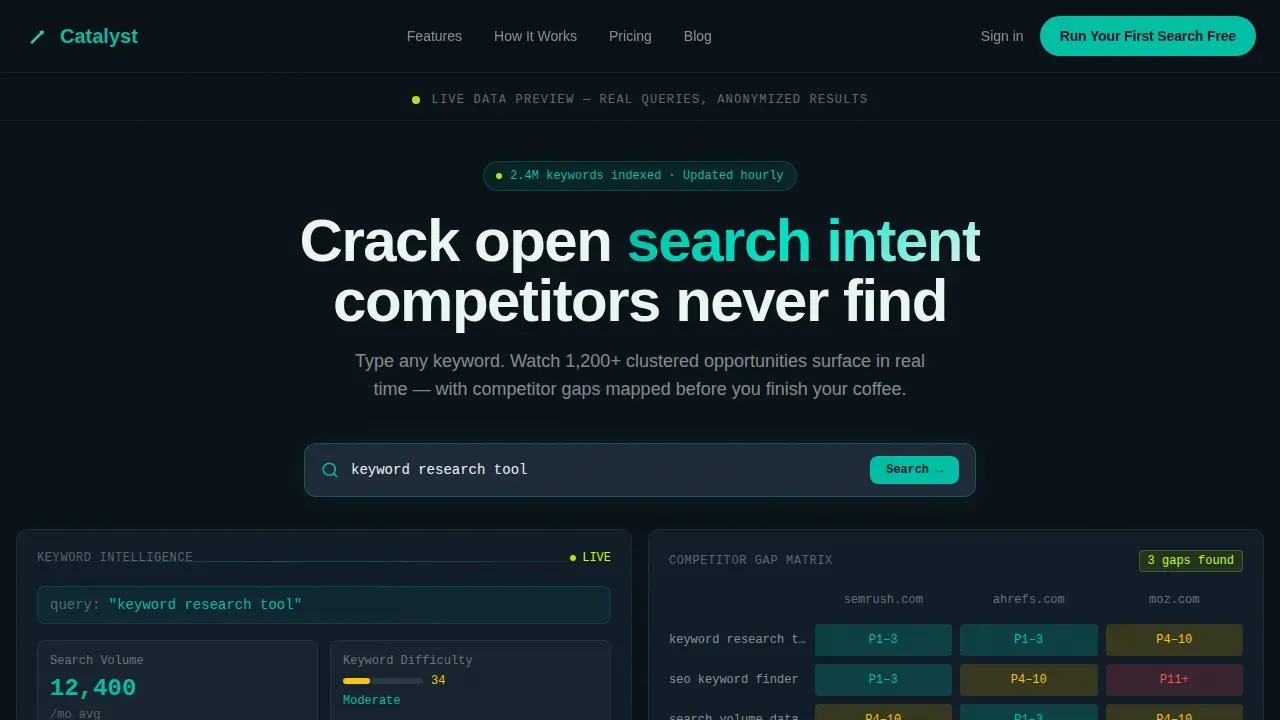
- A split-screen hero section with a live keyword input panel on the left showing search volume, keyword difficulty, cost-per-click, and SERP feature tags, plus a competitor gap matrix on the right with heat-cell ranking overlap
- Five content sections including a workflow comparison block, an animated waterfall chart expanding one seed keyword into 1,200 clustered opportunities, a testimonial strip with exact metric lifts, a final dark call-to-action section, and a sticky bottom bar that activates after forty percent scroll depth
- A complete design system built on the Teal Catalyst color palette with JetBrains Mono for data labels and DM Sans for body copy, styled as a submarine control room at depth
Feature list
This keyword research template is packed with prompt-backed capabilities designed for a data-first SaaS audience. Every feature below is drawn directly from the source brief.
Live Keyword Input Cockpit
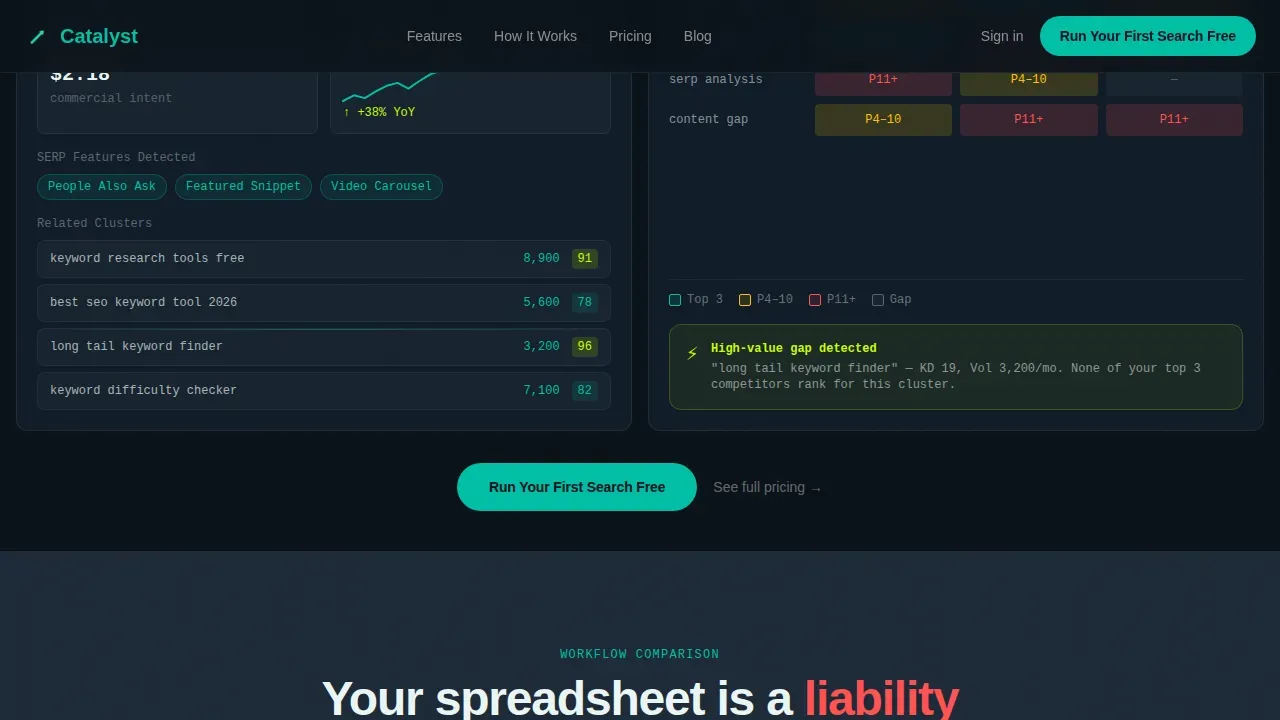
The hero's left panel contains a functional keyword input field pre-loaded with a sample query. It returns a cascade of real numbers: search volume at 12,400 per month, keyword difficulty at 34, cost-per-click at $2.18, SERP feature tags for People Also Ask and Featured Snippet, and a twelve-month trend sparkline climbing right. Visitors interact with keyword data before reading a single line of copy, which is the fastest possible way to demonstrate value.
Competitor Gap Matrix
The hero's right panel renders a competitor gap matrix with three domain columns. Each cell uses green-to-red heat coloring to show ranking overlap between the tool's user and their competitors. This gives visitors an immediate, visual way to understand competitor analysis without any explanation needed. The matrix is built for screenshots and client presentations alike.
Animated Waterfall Expansion Chart
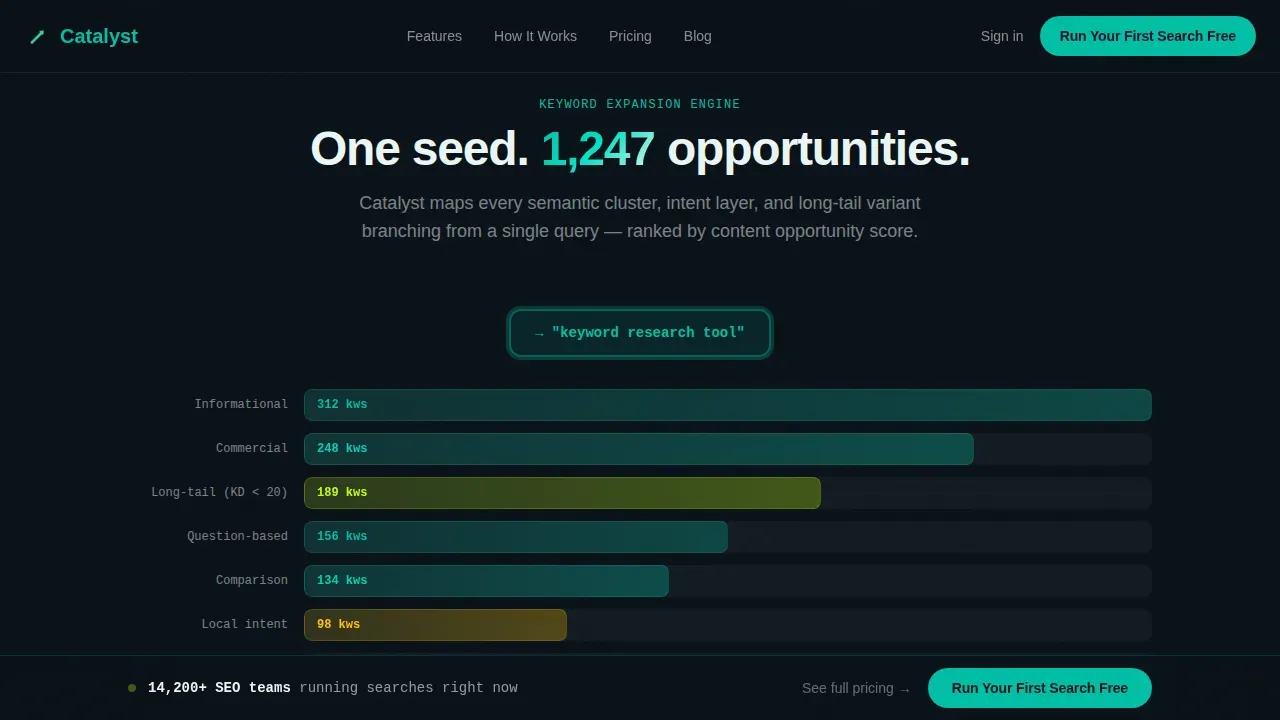
A dedicated scroll section visualizes how a single seed keyword expands into 1,200 clustered opportunities. The animated waterfall chart is scroll-triggered, so the expansion unfolds as the visitor reads. This section is the clearest proof point that the tool's keyword research capabilities go well beyond a basic list of keywords.
Workflow Comparison Block
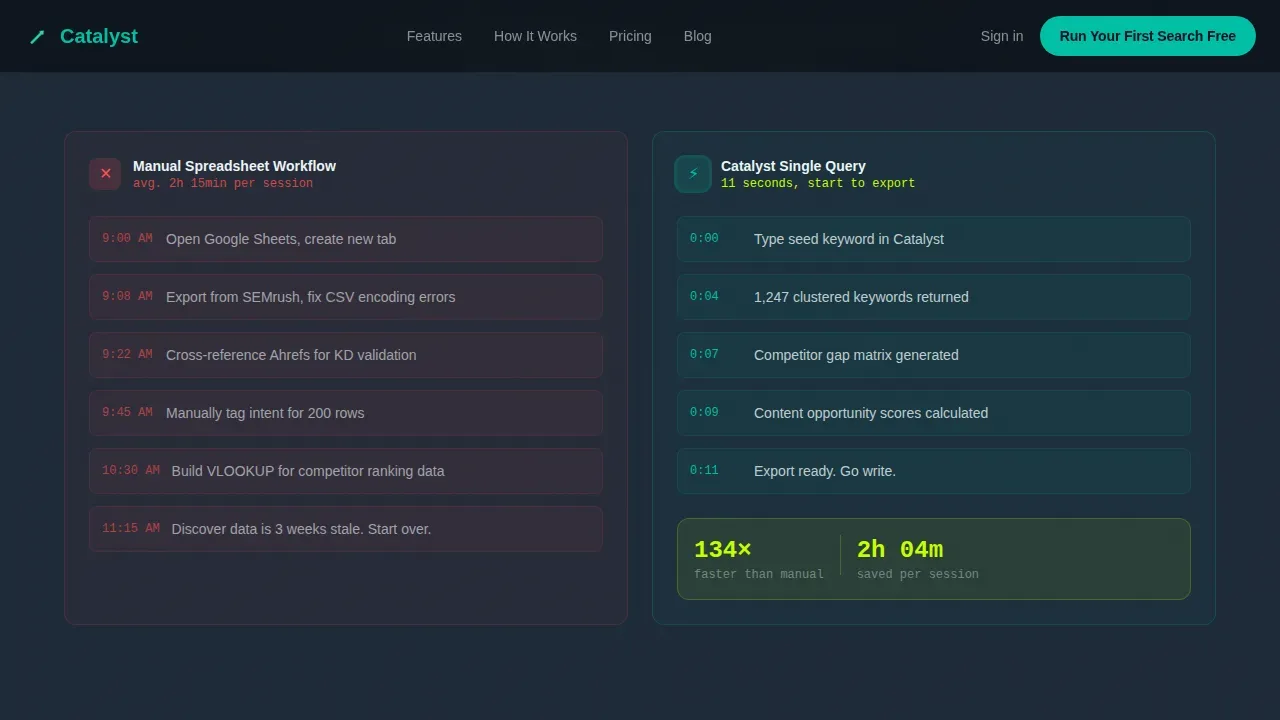
A side-by-side section contrasts a manual spreadsheet workflow against a single Catalyst query. This block speaks directly to anyone who has spent hours copying search terms between tabs, copying keyword ideas from one tool into a csv file, and wrestling with ad groups inside a google ads account. It converts a familiar pain point into a clear before-and-after moment.
Metric-Lift Testimonial Strip
The testimonial section uses real, specific numbers: organic traffic up 214 percent in ninety days, and similar concrete lifts. Each quote is anchored to an exact performance metric so visitors can evaluate social proof the same way they evaluate keyword data: with numbers, not feelings.
Three-Point Call-to-Action System
The primary call to action, "Run Your First Search Free," appears three times. Once floating beneath the hero tool, once mid-page after the waterfall expansion, and once in a sticky bottom bar that activates at forty percent scroll depth. A secondary text link, "See full pricing," sits beside each call to action for visitors who are already ready to decide.
Page sections overview
| Section | Purpose |
|---|---|
| Split-screen hero | Live keyword input left, competitor gap matrix right |
| Workflow comparison | Manual spreadsheet versus single Catalyst query |
| Waterfall expansion | Seed keyword expands into 1,200 clustered groups |
| Testimonial strip | Metric-lift quotes with exact performance numbers |
| Final call to action | Dark section with primary button and pricing link |
| Sticky bottom bar | Persistent call to action activates at 40% scroll |
| Footer | Linear single-row pattern with minimal links |
Design & branding system
The Teal Catalyst color system is built to feel like a submarine control room at operational depth: dark surfaces, luminous readouts, and nothing decorative. Every color choice has a functional role tied directly to the keyword data it frames.
- Core palette: deep operational black (#0B1219) for backgrounds, reactor-core teal (#00BFA6) for primary interactive elements, cool slate panel (#1E2A38) for section alternation, and signal white (#EAF6F4) for typography and data labels
- Electric citron (#C6FF00) accent pulses mark live-data moments: loading spinners, metric counters, and hover states on the competitor matrix
- Typography uses JetBrains Mono for all numbers, search terms, and keyword data labels, and DM Sans for body copy and narrative text, keeping the data feel distinct from the explanatory prose
Mobile & speed optimization
This template is built desktop-first because SEO managers and digital marketing agencies work on wide-screen dashboard setups. However, it includes a mobile-responsive fallback so the keyword tracking interface remains usable on smaller screens.
- The template uses CSS animations and Intersection Observer for scroll-triggered effects, which keeps the animated waterfall chart and counter animations performant without heavy JavaScript dependencies
- Fast loading speed and mobile responsiveness are essential for ranking in Google's mobile-first index, so the template's animation approach prioritizes lightweight delivery over visual complexity
- The split-screen layout reflows gracefully on mobile, stacking the keyword input panel above the competitor gap matrix so the core search experience remains intact
How this template helps you convert
This template is engineered around a single conversion goal: get the visitor into the app with a keyword query already in mind. Every structural decision flows from that objective.
- The hero section places the key action above the fold with no form barrier. The visitor types a keyword and sees plausible search volume, keyword difficulty, and related keywords returned immediately, which creates the strongest possible proof before any copy is read.
- The sticky bottom bar ensures the primary call to action is always visible after forty percent scroll depth, so the visitor never has to scroll back up to act. Studies show that prominent calls to action and minimal distractions are directly linked to higher conversion rates on landing pages built around a single offer.
- The secondary "See full pricing" text link beside each call to action captures bottom-funnel visitors who have already decided and just need to confirm the numbers, ensuring the template converts both early-stage explorers and ready-to-buy decision-makers without separate landing pages.
Other information about this template
This template sits inside the Micro-SaaS and Developer Tools category, making it a strong fit for teams building keyword research tools, search intelligence platforms, and related digital marketing products. The section below covers additional context and practical usage details.
- Teams who conduct keyword research at scale, whether for organic content, ad campaigns, or ad copy planning, will find the workflow comparison block particularly useful for communicating time savings to stakeholders
- The template supports a practical framework for presenting keyword research to non-technical audiences: the waterfall chart visualizes how one seed keyword generates new keywords across multiple product categories and intent types, including informational queries and transactional search terms
- For digital marketing agencies managing multiple client accounts, the competitor gap matrix and metric-lift testimonial strip provide a comprehensive view of the tool's reporting depth, making it easier to position the product to qualified leads
- The keyword tracking sections can be adapted to show performance data across ad groups and ad campaigns, which is relevant for teams running google ads alongside organic optimization efforts
- Google Sheets-based keyword research templates, such as the one offered by HubSpot, include columns for monthly searches, keyword difficulty, and current ranking position. This template's design complements that kind of structured keyword list by giving teams a high-trust visual layer for presenting those insights
- Tools like google keyword planner and the google ads keyword planner help expand a seed keyword list with related queries and related keywords. This template is designed to show that kind of keyword planner output in a compelling, conversion-oriented interface rather than a raw spreadsheet
- Platforms including monday.com, ClickUp, Notion, and Airtable each offer their own keyword research template formats suited to different team collaboration styles and workflow complexity levels. This template focuses on the conversion and presentation layer, not internal task management
- google ads account users who need to group keywords into ad groups and categorize keywords by intent will find the cluster visualization section useful for communicating that structure to clients or leadership teams
- The free plan entry point referenced in the call-to-action copy lowers the barrier for first-time visitors. A free template or free-entry experience removes the commitment objection that often stalls conversions on SaaS landing pages
- Understanding existing page rankings provides critical context for any keyword analysis workflow, and the competitor gap matrix in this template makes that context immediately visual
- The template can display example data for product demos, sales decks, or walkthrough videos where live keyword data is not yet available
- Regularly updating keyword research reports is important for adapting to changing trends, and keyword tracking dashboards like the one visualized in this template make those updates easier to communicate to a target audience
- A csv file export reference in the workflow comparison section is a natural touch point for teams migrating from spreadsheet-based keyword research to a dedicated keyword planner tool
- Content tailored to search intent receives over three times more organic traffic on average, and the search intent grouping visible in the cluster visualization reinforces that message for visitors evaluating the tool's depth
- Effective keyword research is essential for driving organic growth, and this template communicates that value immediately through live keyword data rather than feature lists alone
- The catalyst data command keyword research tool landing page template is a ready-to-deploy starting point for any SaaS team that wants to lead with the product experience rather than a wall of marketing copy
- Brand names referenced in the Surfer keyword context, including google ads, google keyword planner, google ads keyword planner, google sheets, and google search results, are industry-standard reference points. This template does not claim integration with any of those platforms but is designed to complement workflows that include them
Theme
Data Command
Creative direction
Calculator/Tool First
Color system
Teal Catalyst
Style
Split Screen (50/50)
Direction
Click-Through
Page Sections
Live Keyword Input with Real-time Data Cascade
Competitor Gap Matrix with Heat-cell Visualization
Animated Waterfall Keyword Expansion Chart
Workflow Comparison Section
Metric-lift Testimonial Strip
Three-point Call-to-action System with Sticky Bar
Related questions
Who is this template designed for?
Does this template include a form or lead capture field?
Can I display my own keyword data in the hero section?
Is the template mobile-responsive?
What animation and interactivity does this template include?



