Dispatch — Maintenance Pros Landing Page Template
Dispatch is a single-page home services landing page built around a real-time cost estimator that loads before any marketing copy. Visitors interact first, scroll second. The Carbon Fiber visual system, hub-and-spoke anchor navigation, and progressive lead-capture form make this template a focused, high-trust conversion tool for home service businesses.
by Rocket studio
Quick summary
Dispatch is a single-page home services landing page that leads with an interactive cost estimator. Visitors select a service, set square footage, and pick urgency before reading a single headline. Each scrollable spoke section then answers the next logical buyer question. The Carbon Fiber color system and Dynamic Motion theme give the page a professional, tool-ready feel.
Who this template is for
This template is built for home service businesses that need a credible, conversion-focused online presence. It works especially well for companies dealing with urgent, high-stakes service calls where trust and speed matter most.
- Plumbing, electrical, HVAC, and general repair companies that want leads, not just visitors
- Solo operators and small teams who need to look polished and trustworthy at first glance
- Home service businesses replacing outdated contact forms with a smarter, interactive intake flow
What problem this template solves
A homeowner in a crisis does not read paragraphs. They want a number, a name, and a way to book fast. Most home service pages fail at all three. This template solves that problem by flipping the standard page order entirely.
- Visitors see no hero image or tagline first; they see a working estimator tool
- Trust signals like technician profiles and license numbers appear exactly when doubt kicks in
- The booking flow is progressive, reducing friction by collecting information in stages
What you get with this template
You get a fully designed, single-page layout with every section and component described below. The structure is purpose-built for lead generation, with motion, color, and layout all working toward one outcome.
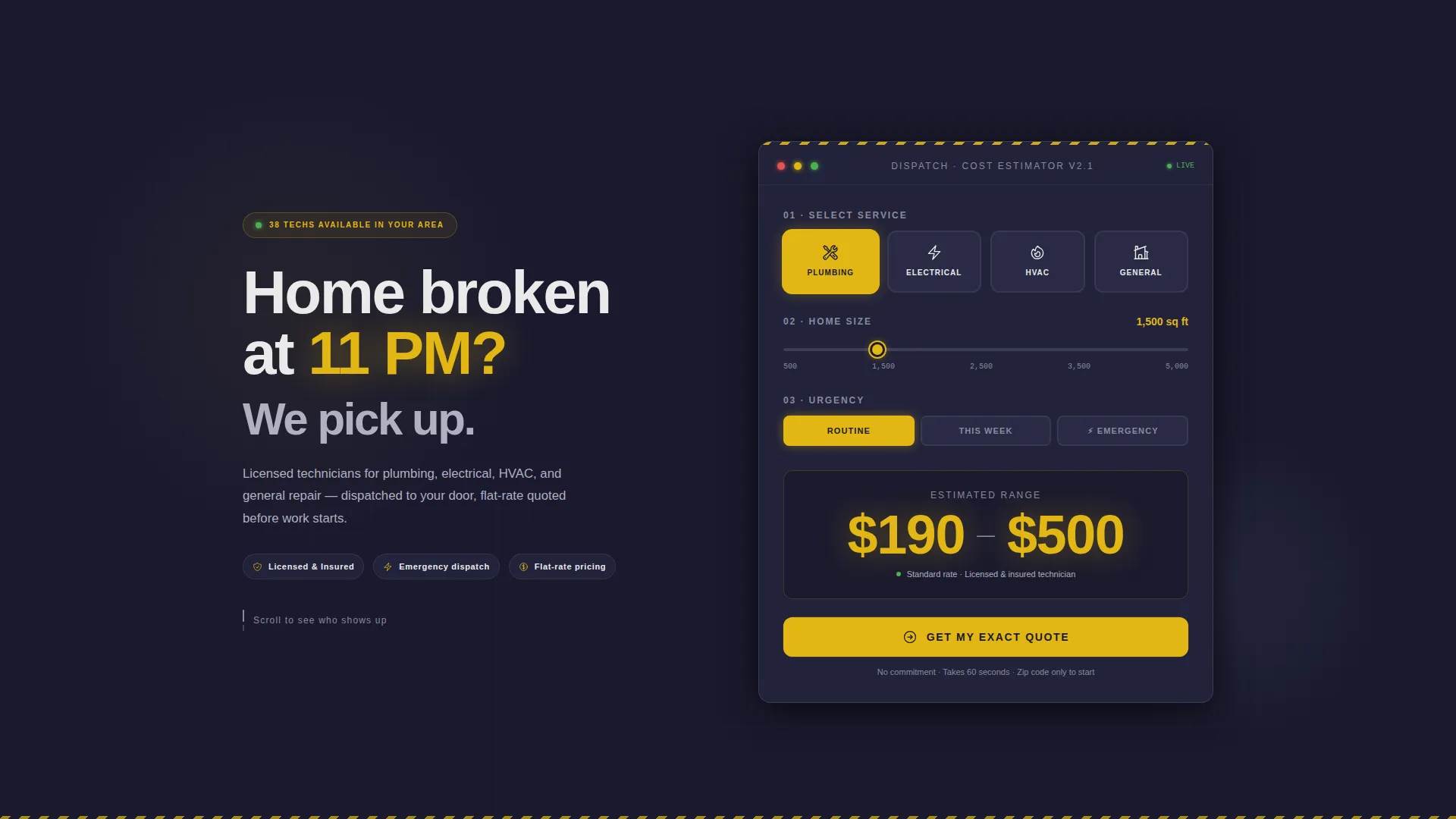
- An above-the-fold cost estimator with animated number output and service category tiles
- A sticky anchor navigation bar with spoke sections covering pricing, scheduling, and team profiles
- A three-screen progressive lead capture form and a persistent tap-to-dial mobile button
Feature list
This template delivers a tightly integrated set of interactive and visual components. Each one is designed to move a hesitant visitor closer to submitting a lead.
Real-Time Cost Estimator
The page opens with an instrument-panel-style estimator tool. Visitors choose a service category from icon tiles that physically depress on click, drag a slider for home square footage, and toggle urgency between routine, this week, and emergency. A live estimated cost range animates upward in large safety-yellow numerals, ticking like an odometer rolling forward.
Hub and Spoke Anchor Navigation
After the fold, a sticky top navigation bar slides into view. Each nav item links to a dedicated spoke section that addresses one buyer objection. The structure keeps the page scannable and lets visitors jump directly to the information they need most.
Technician Profile Spoke
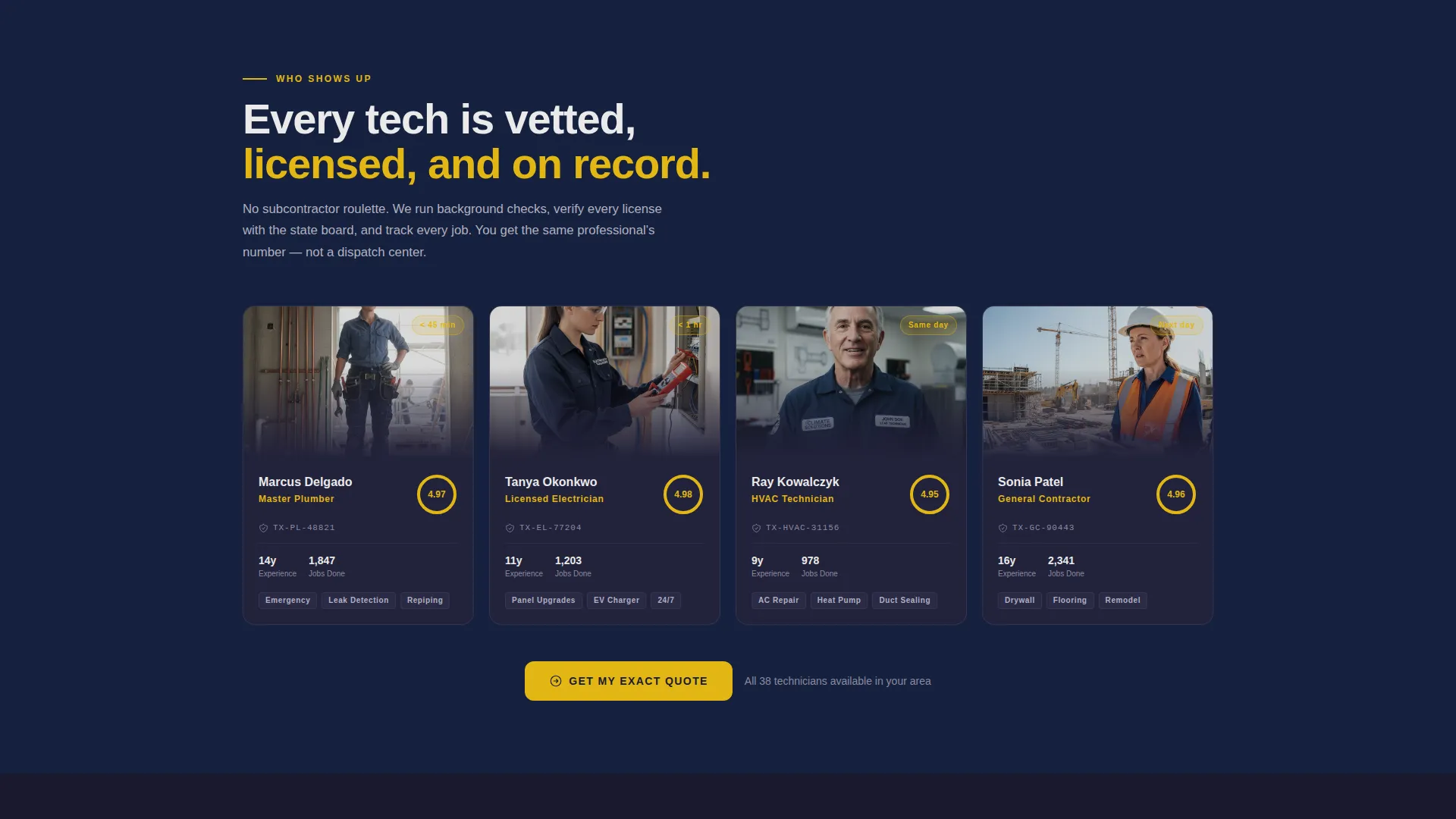
The "Who shows up?" section displays individual technician profiles complete with license numbers and years on the job. This spoke delivers accountability at the exact moment a visitor starts asking whether they can trust the company.
Transparent Pricing Tiers
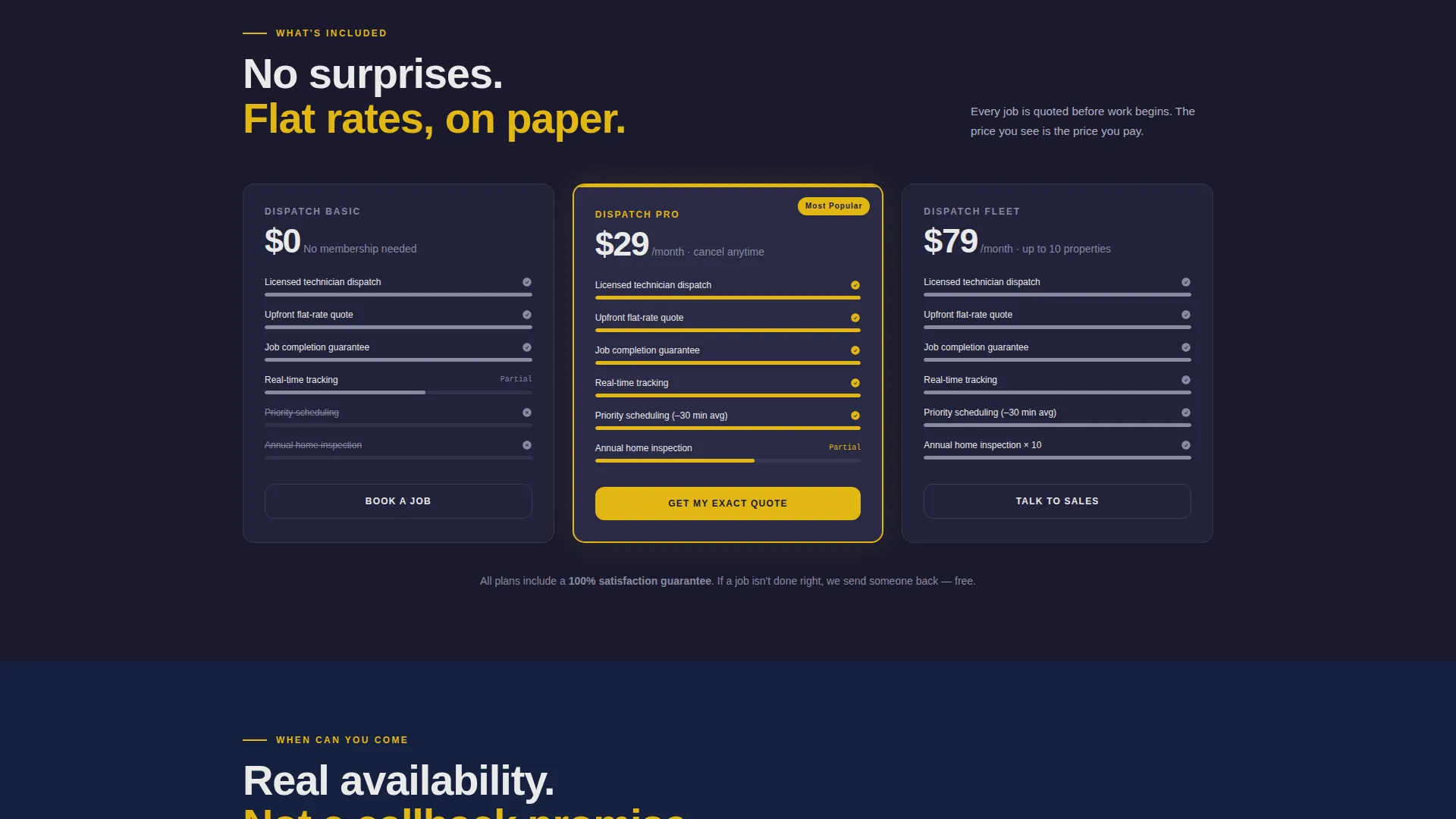
The "What's included?" spoke breaks down service tiers using animated comparison bars that fill as they enter the viewport. Pricing is visible and structured, removing the guesswork that typically pushes cautious buyers to call a competitor.
Live-Style Scheduling Grid
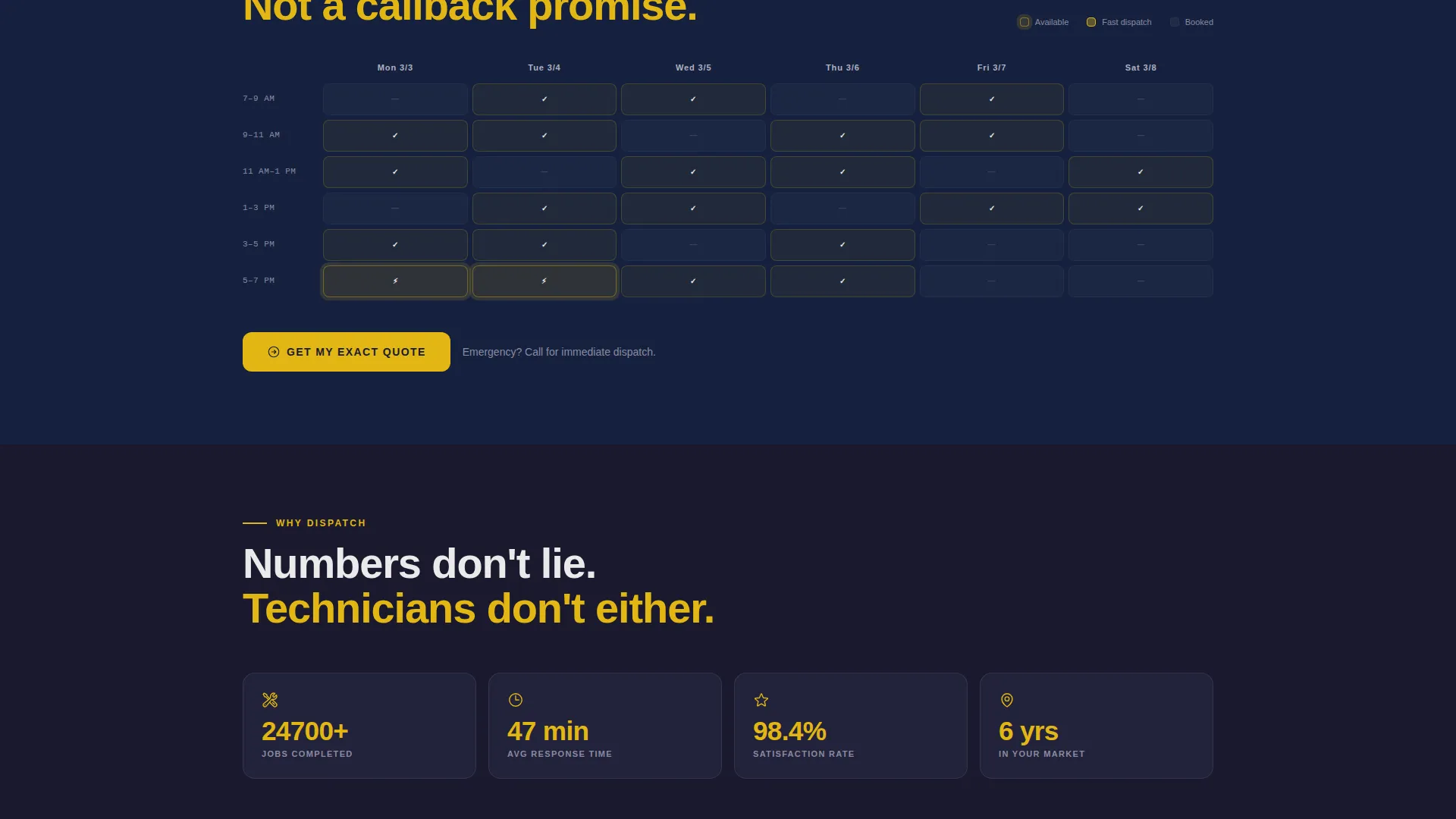
The "When can you come?" spoke shows a scheduling grid with available time slots pulsing gently in safety yellow. The visual rhythm communicates real availability and makes booking feel immediate rather than abstract.
Progressive Lead Capture Form
The primary call to action, labeled "Get My Exact Quote," anchors the estimator and reappears at the end of each spoke. The form runs across three screens: zip code and service type first, description and preferred date second, and name and phone number last. Data from the calculator pre-fills the first screen automatically.
Page sections overview
| Section | Purpose |
|---|---|
| Cost Estimator Header | Captures interaction before any scroll |
| Sticky Anchor Nav | Links all spoke sections from one bar |
| Who Shows Up | Builds trust through technician profiles |
| What's Included | Presents pricing tiers with animated bars |
| When Can You Come | Shows available slots in a scheduling grid |
| Get My Exact Quote | Collects leads through a three-step form |
| Persistent Call Button | Offers a tap-to-dial shortcut on mobile |
Design & branding system
The visual identity follows a Carbon Fiber color system built for a trades-industry audience. Every color choice is functional, not decorative. The overall feel is a professional work van interior: matte surfaces, chrome hardware, and one unmissable strip of caution-yellow tape.
- Deep graphite (#1A1A2E) dominates backgrounds, titanium (#3D3D5C) handles cards and section dividers, and safety yellow (#E2B714) fires on every call to action and interactive element
- Utility white (#EAEAEA) keeps body text sharp and legible against dark surfaces throughout
- Motion design follows a Dynamic Motion theme: cards slide in from alternating sides, progress rings animate on scroll entry, and hover states give every element a mechanical, tactile click-feel
Mobile & speed optimization
The template is designed with mobile-first behavior in mind, particularly for users arriving during an urgent home situation. Key mobile decisions are baked into the layout from the start.
- A persistent "Call Now" button with tap-to-dial functionality floats as a fixed corner element on mobile screens
- The progressive form reduces per-screen input to the absolute minimum, lowering drop-off on small devices
- Estimator tiles and sliders are sized and spaced for comfortable thumb interaction on standard phone screens
How this template helps you convert
The conversion strategy is built into the page structure itself. The template does not rely on persuasive copy alone; it uses interaction, motion, and sequenced information to build commitment before a visitor ever sees a form field.
- The cost estimator creates sixty seconds of active investment before any marketing message appears, making the resulting lead form feel like a natural next step rather than a cold ask
- Each spoke section answers the next logical objection in sequence, so by the time a visitor reaches the "Get My Exact Quote" form, their key doubts about trust, price, and availability are already resolved
- The persistent "Call Now" button on mobile captures visitors who prefer phone contact, ensuring no ready-to-book lead leaves the page without a conversion path
Other information about this template
This template is categorized under Technology with a subcategory focus on Home Services Digital Presence. It is designed specifically for the home services landing page niche and carries a strong intersection match for that use case.
- The template style is Hub and Spoke with Anchor Navigation, a structure well suited to single-page flows that need to address multiple buyer objections without separate page loads
- The creative direction is Calculator or Tool First, meaning the interactive estimator is the hero element rather than an image or headline
- The header concept is classified as Interactive Preview, reflecting the above-the-fold tool experience that replaces a traditional static hero
- The landing page direction is Lead Generation, with every design and layout decision oriented toward capturing contact information from motivated visitors
Theme
Dynamic Motion
Creative direction
Calculator/Tool First
Color system
Carbon Fiber
Style
Hub & Spoke (Anchor Nav)
Direction
Lead Generation
Page Sections
Real-time Cost Estimator
Hub and Spoke Anchor Navigation
Technician Profile Section
Animated Pricing Tiers
Live-style Scheduling Grid
Progressive Three-step Lead Form
Related questions
Can I customize the service categories in the cost estimator?
Does the lead form pre-fill information from the estimator tool?
Is this template suitable for a single-trade business rather than a multi-service company?
What does hub and spoke anchor navigation mean in practice?
Where does the persistent Call Now button appear on mobile?



