Dispatch - Powerful Fleet Landing Page Template
Dispatch is a scroll-reveal fleet telematics landing page built for logistics operations managers. It opens with a live interactive fleet preview, then moves into a Fleet Cost Calculator that shows projected savings instantly. A glassmorphic Data Command visual system keeps every section dark, focused, and data-forward. The primary call to action drives visitors toward a free app download without any form gates.
by Rocket studio
Quick summary
Dispatch is a single-page fleet telematics landing page template designed for operations managers overseeing 50 to 500 vehicles. It leads with a simulated live fleet dashboard, follows immediately with a cost calculator, and builds momentum through progressively revealed sections. The goal is simple: let visitors experience the product's intelligence before they ever tap a download button.
Who this template is for
This template is built for fleet telematics platforms targeting logistics professionals who manage real operational risk every day. If your buyers are making decisions based on fuel reports and maintenance schedules, this page speaks their language directly.
- Logistics operations managers running mid-to-large vehicle fleets
- Fleet telematics software companies seeking an app-download-focused landing page
- IoT hardware and tracking solution providers entering the fleet management market
What problem this template solves
Most fleet software landing pages lead with feature lists that mean nothing until a buyer sees their own numbers. Dispatch solves this by putting an interactive experience first and letting the data do the selling.
- Operations managers cannot justify software spend without seeing projected savings upfront
- Generic hero sections fail to communicate the real-time nature of fleet telematics platforms
- Long-form feature pages lose busy logistics buyers before they reach the call to action
What you get with this template
You get a fully structured, scroll-reveal landing page built around a Data Command visual theme. Every section is designed to reward the visitor for scrolling further, layering capability on top of capability until the download feels inevitable.
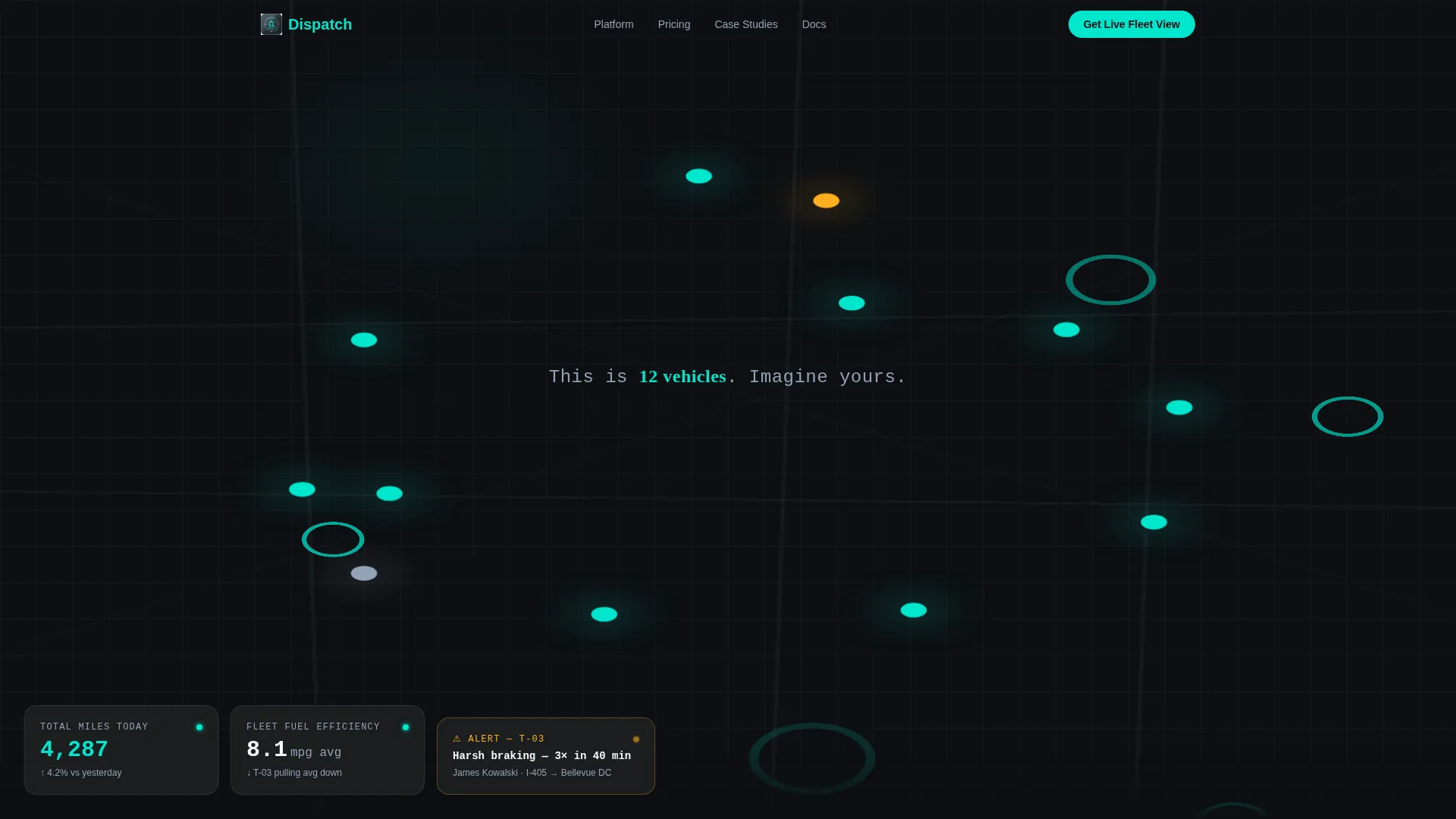
- An interactive header with a simulated live fleet map showing twelve moving vehicles
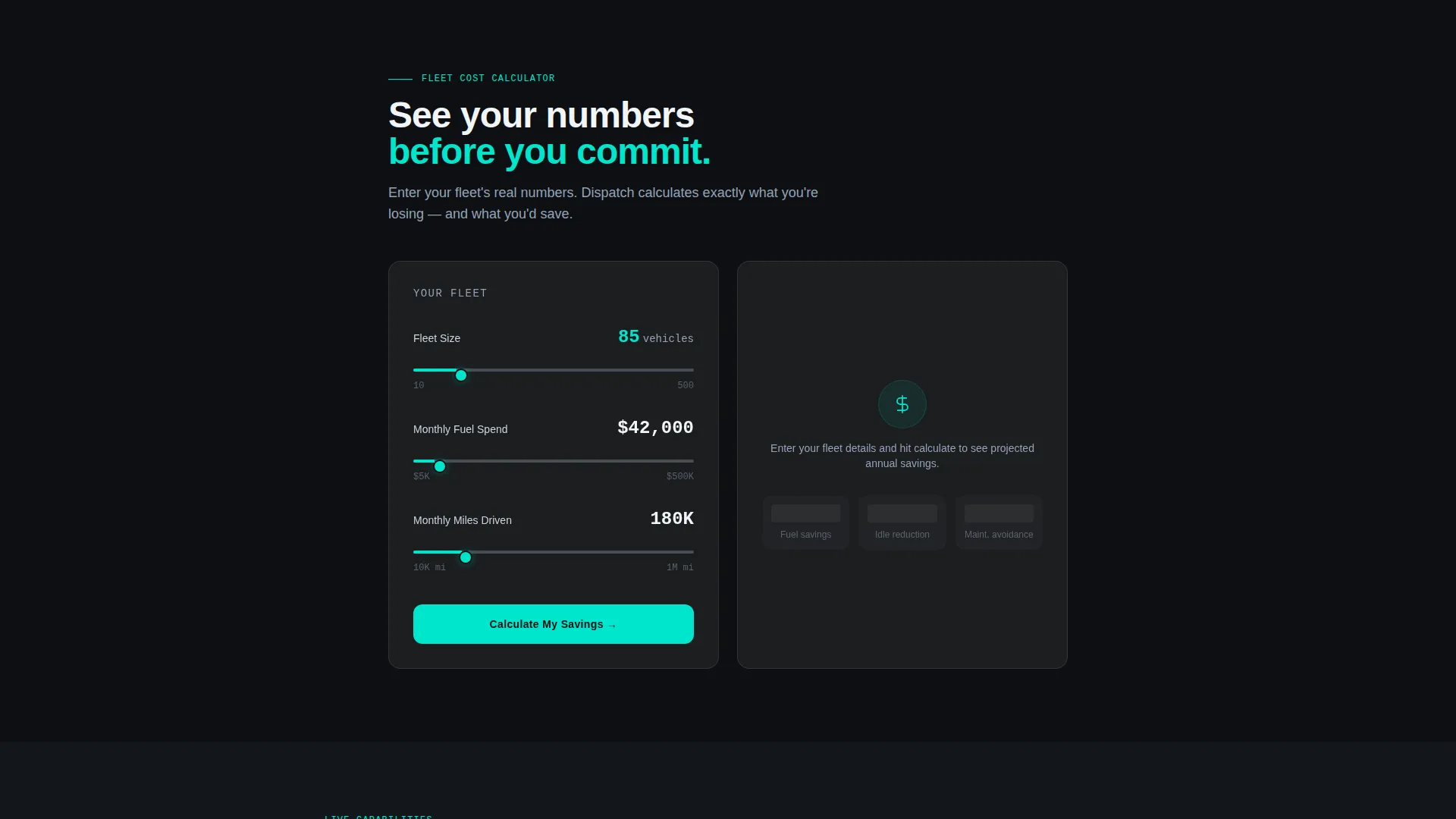
- A Fleet Cost Calculator that renders a personalized glassmorphic results card with animated numbers
- Progressive section reveals including route optimization visuals, driver scorecards, and a maintenance prediction timeline
Feature list
This template is built around six core functional and visual capabilities drawn directly from the brief.
Interactive Live Fleet Preview
The header drops visitors into a simulated mini-dashboard showing twelve vehicles plotted on a dark map in real time. Visitors can tap any vehicle dot to expand a card showing speed, heading, and estimated arrival time. One vehicle is flagged in warning amber for harsh braking, immediately communicating the platform's alert logic. A single line of copy fades in after two seconds: "This is 12 vehicles. Imagine yours."
Fleet Cost Calculator
Positioned immediately below the header, the calculator invites visitors to enter their fleet size, average monthly fuel spend, and miles driven. The tool instantly renders a results card showing projected annual savings, idle-time reduction, and maintenance cost avoidance. Each figure animates into place inside a glassmorphic card, making the output feel live rather than static.
Scroll-Reveal Progressive Sections
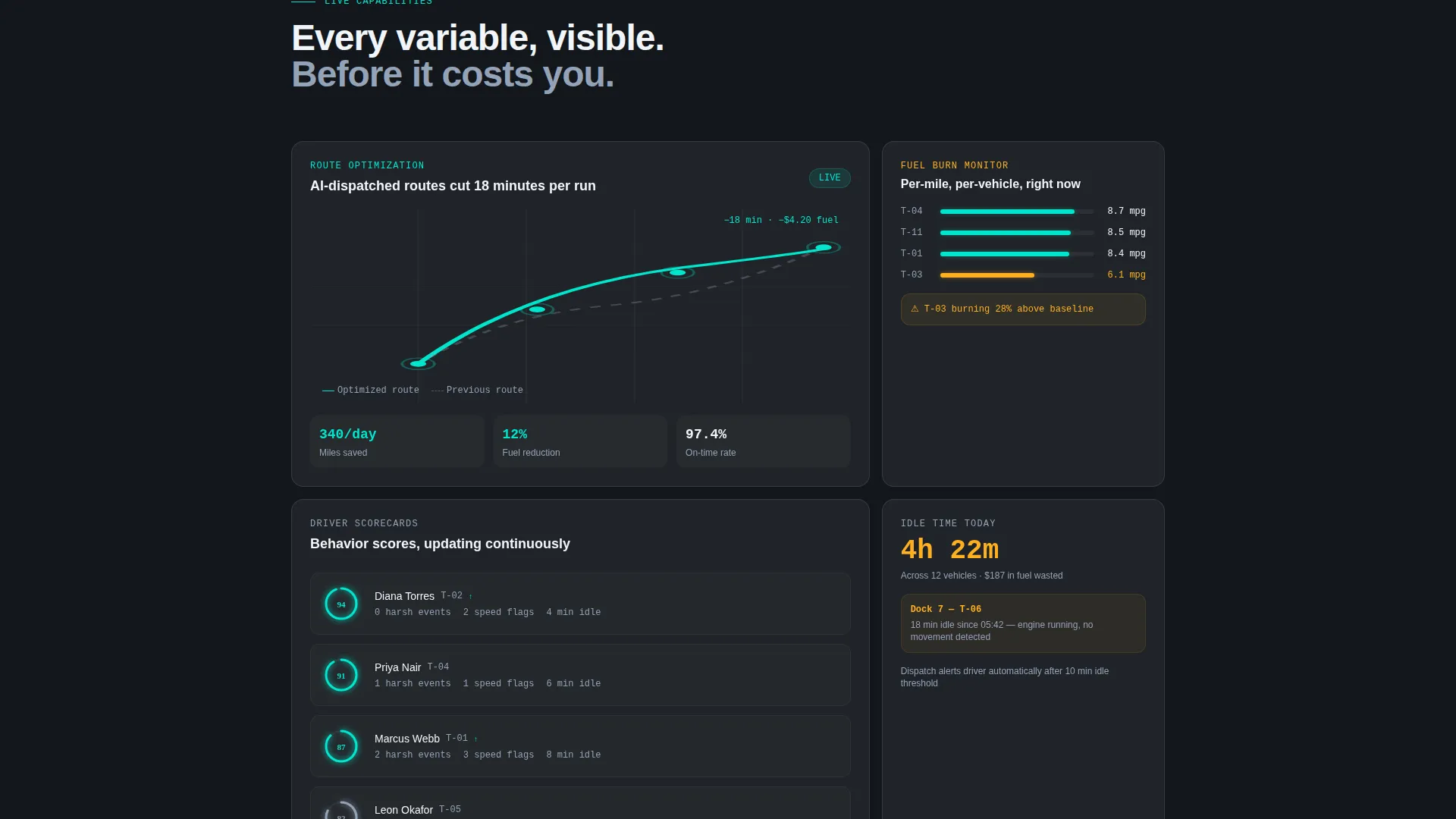
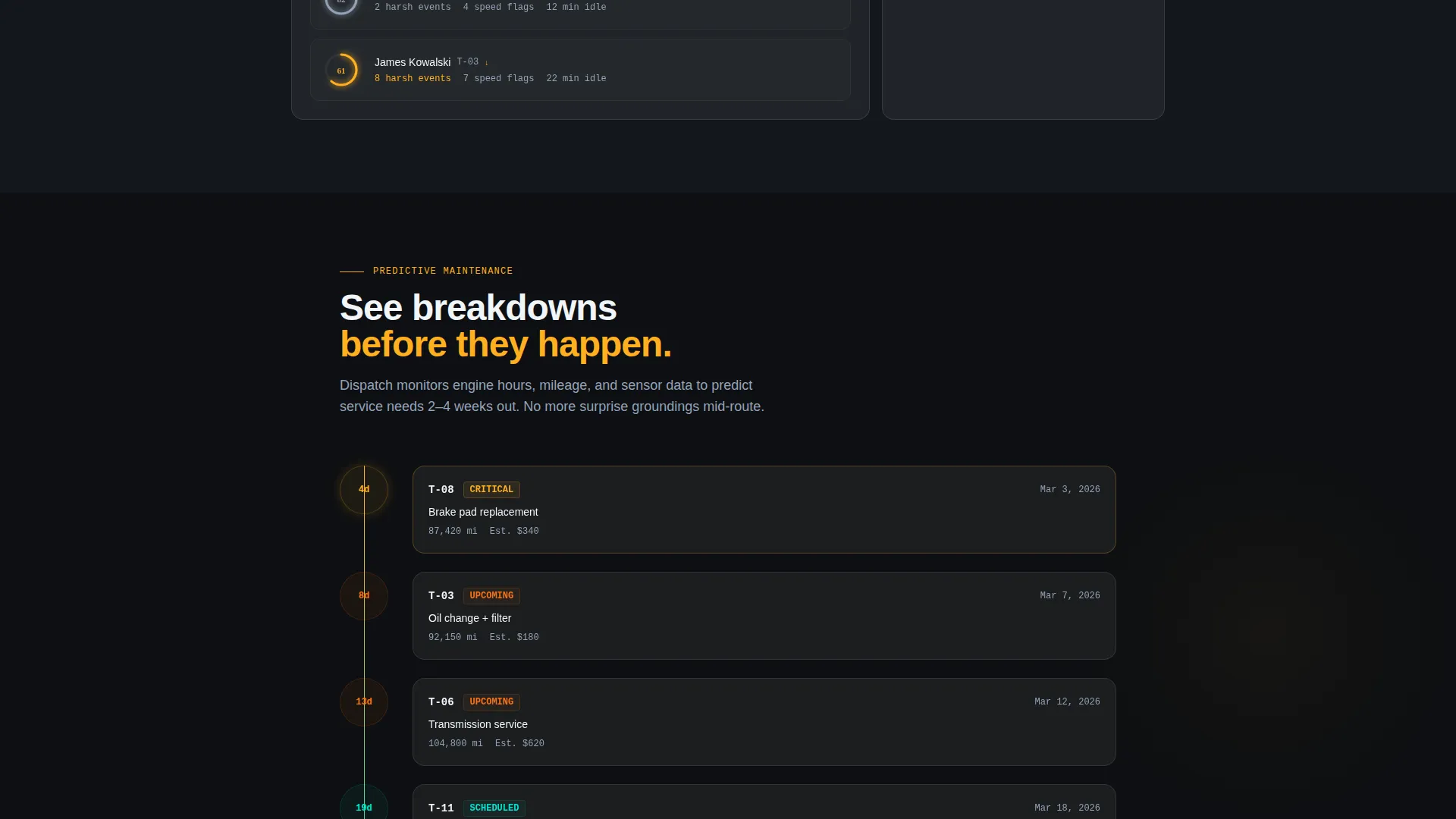
Sections below the calculator stay hidden until the visitor reaches them. Live route optimization visuals slide in from the left. Driver scorecard panels assemble piece by piece. A maintenance prediction timeline builds itself forward in time. Each reveal rewards scrolling momentum with a new layer of platform capability.
App Download Call to Action
The primary call to action is "Get Live Fleet View," linking to both the App Store and Google Play. Device-detected smart buttons present the right store automatically. The calculator results card carries a secondary call to action: "See These Savings With Your Fleet - Download Free." No form fields gate the download at any point.
Glassmorphic Data Command Design System
The visual identity uses frosted glass panels at 12% white opacity floating over a deep asphalt black base. Electric teal marks live data points and active routes. Warning amber signals alerts and threshold breaches. Cool slate handles secondary text and grid lines. The result feels like a control tower at night, dark enough that the data itself glows.
Driver and Vehicle Intelligence Panels
Driver behavior scores update in the simulated real-time view. Scorecard panels assemble progressively as the visitor scrolls, showing individual performance metrics. The maintenance prediction timeline projects vehicle service needs forward, turning reactive maintenance into a visible, plannable story.
Page sections overview
| Section | Purpose |
|---|---|
| Interactive Fleet Header | Simulated live map with twelve vehicle dots and expandable vehicle cards |
| Fleet Cost Calculator | Visitor inputs fleet data; animated results card shows projected savings |
| Route Optimization Visuals | Left-sliding reveal showing live route logic and coverage |
| Driver Scorecard Panels | Progressively assembled panels displaying driver behavior metrics |
| Maintenance Prediction Timeline | Forward-building timeline showing predicted vehicle service events |
| App Download Call to Action | Device-detected smart buttons linking to App Store and Google Play |
Design & branding system
The design follows a Data Command theme executed through a carefully controlled glassmorphic color system. Every color in the palette is functional: it signals a state, not just an aesthetic preference.
- Deep asphalt black (#0D0F12) as the base layer, frosted glass panels at 12% white opacity floating above it
- Electric teal (#00E5CC) on live data points and active routes; warning amber (#FFB020) on alerts and threshold breaches
- Cool slate (#94A3B8) for secondary text, grid lines, and supporting interface labels
Mobile & speed optimization
The template is built with a mobile-first audience in mind, particularly because the primary call to action drives toward an app download. Device detection adjusts the download button automatically based on the visitor's operating system.
- Smart device-detected buttons surface the correct App Store or Google Play link without manual switching
- Progressive scroll-reveal sections load content in stages, keeping the initial page weight low
- The glassmorphic panels and dark base layer render cleanly on high-contrast mobile screens
How this template helps you convert
This template earns the conversion before asking for it. By the time a visitor reaches the download button, they have already interacted with a live dashboard, run their own numbers through a calculator, and watched three sections of platform capability reveal themselves.
- The interactive fleet preview creates immediate product credibility without a word of sales copy, pulling visitors into the experience in the first few seconds.
- The Fleet Cost Calculator personalizes the value proposition by reflecting the visitor's own fleet size and spend back to them as projected savings, making the download decision feel logical rather than speculative.
- Progressive scroll-reveal pacing sustains attention through the full page, ensuring that each new section feels earned rather than dumped, and that the final call to action arrives at peak engagement.
Other information about this template
This template sits at the intersection of the IoT and hardware subcategory within the broader technology category, specifically targeting the fleet telematics niche. The creative direction prioritizes the calculator-first hook above all other conversion strategies.
- Template style: Scroll Reveal (Progressive), meaning sections animate into view as the visitor scrolls rather than loading all at once
- Header concept: Interactive Preview, delivering a functioning simulated dashboard rather than a static hero image or tagline
- Landing page direction: App Download, with no form gates blocking the primary conversion path
- The page is designed to support fleet sizes ranging from 50 to 500 vehicles, matching the operational scale of the intended buyer
- The Data Command theme and glassmorphic color system are fully consistent across every section, from the header map to the maintenance timeline
Theme
Data Command
Creative direction
Calculator/Tool First
Color system
Glassmorphic
Style
Scroll Reveal (Progressive)
Direction
App Download
Page Sections
Interactive Live Fleet Preview Header
Fleet Cost Calculator with Animated Results
Progressive Scroll-reveal Section Flow
Device-detected App Download Call to Action
Glassmorphic Data Command Visual System
Driver Scorecards and Maintenance Timeline
Related questions
What kind of business is this landing page template built for?
Does the Fleet Cost Calculator require a backend or coding setup?
Is this template designed to drive app downloads rather than form submissions?
Can the interactive header map and vehicle count be customized?
How does the scroll-reveal format affect page performance and user experience?



