AI for Home Specialist Professional Website Template
Dispatch is a dashboard-style landing page template built for AI-powered home services document processing. It uses a dark Midnight Blue color system, a Feature Tab Switcher header, and a dense spec-sheet layout to show how the platform extracts structured data from invoices, work orders, permits, lien waivers, and change orders. The design is built to earn the click before the visitor even reads the call to action.
by Rocket studio
Quick summary
Dispatch is a single-page landing page template designed for an AI document processing platform serving home services businesses. It combines a Feature Tab Switcher header, a metrics bar, an interactive data grid, and a persistent call-to-action system. The dark Dashboard Pro visual theme makes every data point legible at a glance, giving operations teams immediate confidence in the platform.
Who this template is for
This template is built for teams that live inside paperwork. It speaks directly to the people whose workdays are defined by document volume and the cost of getting details wrong.
- Operations managers at mid-size plumbing and HVAC companies tracking truck receipts and supplier invoices
- Office administrators who spend end-of-week hours manually re-keying purchase orders into accounting software
- Business owners who need clear, signed records to protect themselves in payment disputes
What problem this template solves
Home services companies lose time and money when documents travel in gloveboxes instead of systems. The right landing page needs to communicate that this platform solves a real, daily operational pain.
- Paper invoices, lien waivers, permits, and change orders pile up without a clear intake process
- Manual data entry creates errors that slow down job billing and reconciliation
- Missing or misfiled documents leave businesses exposed when payment disputes arise
What you get with this template
This template delivers a complete, ready-to-customize landing page built around proof and conversion. Every section is designed to show the platform working, not just describe it.
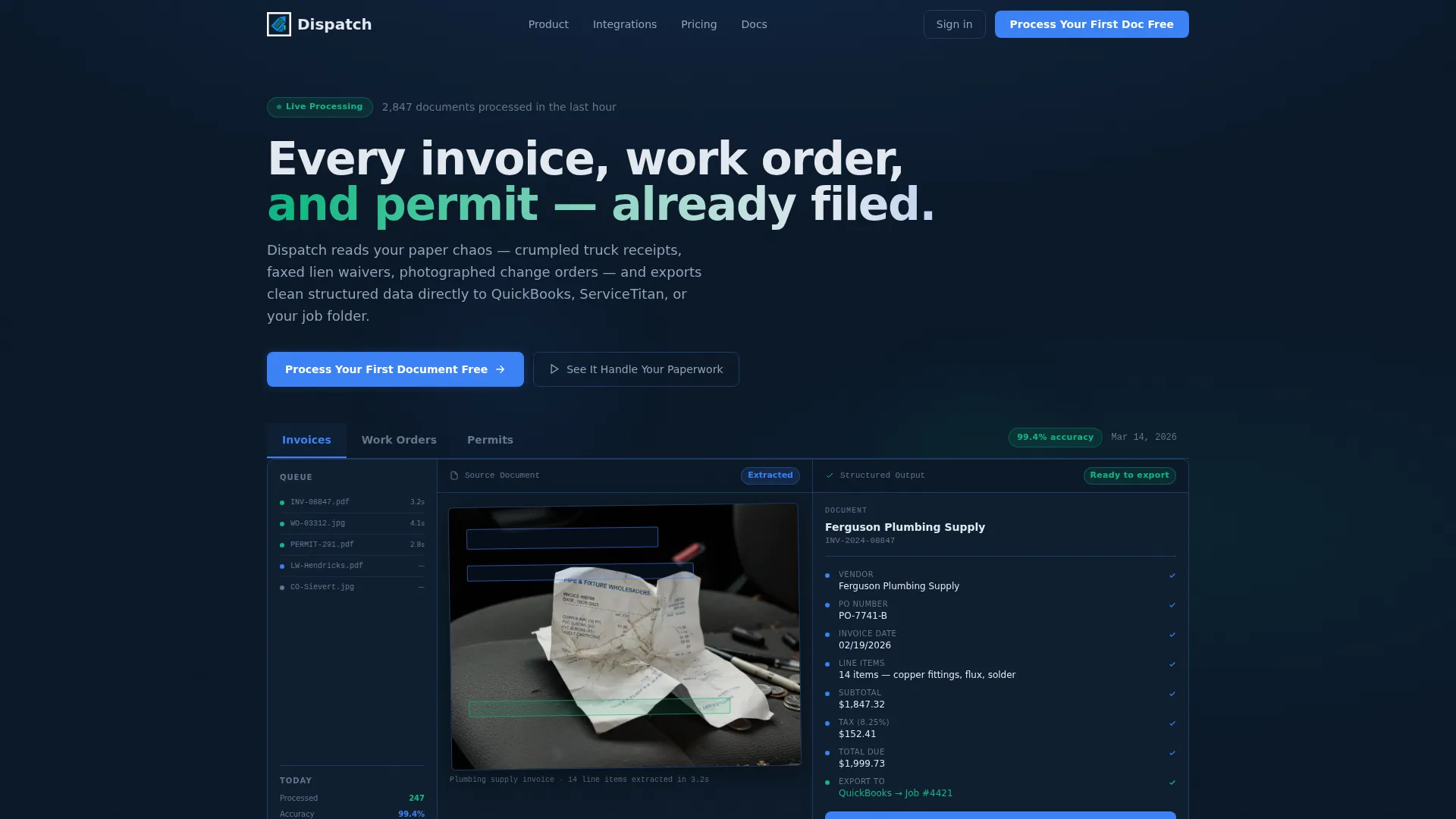
- A Feature Tab Switcher header with live dashboard mockup showing document extraction across three trade scenarios
- A horizontal metrics bar, an interactive data grid with expanding row detail, and a persistent call-to-action in both mobile and desktop layouts
- A dark, high-contrast visual system built for long screen sessions that still highlights every critical data point
Feature list
This template is built around components that demonstrate the platform's capability at every scroll depth. Each section stacks evidence so the visitor arrives at the call to action already convinced.
Feature Tab Switcher Header
Three labeled tabs sit above a live dashboard mockup. The default view shows a scanned plumbing supply invoice paired with a structured data card showing every extracted field highlighted in electric blue. Clicking a tab swaps both the source document and the extracted output, drawing from different trade scenarios each time.
Interactive Document Data Grid
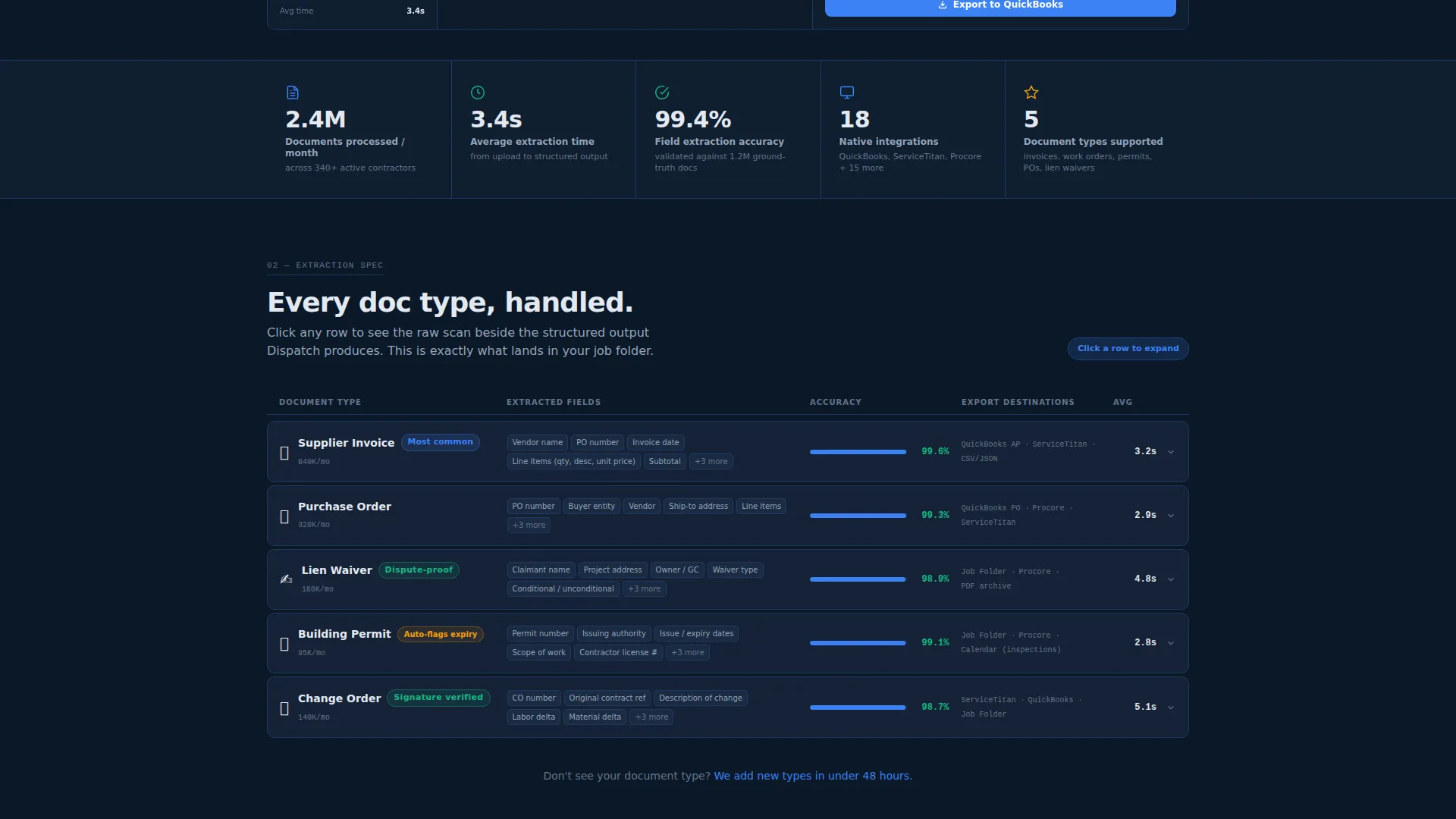
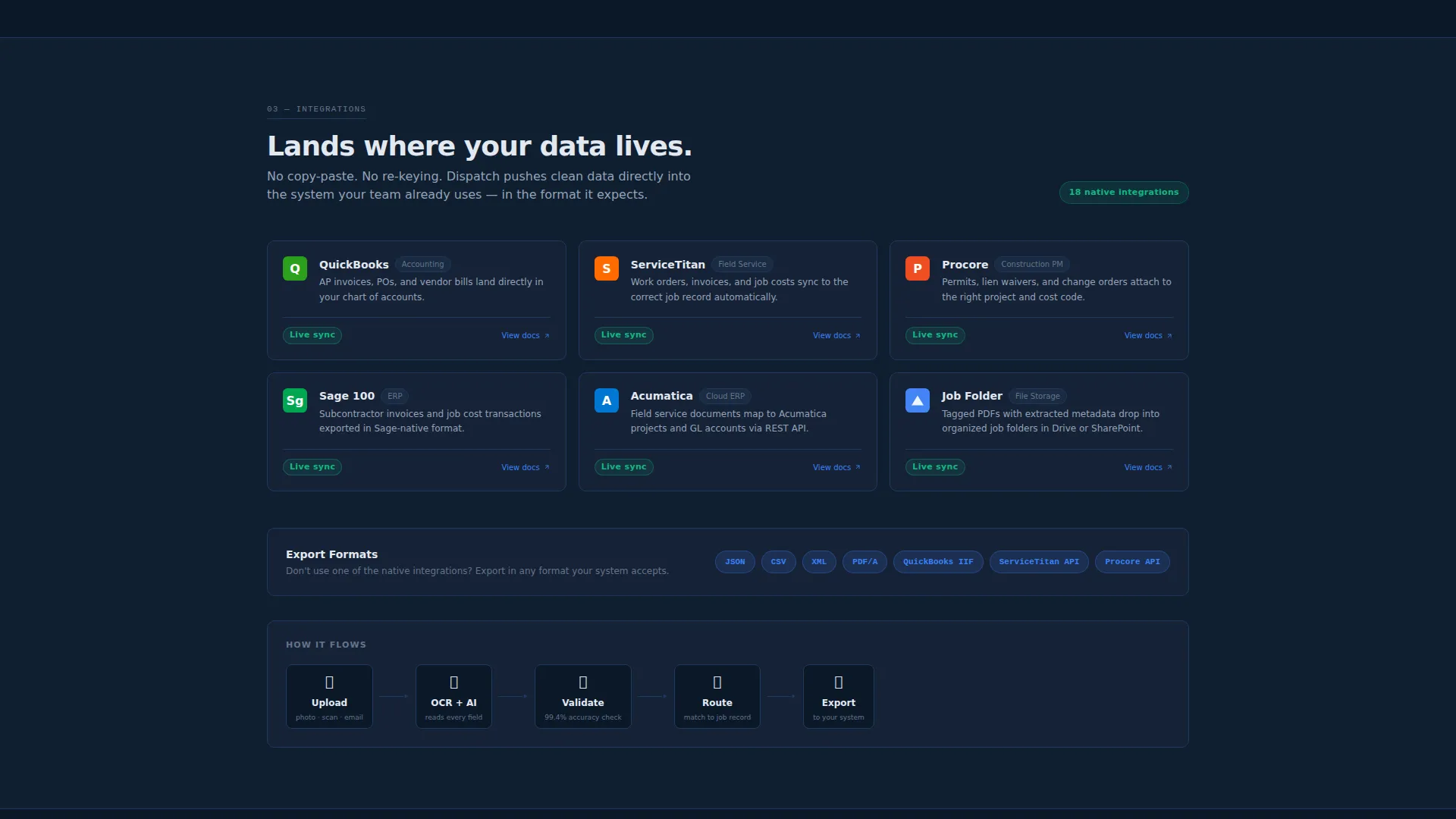
Each row in the data grid represents a document type: invoice, purchase order, lien waiver, permit, and change order. Columns show extraction fields, accuracy rate, and export destination. Every row expands on click to display a before-and-after view of the raw scan versus the clean structured output.
Horizontal Metrics Bar
A scannable bar below the header displays key platform proof points, including documents processed per month, average extraction time, and supported integrations count. It gives operations-minded visitors immediate quantitative evidence without requiring them to scroll deeper.
Persistent Call-to-Action System
The primary call to action, "Process Your First Document Free," renders as a fixed bottom bar on mobile and a fixed sidebar button on desktop, both in electric blue. No form appears on the landing page itself; the click leads directly to a signup flow where visitors upload a real document and watch live extraction.
Inline Demo Video Trigger
A secondary call to action, "See It Handle Your Paperwork," triggers an inline demo video. This gives hesitant visitors a lower-commitment way to see the extraction process before they commit to signing up.
Dashboard Sidebar and Accuracy Badge
The dashboard frame includes a sidebar showing document counts, a processing queue, and a small accuracy badge reading 99.4 percent. These details reinforce platform credibility within the visual design itself, not just in body copy.
Page sections overview
| Section | Purpose |
|---|---|
| Feature Tab Switcher | Show live document extraction across invoice, work order, and permit scenarios |
| Horizontal Metrics Bar | Display platform proof points: volume, speed, and integration count |
| Document Data Grid | Let visitors explore extraction detail by document type with expandable rows |
| Persistent call to action Bar | Drive signups via a fixed call-to-action present at all scroll depths |
| Inline Demo Trigger | Offer a low-commitment video preview of the extraction process |
Design & branding system
The visual identity follows a Dashboard Pro theme using a Midnight Blue color system. The palette is built for long screen sessions, with enough contrast to surface anomalies without causing eye fatigue.
- Core backgrounds range from deep terminal navy (#0B1929) to panel-surface slate (#162236), with card borders at a subtle 1px in deep navy (#1E3A5F)
- Active-state electric blue (#3B82F6) appears only on interactive elements such as tabs, toggles, and progress bars, while success-confirmation teal (#10B981) marks processed-document indicators
- Text runs in interface white (#E2E8F0) with muted secondary labels in slate gray (#64748B), keeping information hierarchy clear without noise
Mobile & speed optimization
The template is designed so the call-to-action is never out of reach, regardless of screen size. The layout adapts from a dense desktop data grid to a clear, tap-friendly mobile structure.
- The primary call-to-action shifts to a persistent bottom bar on mobile, keeping the conversion path visible at every scroll position
- The fixed sidebar call-to-action button on desktop ensures the action is always one click away without interrupting the data grid reading flow
- Interactive elements such as the tab switcher and expanding data grid rows are designed to function clearly on both touch and pointer-based devices
How this template helps you convert
The template earns the click by showing the platform in action throughout the page. By the time a visitor reaches the call to action, they have already seen the extraction working on documents that match their own daily workload.
- The Feature Tab Switcher and data grid replace persuasion copy with working demonstrations, so visitors build confidence through direct observation rather than marketing claims.
- The persistent call-to-action placement on both mobile and desktop removes friction at the moment of decision, sending visitors directly into a live upload experience rather than a form.
Other information about this template
This template is a strong fit for SaaS platforms and AI tools targeting the trades and field service industry. It is built around a spec-sheet creative direction that appeals to practical, detail-oriented buyers.
- The template style is Dashboard and Data Grid, suited for platforms that need to communicate data density and processing capability
- The header concept is a Feature Tab Switcher, ideal for products with multiple document types or workflow categories to demonstrate
- The landing page direction is Click-Through, meaning the page goal is to pass qualified visitors into a signup or product experience rather than capture a lead form on the page itself
- This template works well for home services AI document processing tools that need to establish credibility quickly with operations-focused audiences
- The Midnight Blue color system and Dashboard Pro theme are consistent with enterprise operations software aesthetics, reinforcing trust with technical and administrative buyers
Theme
Dashboard Pro
Creative direction
Spec Sheet
Color system
Midnight Blue
Style
Dashboard/Data Grid
Direction
Click-Through
Page Sections
Feature Tab Switcher Header
Interactive Document Data Grid
Horizontal Metrics Bar
Persistent Click-through Call to Action
Inline Demo Video Trigger
Dashboard Sidebar with Accuracy Badge
Related questions
Who is the Dispatch template designed for?
What document types does the data grid section cover?
Does the landing page include a lead capture form?
Can the tab switcher header be customized for different trade scenarios?
What makes the Midnight Blue color system suitable for this type of platform?



