Manufacturing Software Reviews Website Template
Dispatch is a bento grid landing page template built for manufacturing order management platforms. It leads with an interactive app dashboard preview, guides visitors through a Problem-to-Solution scroll arc, and closes with app download calls to action. The design follows a Data Command aesthetic using deep charcoal, brushed aluminum, and sky blue across card-based layouts built for plant managers and operations teams.
by Rocket studio
Quick summary
Dispatch is a single-page bento grid template for manufacturing order management software. It opens with a live-feeling interactive purchase order dashboard, walks visitors through escalating factory floor pain points, and drives toward app downloads with paired store badges and a "Text me the link" phone input. The design feels like a well-lit operations center at 6 AM.
Who this template is for
This template is built for teams launching or marketing a manufacturing operations platform. It speaks directly to the people who live inside production schedules and purchase order queues every day.
- Operations directors and plant managers at manufacturers running 50 to 500-person shops
- Procurement leads managing multiple supplier timelines across disconnected spreadsheets
- Floor supervisors who need to confirm material arrivals without calling the front office
What problem this template solves
Factory floor communication breaks down when orders live in inboxes, delays hide in spreadsheet versions, and no single person has a clear picture of what is late. This template helps a manufacturing software product present itself as the fix for exactly that problem.
- Late shipment notifications arrive after the damage is done, not 72 hours before
- Production bottlenecks compound because teams cannot see purchase order status in one place
- Customer chargebacks follow material delays that were predictable but invisible until too late
What you get with this template
You get a complete, scroll-driven single-page layout structured around real manufacturing pain points and built for high interactivity. Every section is designed to earn the download before the visitor reaches the call to action.
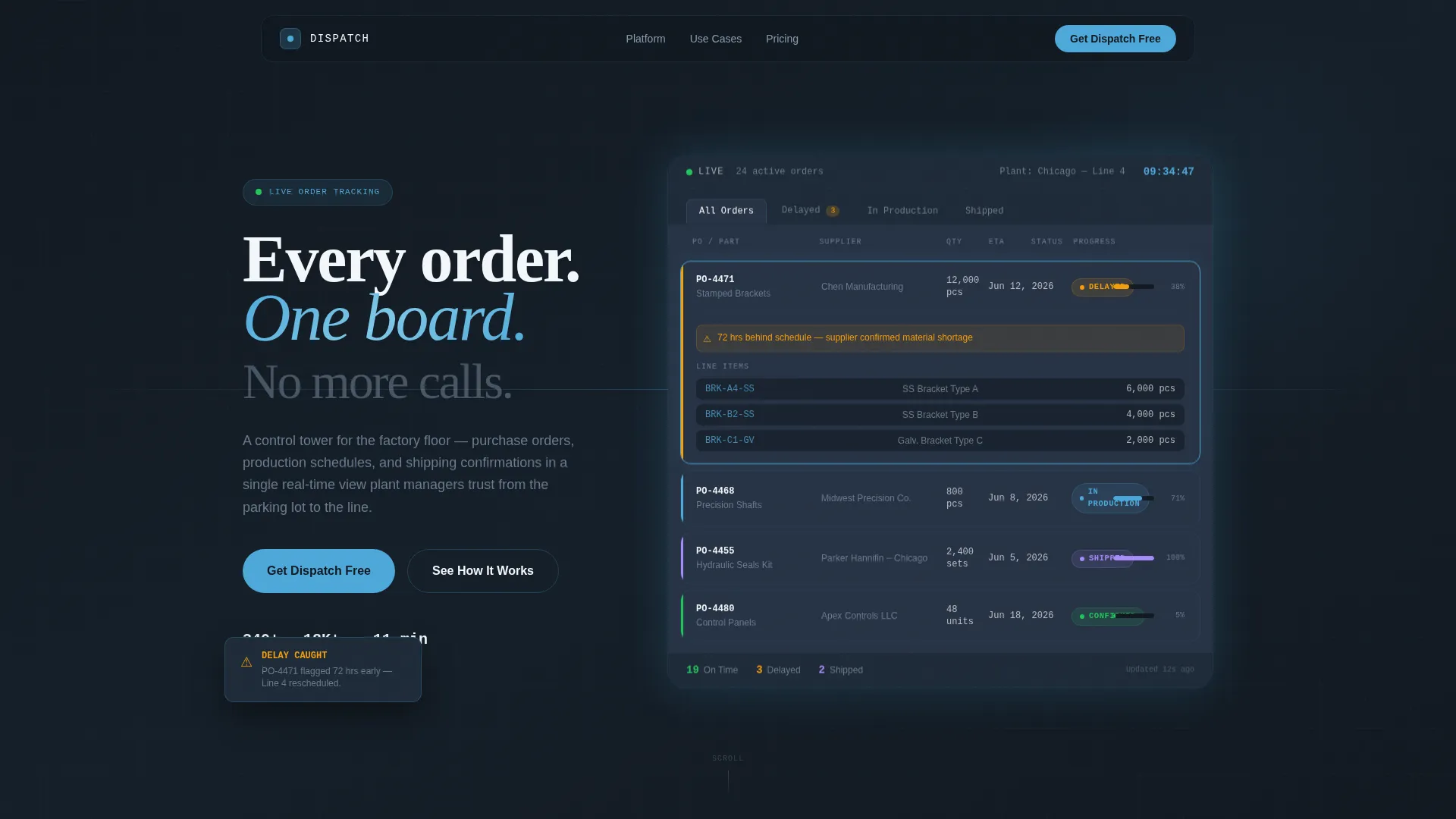
- A fully rendered interactive app dashboard in the hero section with expandable purchase order cards showing supplier names, line items, and delivery dates
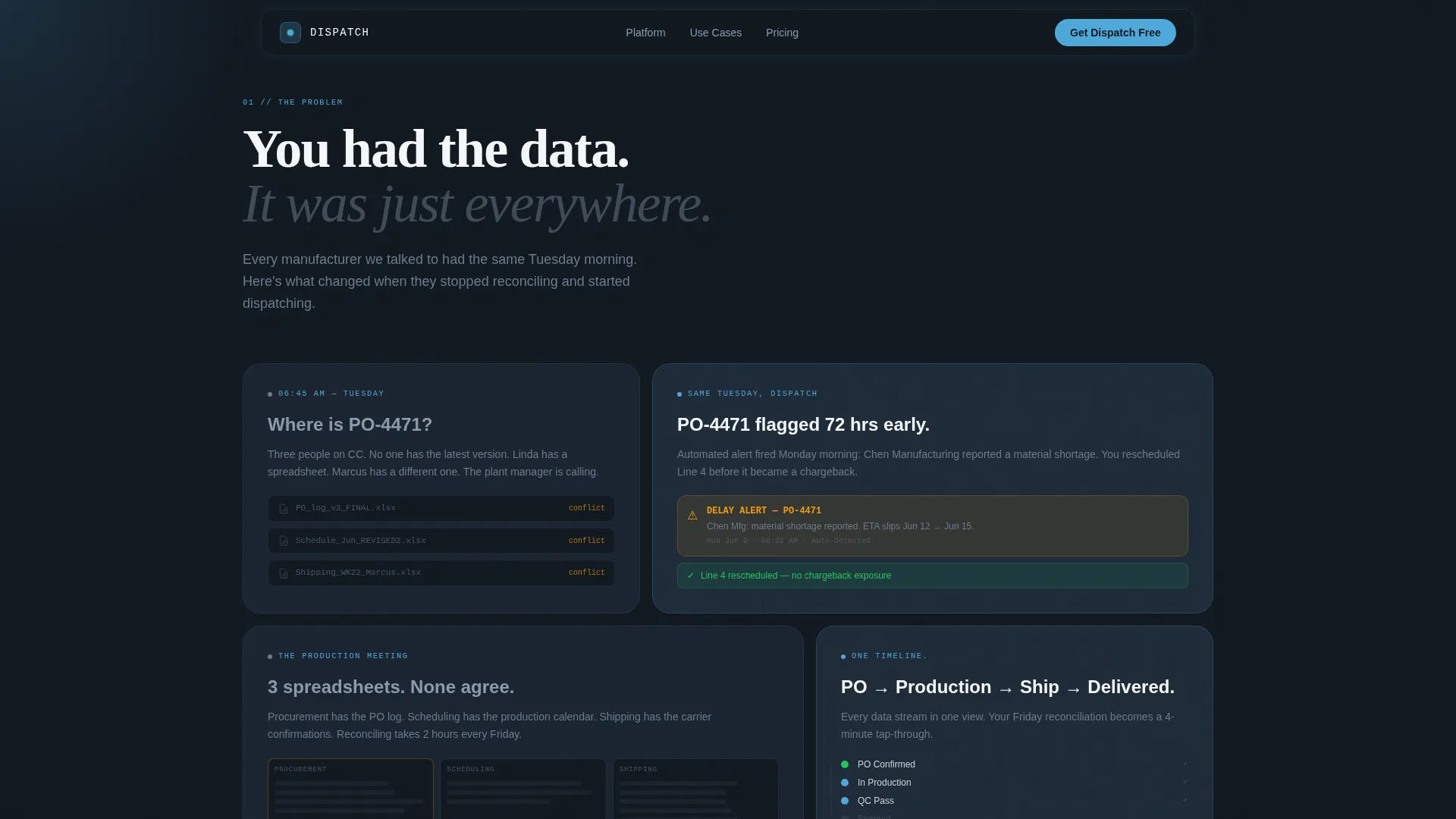
- A bento grid Problem-to-Solution arc that pairs each pain-point tile directly with a resolution tile
- App download calls to action including App Store and Google Play badges, a phone number input field, and a guided demo path
Feature list
This template covers the full conversion flow from first impression to download action. Each built-in component serves a specific job in moving a floor manager from recognition to sign-up.
Interactive Purchase Order Dashboard Header
The hero section renders a full viewport app screen showing purchase orders in multiple states: confirmed, in production, delayed, and shipped. Visitors can click or tap individual order cards to expand them and reveal line items, supplier names, and delivery estimated time of arrival data. The detail level is specific enough that a plant manager recognizes a Tuesday morning scenario instantly.
Bento Grid Problem-to-Solution Arc
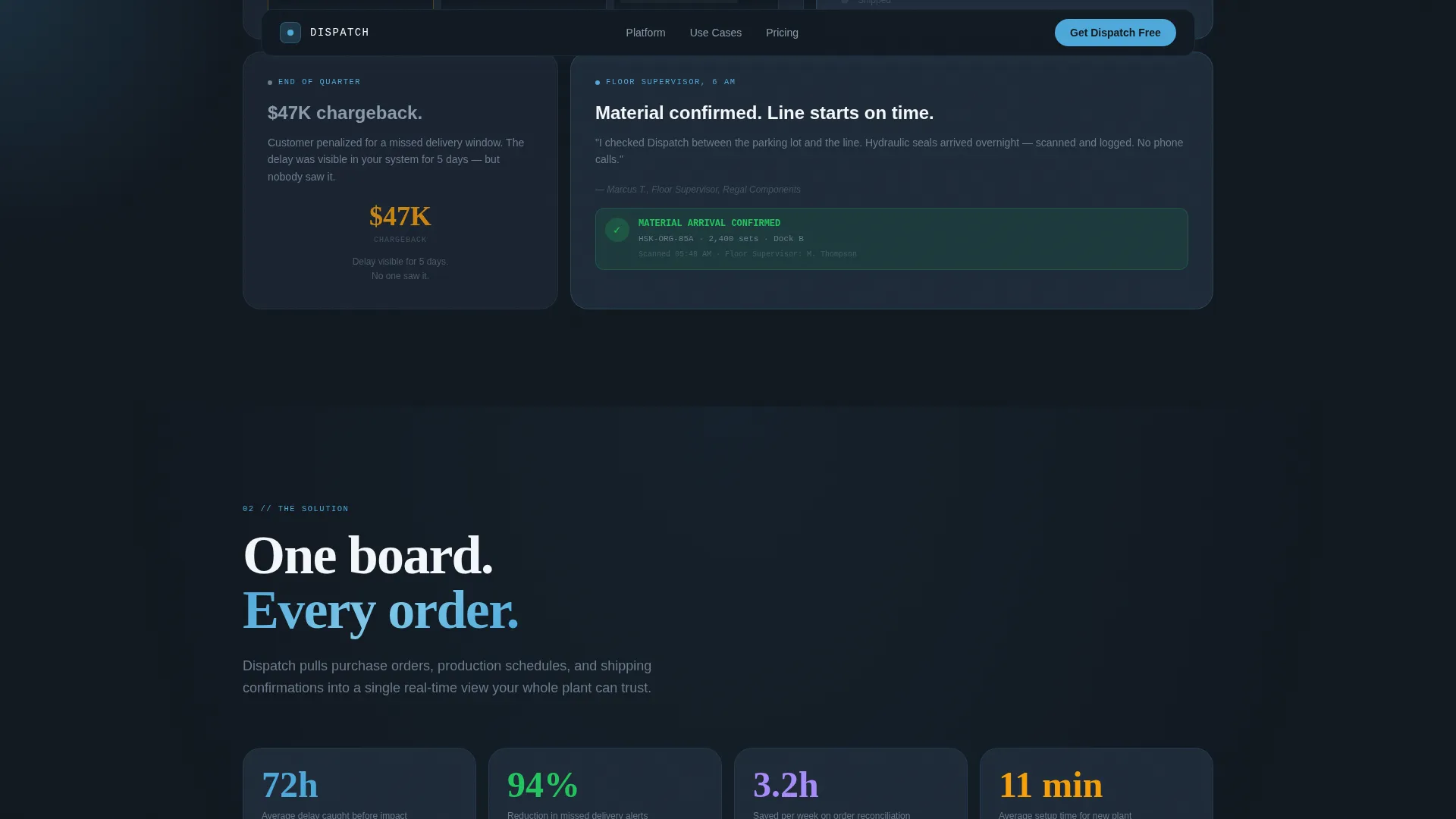
The scroll section pairs each manufacturing pain-point tile with a direct solution tile. A missed shipment tile sits next to a tile showing the same scenario caught 72 hours early. Three disconnected spreadsheet tiles collapse into a unified timeline tile. Each row raises the stakes before resolving it, building trust through recognition rather than feature lists.
Animated Card Assembly Sequence
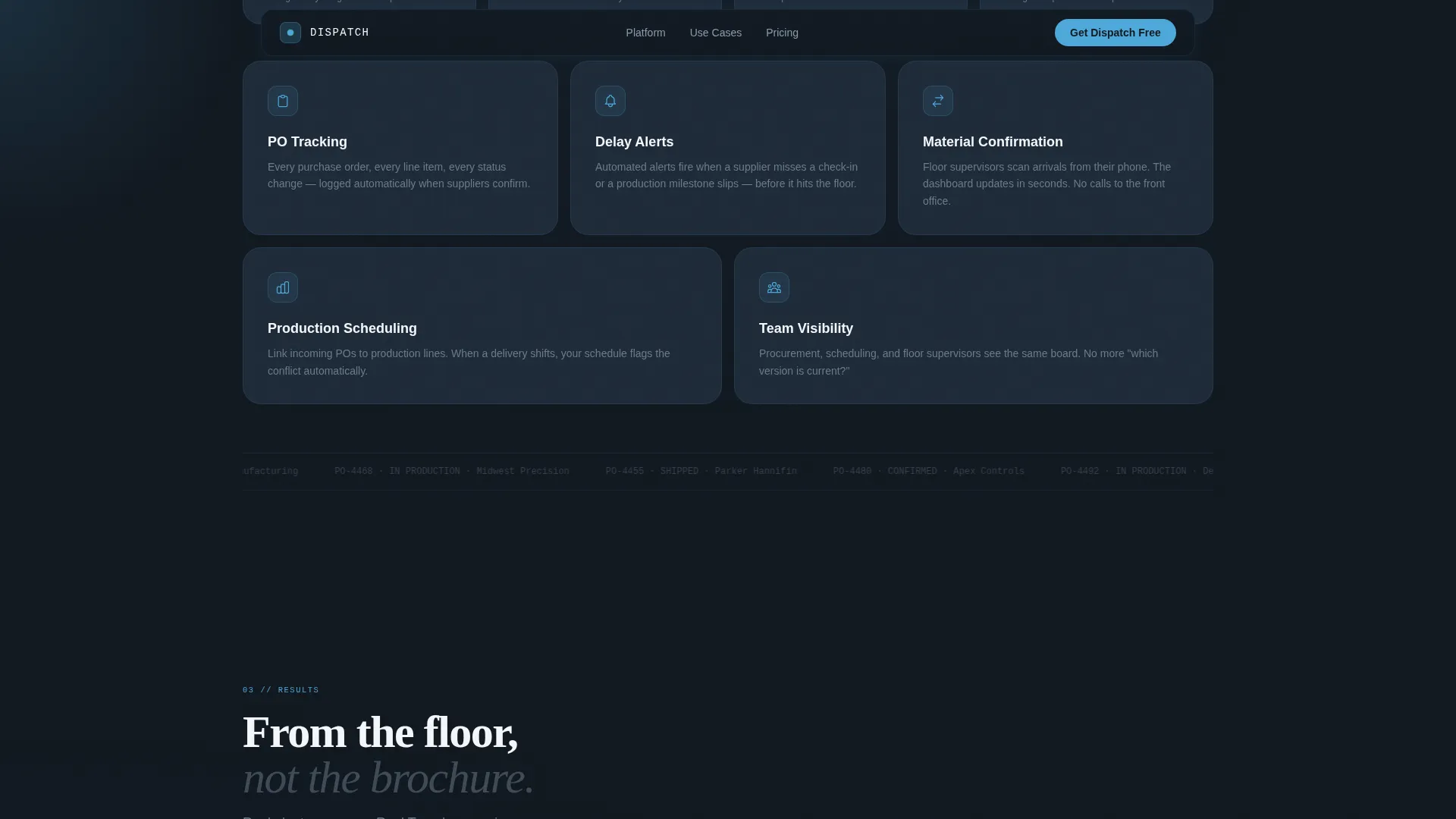
Bento cards snap together as the visitor scrolls, using GSAP ScrollTrigger to create the feeling of a command dashboard assembling itself in real time. The final row resolves into one unified app screen, giving a visual payoff to the Problem-to-Solution arc.
App Download Call-to-Action Section
The primary call to action reads "Get Dispatch Free" and is paired with App Store and Google Play badges. A single phone number input field labeled "Text me the link" serves desktop visitors who will use the app on the floor. A secondary path labeled "See It With Your Data" leads to a guided demo upload flow.
Social Proof Tiles
Plant manager testimonials with specific operational metrics are embedded as bento tiles within the layout. Testimonials come from operations directors and reflect real floor-level outcomes rather than generic praise.
Data Command Typography System
Three typefaces work together to reinforce the operations center aesthetic. DM Sans handles body copy for readability, Fraunces provides display accent weight for headings, and JetBrains Mono renders all order codes, quantities, and data fields to make the interface look live and functional.
Page sections overview
| Section | Purpose |
|---|---|
| Hero Interactive Dashboard | Display live-feeling purchase order cards that expand on tap or click |
| Problem Arc Grid | Surface escalating factory floor pain points in paired bento tiles |
| Solution Board | Show bento cards assembling into a unified real-time order view |
| Social Proof Tiles | Build trust with operations director testimonials and specific metrics |
| App Download Call to Action | Drive downloads via store badges, phone input, and demo path |
| Footer Single Row | Close the page with a clean linear single-row footer pattern |
Design & branding system
The visual identity follows a Data Command theme that feels like an operations center at shift start. Every color choice reflects the physical environment its users work in, not a generic software palette.
- Deep mill-floor charcoal (#1E2A38) as the primary background, brushed aluminum mid-tone (#6B7B8D) for secondary surfaces, open-sky blue (#4DA8DA) for active states and progress indicators, and high-visibility white (#F4F7FA) for card surfaces
- DM Sans for body text, Fraunces as a display accent for headings, and JetBrains Mono for all data fields, order codes, and quantity values
- Magnetic button effects, cursor glow interactions, and high-intensity GSAP ScrollTrigger animations keep the interface feeling alive without crossing into decorative territory
Mobile & speed optimization
The template is built mobile-first because floor supervisors are reading purchase order statuses on phones between line walks, not at desks. Desktop visitors still get the full interactive dashboard experience.
- Mobile-first layout ensures that order cards, bento tiles, and call-to-action inputs are touch-friendly and legible at small screen sizes
- The interactive dashboard header and animated bento reveals use client-side rendering, while static sections use server components to keep load behavior efficient
- The phone number input field is prominently placed for desktop visitors who plan to use the app on the floor, bridging the desktop discovery and mobile use case in a single interaction
How this template helps you convert
Every section of this template is designed to move a skeptical plant manager from recognition to action. The page earns the download by solving problems the visitor had this morning.
- The interactive hero dashboard creates immediate recognition. A visitor sees "PO-4471 · Stamped Brackets · Qty 12,000 · ETA June 12" and understands the product before reading a single line of marketing copy.
- The Problem-to-Solution arc builds escalating urgency by mirroring real scenarios: late materials, then production bottlenecks, then customer chargebacks. Each problem tile resolves into a solution tile, making the value proposition feel earned rather than claimed.
- The "Text me the link" phone input removes the friction between desktop discovery and floor-level use. A plant manager reading this in their office can send the app link directly to their phone without leaving the page.
Other information about this template
This template is a strong fit for any team building or relaunching a manufacturing operations software product that targets mid-market industrial businesses. It is production-ready as a standalone landing page and is structured to support both direct app marketing and demo-led sales funnels.
- The template style is bento grid, making it straightforward to rearrange or extend individual tiles as product messaging evolves
- Localization defaults are English language, USD currency, and US date format, which aligns with the mid-market North American manufacturer audience
- The footer uses a Pattern 1 Linear Single-Row layout for a clean, low-distraction close that keeps attention on the call-to-action section above it
- Animation intensity is high by design, using GSAP ScrollTrigger, magnetic buttons, expandable order cards, and a cursor glow effect suited to an interactive product demonstration context
Theme
Data Command
Creative direction
Problem→Solution Arc
Color system
Slate & Sky
Style
Bento Grid
Direction
App Download
Page Sections
Interactive Purchase Order Dashboard
Bento Grid Problem-to-solution Arc
Animated Card Assembly Sequence
App Download Call-to-action Block
Social Proof Bento Tiles
Data Command Typography System
Related questions
Who is this template designed for?
Can I customize the purchase order data in the interactive dashboard?
Does this template support both app download and demo request paths?
What animation library does this template use?
Is this template suitable for a product not yet live in app stores?



