Dispatch - Powerful Restaurant Landing Page Template
Dispatch is a bold brutalist landing page template built for a food and beverage AI chatbot. It uses a scroll reveal structure, a Stats/Metrics header wall, and an Acid Digital color system to make inventory data feel urgent and alive. The template drives toward an app install call to action with platform toggles and a POS provider dropdown for routing.
by Rocket studio
Quick summary
Dispatch is a single-page scroll reveal template designed for a restaurant AI chatbot product. It opens with a full-viewport metrics wall, builds through an industry report narrative, and closes with a full-width app download block. The design runs on void black and toxic chartreuse, making every data point feel live and operational.
Who this template is for
This template is built for teams launching AI-powered tools inside the food and beverage industry. It speaks directly to operators and distributors who need hard proof before they commit to a new platform.
- Multi-unit franchise operators who review waste reports early in the morning and need instant clarity
- Independent restaurant owners who manage purchasing without dedicated staff
- Beverage distributors whose sales reps need real-time allocation data while on the road
What problem this template solves
Most product landing pages for AI tools feel generic and fail to communicate urgency. Dispatch solves the credibility gap by leading with raw operational data instead of marketing language.
- Restaurant operators dismiss AI tools that cannot show measurable, kitchen-level outcomes
- A static, image-heavy layout cannot convey that an AI system is already running at scale
- Visitors leave before they feel the cost of inaction, so the install never happens
What you get with this template
You get a fully structured scroll reveal landing page that builds a data-driven case for your AI chatbot from the first pixel to the final call to action. Every section is designed to add weight progressively.
- A brutalist Stats/Metrics header wall with odometer-style number animations and live-formatted figures
- An industry report narrative flow with animated bar charts, chatbot transcript sections, and benchmark comparison blocks
- A persistent bottom bar call to action, a POS provider dropdown, and a full-width app download block with platform toggles for iOS, Android, and point-of-sale integration
Feature list
This template delivers a set of purposefully designed components. Each one is grounded in the operational urgency the product needs to communicate.
Brutalist Stats Header Wall
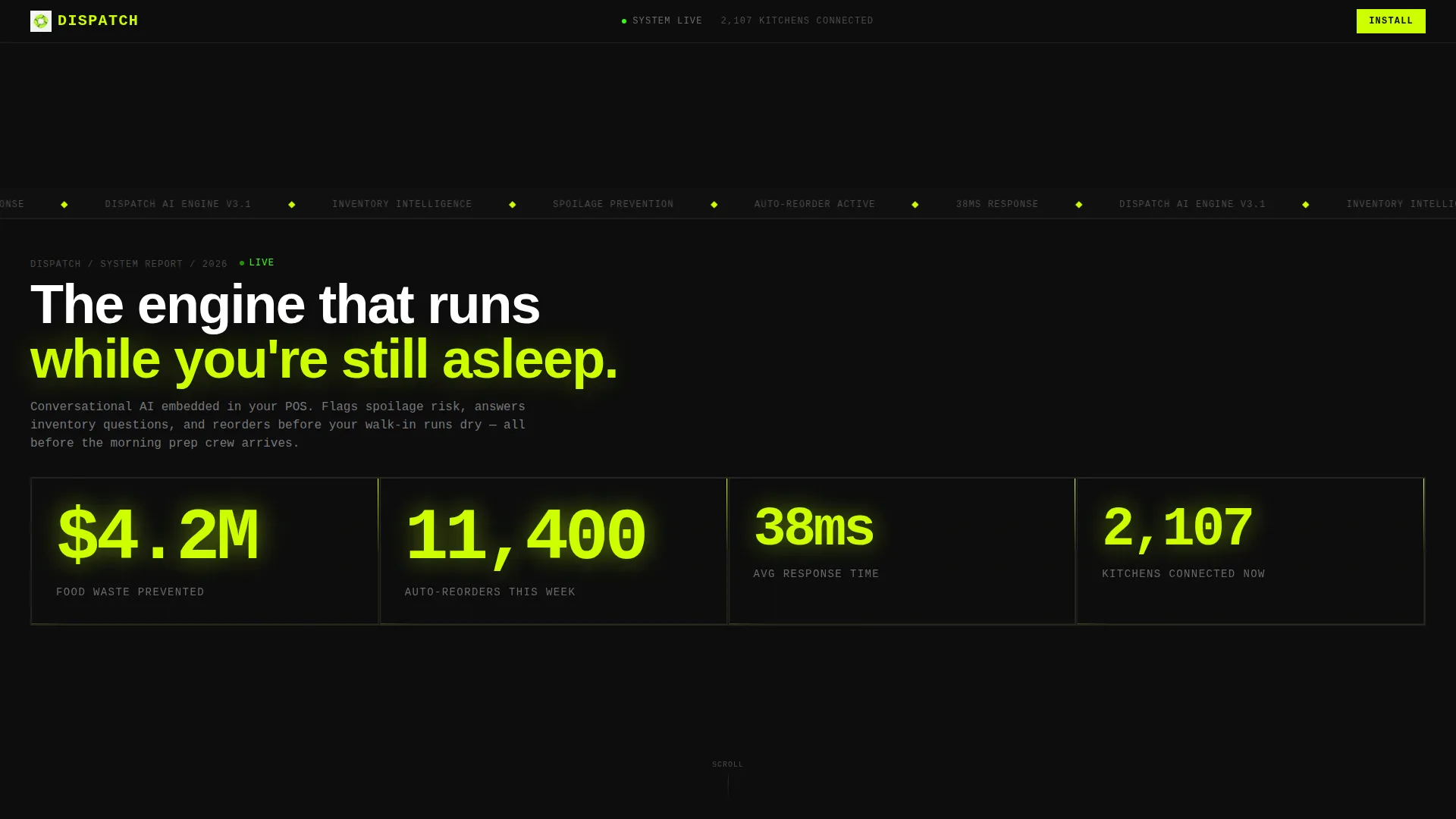
The header fills the entire viewport with heavy condensed figures on void black. Numbers like waste prevented, auto-reorders, response time, and kitchens connected are rendered at billboard scale with chartreuse type and no imagery.
Odometer Number Animations
Each metric in the header ticks upward using a mechanical odometer animation. The effect implies the system is running in real time behind the page, not just presenting a static claim.
Scroll Reveal Section Snapping
Sections do not fade or slide. They snap into view as the reader scrolls, like pages loading on a slow connection. Each reveal adds a new data layer, making the reading experience feel like paging through a live report.
Animated Bar Charts
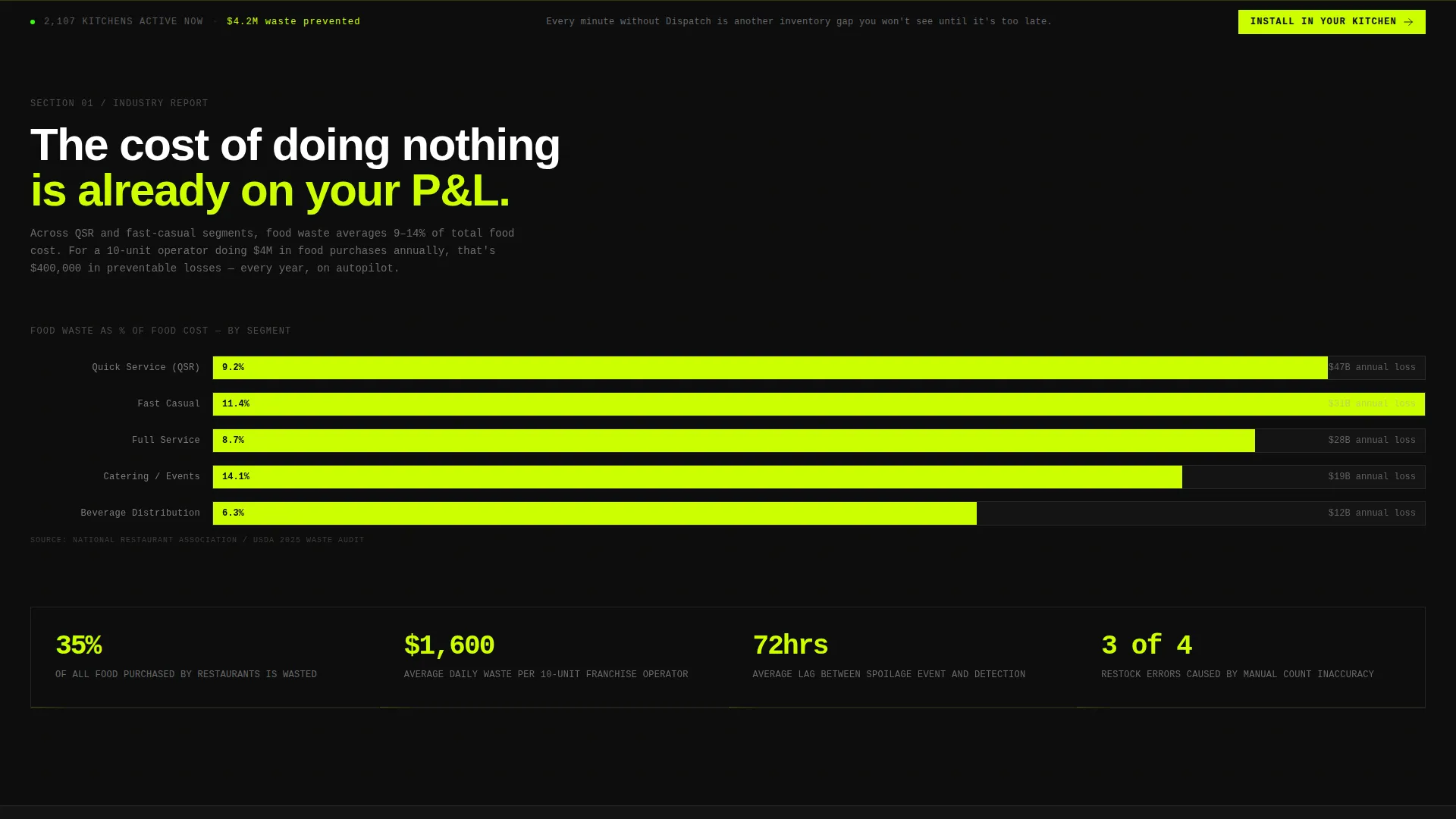
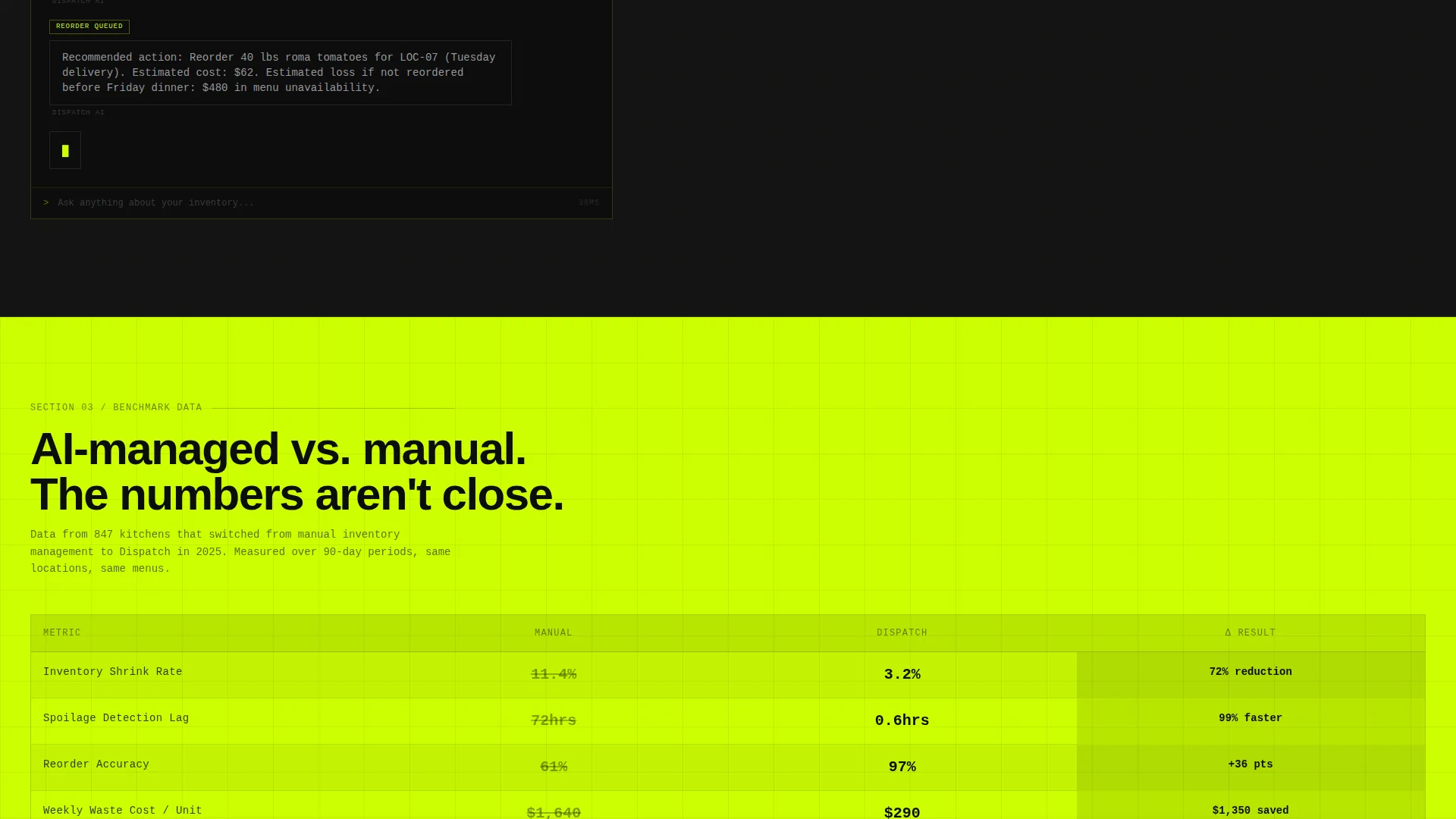
Cost-of-waste data and inventory shrink benchmark comparisons are presented using bar charts that build as they enter the viewport. The charts distinguish between AI-managed and manually-managed outcomes.
Chatbot Transcript Block
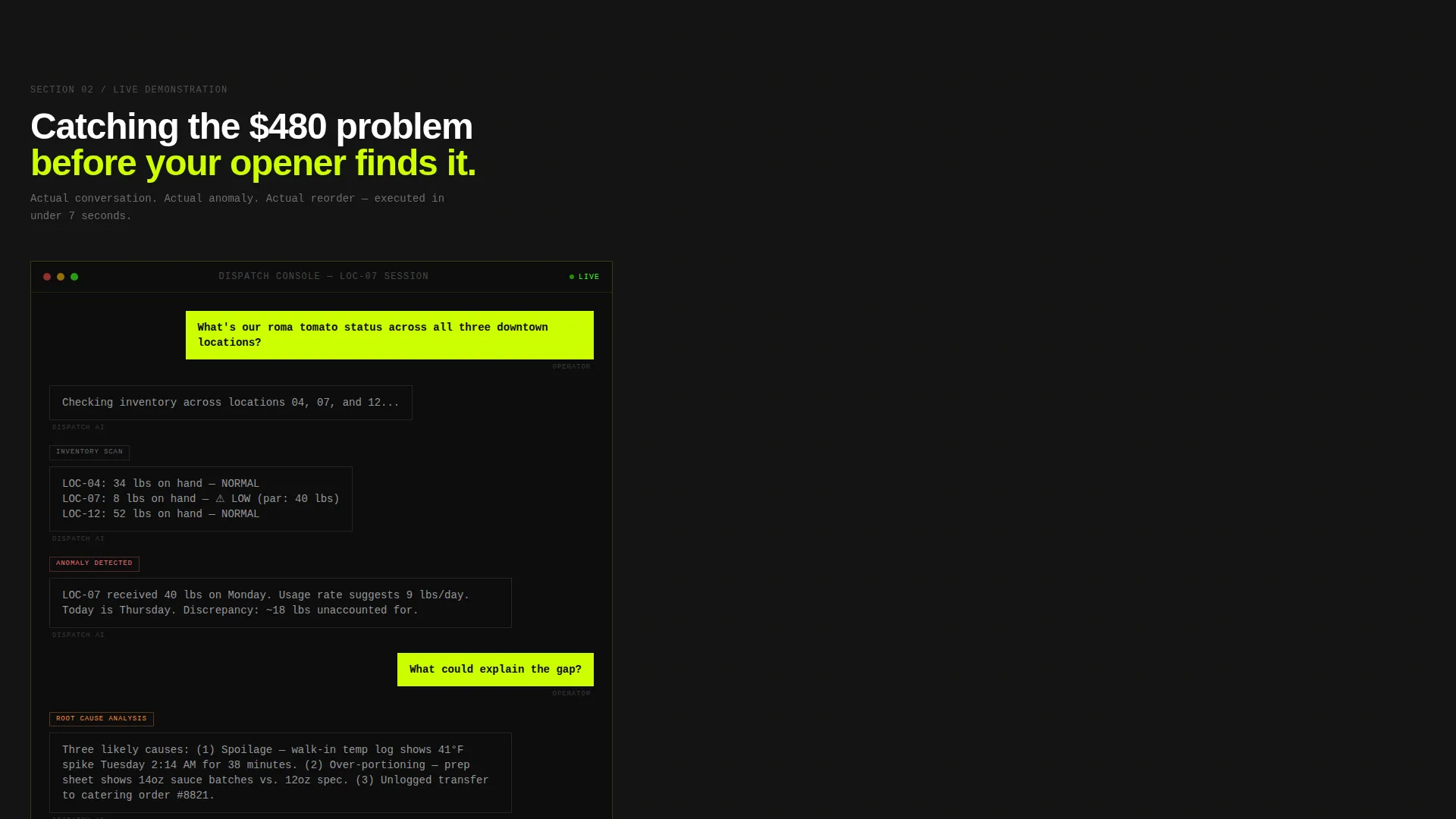
A formatted conversation transcript shows the AI catching a produce order anomaly in real time. This section shifts the page from industry problem to product proof using a concrete, relatable example.
POS Provider Dropdown and Platform call to action Block
Before the final download block, a single-field input lets visitors select their point-of-sale provider from a dropdown list. The selection routes the download link to the correct integration path across iOS, Android, and POS platforms.
Page sections overview
| Section | Purpose |
|---|---|
| Stats metrics wall | Opens with live-formatted operational numbers at full viewport scale |
| Cost of waste | Presents QSR and fast-casual food waste data with animated bar charts |
| Chatbot transcript | Shows the AI catching a real produce anomaly mid-conversation |
| Benchmark comparison | Contrasts AI-managed and manually-managed inventory shrink rates |
| Persistent call to action bar | Appears after the second scroll reveal and stays anchored at the bottom |
| POS provider input | Captures the visitor's platform choice before routing the download |
| App download block | Full-width brutalist close with iOS, Android, and POS integration toggles |
Design & branding system
The visual identity is Bold Brutalist with an Acid Digital color system. The palette is designed to feel like a kitchen display screen glowing in a dark pass, electric and functional.
- Void black (#0D0D0D) dominates the background so data appears to float on nothing; toxic chartreuse (#CCFF00) owns every number, stat, and interactive element that demands attention
- Terminal phosphor green (#39FF14) handles secondary callouts while raw aluminum gray (#A8A9AD) carries body text and divider rules
- Midway through the page, the chartreuse ratio inverts, flashing acid green backgrounds with black text to signal the shift from diagnosis to solution
Mobile & speed optimization
The template is structured for a focused, linear reading experience that works across screen sizes. The scroll reveal behavior and snap transitions are built to remain legible and impactful on smaller displays.
- Heavy condensed typefaces and high-contrast chartreuse-on-black combinations remain readable at mobile viewport widths
- Single-column stacking ensures the Stats wall, transcript blocks, and call to action bar adapt cleanly without losing hierarchy
How this template helps you convert
The template is engineered to earn the install rather than ask for it. Every section adds evidence before the call to action appears.
- The Stats wall creates immediate proof of scale, making visitors feel they are already behind, which drives them to keep reading
- The industry report narrative builds through cost data, a live transcript, and benchmark comparisons before the call to action ever appears, so the install feels like a logical next step rather than a sales push
Other information about this template
This template is part of a broader category of AI product landing pages built for the food and beverage technology space. It is particularly well suited for teams launching restaurant automation tools, kitchen management software, or inventory AI platforms that need to communicate credibility fast.
- The template style is Scroll Reveal (Progressive), meaning content layers build as the reader moves down the page rather than loading all at once
- The creative direction follows an Industry Report format, which positions the product inside a data narrative rather than a traditional marketing frame
- The header concept is Stats/Metrics, a pattern that works especially well for AI tools where proof of scale is the strongest sales argument
- The landing page direction targets App Download, with the POS dropdown ensuring the install path is relevant to each visitor's existing setup
Theme
Bold Brutalist
Creative direction
Industry Report
Color system
Acid Digital
Style
Scroll Reveal (Progressive)
Direction
App Download
Page Sections
Brutalist Stats Header Wall
Odometer Number Animations
Scroll Reveal Section Snapping
Animated Bar Charts
Chatbot Transcript Block
POS Dropdown and App Download Call to Action
Related questions
What kind of product is this template designed for?
Can I edit the metrics shown in the Stats header wall?
How does the POS provider dropdown work?
Who is the target audience this template is written for?
Does this template include a working AI chatbot?



