Real Estate Volunteer Management Landing Page
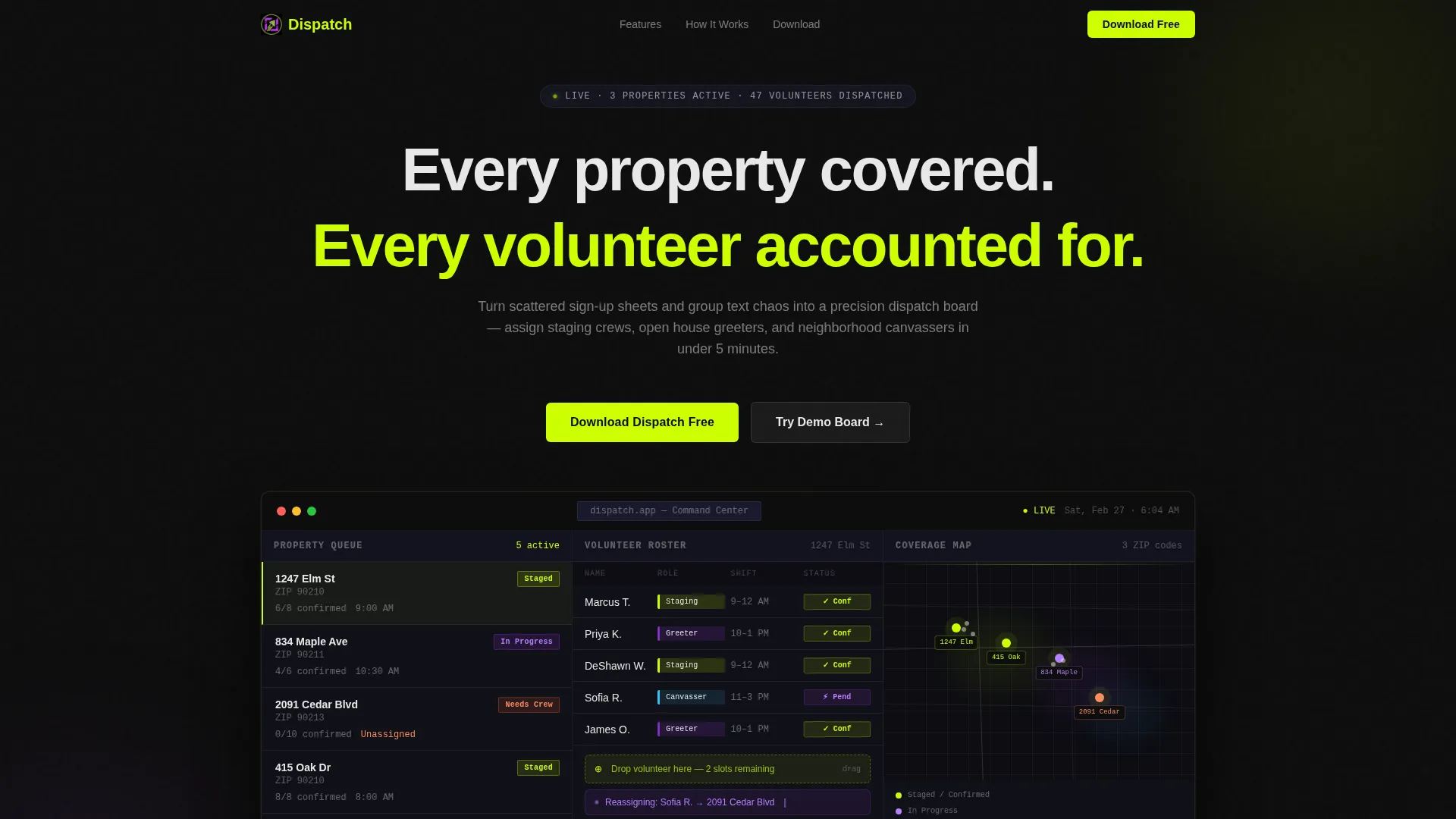
Dispatch is a dashboard-style real estate volunteer management landing page template built for coordinators who need order, not chaos. It presents a pixel-sharp dispatch interface, a spec-driven feature scroll, and a frictionless app download path. Designed for nonprofit housing directors, brokerage outreach managers, and association presidents who must place dozens of volunteers across multiple properties fast.
by Rocket studio
Quick summary
Dispatch is a single-page, dashboard-style landing page template for real estate volunteer management teams. It leads with a product screenshot header, accelerates through a spec-sheet feature scroll, and closes with a no-form app download call to action. The template is built for coordinators who need to show up at 6 AM and see every shift already filled.
Who this template is for
This template is designed for people who coordinate volunteers across real estate and housing projects at scale. They need clarity, speed, and a tool that earns trust before anyone hits a download button.
- Nonprofit housing directors managing weekend build crews across multiple properties
- Brokerage community outreach managers rallying agents for Habitat-style projects
- Association presidents who need forty volunteers at a foreclosure cleanup by Saturday morning
What problem this template solves
Volunteer coordination in real estate moves fast and breaks easily. Group texts, scattered sign-up sheets, and last-minute no-shows turn a planned open house or staging day into a scramble. This template solves the perception problem first: it shows visitors a dispatch board that already looks like it works.
- Scattered sign-up chaos replaced by a visible, role-coded volunteer roster
- No-show risk addressed through an Attendance Tracker and Auto-Remind module callout
- Lengthy onboarding friction removed with a frictionless, no-form app download path
What you get with this template
You get a complete, single-page landing page template structured like a product datasheet. Every section is a discrete capability module presented with real interface crops and metric callouts. The design system is ready to go and consistent from header to download bar.
- A full-width product screenshot header showing the dispatch dashboard mid-operation
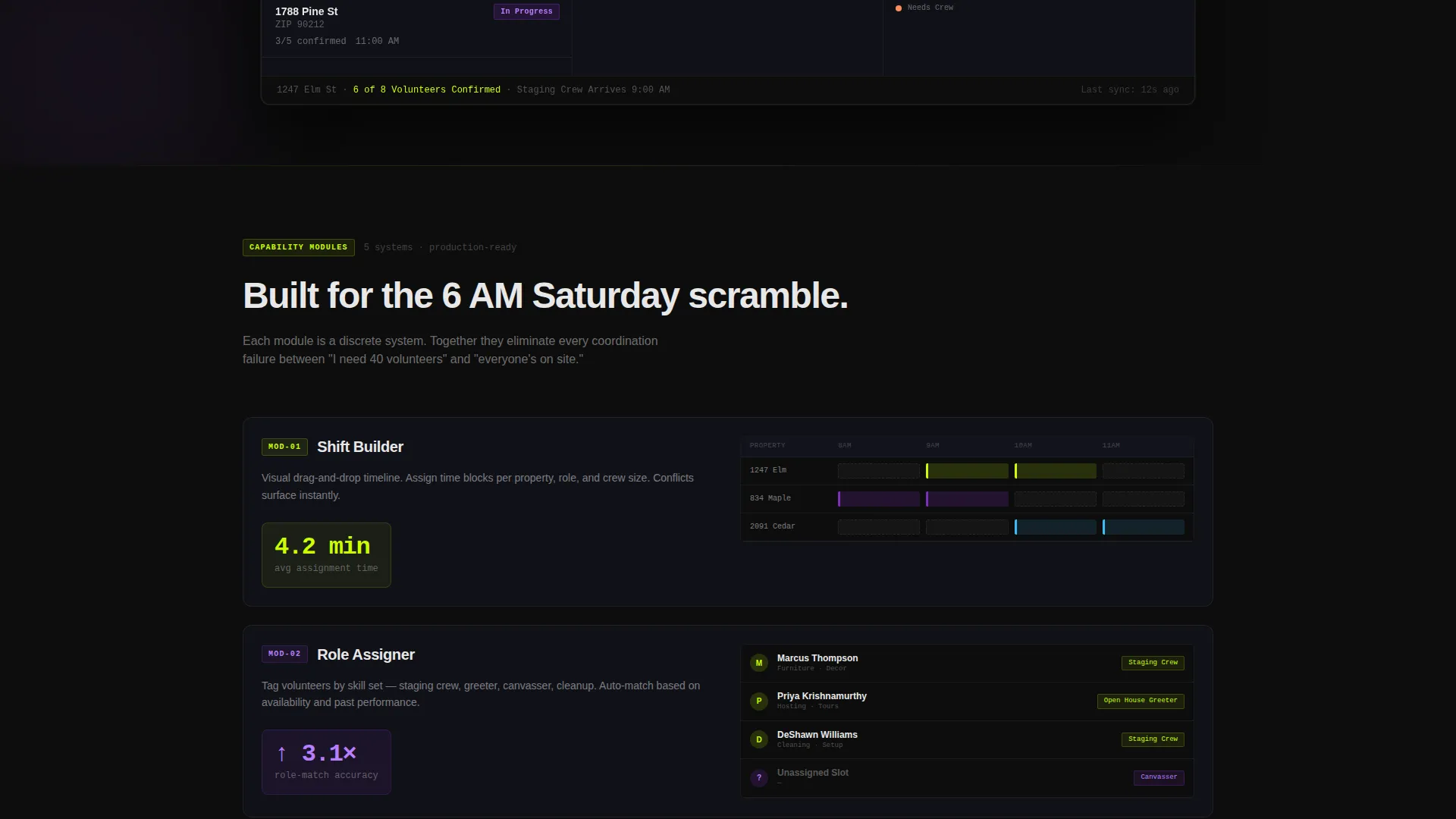
- A spec-sheet feature scroll with five capability modules: Shift Builder, Role Assigner, Property Queue, Attendance Tracker, and Auto-Remind
- A pinned chartreuse download bar with App Store and Google Play badge slots, plus a secondary demo board link
Feature list
This template covers the full product story through five tightly scoped capability modules. Each module is designed to accelerate visitor trust through specificity.
Shift Builder Module
The Shift Builder is presented as a mini data grid with real interface crops. It shows how coordinators construct shifts visually, with time blocks color-coded by role. A metric callout highlights 4.2 minutes as the average assignment time.
Role Assigner Display
The Role Assigner section assigns staging crews, open house greeters, and neighborhood canvassers to specific properties. Each role is visually distinct inside the volunteer roster grid, making the system's logic immediately readable.
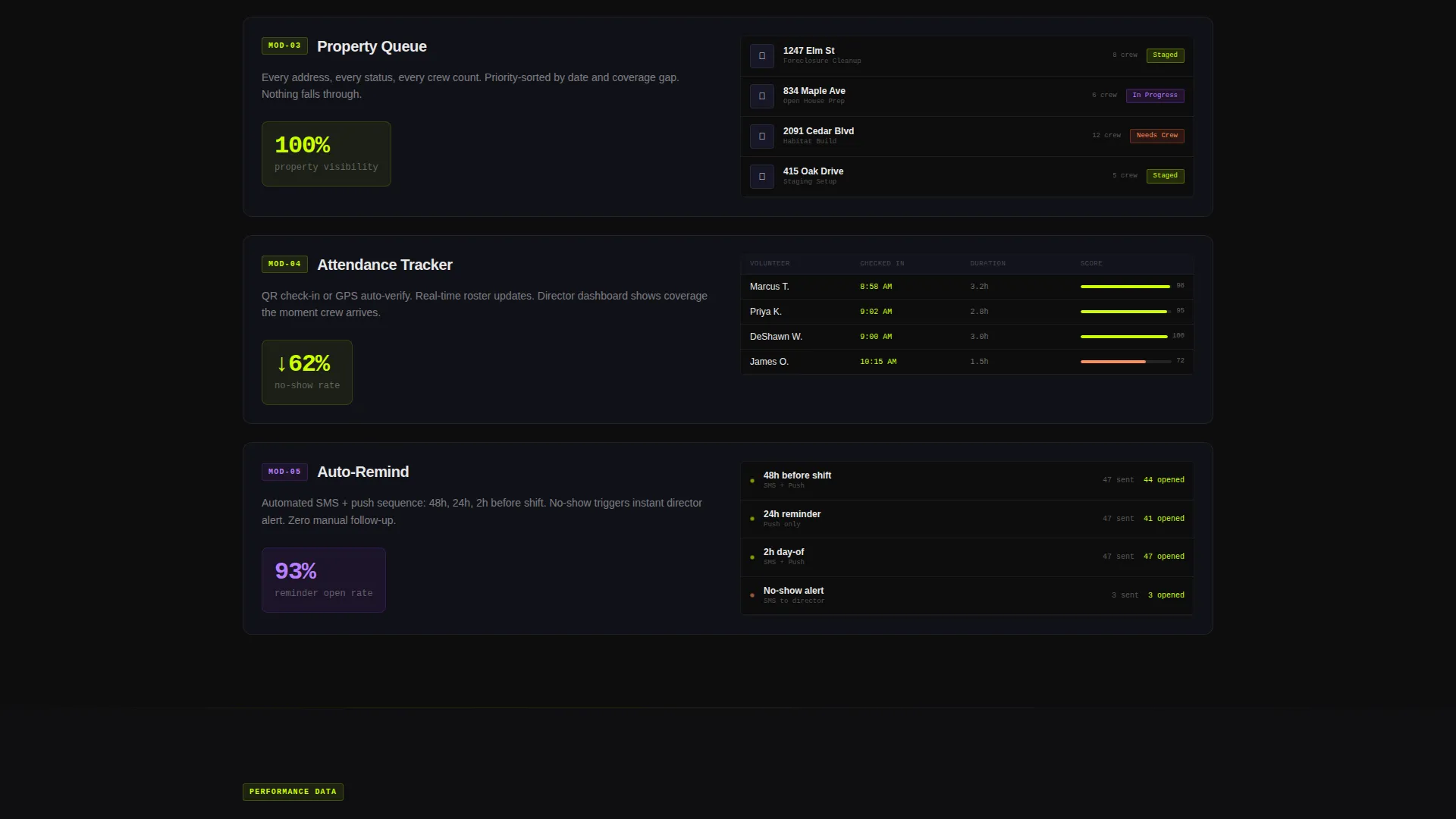
Property Queue Grid
The Property Queue displays a scrollable list of properties with address thumbnails and status chips: Staged, Needs Crew, and In Progress. Visitors see exactly how coordinators track coverage across a full property list.
Attendance Tracker Callout
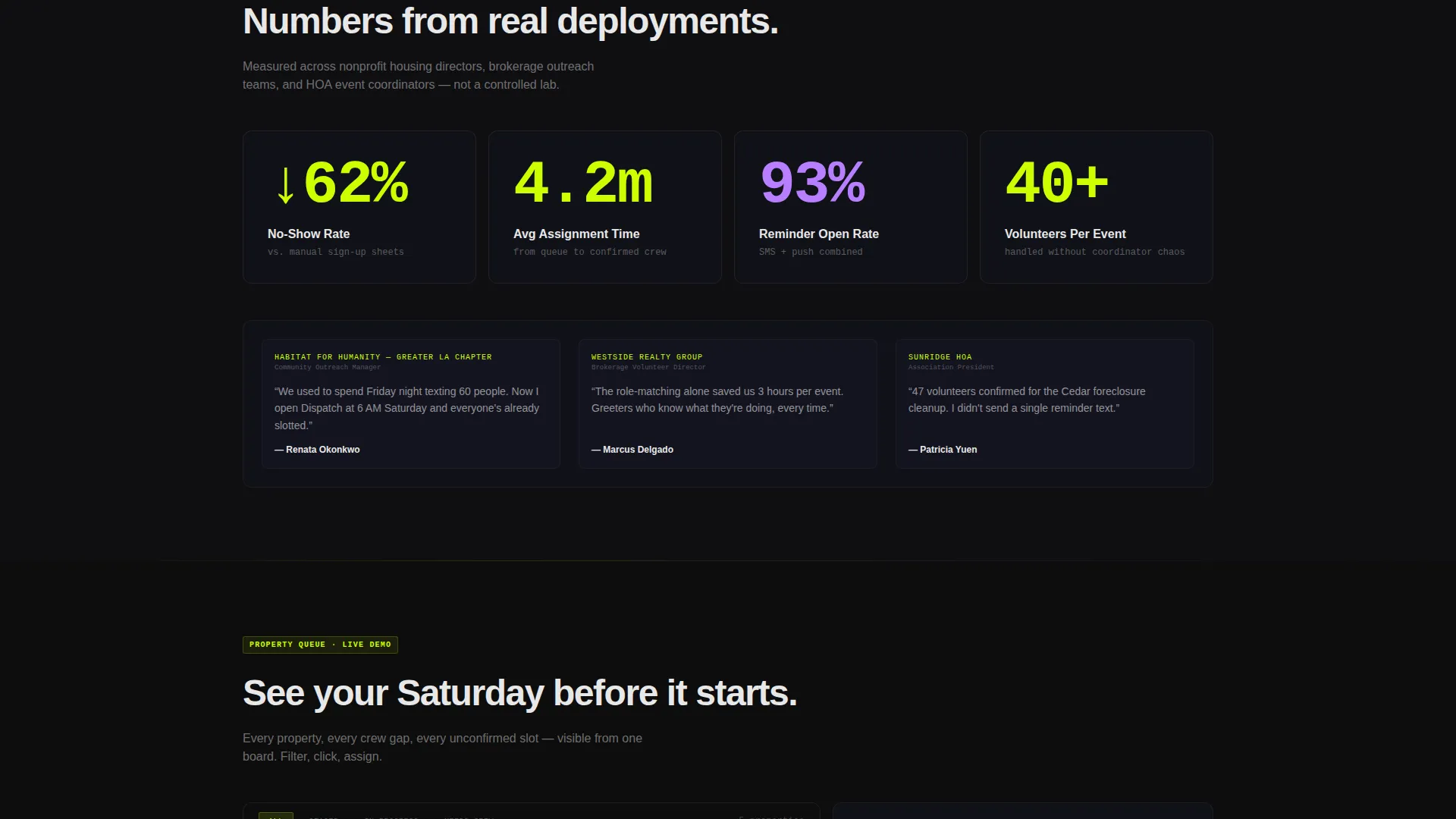
The Attendance Tracker module leads with a bold metric: a 62 percent reduction in no-show rate. It positions the feature as the operational backbone of the dispatch system, reinforcing the download decision.
Auto-Remind Specification
Auto-Remind is presented as a one-line spec with supporting user interface context. It covers the confirmation loop that keeps every volunteer slot active and every shift covered before the morning starts.
Page sections overview
| Section | Purpose |
|---|---|
| Full-Width Header | Displays the product screenshot with the dispatch dashboard mid-operation |
| Headline Block | Anchors the value proposition: "Every property covered. Every volunteer accounted for." |
| Pinned Download Bar | Keeps the primary call to action visible after the first scroll |
| Shift Builder Module | Shows how shifts are built with role-coded time blocks and a speed metric |
| Role Assigner Module | Demonstrates how volunteers are mapped to specific property roles |
| Property Queue Module | Lists property statuses with address thumbnails and coverage chips |
| Attendance Tracker Module | Leads with the no-show reduction metric and confirms system reliability |
| Auto-Remind Module | Closes the feature scroll with the confirmation and reminder spec |
| Demo Board Link | Offers a secondary interactive path to try a sample dispatch board |
| App Download Footer | Closes the page with App Store and Google Play badge slots |
Design & branding system
The visual identity uses an Acid Digital color system built around four core values. The palette feels synthetic and high-contrast, optimized for dense data grids that need to stay readable at a glance.
- Void black (#0D0D0D) and interface gray (#1A1A2E) form the background gradient behind all data grids
- Electric chartreuse (#CCFF00) drives every active-state element, toggle, confirmation badge, and the pinned download bar
- UV purple (#7B2FBE) marks escalation states, unassigned slots, and alert conditions across the roster grid
Mobile & speed optimization
The template is designed around a mobile-first download goal. The pinned chartreuse bar and App Store and Google Play badges are built to be immediately tappable on small screens. The layout prioritizes vertical readability so the spec-sheet scroll stays clear on any device.
- The pinned download bar remains fixed after the first scroll, keeping the call to action reachable at all times
- The product screenshot header and data grid modules are structured to scale cleanly from desktop to mobile viewport widths
How this template helps you convert
Dispatch removes every friction point between a visitor and a download decision. The page is built to answer objections through evidence before the visitor forms them.
- The product screenshot header shows the dispatch board mid-operation, so the product proves itself before a single word is read
- The spec-sheet feature scroll uses real metric callouts and interface crops to eliminate doubt and accelerate the decision toward the frictionless download bar
Other information about this template
This template is categorized under Technology and Real Estate Software. It is built on a Dashboard Pro theme using a Dashboard and Data Grid template style. The Spec Sheet creative direction means every section is a discrete capability module, not a narrative story. The header concept is a Product Screenshot, and the primary landing page direction is App Download. The template supports two conversion paths: a direct app download with no email gate, and a secondary demo board link for visitors who want to interact before committing.
- Template theme: Dashboard Pro
- Template style: Dashboard and Data Grid
- Color system: Acid Digital
- Creative direction: Spec Sheet
- Header concept: Product Screenshot
- Landing page direction: App Download
Theme
Dashboard Pro
Creative direction
Spec Sheet
Color system
Acid Digital
Style
Dashboard/Data Grid
Direction
App Download
Page Sections
Shift Builder with Speed Metrics
Role Assigner Grid
Property Queue with Status Chips
Attendance Tracker Callout
Auto-remind Specification Block
Pinned Frictionless Download Bar
Related questions
Who is this template designed for?
Does this template require visitors to submit a form or email to download?
Can visitors interact with the product before downloading?
What are the five capability modules shown in the feature scroll?
What metrics does the template use to build visitor trust?



