Home Services Email Marketing Cost Calculator Website Template
Dispatch is a scroll-reveal landing page template built for home services referral platforms. It opens with an interactive estimator widget where visitors select their problem and set urgency, then guides them through an animated Problem-to-Solution arc. The result is a high-momentum, lead-first layout designed to turn late-night repair panic into a submitted referral request.
by Rocket studio
Quick summary
Dispatch is a single-page, scroll-reveal landing page template for home services referral platforms. Visitors start by describing their repair problem and urgency inside a live estimator widget. As they scroll, animated sections move from chaos to clarity. Every section builds toward one action: connecting a homeowner with the right pro, fast.
Who this template is for
This template is built for businesses that match homeowners with repair professionals. If your platform sits between a stressed homeowner and a qualified contractor, Dispatch was designed with your audience in mind.
- Home services referral platforms connecting homeowners to local repair pros
- Lead generation businesses serving emergency repair categories such as plumbing, electrical, and HVAC
- Landlords or property managers who want a self-serve intake page for their repair pipeline
What problem this template solves
Homeowners in repair emergencies do not browse slowly. They need instant clarity: who to call, how fast, and whether the service is real. Most referral landing pages fail that test by leading with text blocks and stock photography instead of action.
- Visitors arrive stressed and need immediate engagement, not a wall of marketing copy
- Generic lead forms create hesitation because they ask for contact details before establishing value
- Platforms struggle to convey speed and reliability without an interactive proof point
What you get with this template
Dispatch delivers a complete, scroll-reveal single-page layout structured around momentum and progressive trust-building. Every section has a defined role in moving a visitor from anxious to confident.
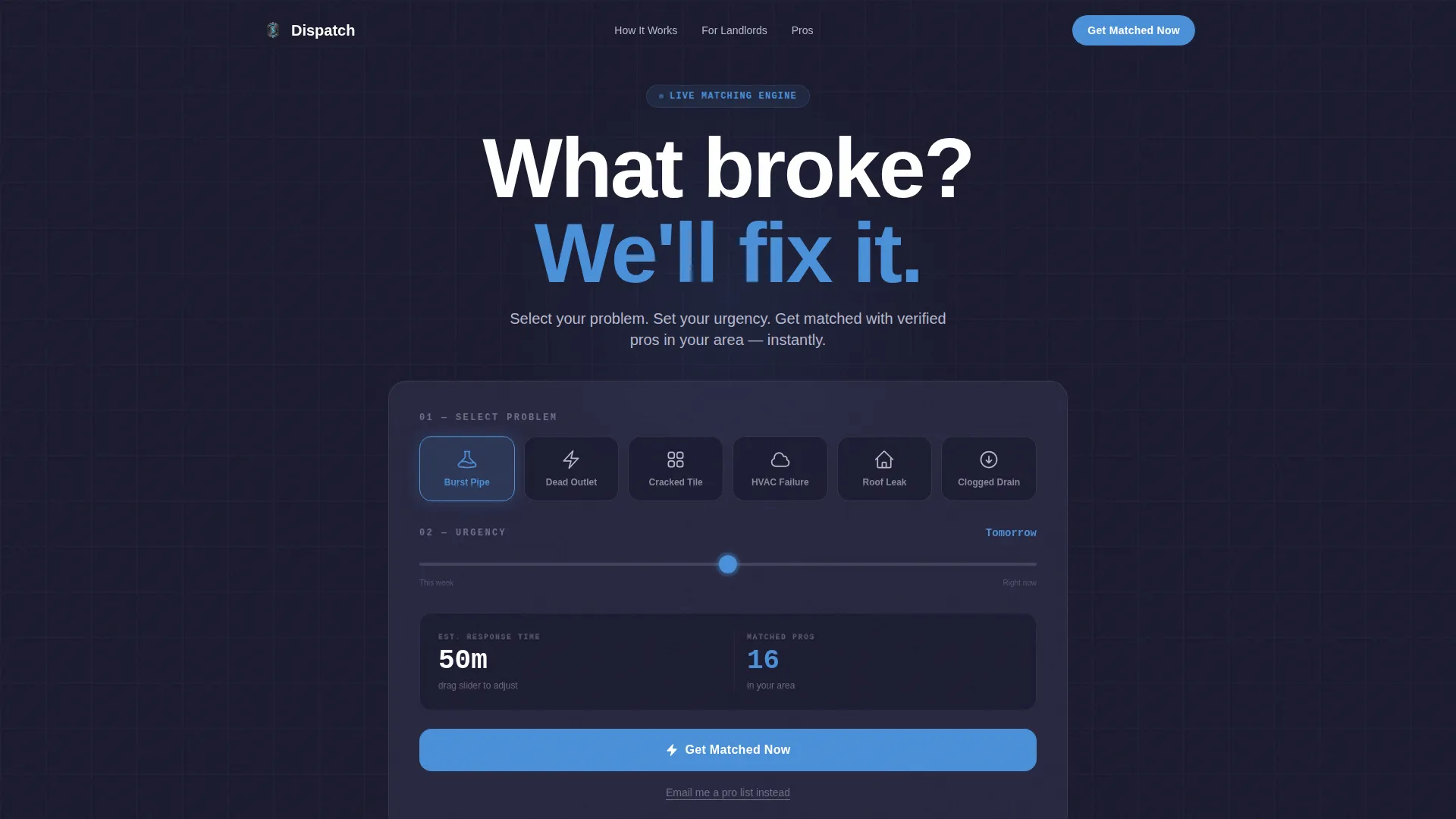
- An interactive hero estimator with problem-category icons, an urgency slider, and physics-based animated counters
- A Problem-to-Solution arc with a chaos statistics section, a scroll-triggered split-crack reveal, and a three-step how-it-works layout
- A trust and testimonials section with pro verification signals, specific scenario quotes, and response time metrics
Feature list
Below is a closer look at the core functional and design components built into this template.
Live Estimator Hero Widget
The hero opens with an interactive estimator, not a static headline. Visitors tap illustrated icons representing common problems such as burst pipe, dead outlet, cracked tile, or HVAC failure. They then drag an urgency slider from "this week" to "right now." As they interact, animated counters display estimated response time shrinking and matched pro count rising. The numbers move with physics-based easing, giving each figure a weighted, mechanical feel.
Scroll-Triggered Split-Crack Reveal
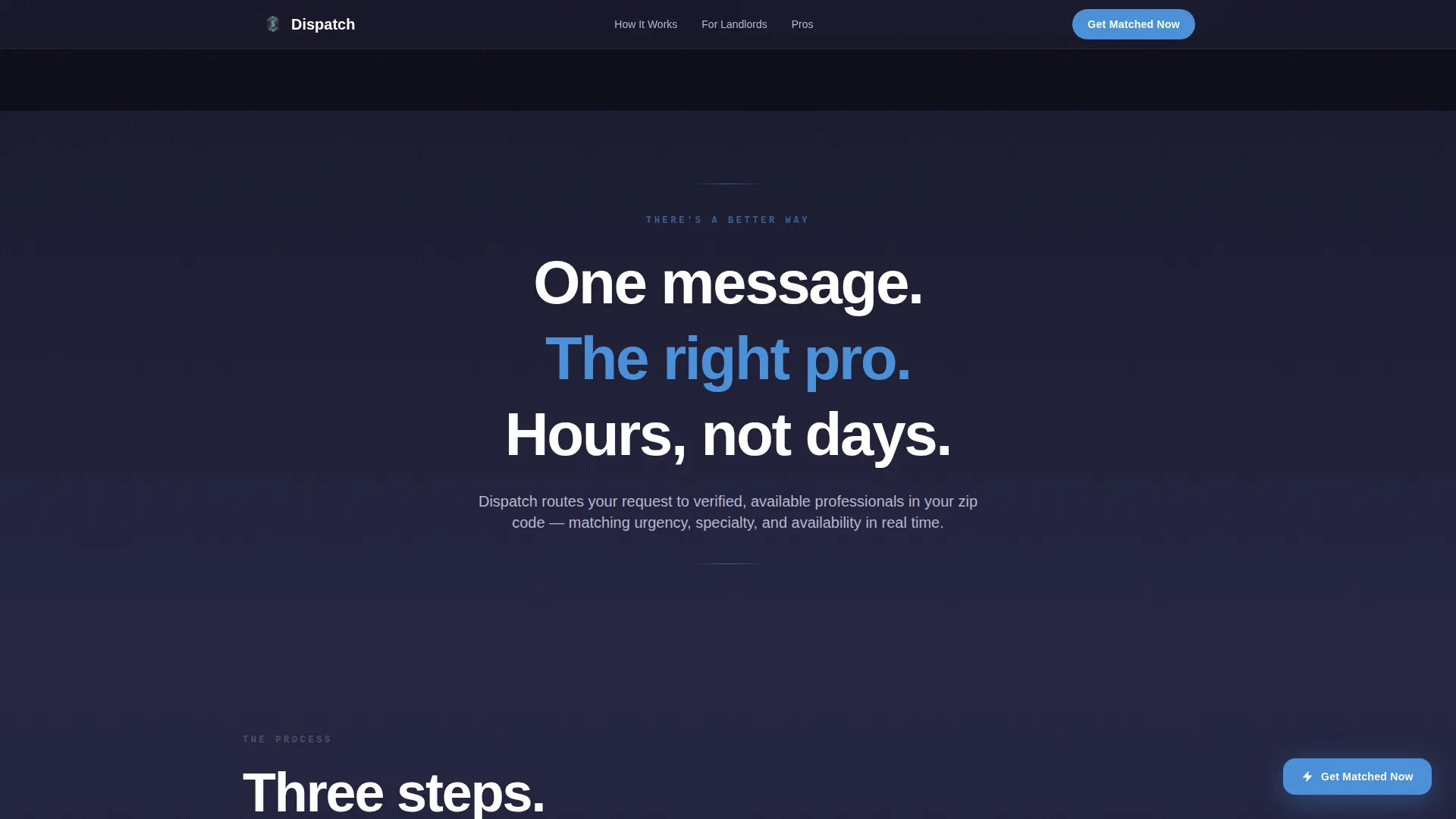
After the chaos statistics section, the viewport splits open in a scroll-triggered animation. The crack separates the problem layer from the solution layer beneath it. This visual moment signals the transition from disorder to resolution. Motion here is purposeful: every animated element represents something moving from broken to fixed.
Progressive Section Slide-Ins
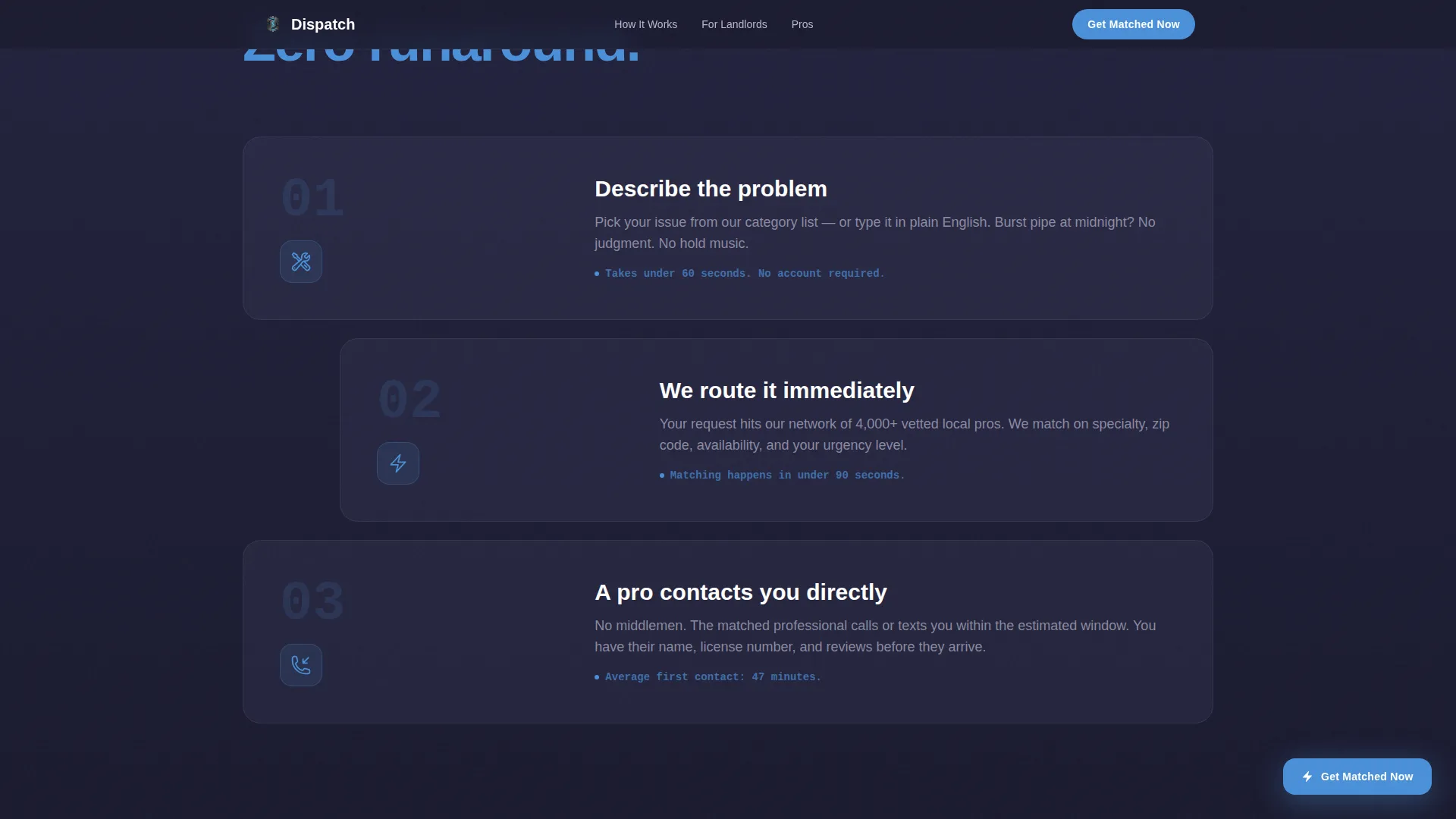
The how-it-works section uses an asymmetric three-step layout. Each step slides in from off-screen with momentum as the visitor scrolls. Elements arrive with stagger timing so the eye follows a clear path. No section loads all at once; each reveal earns the next.
Persistent Floating Call to Action
After the second scroll reveal, a floating "Get Matched Now" button appears and stays visible as the visitor continues scrolling. This ensures the primary action is always one tap away without interrupting the reading flow. The button uses arc-weld blue to stand out against the dark steel palette.
Three-Field Lead Capture Form
The lead form asks for problem category first, zip code second, and phone number third. If a visitor used the estimator, the problem category field is pre-filled automatically. This sequence moves from specificity to identity, which reduces form abandonment. A secondary path labeled "Email Me a Pro List" is available for visitors who prefer to compare options before committing.
Chaos Statistics Section
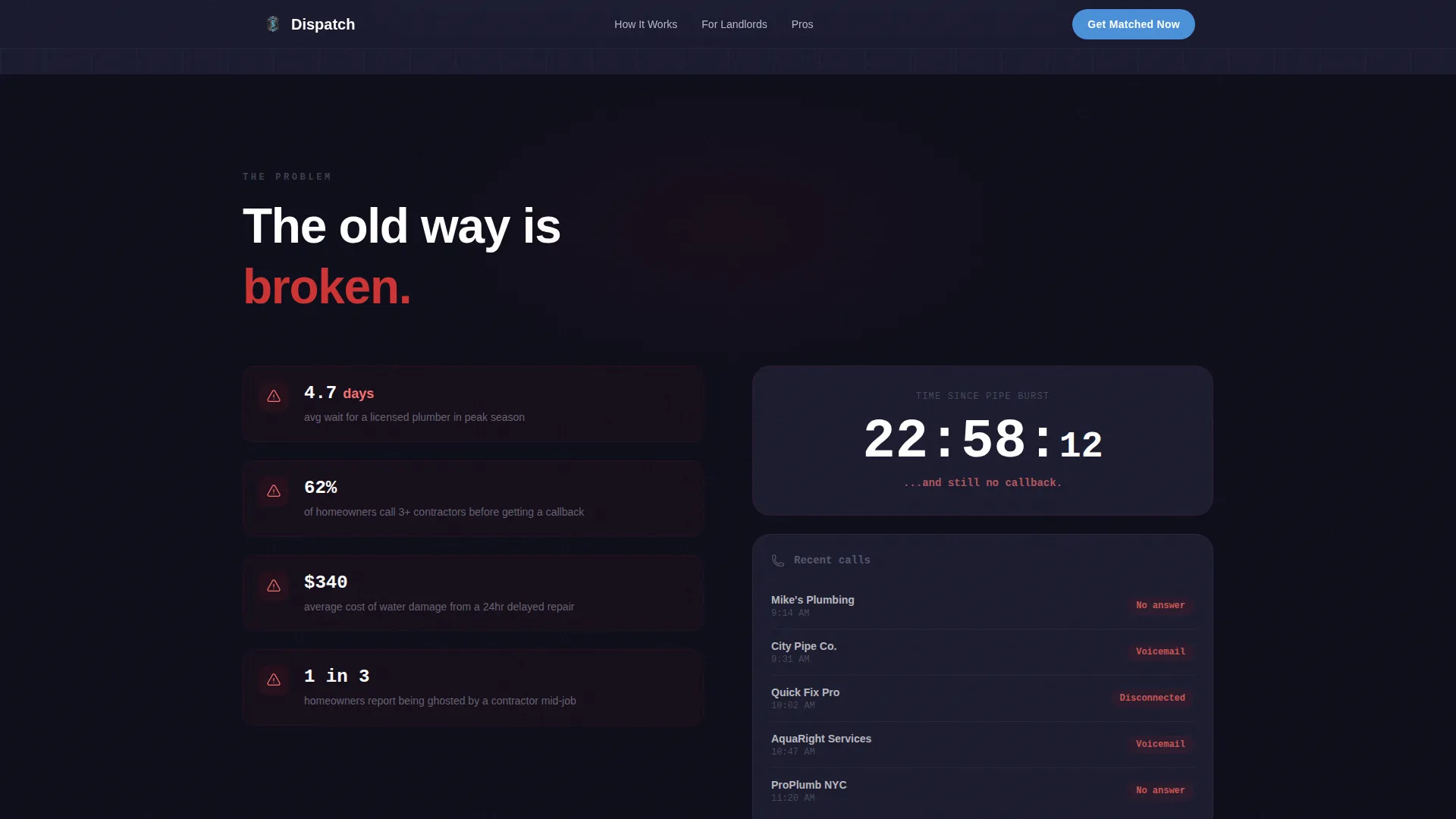
Before revealing the solution, the page shows the problem in data form. Animated statistics display industry average wait times. A ticking clock visual reinforces urgency. Screenshots of unanswered voicemails add a relatable, honest detail. This section earns the viewer's trust by naming their pain before offering the fix.
Page sections overview
| Section | Purpose |
|---|---|
| Hero Estimator Widget | Let visitors describe their problem and urgency interactively before any form appears |
| Chaos Stats Section | Show the real cost of waiting with animated industry data and a ticking clock |
| Split-Crack Reveal | Signal the shift from problem to solution with a scroll-triggered viewport split animation |
| How It Works | Walk visitors through the three-step referral process using momentum slide-in reveals |
| Trust and Testimonials | Build confidence with pro verification badges, scenario-specific quotes, and response time stats |
| Footer | Provide a clean, single-row linear footer with secondary navigation and contact context |
Design & branding system
The visual identity follows a Dynamic Motion theme with a Monochrome Steel color system. The palette feels industrial and precise, like a well-organized toolbox, with one electric accent reserved for action.
- Core colors: forge black (#1A1A2E) as the base, brushed gunmetal (#3D3D5C) for surfaces, galvanized silver (#B8B8CC) for secondary text and dividers
- Accent color: arc-weld blue (#4A90D9) used exclusively on interactive elements and calls to action, never for decoration
- Typography pairing: DM Sans for headings and body weight, JetBrains Mono for data displays and counter numbers
Mobile & speed optimization
Emergency repair searches happen on phones at odd hours. This template is built mobile-first, with every interaction designed for a thumb, not a cursor.
- Scroll reveals use Intersection Observer so animations trigger only when sections enter the viewport, avoiding unnecessary processing
- All animations rely on CSS transforms only, keeping layout reflow out of the render path
- Physics-based counter animations use requestAnimationFrame (RAF) loops for smooth, frame-consistent number updates
How this template helps you convert
Every design and interaction decision in Dispatch points toward one outcome: a submitted lead request from a visitor who already trusts the platform.
- The estimator widget earns micro-commitments before the form appears. By the time a visitor has selected their problem and set their urgency, filling out three fields feels like a natural next step rather than a cold ask.
- The persistent floating "Get Matched Now" button keeps the primary call to action visible throughout the scroll journey without forcing the visitor to hunt for it.
- The secondary "Email Me a Pro List" path captures lower-urgency visitors who would otherwise leave without converting, giving the platform a second chance at engagement.
Other information about this template
Dispatch fits neatly into a broader home services lead generation strategy. A few additional details worth knowing before you customize and launch.
- The template is single-page and section-led, making it a focused landing page rather than a multi-page site structure
- The footer follows Pattern 1, a linear single-row layout, keeping the bottom of the page clean and uncluttered
- Localization defaults are set for English, US dollar formatting, US date conventions, and US zip codes
- The template does not include backend processing, database connections, or third-party integrations out of the box; those are added separately based on your platform setup
- The animated counter and slider components are designed to work independently of any specific data source and can be connected to live data by a developer
Theme
Dynamic Motion
Creative direction
Problem→Solution Arc
Color system
Monochrome Steel
Style
Scroll Reveal (Progressive)
Direction
Lead Generation
Page Sections
Live Estimator Hero Widget
Scroll-triggered Split-crack Reveal
Chaos Statistics Section
Persistent Floating Call to Action Button
Three-field Sequential Lead Form
Progressive Momentum Slide-in Sections
Related questions
Can I use this template without the estimator widget if I want a simpler layout?
Does the pre-fill feature on the lead form require custom development?
Is this template suitable for a landlord or property management company?
What animation approach does the scroll-reveal use?
Can the template support more than three lead form fields?



