Intelligent Freight Tracking AI Landing Page Template
Dispatch is an AI-powered logistics landing page template built for freight operations teams. It uses a bold Split Screen layout, a Void and Violet color system, and a Spec Sheet creative direction to showcase real-time shipment tracking, BOL parsing, and TMS install flows. The template is designed to convert logistics professionals into active platform users from the first scroll.
by Rocket studio
Quick summary
Dispatch is a single-page landing page template purpose-built for an AI-powered freight tracking chatbot. It pairs a Dashboard Pro visual theme with a Void and Violet color system to create a control-tower atmosphere. Every section is structured to display quantified claims alongside live interface screenshots, pushing logistics professionals toward a TMS install or sandbox demo.
Who this template is for
This template is built for teams bringing an intelligent logistics platform to market. It speaks the language of freight operations without needing a designer or developer to interpret the brief.
- Third-party logistics coordinators managing 200 or more active loads who need a fast, credible web presence
- Warehouse managers and supply chain leaders who want to show customers how cargo tracking works in real time
- AI-powered SaaS founders and product teams in the logistics industry looking to generate installs and demo signups
What problem this template solves
A landing page for an AI-powered dispatch and freight tracking solution must bridge the gap between complex technology and practical logistics operations. Most template options are generic. They do not reflect the rhythm of freight management, they miss the spec-proof format buyers expect, and they fail to move potential clients from curiosity to commitment.
- Logistics companies lose leads when their website cannot quickly communicate response times, integration depth, and cargo tracking accuracy
- Coordinators and supply chain VPs need to see the product working, not read abstract promises
- Teams waste weeks creating a professional site from scratch when a structured, customizable template can launch the project faster
What you get with this template
You get a complete, ready-to-customize landing page built around the Dispatch AI chatbot concept. Every section is pre-structured to display product proof alongside feature claims, so users can trust the platform before they ever tap an install button.
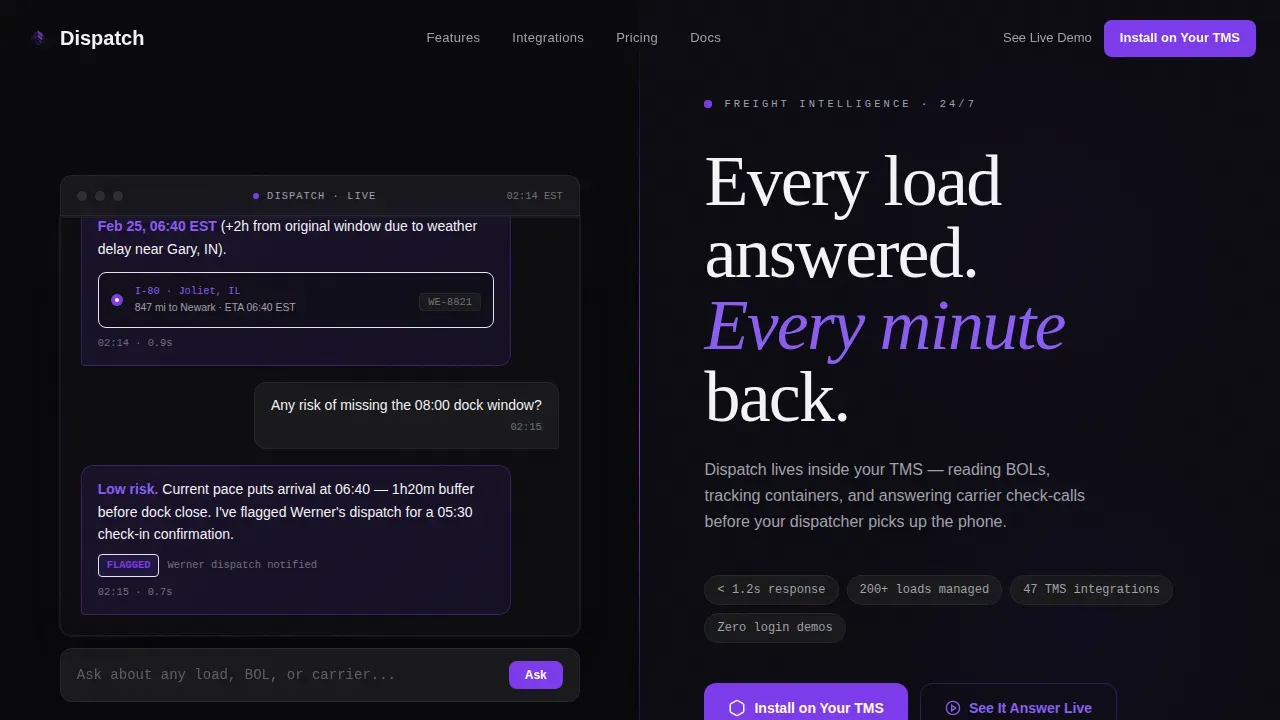
- A 50/50 Split Screen hero with a live chat interface on the left and a headline with a call to action on the right
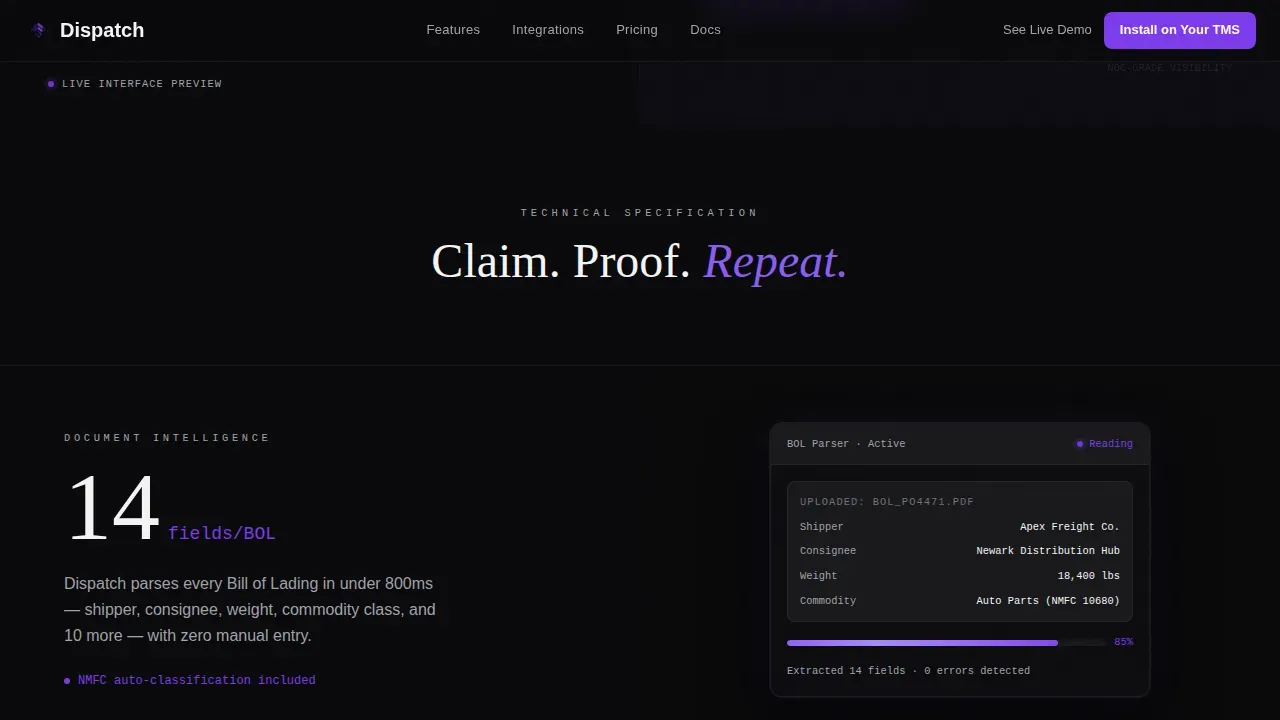
- A Spec Sheet scroll flow with alternating claim-and-screenshot rows that escalate in impact as visitors move down the page
- An install call-to-action section with buttons for iOS, Android, and a desktop web app, plus a secondary path to a no-login sandbox demo
Feature list
This template includes six core feature areas, each grounded in the Dispatch brief and designed to support logistics companies optimizing their conversion flow.
Split Screen Hero with Live Chat Interface
The hero section splits the viewport clean down the center. The left panel displays a realistic chat interface mid-conversation, showing a user asking about a shipment and the AI responding with carrier location, route detail, and a revised delivery window. The right panel holds the headline and primary call to action. No stock photography is used. The product itself is the visual.
Spec Sheet Scroll with Alternating Claim-and-Proof Rows
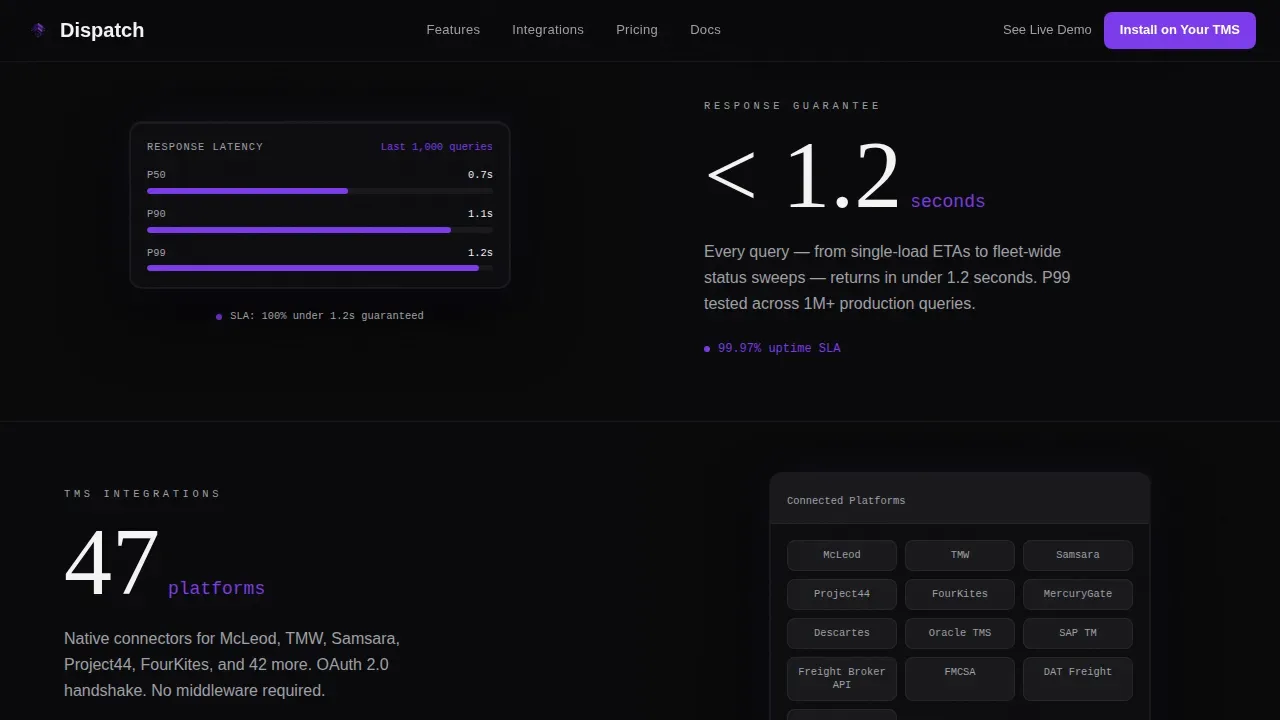
The scroll rhythm follows a mechanical pattern: claim on one side, product screenshot on the other. Each row surfaces a different capability, from BOL document parsing to TMS platform connection counts. Numbers grow as visitors scroll, building a sense of ROI before the install buttons appear. This layout is ideal for logistics professionals who make informed decisions based on evidence.
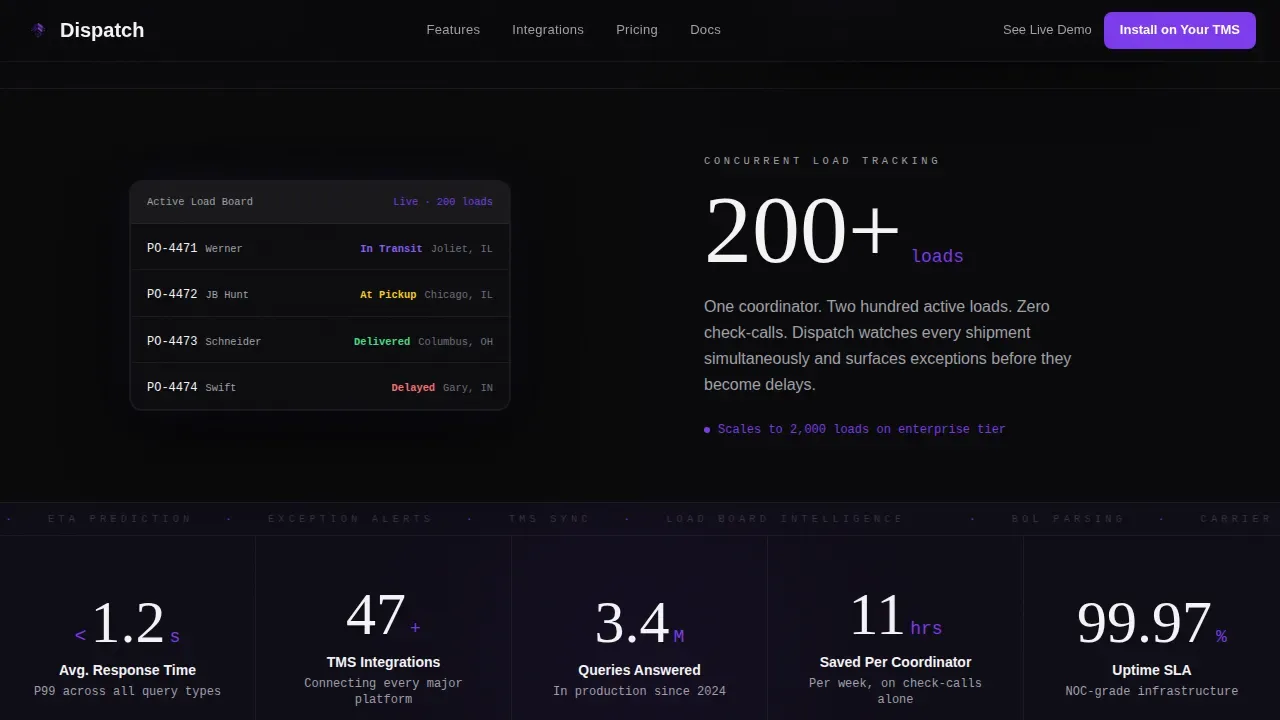
Escalating Stats Bar
A dedicated stats bar displays key metrics in a count-up animation format. Response time, total loads managed, and hours saved are shown as live figures. This section helps build trust by anchoring the product in measurable operational efficiency outcomes without requiring visitors to read case studies.
App Install Call-to-Action Section
The install section groups three download options in one place: iOS, Android, and a desktop web app link. Each button is styled in electric violet against void black for maximum contrast. A secondary call to action links to a sandbox demo that requires no login, reducing friction for potential clients who want to explore before committing.
GSAP Animation and Interactivity Layer
The template is built with high animation fidelity. GSAP scroll reveals, stagger entrances, a typing indicator loop, and number count-up effects are all planned into the structure. Hover states on spec rows and magnetic call-to-action buttons add engagement without distracting from the freight management content.
Single-Row Footer
The footer follows a linear single-row pattern. It keeps the page clean and focused, maintaining the NOC-center visual tone through the final section. Essential links and communications can be placed here without breaking the dark, data-forward layout.
Page sections overview
| Section | Purpose |
|---|---|
| Hero Split Screen | Displays live chat interface and primary headline with call to action |
| Spec Sheet Row One | Shows BOL parsing claim paired with a product screenshot |
| Spec Sheet Row Two | Displays TMS integration count alongside a connection interface view |
| Escalating Stats Bar | Presents response time, loads managed, and hours saved as animated figures |
| Install Call to Action | Groups iOS, Android, and web app install buttons with a sandbox demo link |
| Linear Single-Row Footer | Closes the page with essential links in a clean, minimal layout |
Design & branding system
The visual identity follows a Dashboard Pro theme built around a Void and Violet color system. The palette feels like a live network operations center after midnight: screens active, walls dark, every interactive element glowing in electric violet.
- Colors: absolute void black (#09090B) as the base, deep space indigo (#1A1333) for section depth, electric violet (#7C3AED) for all active states including buttons, progress indicators, and typing animations, and cool terminal gray (#A1A1AA) for secondary text
- Typography: DM Sans is used for interface labels and data readouts; Fraunces handles display headlines, creating a contrast between technical precision and editorial weight
- Graphics and layout: no lifestyle imagery or stock photos appear anywhere on the page; all visual display comes from the product interface itself, keeping the brand identity rooted in the actual tool
Mobile & speed optimization
The template is designed desktop-first, reflecting the NOC-center and dispatcher workstation context. It scales responsively so the layout holds across every device size without losing the dark-mode aesthetic.
- Server Components handle static sections for fast initial loading, while a dedicated Client Component manages the animated chat interface independently
- Responsive design ensures that shipment tracking panels, spec rows, and call-to-action buttons reflow cleanly on smaller screens
- The animation layer uses GSAP for scroll-triggered reveals, keeping motion smooth and purposeful rather than decorative, so the page performs well even on high-density displays
How this template helps you convert
The page is structured to earn the install before the install button appears. By the time visitors reach the call-to-action section, they have already seen twelve quantified claims and six real interface states.
- Front-loaded spec proof builds confidence early: response times, cargo tracking depth, and carrier communications are all visible within the first two scroll sections, so users arrive at the install buttons already persuaded
- The no-login sandbox demo secondary path removes the final barrier for hesitant visitors, giving potential clients a direct route to experiencing the product without payments or account creation
- Alternating claim-and-screenshot rows create a rhythm that keeps visitors moving through the page, reducing drop-off and increasing the chance that each section reinforces the previous one
Other information about this template
This template supports the broader category of transport and logistics templates that help streamline operations and improve communication within teams. It fits naturally alongside tools used for optimizing freight broker websites, SaaS logistics platforms, and modern dispatch management systems. The customizable structure means your team can alter the layout, color tokens, and content blocks to match your specific brand identity without rebuilding from scratch.
- The template is suitable for marketing campaigns targeting logistics companies across various aspects of freight, cargo, and supply chain services
- Seo optimization is built into the page structure through clean heading hierarchy and content flow, helping the site surface to the right logistics professionals searching for AI tracking tools
- Analytics and reporting insights, case studies, and customer feedback sections can be added into the existing layout without disrupting the visual system
- The template supports documents like shipping schedules, service showcases, and testimonial sections, making it useful beyond the core install flow for teams wanting to display a fuller range of service offerings
- Attracting clients in the logistics industry is easier when the website reflects the same professional quality as the product itself; this template is designed to display that quality from the first pixel
- Payments, quote request flows, and contact forms are all compatible with the existing section structure, giving your team the flexibility to expand the platform as your business grows
Theme
Dashboard Pro
Creative direction
Spec Sheet
Color system
Void & Violet
Style
Split Screen (50/50)
Direction
App Download
Page Sections
Split Screen Hero with Live Chat User Interface
Spec Sheet Alternating Scroll Rows
Animated Escalating Stats Bar
Multi-path App Install Section
High-fidelity GSAP Animation Layer
Dashboard Pro Void and Violet Visual System
Related questions
Can I customize the colors and layout of this template?
Do I need coding experience to use this template?
Does this template support real-time shipment tracking functionality?
What makes this template a good fit for logistics companies?
Can I add a sandbox demo or secondary call-to-action path?



