Self-Hosted Enterprise Software Careers Website Template
Dispatch is a self-hosted IT Service Management (ITSM) landing page template built for operators who refuse to surrender their incident data to a third-party cloud. The template follows a hub and spoke layout with anchor navigation, a terminal-dark visual identity, and ungated Docker-based app delivery. It is designed to convert sysadmins, DevOps engineers, and compliance-locked IT directors into immediate self-serve downloaders.
by Rocket studio
Quick summary
Dispatch is a single-page landing page template for a self-hosted ITSM platform. It uses a hub and spoke anchor navigation structure to guide visitors through a Problem to Solution arc, from shared-inbox chaos to a fully owned incident management app running on your own infrastructure. The template is built for technical audiences and drives toward an ungated Docker image download as its primary conversion action.
Who this template is for
This template speaks directly to the operators who live inside the problem. It is made for people who need complete control over their IT services, their incident database, and their compliance posture, and who have no patience for SaaS gatekeeping.
- Solo sysadmins and DevOps engineers drowning in forwarded emails and shared-inbox chaos who need a structured way to log, track, and resolve incidents without depending on someone else's cloud
- Mid-stage startup infrastructure leads who have outgrown free-tier tooling and need to host a capable ITSM app on their own servers without a long procurement process
- Compliance-locked IT directors at hospitals and defense contractors whose organization policy forbids incident records from leaving the network perimeter
What problem this template solves
Most IT teams reach a breaking point. Tickets scatter across Slack threads, forwarded emails, and spreadsheet fragments. Shared inboxes create duplicate work. SaaS ITSM tools introduce cloud dependency and data residency risk that strict-compliance organizations simply cannot accept. This template exists to make the alternative feel inevitable and trustworthy, not scary.
- It dissolves the visual chaos of the before-state and replaces it with a clean, authoritative product story that shows exactly what a self-hosted ITSM app can do for your operations
- It removes friction at the conversion point by delivering an ungated app download, no form fields, no email gates, just a Docker pull command and a secondary archive option for air-gapped environments
- It communicates compliance credibility through operator language, live-looking dashboard mockups, and a self-host section that provides clear deployment information up front
What you get with this template
This template includes a complete, ready-to-customize landing page built around the Dispatch self-hosted ITSM app. Every section is pre-structured to tell a specific part of the story, and every interactive element is wired to help visitors feel like they are already using the product before they download it.
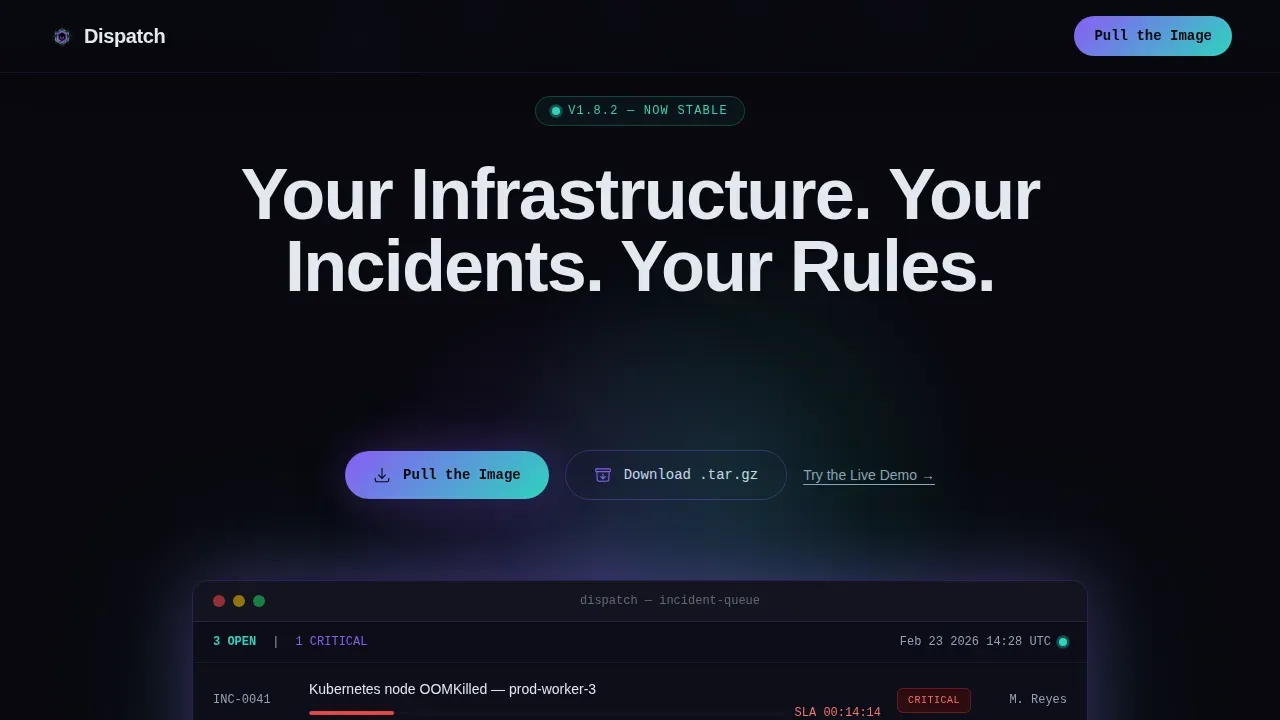
- A dark full-bleed hero section with a luminous ITSM dashboard mockup, a typewriter headline, and one-click copy of the Docker pull command so engineers can act immediately from the browser
- Five anchor-linked spoke sections, Tickets, Workflows, SLA Engine, Self-Host, and Integrations, each with its own micro-interaction so visitors can click, toggle, or copy something at every stage of the page
- A complete design system built on void black, holographic violet, and iridescent teal that gives the app a terminal-dark aesthetic with prismatic highlights on interactive elements
Feature list
This template includes a set of purpose-built sections and interactive components. Each one is designed to support a specific moment in the visitor's decision process.
Dark Full-Bleed Hero with Typewriter Effect
The hero section floods the page with a void black background and places a luminous ITSM dashboard mockup at the center. The dashboard shows a live-looking ticket queue with severity badges in iridescent teal and holographic violet, plus an SLA countdown timer. The headline fades in character by character using a typewriter animation, delivering the message "Your Infrastructure. Your Incidents. Your Rules." with immediate visual impact. The primary call to action invites visitors to pull the Docker image with a single click, and a secondary button handles download for air-gapped environments. A tertiary path lets visitors open the live demo in a sandboxed instance.
Hub and Spoke Anchor Navigation
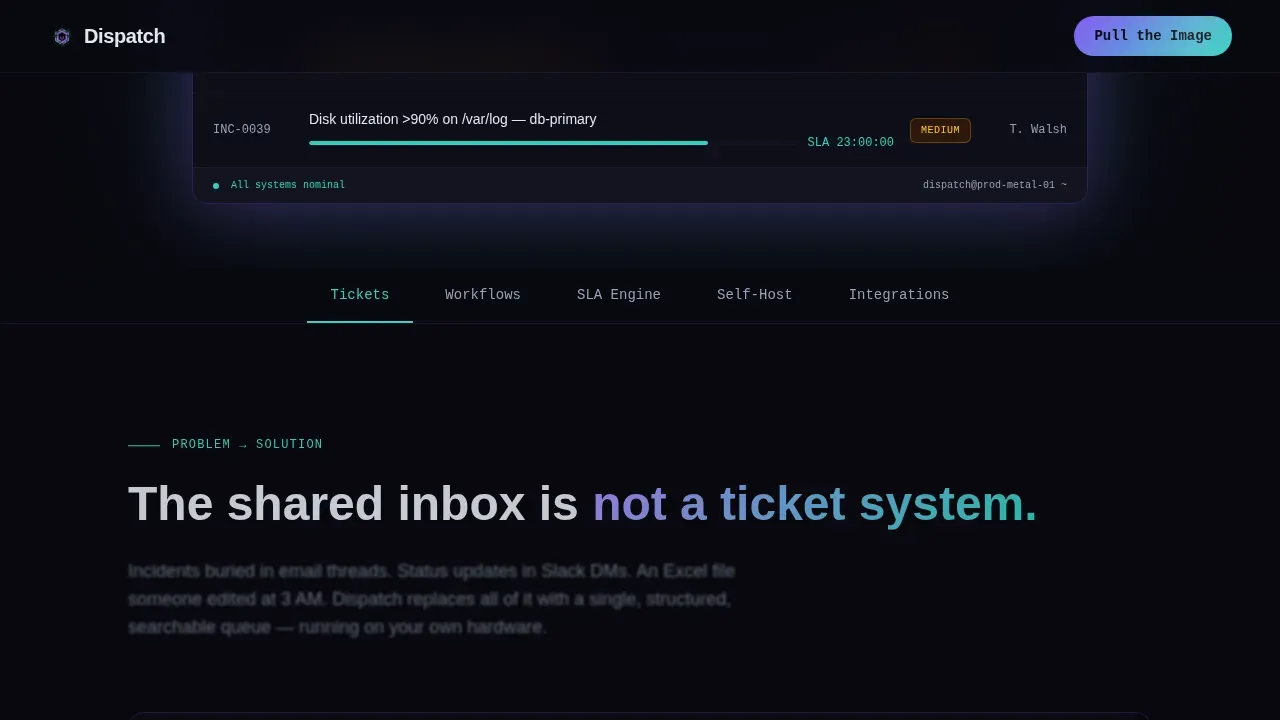
A sticky anchor bar pins to the top of the page after the hero clears the browser viewport. Each spoke, Tickets, Workflows, SLA Engine, Self-Host, Integrations, is labeled in operator language so engineers can navigate directly to the section most relevant to them. The active spoke pulses in holographic violet on hover and selection states, making it easy to track position on the page at all time.
Problem to Solution Scroll Arc
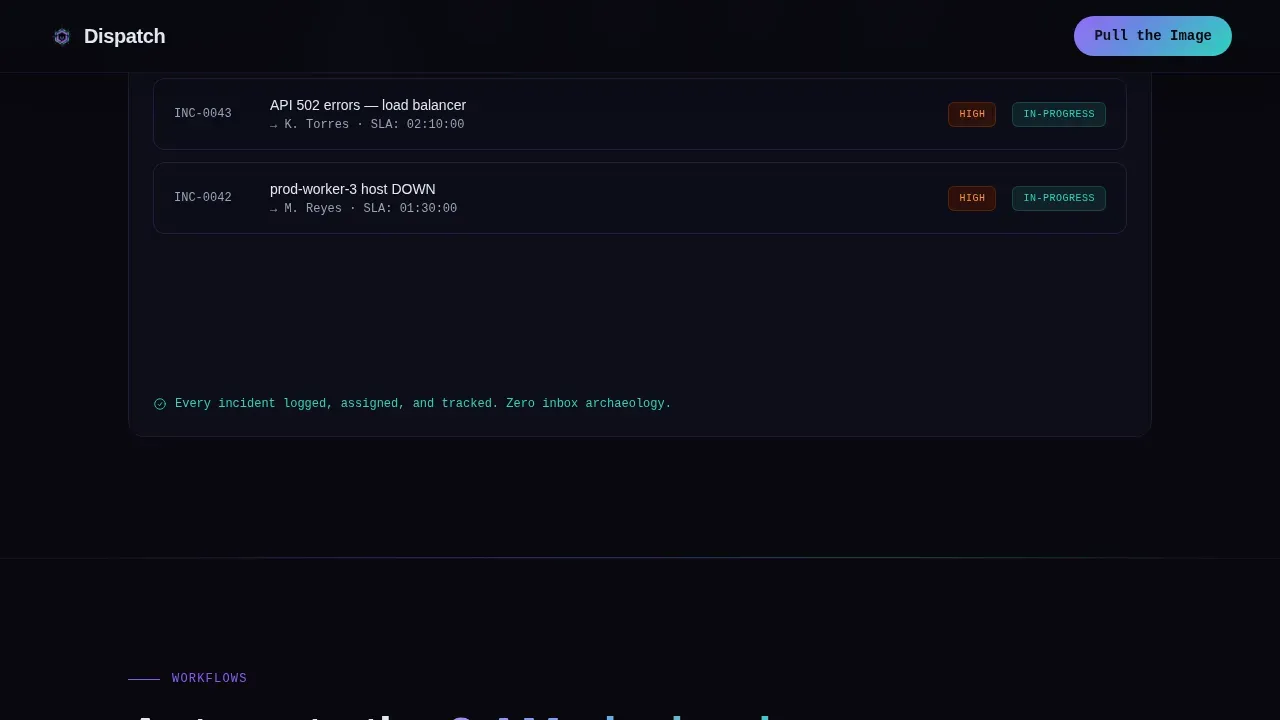
The first content section below the hero opens with the chaotic before-state: a visual wall of forwarded emails, Slack screenshots, and spreadsheet fragments. As the visitor scrolls, the chaos dissolves into a clean ticket board. This scroll-dissolve animation creates before-and-after tension that establishes why the app exists. Each subsequent spoke deepens the solution narrative, escalating from "manage tickets" to "enforce SLAs" to "own your compliance posture."
SLA Engine with Live Countdown Clocks
The SLA Engine spoke shows countdown clocks that shift color as deadlines approach, from calm teal to urgent violet. This animated component helps visitors immediately understand how the app enforces service-level policy and tracks time against open incidents. It gives compliance-focused IT directors a concrete visual of what enforcing SLA commitments looks like inside the running app.
Self-Host Section with Docker Code Block
The self-host spoke provides a single Docker pull command glowing inside a styled code block. Visitors can click to copy the command directly from the browser without leaving the page. This section also includes space for integration logos and compliance badges, giving the organization a place to communicate infrastructure compatibility and regulatory alignment. Self-hosting offers high security and full data ownership, though it does require managing a more complex infrastructure stack than typical SaaS solutions.
Workflow Automation Node Graph
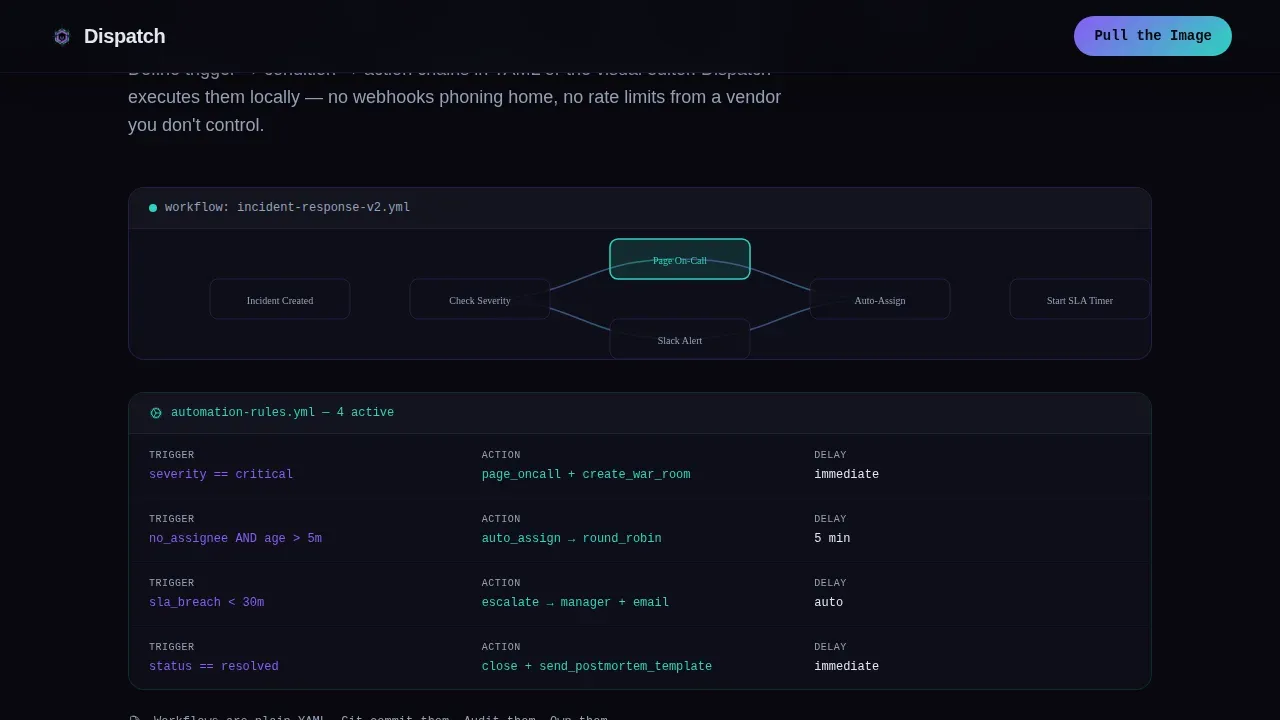
The Workflows spoke visualizes automation rules as an animated node graph. Each node represents a step in a workflow, triage, assign, escalate, resolve, and the connections between them animate to show how the app can execute a process automatically. This helps DevOps engineers and sysadmins understand how the app handles repetitive operations without manual intervention, reducing support effort over time.
Page sections overview
| Section | Purpose |
|---|---|
| Hero Header | Introduce the app with a luminous dashboard mockup, typewriter headline, and Docker download call to action |
| Tickets Spoke | Show the problem-to-solution arc, dissolving inbox chaos into a clean ticket board |
| Workflows Spoke | Visualize automation rules as an animated node graph to demonstrate how the app can execute processes |
| SLA Engine Spoke | Display countdown clocks with color-shift behavior to illustrate how the app enforces service-level policy |
| Self-Host Spoke | Present the Docker pull command, integration logos, and compliance badge area for infrastructure teams |
| Integrations Spoke | Show messaging hooks and API connection points for tools like Slack and other services |
| Page Footer | Provide horizontal navigation flow with links to documentation, support resources, and the live demo |
Design & branding system
The visual identity channels a Startup Velocity theme through an AI Iridescent color system. The palette feels like light refracting through a prism laid on a matte-black server rack, dark and confident, then suddenly prismatic where it counts. Every color has a job. The darkness anchors the eye while the iridescent accents direct attention to actions and data points.
- Core palette: void black (#09090F) floods every background; holographic violet (#8B5CF6) pulses on hover states and active anchor nav spokes; iridescent teal (#2DD4BF) marks severity badges and status indicators; shimmer white (#E2E8F0) handles all body text and label copy
- Typography: JetBrains Mono is used for code blocks, terminal labels, and command-line elements; Manrope handles headings and body paragraphs, keeping the page readable without losing the operator aesthetic
- Gradients shift between violet and teal on interactive elements so the page seems to breathe, while the dark backgrounds always dominate, keeping the overall feel grounded and focused
Mobile & speed optimization
The template is designed desktop-first, reflecting the reality that sysadmins and infrastructure engineers primarily work from workstations with wide browser windows. That said, the layout remains fully responsive so the page works on any device without breaking the visual hierarchy or the interactive components.
- Server Components handle all static sections of the page, keeping the initial render fast and reducing the amount of JavaScript the browser needs to execute before the page becomes usable
- Client Components are scoped to animated and interactive elements, the typewriter effect, scroll-dissolve transition, node graph animation, SLA countdown clocks, and copy-to-clipboard code blocks, so interactivity loads progressively without blocking the rest of the page
- The anchor navigation bar is built to remain sticky across all screen sizes, and interactive elements like the Docker code block are designed to work cleanly on any device so engineers in the field can pull the image from their browser without friction
How this template helps you convert
Conversion on this template is not about collecting leads. It is about giving technical visitors everything they need to make a confident decision and act immediately. The design philosophy matches the product ethos: self-hosted means self-served, and trust is earned by giving everything away up front.
- The hero section puts the Docker pull command within one click of arrival, making the download frictionless before the visitor has read a single word of body copy, ideal for engineers who already know what they need and just want to act
- The hub and spoke structure lets skeptical visitors navigate directly to the spoke that addresses their specific concern, compliance directors can jump to Self-Host, DevOps leads can jump to Workflows, so the page meets each audience at the right point in their evaluation without forcing a linear read
- Every spoke ends with a micro-interaction, a toggle, a code snippet, a config preview, so visitors feel they are already using the app, making the transition from page visitor to active user feel like a natural next step rather than a commitment
Other information about this template
This template is part of a broader ecosystem of self-hosted infrastructure tooling templates. It is useful not only as a product landing page but as a reference design for teams who want to present any self-hosted app with the same level of technical confidence and visual authority.
- The template is fully customizable. Teams can update colors, swap logo assets, add support content like knowledge bases, and adjust section copy to reflect their own organization's branding and policy requirements without touching the core layout
- Self-service portals built on this template can include links for users to submit tickets, request equipment, or access knowledge bases, giving the organization a centralized single pane of glass for all IT service interactions
- The page structure supports ITIL-based process framing, including incident, problem, and change management language, so IT directors can align the template's narrative with their organization's existing service management policy
- Many organizations are implementing AI-driven self-service solutions to support IT processes. This template is designed to sit alongside or introduce those capabilities, intelligent global search, for example, can utilize natural language processing to surface relevant articles or service catalog items when integrated into the running app
- AI-driven IT service automation can transform IT service delivery by lowering support effort, improving compliance, and increasing throughput. Generative AI approaches to ITSM are increasingly common, though generative AI agents are non-deterministic, meaning their responses can vary across conversations even with identical inputs, a consideration worth communicating clearly on any self-hosted ITSM landing page
- Integrating observability tools like OpenTelemetry or monitoring stacks such as Prometheus and Grafana is a natural extension for self-hosted deployments. This template includes space in the integrations spoke to display such services alongside messaging platform hooks for Slack, Microsoft Teams, and other communication tools
- Open source dispatch systems demonstrate the range of what self-hosted tooling can do. Some open source platforms can scale to meet the needs of organizations ranging from dozens of people and resources to tens of thousands, and all their services and web apps are typically dockerized and can be deployed in a containerized environment, patterns this template's design reflects and celebrates
- The template uses a deployment-plan-friendly layout, making it straightforward to document the transition strategy for any organization moving to a new self-hosted ITSM tool. Using a deployment plan template alongside this landing page template can help teams communicate rollout information clearly to all stakeholders
- Secure authentication integration such as Single Sign-On (SSO) is a common requirement for self-hosted ITSM portals. The template's self-host section provides a natural location to communicate authentication policy, access controls, and network isolation capabilities to prospective users
- The dispatch self hosted itsm infrastructure landing page template is designed to run on a company's own servers, providing a central hub for incident reporting and IT asset management, and it is available as a fully customizable starting point for any team building a professional self-hosted ITSM presence
Theme
Startup Velocity
Creative direction
Problem→Solution Arc
Color system
AI Iridescent
Style
Hub & Spoke (Anchor Nav)
Direction
App Download
Page Sections
Dark Hero with Typewriter Headline
Hub and Spoke Anchor Navigation
Problem-to-solution Scroll Dissolve
Animated SLA Countdown Engine
Docker Self-host Code Block
Workflow Automation Node Graph
Related questions
Can I customize this template to match my organization's branding?
Does this template require a specific hosting environment to deploy?
Is the app download truly ungated with no sign-up required?
What integrations does the template reference in the integrations spoke?
Can this template support knowledge bases and self-service portal content?



