Live Simulation Logistics Training Landing Page Template
Dispatch is a dashboard-style logistics training landing page designed for warehouse supervisors, freight coordinators, and last-mile dispatchers. It presents live simulation training modules in a spec-sheet data grid, using a dark ops terminal aesthetic with teal and amber accents. No forms, no friction, just a single click to a free sandbox module.
by Rocket studio
Quick summary
Dispatch is a single-page logistics training landing page designed to convert break-room browsers into active learners. It presents six simulation training modules as scannable data-grid cards, each showing certification earned, pass rate, and average completion time. The landing page uses a dark dispatch-terminal visual style to build immediate credibility with operations professionals who value data over decoration.
Who this template is for
This landing page is built for logistics training platforms that serve working operations professionals. It speaks directly to people who make decisions under pressure and need training that matches the pace of real terminal work. The landing page design is confident, data-first, and frictionless, built to earn a click without asking for anything first.
- Warehouse supervisors and freight coordinators studying between shifts on a tablet
- Newly promoted team leads who need OSHA and HazMat DOT compliance certifications before a quarterly deadline
- Third-party logistics firms onboarding seasonal surge staff within a tight seventy-two-hour window
What problem this template solves
Most logistics training pages fail the people they are supposed to help. They bury key information in dense paragraphs, lack any sense of operational urgency, and ask for form submissions before demonstrating any real value. Dispatchers and ops managers do not have time for that. They need to evaluate a platform in under a minute, understand exactly what they will learn, and decide whether to start with confidence.
This landing page solves that problem by treating every section like a dispatch board: clear, live, and immediately readable.
- Lack of trust from generic training pages that hide pass rates and completion data
- Manual scrolling through walls of text when a supervisor has a five-minute break window
- No way to assess whether simulation tasks are relevant to real cargo routing and compliance scenarios
What you get with this template
This template gives you a fully structured, single-page logistics landing page designed around a dashboard and data-grid layout. Every section is purpose-built to move a logistics professional from cold visitor to active trial user. The page is pre-structured so you can customize module names, certification details, pass rates, and delivery metrics without rebuilding the layout from scratch.
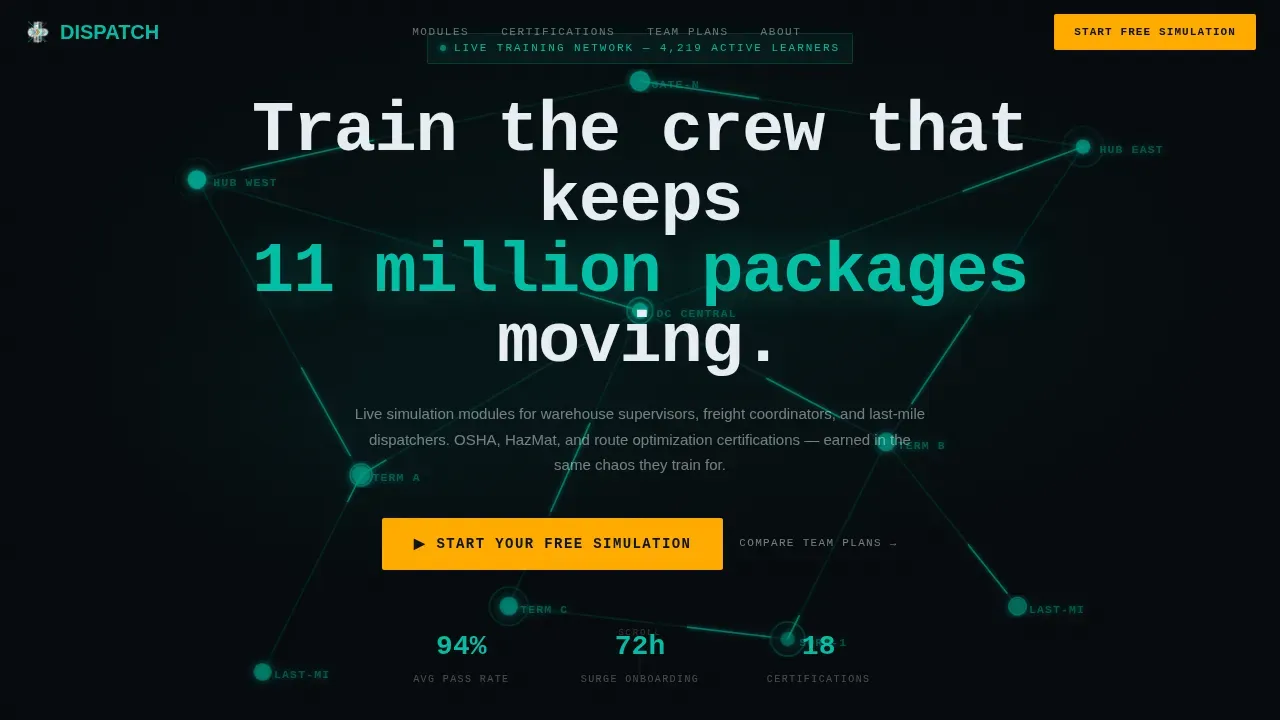
- A hero section with an SVG logistics network animation, a bold mono headline, and a single amber call-to-action button
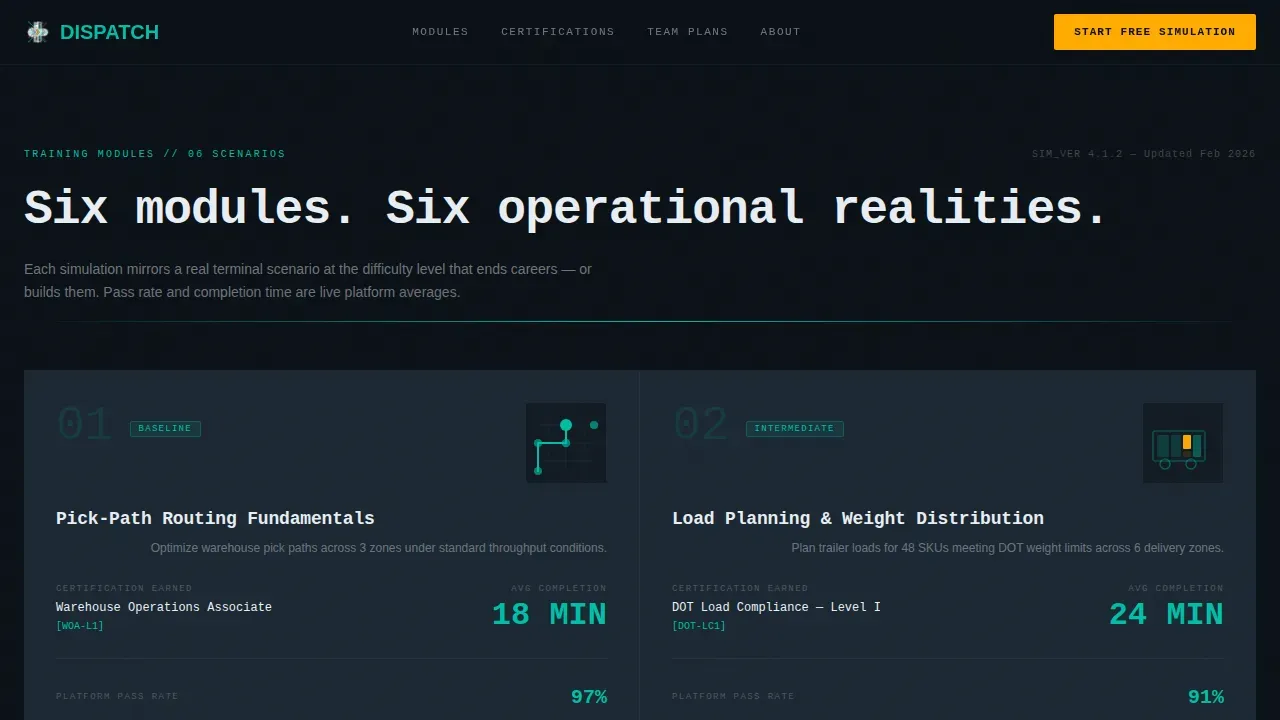
- A module spec grid with six data-grid cards presenting training details in spec-sheet cadence, each designed to surface key numbers at a glance
- A certification trust bar, a simulation preview card, a live metrics ticker marquee, and a minimal single-row footer
Feature list
This landing page template is designed with six core features that work together to present logistics simulation training in the most credible, conversion-focused way possible.
SVG Network Hero with Dark Full-Bleed Glow
The header fills the full viewport in deep operations black. A stylized logistics network map renders in teal neon lines, with nodes pulsing softly as simulated cargo routes between them. A crisp white monospace headline sits over the animation, and a single amber call-to-action button floats below. The visual immediately communicates that this platform is built for dispatchers and transportation professionals who understand what a live routing map looks like.
Module Spec Grid with Data-Card Layout
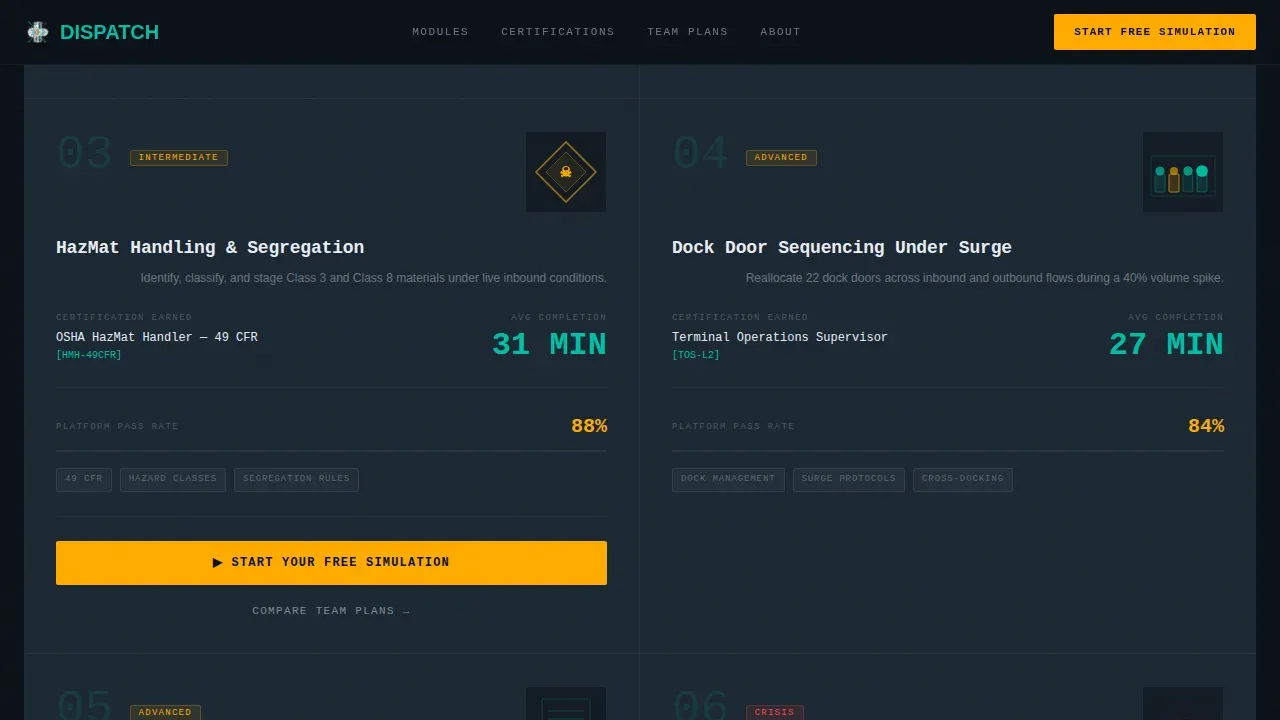
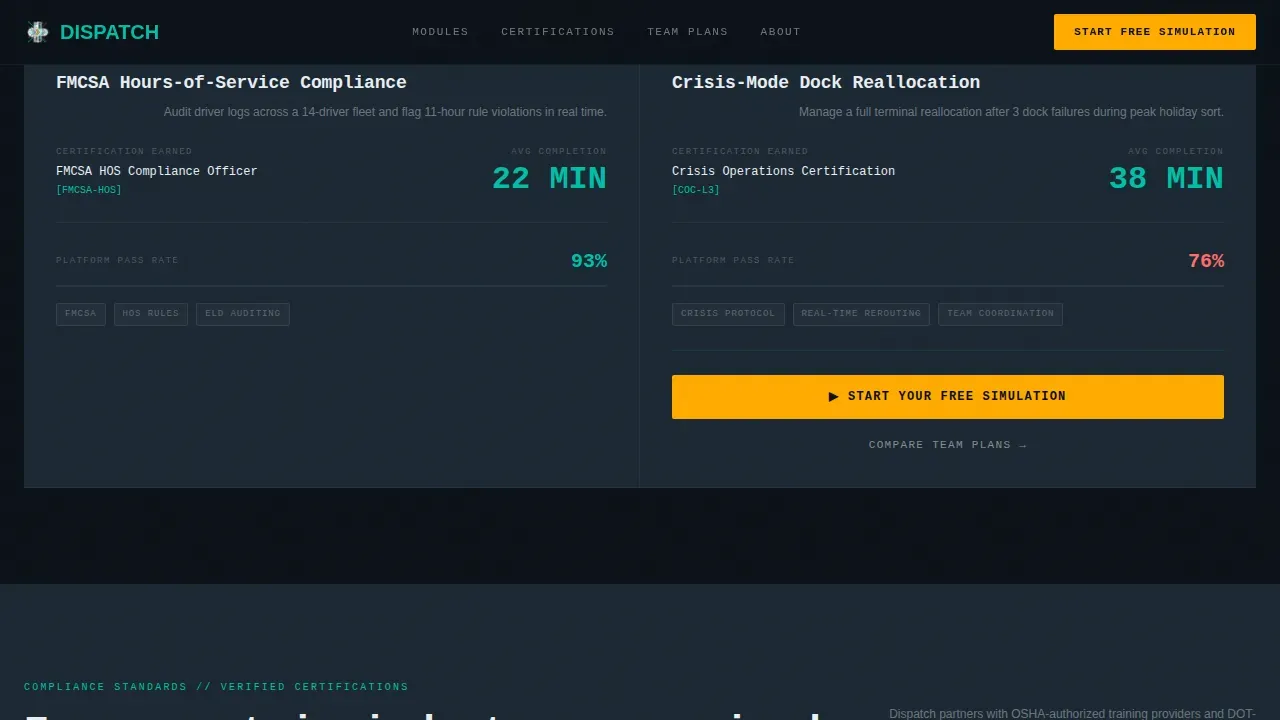
Six training module cards are presented in a data-grid layout using spec-sheet cadence. Each card shows module name, certification earned, average completion time, pass rate, and a micro-animation showing the simulation scenario. Numbers are large and left-aligned. Descriptions are tight and right-justified. A supervisor on break can evaluate six modules in under a minute, understanding exactly which practical task each simulation covers and what credentials it delivers.
Amber Call-to-Action System
The primary call to action, "Start Your Free Simulation," appears in the hero and repeats anchored at the bottom of every third module card. It renders in alert amber against gunmetal panels exclusively, so it is never confused with content. A secondary text link, "Compare Team Plans," sits beneath each call to action for procurement managers who need to assess enterprise services before committing. No form is required on this page, the click carries the visitor directly to a sandbox environment.
Live Metrics Ticker Marquee
A scrolling marquee section displays real-time platform statistics: active learner count, modules completed, average pass rate, and certification delivery numbers. This section helps dispatchers and logistics professionals understand the scale of the platform instantly. Displaying live metrics alongside industry logos and certification badges builds the kind of credibility that a logistics company expects before investing in workforce training.
Certification Trust Bar
A dedicated section surfaces certification logos, including OSHA, HazMat DOT, and FMCSA compliance badges, alongside pass rate statistics. Compliance badges and recognizable credential logos displayed prominently reduce perceived risk for procurement managers evaluating enterprise team plans. This section ensures that safety compliance training is front and center for any team lead who needs credentials before a quarter-end date.
GSAP-Powered Animation and Interactivity
The template is built for high animation fidelity using GSAP ScrollTrigger for stagger reveals, SVG node pulse effects, and a magnetic call-to-action hover state. All animations use GPU-accelerated transforms to keep the landing page responsive and smooth. Lazy image loading is included to keep page loading times efficient, ensuring the simulation preview card and data grid perform well even on tablet connections in a break-room setting.
Page sections overview
| Section | Purpose |
|---|---|
| Hero Network Animation | Establishes dispatch terminal tone and surfaces the primary amber call to action |
| Live Metrics Ticker | Communicates platform scale through a scrolling marquee of live training statistics |
| Module Spec Grid | Presents six simulation training modules as scannable data-grid cards with spec-sheet detail |
| Certification Trust Bar | Displays OSHA, HazMat DOT, and FMCSA badges with pass rate data to build compliance credibility |
| Simulation Preview Card | Shows an interactive dark-mode preview of the simulation interface with a final call-to-action block |
| Minimal Single-Row Footer | Closes the page cleanly with a developer-minimal single-row footer pattern |
Design & branding system
The visual identity follows a Dynamic Motion theme through the Teal Catalyst color system. The design feels like a fleet management screen glowing in a dark dispatch office, data becomes the architecture, and color is used with strict purpose. Typography pairs JetBrains Mono for headlines and data values with DM Sans for body descriptions, reinforcing the ops-terminal personality across every card and section.
- Core palette: deep operations black (#0B1117) as background, live-signal teal (#00BFA6) as the primary data and user interface color, panel gunmetal (#1C2833) for card surfaces, and alert amber (#FFAB00) reserved exclusively for calls to action and progress indicators
- Visual rhythm follows Spec Sheet creative direction: each module card is clinical, fast, and scannable, with large left-aligned numbers and tight right-justified descriptions
- GSAP ScrollTrigger drives stagger card reveals, SVG network pulse in the hero, and a magnetic effect on call-to-action buttons
Mobile & speed optimization
This landing page is designed with tablet-first layout priority, reflecting the real-world use case of supervisors and dispatchers reviewing training options between shifts. The layout ensures that simulation previews, data-grid cards, and call-to-action buttons are all fully readable and thumb-friendly on tablet screens without requiring pinching or horizontal scrolling.
- All animations rely on GPU-accelerated CSS transforms to ensure smooth performance across tablet and desktop devices
- Lazy image loading is applied to the simulation preview card and module grid to keep initial page loading fast on shared or limited connections
- The landing page design ensures that module cards, certification badges, and call-to-action buttons are clearly visible and actionable across screen sizes
How this template helps you convert
This landing page is specifically designed to remove every barrier between a logistics professional and a free simulation trial. It lets the data do the selling, the way a dispatcher lets the board speak for itself. B2B logistics decisions usually involve multiple stakeholders with varying priorities, so the page is structured to satisfy both the operational buyer and the procurement evaluator in a single scroll.
- Module spec cards surface exact pass rates, completion times, and certification credentials before any call to action appears, so visitors understand the value before being asked to act. This mirrors how logistics professionals make quick decisions based on efficiency and reliability.
- The amber call-to-action system repeats at the right cadence, once in the hero and once every three modules, so the invitation to start a free simulation is always visible without feeling aggressive. The secondary "Compare Team Plans" link ensures procurement managers can also evaluate enterprise services without friction.
- Compliance badges, live metrics, and certification logos displayed prominently reduce perceived risk for enterprise buyers. An effective B2B landing page built with this level of trust infrastructure can achieve significantly higher conversion rates than a generic training page.
Other information about this template
This template is designed for logistics training platforms operating across North American markets, with content structured in English, USD pricing format, and US date conventions. It is equally useful for a logistics company running internal workforce development programs and for independent training providers serving dispatchers and transportation coordinators across regions including Texas and beyond.
The landing page design follows best practices for B2B SaaS conversion: a benefit-driven headline addressing the need for faster and more accurate dispatches, interactive visuals that convey complex simulation functions faster than text, and a clear unique value proposition stating how live simulation reduces errors and improves service quality.
- The template supports creating a risk-free training environment where dispatchers can practice rare, high-acuity scenarios involving cargo rerouting, dock reallocation, and hazardous materials handling without impacting live operations
- Logistics training programs built on this template can cover dispatch planning, route optimization, safety and compliance protocols, and real-world case studies, giving employees both theoretical knowledge and practical skills
- The landing page is designed to help logistics managers emphasize metrics like reduced onboarding time, increased safety compliance, and improved service quality when presenting the platform to stakeholders
- Templates in this category are designed to save time during setup: the pre-built section structure, color system, and animation logic mean your team can go from blank canvas to a live logistics website without building the layout from scratch
- Communication between procurement managers and operations leads is supported by the dual call-to-action structure: one path to start a free simulation, another to compare team plan services
- The page is built to ensure that goods-in-transit scenarios, load planning tasks, and compliance processes are all represented clearly in the module grid so that every visitor can identify training relevant to their role
Theme
Dynamic Motion
Creative direction
Spec Sheet
Color system
Teal Catalyst
Style
Dashboard/Data Grid
Direction
Click-Through
Page Sections
SVG Network Hero with Dark Glow
Module Spec Grid with Data Cards
Amber Call-to-action System
Live Metrics Ticker Marquee
Certification Trust Bar
GSAP Animation and Interaction Layer
Related questions
Who is this landing page template designed for?
Does this landing page include a lead capture form?
Can I customize the module cards and certification details?
How does this template build trust with enterprise buyers?
Is this template suitable for onboarding seasonal logistics staff quickly?



