Franchise Order Management Landing Page Template
Dispatch is a split-screen franchise order management landing page template built for multi-unit operators who need every location visible on one screen. It combines an interactive franchise map, a live-feel order dashboard, and a feature matrix layout to showcase centralized dispatch capabilities. The template targets operations leaders ready to stop calling stores one by one and start managing the whole network in real time.
by Rocket studio
Quick summary
Dispatch is a high-impact, single-page landing page template designed for franchise order management platforms. It uses a 50/50 split-screen layout, an interactive location map, and a scroll-driven feature matrix to communicate one clear promise: every location, one screen, zero phone calls. The template is built for lead generation, with a structured form flow and a sticky call-to-action bar that appear once visitors have already experienced the product's core value through hands-on interaction.
Who this template is for
This template is purpose-built for B2B software companies selling franchise operations platforms to multi-unit operators. It speaks directly to the people who feel the daily pain of fragmented order management across dozens or hundreds of locations. If your product centralizes dispatch, menu sync, or order flow across a franchise network, this landing page template is the right vehicle.
- Multi-unit franchise owners managing fifteen to several hundred locations who need a single view of order status, menu versions, and fulfillment progress across every site
- Operations vice presidents at corporate headquarters who oversee POS version rollouts and need to push system-wide changes without calling each location individually
- Regional managers responsible for field service operations across a metro area who currently spend their mornings chasing stores by phone because their current system cannot batch updates
What problem this template solves
Franchise operators face a specific and painful set of problems. Sales orders pile up across locations with no unified view. Menu versions drift out of sync. Technician performance data lives in separate systems. And when something breaks, the only fix is a round of phone calls. A landing page that just describes these problems without demonstrating the solution earns no trust and captures no leads.
This template solves the communication gap between what your platform does and what a skeptical operator believes is possible. It shows the solution before asking for anything.
- Franchise operators visit a landing page and cannot picture how the system works at scale, so they leave without converting; the interactive header preview lets them click location pins and watch the order dashboard update instantly, making the platform's value tangible before a single word of copy is read
- Operations teams struggle to evaluate dispatch software solutions because feature lists feel abstract; the feature matrix layout pairs each real operational pain scenario with a cropped user interface mockup, so every section answers a specific objection rather than making a generic claim
- Lead generation forms with too many fields reduce conversion rates; the streamlined form flow asks for number of locations first, then POS system in use, then work email and name, reducing cognitive load and focusing the visitor on relevant details rather than exhausting them upfront
What you get with this template
Dispatch delivers a fully structured landing page template that covers every stage of the visitor journey, from first impression to form submission. The layout, copy structure, interaction model, and visual system are all defined in the template so your team can build and launch without starting from scratch.
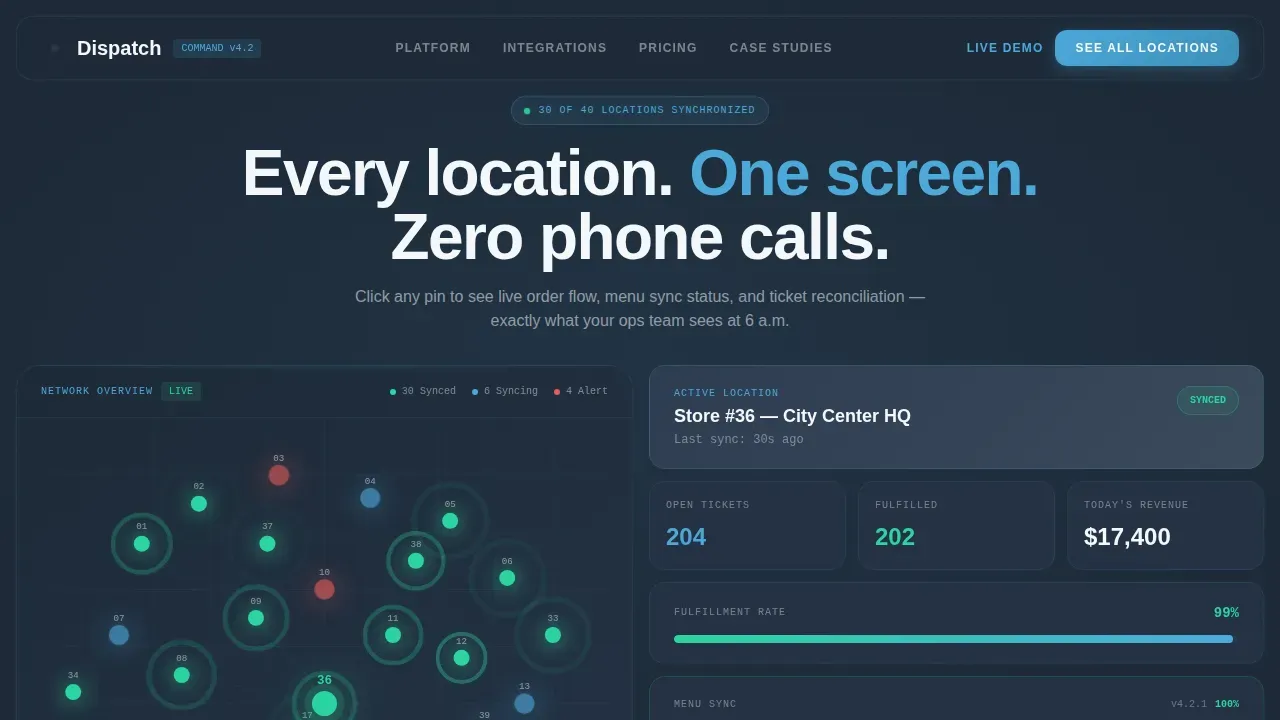
- A 50/50 split-screen hero section with an SVG franchise map on the left and a live-feel order dashboard on the right, where clicking a location pin updates the right panel in real time to show store name, ticket counts, fulfillment percentages, and menu sync status
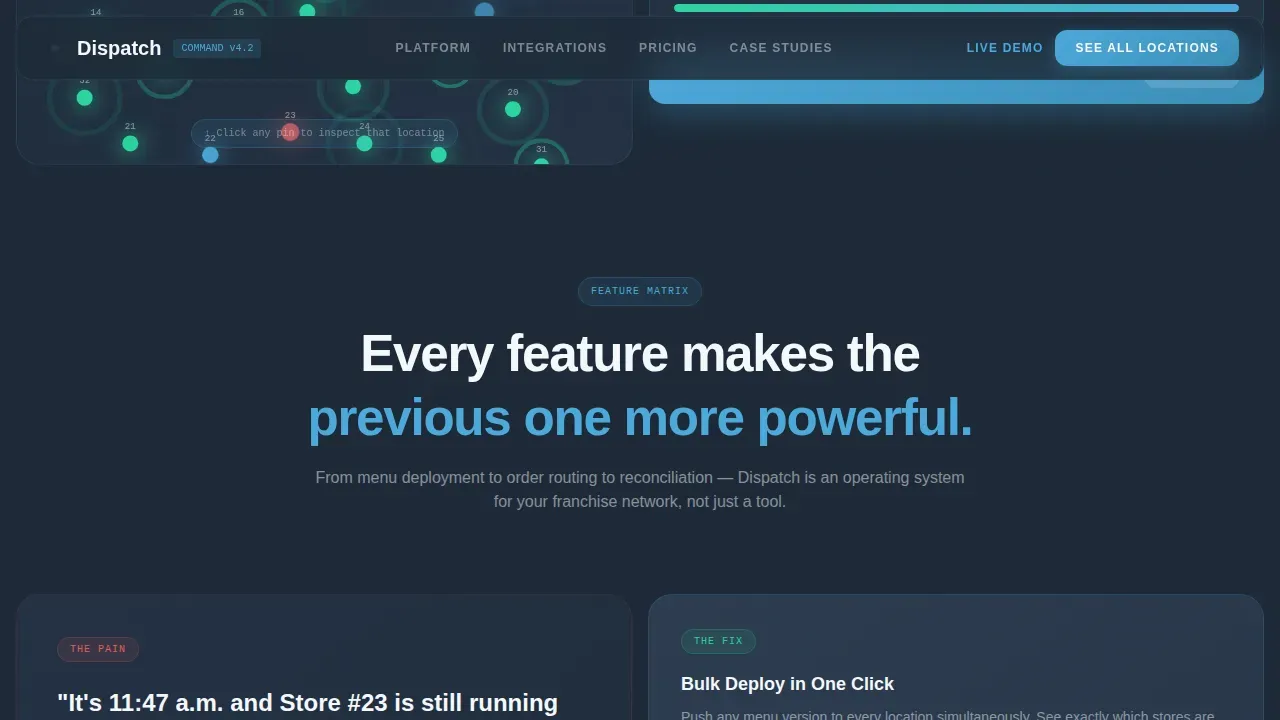
- A scroll-driven feature matrix with three escalating sections that each split the screen between an operational pain scenario on the left and a user interface mockup on the right, building a compound case for the platform's order management capabilities from basic order routing through bulk menu deployment to real-time exception alerts
- A lead generation form section with a location count slider from five to five hundred plus, a POS dropdown, and work email and name fields, alongside a sticky call-to-action bar that appears after the second feature section and a secondary conversion path offering a self-guided interactive demo gated behind just an email
Feature list
This template is built around functional, high-intent components. Each feature serves a specific job in the visitor's decision process and contributes to the overall flow of the landing page.
Interactive Franchise Map with Pin-Click Dashboard
The hero section places a stylized SVG franchise map on the left panel, showing forty numbered location pins that pulse gently to suggest live activity. Visitors can click any pin and watch the right panel update instantly with that location's store name, current ticket counts, fulfillment percentages, and menu sync progress. This interaction communicates the core dispatch promise faster than any paragraph of copy could. It also sets the right expectation: the platform gives operators real time data across the entire network, not just a static report. The ability to explore the map before reading anything reduces skepticism and builds trust in the product's work order management capabilities.
Scroll-Triggered Feature Matrix Layout
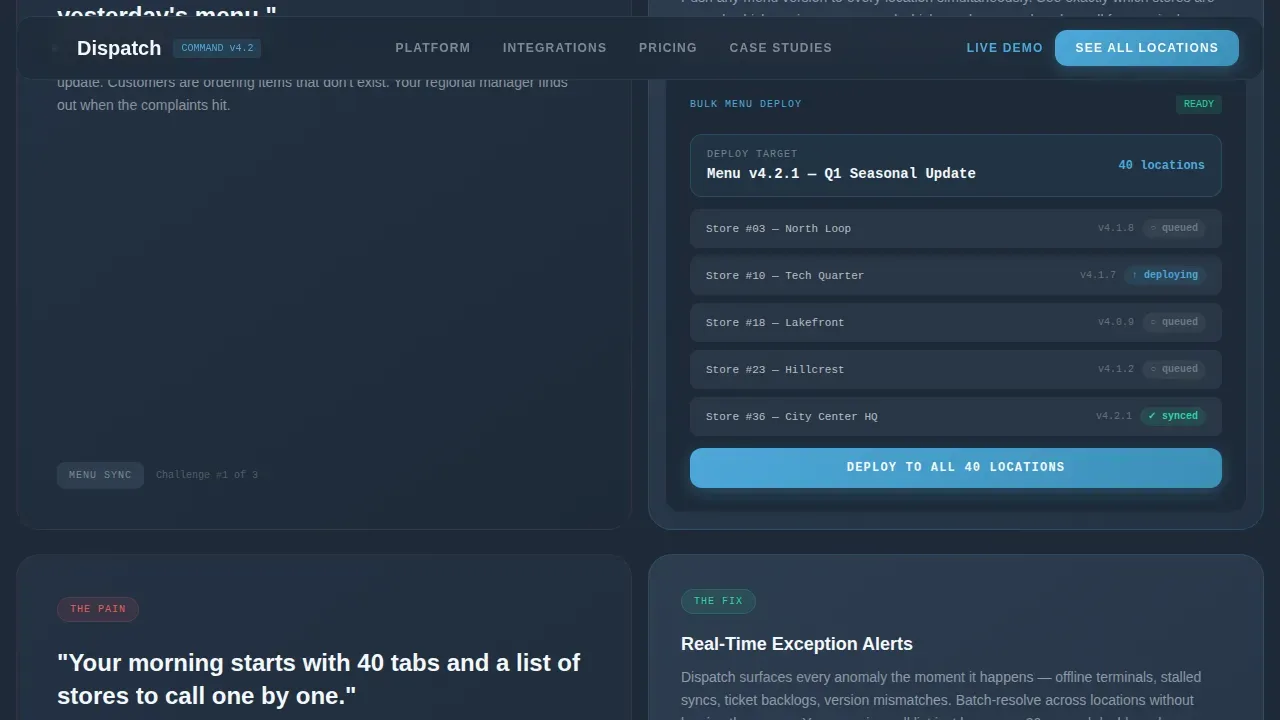
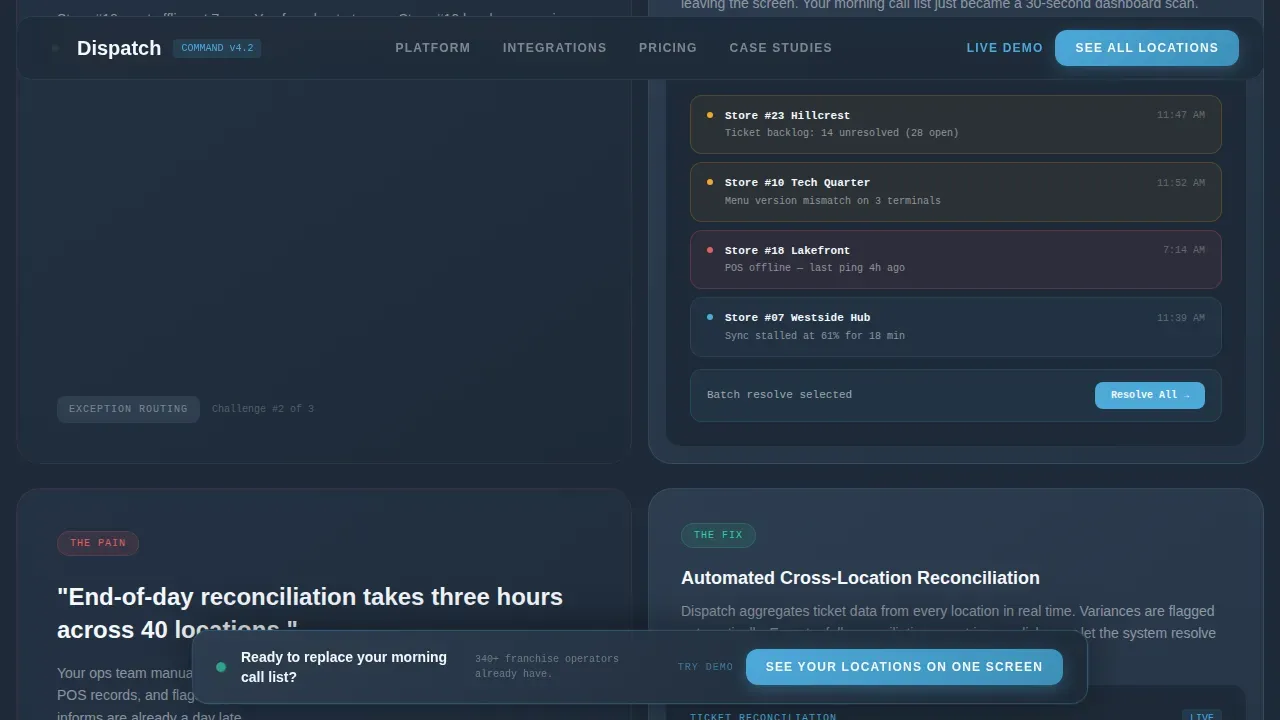
After the hero, the page moves into a feature matrix where each scroll section splits the screen between a punchy operational pain scenario on the left and a cropped user interface screenshot on the right. The first section covers menu sync, showing the specific scenario of a store still running yesterday's menu at 11:47 a.m. and the bulk deploy interface that solves it. The second section covers order routing and exception alerts, contrasting the old one-by-one phone call approach with the batch alert dashboard that lets dispatchers assign work orders and track progress across the whole network. Each section builds on the previous one, so by the time visitors reach the bottom, they understand they are looking at an operating system for franchise field service operations, not just a point tool. The feature matrix is one of the most effective ways to document each capability with detailed information in a format that busy operations leaders can scan quickly.
Sticky Lead Generation Bar and Form
The landing page template includes a sticky call-to-action bar that appears after the visitor scrolls past the second feature section. The bar stays visible as they continue reading, making it easy to act whenever they are ready. The main form section uses a location count slider, a POS system dropdown, and a minimal set of fields: work email and name. A secondary conversion path offers a self-guided interactive demo gated behind just an email address. This two-path approach lets visitors choose their own level of commitment, which improves overall lead volume while still capturing high-intent leads through the full form. Reducing the form to only the most necessary fields is consistent with best practices for franchise order management landing pages, where simplification can significantly improve conversion rates.
Integrations and Social Proof Section
The template includes a dedicated social proof section that combines a POS compatibility logo wall with stat numbers covering locations managed, sync success rate, and sync speed. An operator quote adds human credibility alongside the numbers. This section is placed after the feature matrix, once visitors have already seen the product in action, so the proof lands with more weight. Operators evaluating dispatch software solutions want to know that the system already works at their scale, and this section answers that question directly through data rather than claims.
Data Command Visual System and Typography
The template's visual identity follows a Data Command theme. The color system pairs deep operations slate with a lighter command-panel gray, an open-sky blue for active states and data highlights, and a crisp cloud white for card surfaces. Typography uses Plus Jakarta Sans for headings and body text, with JetBrains Mono reserved for data elements, metrics, and code-style labels. Together, these choices create the feeling of a well-organized dashboard at 6 a.m., calm authority with every pixel serving a functional purpose. The visual system supports the landing page's goal of making franchise operators feel they are already inside the tool when they visit the page.
Animated Progress and Status Indicators
The template specifies high-animation components throughout the page. The SVG location pins pulse gently to suggest live network activity. The sync progress bar animates to show menu deployment in progress. Scroll-triggered reveals bring each feature section into view as the visitor reaches it. These motion details are not decorative; each one reinforces the sense that the dispatch system is active and responsive. Work order status states, including to-do, assigned, in-progress, and completed stages, are all represented visually, giving visitors a clear picture of the order management flow they would be stepping into.
Page sections overview
| Section | Purpose |
|---|---|
| Hero Interactive Split | Franchise map left, order dashboard right, clickable pins update panel in real time |
| Feature Matrix Menu Sync | Operational pain scenario paired with bulk menu deploy user interface mockup |
| Feature Matrix Exceptions | Batch alert dashboard contrasted with one-by-one phone call scenario |
| Social Proof Integration | POS logo wall, stat numbers, and operator quote to build network-scale trust |
| Lead Generation Form | Location slider, POS dropdown, email and name fields, secondary demo path |
| Sticky Call-to-Action Bar | Persistent bar that appears after second feature section for ongoing conversion access |
| Footer Minimal Row | Single-row footer following a developer-minimal pattern |
Design & branding system
The Dispatch template uses a Slate and Sky color system built entirely around the visual language of operations dashboards. Every color choice is functional. The palette creates a sense of calm authority without any decorative noise, which is exactly what operations leaders expect from tools they rely on to manage complex networks.
- Color palette: deep operations slate (#1E2A38) as the primary background, command-panel gray (#3B4A5C) for panel surfaces, open-sky blue (#4DA8DA) for active states, data highlights, and interactive elements, and cloud white (#F4F7FA) for card surfaces and breathing room between data-dense sections
- Typography: Plus Jakarta Sans handles all headings and body text for clean readability at any size; JetBrains Mono is used specifically for data labels, ticket counts, metric values, and any code-style detail that needs to read as system output rather than marketing copy
- Animation and motion: pulsing SVG location pins, smooth panel transitions when a map pin is clicked, scroll-triggered feature section reveals, sticky bar fade-in after the second feature section, and an animated sync progress bar that visually demonstrates menu deployment in action
Mobile & speed optimization
The Dispatch template is designed desktop-first because its primary users, operations vice presidents and multi-unit franchise owners, work at workstations where they need the full split-screen layout to evaluate the product. The responsive design ensures the template also works cleanly on tablets and smartphones for regional managers who access dashboards on the go.
- Desktop-first layout: the 50/50 split screen, interactive map, and feature matrix are all optimized for wide-screen viewing where data-dense panels can be read side by side without compression
- Responsive mobile fallback: the layout adapts for tablet and smartphone screens, stacking panels vertically and preserving interactivity so mobile users can still engage with the location pin system and navigate the form flow without friction
- Performance architecture: the template uses server components for static sections and client components for the interactive map and lead generation form, keeping the page light where possible and reserving heavier rendering only for the sections that require live interactivity
How this template helps you convert
The Dispatch landing page template is engineered around a specific conversion logic: earn the click by delivering value before asking for anything. The visitor plays first, then decides. This approach is especially effective for franchise operators who are skeptical of software claims and need to see the product work before they trust it.
- The interactive hero section lets visitors click location pins and watch the order dashboard respond before they have read a single line of copy; this hands-on experience creates a moment of genuine recognition, making the lead generation form feel like the obvious next step rather than a cold ask
- The feature matrix builds a compound case with each scroll section, so by the time visitors reach the form, they have seen a specific answer to each of their main operational objections around menu sync, exception alerts, and order routing; the sticky call-to-action bar ensures the conversion opportunity is always visible without interrupting their reading flow
- The two-path conversion design offers both a full lead form for high-intent visitors and a lighter self-guided demo path gated behind just an email, which means the template captures leads at multiple commitment levels and gives your team more contacts to follow up with regardless of where a visitor is in their decision process
Other information about this template
The Dispatch template is built within a technology category focused on franchise software and franchise order management. It is relevant for teams building or marketing cloud based software platforms that serve field service businesses, multi-unit restaurant operators, and enterprise franchise networks. The following notes cover additional context that is helpful for teams evaluating whether this template fits their project.
- The landing page is designed to connect with an ERP system on the backend to automate payments and shipping workflows; the template provides the front-end structure and form fields, including Franchisee ID and Location, Customer Name, Address, and Service or Product requested, so the integration handoff is clearly defined from the start
- AI-powered order management capabilities fit naturally within the feature matrix layout; the template's user interface mockup slots can document how machine learning tools automate order management processes, provide real time visibility into order status and inventory levels, and support informed decisions by analyzing data and predicting trends across the franchise network
- Teams building for field service operations will find the template's dispatch board concept directly applicable; dispatchers can be shown assigning work orders to technicians based on skills and location, visualizing technician schedules on a calendar interface, and making dynamic scheduling adjustments for urgent requests, all of which are standard expectations in field service businesses
- The landing page includes a scoreboard card area for key performance metrics across business units, letting users track sales orders, monitor fulfillment progress across a date range, and navigate directly to a specific sales order by entering the order number; users can also search for tasks in the actions drawer and pin frequently used actions so they appear by default on the landing page
- Accounting software integration is a common downstream requirement for franchise order management platforms; the template's form and social proof section can document compatibility with accounting software systems to reassure operations leaders that billing, cost tracking, and financial reconciliation flows will not be disrupted
- For teams focused on technician performance, the template's feature matrix can be adapted to document how the system tracks job record details, monitors technician progress through each work order stage, and produces documentation of completed jobs; this makes the template useful beyond restaurant franchises and into any field service context where work order management is central
- The template supports a full project build from scratch, but it is also structured so that teams can customize individual sections, swap out user interface mockup slots with their own screenshots, and adjust the location slider range to reflect their actual customer scale; small business operators managing fewer than twenty locations and enterprise networks managing five hundred plus are both addressed by the slider's range and the copy's tone
- Route planning and local deliveries are operational details that the interactive map and dashboard panels can represent visually; the template's pin-click interaction can be adapted to show route planning data or local deliveries status for platforms that serve dispatch-heavy logistics use cases beyond restaurant franchises
- Security is a practical concern for any cloud based software platform collecting work email addresses and POS system details through a lead generation form; teams should ensure their form submission handling meets their own security and data handling standards, as the template provides the front-end structure and field definitions but does not configure back-end security independently
- The Dispatch Command Your Franchise Order Management Landing Page Template is the specific template name for this product listing, and it represents the full-featured, single-page lead generation structure described throughout this page
Theme
Data Command
Creative direction
Feature Matrix
Color system
Slate & Sky
Style
Split Screen (50/50)
Direction
Lead Generation
Page Sections
Interactive Franchise Map with Live Dashboard
Scroll-driven Feature Matrix Layout
Sticky Lead Generation Bar and Two-path Form
Social Proof and Integrations Section
Animated Status and Progress Indicators
Data Command Visual Identity System
Related questions
Who is the Dispatch template built for?
Can I customize the location slider range and form fields?
Does the interactive map require a specific technical setup?
How does this template support lead generation goals?
Is this template suitable for field service businesses outside restaurant franchises?



