Dispensary & Retail Cost Calculator Website Template
Dispense is a single-column direct-sales landing page template built for autonomous cannabis vending machines. It guides dispensary owners, airport concession directors, and hotel operators from a 12-second transaction timeline infographic through an annotated machine diagram, a state compliance map, a live cost calculator, and operator case studies, ending at a stepped configurator that closes the sale.
by Rocket studio
Quick summary
Dispense is a direct-sales landing page template for a regulated cannabis vending machine. It opens with a horizontal transaction timeline infographic, then walks buyers through machine anatomy, compliance, live revenue math, and real operator results. Every section is designed to answer the next objection before it forms, ending at a stepped configurator or a compliance kit download.
Who this template is for
This template is built for operators selling or deploying autonomous cannabis vending hardware in regulated US markets. The layout speaks directly to buyers who make considered, high-value purchase decisions and need every question answered before they act.
- Dispensary owners looking to eliminate night-shift staffing and add a self-service revenue channel
- Airport concession directors and hotel operators exploring compliant grab-and-go retail in lobbies or terminals
- Cannabis retail technology vendors who need a conversion-focused page that handles B2B objections head-on
What problem this template solves
Selling a regulated hardware product with a four-figure price tag requires more than a brochure. Buyers need proof, compliance clarity, and economic justification before they ever reach a checkout step. Most generic templates cannot carry that weight.
- No structure for walking buyers through regulatory requirements state by state
- No built-in space for annotated product diagrams, live revenue calculators, or ROI case studies
- No conversion path that branches between ready-to-buy operators and prospects still seeking internal approval
What you get with this template
You get a fully structured single-column landing page that handles the entire B2B sales conversation in one scroll. The layout is desktop-first and built for complex purchase decisions, with every interactive section scoped and positioned to match buyer intent at each stage.
- A 12-second transaction timeline infographic as the hero, plus an oversized social proof stat in large display type
- Five content sections covering machine anatomy, state compliance, cost projection, operator case studies, and a multi-step configurator
- A secondary email-capture path delivering a compliance kit PDF for prospects who need internal sign-off before purchasing
Feature list
This section covers the core functional and design capabilities delivered by the Dispense template, as defined by the source brief.
12-Second Transaction Timeline Hero
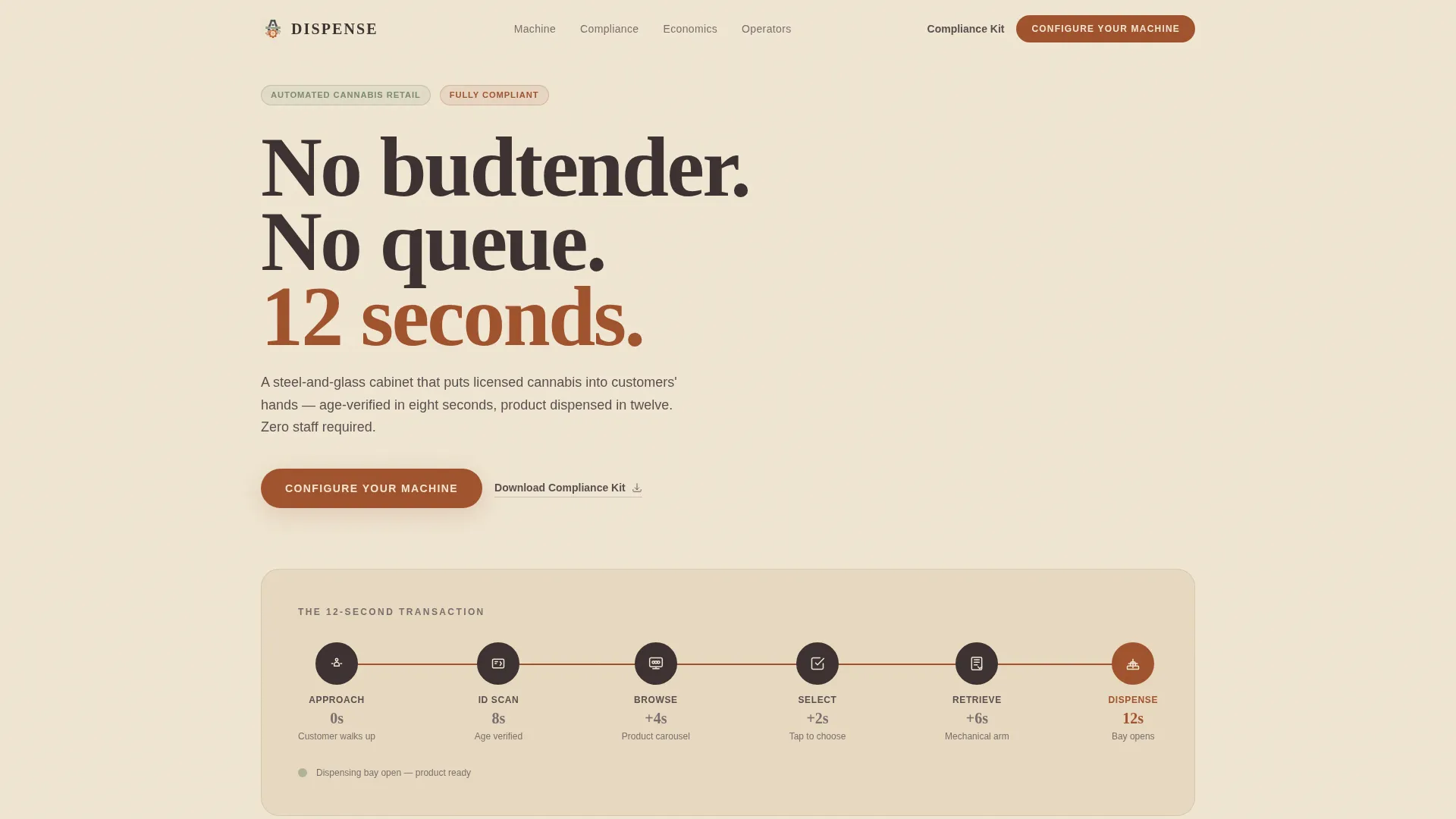
The header features a full-width horizontal infographic showing each stage of the transaction as a labeled node. A customer silhouette approaches, a license icon triggers age verification, a product carousel appears, a mechanical arm retrieves the selection, and a dispensing bay closes the sequence. Each node carries a rust-numeral duration label and is animated with GSAP scroll-triggered entrance effects.
Annotated Machine Anatomy Diagram
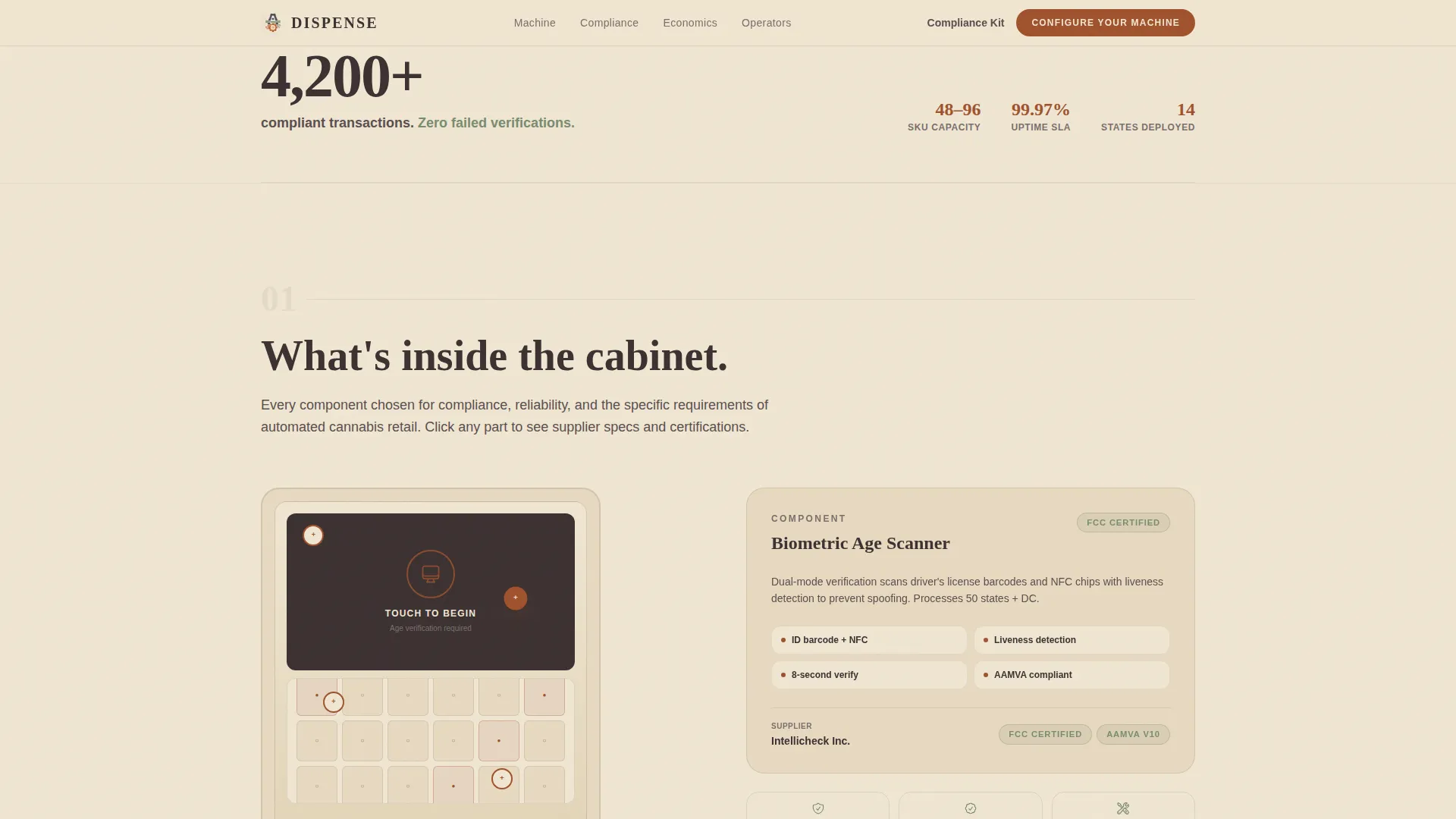
Section one explodes the machine into a clickable annotated diagram. Each component, refrigeration unit, biometric scanner, inventory carousel, and cash-and-card module, is individually labeled and clickable. Clicking a part reveals supplier specifications and compliance certifications, giving procurement-minded buyers the documentation they need without leaving the page.
Interactive State Compliance Map
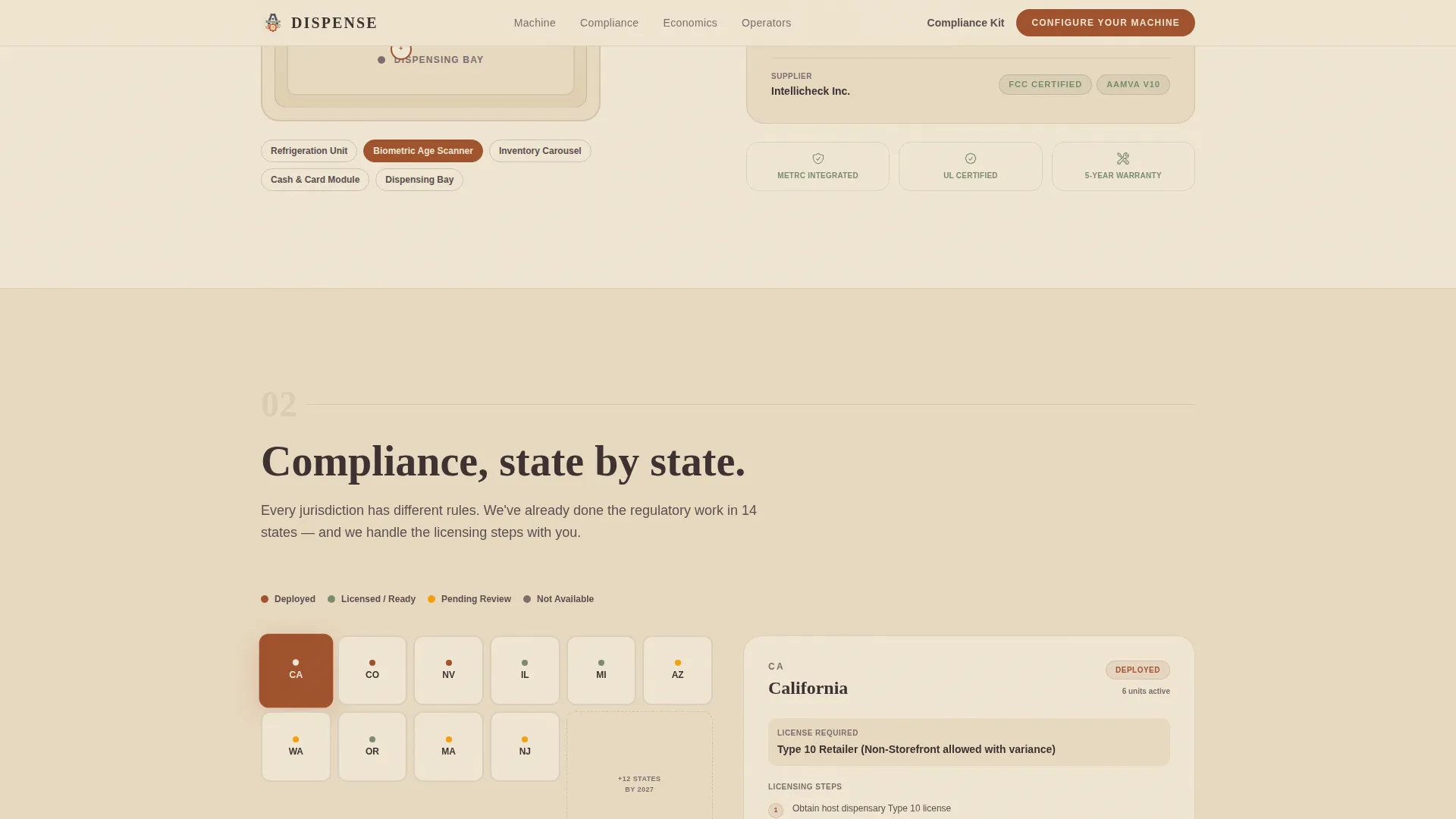
Section two presents an interactive United States map. Clicking any state surfaces per-state licensing steps and current machine operating locations. This directly addresses regulatory hesitation, the most common objection from operators in newly legal states.
Live Revenue Cost Calculator
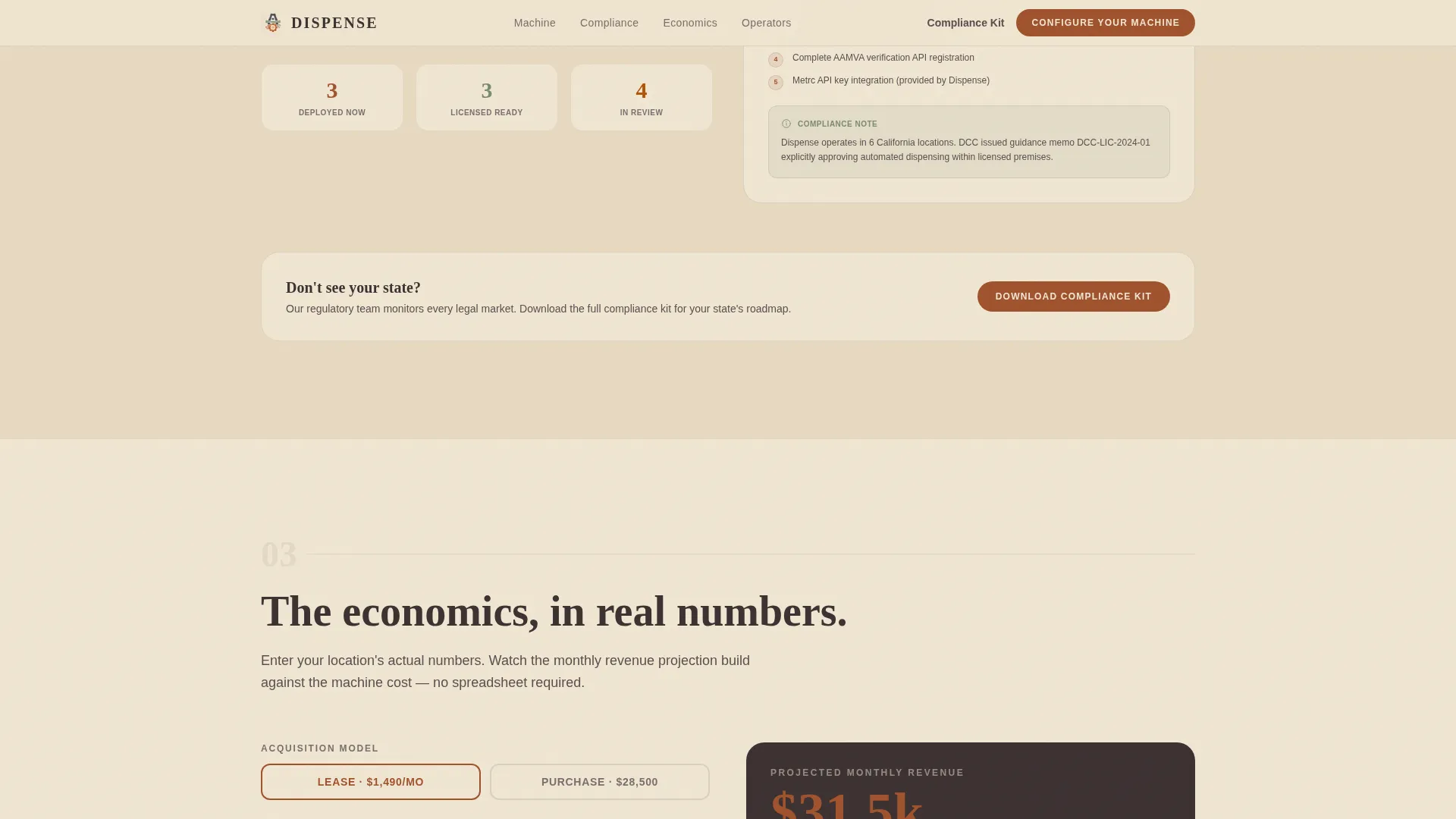
Section three provides a real-time cost calculator. The visitor inputs foot traffic volume, average basket size, and operating hours, then watches a projected monthly revenue figure build against the machine's lease or purchase price. The calculator is built as a Client Component for live interactivity.
Operator Case Study Stack
Section four replaces generic testimonials with mini case studies. Each entry includes a unit placement photo, monthly transaction counts, and an ROI timeline. This format gives prospective buyers concrete, comparable data rather than abstract endorsements.
Multi-Step Purchase Configurator
The primary call-to-action opens a four-step configurator. Buyers choose purchase or lease, select 48-slot or 96-slot capacity, add optional modules such as a camera upgrade, cash recycler, or refrigeration tier, then submit shipping address and payment details. The configurator appears first below the hero and again as a persistent bottom bar after the calculator.
Page sections overview
| Section | Purpose |
|---|---|
| Hero Timeline Infographic | Visualizes the 12-second transaction flow and anchors the page with a verified social proof stat |
| Machine Anatomy Diagram | Lets buyers explore annotated components and access compliance certifications per part |
| State Compliance Map | Addresses regulatory hesitation with per-state licensing steps and operating locations |
| Live Cost Calculator | Turns foot traffic and basket size into projected monthly revenue against lease or purchase cost |
| Operator Case Studies | Builds confidence with real unit placements, transaction counts, and ROI timelines |
| Stepped Configurator call to action | Guides qualified buyers through capacity, modules, and payment in four structured steps |
| Compliance Kit Capture | Offers a downloadable PDF for prospects who need internal approval before committing |
| Linear Footer | Closes the page with a single-row footer pattern consistent with the industrial utility theme |
Design & branding system
The Dispense template uses a Service Utility theme expressed through a Parchment and Rust color system. The aesthetic feels like a well-worn field manual left on a workbench, honest, industrial, and free of decorative gloss. There is no lifestyle photography and no leaf imagery; the machine and its process are the only visuals.
- Aged parchment (#F0E6D3) dominates all backgrounds; warm charcoal (#3B3131) carries all body text; oxidized rust (#A0522D) marks every interactive element and price callout
- Dry sage (#7A8B6F) appears only on compliance badges and age-verification indicators, reserving it as a visual trust signal
- Typography pairs Fraunces for oversized display numbers and headlines with DM Sans for body text and interface labels, creating clear hierarchy without ornament
Mobile & speed optimization
The template is designed desktop-first, reflecting the complexity of the configurator and the B2B purchase context. The layout is structured using Server Components for static sections and Client Components only where live interactivity is required.
- Interactive sections, the clickable diagram, state map, calculator, and configurator, are isolated as Client Components to keep non-interactive layout rendering efficient
- GSAP-powered animations include scroll-triggered reveals and staggered timeline node entrances, all scoped to avoid blocking the initial page render
- The single-column flow adapts cleanly to tablet viewports, keeping the sales narrative intact for buyers who review the page on secondary devices
How this template helps you convert
The Dispense template is structured around objection elimination. Each section removes one barrier to purchase, so by the time the configurator appears, the decision feels like a formality rather than a leap.
- The hero infographic and stat establish immediate credibility with verified transaction numbers, giving buyers a reason to keep reading before any product copy appears.
- The anatomy diagram, compliance map, and cost calculator address the three biggest B2B objections in sequence: "What exactly am I buying?", "Is this legal in my state?", and "Will this make money?", each answered with interactive, verifiable content.
- The dual conversion path captures both ready-to-buy operators through the configurator and approval-stage prospects through the compliance kit download, so no qualified lead leaves the page empty-handed.
Other information about this template
The Dispense template is part of a Cannabis and Hemp category focused on Dispensary and Retail technology. It is specifically scoped for the cannabis vending machine niche and carries an intersection match score of 13, indicating strong alignment between the template structure and the niche's known buyer journey requirements.
- The page uses an Intersection Match Score to confirm that the single-column flow, direct-sales direction, Transparent Process creative direction, and Infographic header concept are all validated combinations for this niche
- Localization defaults are set for the United States market, with currency formatted in USD and dates in MM/DD/YYYY format
- The compliance kit secondary path is designed to serve buyers in states where internal legal or compliance review is required before a capital equipment purchase can be approved
- The footer follows a Linear Single-Row pattern, keeping the close of the page clean and consistent with the industrial utility aesthetic
Theme
Service Utility
Creative direction
Transparent Process
Color system
Parchment & Rust
Style
Single Column Flow
Direction
Direct Sales
Page Sections
Second Transaction Timeline Hero
Clickable Machine Anatomy Diagram
Interactive State Compliance Map
Live Revenue Cost Calculator
Operator Mini Case Studies
Four-step Purchase Configurator
Related questions
What types of businesses is this landing page template designed for?
Does the template include a way to capture leads who are not ready to buy yet?
What interactive components are included in this template?
Can the configurator handle both lease and purchase options?
What does the live cost calculator actually show the visitor?