Cannabis Booking Software Landing Page Template
Dispense is a dashboard-style landing page template built for cannabis booking software. It combines a Feature Tab Switcher header, a Problem-to-Solution scroll arc, and a dark Data Command visual identity. The template is designed to convert dispensary operations managers and compliance officers into free trial signups by letting them interact with the product before committing.
by Rocket studio
Quick summary
Dispense is a single-page landing page template built for cannabis booking and scheduling software. It uses a dark dashboard aesthetic, interactive tab demos, and a Problem-to-Solution content arc to speak directly to dispensary operators. Visitors explore three live-feel micro-demos before reaching the free trial call to action.
Who this template is for
This template is designed for software teams and founders selling scheduling or compliance tools into the cannabis industry. It targets decision-makers who understand operational pain, not just general software buyers.
- Dispensary operations managers handling multi-room appointment calendars and compliance logs
- Multi-location owners who need a single calendar view across several storefronts
- Compliance officers responsible for patient verification records and state reporting accuracy
What problem this template solves
Dispensaries face a specific combination of operational problems that generic booking software pages do not address. Missed confirmations, inventory mismatches, and compliance filing gaps all carry real consequences, from lost revenue to license risk. This template is built to show that the software understands those stakes before asking for a signup.
- Confirmation texts that never send, causing no-show rates that hurt daily revenue
- Inventory and booking calendars that fall out of sync, creating overselling or stock gaps
- Compliance paperwork that piles up manually instead of being generated automatically
What you get with this template
You get a complete, ready-to-customize single-page layout that mirrors the look and feel of a real dispensary operations dashboard. Every section is purposefully sequenced to build trust and drive trial signups through interaction rather than persuasion alone.
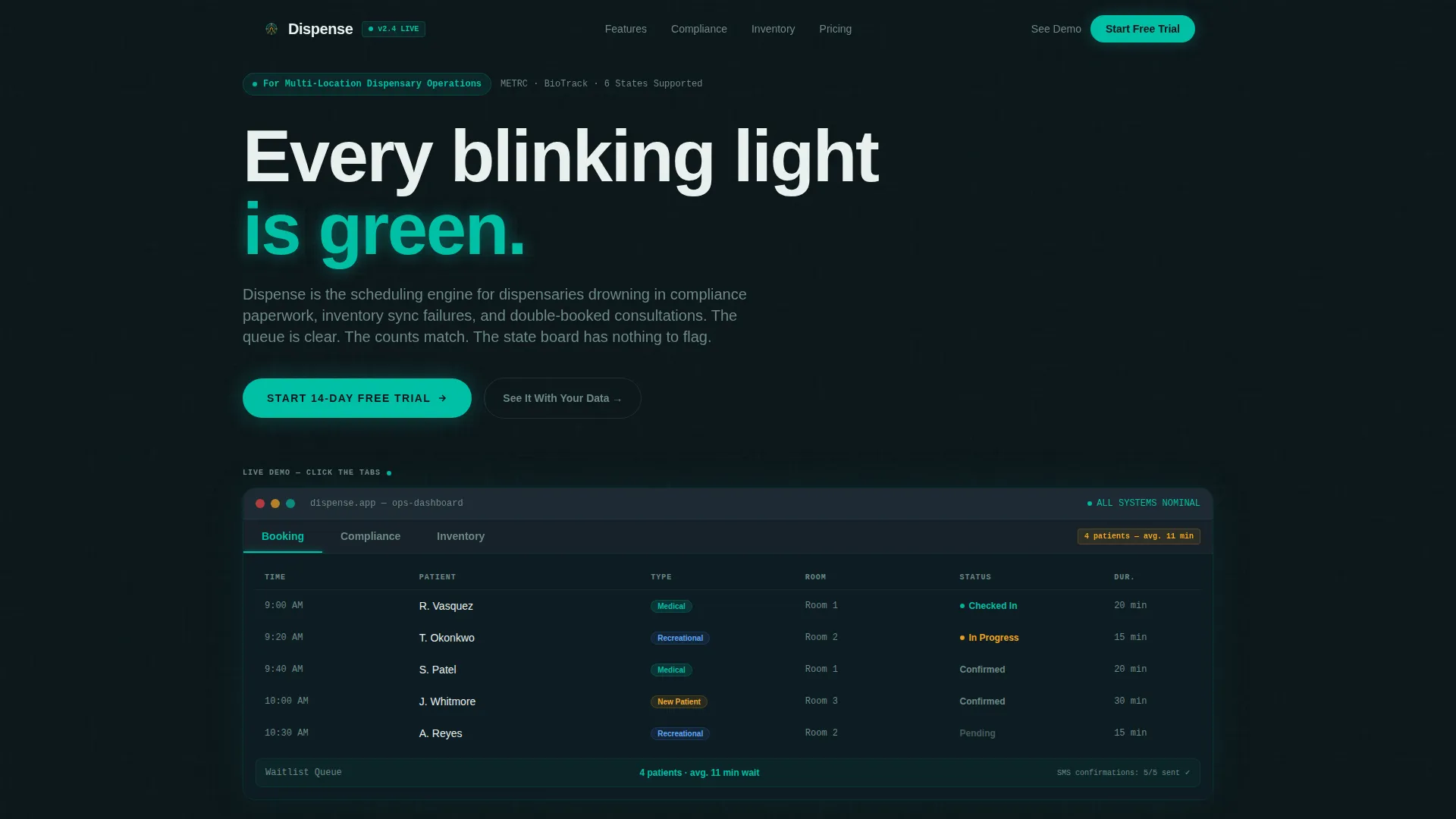
- A Feature Tab Switcher header with three clickable demo panels: Booking, Compliance, and Inventory
- A full Problem-to-Solution scroll arc with pain-point statistics answered by interactive solution visuals
- A Freemium/Trial conversion section with an expanding email form and a secondary Calendly-linked demo path
Feature list
This template includes purpose-built components that reflect how cannabis scheduling software actually works. Each section earns visitor attention by showing the product in action rather than describing it in abstract terms.
Feature Tab Switcher Header
The header contains three clickable tabs labeled Booking, Compliance, and Inventory. Each tab loads a different dashboard panel with a smooth slide animation, so visitors feel like they are already inside the product. The default view shows a day-view appointment grid with color-coded patient types, assigned consultation rooms, and a live waitlist counter.
Problem-to-Solution Scroll Arc
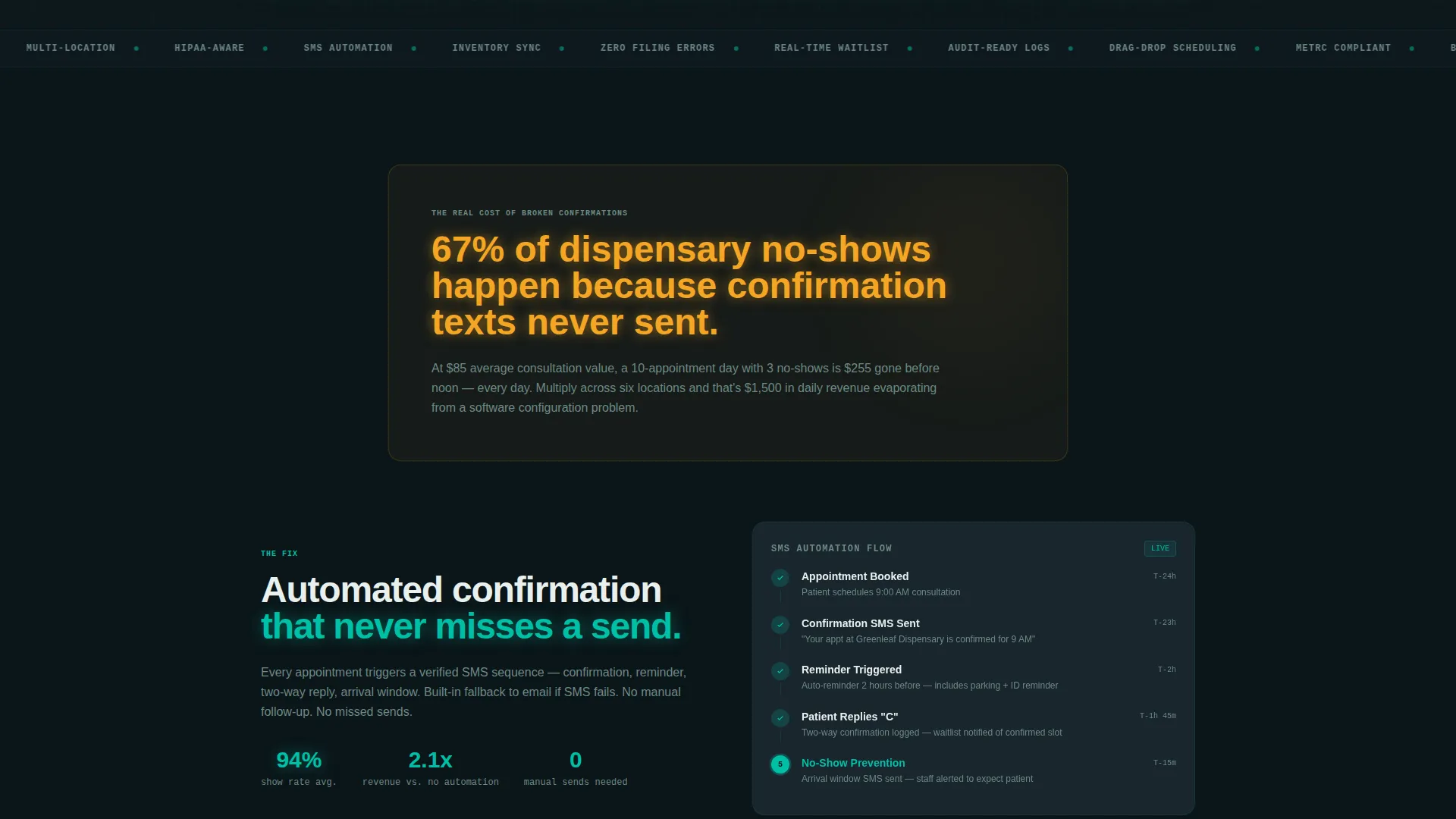
Each content section pairs a specific industry statistic with an interactive solution visual. The arc opens with a compliance fine or no-show rate displayed in amber text on a dark card. The following panel answers it with a rendered workflow diagram or data grid the visitor can click through.
Automated SMS Flow Diagram
An animated data grid illustrates how confirmation texts move from booking to patient device. This section directly addresses the no-show statistic introduced in the pain-point card above it, making the connection between problem and fix immediately visible.
Inventory-Linked Booking Panel
The Inventory tab reveals strain-level stock counts synced to the appointment calendar. Items with low stock that have upcoming appointments scheduled against them are flagged automatically, giving operators a clear view of potential fulfillment conflicts.
Drag-and-Drop Shift Builder
A visual shift scheduling component is rendered as a data grid synced to appointment volume. It shows staff coverage mapped against booking density, addressing the operational chaos of manual staff scheduling.
Freemium Trial Conversion Form
The primary call-to-action uses a single email field that expands on click to collect dispensary name, state selection with auto-populated compliance ruleset, and number of locations. A secondary path links to a guided demo booking for visitors who want a hands-on walkthrough before committing.
Page sections overview
| Section | Purpose |
|---|---|
| Tab Switcher Header | Show live Booking, Compliance, and Inventory demo panels |
| Pain Point Card | Open with a blunt no-show statistic in amber text |
| SMS Flow Diagram | Answer the no-show problem with an automated confirmation visual |
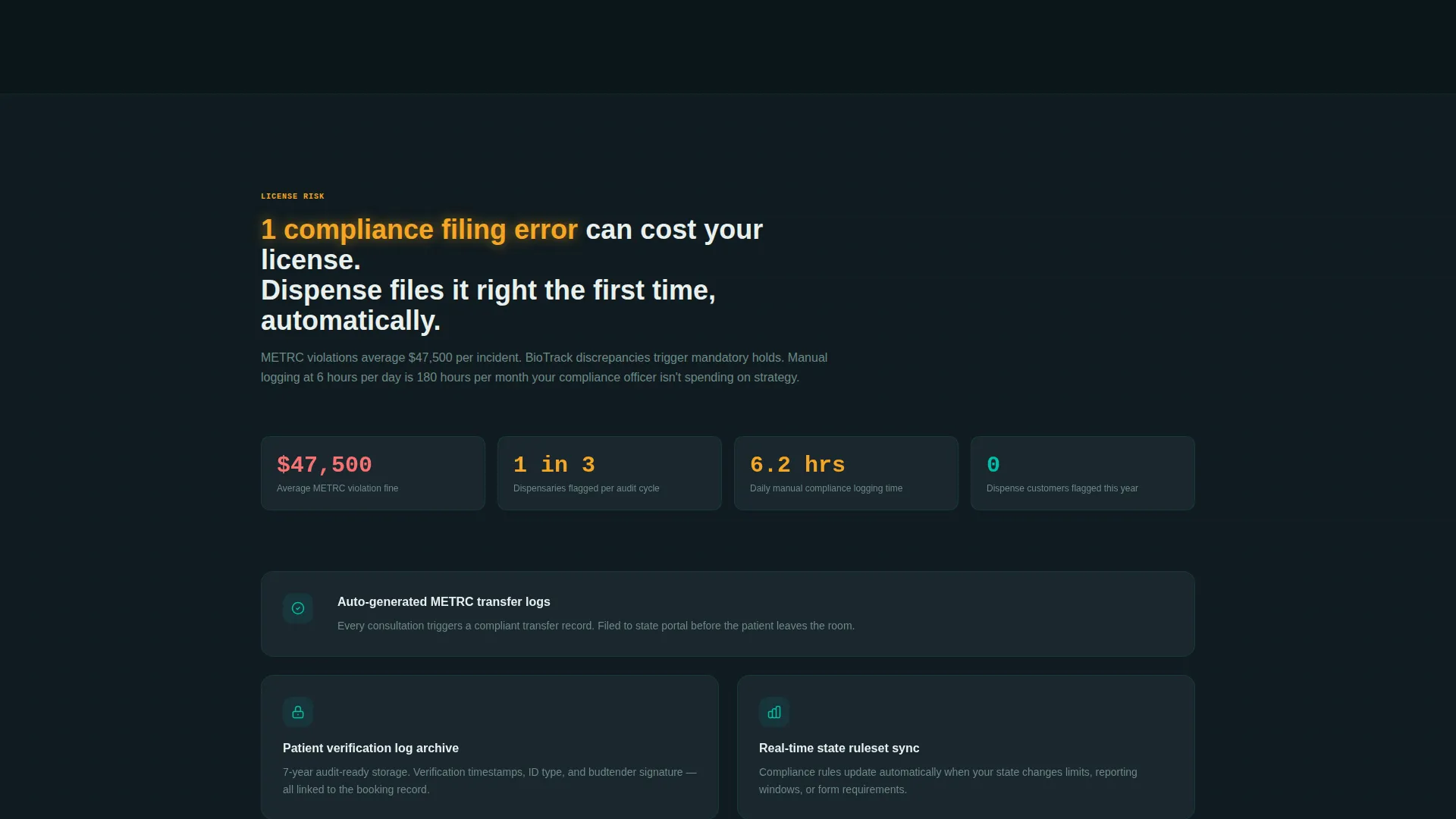
| Compliance Stats Panel | Present compliance fine risk as an escalating stake |
| Auto-Filing Dashboard | Resolve compliance risk with a state reporting demo grid |
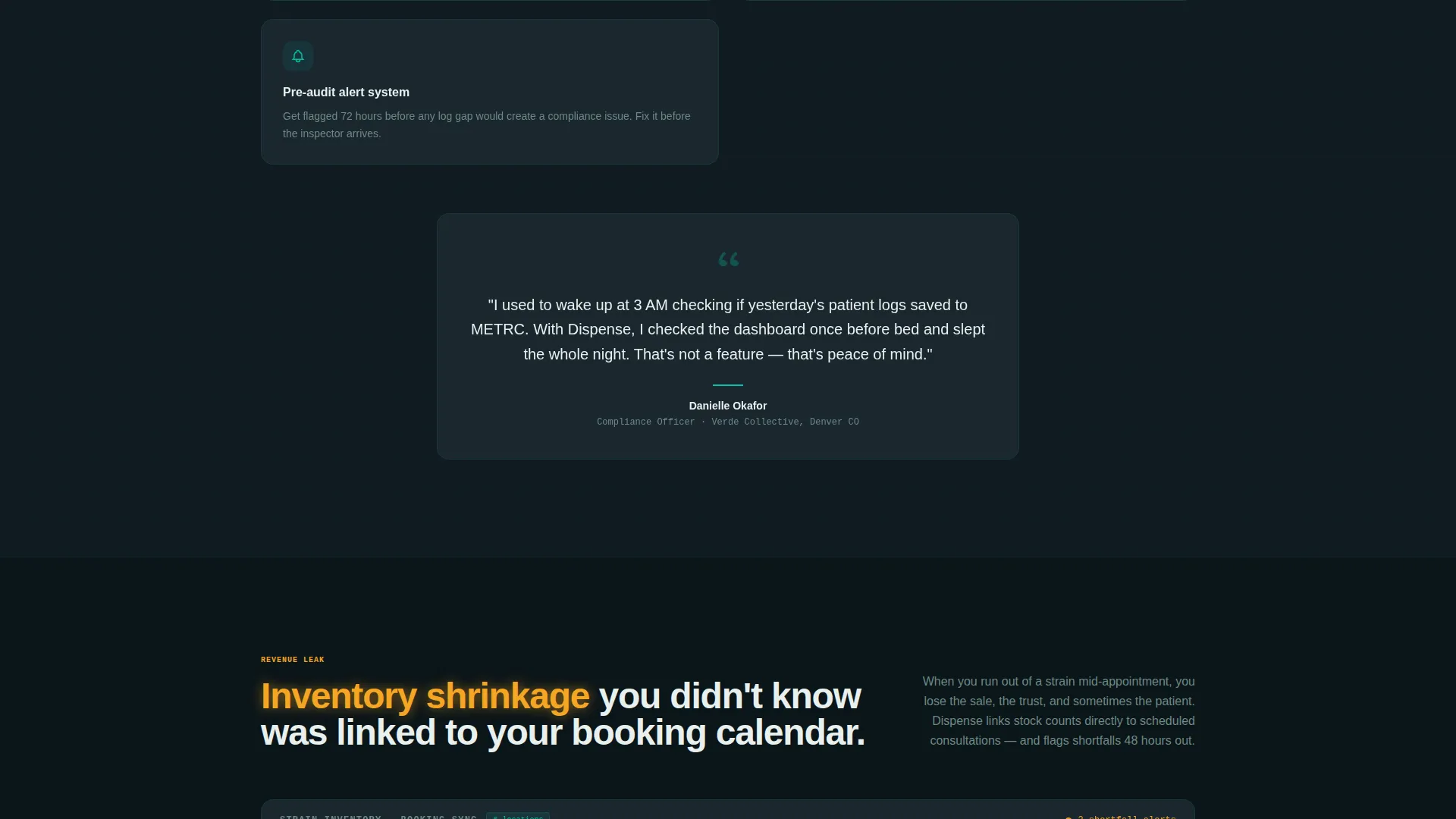
| Inventory Shrinkage Block | Introduce stock loss as a revenue and booking conflict |
| Depletion Tracking Panel | Show booking-linked inventory depletion as a live data view |
| Shift Builder Section | Address staff scheduling chaos with a drag-and-drop visual |
| Trial Conversion Form | Capture dispensary name, state, and location count on click |
| Demo Booking Path | Offer a Calendly-linked guided demo as a secondary conversion |
Design & branding system
The visual identity follows a Data Command theme built on the Teal Catalyst color system. The palette is designed to feel like a well-run dispensary's backroom monitor at midnight: dark, calm, and fully reporting nominal status.
- Deep dispensary black (#0B1519) as the page background, giving every panel a focused, terminal-like weight
- Operational teal (#00BFA6) used for active data indicators, glowing status elements, and live-sync confirmations
- Slate panel gray (#1E2A33) for card surfaces and dashboard containers, separating content blocks cleanly
- Alert amber (#F5A623) reserved for notification badges, pain-point statistics, and hover states only
Mobile & speed optimization
The template layout is structured to remain readable and functional on smaller screens. The dashboard-style components are organized so that tab panels and data grids stack cleanly without losing their visual logic.
- Tab panels and data grids are arranged to reflow vertically on mobile without breaking the interactive demo sequence
- The expanding trial form collapses to a single visible input on small screens, keeping the conversion path frictionless
- Pain-point cards and solution panels maintain their visual contrast and amber highlight treatment across screen sizes
How this template helps you convert
The conversion strategy is built into the page structure itself. Visitors reach the call-to-action only after they have already interacted with three working demo panels, which lowers resistance and raises intent.
- The Feature Tab Switcher lets visitors explore Booking, Compliance, and Inventory views before any signup prompt appears, so they arrive at the form already engaged with the product.
- The Problem-to-Solution arc escalates stakes from inconvenience to license risk to revenue loss, making the free trial feel like a practical next step rather than a sales pitch.
- The secondary Calendly-linked demo path gives higher-intent visitors a direct route to a guided walkthrough, capturing leads who are not yet ready to self-serve.
Other information about this template
This template is built specifically for the cannabis software and software-as-a-service category, where regulatory context and operational trust are prerequisites for any conversion. It is designed to work within a technology-forward product marketing context.
- The template is categorized under Technology, Cannabis Software and SaaS, with a niche focus on cannabis booking software
- The state auto-population feature in the trial form is designed to signal compliance ruleset awareness to operators who work across multiple regulatory environments
- The Calendly integration path is referenced in the brief as a secondary conversion route for guided demo bookings
- The intersection match between the Data Command theme, Teal Catalyst color system, Dashboard/Data Grid template style, and Freemium/Trial direction makes this template a focused fit for cannabis scheduling and compliance software products
Theme
Data Command
Creative direction
Problem→Solution Arc
Color system
Teal Catalyst
Style
Dashboard/Data Grid
Direction
Freemium/Trial
Page Sections
Feature Tab Switcher Header
Problem-to-solution Scroll Arc
Automated SMS Flow Diagram
Inventory-linked Booking Panel
Drag-and-drop Shift Builder
Expanding Freemium Trial Form
Related questions
Who is this landing page template designed for?
What does the Feature Tab Switcher in the header do?
Can I customize the color system and branding?
How does the trial conversion form work?
Does the template include a path for visitors who are not ready to sign up?



