Pharmaceutical Software & SaaS Professional Website Template
Dispense is a pharmaceutical point-of-sale landing page template built for pharmacy professionals who need a system that speaks their language. It showcases a POS designed around Drug Enforcement Administration scheduling, insurance adjudication, and compounding lot tracking, not adapted from generic retail. The dark glass aesthetic and scroll-reveal structure make a powerful first impression on every visitor who reaches the form.
by Rocket studio
Quick summary
Dispense is a single-page, scroll-reveal landing page template for a pharmacy-native point-of-sale system. It targets independent pharmacy owners, chain pharmacy IT directors, and compounding pharmacists. The page opens in the pain of rejected claims and legacy system failures, then assembles the product solution piece by piece through animated dark glass panels and a qualifying lead generation form.
Who this template is for
This template was built for teams selling complex healthcare technology to pharmacy professionals. It speaks directly to people who have outgrown generic retail registers and need a point-of-sale built around real dispensary workflows.
- Independent pharmacy owners managing rejected insurance claims and manual Drug Enforcement Administration compliance logs
- Chain pharmacy IT directors standardizing point-of-sale operations across 200 or more locations
- Compounding pharmacists who need lot tracking, beyond-use dates, and controlled substance logs built into every transaction
What problem this template solves
Generic point-of-sale systems were designed for retail counters selling shoes and groceries, not for counters where every transaction involves a National Drug Code lookup, a DAW (Dispense As Written) indicator, and a live insurance adjudication. The gap between what retail registers offer and what pharmacy workflows demand is exactly the tension this template dramatizes.
- Legacy systems force manual DEA schedule logging, split-billing workarounds, and blind spots in compounding inventory
- Rejected claim error codes cost independent pharmacies time and cash flow every single shift
- Chain IT directors lack the audit trails and standardized reporting that multi-location compliance requires
What you get with this template
You get a complete, scroll-reveal landing page template structured around a Problem-to-Solution narrative arc. Each scroll reveal catalogs a specific failure of legacy systems, then wipes it away with the product's answer. The page earns visitor trust before it ever asks for contact information.
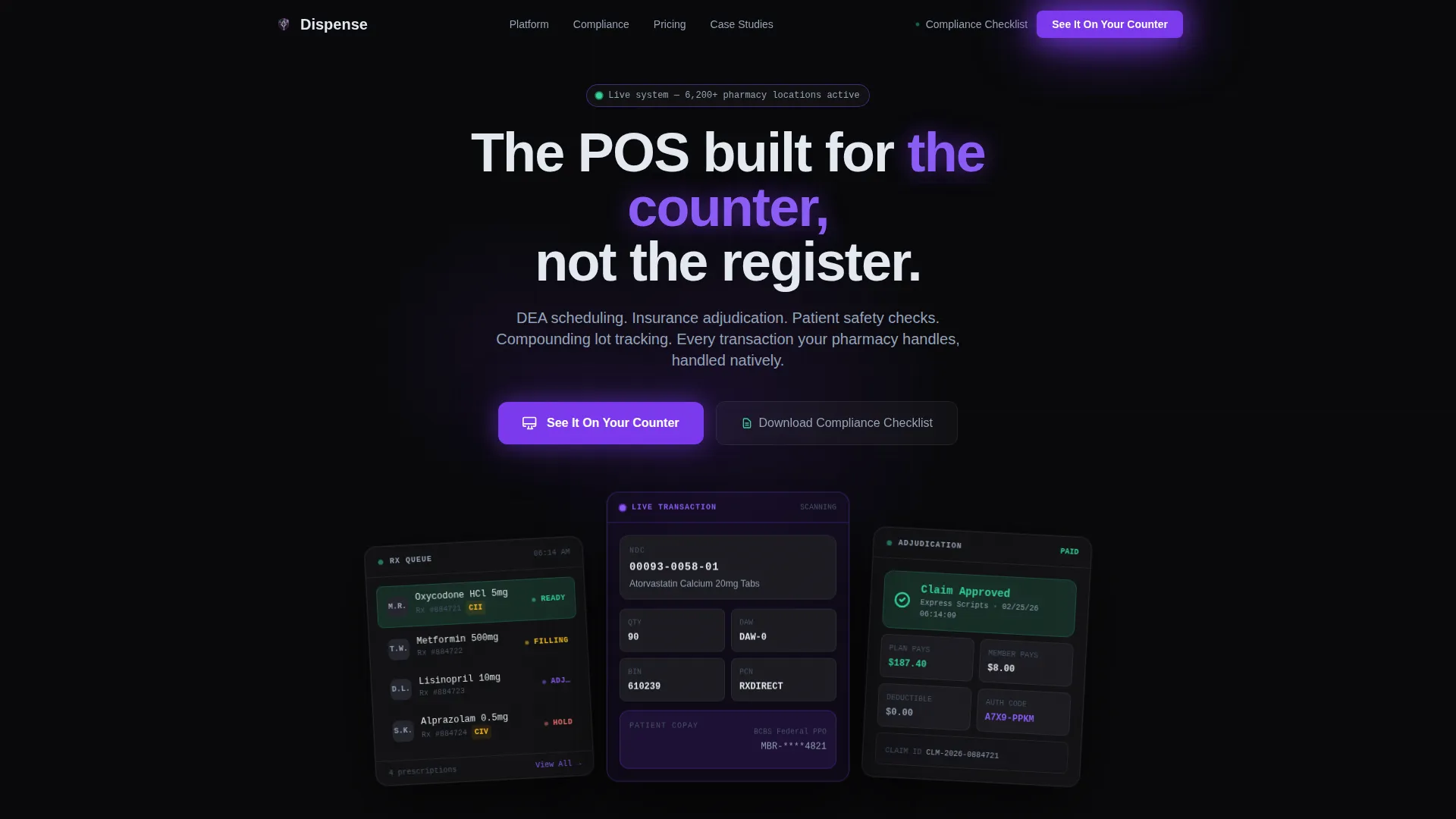
- A hero section with three floating dark glass panels showing a live prescription queue, a mid-transaction NDC scan, and an insurance adjudication response
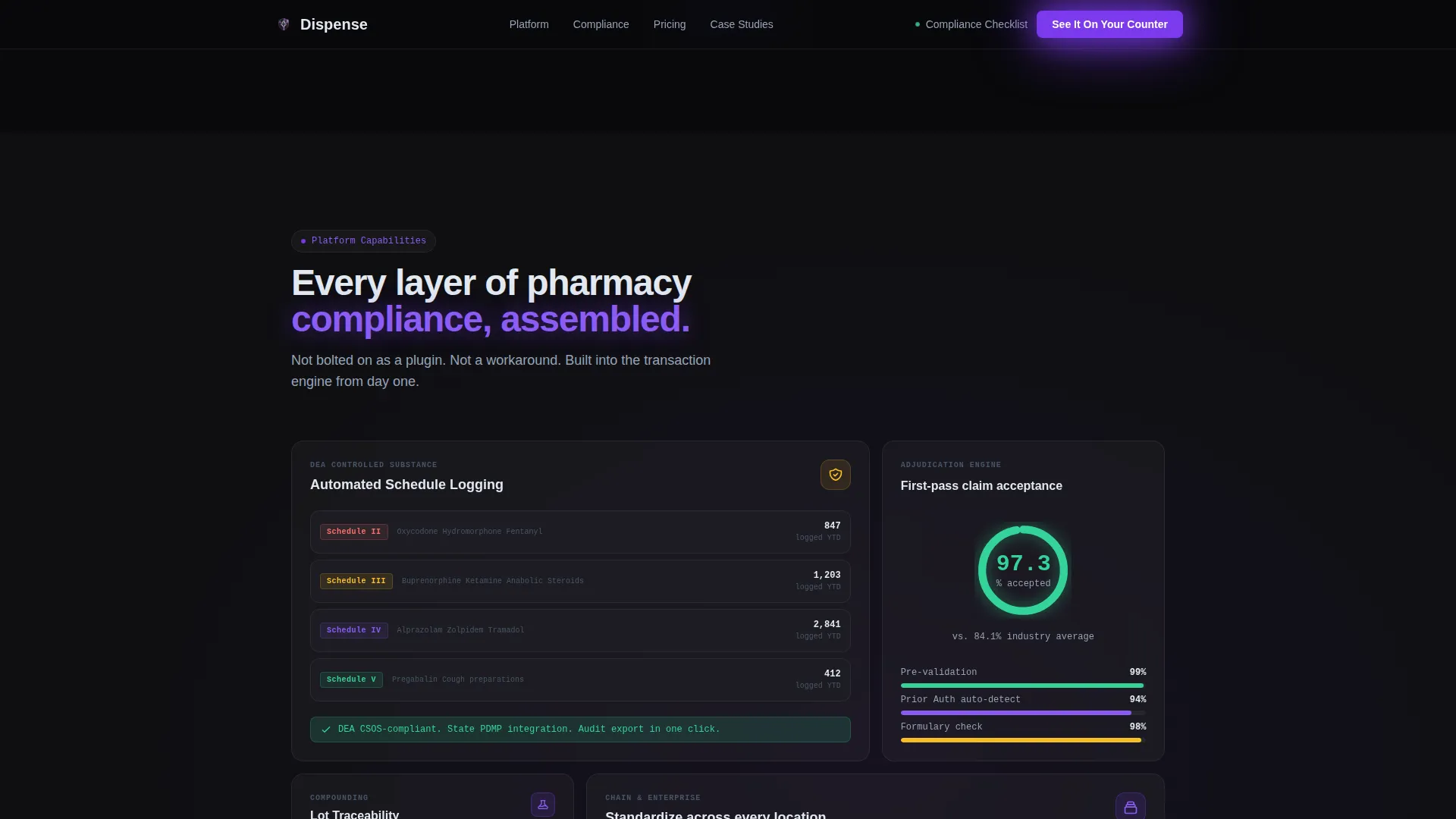
- A bento-grid features section covering DEA scheduling, insurance adjudication, compounding lot tracking, and split billing
- A dual-path lead generation section with a qualifying demo form and a secondary gated compliance checklist download
Feature list
This template includes purpose-built sections and interactive components grounded in the pharmacy POS workflow described in the source brief.
Scroll-Reveal Problem Arc
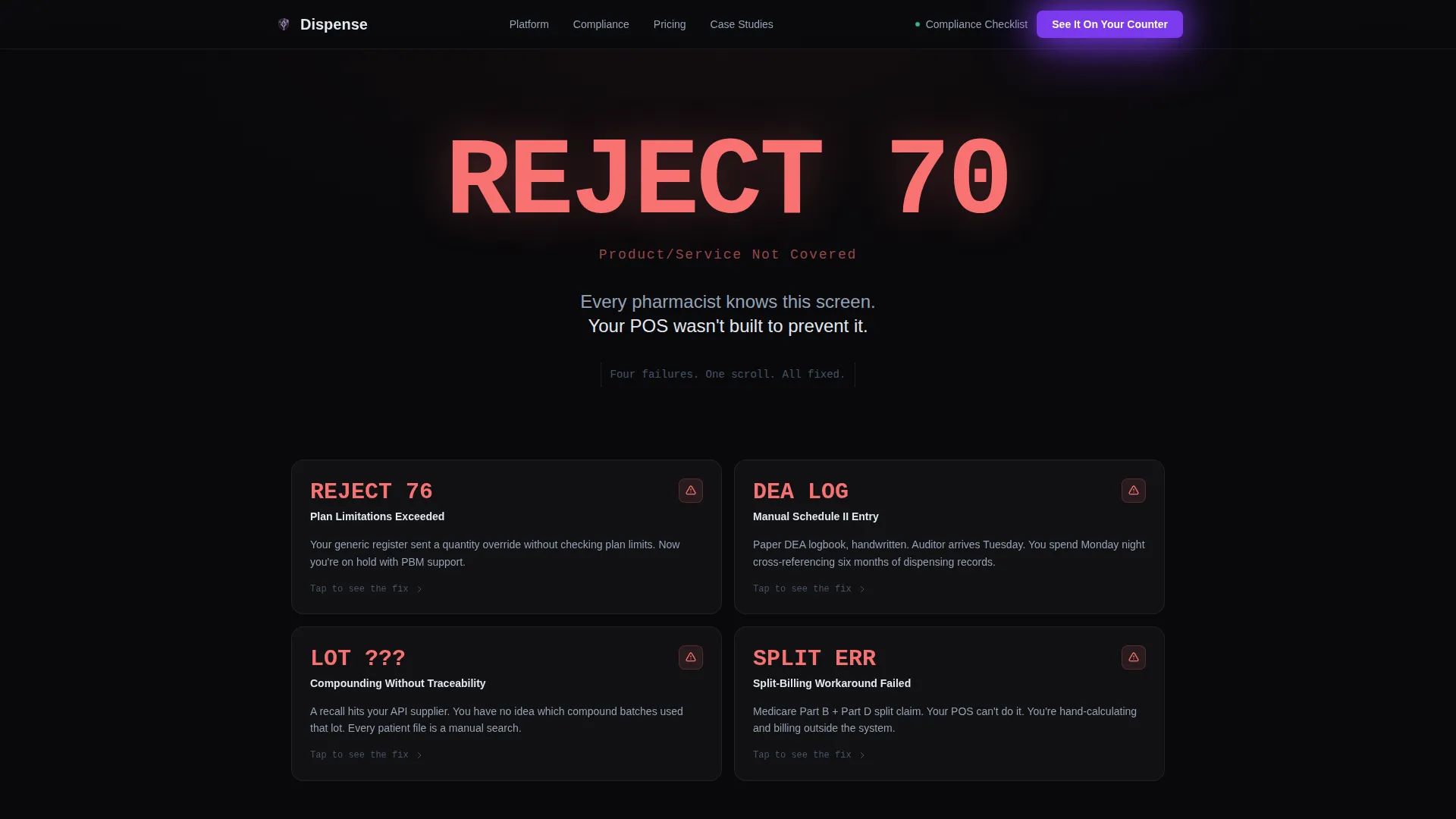
The page opens with a rejected claim error code rendered large against a black background. Each scroll step exposes a specific legacy POS failure and resolves it with an animated glass panel carrying the product solution. Tension builds and releases with every reveal, keeping visitors engaged through the entire page.
Three-Panel Hero Interface
Three translucent, frosted-glass rectangles float at parallax angles against a void black field. The left panel shows a prescription queue with patient initials and fill statuses. The center panel displays a live transaction mid-scan with NDC code, DAW indicator, and copay calculation. The right panel returns a paid insurance adjudication response.
Pharmacy-Specific Features Bento Grid
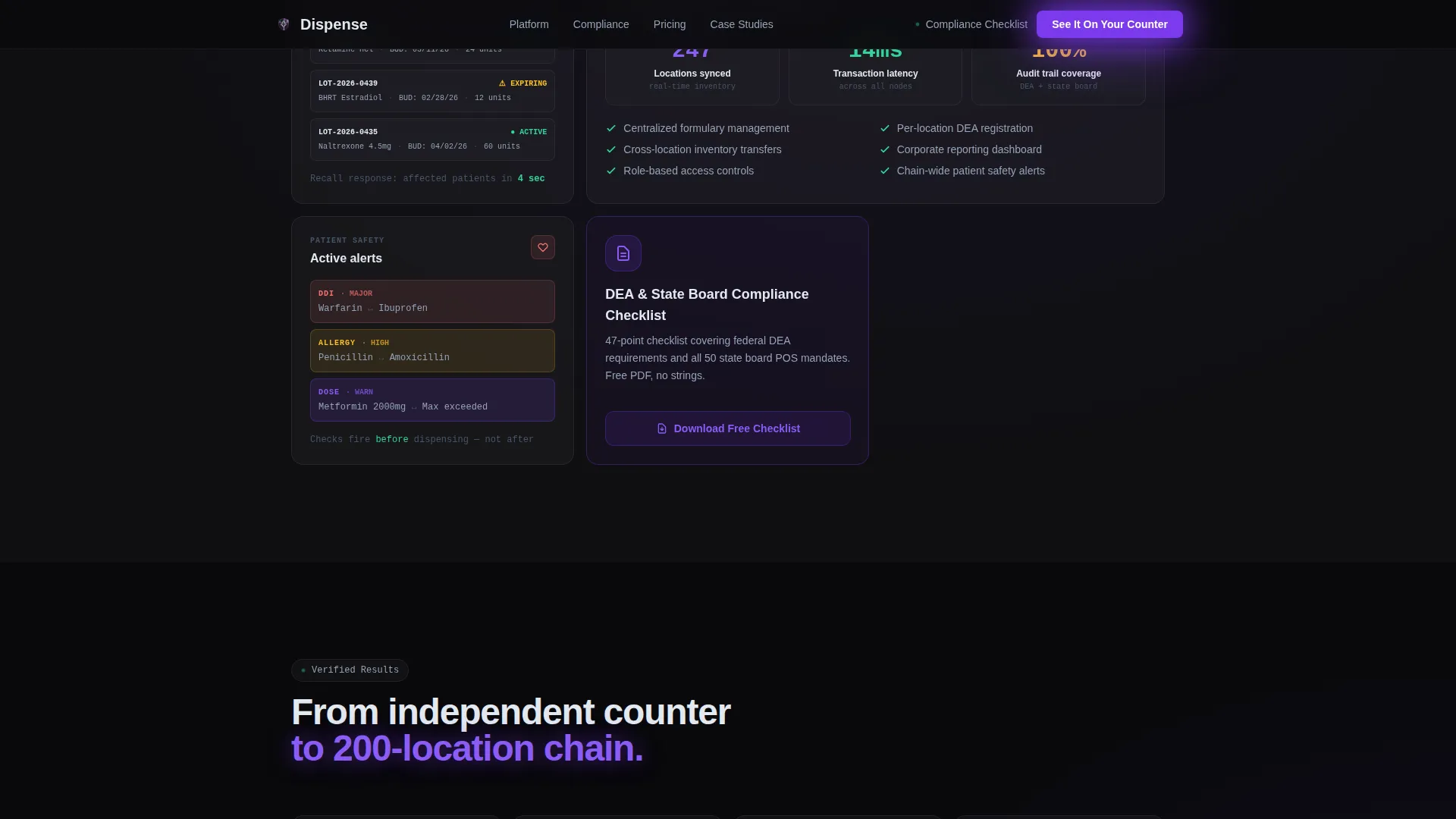
An asymmetric bento grid lays out the core capabilities: DEA schedule logging, real-time insurance adjudication, compounding lot tracking, and split-billing support. Each grid cell is designed to demonstrate a workflow that generic retail registers cannot handle natively.
Dual-Path Lead Generation Form
The primary call to action, "See It On Your Counter," anchors to a short qualifying form. Fields capture pharmacy type, current point-of-sale system, number of locations, and work email. A secondary path offers a gated PDF compliance checklist on DEA and state board point-of-sale requirements for visitors not yet ready to book a demo.
GSAP-Animated Counter and Panel Assembly
Scroll-triggered counter animations display social proof metrics as visitors reach the proof section. Glass panels assemble themselves on scroll, and staggered reveals sequence each problem-solution pairing. Hover effects on glass panels add tactile depth without breaking the clinical readability of the interface.
Role-Specific Social Proof Section
Metrics and testimonials are segmented by audience role: independent pharmacy owner, chain IT director, and compounding pharmacist. Claim acceptance rates, time saved per shift, and locations managed give each role a specific, believable proof point rather than a generic endorsement.
Page sections overview
| Section | Purpose |
|---|---|
| Hero Glass Panels | Introduce the system visually through three floating interface panels and the primary call to action |
| Pain Arc Reveal | Open on a rejected claim error code and expose each legacy POS failure before wiping it with the solution |
| Features Bento Grid | Present DEA scheduling, adjudication, lot tracking, and split billing in an asymmetric visual layout |
| Role-Based Social Proof | Deliver metrics and testimonials matched to each target audience role |
| Lead Generation Form | Qualify demo prospects and capture secondary leads through the compliance checklist download |
| Footer Flow | Close with the Vercel horizontal flow footer pattern |
Design & branding system
The visual identity follows a Tech Glass theme built on the Void and Violet color system. Every surface feels like a backlit terminal inside a clean room: dark, precise, and luminous.
- Core palette: void black (#09090B) as the primary field, deep pharma violet (#7C3AED) for accents and pulse effects, frosted glass panel white (#E2E8F0 at 25% opacity) for translucent surfaces, and clinical readout green (#34D399) reserved for success states and confirmed adjudications
- Typography: DM Sans for interface clarity across body and user interface labels; JetBrains Mono for NDC codes, DAW indicators, and all data readout displays
- No stock photography or faces; the hero presents only the system itself, luminous and mid-shift, as if the visitor walked behind the counter
Mobile & speed optimization
The template is desktop-first by design. Pharmacy counter operators work from workstations, and the three-panel hero and bento grid are optimized for that environment. Tablet responsiveness is included to support chain IT directors reviewing the page away from their desks.
- Static sections use server-rendered components for fast initial load; interactive animations run as client components to isolate rendering cost
- Parallax depth layers, glass panel hover effects, and GSAP-powered scroll reveals are scoped to client components so they do not block static content delivery
- The qualifying form includes client-side validation to reduce friction at the conversion step
How this template helps you convert
The page is structured to earn the click before it asks for one. Visitors see their exact daily frustration cataloged and solved in sequence, which builds trust and purchase intent well before the form appears.
- The Problem-to-Solution scroll arc makes every rejected claim and compliance gap feel personally recognized, so the visitor arrives at the demo form already convinced the product understands their workflow
- The dual-path conversion design captures two distinct buyer stages: prospects ready for a demo qualify through the primary form, while earlier-stage visitors self-select into the compliance checklist download, keeping both audiences inside the funnel
Other information about this template
This template is built specifically for the United States pharmacy regulatory context. All interface copy, form logic, and feature framing reflect US-standard terminology: DEA scheduling, National Drug Code (NDC) lookups, DAW indicators, and state board point-of-sale compliance requirements.
- The template style is Scroll Reveal (Progressive), making it well-suited for B2B SaaS and healthcare technology products that require trust-building before conversion
- The creative direction follows a Problem-to-Solution Arc, a structure effective for pharmacy software sales cycles where buyers need to feel understood before they engage
- Built under the Tech Glass theme with the Void and Violet color system, this template is a strong fit for pharmaceutical software, pharmacy management systems, and healthcare point-of-sale platforms looking to differentiate from generic retail technology presentations
Theme
Tech Glass
Creative direction
Problem→Solution Arc
Color system
Void & Violet
Style
Scroll Reveal (Progressive)
Direction
Lead Generation
Page Sections
Scroll-reveal Problem Arc
Three-panel Parallax Hero
Pharmacy Features Bento Grid
Dual-path Lead Generation
Role-segmented Social Proof
GSAP Counter and Panel Animations
Related questions
Who is this landing page template designed for?
What sections are included in this template?
Can I customize the lead generation form fields?
Does this template require animation libraries to work?
Is this template suitable for a compounding pharmacy specifically?



