Local Pharmacy Software Professional Website Template
Dispense is a pharmacy order management landing page template built around a live-feeling dashboard interface. It presents prescription queues, fill status indicators, prior authorization flags, and multi-location inventory in one organized view. Designed for independent pharmacies, regional chains, and hospital outpatient departments, it communicates operational depth through real data and an interactive header.
by Rocket studio
Quick summary
Dispense is a single-page template for pharmacy order management platforms. The header launches visitors directly into a breathing dashboard viewport. Scroll sections prove system capability through data-rich modules covering order routing, inventory sync, and insurance adjudication. The page closes with a frictionless freemium sign-up that deploys a sandbox pre-loaded with 50 sample prescriptions.
Who this template is for
This template speaks directly to pharmacy operations professionals who need to show platform depth fast. It does not waste time on generic benefit lists. It earns trust by looking and feeling like real pharmacy software.
- Independent pharmacy owners managing roughly 300 prescriptions a day with a small team
- Regional chain directors who need real-time visibility into fill rates and inventory turns across multiple locations
- Hospital outpatient managers dealing with discharge-to-fill handoff errors and tight coordination windows
What problem this template solves
Pharmacy software platforms face a specific credibility problem. Decision-makers in this space are experienced operators. A polished marketing page with stock photos does not convince them. They need to see the system think in pharmacy terms before they commit to a trial.
- Generic software landing pages fail to demonstrate NDC-level workflow knowledge, so prospects leave before signing up
- Static screenshots cannot show how a queue moves, how a prior-auth alert resolves, or how fill status changes in real time
- Long sign-up forms create friction at the moment a visitor is most ready to engage
What you get with this template
You get a fully structured, single-page layout purpose-built for a pharmacy order management platform. Every section is designed to advance trust and reduce hesitation, from the first scroll to the final call to action.
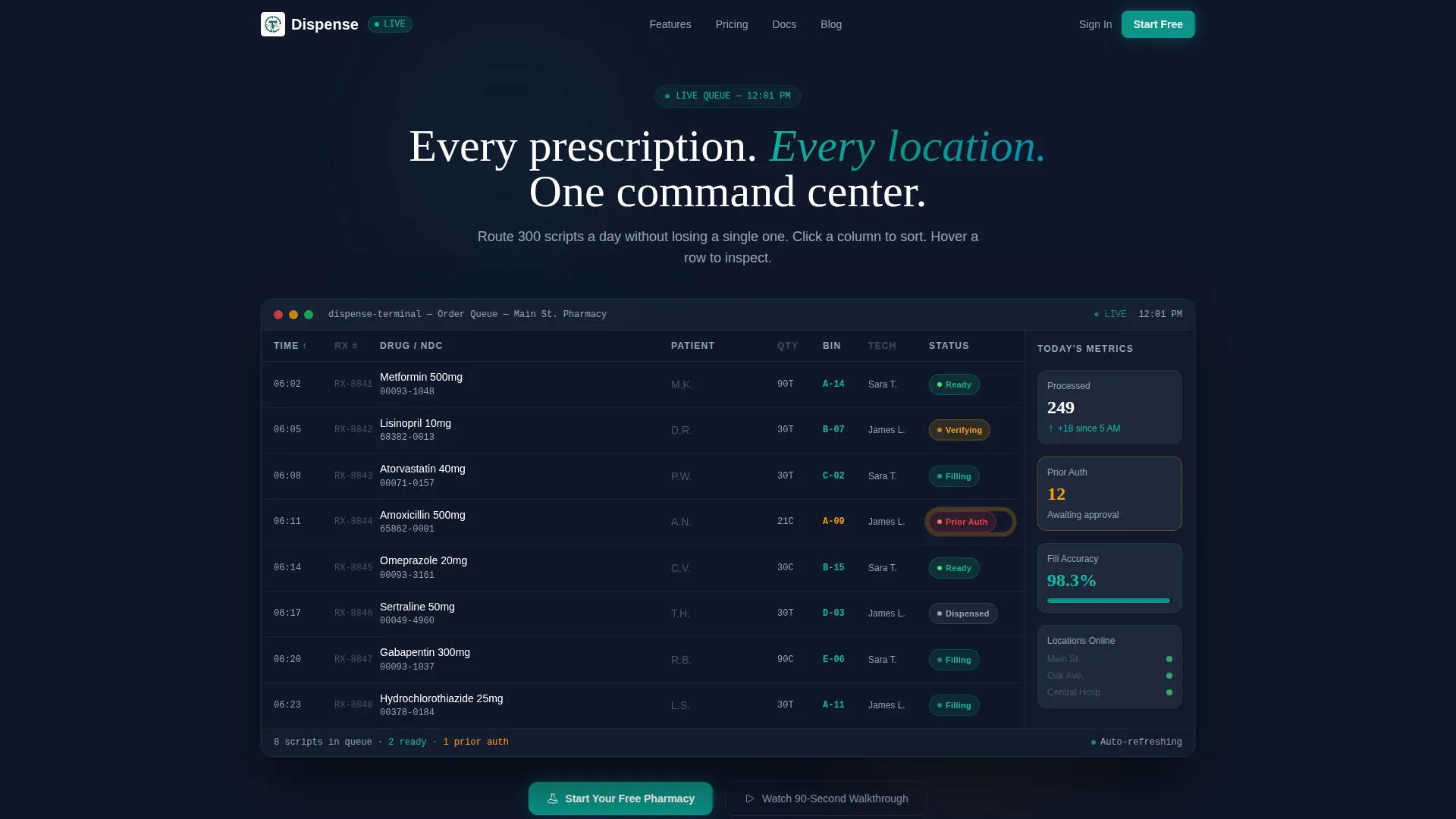
- An interactive dashboard header showing a live-feeling prescription queue with sortable columns, hoverable row detail cards, and a self-resolving prior-auth alert animation
- Three scroll-through spec modules covering order routing logic, multi-location inventory sync, and insurance adjudication with a claim timeline
- A freemium conversion section with a two-field sign-up form and a secondary video walkthrough path for visitors not yet ready to commit
Feature list
This template packages a set of purpose-built components that work together to establish platform credibility and drive trial sign-ups.
Live-Feeling Dashboard Header
The header renders a fully interactive dashboard viewport rather than a static screenshot. Prescription rows populate with patient initials and real drug names such as Metformin 500mg and Lisinopril 10mg. Fill status pills toggle between "Verifying" and "Ready." A sidebar shows today's metrics: 247 orders processed, 12 awaiting prior authorization, and 98.3% fill accuracy.
Sortable and Hoverable Data Grid
Visitors can click column headers to re-sort the order queue and hover individual rows to reveal expanded detail cards. This behavior demonstrates that the underlying platform handles real workflow logic, not just a visual display.
Order Routing Flowchart Module
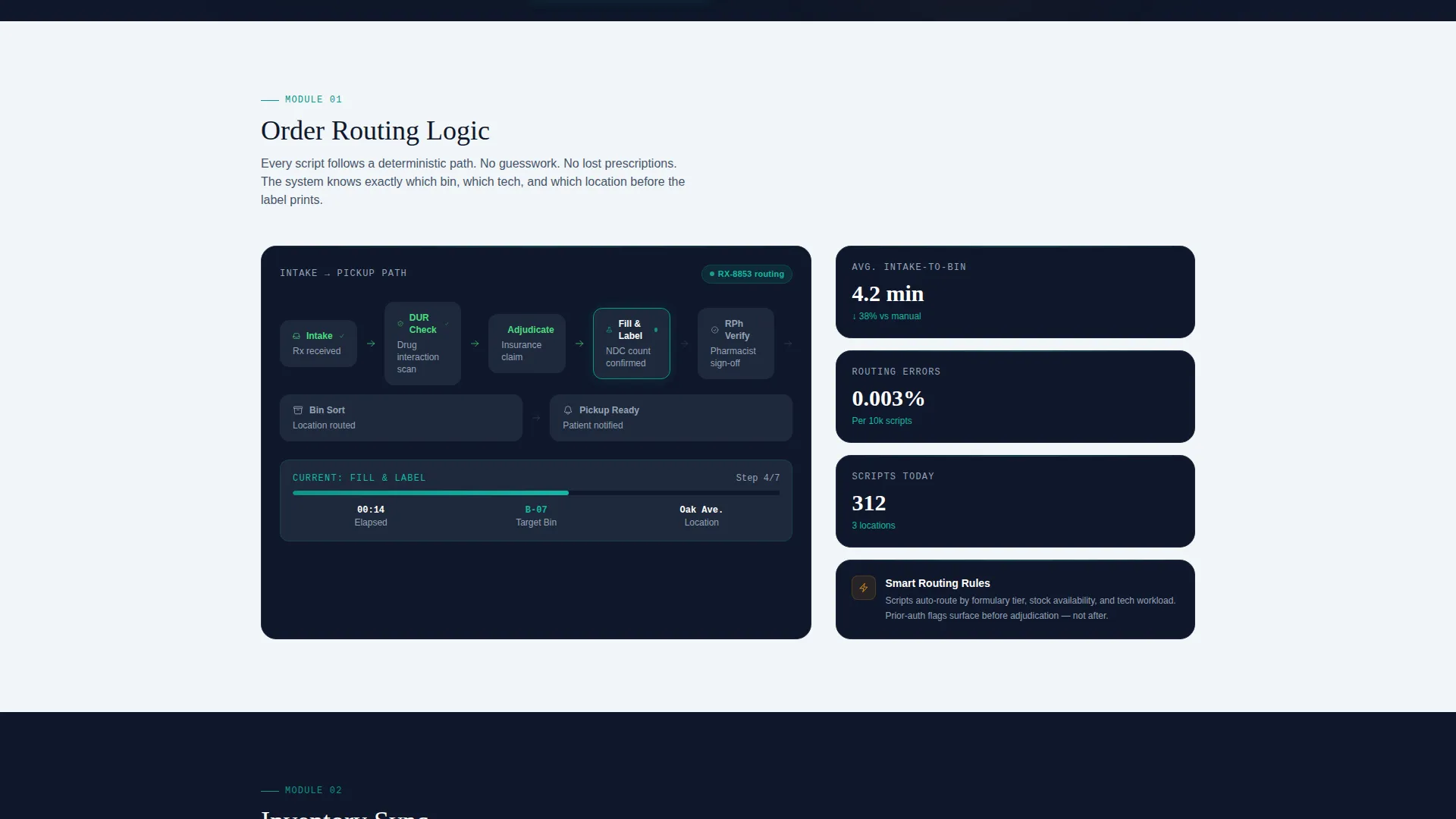
A dedicated scroll section isolates the order routing capability and presents it as a data-rich flowchart. It maps the full intake-to-bin path so visitors can see how prescriptions move through the system step by step.
Multi-Location Inventory Sync Module
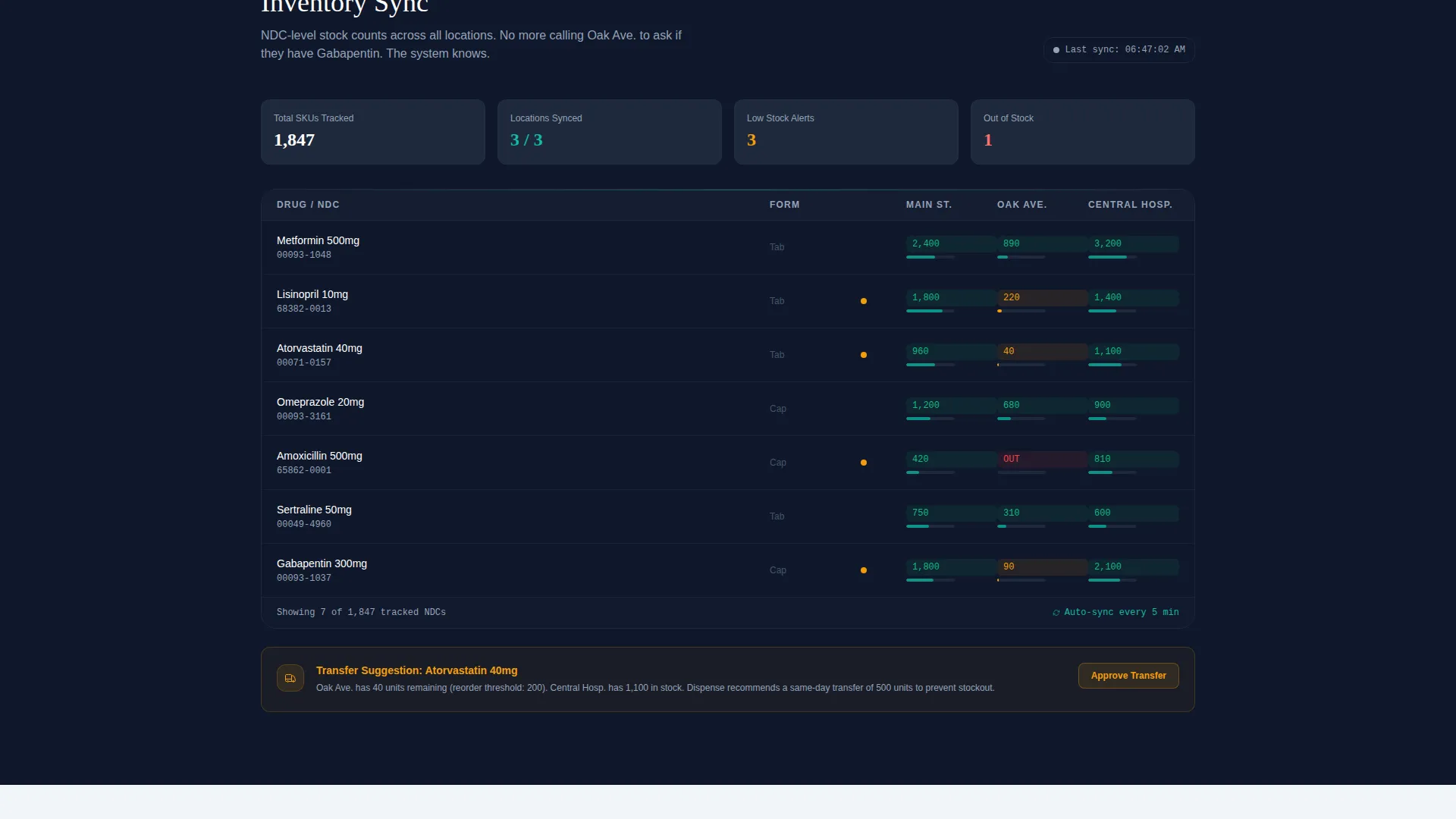
A second scroll section displays National Drug Code (NDC) level stock counts across three pharmacy locations simultaneously. This module builds confidence that the platform tracks inventory at the most granular level pharmacists actually care about.
Insurance Adjudication Timeline Module
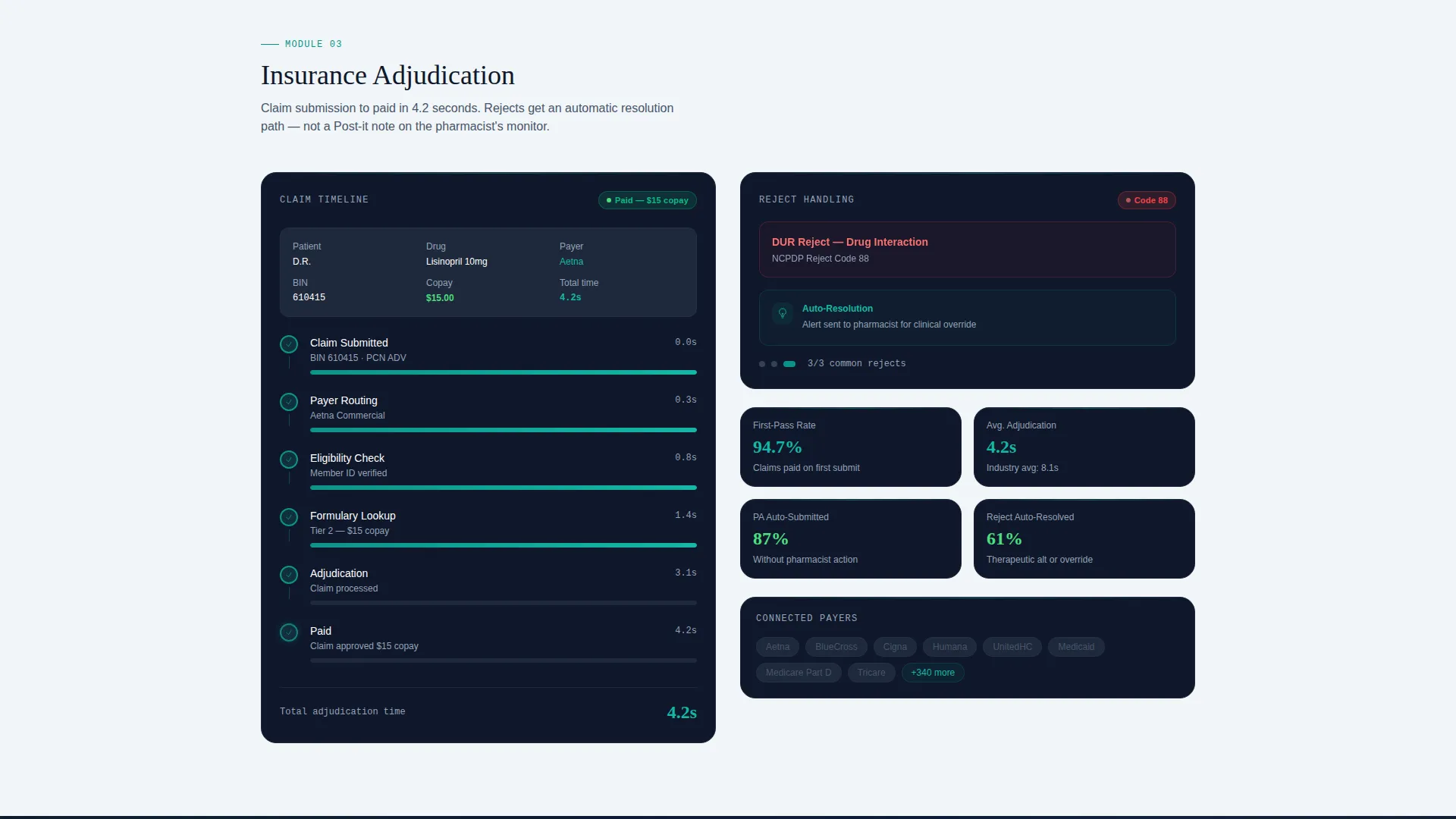
A third scroll section shows a claim moving from submission to paid status in 4.2 seconds. The visual timeline format makes a complex process legible without over-simplifying it.
Freemium Sign-Up with Sandbox Access
The conversion section uses a two-field form asking only for an email address and a pharmacy name. On submission, it deploys a sandbox environment pre-loaded with 50 sample prescriptions. A visitor can sort, filter, and route within 30 seconds of signing up.
Page sections overview
| Section | Purpose |
|---|---|
| Interactive Dashboard Header | Demonstrate live order queue behavior and key daily metrics |
| Order Routing Module | Show intake-to-bin prescription pathing with a flowchart |
| Inventory Sync Module | Display NDC-level stock counts across multiple locations |
| Insurance Adjudication Module | Visualize claim timeline from submission to paid status |
| Freemium Sign-Up Section | Capture email and pharmacy name; deploy pre-loaded sandbox |
| Secondary Video call to action | Offer a 90-second walkthrough for visitors not ready to sign up |
Design & branding system
The visual identity follows a Directory and Discovery theme built on the Teal Catalyst color system. The palette is designed to feel like a well-organized dispensing terminal at early morning: sterile, alert, and precise.
- Clinical teal (#0D9488) drives active states and progress indicators; deep pharmacy midnight (#0F172A) forms the data grid background; clean compounding white (#F8FAFC) surfaces card rows
- Catalyst amber (#F59E0B) fires on alerts, prior authorization flags, and overdue refill indicators to draw the eye exactly where attention is needed
Mobile & speed optimization
The template is structured to remain functional and readable on smaller screens. Data-heavy sections are designed to reflow without losing operational context.
- The dashboard header and data grid adapt to narrower viewports so column labels and status pills remain legible on mobile devices
- Module sections stack vertically on smaller screens, preserving the spec-sheet reading flow without requiring horizontal scrolling
How this template helps you convert
The conversion strategy in this template works because it removes doubt before it asks for commitment. Every design decision builds toward a confident sign-up.
- The interactive header demonstrates system competence immediately, so visitors arrive at the sign-up section already believing the platform works
- The two-field form and instant sandbox access eliminate the usual friction of long onboarding flows, letting a pharmacist explore real prescriptions within 30 seconds
Other information about this template
This template sits within the pharmacy software and pharmacy order management category, making it relevant for any platform targeting independent pharmacies, outpatient hospital departments, or multi-location chain operations.
- The template style is a Dashboard and Data Grid layout, which suits any software product that needs to show live operational data rather than describe it
- The creative direction is a Spec Sheet approach: each section proves a capability with real numbers rather than persuading with benefit language
- The theme follows a Directory and Discovery structure, which helps complex platforms guide visitors through dense information without overwhelming them
Theme
Directory & Discovery
Creative direction
Spec Sheet
Color system
Teal Catalyst
Style
Dashboard/Data Grid
Direction
Freemium/Trial
Page Sections
Live-feeling Interactive Dashboard Header
Sortable and Hoverable Data Grid
Order Routing Flowchart Module
Multi-location Inventory Sync Module
Insurance Adjudication Timeline Module
Two-field Freemium Sign-up with Sandbox
Related questions
Can I customize the drug names and metrics shown in the dashboard header?
Does the template include the sandbox functionality itself?
Is this template suitable for a multi-location pharmacy chain?
How does the prior authorization alert animation work in the header?
Can a non-technical pharmacy team member use this template to evaluate the platform?



