Live Kubernetes & Docker Training Landing Page Template
Dock is a split-screen landing page template built for live Kubernetes and Docker training platforms. It pairs a stats-driven metrics dashboard with an interactive terminal simulation to convert visiting engineers before asking for anything. The Monochrome Steel palette, Dynamic Motion animations, and freemium "Launch Free Lab" flow make it purpose-built for containerization training and certification products targeting hands-on developers.
by Rocket studio
Quick summary
Dock is a single-page template designed for containerization training platforms that teach engineers by doing. It uses a 50/50 split-screen layout, real terminal interactions, and a cold data-center visual identity to build trust with technical audiences instantly. The freemium conversion model lets visitors execute a real command before seeing a signup form, which earns the click rather than demanding it.
Who this template is for
This template is built for technical education products at the intersection of developer tools and professional certification. If you are launching or scaling a platform that teaches engineers to work confidently with containers, this template speaks their language from the first pixel.
- Mid-level backend developers actively pursuing their Certified Kubernetes Administrator (CKA) certification who need to practice in real environments, not click-through simulations
- DevOps engineers under pressure to lead a migration to microservices, who need a fast, credible way to evaluate whether your platform is worth their limited time
- Platform teams at growth-stage startups who inherited a tangled infrastructure and need to learn how to manage a kubernetes cluster, untangle multi-service docker compose stacks, and deploy with confidence before the next release
What problem this template solves
Most training landing pages describe what learners will do. Dock shows them. The gap between a content-heavy course page and a conversion-optimized technical product page is exactly what this template is designed to close. Engineers do not trust marketing copy; they trust data and working code.
- Generic course templates fail to communicate the hands-on, real-cluster nature of a platform where every lesson means running a command against live worker nodes, watching a deployment succeed or fail, and debugging from actual log output
- Visitors who are mid-migration or mid-certification do not have patience for long-form sales copy; they need to see proof of practical value in a few seconds or they leave
- A standard template cannot communicate the difference between a simulated environment and a live kubernetes cluster; Dock makes that difference visible in the hero section before the visitor scrolls
What you get with this template
Dock delivers a fully structured single-page layout with every section pre-built for a containerization training product. The design system is implemented with precision: color tokens, typography scale, and interaction states are all defined and consistent. You receive a deployable foundation, not a wireframe.
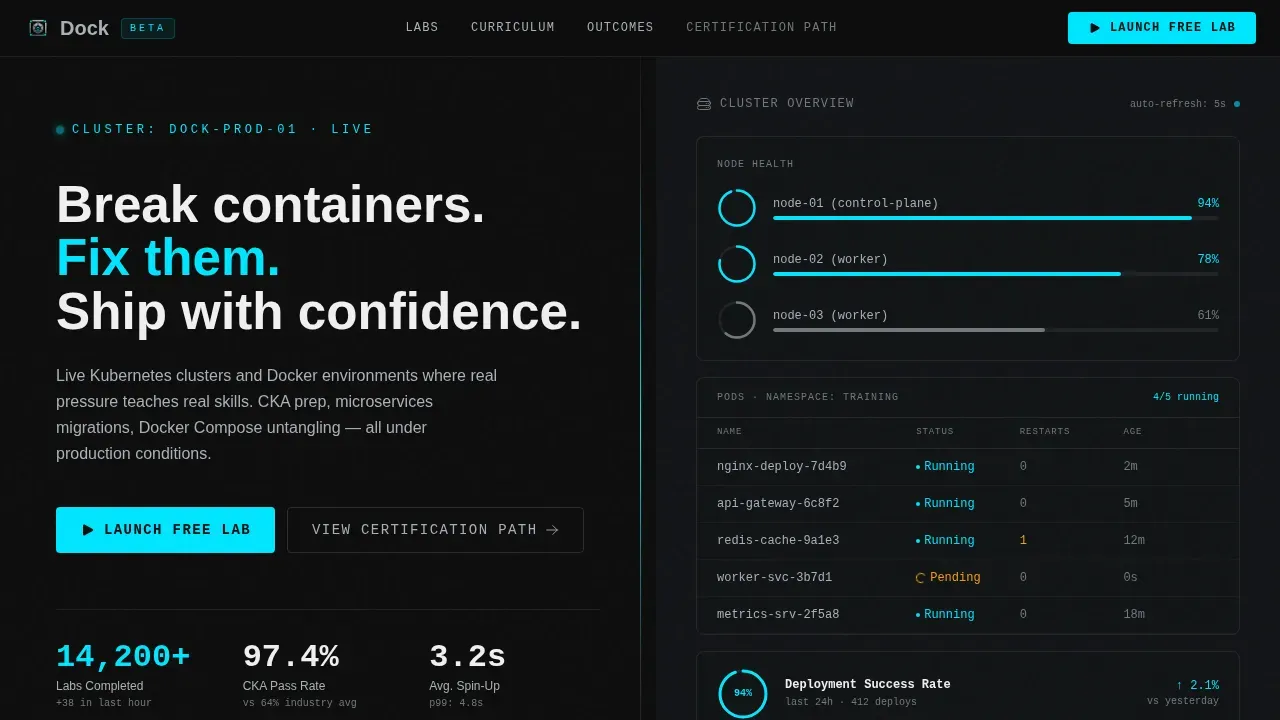
- A 50/50 split-screen hero that pairs a live-updating metrics dashboard on the left with a terminal simulation on the right, including dual call-to-action placement and oversized monospace stat counters
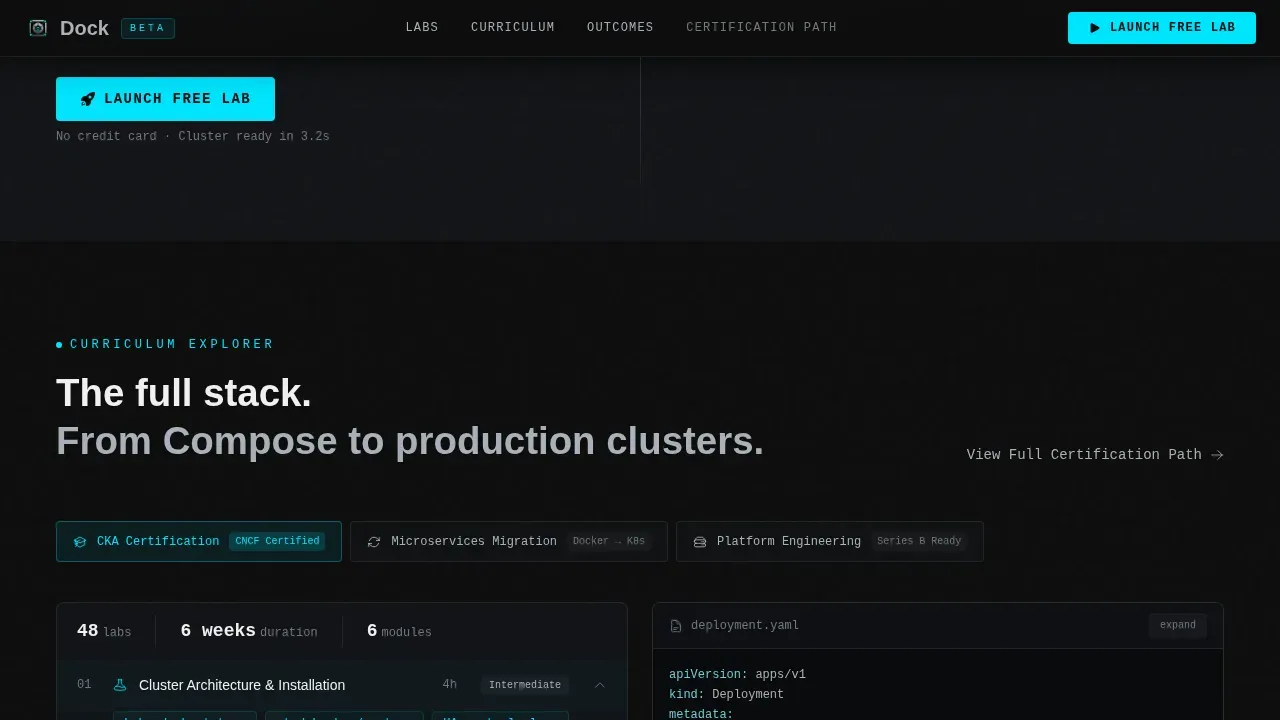
- An interactive curriculum explorer with draggable YAML blocks, toggleable configuration diff views, and a service mesh diagram that lights up path-by-path on hover, giving visitors a hands-on descent through the container stack
- A complete conversion section featuring a single-field email signup, GitHub and Google OAuth options, a sticky header call to action, and a secondary "View Full Certification Path" anchor link for visitors who need more context before committing
Feature list
Dock is built around five core design and interaction systems that work together to convert technical visitors into trial signups. Each feature reflects a specific decision about how engineers evaluate tools and training products.
Split-Screen Stats Dashboard Hero
The hero section divides the viewport into two equal panels. The left panel renders a live-updating cluster overview with pod counts, node health rings, and deployment success rate indicators. The right panel displays three oversized monospace numbers: labs completed, CKA pass rate, and average container spin-up time. The numbers are designed to feel as though they just ticked upward, creating immediate data credibility without a single word of marketing copy.
Interactive Terminal Curriculum Explorer
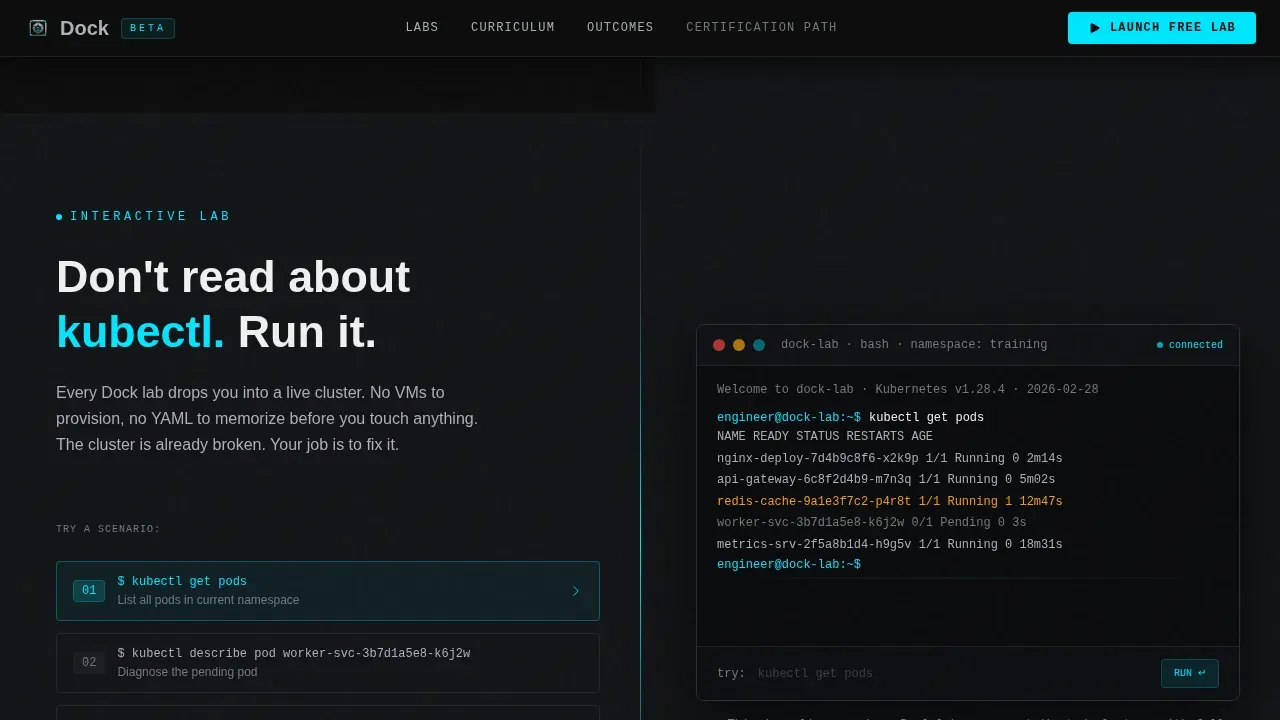
Below the hero, the left panel shows a simplified terminal where visitors can type a real command. The right panel animates the cluster response in real time. Each subsequent scroll section descends deeper into the container stack: networking, volumes, secrets, ingress. Visitors are not reading about the curriculum; they are touching it. This interaction converts curiosity into confidence before any signup prompt appears.
Draggable YAML and Config Diff Components
The curriculum explorer section includes draggable YAML blocks and toggleable configuration file diff views. These components let visitors manipulate actual kubernetes configuration files and see how a change to one container affects the broader deployment. This level of interactivity communicates practical depth and positions the platform as genuinely hands-on rather than video-based.
Service Mesh Hover Diagram
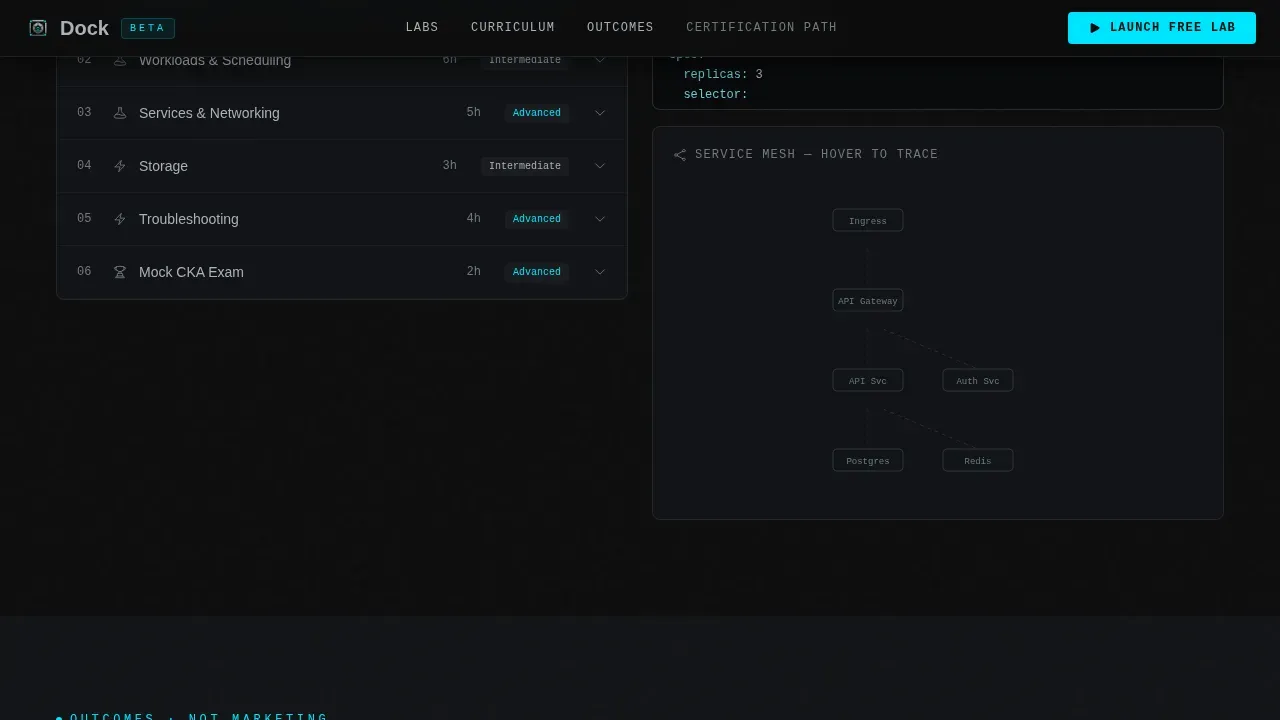
A dedicated service mesh diagram lights up path-by-path as visitors hover over each node. Traffic flows between the load balancer, api server, worker nodes, and individual pods become visible one connection at a time. This micro-interaction teaches while it markets, showing visitors exactly what kind of learning experience they are buying into.
Freemium Conversion Flow with OAuth
The primary call-to-action reads "Launch Free Lab" in cyan against terminal black. It appears in the sticky header and again at peak engagement after the interactive terminal section. Clicking opens a single-field form: work email only, with GitHub and Google OAuth flanking the input. A secondary path, "View Full Certification Path," anchors below the curriculum explorer for visitors who are browsing rather than ready to commit.
Monochrome Steel Design System
Every visual token in the template is defined: deep terminal black (#0D0D0D) and near-black (#121417) alternate as section backgrounds, brushed steel mid-gray (#71797E) handles secondary text, cold alloy highlight (#A8B0B8) handles body copy, and pure white (#F0F0F0) anchors headlines. The electric cyan (#00E5FF) fires only on interactive states, progress indicators, and call to action elements. JetBrains Mono handles all terminal and code typography; DM Sans handles interface and body text.
Page sections overview
| Section | Purpose |
|---|---|
| Sticky Header Bar | Holds the primary call to action and platform navigation without adding scroll friction |
| Hero Split Screen | Left panel shows cluster metrics dashboard; right panel renders terminal simulation with dual call to action |
| Interactive Terminal Explorer | Visitors type a real command and watch the animated cluster response unfold section by section |
| Curriculum Stack Descent | Layer-by-layer exploration of networking, volumes, secrets, and ingress through interactive components |
| YAML and Config Diffs | Draggable YAML blocks and toggleable configuration diffs demonstrate hands-on platform depth |
| Service Mesh Diagram | Hover-activated path diagram shows live traffic flow between cluster components |
| Social Proof Section | CKA pass rate stats, labs completed counter, engineer testimonials with roles and company names |
| Freemium Signup call to action | Single-field email form with GitHub and Google OAuth; "Launch Free Lab" primary action |
| Certification Path Anchor | Secondary call to action for visitors browsing the full curriculum before committing to a trial |
| Linear Footer | Single-row footer with minimal links to maintain single-action conversion focus |
Design & branding system
Dock uses a Monochrome Steel color system built to feel like the inside of a cold data center: precise, metallic, and quietly powerful. Every color decision is functional. Cyan only appears when something is interactive or alive. The typography stack separates terminal context from interface context with two distinct typefaces, each assigned a clear role.
- Color tokens: deep terminal black (#0D0D0D) and near-black (#121417) for backgrounds; brushed steel (#71797E) for secondary labels; cold alloy (#A8B0B8) for body text; pure white (#F0F0F0) for headlines; electric cyan (#00E5FF) exclusively for hover states, progress rings, call to action buttons, and completion indicators
- Typography: JetBrains Mono for all terminal output, command strings, code blocks, and metric counters; DM Sans for all interface labels, body paragraphs, and navigation elements
- Motion and theme: Dynamic Motion direction with high-fidelity animation including typing simulation, staggered section reveals, counter animations, hover path lighting, and per-component micro-interactions throughout the scroll
Mobile & speed optimization
Dock is designed desktop-first because its primary audience, engineers at workstations, will engage with the interactive terminal and mesh diagram on larger screens. The template includes a solid mobile fallback to ensure the conversion flow remains accessible on smaller viewports.
- Desktop-first layout: the 50/50 split-screen hero, multi-panel curriculum explorer, and hover-based mesh diagram are optimized for widescreen workstation viewing where engineers spend most of their time
- Mobile fallback: the split panels stack vertically on smaller screens, terminal interactions remain tappable, and the sticky call to action persists across all viewport sizes to maintain conversion continuity
- Rendering architecture: server components handle all static sections for fast initial paint; client components are scoped to the interactive terminal, YAML diff panels, and mesh diagram where real-time interaction is required
How this template helps you convert
Dock is built around one conversion principle: deliver real value before requesting anything. Every structural decision in the template, from the metrics hero to the terminal interaction to the single-field signup, is designed to lower resistance at each step of the visitor journey.
- The hero section earns attention immediately with live cluster data, a stats dashboard frozen mid-pulse, and an oversized metrics panel that communicates platform credibility in the language engineers trust: numbers, uptime, and pass rates
- The interactive terminal section creates an engagement peak where visitors have already executed a command, seen a response, and touched the product before the "Launch Free Lab" call to action appears, making the conversion feel like a natural next step rather than a cold ask
- The single-field signup with GitHub and Google OAuth removes every friction point from the trial start, and the secondary "View Full Certification Path" anchor gives non-ready visitors a lower-commitment path that keeps them in the funnel
Other information about this template
Dock is a purpose-built template for the containerization training niche, and its depth of interaction reflects the expectations of a technical audience that builds and operates real systems every day. The following details cover additional context about the template's scope, flexibility, and relevant technical ecosystem.
- The template is named after the Dock training platform concept, and the page content is structured to support the full dock live kubernetes containerization training landing page template use case out of the box
- Engineers who visit a platform like this are already familiar with docker and kubernetes at a working level; they have used docker compose locally, run a single container with a docker run command via the docker cli, pulled docker images from docker hub, and managed a docker desktop environment on their operating system before arriving at a course page
- The metrics shown in the hero section, including CKA pass rate and container spin-up time, are placeholder values designed to be replaced with real platform data; the component architecture supports live counter animations that update figures as the page loads
- The curriculum explorer is structured to cover the full kubernetes learning arc: from running one container locally to managing multiple containers across worker nodes, configuring environment variable injection, setting up a load balancer, enabling service discovery, managing data storage with persistent volumes, and using cert manager for ingress TLS
- The template supports content covering advanced features such as kubernetes deployments with rolling updates, resource management policies, the api server and control plane architecture, and the relationship between the kubernetes master and its worker nodes
- Visitors coming from a blog post, a github repository link, or a google cloud tutorial will land in a context they immediately recognize: a terminal, a cluster, and a command prompt waiting for input
- The service mesh diagram is designed to show how traffic moves from the outside world through a load balancer, into the api server, down to the control plane, and out to individual pods on worker nodes
- The social proof section is structured to display named engineers with their roles and company names, specific certification outcomes, and labs completed counters, all of which function as trust signals for visitors evaluating the platform
- The freemium signup section is intentionally minimal: one field, two OAuth buttons, no password, no credit card, consistent with best practices for reducing conversion friction on technical training products
- Pricing transparency, instructor authority, and a clear certification path are all accommodated within the template's existing section structure; additional content blocks can be added within the curriculum and social proof sections without breaking the layout
- Teams migrating from docker swarm or untangling a legacy docker compose stack will find the curriculum section framing directly relevant to their current situation
- The download docker desktop prompt and the docker run command examples used in the interactive terminal section provide a natural entry point for learners who are just beginning to download docker desktop and run containers locally for the first time
- The container registry workflow, including how to tag a container image, push it to docker hub, and pull the latest version into a kubernetes cluster, is part of the curriculum arc the template is designed to support
- The template's source code architecture separates static and interactive rendering clearly, making it straightforward to connect a real container orchestration backend or replace placeholder data with live api calls
- For platform teams building or deploying web applications across a kubernetes cluster, the template communicates the full deployment pipeline: from writing yaml files and running kubectl apply f to watching pods spin up on worker nodes in a few seconds
- The personal applications use case is also accommodated; individual learners building and deploying personal applications to practice on a cloud provider such as google cloud will find the curriculum path framing relevant to their goals
- The open source system framing of kubernetes is surfaced in the curriculum section to help visitors understand that the skills they are learning transfer across any cloud provider or data center environment
- A 30-day money-back guarantee or similar risk-reduction element can be added to the conversion section without structural changes, which reduces perceived risk for potential students evaluating the platform
- Clear session scheduling information, including timezone details for any live labs, can be added to the curriculum section to support enrollment decisions for time-pressured learners
Theme
Dynamic Motion
Creative direction
Interactive Explorer
Color system
Monochrome Steel
Style
Split Screen (50/50)
Direction
Freemium/Trial
Page Sections
Split-screen Metrics Dashboard Hero
Interactive Terminal Curriculum Explorer
Draggable YAML and Config Diff Components
Service Mesh Hover Path Diagram
Freemium Signup with Oauth Conversion Flow
Monochrome Steel Design and Motion System
Related questions
What kind of platform is this template designed for?
Can I replace the placeholder metrics with real platform data?
Does the interactive terminal work as a real command interface?
Is this template suitable if my audience is just starting with containers?
What conversion model does this template support?



