Law Firm Donor Management Landing Page Template
Docket is a hub-and-spoke landing page template built for law firm philanthropy platforms. It presents a spec-sheet layout with a dashboard preview hero, anchor navigation, pledge-tracking panels, reporting mockups, and a demo-download call to action. Every section is designed to help donors, development directors, and CSR teams see exactly how their gift data lives in one place.
by Rocket studio
Quick summary
Docket is a single-page, anchor-nav landing page template built for a law firm donor management platform. It opens with a cinematic dashboard preview, moves through spec-level content panels, and closes with a download call to action. The page gives every visitor a clear picture of how pledge data, campaign progress, and compliance reporting form one organized command center.
Who this template is for
This landing page speaks directly to the people managing legal philanthropy at scale. It is built for procurement committees and operations teams who need evidence before they commit to a platform download.
- Managing partners and CSR coordinators at AmLaw 200 firms who must prove community impact before an annual report deadline
- Development directors at legal nonprofit organizations chasing pledge fulfillment from dozens of firm contacts
- Legal technology buyers who need spec-level detail to evaluate a platform before routing it to committee review
What problem this template solves
Law firm philanthropy runs on scattered spreadsheets, forgotten pledges, and siloed campaign data. A donation landing page for this audience has to do more than appeal to goodwill. It has to earn trust from people who review contracts for a living.
- Pledge data, volunteer hours, and campaign thermometers live in separate tools with no unified view
- Donors and firm contacts fall through gaps when no single system tracks payment schedules, matching gift eligibility, or restricted designations
- Compliance teams cannot quickly produce FASB or IRS substantiation records without manual assembly
What you get with this template
This page template gives you a complete, section-led layout ready to customize for a legal technology platform. Every section is self-contained and scannable in under fifteen seconds.
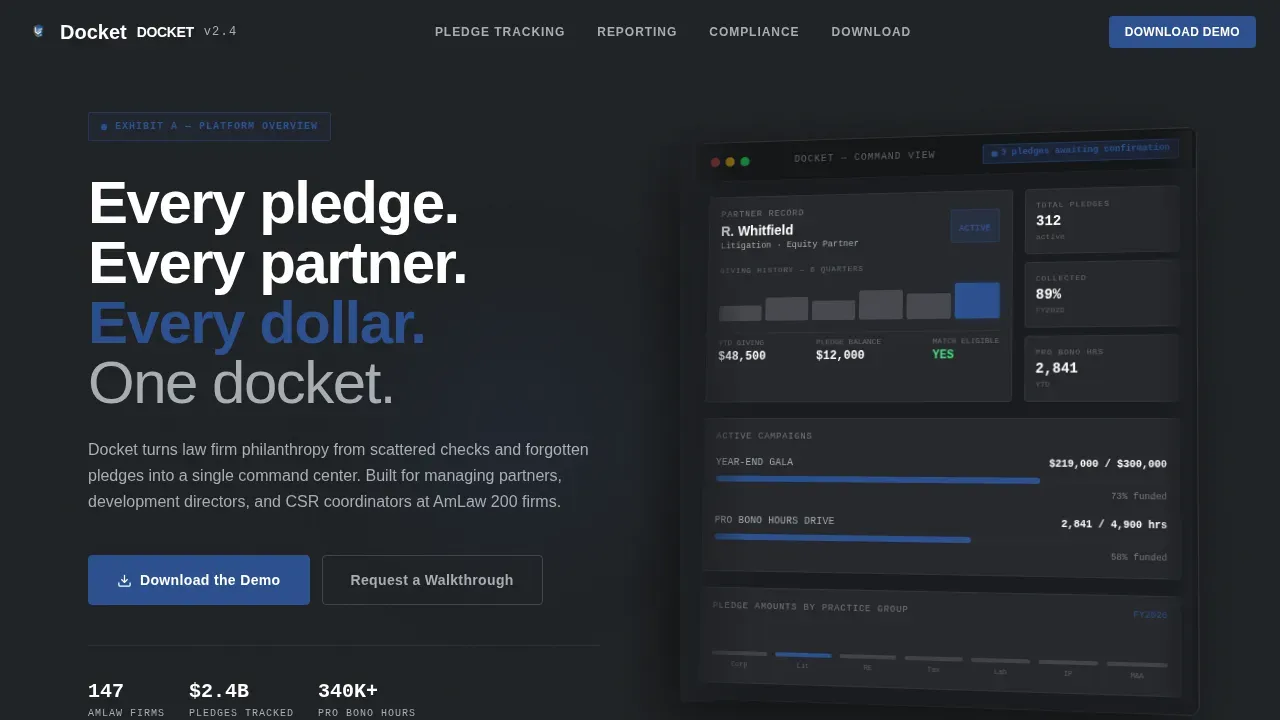
- A hero section with a three-quarter-angle dashboard screenshot, a fade-in headline, and a live metrics strip showing pledge pipeline data
- Spec-sheet content panels for pledge tracking, reporting, and compliance, each formatted to satisfy a procurement audience
- A download call to action with platform toggles, a work-email form field, and firm-name autocomplete for AmLaw contacts
Feature list
This landing page template ships with purpose-built sections that reflect real law firm donor management workflows. Each feature below maps directly to a section or component in the template.
Dashboard Preview Hero
The hero places a pixel-accurate platform screenshot at three-quarter angle on a dark gunmetal field. A headline fades in above the dashboard. A floating metrics strip shows live-style figures: pledge amounts by practice group, a giving history timeline, campaign thermometers, and a notification badge for pending pledge confirmations. This gives visitors an immediate sense of their workflow inside the product before they read a single line of body copy.
Anchor Navigation System
A persistent anchor nav lets viewers jump directly to any spoke section without scrolling through content that does not apply to them. Each nav item links to a labeled panel: Pledge Tracking, Reporting and Compliance, Social Proof, and the Download call to action. This hub-and-spoke structure helps procurement teams navigate the page efficiently and return to specific sections during committee review.
Pledge Tracking Spec Panel
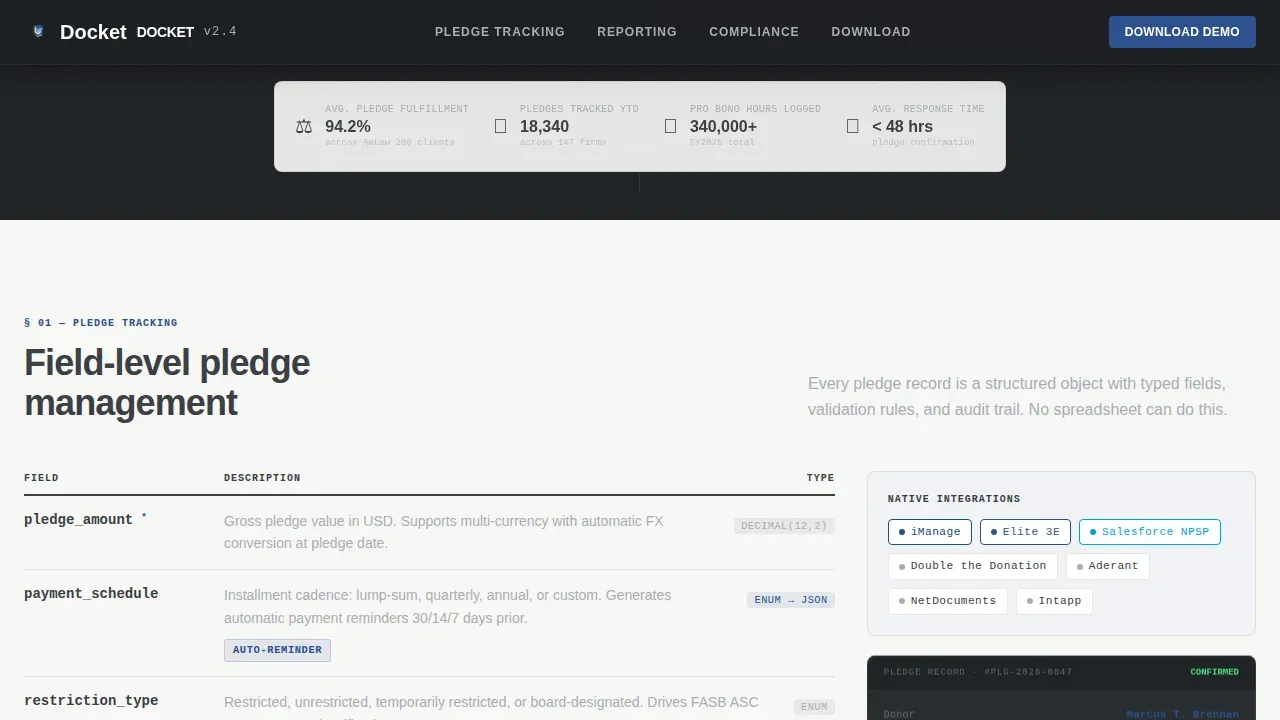
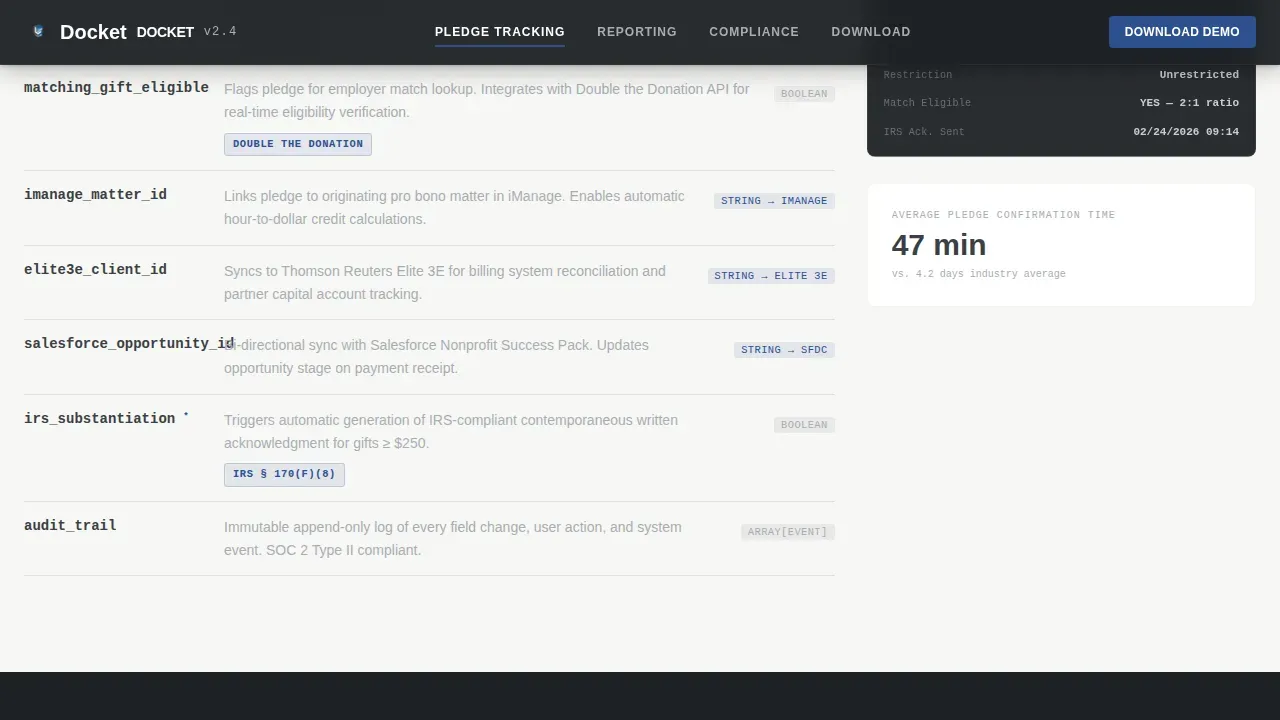
The pledge tracking section reads like a technical data sheet. It displays field-level detail: pledge amount, payment schedule, restricted or unrestricted designation, and matching gift eligibility. Integration badges appear alongside each data type to show how the platform connects with legal practice management and billing systems. This form of presentation helps clients evaluate the platform the same way they would review a vendor proposal.
Reporting and Compliance Panel
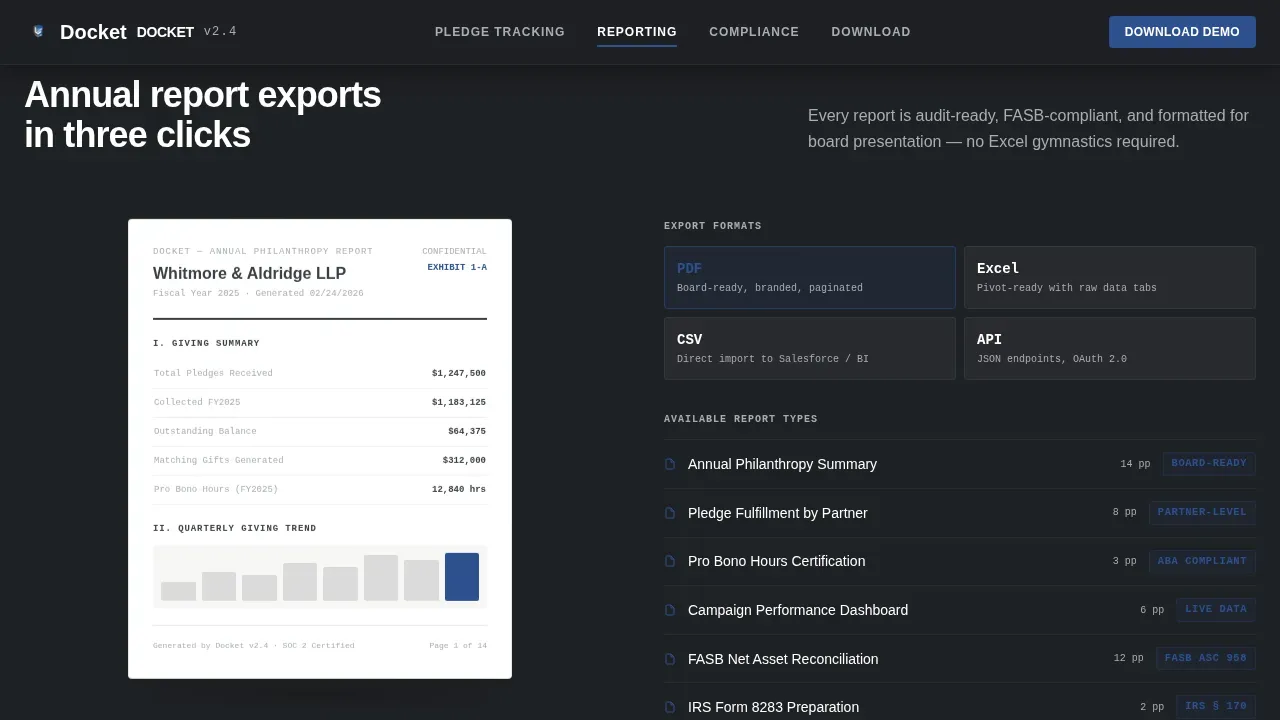
This section displays an exported PDF preview mockup alongside a list of compliance rules the platform automates. It covers FASB and IRS substantiation requirements relevant to firm-level charitable giving. The layout signals that the platform handles the compliance process so the team does not have to build it manually from raw donation data.
Download Call to Action
The call to action section presents a primary "Download the Demo" message with platform toggle buttons for iOS, Android, and Desktop. Below the toggles, a single work-email form field and a firm-name autocomplete field recognize AmLaw firm names by default. A secondary path offers a "Request a Walkthrough" option for committees that need a live demo before committing to an install.
Social Proof Section
The proof section displays firm-level statistics: total pledges tracked, volunteer hours logged, and campaign dollars managed. A named testimonial from a development director adds a human voice to the data. Real people and real figures give the page credibility that generic platform copy cannot provide.
Page sections overview
| Section | Purpose |
|---|---|
| Hero Dashboard Preview | Opens with a platform screenshot, fade-in headline, and live metrics strip |
| Pledge Tracking Panel | Spec-sheet layout showing field-level pledge data and integration badges |
| Reporting Compliance Panel | PDF export mockup with automated FASB and IRS compliance list |
| Social Proof Section | Firm-level statistics, testimonials, and a named development director quote |
| Download Call to Action | Platform toggles, work-email form, firm autocomplete, and walkthrough request |
| Footer | Horizontal flow footer with logo, links, and contact information |
Design & branding system
The visual identity follows a Directory and Discovery theme built on a Monochrome Steel color system. The palette signals precision and authority without decoration.
- Gunmetal base (#3B3F45) and legal-pad white (#F7F7F5) form the alternating background system, with high-contrast text pairings throughout
- Brushed aluminum (#A8ADB3) appears in secondary labels and data fields rendered in IBM Plex Mono, while judicial blue (#2E5090) is reserved exclusively for interactive elements, active nav states, and call to action buttons
- Plus Jakarta Sans handles headings in bold and semibold weights; icons, badges, and data labels use monospaced styling to reinforce the spec-sheet creative direction
Mobile & speed optimization
Over 60% of searches happen on mobile, and half of all nonprofit website visits come from users on mobile devices. This page is built desktop-first for procurement committee use cases and fully supports mobile devices without sacrificing layout fidelity.
- Trust indicators, including security badges and social proof statistics, are positioned adjacent to the payment fields and download form so donors can review them at the moment of decision
- The donation form and platform toggle buttons adapt cleanly across screen sizes, and calls to action describe the outcome of the action rather than relying on generic button copy
- Testing the page on both desktop and mobile devices before launch helps teams identify any layout breaks before real visitors arrive
How this template helps you convert
A donation landing page for a legal audience must earn the download before it asks for it. This template uses front-loaded credibility and spec-level detail to move procurement committees toward action.
- The dashboard preview hero converts passive viewers into engaged prospects by showing the actual platform interface above the fold, so the audience understands the product before reading a single marketing message
- Each anchor-nav spoke section delivers scannable, specific content that helps the team write an internal recommendation, choose a deployment path, and justify the decision to leadership without scheduling an additional meeting
- The download call to action places the form and trust signals on the same visual plane, so every dollar commitment and every gift designation feels supported by evidence rather than by appeal alone
Other information about this template
This template is designed to support law firm clients and nonprofit organizations that need to create a professional donation landing page without rebuilding their website. It fits teams that want to launch quickly and customize the experience around their own logo, photos, and mission copy.
- The layout can accommodate videos, event announcements, and campaign updates in the social proof section to keep supporters engaged across giving seasons
- Foundations and legal aid organizations can adapt the page to collect tax-deductible gifts, set default donation amounts, and send automated thank-you messages that donors receive immediately after completing the donation form
- The Docket law firm donor management command center landing page template is suited to teams that want to save setup time, engage paid and organic audiences equally, and highlight their organization's impact with real data rather than generic nonprofit copy
Theme
Directory & Discovery
Creative direction
Spec Sheet
Color system
Monochrome Steel
Style
Hub & Spoke (Anchor Nav)
Direction
App Download
Page Sections
Dashboard Preview Hero Section
Persistent Anchor Navigation
Pledge Tracking Spec Panel
Reporting and Compliance Panel
Demo Download Call to Action
Social Proof and Statistics Section
Related questions
Can this template support recurring donation options?
Do I need coding experience to set up this landing page?
Can development directors at nonprofit organizations use this template?
How does the page build trust with a procurement committee?
Can this template be adapted for a pro bono program page?



