Docket - Seamless Government Landing Page Template
Docket is a scroll-reveal government booking landing page built for municipalities that need to replace phone trees and paper logs with a clean, three-click scheduling flow. It pairs a Dashboard Pro theme with an AI Iridescent color system to deliver a futuristic yet authoritative interface that lets visitors experience the product before they ever commit to a demo.
by Rocket studio
Quick summary
Docket is a single-page, scroll-reveal landing page template for government scheduling software. It guides visitors through an interactive booking widget, a live-data dashboard reveal, and a dual-view toggle before routing them to a demo. The design uses void black, holographic violet, and spectral teal to project calm authority and modern clarity.
Who this template is for
This template is built for teams that sell or deploy scheduling software inside local government environments. If your audience spends their day managing appointment chaos rather than serving constituents, this page speaks their language directly.
- County clerks managing high volumes of permit, inspection, and hearing requests
- IT directors at mid-size municipalities replacing legacy calendar systems
- Department heads who need to justify a scheduling upgrade to budget-holders
What problem this template solves
Government offices still rely on phone trees, callback slips, and walk-in paper logs to manage public appointments. The result is wasted staff hours, missed bookings, and frustrated citizens. This template gives you a landing page that immediately demonstrates a better way.
- No clear product story means visitors leave before they understand the value
- Generic SaaS templates do not convey the trust and authority government buyers expect
- Budget-holders need proof of return on investment before they approve any software purchase
What you get with this template
You get a fully designed, scroll-reveal landing page built around the Docket scheduling concept. Every section is sequenced to build credibility progressively, turning passive scrolling into active product exploration.
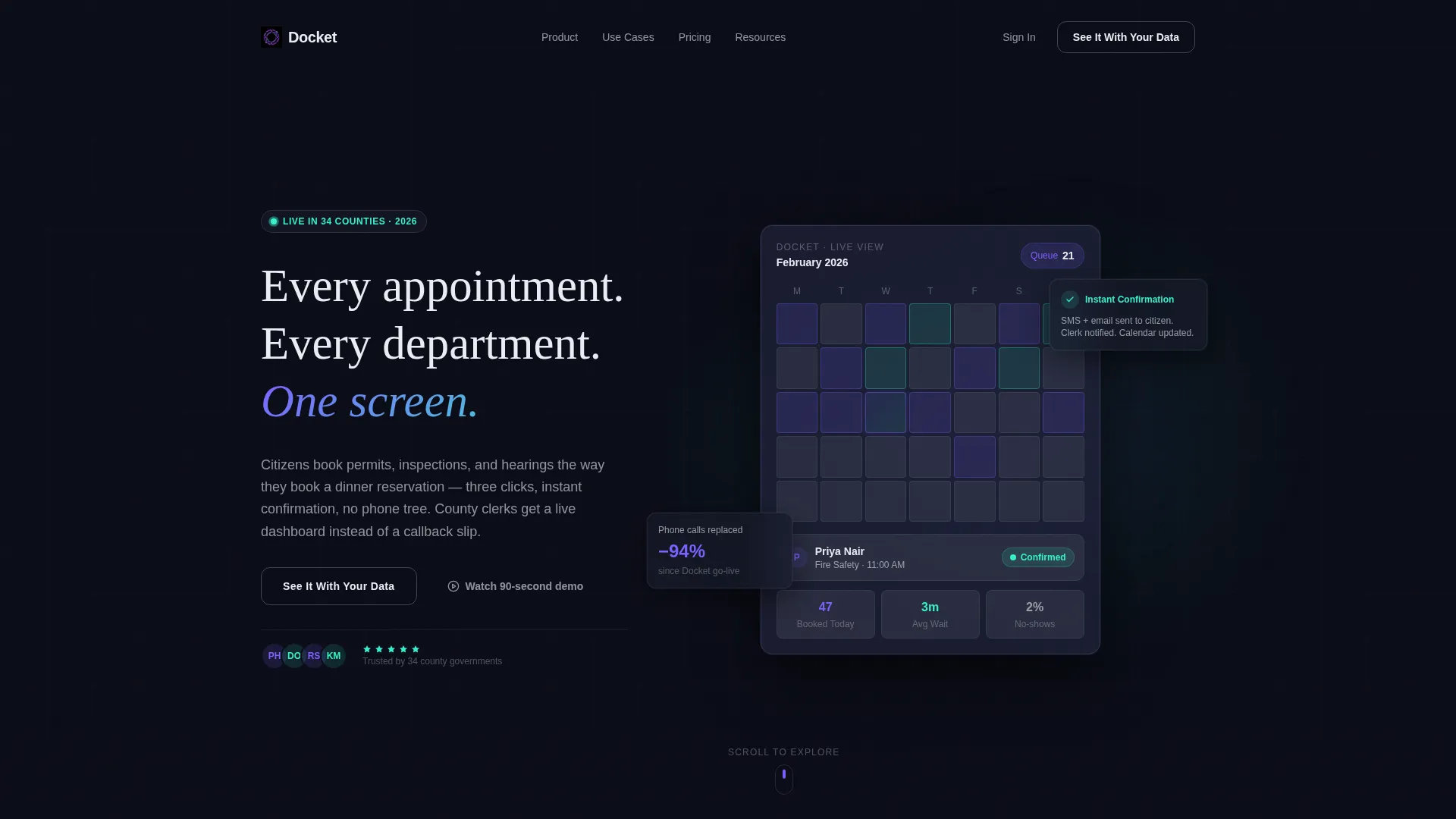
- A dark full-bleed header with an animated isometric booking dashboard and live micro-animations
- An interactive booking widget, a stat-driven dashboard reveal, and a Citizen versus. Admin view toggle
- A dual call-to-action structure with a primary demo button and a persistent secondary resource link
Feature list
The template delivers six purpose-built feature areas that work together to build visitor confidence and drive action.
Animated Hero Dashboard
The header fills edge to edge in void black (#0B0D17). A single isometric booking dashboard glows at center frame, radiating a violet-to-teal gradient halo. Real-time micro-animations show a citizen's name populating a time slot, a teal confirmation badge pulsing, and a queue counter ticking down. The headline materializes in signal white after a two-second delay.
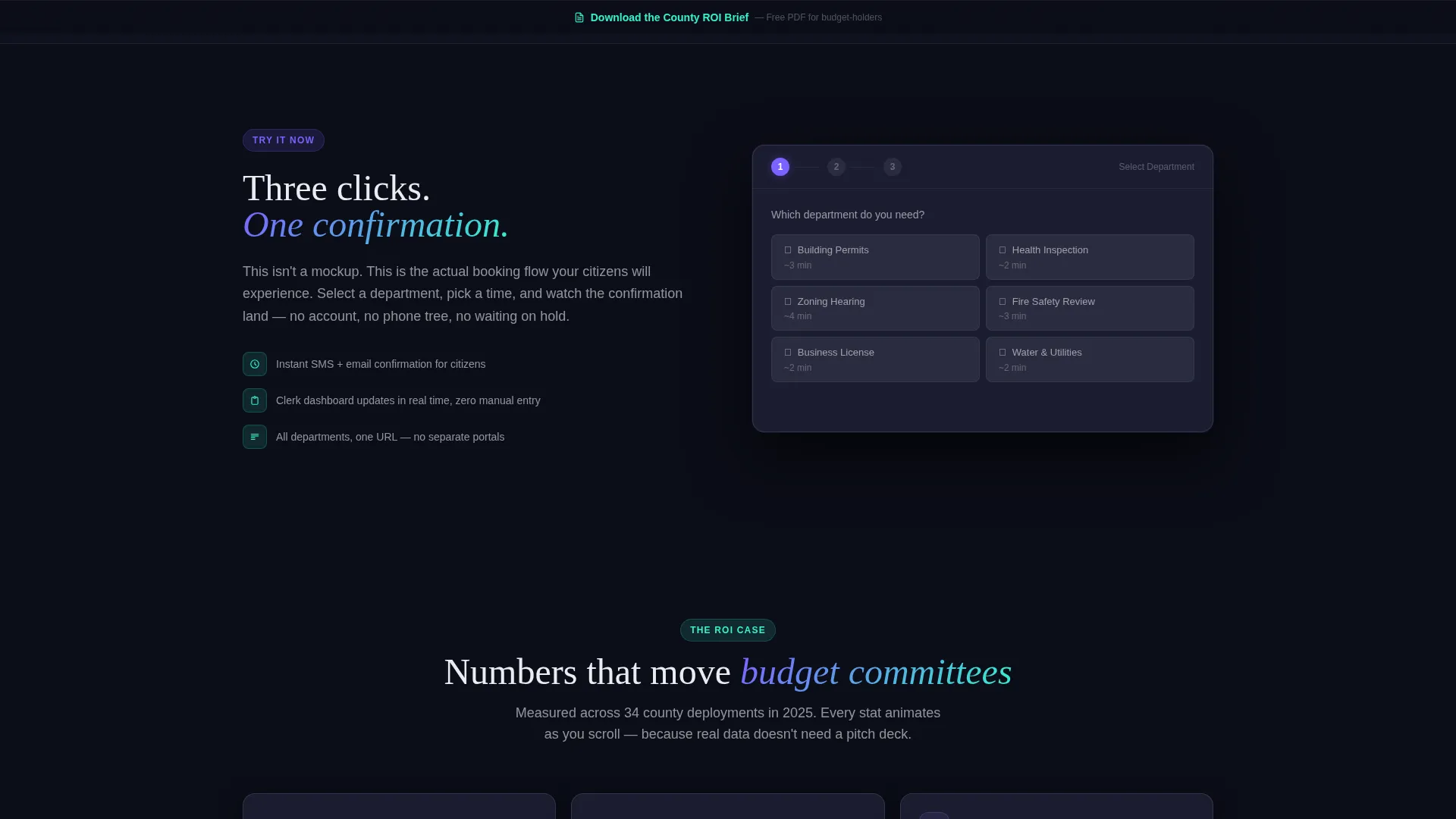
Interactive Booking Widget
Section one surfaces a simplified, tappable booking flow. Visitors can select a department, pick a date, and confirm the appointment in three steps. The interaction is designed to create muscle memory before the visitor ever reads a feature claim.
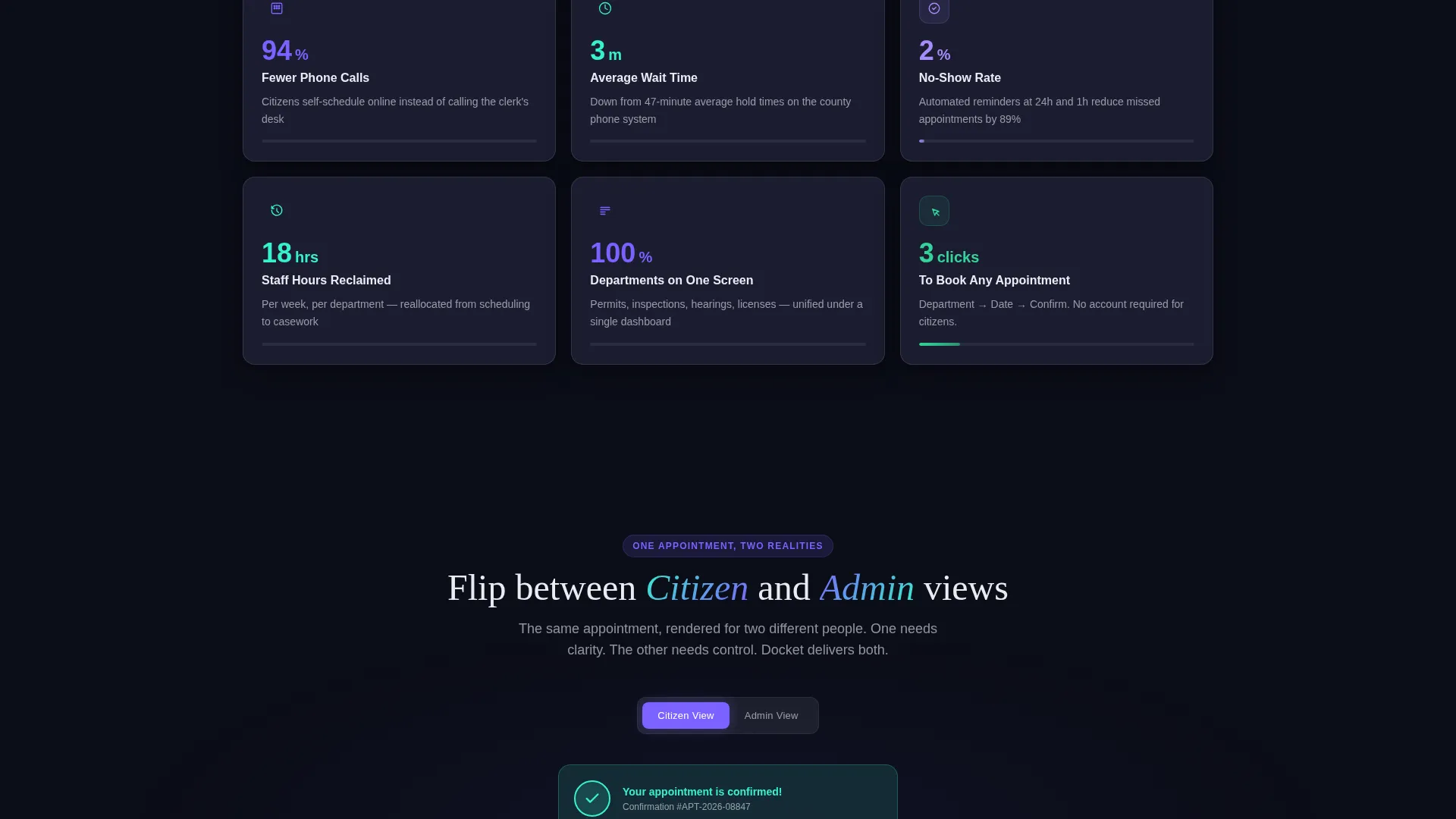
Progressive Stats Dashboard
Section two unveils data cards one by one as they enter the viewport. Each card animates from zero to its target number, showing metrics such as no-show rates dropping, average wait times shrinking, and staff hours reclaimed. The reveal is paced to match the scroll cadence.
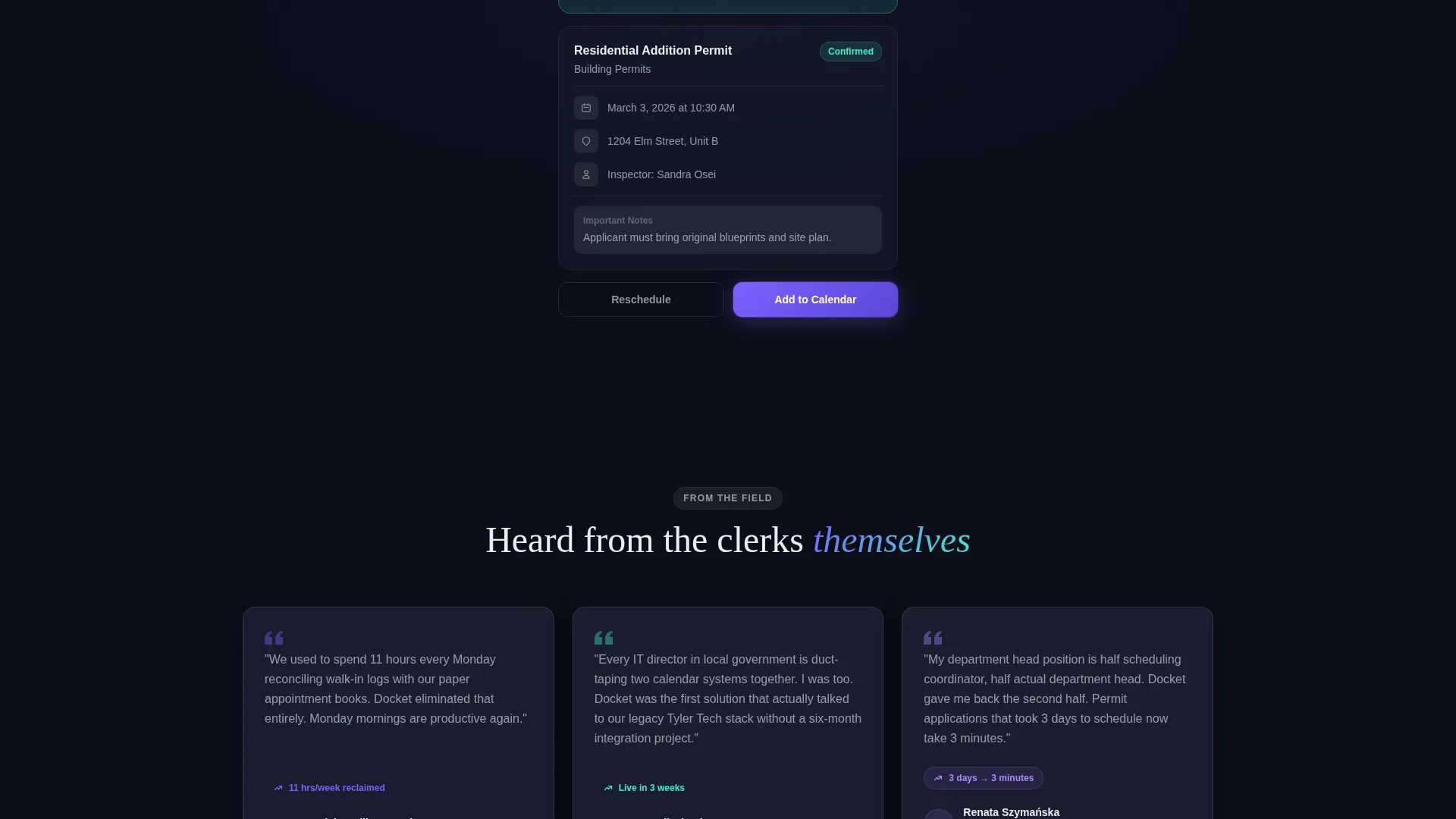
Dual-View Toggle Panel
Section three presents a single appointment record through two lenses. Visitors flip between the Citizen View and the Admin View to see how the same booking looks on each side of the counter. This comparison removes abstract feature claims and replaces them with direct experience.
Scroll-Reveal Progressive Disclosure
Every section earns the next reveal. Content fades, slides, or pulses into view only when the visitor scrolls to it. This structure keeps attention focused and builds a cumulative case without overwhelming the reader on arrival.
Two-Stage Call-to-Action System
The primary call to action, "See It With Your Data," starts as a ghost button in the header and solidifies into a glowing violet button after the interactive widget section. A secondary call to action, "Download the County ROI Brief," floats as a persistent teal text link in the bottom rail for budget-holders who need documentation before a demo.
Page sections overview
| Section | Purpose |
|---|---|
| Dark hero header | Introduces product with animated dashboard and headline |
| Interactive booking widget | Lets visitors complete a three-step booking flow |
| Live stats dashboard | Reveals animated metrics cards on scroll entry |
| Citizen versus. Admin toggle | Shows both user perspectives on one appointment |
| Primary call to action block | Converts engaged visitors to demo sign-ups |
| Persistent bottom rail | Keeps secondary ROI resource link always visible |
Design & branding system
The template uses the AI Iridescent color system layered over a Dashboard Pro theme. The palette is built to feel authoritative and forward-looking without relying on stock photography or decorative illustration.
- Void black (#0B0D17) forms the full-bleed background, making user interface cards appear to float above the surface
- Holographic violet (#7B61FF) marks primary actions, active states, and the solidified demo button
- Spectral teal (#36F1CD) pulses on confirmation badges, success indicators, and the persistent secondary link; signal white (#EAEDF3) is used for body text and labels
Mobile & speed optimization
The scroll-reveal structure and interactive components are designed to feel just as intentional on a phone screen as on a wide monitor. Touch targets and swipe-friendly interactions are considered throughout the layout.
- The booking widget tap flow is optimized for thumb-reach on standard mobile viewports
- Cards in the stats dashboard stack vertically on smaller screens, preserving the one-by-one reveal cadence
- The persistent bottom rail remains accessible on mobile so the secondary call to action is never buried
How this template helps you convert
The page is structured as a click-through funnel that earns commitment by letting visitors operate the product first.
- The interactive widget in section one turns passive interest into a hands-on micro-experience, building confidence before any claim is made in copy.
- The progressive stats reveal in section two gives budget-holders concrete numbers to hold onto, reducing the friction between curiosity and a demo request.
- The two-stage call-to-action system captures both high-intent visitors ready for a demo and cautious buyers who need a PDF first, covering the full decision spectrum in a single page.
Other information about this template
This template is categorized under Technology, Government Software and Software as a Service (SaaS), and the Government Booking Software niche. It is designed as a single-page scroll-reveal layout, meaning all content lives in one continuous flow rather than across multiple pages.
- Template style: Scroll Reveal (Progressive); theme: Dashboard Pro; color system: AI Iridescent
- Creative direction: Interactive Explorer; header concept: Dark Full-Bleed with Glow effect
- Landing page direction: Click-Through funnel routing to a personalized demo environment
- The no-stock-photography rule keeps the design focused entirely on the product interface
Theme
Dashboard Pro
Creative direction
Interactive Explorer
Color system
AI Iridescent
Style
Scroll Reveal (Progressive)
Direction
Click-Through
Page Sections
Animated Isometric Hero Dashboard
Three-step Interactive Booking Widget
Scroll-triggered Stats Dashboard
Citizen and Admin View Toggle
Two-stage Call-to-action System
Progressive Scroll-reveal Layout
Related questions
Who is the ideal audience for this landing page template?
Can visitors actually interact with the booking flow on the page?
What are the two calls to action included in this template?
Does the template use stock photography or illustration?
How does the Citizen View and Admin View toggle work?



