Automotive Digital Presence Professional Website Template
Torque is a hub-and-spoke automotive job board landing page built for technicians, service advisors, and parts professionals. It uses a dark Dashboard Pro aesthetic with diagnostic amber call-to-action highlights, a terminal-style animated header, and spec-sheet content sections that surface salary data, certification filters, and shop profiles to drive visitors straight to live job search results.
by Rocket studio
Quick summary
Torque is a single-page automotive job board landing page with a persistent anchor navigation system. It speaks directly to flat-rate technicians, service advisors, and parts counter professionals while giving dealership managers and independent shop owners a clear path to post openings. Every section is built to move visitors toward one destination: the live job search results page.
Who this template is for
This template is designed for operators building an automotive-specific job board or talent marketplace. It fits equally well for niche job platforms and regional automotive staffing services.
- Flat-rate technicians and ASE-certified professionals looking for shops with open bays
- Dealership service managers and independent shop owners hiring skilled automotive staff
- Job board founders and automotive staffing brands launching a candidate-facing landing page
What problem this template solves
Generic job board templates fail automotive audiences. They treat a Master Technician the same as an office administrator. Torque fixes that mismatch. It leads with the language, data points, and credentials that automotive professionals actually care about.
- Techs cannot quickly evaluate whether a shop matches their certification level or pay expectations
- Shop owners lack a dedicated space to communicate what makes their workplace worth considering
- Most landing pages bury salary data and job volume, reducing the motivation to click through
What you get with this template
You get a fully structured, single-page layout built around five anchored spoke sections. The persistent top navigation keeps every section one click away at all times.
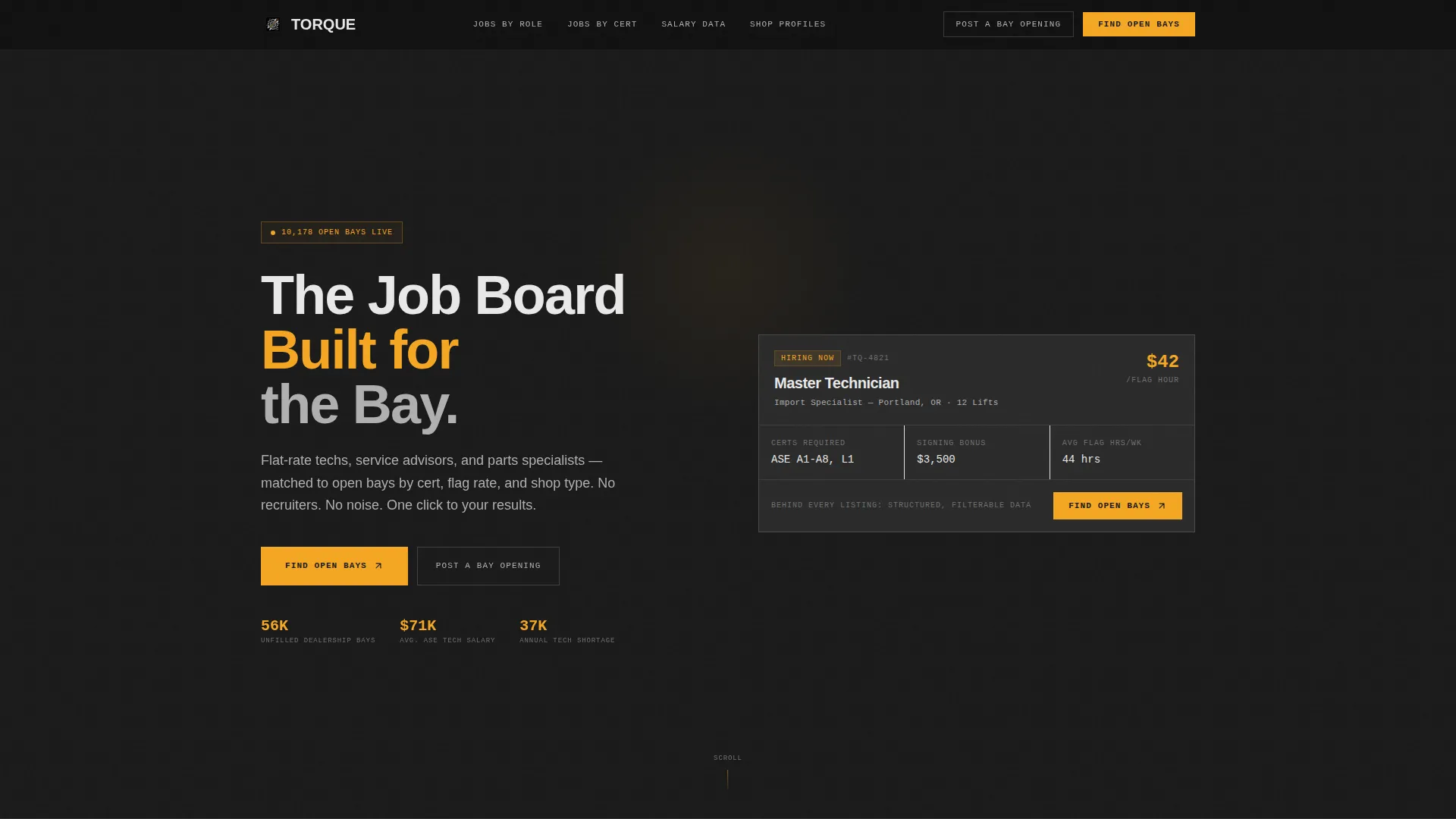
- An animated terminal-style header that reveals a live job listing as structured data, then collapses into a clean job card
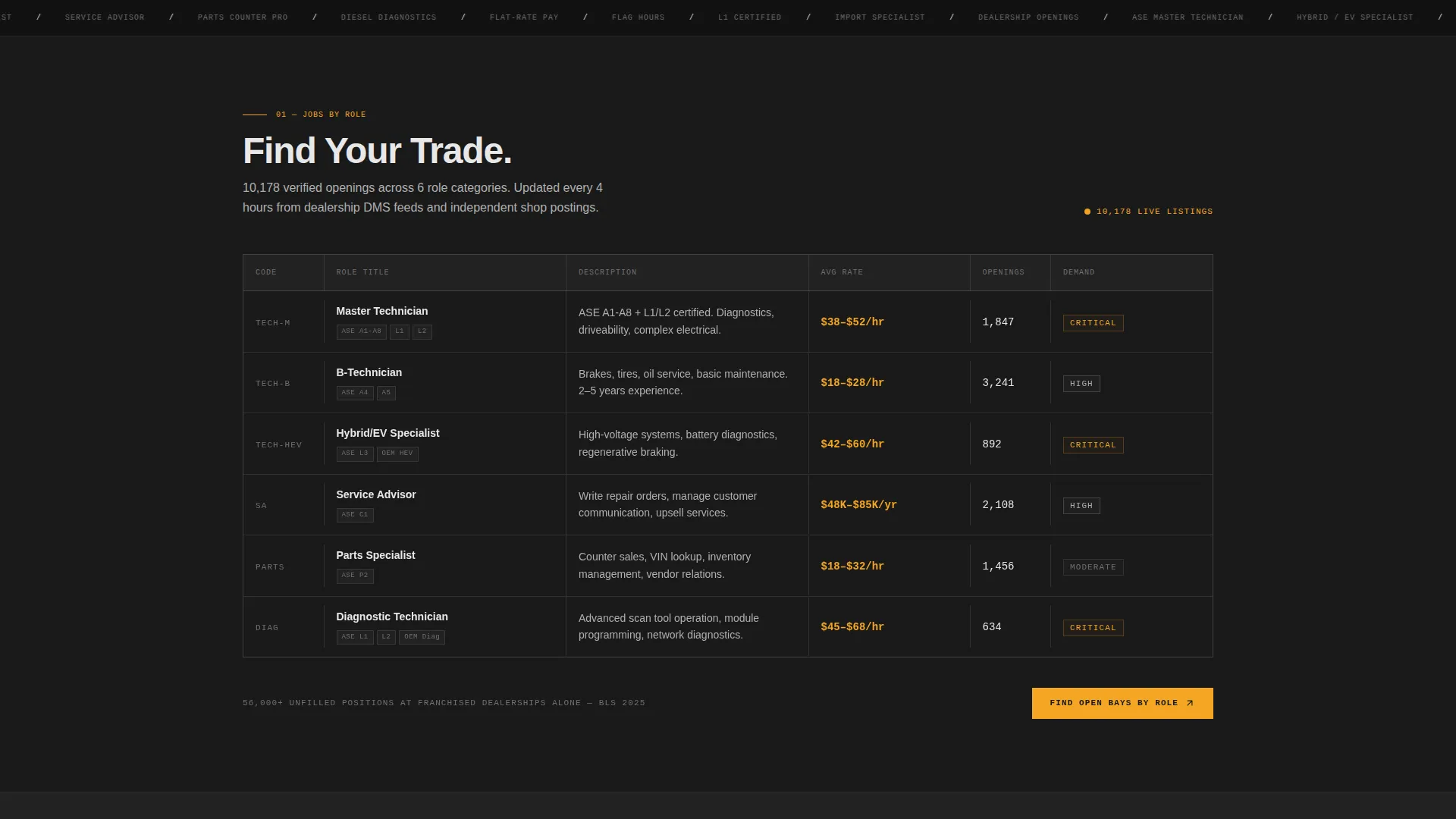
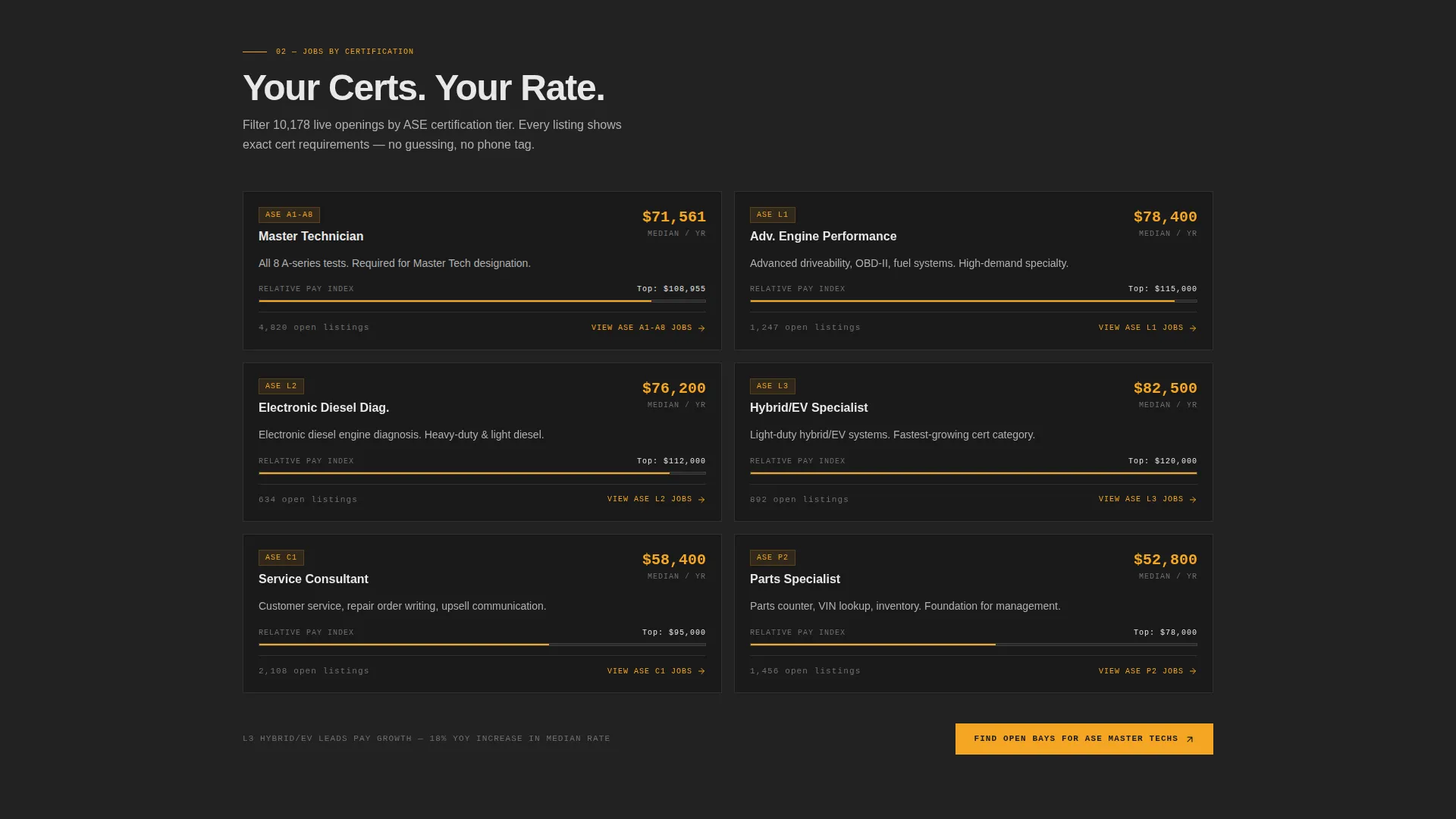
- Five content spokes covering Jobs by Role, Jobs by Cert, Shop Profiles, Salary Data, and Post a Job
- Spec-table and key-value pair layouts throughout, designed to surface numbers and credentials at a glance
Feature list
This template is built around five tightly defined capabilities, all grounded in the source brief.
Animated Code Snippet Header
The header opens with a monospaced terminal animation. Job data renders line by line, displaying fields like role, certifications, flag rate, shop description, and hiring status. The sequence collapses into a polished job card, proving that structured data sits behind every listing.
Persistent Hub Navigation
A fixed top navigation bar links to all five spoke sections using anchor links. Visitors can jump between Jobs by Role, Jobs by Cert, Shop Profiles, Salary Data, and Post a Job without scrolling back to the top.
Spec-Sheet Section Layouts
Each spoke section uses diagnostic-style formatting: columns, key-value pairs, and comparison grids. The visual language mirrors a technical service bulletin, making dense information instantly scannable rather than overwhelming.
Salary and Benchmark Data Display
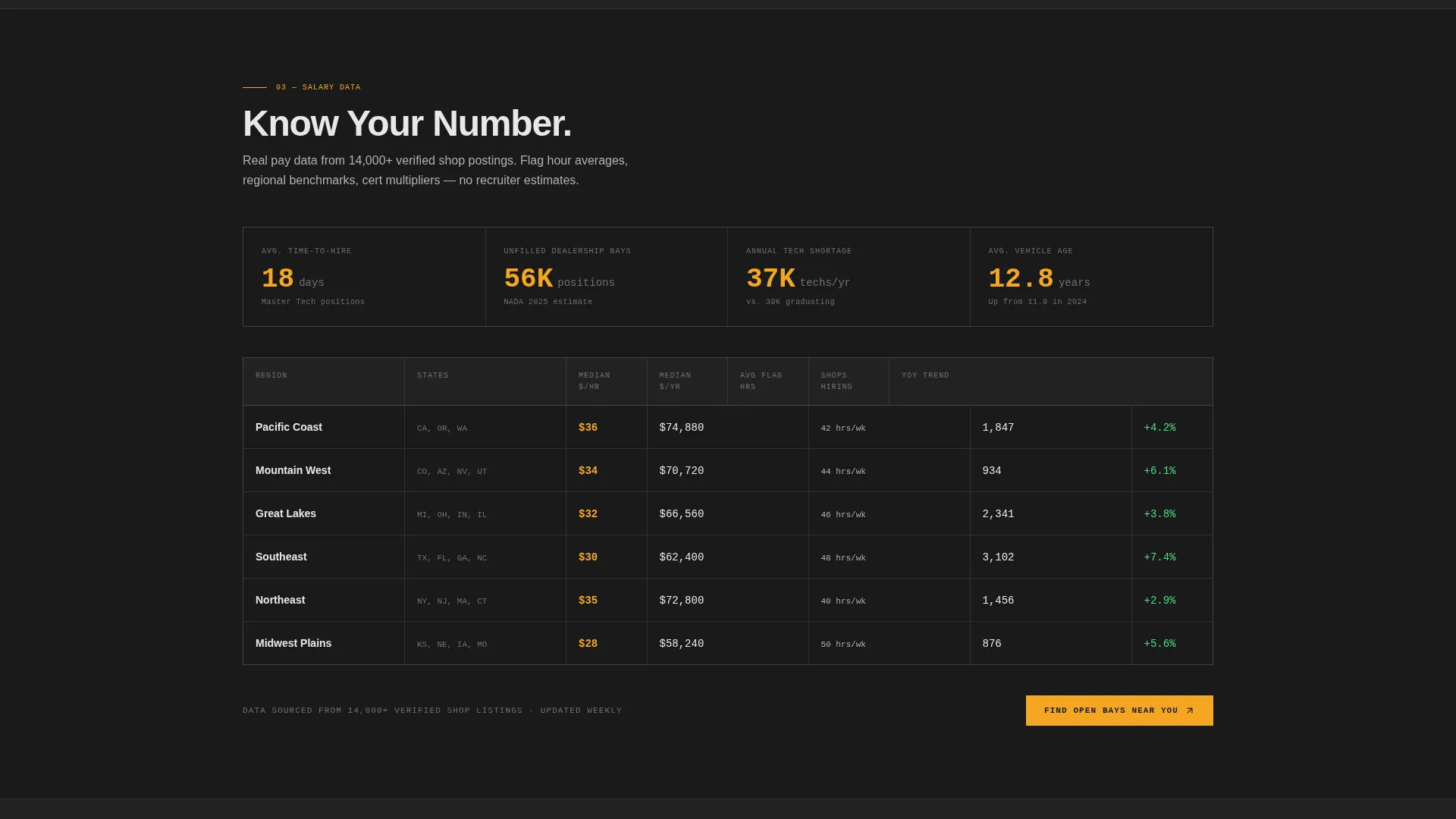
The Salary Data spoke prominently features numbers: average flag hours by region, median pay by ASE certification level, and time-to-hire benchmarks. These figures give both job seekers and employers concrete reasons to stay on the page and click through.
Contextual Repeat Call-to-Action System
The primary call-to-action, "Find Open Bays," appears at the close of each spoke section with contextual modifiers. A secondary employer path, "Post a Bay Opening," appears once in the navigation and once in the Shop Profiles spoke. No forms appear on the landing page itself.
Shop Profiles Spoke
The Shop Profiles section presents individual shops in a comparable, spec-style format. Visitors move from browsing open roles to evaluating specific workplaces, creating a natural escalation from general interest to hiring intent.
Page sections overview
| Section | Purpose |
|---|---|
| Header / Hero | Animate job data into a polished card to establish credibility |
| Anchor Navigation Bar | Provide persistent one-click access to all five spokes |
| Jobs by Role | Browse open positions grouped by automotive job type |
| Jobs by Cert | Filter opportunities by ASE certification level |
| Shop Profiles | Compare individual shops using spec-style detail layouts |
| Salary Data | Display pay benchmarks and flag-hour averages by region |
| Post a Job | Direct employers to submit a bay opening |
Design & branding system
The visual identity follows a Dashboard Pro theme with a Monochrome Steel color system. The result is a scan-tool interface aesthetic: dark, utilitarian, and precise. Every bright element carries a clear purpose.
- Carbon black (#1A1A1A) for the primary background, brushed aluminum (#B0B0B0) for secondary surfaces and dividers, and chrome highlight (#E8E8E8) for text and card faces
- Diagnostic amber (#F5A623) reserved exclusively for calls-to-action, active navigation states, and notification badges
- Monospaced typeface used in the header animation and data display areas to reinforce the structured-data identity
Mobile & speed optimization
The layout is built to stay scannable and functional at any screen size. Spec tables and key-value grids reflow for smaller viewports without losing their structured character.
- Anchor navigation condenses cleanly for mobile visitors, keeping all five spokes accessible
- Data-dense sections like Salary Data and Jobs by Cert maintain column clarity on narrow screens
How this template helps you convert
Torque removes every barrier between a visitor and the job search results page. The conversion path is deliberate and sequential.
- The animated header earns attention immediately by showing real job data rendered like a diagnostic readout, establishing that the listings are structured and trustworthy before a single click.
- Salary benchmarks and flag-hour data in the Salary Data spoke give visitors a concrete reason to search, because they already know roughly what they should be earning or offering.
- Every spoke section closes with a contextual "Find Open Bays" call-to-action, so the transition from browsing to searching feels natural rather than forced.
Other information about this template
This template is designed as a single landing page within a broader automotive digital presence strategy. It acts as the top-of-funnel entry point for a job board platform, not as the platform itself.
- The template covers the hub-and-spoke anchor navigation pattern, meaning all five spokes live on one scrollable page with the nav providing fast access
- No forms appear on the landing page; all data collection happens on the destination search results page after the click-through
- The Torque template is well-suited to automotive digital presence projects targeting technician recruitment, shop staffing, or niche job board launches in the automotive sector
Theme
Dashboard Pro
Creative direction
Spec Sheet
Color system
Monochrome Steel
Style
Hub & Spoke (Anchor Nav)
Direction
Click-Through
Page Sections
Animated Terminal Header
Persistent Anchor Navigation
Spec-sheet Content Layouts
Salary and Benchmark Data Spoke
Contextual Repeat Call-to-action
Shop Profiles Spoke
Related questions
Does this template include a working job search form?
Can I update the salary figures and benchmark data in the Salary Data spoke?
Is this template suitable for a dealership group or a multi-shop network?
How does the animated header work?
Can the employer call-to-action be customized?



