School Landing Page Template with Comparison Tables
Drum is a single-page comparison table landing page built for drum and percussion schools. It opens with a personality-driven quiz, guides visitors through FAQ-led sections, and presents Free, Core, and Intensive tier comparisons side by side. The Forest Trust color system and Corporate Precision theme create a focused, trustworthy feel that turns curious visitors into enrolled students.
by Rocket studio
Quick summary
Drum is a high-converting landing page template for drum and percussion schools. It leads with an interactive quiz that personalizes the visitor's journey, then answers real enrollment questions through structured FAQ sections backed by tier comparison tables. The result is a page that feels like a conversation, not a sales pitch.
Who this template is for
This template is built for percussion educators and drum school owners who need a focused, professional landing page. It works equally well for solo instructors and small studios offering multiple enrollment tiers.
- Adult professionals teaching early-morning or evening drum sessions to working students
- Studio owners enrolling beginners, returning players, and gigging musicians with gaps in their training
- Percussion instructors offering in-person, live online, or self-paced lesson formats
What problem this template solves
Most music school pages bury the information prospective students actually need. Visitors leave before they find answers to basic enrollment questions, and generic hero sections do not address the real hesitations that stop people from booking.
- No clear way to show how different experience levels fit into available tiers
- Prospective students cannot see whether they need equipment before enrolling
- Schools lose warm leads who are interested but not yet ready to book a session
What you get with this template
This template gives you a complete single-page layout designed specifically for a drum and percussion school's conversion goals. Every section serves a practical purpose, from the opening quiz to the final sticky call-to-action bar.
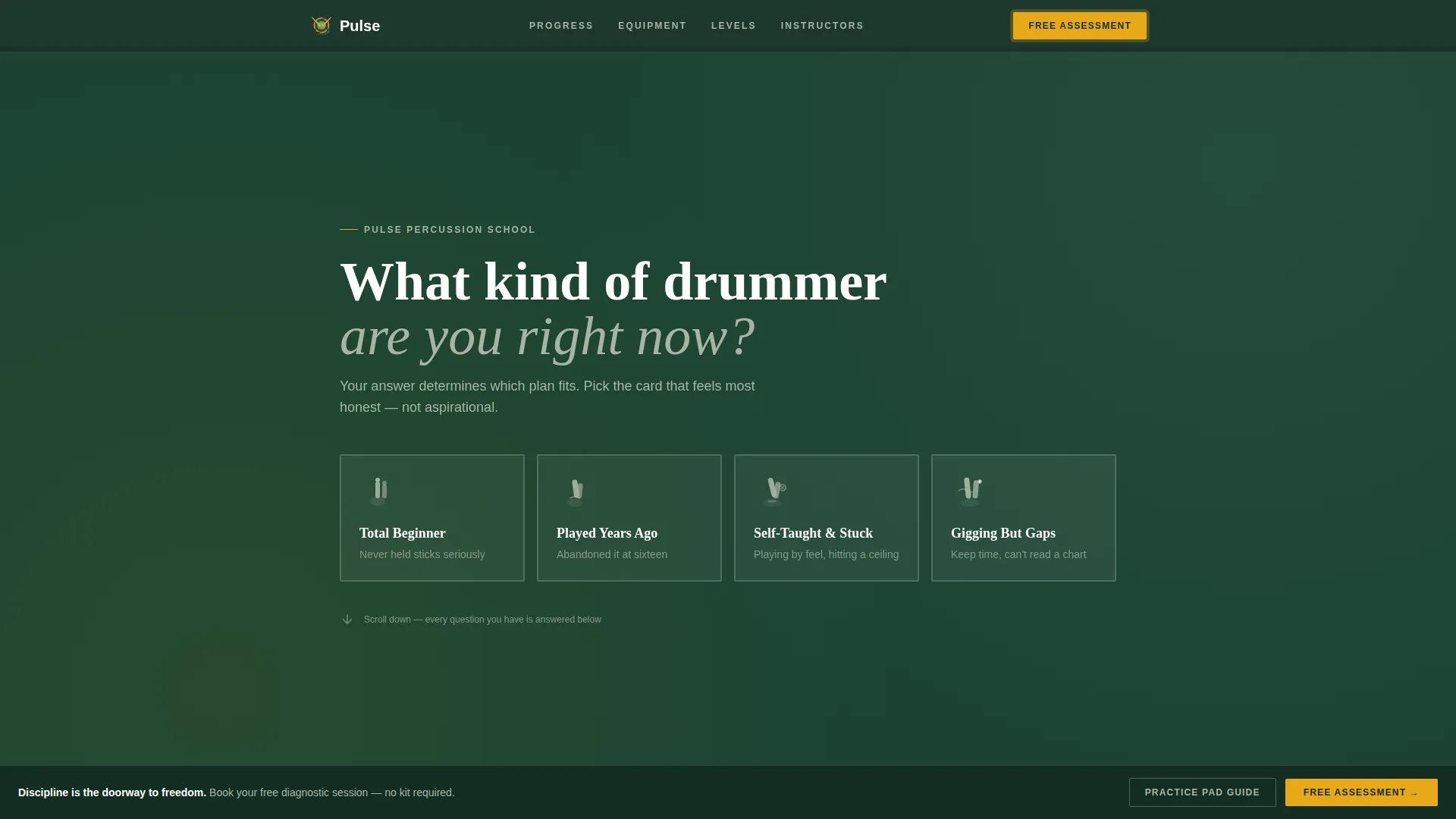
- A quiz-led header with four clickable student-type cards that personalize the scroll experience
- FAQ-anchored content sections each paired with a Free, Core, and Intensive comparison table
- Two conversion paths: a free rhythm assessment form and a practice pad starter guide download
Feature list
This template ships with a focused set of components drawn directly from the design brief. Each feature supports either visitor engagement, enrollment clarity, or lead capture.
Quiz Starter Header
The page opens with a bold serif question: "What kind of drummer are you right now?" Visitors choose from four clickable cards, each with a bark-brown border and a small hand-grip illustration. Their selection personalizes which comparison rows are highlighted as they scroll.
FAQ-Driven Section Structure
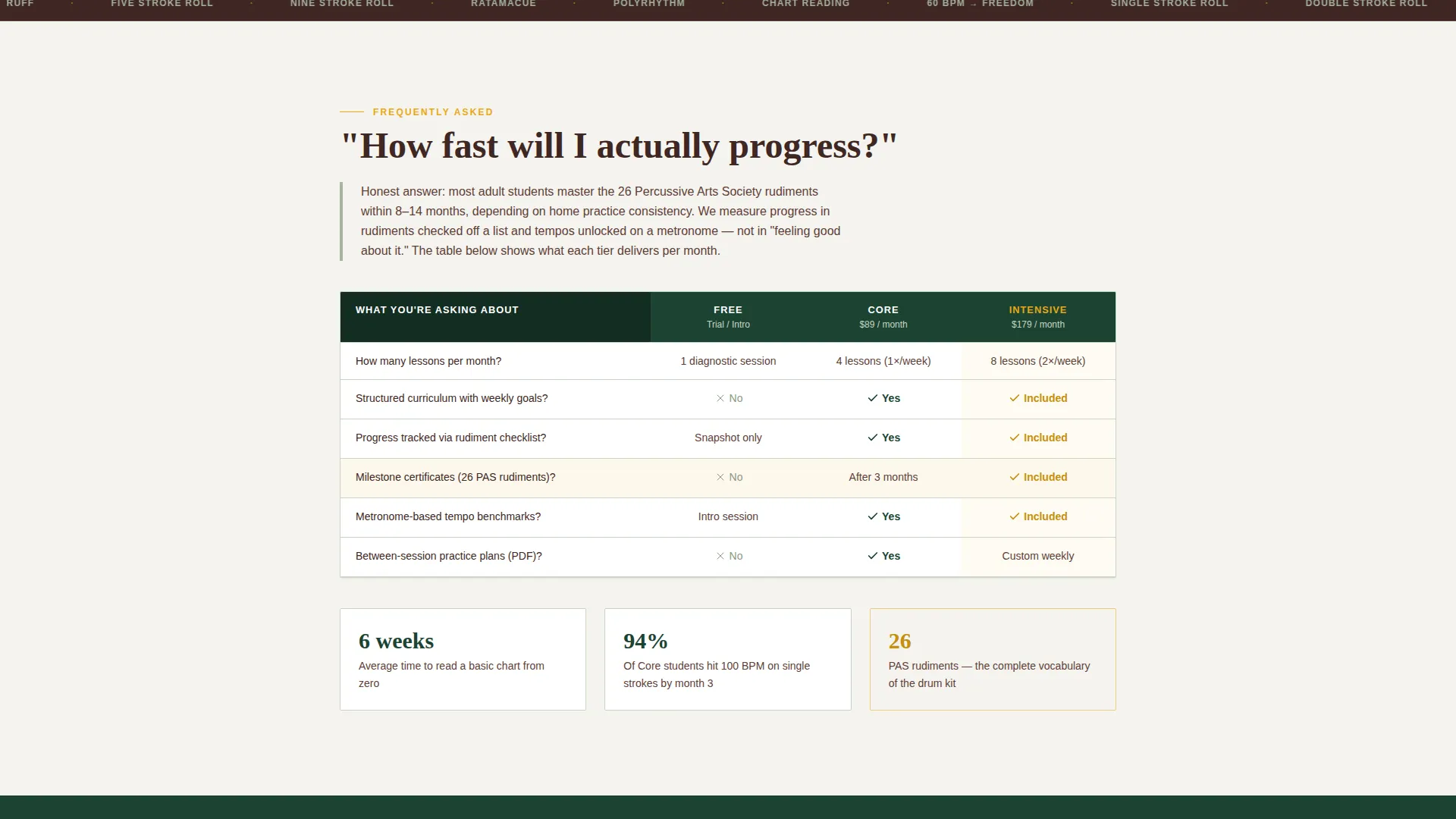
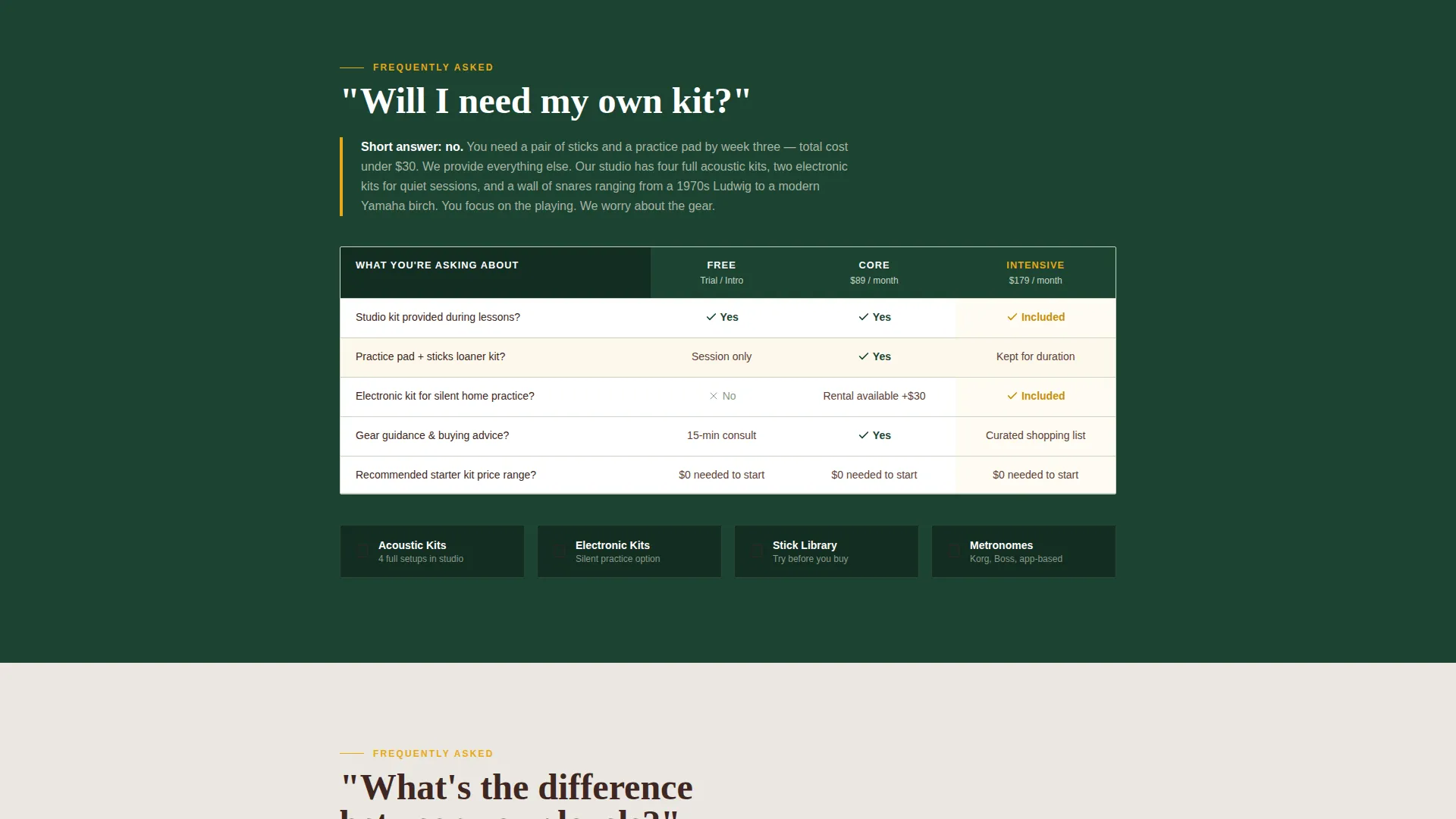
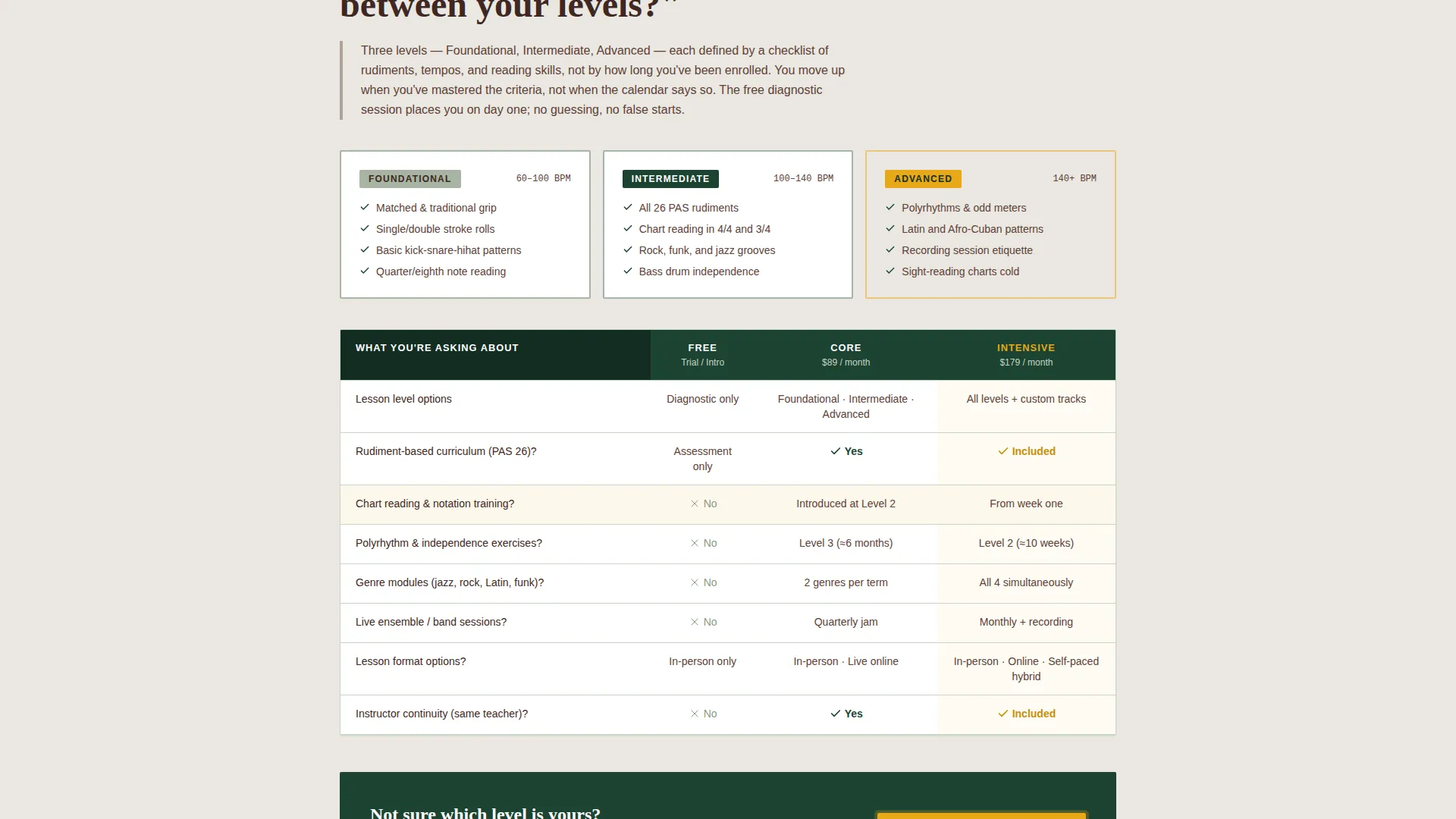
Each content section is anchored by a real prospective student question. A concise paragraph answers the question first, then a comparison table shows how Free, Core, and Intensive tiers each address that concern. The layout reads like a conversation with a patient admissions director.
Three-Tier Comparison Tables
The comparison tables sit inside each FAQ section and display the Free, Core, and Intensive plans side by side. Each table is tied to a specific enrollment question, making it easy for visitors to evaluate tiers in context rather than in the abstract.
Two-Step Enrollment Form
The primary call-to-action opens a two-step form. Step one captures first name and quiz result, which is pre-filled from the header interaction. Step two asks for preferred lesson format and best weekly time window.
Sticky Call-to-Action Bar
A sap amber sticky bar labeled "Start Your Free Rhythm Assessment" appears after the visitor passes the second FAQ section. It keeps the primary conversion path visible without interrupting the reading flow.
Secondary Lead Capture Path
A "Download the Practice Pad Starter Guide" option captures email-only leads who are not ready to book. This secondary path nurtures visitors toward the full assessment at their own pace.
Page sections overview
| Section | Purpose |
|---|---|
| Quiz Starter Header | Segments visitors by experience level before they scroll |
| Quiz Results Cards | Pre-fills enrollment form with the visitor's self-selected profile |
| FAQ Section One | Answers "Will I need my own kit?" with tier comparison support |
| FAQ Section Two | Answers "How fast will I actually progress?" with tier comparison support |
| FAQ Section Three | Answers "What's the difference between your levels?" with tier comparison |
| Sticky call to action Bar | Keeps the free assessment offer visible after FAQ section two |
| Assessment Form | Two-step form collecting name, quiz result, format, and schedule preference |
| Starter Guide Capture | Email-only secondary opt-in for visitors not ready to book |
Design & branding system
The template follows a Corporate Precision theme built on the Forest Trust color system. The palette draws from natural, textured references and keeps visual hierarchy sharp and intentional.
- Deep evergreen (#1B4332) anchors backgrounds and section dividers; bark brown (#3E2723) carries body text and card borders; lichen gray (#A8B5A2) softens secondary surfaces
- Sap amber (#E8A817) is reserved exclusively for calls-to-action and progress indicators, so every amber element signals a decision point
- Large weighted serif typography sets the tone in the header; the overall feel is a mahogany-paneled practice room that is serious, warm, and earned through patience
Mobile & speed optimization
The layout is structured for clarity on smaller screens. The quiz cards, comparison tables, and sticky bar are all designed to remain readable and functional across device sizes.
- Quiz cards stack vertically on mobile so each option remains tap-friendly and legible
- Comparison tables are built for horizontal scroll or condensed display on narrow viewports
- The sticky call-to-action bar is positioned to stay accessible without covering critical content on any screen size
How this template helps you convert
The page is engineered around two conversion goals: booking a free rhythm assessment and capturing emails from visitors who need more time. Every layout decision supports one of those two outcomes.
- The quiz header creates immediate engagement. Visitors act before they scroll, and their answer shapes which comparison highlights feel personally relevant to them throughout the rest of the page.
- The FAQ structure dissolves objections in sequence. Each real question is answered directly, then backed by a tier comparison table, so by the time a visitor reaches the form, their main hesitations have already been addressed.
Other information about this template
This template is built as a single-page landing page, making it straightforward to publish and maintain without a multi-page site structure. It is suited to drum and percussion schools at any stage, from a solo instructor just launching to an established studio refreshing its enrollment flow.
- The Freemium/Trial conversion model means no pricing pressure is applied in the primary call-to-action; the free assessment lowers the barrier to entry for all four visitor types
- The template style is a Comparison Table layout, meaning the three-tier structure is central to the page and not an afterthought
- The page supports schools offering any combination of in-person, live online, and self-paced lesson formats, as all three are surfaced in the two-step enrollment form
Theme
Corporate Precision
Creative direction
FAQ-Driven
Color system
Forest Trust
Style
Comparison Table
Direction
Freemium/Trial
Page Sections
Quiz Starter Header with Clickable Cards
Faq-led Comparison Table Sections
Two-step Enrollment Form
Sticky Sap Amber Call to Action Bar
Secondary Email Lead Capture
Forest Trust Color System
Related questions
Can I use this template without offering multiple pricing tiers?
Does the quiz personalization connect to the enrollment form?
What are the two conversion paths built into this template?
Is this template suitable for schools teaching both children and adult beginners?
Where does the sticky call-to-action bar appear during the scroll?



