Advanced Economics Education Professional Website Template
Econ is a hub-and-spoke landing page template built for economics video lesson libraries. It opens with a multi-step diagnostic form, flows through five anchor-nav spokes, and closes each section with a gold call to action. The design follows a Corporate Precision theme in deep teal, midnight slate, and catalyst gold, structured to turn curious visitors into enrolled learners or qualified leads.
by Rocket studio
Quick summary
Econ is a single-page, anchor-nav landing page template designed for a digital library of studio-produced economics video lessons. It uses a multi-step form as its header, a five-spoke scrolling structure, and a dual-path lead generation model. The visual identity is built on a deep teal, midnight slate, and catalyst gold palette that signals institutional credibility.
Who this template is for
This template is built for teams and individuals who need to communicate the value of a structured economics education library. The audience ranges from corporate learning programs to independent educators and exam-focused professionals.
- Corporate Learning and Development managers building analyst onboarding tracks
- University adjuncts using flipped-classroom video content to supplement lectures
- Self-directed professionals studying for the Chartered Financial Analyst (CFA) examination
What problem this template solves
Economics content is often dense, scattered, or buried behind long course catalogs. A visitor who lands on a generic page leaves before understanding what they will actually learn. This template solves the trust and clarity gap between a curious visitor and a committed learner.
- Visitors cannot quickly assess whether the content matches their role or knowledge level
- Decision-makers need proof of outcomes before approving a curriculum purchase
- The page structure itself must demonstrate the product quality before asking for a commitment
What you get with this template
You get a fully structured, single-page layout designed around a Problem-to-Solution arc. Every section builds on the previous one, escalating stakes from gap identification through product demonstration to measurable proof.
- A multi-step diagnostic form header that doubles as a product experience preview
- Five anchor-nav spokes covering the knowledge gap, lesson samples, curriculum map, impact metrics, and enrollment
- A dual-path lead generation system with a primary call to action and a free single-lesson unlock option
Feature list
This template delivers a set of prompt-defined components that work together to move visitors through a complete evaluation journey.
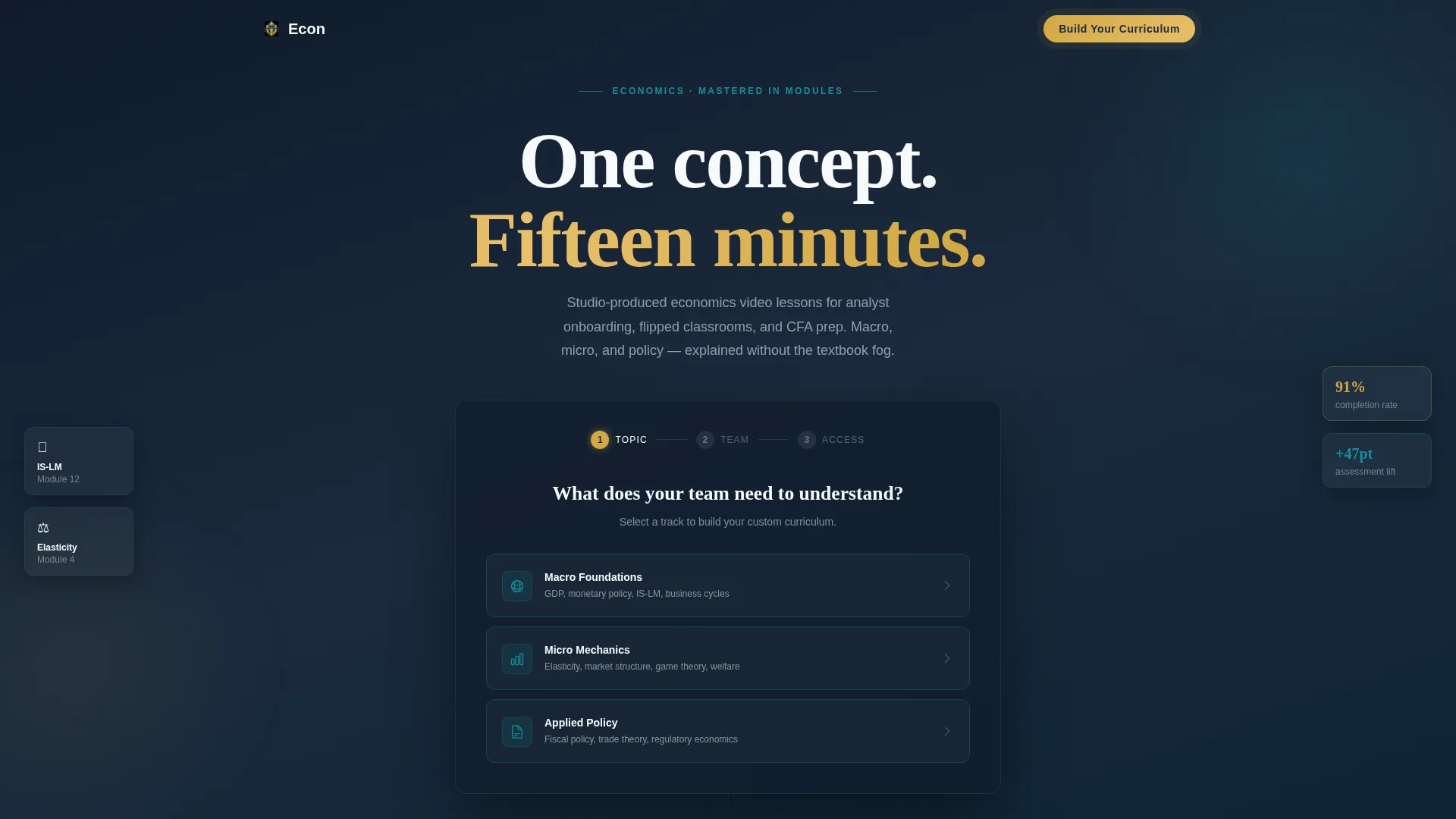
Multi-Step Diagnostic Form Header
The header opens on a dark slate viewport with a single clarifying question. Visitors choose from three topic cards, then complete a team-size selector and work email step. Each slide transition mirrors the lesson interface, making the form itself a live product demonstration.
Anchor Navigation Bar
After the header form, a sticky anchor nav locks to the top of the viewport. Five labeled spokes give visitors instant access to any section. The nav keeps orientation clear across a long, content-rich scroll.
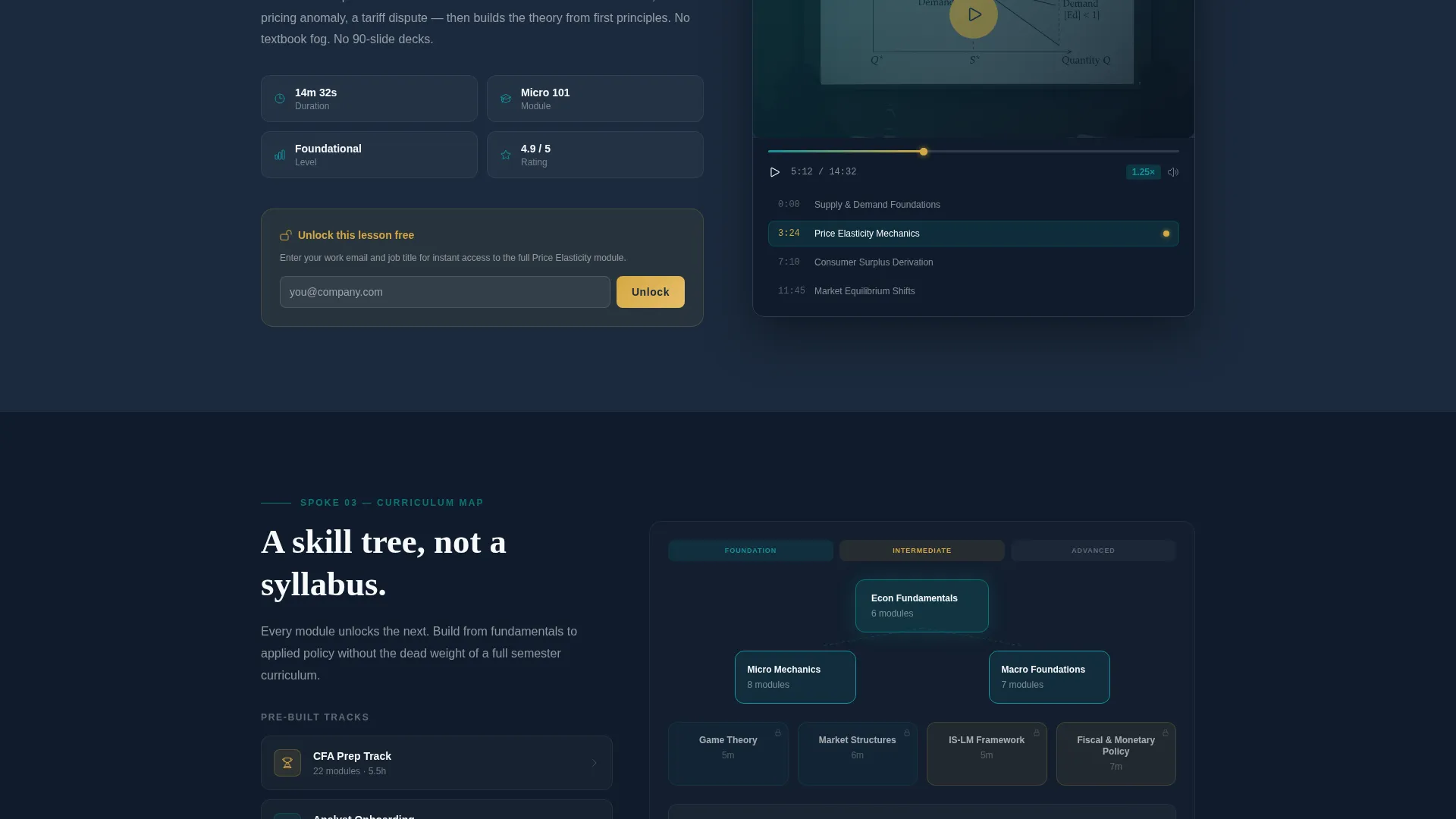
Inline Lesson Sample Player
A mid-page embedded video thumbnail lets visitors watch a sample lesson without leaving the page. The chaptered scrub bar visible in the player reflects the same interface used in the full library, reinforcing product quality before the ask.
Interactive Curriculum Skill Tree
The curriculum map spoke displays content as an expandable skill tree. Visitors can explore subject relationships across macroeconomic theory and microeconomic mechanics, understanding the scope of the library before enrolling.
Dual-Path Lead Generation System
The primary call-to-action, "Build Your Curriculum," appears in catalyst gold at the close of each spoke and scrolls visitors back to the header form with prior selections preserved. A secondary path unlocks a free lesson gated only by a work email and job title, placed mid-page for lower-friction entry.
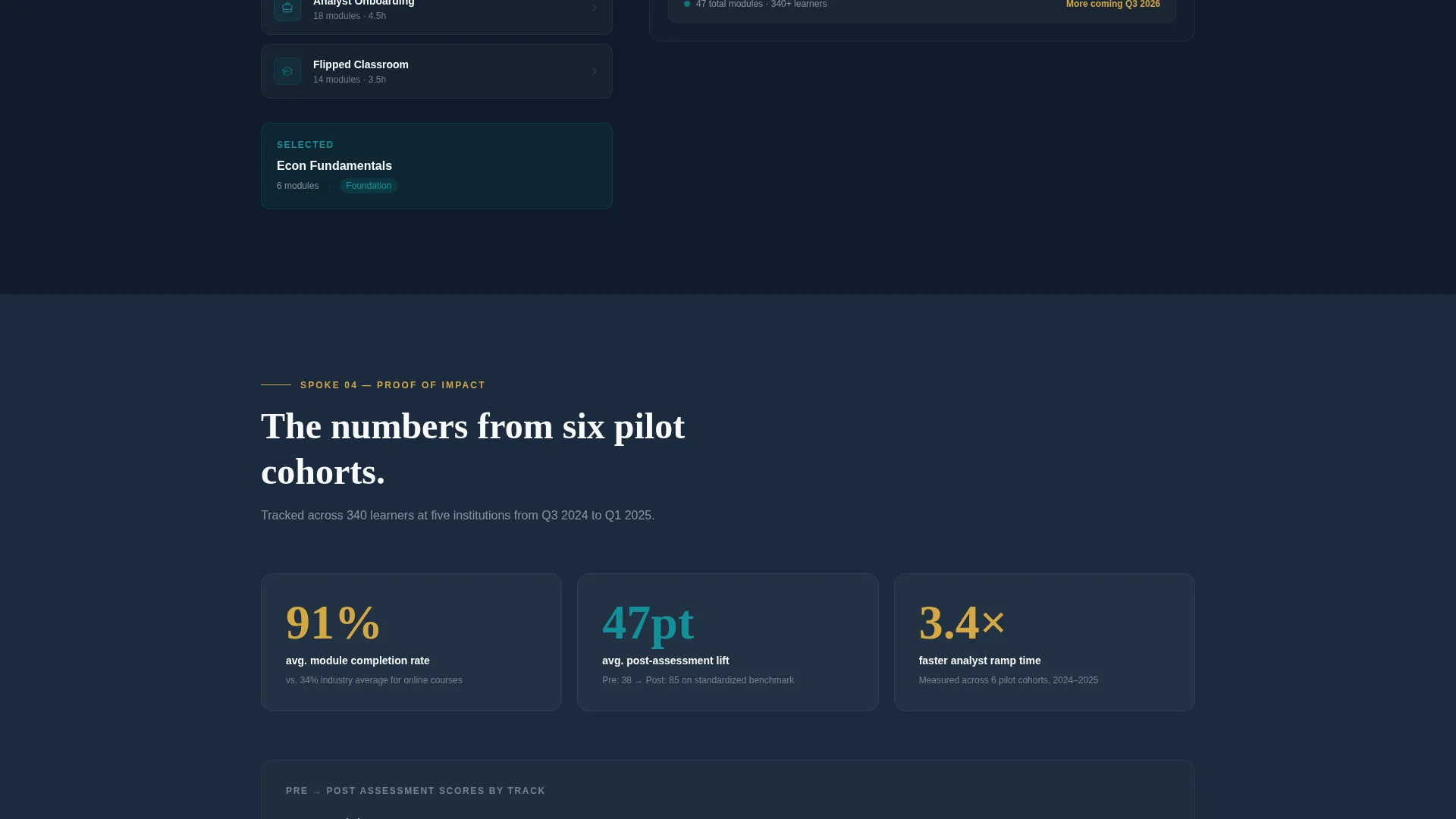
Impact Metrics Display
A dedicated spoke presents completion rates and pre-and-post assessment lift data from named pilot clients. The data visualization format lets the numbers make the case without additional copy, matching the template's overall show-don't-tell logic.
Page sections overview
| Section | Purpose |
|---|---|
| Diagnostic Form Header | Qualifies visitor intent and previews lesson user experience |
| Anchor Navigation Bar | Orients visitors and enables non-linear browsing |
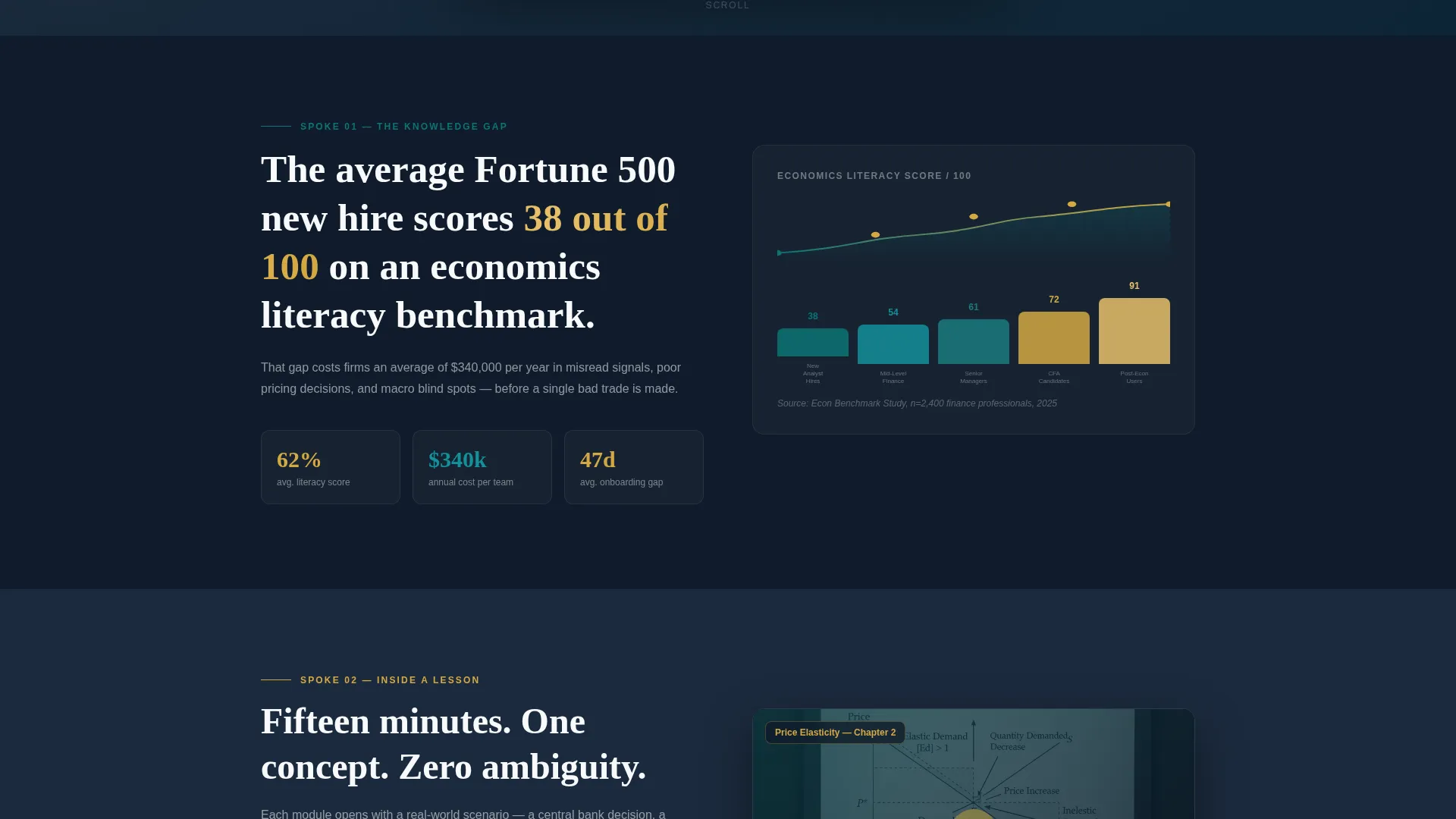
| The Knowledge Gap | Opens with literacy data to establish the core problem |
| Inside a Lesson | Inline video sample with chaptered scrub bar |
| Curriculum Map | Interactive skill tree showing full content scope |
| Proof of Impact | Completion rates and assessment lift from pilot clients |
| Start Learning | Final enrollment spoke with dual-path call to action |
Design & branding system
The template follows a Corporate Precision theme built on the Teal Catalyst color system. The palette is designed to feel institutional and focused, like a Bloomberg terminal paired with a precision writing instrument.
- Deep boardroom teal (#0D7377) anchors the primary brand presence across borders, hover states, and section accents
- Midnight slate (#1B2A3D) handles section backgrounds and typographic weight, giving the page its authoritative tone
- Catalyst gold (#D4A843) is reserved exclusively for calls-to-action, progress indicators, and hover interactions, ensuring these elements always stand out
Mobile & speed optimization
The template is structured for responsive display across screen sizes. The anchor nav, multi-step form, and inline video components are all laid out with stacked mobile behavior in mind.
- The multi-step form cards stack vertically on smaller screens to preserve tap target clarity
- The anchor navigation bar adapts to a compact format on mobile without losing section access
- The skill tree and data visualization sections are designed to remain legible at reduced viewport widths
How this template helps you convert
The entire page is built as a progressive commitment sequence. Each section reduces hesitation by delivering value before making a request.
- The multi-step form qualifies and segments visitors immediately while previewing the product experience, so the page opens with engagement rather than a pitch.
- Inline lesson samples and the interactive curriculum map let visitors experience the content depth before they see a call to action, so the gold "Build Your Curriculum" button feels earned rather than forced.
- The dual-path model captures both high-intent buyers ready to build a full curriculum and exploratory visitors who only want a free single-lesson unlock, widening the net without diluting the primary conversion goal.
Other information about this template
This template is purpose-built for the economics education niche and reflects the specific needs of that intersection. A few additional details worth noting before you decide.
- The fifteen-minute module format referenced in the template structure is designed to fit analyst onboarding schedules and CFA study sessions without overwhelming learners
- The template style is Hub and Spoke with anchor navigation, meaning each spoke is a self-contained content block that can be updated independently
- The Corporate Precision theme and Teal Catalyst color system are set up for audiences in finance, policy, and professional education where visual credibility matters
- The Problem-to-Solution arc creative direction means the page copy should escalate in specificity as visitors scroll, matching the template's built-in structure
Theme
Corporate Precision
Creative direction
Problem→Solution Arc
Color system
Teal Catalyst
Style
Hub & Spoke (Anchor Nav)
Direction
Lead Generation
Page Sections
Multi-step Diagnostic Form Header
Sticky Anchor Navigation Bar
Inline Lesson Sample Player
Interactive Curriculum Skill Tree
Dual-path Lead Generation System
Impact Metrics Display
Related questions
Who is this landing page template designed for?
What makes the multi-step form different from a standard signup form?
Do I need pilot client data to use the impact metrics section?
Can this template support both corporate buyers and individual learners?
Is the anchor navigation suitable for a long single-page layout?



