Education - Premium K-12 Landing Page Template
Spark is a hub-and-spoke landing page template built for a K-12 AI image generator. It combines a glassmorphic visual system, a live demo header, sticky anchor navigation, and a dual-path lead generation flow. The design speaks directly to teachers, instructional coaches, and district administrators who need safe, curriculum-aligned visuals fast.
by Rocket studio
Quick summary
Spark is a single-page, anchor-nav template designed to market a browser-based AI image generator for K-12 classrooms. It leads with social proof, puts a live demo front and center, and walks visitors through safety specs, format options, and pricing before asking for a single detail. Every section earns trust before the form appears.
Who this template is for
This template is built for ed-tech teams and school district stakeholders who need to communicate the value of an AI image tool to cautious education buyers. It speaks the language of the classroom, not the pitch deck.
- Fourth-grade teachers building last-minute unit materials and needing safe, grade-appropriate visuals fast
- District instructional coaches standardizing visual assets across dozens of school buildings
- ESL coordinators sourcing culturally responsive illustrations that stock photo libraries do not carry
What problem this template solves
Finding curriculum-safe, print-ready visuals for classroom use is genuinely hard. Teachers patch together images from unreliable sources, and districts have no consistent visual standard. This template frames a purpose-built AI image tool as the direct fix for that problem.
- No trust-building structure to convert skeptical school administrators into pilot signups
- No clear way to communicate content safety, curriculum alignment, and format flexibility on one page
- No dual-path lead flow that serves both individual teachers and district procurement teams at once
What you get with this template
You get a fully structured, section-led landing page that doubles as a product data sheet for education buyers. Every section is designed to answer a specific objection before it is raised.
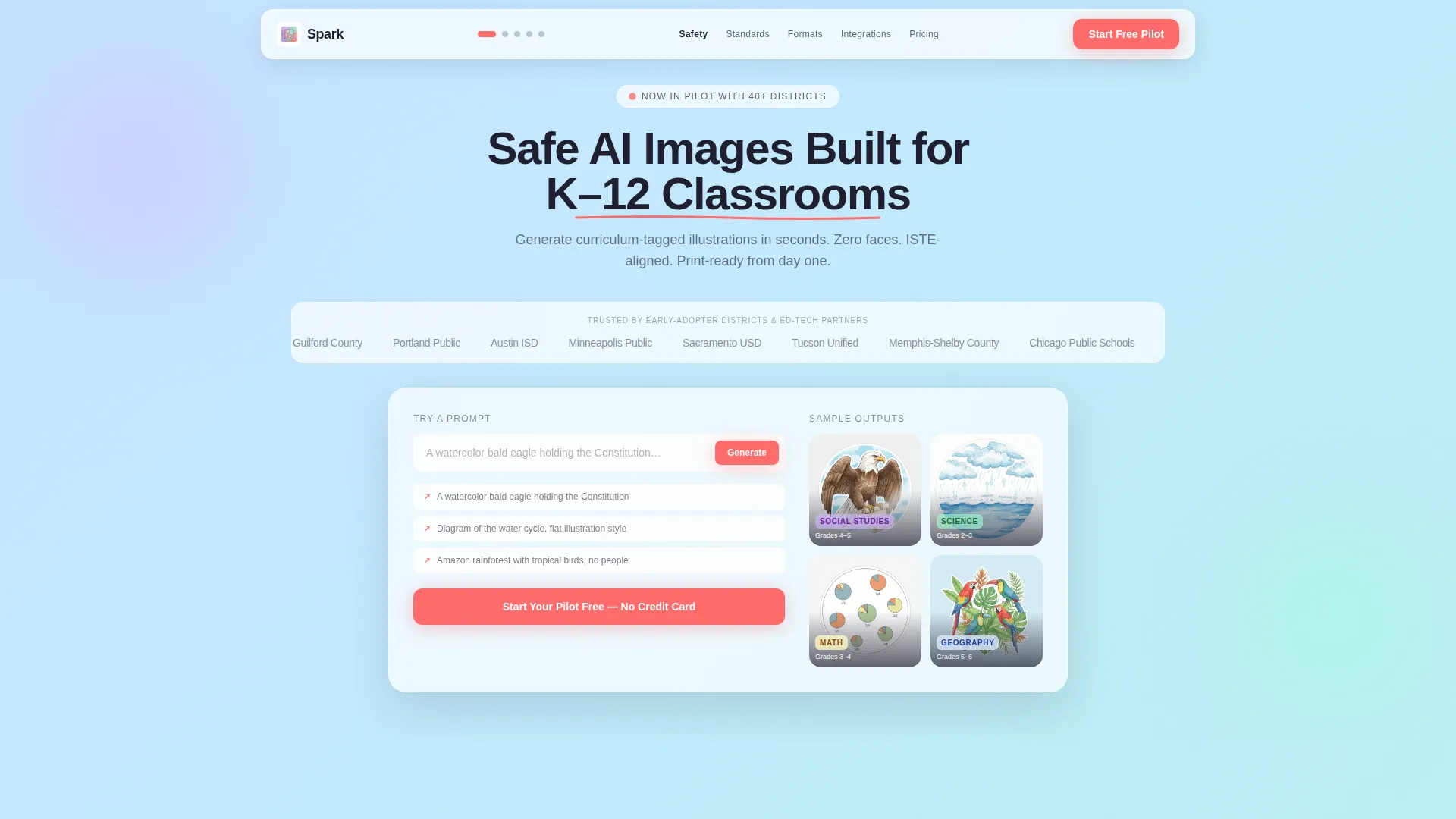
- A header with auto-scrolling district and partner logos, a bold headline, and a live demo input card with sample output thumbnails
- Five sticky-nav spoke sections covering Safety, Standards, Formats, Integrations, and Pricing Tiers, each opening with a bold spec number
- A dual-path lead generation system with a three-field pilot modal and a longer district quote form at the bottom
Feature list
This template delivers several purpose-built components that work together to build credibility and drive signups from education decision-makers.
Live Demo Input Card
A frosted-glass card sits below the logo bar and holds a live demo input field with ghost text pre-filled with a sample prompt. Four sample output thumbnails are displayed, each tagged with a grade band and subject area, letting visitors imagine the tool in use before they ever click a button.
Sticky Anchor Navigation
A slim navigation bar stays fixed at the top of the page as visitors scroll. Hot coral active-state dots mark the current section. Each nav item links directly to a spoke section, making the page feel organized and easy to jump between.
Spec Sheet Spoke Sections
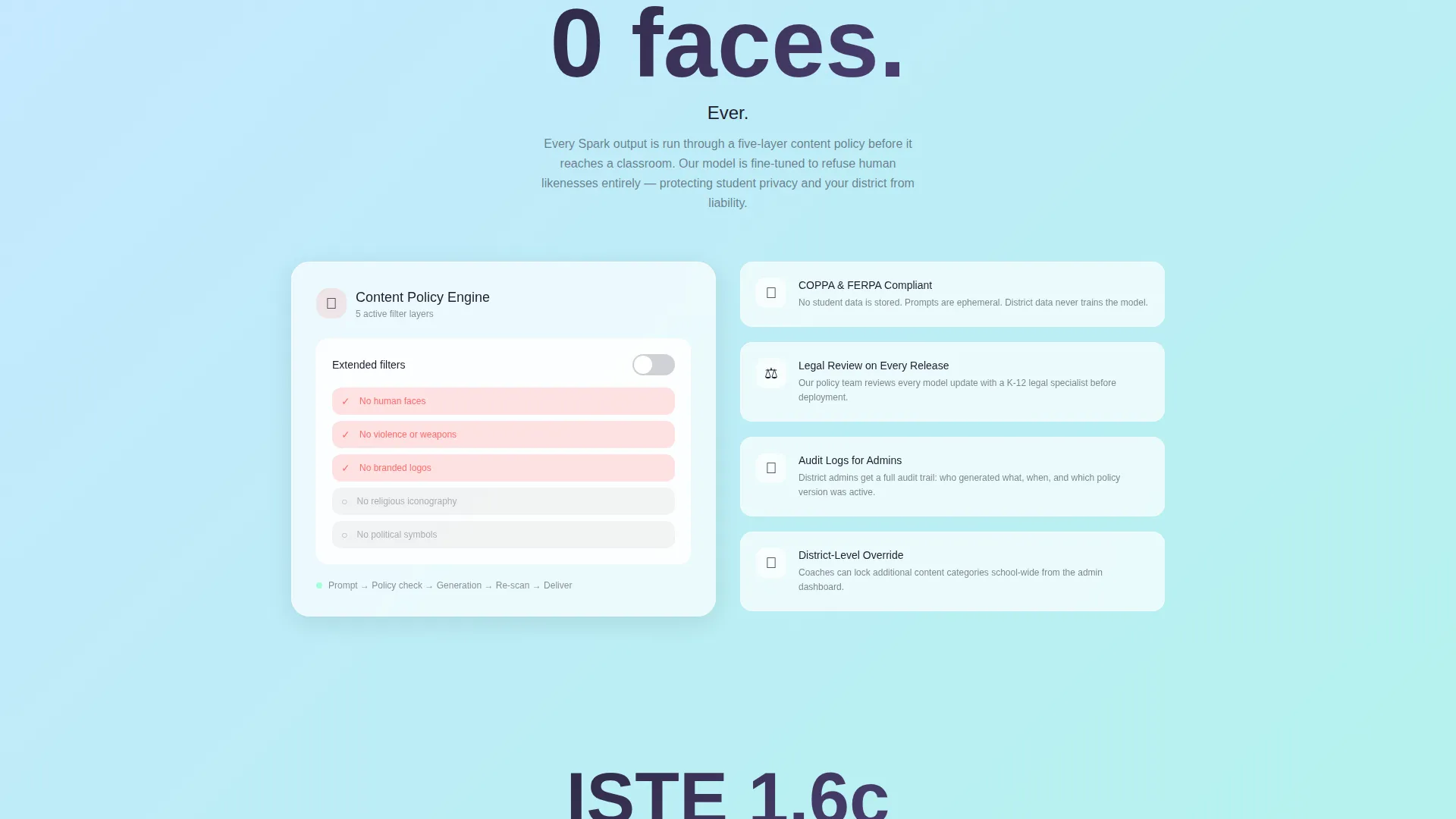
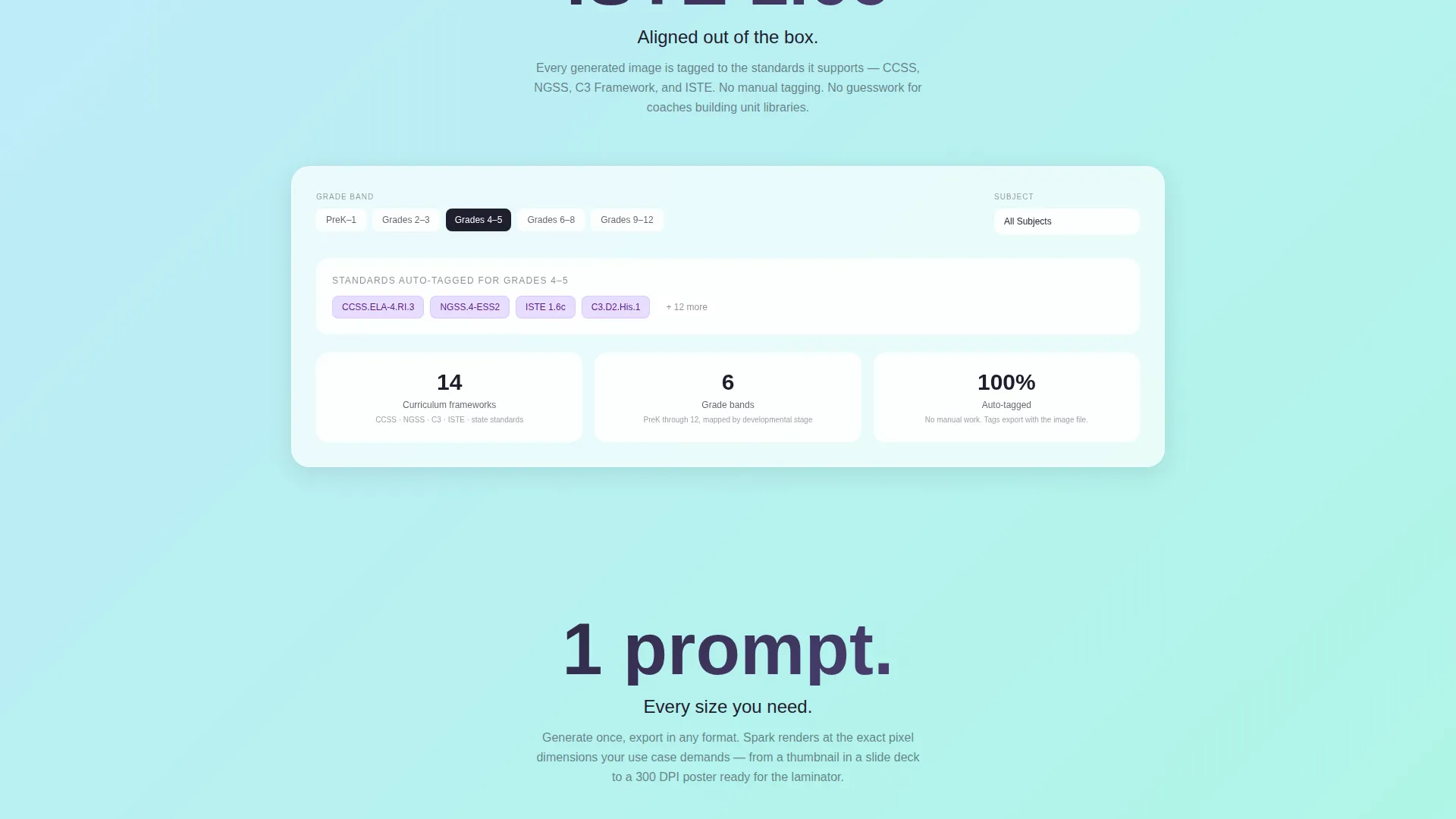
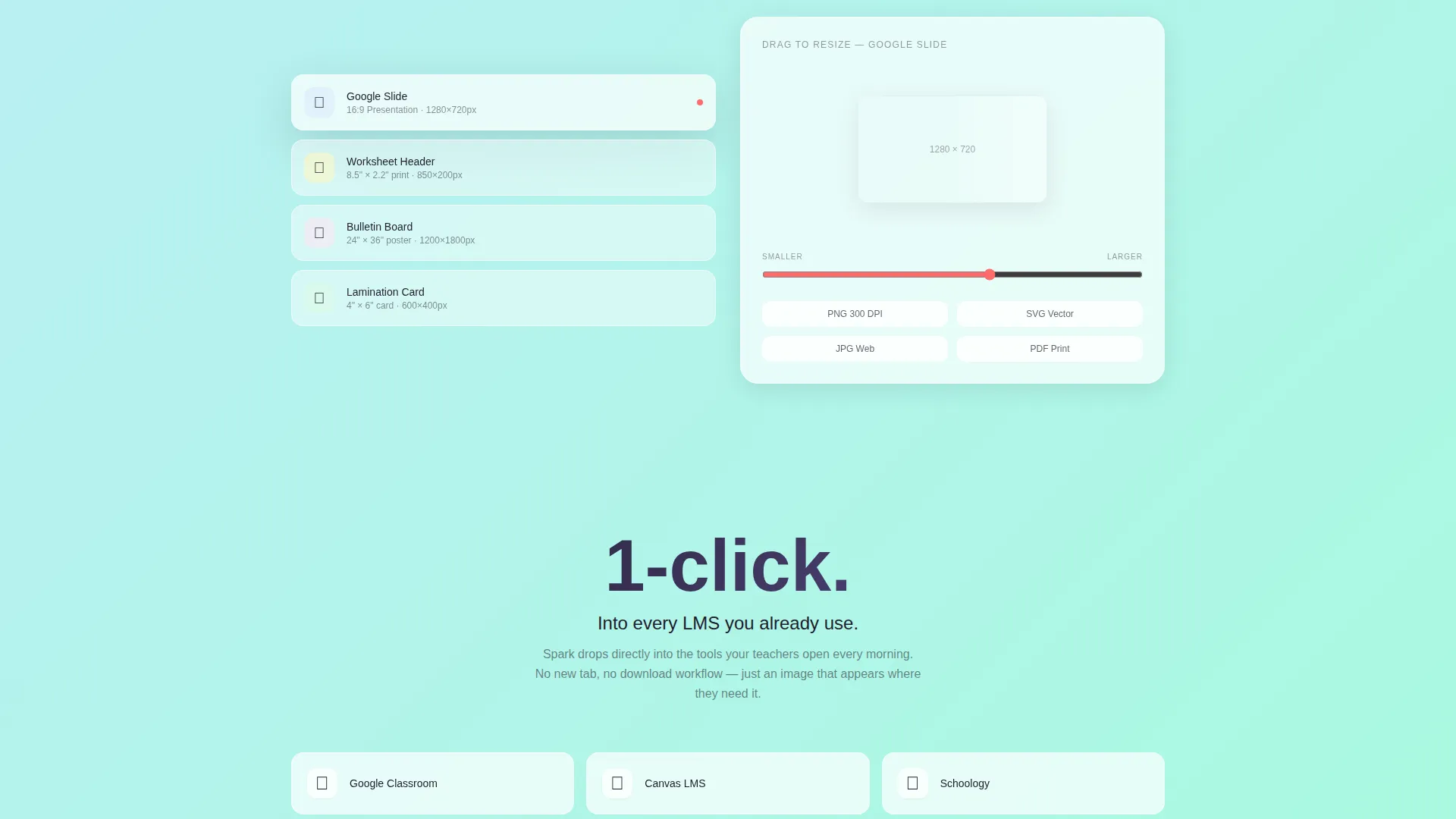
Each of the five spoke sections opens with a single bold stat or specification number. A short paragraph unpacks it, a frosted-glass feature card reinforces it, and a micro-interaction makes it tangible. Interactions include a toggle, a drag handle for resizing outputs, and a content-policy filter dropdown.
Dual-Path Lead Generation Flow
The primary call to action, "Start Your Pilot Free," appears in the header demo card and repeats as a fixed frosted button in the nav bar. It opens a lightweight three-field glassmorphic modal. A secondary path at the bottom spoke, "Request a District Quote," expands into a longer form for district-level buyers.
Auto-Scrolling Logo Bar
A horizontal strip below the main headline auto-scrolls left at a relaxed pace, showing logos from early-adopter school districts and ed-tech partners. It establishes credibility before any spec is presented.
Glassmorphic Modal Forms
Both lead capture forms use the same frosted-glass visual system as the rest of the page. The pilot modal collects school or district name, role, and work email. The district quote form adds student count range and current learning management system.
Page sections overview
| Section | Purpose |
|---|---|
| Logo Bar Header | Establish credibility with partner and district logos before the pitch begins |
| Live Demo Card | Let visitors imagine real use with a sample prompt input and tagged output thumbnails |
| Safety Spoke | Lead with the zero-faces content policy spec to address the top educator concern |
| Standards Spoke | Show curriculum alignment with a specific standards reference to reassure instructional coaches |
| Formats Spoke | Demonstrate sizing flexibility from Google Slides to bulletin-board posters |
| Integrations Spoke | Detail platform compatibility for district technology coordinators |
| Pricing Tiers Spoke | Present plan options clearly so teachers and admins can self-select |
| Pilot Signup Modal | Capture individual teacher and coach leads with a minimal three-field form |
| District Quote Form | Serve district procurement leads with a longer, role-specific inquiry form |
Design & branding system
The visual identity is built around a glassmorphic color system layered over a soft gradient canvas. The overall feel is described in the brief as an iPad screen caught in morning sunlight, translucent and weightless.
- Frosted white panels at partial opacity float over a gradient that moves from digital lavender to electric mint, with deep graphite used for all body type
- Hot coral is reserved strictly for calls to action and active-state nav dots, keeping the action signal visually distinct at every scroll depth
- The Startup Velocity theme keeps the layout slim, confident, and data-forward, with borders drawn in light rather than ink and micro-interactions reinforcing product credibility
Mobile & speed optimization
The template is structured to stay readable and functional on smaller screens where many teachers and coaches will land first. The sticky nav, frosted cards, and modal forms are all sized for touch interaction.
- Frosted-glass panels and gradient backgrounds are defined in CSS-level color values, keeping visual weight low without sacrificing the design aesthetic
- The auto-scrolling logo bar and thumbnail grid are designed to reflow cleanly at tablet and phone widths so no social proof element disappears on mobile
How this template helps you convert
The page is built around a deliberate trust sequence. Every element earns the next click before asking for anything in return.
- The logo bar and bold headline establish immediate credibility, so first-time visitors from a district or school context feel they have landed in a vetted space before reading a single spec.
- The live demo card creates a moment of imagined use. A teacher reading the ghost-text prompt can picture their own classroom need, which makes the pilot signup form feel like a natural next step rather than a cold ask.
- The spec sheet spoke sections resolve every major objection in order, moving from content safety to curriculum standards to formats to pricing, so by the time the "Request a District Quote" form appears, the visitor has already absorbed the evidence needed to feel confident.
Other information about this template
This template is well-suited for ed-tech startups and school district technology offices that are preparing to launch or scale a K-12 AI image generation product. It is built to support both direct teacher acquisition and district-level procurement conversations from a single page.
- The anchor navigation structure makes it easy to share deep links to specific spoke sections, such as the Safety or Pricing Tiers section, in sales emails or district presentations
- The dual lead path means the same page can serve a fourth-grade teacher exploring the tool independently and a chief academic officer evaluating a district-wide pilot at the same time
- The template's Spec Sheet creative direction is deliberately dense and scannable, matching the research-mode behavior of education buyers who need to justify a purchase to a principal or board
Theme
Startup Velocity
Creative direction
Spec Sheet
Color system
Glassmorphic
Style
Hub & Spoke (Anchor Nav)
Direction
Lead Generation
Page Sections
Live Demo Card with Sample Outputs
Sticky Anchor Navigation Bar
Spec Sheet Spoke Sections
Dual-path Lead Generation
Auto-scrolling Logo Bar
Glassmorphic Modal Forms
Related questions
Can this template be used for a product that is still in early access or beta?
Does the template support both teacher signups and district procurement inquiries?
How customizable are the spoke sections?
Is the demo input card connected to a live product backend?
Who is the ideal buyer for this template?



