Coaching Digital Presence Advanced Directory Website Template
Calibrate is a dashboard-style coaching landing page built for life coaches, executive mentors, and wellness practitioners who need a credible online presence fast. It combines a stats-first impact layout, a filterable template directory, and three strategically placed calls to action. The result is a conversion-ready page that looks polished the moment you open it.
by Rocket studio
Quick summary
Calibrate hands coaches a conversion-ready landing page without the usual setup struggle. The design leads with performance data, shifts into a browsable template directory, and keeps the primary call to action visible at every scroll depth. It is built for coaches who need to look credible online before their calendar fills up.
Who this template is for
This template is designed for independent coaches and small coaching practices that need a professional web presence without hiring a design team. If you are building credibility before your roster is full, Calibrate was made for you.
- Solo life coaches moving away from patched-together Canva mockups
- Boutique coaching firms that have outgrown referral-only growth
- Career-pivot professionals who need a polished presence right now
What problem this template solves
Most coaching websites stall at the mockup stage. Coaches either spend weeks tweaking layouts or go live with something that does not reflect their expertise. Calibrate removes that bottleneck by providing a page that is ready to personalize from the first click.
- No blank-canvas paralysis: the structure and visual hierarchy are already built
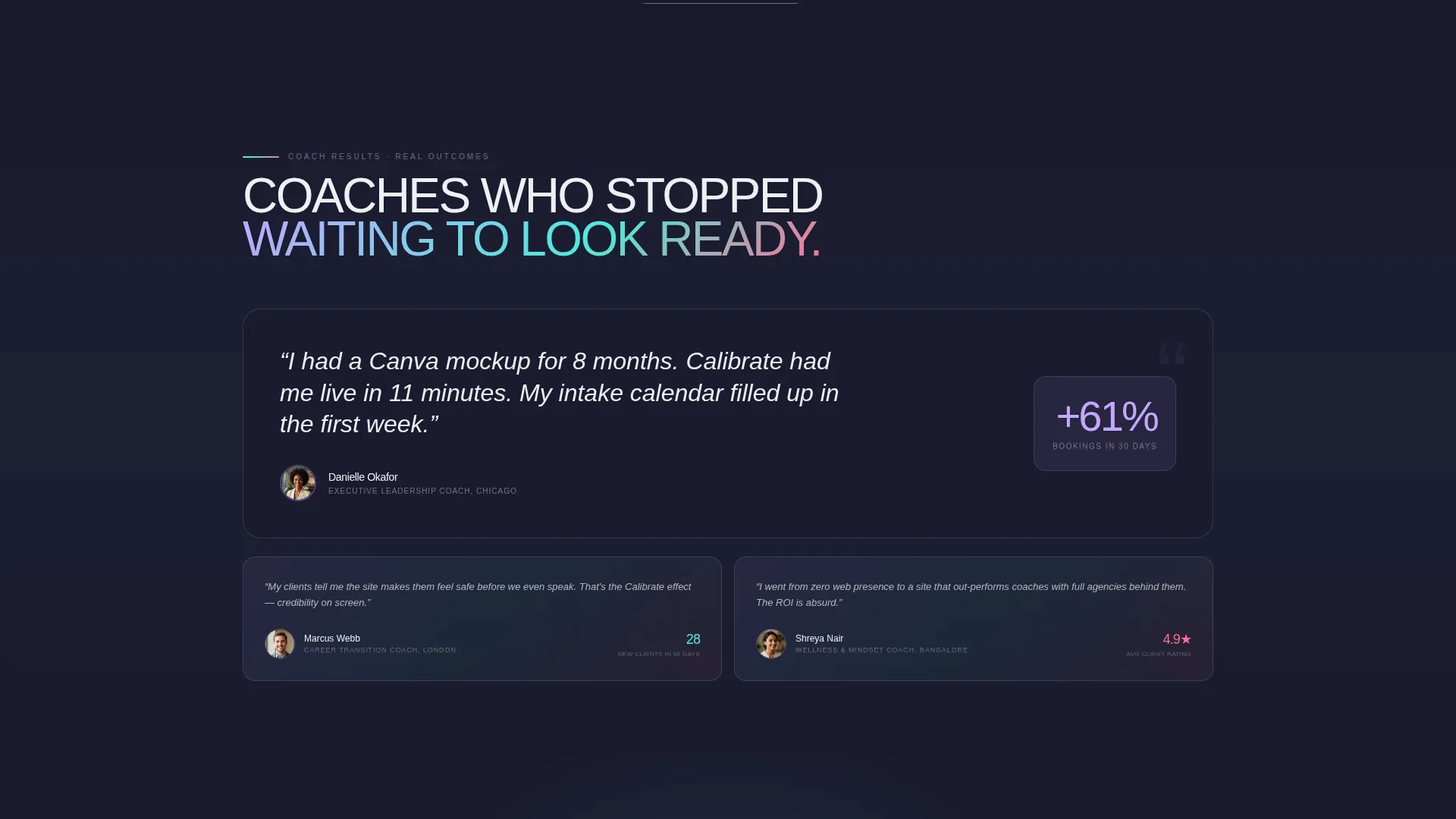
- No credibility gap: real conversion stats and social proof are woven into the layout
- No friction at the decision moment: the call to action is present without being aggressive
What you get with this template
You get a fully structured, single-page coaching landing page with a stats-driven opening section, a browsable template directory, and a clear conversion path. Every section is designed to do a specific job so you do not have to rearrange anything from scratch.
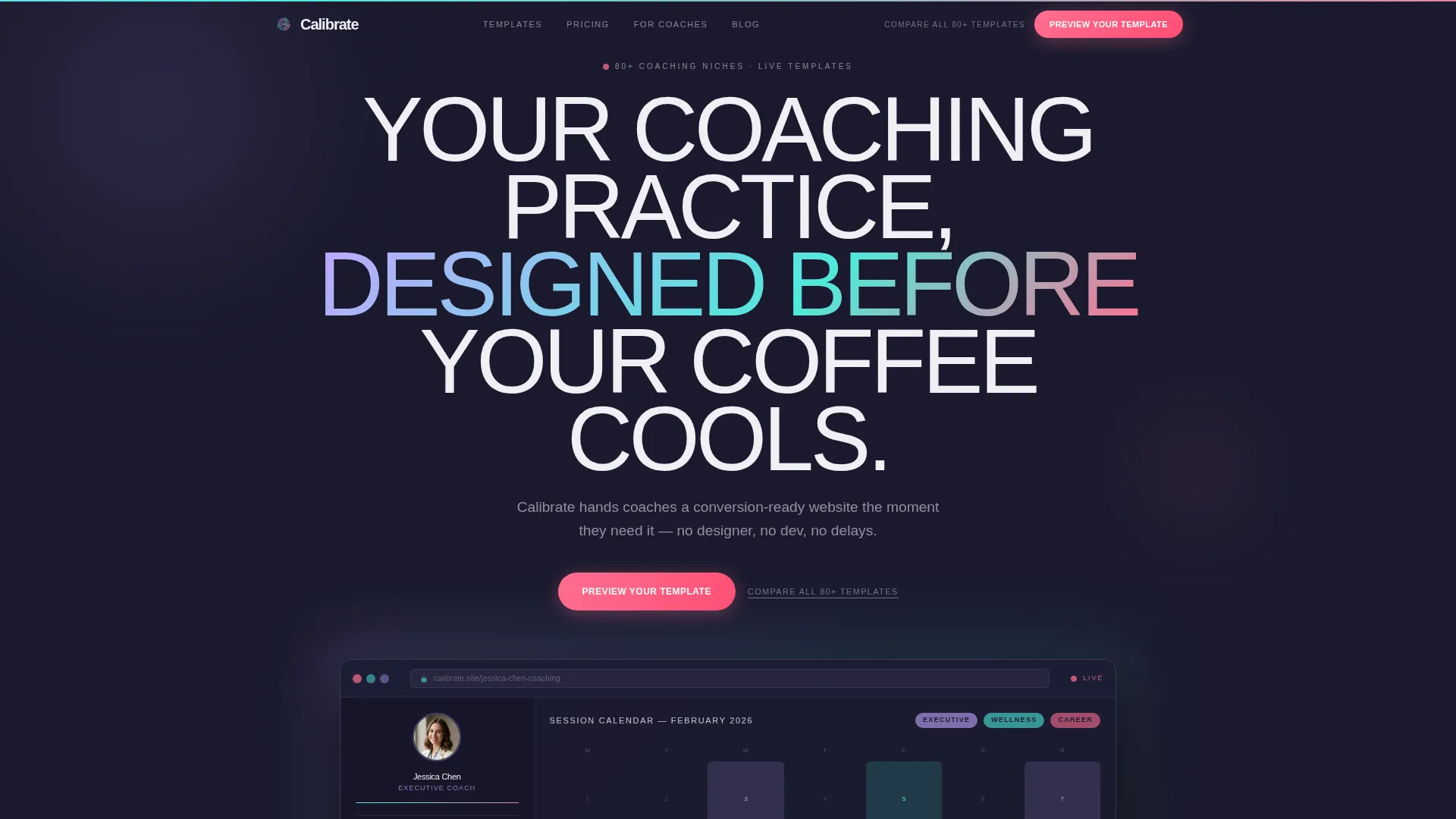
- A full-width product screenshot header with an animated headline
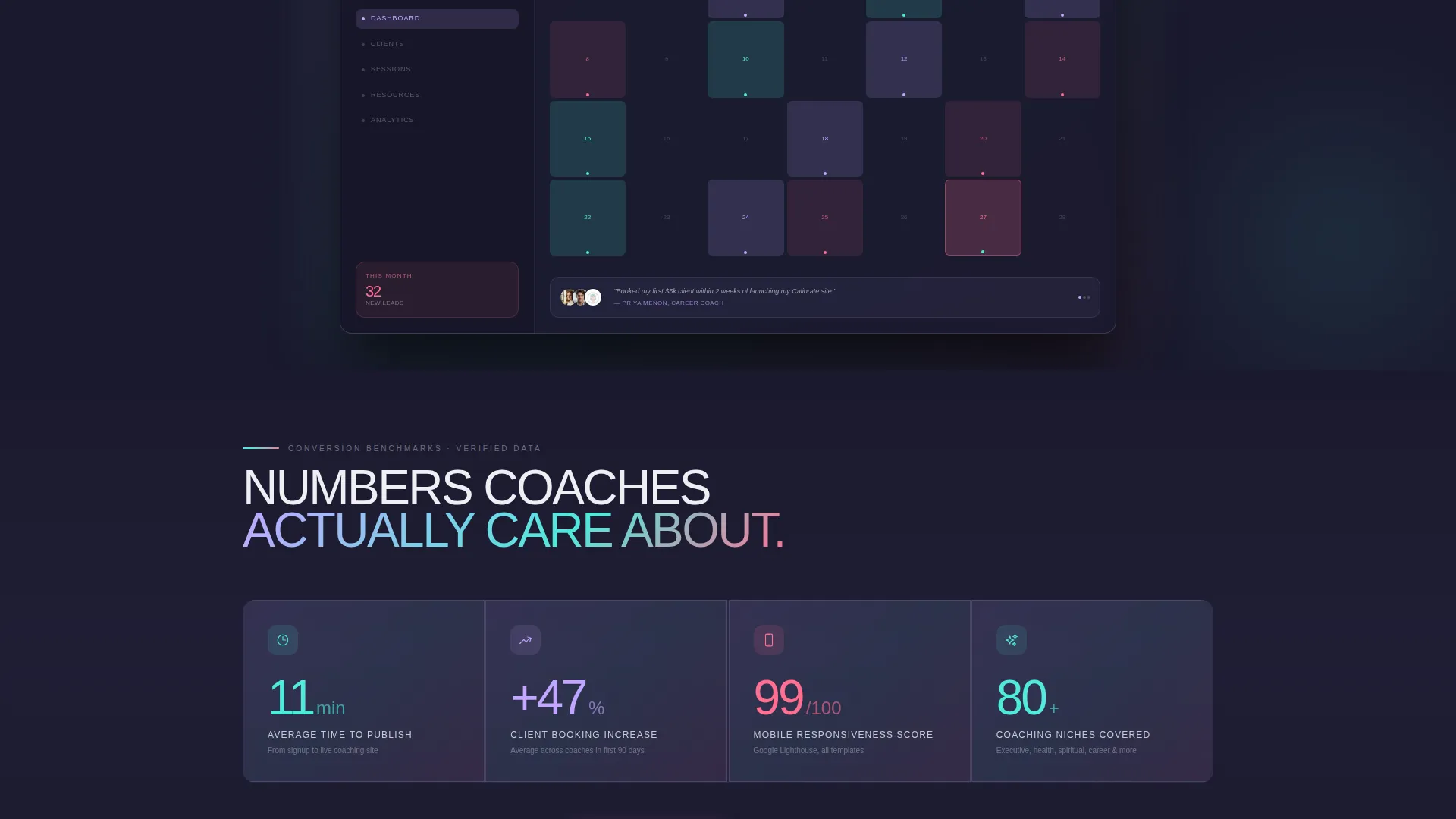
- A data grid showing four live conversion benchmarks with card entry animations
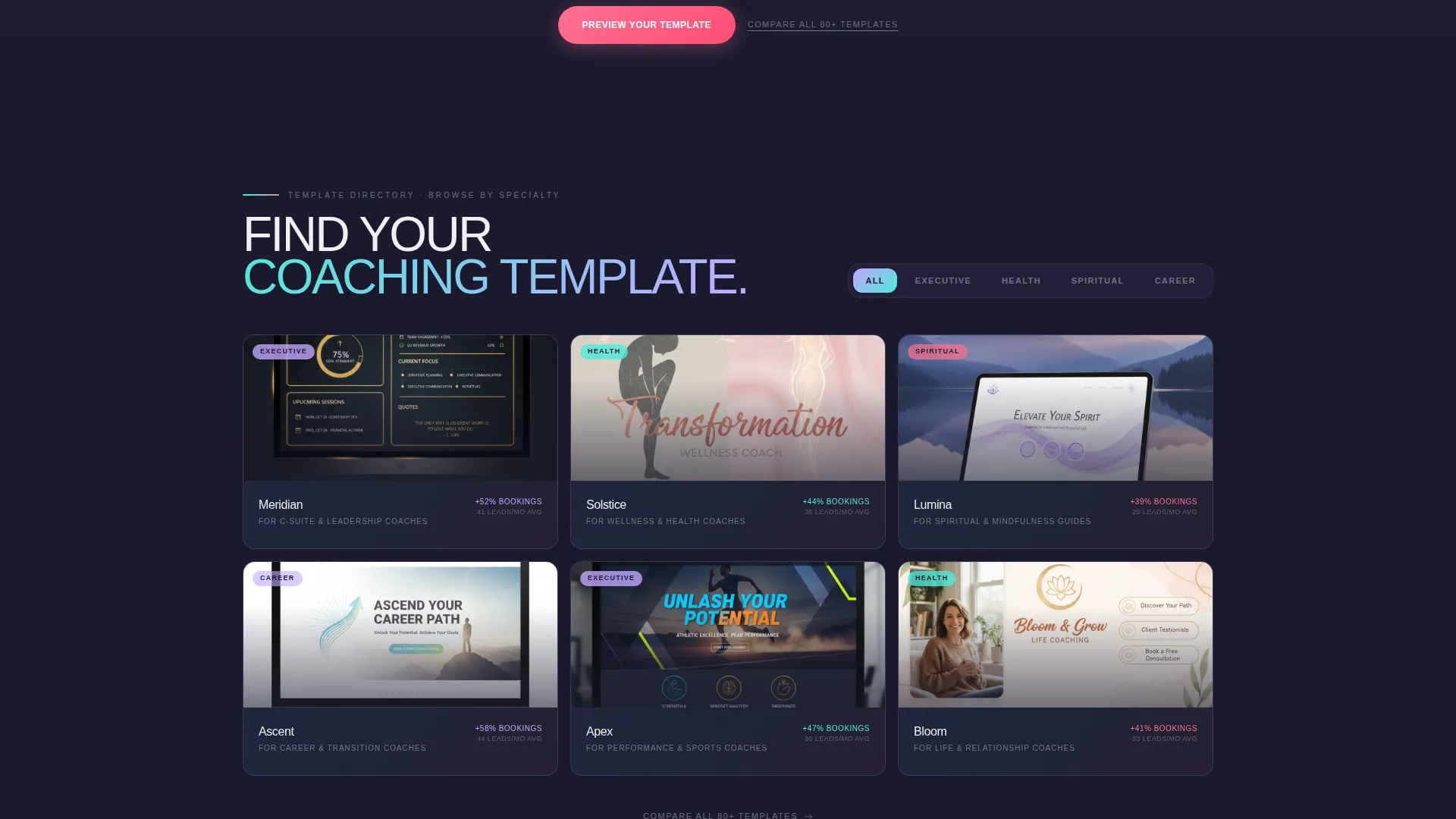
- A filterable coaching niche directory with expandable full-page card previews
- Three placements of the primary call to action across the page
- A secondary catalog link beneath each call to action for comparison browsers
Feature list
This section covers the core built-in components that make Calibrate work as a coaching landing page.
Stats-First Data Grid
Four animated stat cards open the scroll: average publish time of 11 minutes, a 47 percent client booking increase, a mobile responsiveness score of 99, and coverage across 80-plus coaching niches. Each card animates on entry so the numbers land with impact.
Filterable Niche Directory
A grid of template previews is tagged by coaching specialty: executive, health, spiritual, and career. Visitors filter and browse the way they would scroll a curated marketplace. Each card expands on click to show a full-page preview of that niche layout.
Triple Call-to-Action Placement
The primary "Preview Your Template" button appears three times: pinned in the top navigation, floating after the stats grid, and anchoring the final section. Clicking routes directly to a niche picker with instant personalized preview, no form or email gate required.
Product Screenshot Header
The header is a full-width browser frame showing a live coaching dashboard in use. It displays a coach profile card, a color-coded session calendar, a testimonial carousel, and a small analytics widget reading "32 new leads this month."
Iridescent Visual Identity
The AI Iridescent color system uses deep graphite, shimmering lilac, holographic teal, soft pearl white, and signal pink. Gradient cards, hover states, and call to action pulses are all mapped to specific palette roles so the page feels intentional at every scroll depth.
Secondary Catalog Link
A text link reading "Compare all 80+ templates" sits beneath each primary call to action. It gives comparison-minded visitors a low-pressure path to the full catalog without disrupting the main conversion flow.
Page sections overview
| Section | Purpose |
|---|---|
| Top Navigation Bar | Pins the primary call to action and keeps it accessible at all times |
| Hero Header | Anchors attention with a product screenshot and animated headline |
| Stats Data Grid | Opens the scroll with four conversion benchmark cards |
| Niche Directory Grid | Lets visitors filter and preview templates by coaching specialty |
| Floating call to action Strip | Re-surfaces the primary action after the stats section |
| Final call to action Section | Closes the page with a clear, anchored conversion prompt |
Design & branding system
The visual identity follows a Directory and Discovery theme powered by the AI Iridescent color palette. Every color has a fixed role, so the hierarchy reads clearly without extra configuration.
- Deep graphite (#1A1A2E) anchors every background panel for contrast and depth
- Shimmering lilac (#C3A6FF) and holographic teal (#4EEADB) wash across gradient cards and hover states
- Signal pink (#FF6F91) is reserved exclusively for calls to action and live-data accents, making every clickable moment immediately obvious
- Soft pearl white (#F0EFF4) carries body text and supporting copy throughout
Mobile & speed optimization
The template is structured for a clean, responsive experience across screen sizes. The dashboard layout and filterable grid adapt so mobile visitors see the same hierarchy as desktop users.
- The stats grid stacks vertically on smaller screens without losing its card-entry animation
- The filterable niche directory reflows into a scrollable single-column view on mobile
- The pinned navigation call to action remains accessible regardless of device or viewport size
How this template helps you convert
Calibrate is built around a single conversion insight: reduce the number of decisions a visitor has to make before clicking. Every structural choice serves that goal.
- Leading with data earns trust before the visitor reaches any sales copy, so the "Preview Your Template" click feels like a confident next step rather than a gamble.
- The filterable directory turns passive browsing into active personalization, which keeps visitors engaged and moves them toward a niche-specific preview rather than a generic signup.
- Removing the email gate from the primary call to action means the click itself is the conversion, cutting friction to a single decisive tap.
Other information about this template
Calibrate is categorized under Technology with a focus on coaching digital presence. It is designed specifically for the coaching website template niche, making it a practical fit for practitioners who want a modern, data-forward online presence.
- The template style is Dashboard and Data Grid, which suits coaches who want their page to communicate authority through structure and proof points
- The theme follows a Directory and Discovery format, ideal for platforms or practitioners offering multiple niche offerings under one roof
- The creative direction is Stats-First Impact, meaning social proof and performance numbers appear before any feature copy
- The landing page direction is Click-Through, with the entire page optimized to move visitors toward a single low-friction action
Theme
Directory & Discovery
Creative direction
Stats-First Impact
Color system
AI Iridescent
Style
Dashboard/Data Grid
Direction
Click-Through
Page Sections
Stats-first Data Grid with Animations
Filterable Coaching Niche Directory
Triple Call-to-action Placement
Product Screenshot Hero Header
AI Iridescent Color System
Secondary Catalog Navigation Link
Related questions
How long does it take to set up this template?
Do I need design experience to use Calibrate?
Can I use this template if I coach in a niche not listed in the directory?
Is there a way for visitors to browse all available templates?



