Nonprofit Software & SaaS Cost Calculator Website Template
Uplift is a modular card-grid landing page template built for a nonprofit mobile app. It features an interactive estimator header, a Problem-to-Solution scroll arc, and a Tech Glass visual identity. The page guides small nonprofit teams from recognizing their daily chaos to downloading a tool that quietly organizes donations, volunteers, and compliance tasks in one place.
by Rocket studio
Quick summary
Uplift is a single-page, card-grid landing page template designed to promote a nonprofit mobile app. It opens with an interactive estimator that quantifies a visitor's pain, then walks them through a before-and-after scroll journey. The result is a focused, high-trust path from "I recognize this problem" to "Get Uplift Free."
Who this template is for
This template is built for lean nonprofit teams who need to communicate real app value fast. It speaks directly to the people doing the most work with the fewest resources.
- Executive directors running small operations like food banks with two or three staff members
- Grant writers managing multiple active applications and deadlines simultaneously
- Volunteer coordinators who need real-time visibility into who is showing up and when
What problem this template solves
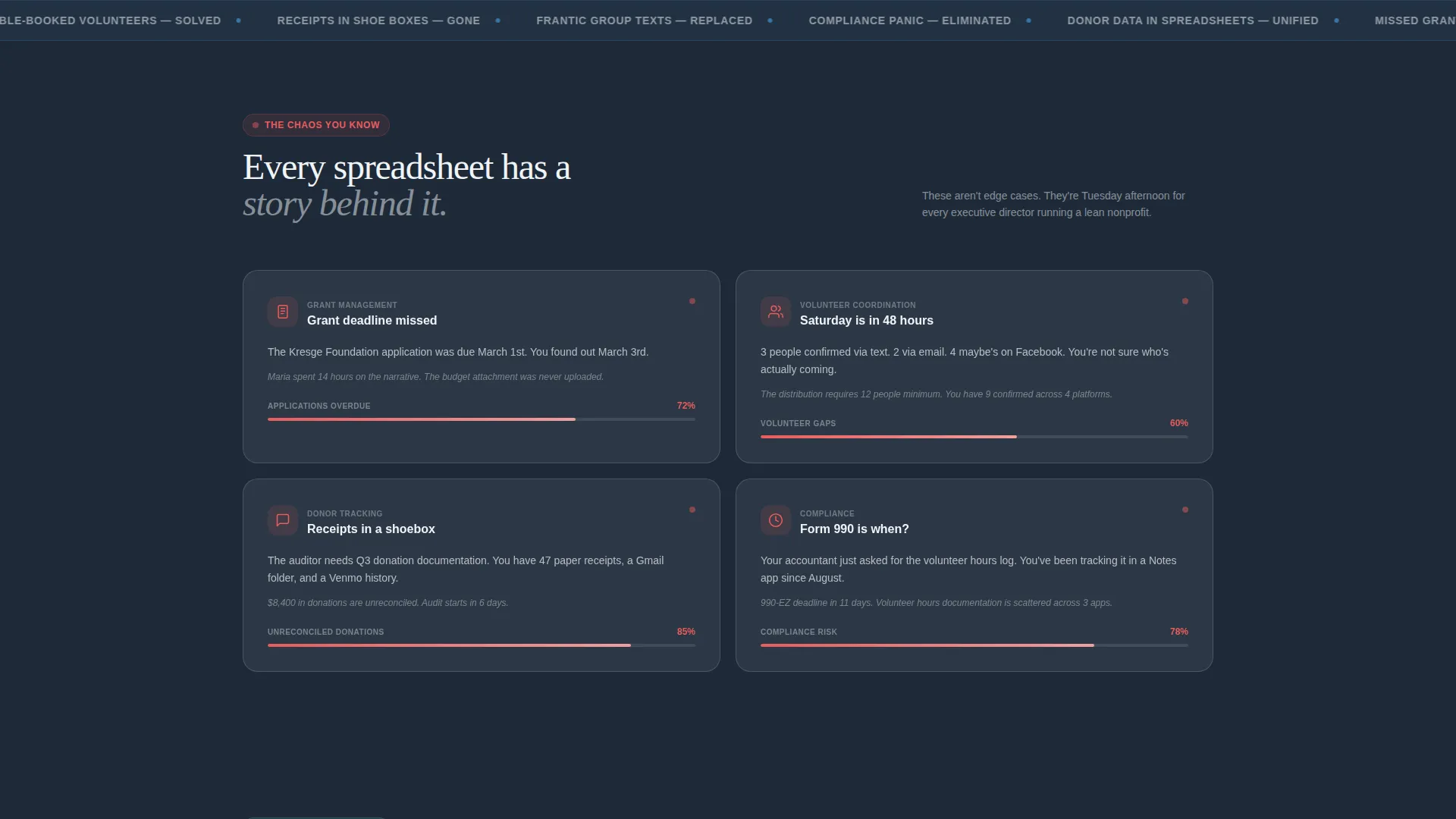
Small nonprofits often operate in organized chaos. Donation records live in shoe boxes, volunteer schedules exist in group texts, and compliance deadlines sneak up between site visits. A landing page needs to reflect that reality before it can offer relief.
- Missed grant deadlines and scattered donation receipts go unaddressed by generic app pages
- Visitors leave before converting because the page never earns their trust by naming the real problem
- No clear, quantified reason to download means no urgency and no tap
What you get with this template
You get a fully structured, single-page layout that takes a visitor from curious to convinced. Every section is designed with a specific job to do, and no section wastes the visitor's attention.
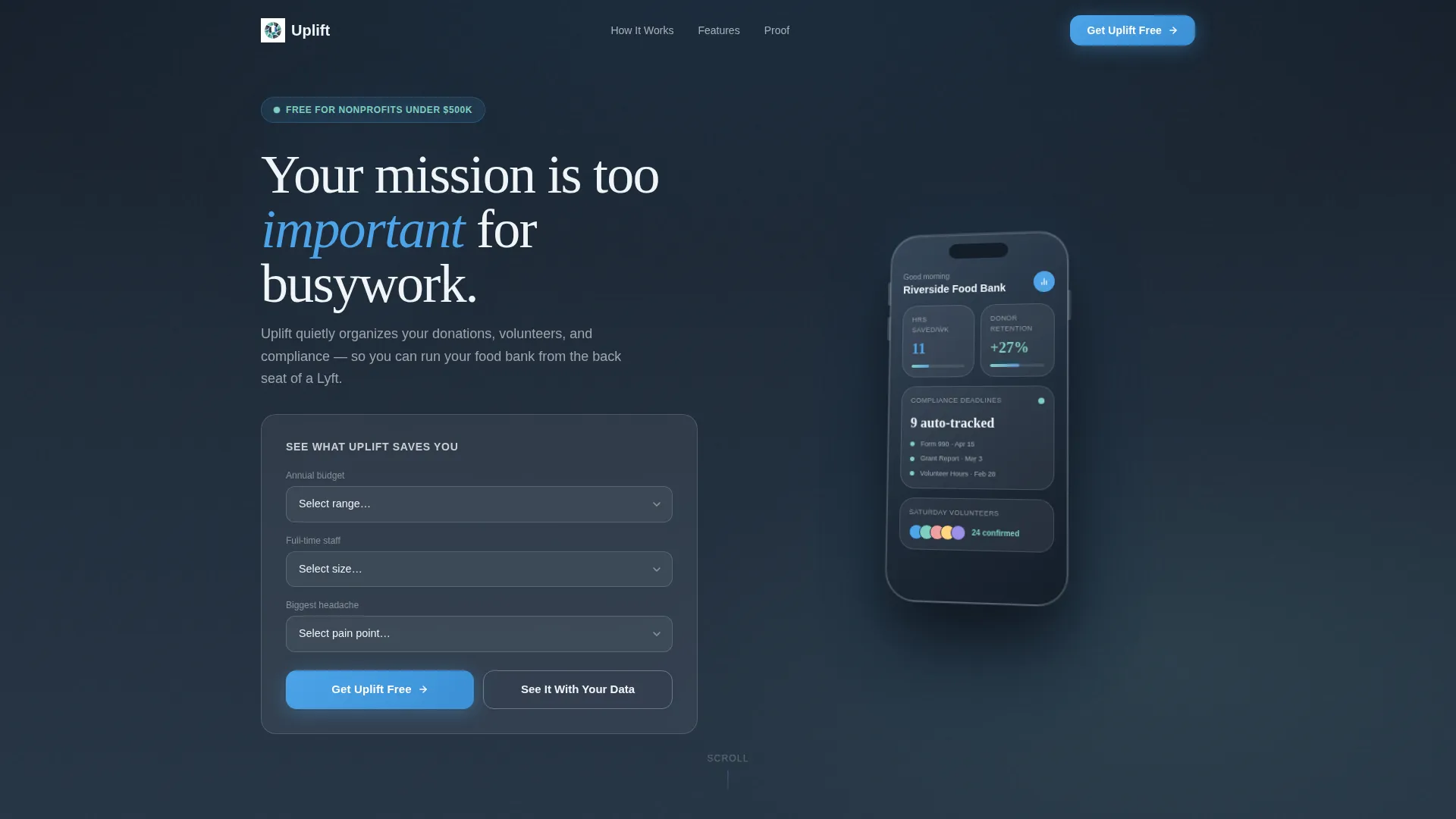
- An interactive estimator header that renders a personalized dashboard mockup based on budget range, team size, and biggest pain point
- A modular card grid that transitions from problem cards to solution cards as the visitor scrolls
- Two clear conversion paths: a direct app download button and a personalized demo request form
Feature list
This template includes purpose-built components that match how small nonprofit teams actually think and decide.
Interactive Estimator Header
Visitors select their nonprofit's annual budget range, team size, and top pain point from three dropdown fields. The page instantly renders a frosted glass dashboard mockup showing projected hours saved per week, donor retention lift, and compliance deadlines auto-tracked. Numbers animate upward like a scoreboard, making the value feel immediate and specific.
Problem-to-Solution Card Arc
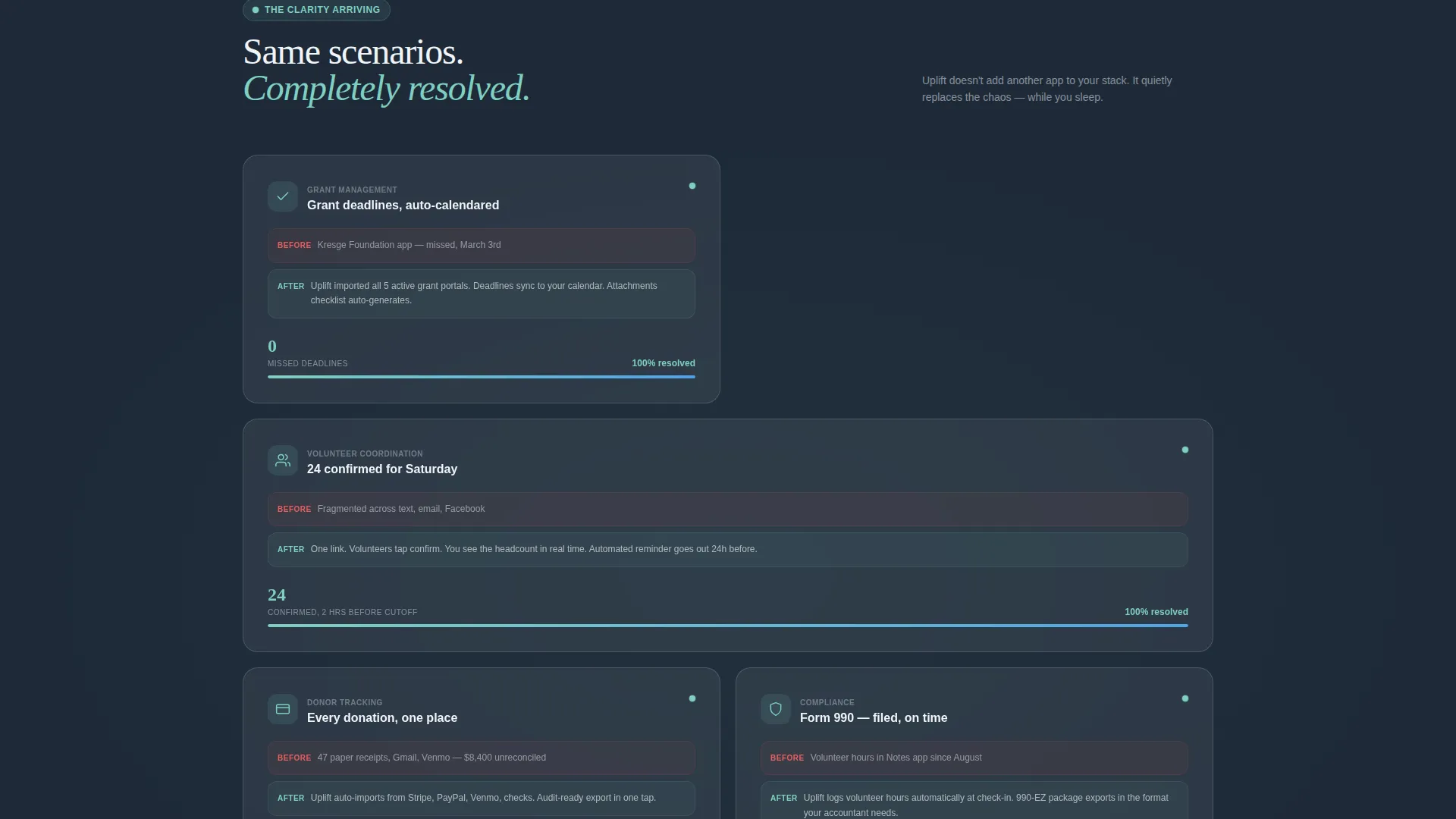
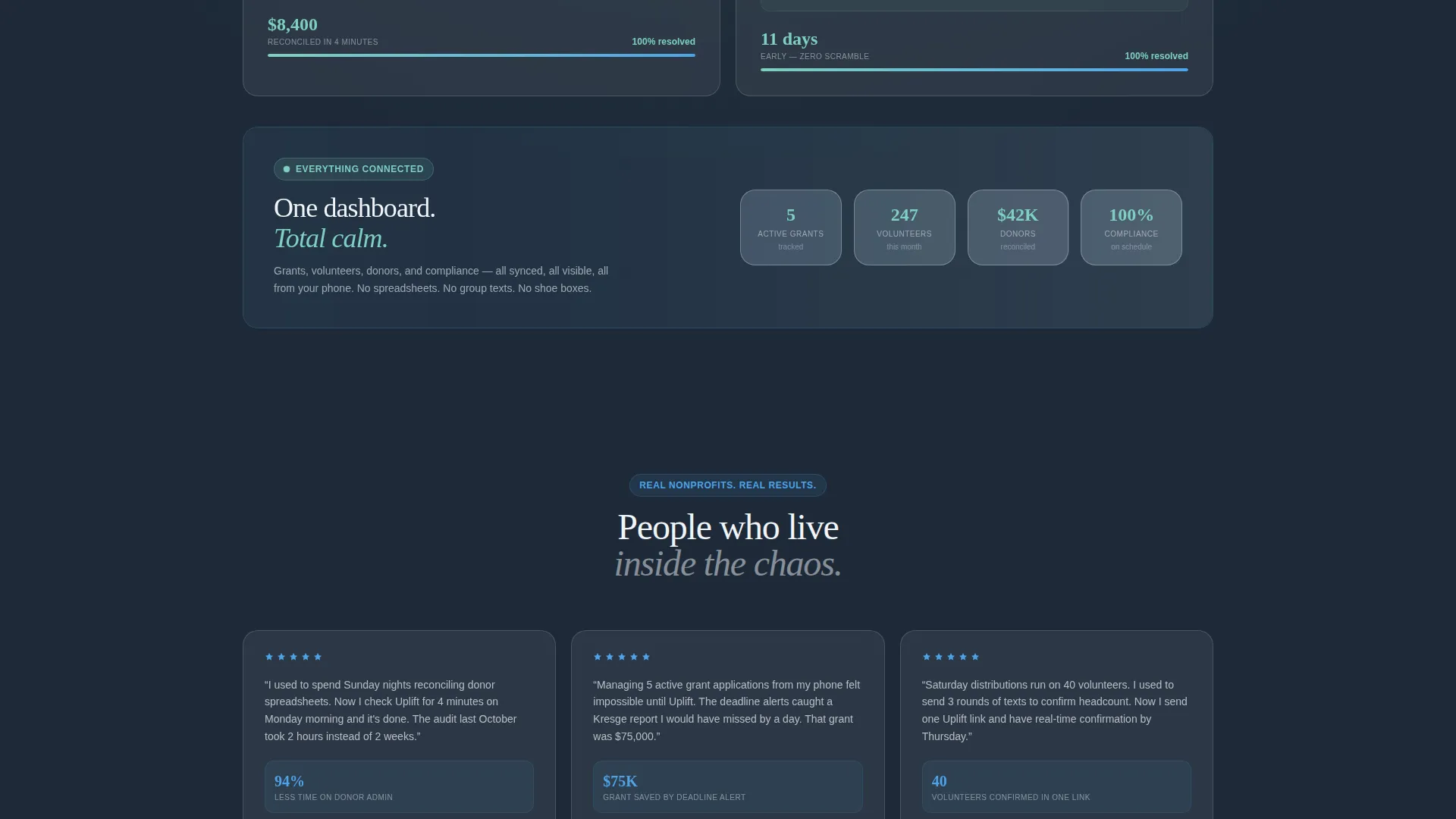
The first row of modular cards presents real chaos scenarios: missed grant deadlines, double-booked volunteers, and receipts in shoe boxes. Each card carries a subtle red stress indicator. As the visitor scrolls, the same scenarios replay inside the app interface, stress indicators shifting to aurora teal, numbers resolving. The grid tightens as you descend until a single unified dashboard view closes the arc.
3D Phone Mockup Display
The phone mockup in the header section tilts gently in three-dimensional space with light refracting across its glass surface. This gives visitors an immediate sense of the app's polish and signals that the product is real and ready.
Dual Conversion Path System
A primary call to action reads "Get Uplift Free" and appears beneath the estimator results. It also persists as a bottom bar on mobile with smart device detection linking to the App Store and Google Play. A secondary path offers "See It With Your Data," a short form requesting organization name and email to receive a personalized demo video within twenty-four hours.
Persistent Mobile Bottom Bar
On mobile screens, the primary download call to action stays fixed at the bottom of the viewport throughout the scroll. Visitors never have to hunt for the next step, no matter where they are in the page.
Modular Card Grid Layout
Cards are self-contained units, each telling one complete story. The grid layout is flexible and visually consistent, with frosted glass surfaces floating against the deep slate background. The structure makes it easy to scan, compare, and absorb information in short bursts.
Page sections overview
| Section | Purpose |
|---|---|
| Estimator Header | Quantify visitor pain with interactive fields and animated mockup |
| Problem Card Row | Surface real chaos scenarios with red stress indicators |
| Solution Card Row | Replay same scenarios resolved inside the app interface |
| Unified Dashboard View | Close the arc with a single connected, calm dashboard card |
| Primary call to action Block | Drive app download beneath the estimator results |
| Demo Request Form | Capture leads via personalized demo video offer |
| Persistent Mobile Bar | Keep download call to action visible throughout the full scroll |
Design & branding system
The visual identity follows a Tech Glass theme built on a Slate and Sky color system. The palette is designed to feel like clarity arriving after a long, overcast day.
- Deep charcoal slate (#1E2A38) forms the primary background, giving cards a strong, grounded contrast
- Cloud-gray glass (#D6DFE8) surfaces the card panels with frosted-glass blur and light-catching edges
- Open-sky blue (#4DA3E8) drives calls to action and active states, while aurora teal (#7ECFC0) marks progress bars and success indicators
Mobile & speed optimization
The template is built with mobile users at the center. Nonprofit staff are on the move, checking phones between site visits and volunteer shifts.
- The layout adapts to small screens without losing the card-grid structure or the frosted-glass visual identity
- The persistent bottom bar keeps the primary call to action reachable on any screen size
- Smart device detection on the download button routes visitors directly to the App Store or Google Play without an extra step
How this template helps you convert
The page earns the download before it asks for one. Every section builds trust and reduces friction in a deliberate sequence.
- The estimator at the top personalizes the value proposition immediately, giving each visitor a specific number to hold before they read another word
- The Problem-to-Solution card arc creates an emotional recognition moment, then resolves it inside the app, making the transition from interest to intent feel natural
- The dual conversion path removes the all-or-nothing pressure: visitors can download now or request a demo, keeping both ready-to-act and cautious visitors in play
Other information about this template
This template is a strong fit for nonprofit technology marketing where the audience is time-poor and skeptical of overpromised tools. A few additional details worth knowing before you build with it.
- The template style is Card Grid (Modular), making individual sections easy to reorder or update without rebuilding the full layout
- The creative direction follows a Problem-to-Solution Arc, a proven narrative structure for software landing pages targeting operationally stressed buyers
- The header concept is a Calculator and Estimator, which places quantified value front and center before any product claim is made
- The landing-page direction is App Download, so every section feeds toward one primary action rather than splitting attention across multiple goals
- The theme is Tech Glass, a visual style well suited to modern nonprofit software products that want to feel polished without feeling corporate
Theme
Tech Glass
Creative direction
Problem→Solution Arc
Color system
Slate & Sky
Style
Card Grid (Modular)
Direction
App Download
Page Sections
Interactive Estimator Header
Problem-to-solution Card Arc
3D Phone Mockup with Glass Effects
Dual Conversion Path
Persistent Mobile Bottom Bar
Modular Card Grid Layout
Related questions
Can I customize the estimator fields for a different nonprofit focus?
Does the template include both App Store and Google Play links?
What is the 'See It With Your Data' secondary conversion path?
Is this template suitable for nonprofits beyond food banks?
How does the before-and-after card storytelling work visually?



