Cannabis Software & SaaS Professional Website Template
Cultivate is a modular cannabis website builder template designed for dispensaries, delivery services, and multi-location cannabis brands. It ships with built-in age verification, state-by-state menu syncing, and compliant payment gateway support. The dark-mode SaaS interface feels like a command center from day one, and the freemium flow gets your site live with just an email and dispensary name.
by Rocket studio
Quick summary
Cultivate is a compliance-forward cannabis website template built for operators who need their site to work across state lines. It pairs a modular card grid layout with a Startup Velocity dark-mode design system. Age verification, menu syncing, and payment gateway support come pre-wired. The freemium entry path asks only for an email and dispensary name to get started.
Who this template is for
This template is built for cannabis business operators who need more than a generic site builder. It targets the people who already know what compliance-gated commerce means and need a template that keeps pace with them.
- Dispensary owners managing live menus across point-of-sale systems
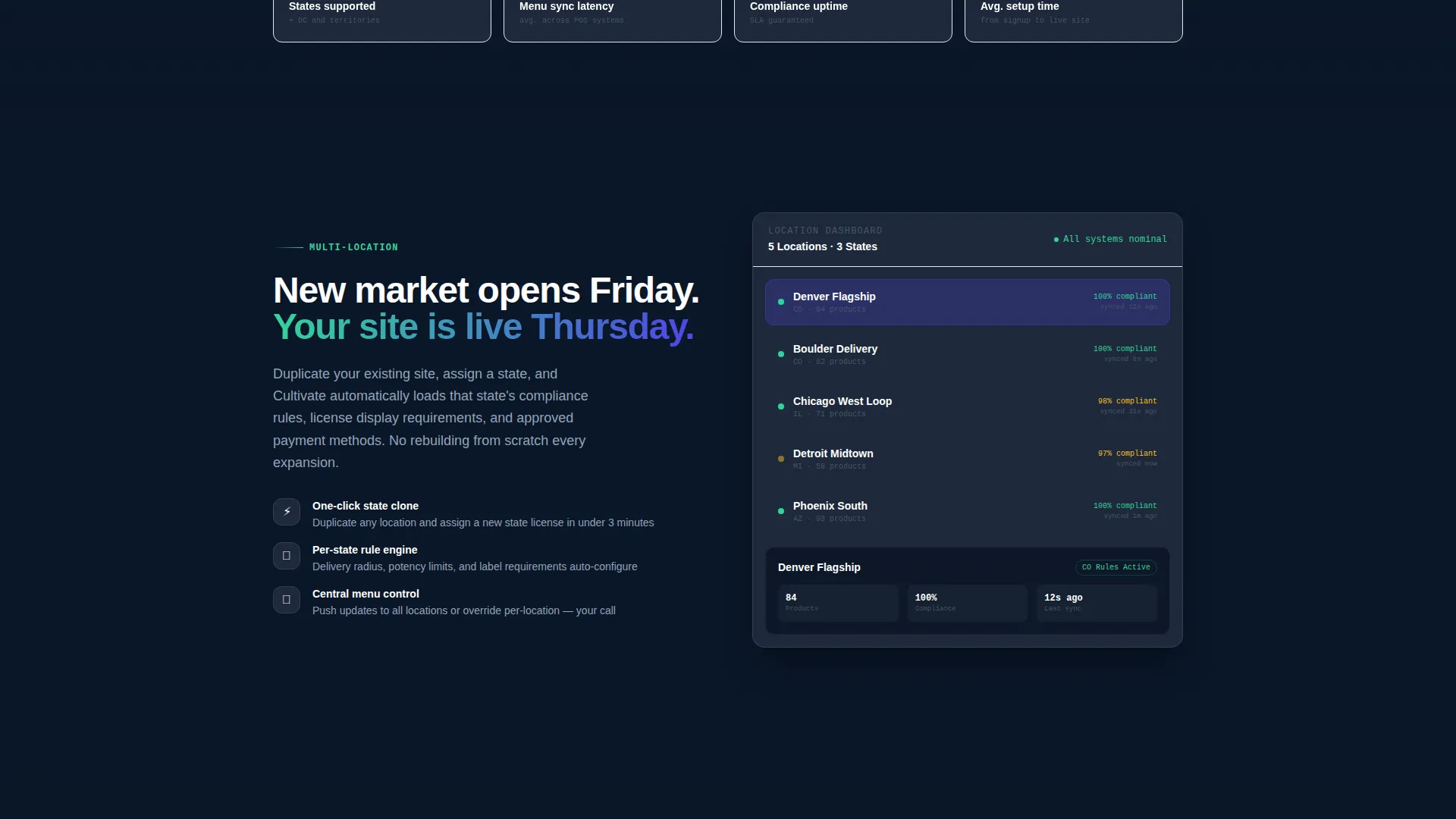
- Multi-state operators who need to launch new market storefronts quickly
- Cannabis marketing agencies handling multiple dispensary accounts at once
What problem this template solves
Most general-purpose website templates were not built with cannabis regulations in mind. Operators end up bolting on age gates, manually updating menus, and losing sales at checkout because their payment processor does not understand the category.
- No native age verification forces operators to rely on clunky third-party workarounds
- Menu updates across locations become a time-consuming manual task every week
- Payment gateway incompatibility creates checkout dead ends that cost real revenue
What you get with this template
Cultivate delivers a fully structured cannabis website layout with every compliance-critical component already in place. The modular card grid lets you present your capabilities like a SaaS product, so visitors can compare features at a glance rather than reading walls of text.
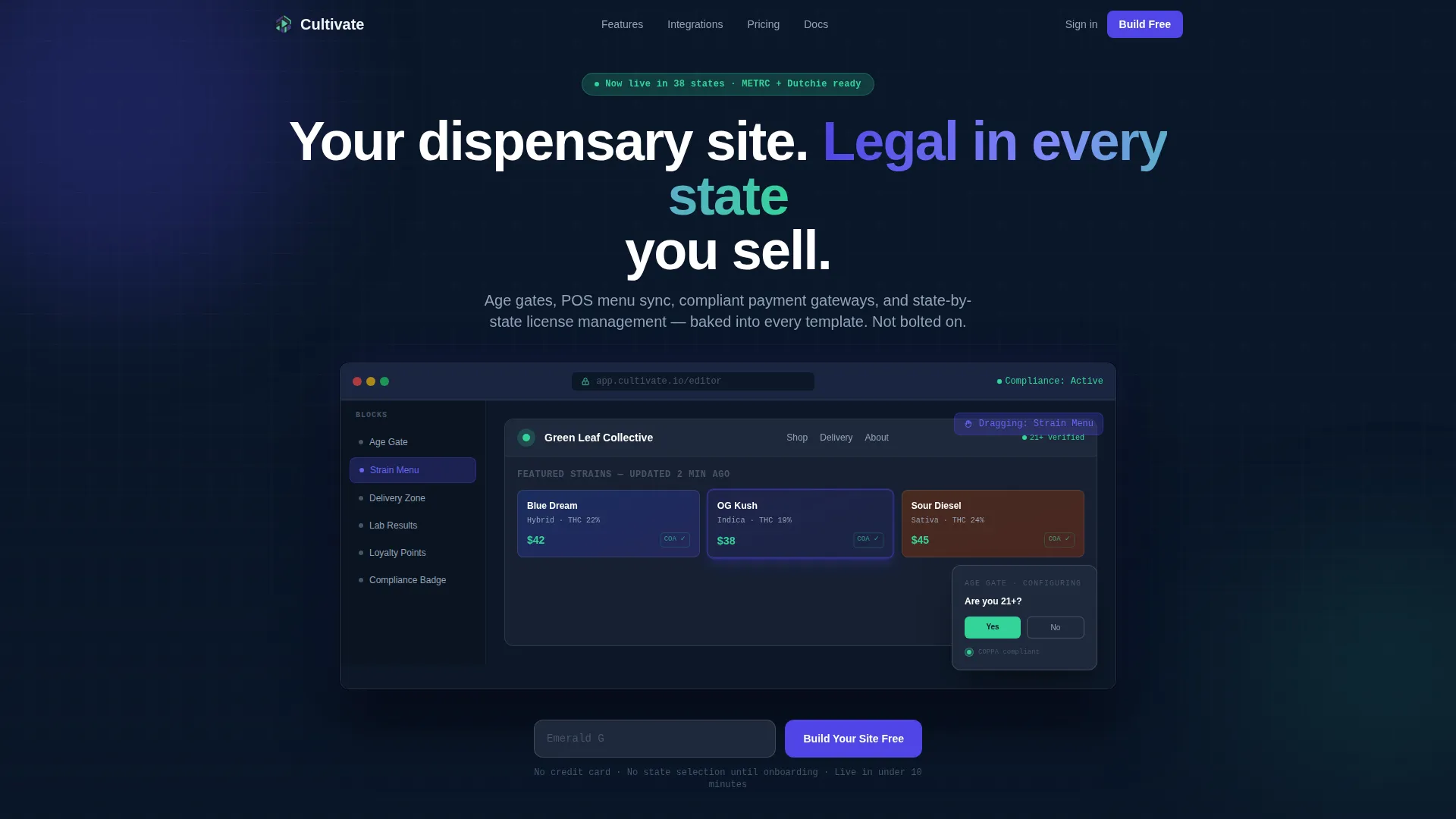
- A browser-framed Dashboard Preview header showing the live editor mid-build
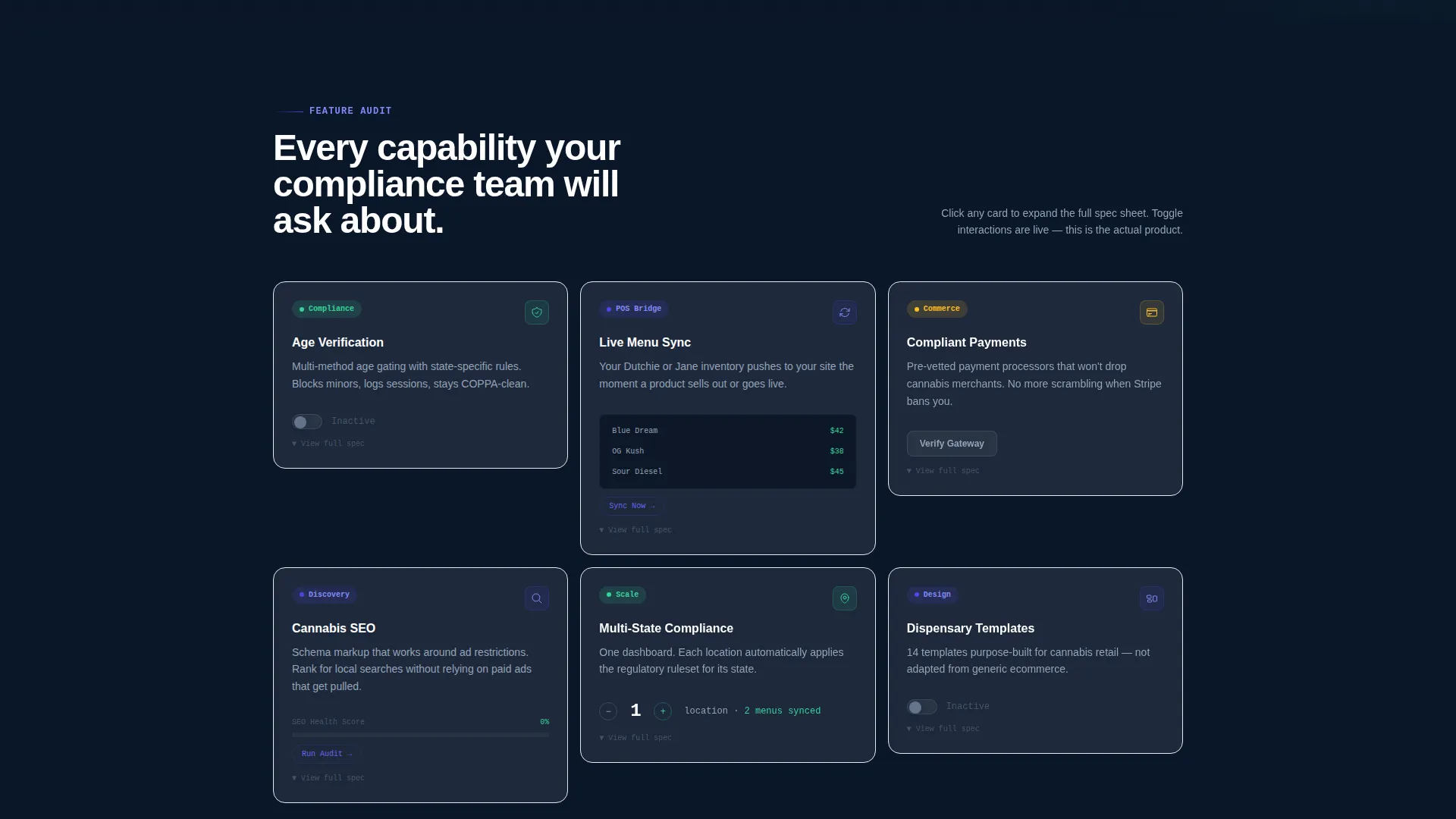
- A Spec Sheet card grid where each feature block contains its own micro-interaction
- A freemium conversion flow with a pinned "Build Your Site Free" call to action
Feature list
Cultivate ships with a focused set of capabilities drawn directly from the compliance and commerce needs of cannabis operators.
Age Verification Module
The age gate component comes pre-configured with supported verification methods already listed inside the feature card. Visitors see the modal in a half-configured state during the header demo, showing exactly how the flow works before they ever sign up.
State-by-State Menu Sync
Menu cards update per location based on state-level availability, removing the manual Friday-night update grind. Each menu card in the grid is a discrete spec block that shows how syncing works in real time through a micro-interaction animation.
Compliant Payment Gateway Support
Payment gateway cards display compliant processor options directly inside the feature grid. The template surfaces this capability as a standalone spec card so visitors immediately understand that checkout dead ends are accounted for.
POS Integration Display Cards
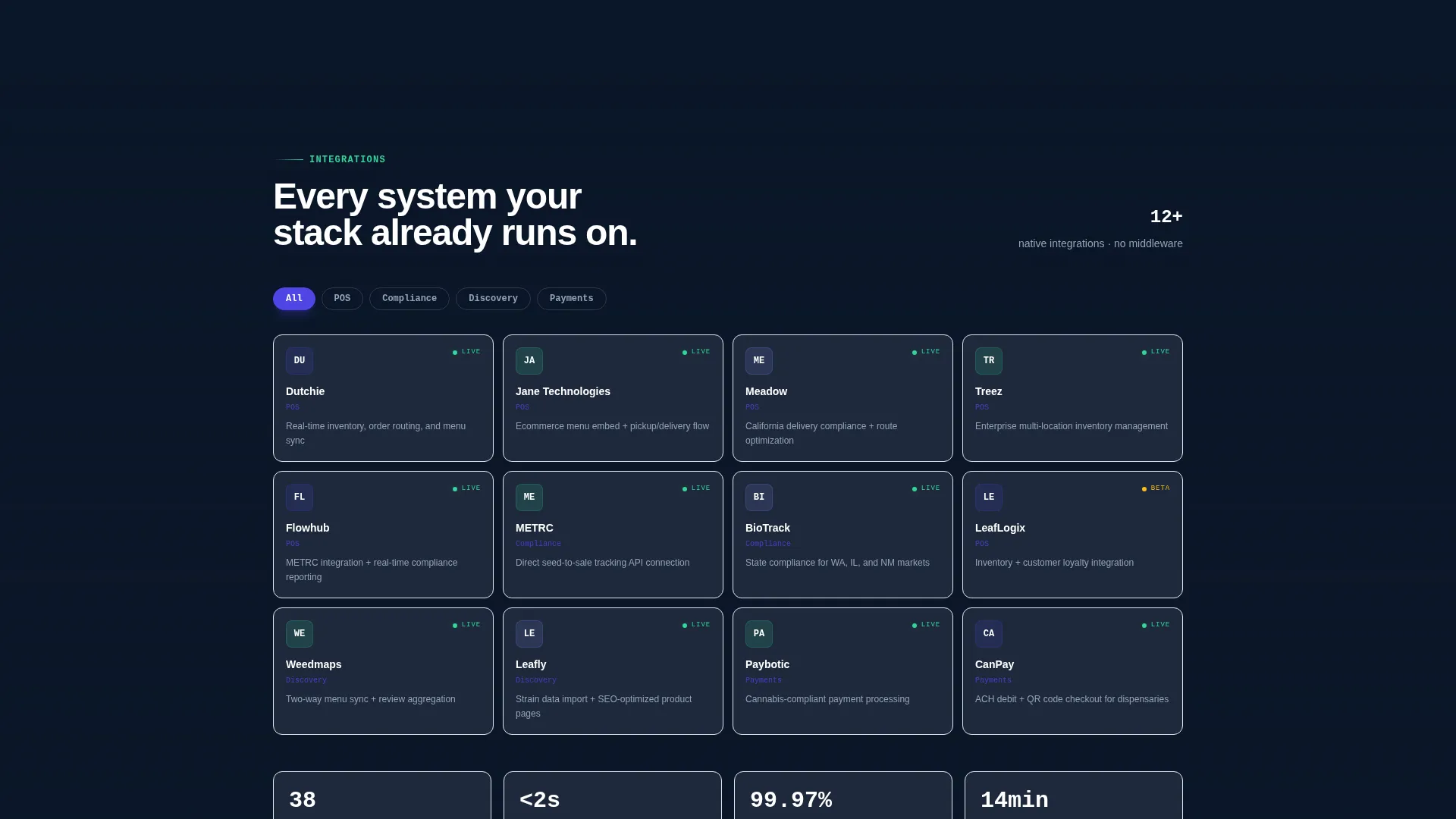
Integration cards inside the grid present point-of-sale logos and supported connection details in a compact, scannable format. Operators can see at a glance which systems the template is built to work alongside.
SEO Tools for Cannabis Search
The template includes an SEO capability card built around the specific restrictions cannabis brands face in organic search. It surfaces tools designed for a category where standard keyword playbooks often do not apply.
Guided Demo Conversion Path
A secondary call-to-action labeled "See It Built for You" triggers a 60-second guided demo. Visitors choose a dispensary type and watch a template auto-populate, letting them experience the product before entering any personal information.
Page sections overview
| Section | Purpose |
|---|---|
| Pinned Top Bar | Keeps "Build Your Site Free" visible after first scroll |
| Dashboard Preview Header | Shows live editor with age gate and compliance badge |
| Real-Time Mockup Input | Generates a dispensary preview from name entry |
| Feature Spec Card Grid | Lets visitors audit capabilities as discrete product specs |
| Age Verification Card | Displays supported verification methods with toggle interaction |
| Menu Sync Card | Animates state-by-state menu population |
| Payment Gateway Card | Shows compliant processor options in compact format |
| POS Integration Card | Lists point-of-sale connections with logos |
| SEO Tools Card | Covers cannabis-specific search capability |
| Guided Demo Path | Leads to 60-second auto-populate demo flow |
| Primary call to action Section | Collects email and dispensary name to start free build |
Design & branding system
The visual identity runs on a Midnight Blue color system built to feel like a SaaS command center at 2 a.m. Every color choice has a functional role: nothing decorates without also communicating.
- Deep terminal navy (#0A1628) as the primary background, cool slate (#1E293B) for card surfaces, and electric indigo (#4F46E5) for hover states and active buttons
- Sharp mint (#34D399) fires on toggles, checkmarks, and success states to guide the eye toward positive actions
- Dark mode is the default state; every glow and accent is intentional and tied to a specific interaction or status signal
Mobile & speed optimization
The modular card grid is structured so each spec card functions as a self-contained unit. This makes the layout naturally adaptable across screen sizes without requiring a separate mobile design pass.
- Uniform card sizing keeps the grid consistent and readable on smaller viewports
- Micro-interactions inside each card are scoped to the card itself, so they do not create layout conflicts on touch screens
- The pinned top bar is designed to remain functional and visible across device widths
How this template helps you convert
Cultivate earns the click by showing the product working before asking for anything personal. The conversion architecture is layered so visitors move at their own pace.
- The Dashboard Preview header puts a live editor screenshot front and center, so visitors see a real dispensary site being built the moment they land on the page.
- The real-time mockup input lets visitors enter their dispensary name and watch a preview generate, creating immediate personal investment before the signup ask.
- The pinned "Build Your Site Free" bar stays visible throughout the scroll, while the "See It Built for You" demo path offers a lower-commitment second route for visitors who are not ready to sign up.
Other information about this template
Cultivate is categorized under Cannabis Software and Software-as-a-Service (SaaS) within the Technology template category. It is built for the cannabis website builder niche, where compliance requirements make generic templates a poor fit.
- The freemium entry flow requires only an email address and dispensary name, with no credit card and no state selection required until onboarding
- The template style is Card Grid (Modular), which aligns with the Spec Sheet creative direction and supports a feature-audit browsing experience
- The Startup Velocity theme underpins the overall design energy, giving the page a modern SaaS product feel that cannabis operators increasingly expect from their software tools
- Dutchie and Jane are among the point-of-sale platforms referenced in the integration display cards within the template grid
Theme
Startup Velocity
Creative direction
Spec Sheet
Color system
Midnight Blue
Style
Card Grid (Modular)
Direction
Freemium/Trial
Page Sections
Age Verification Module
State-by-state Menu Sync
Compliant Payment Gateway Cards
POS Integration Display
Cannabis SEO Tools Card
Guided Demo Path
Related questions
Do I need a credit card to start building with Cultivate?
Can Cultivate support more than one dispensary location?
What does the age verification component include?
Can I see the template in action before signing up?
Who gets the most value from this template?



