Endow - Powerful Donor Management Landing Page Template
Endow is a hub-and-spoke landing page template built for education donor management platforms. It pairs a live dashboard header with an interactive five-module explorer, a two-step demo booking form, and a gated ROI calculator download. The Midnight Blue and donor-green palette makes every data point feel urgent and authoritative, ideal for advancement teams ready to impress boards and donors alike.
by Rocket studio
Quick summary
Endow is a single-page, anchor-nav landing page template designed for education donor management platforms. It opens with an animated command-center dashboard, guides visitors through five interactive modules, and closes with a frictionless demo request flow. The deep navy and donor-green visual system signals institutional authority while keeping every call to action impossible to miss.
Who this template is for
This template is built for teams in educational fundraising who need to communicate platform value quickly and credibly to decision-makers.
- Advancement officers at independent schools managing multiple capital campaigns simultaneously
- Development directors at universities who report giving data to boards and need to move beyond spreadsheet-based reporting
- Foundation managers at community colleges stretching every gift across competing institutional priorities
What problem this template solves
Donor management platforms often struggle to convey their depth to buyers who are time-pressed and skeptical of software promises. A static screenshot or a generic product page rarely earns the click.
- Visitors cannot visualize how the platform handles real workflows like gift tracking, stewardship, or board reporting
- Decision-makers need to feel confident before booking a demo, but cold calls-to-action placed too early lose them
- Development teams need a page that speaks the language of advancement work, not generic software marketing
What you get with this template
This template delivers a complete, conversion-focused landing page experience built around animated storytelling and progressive discovery.
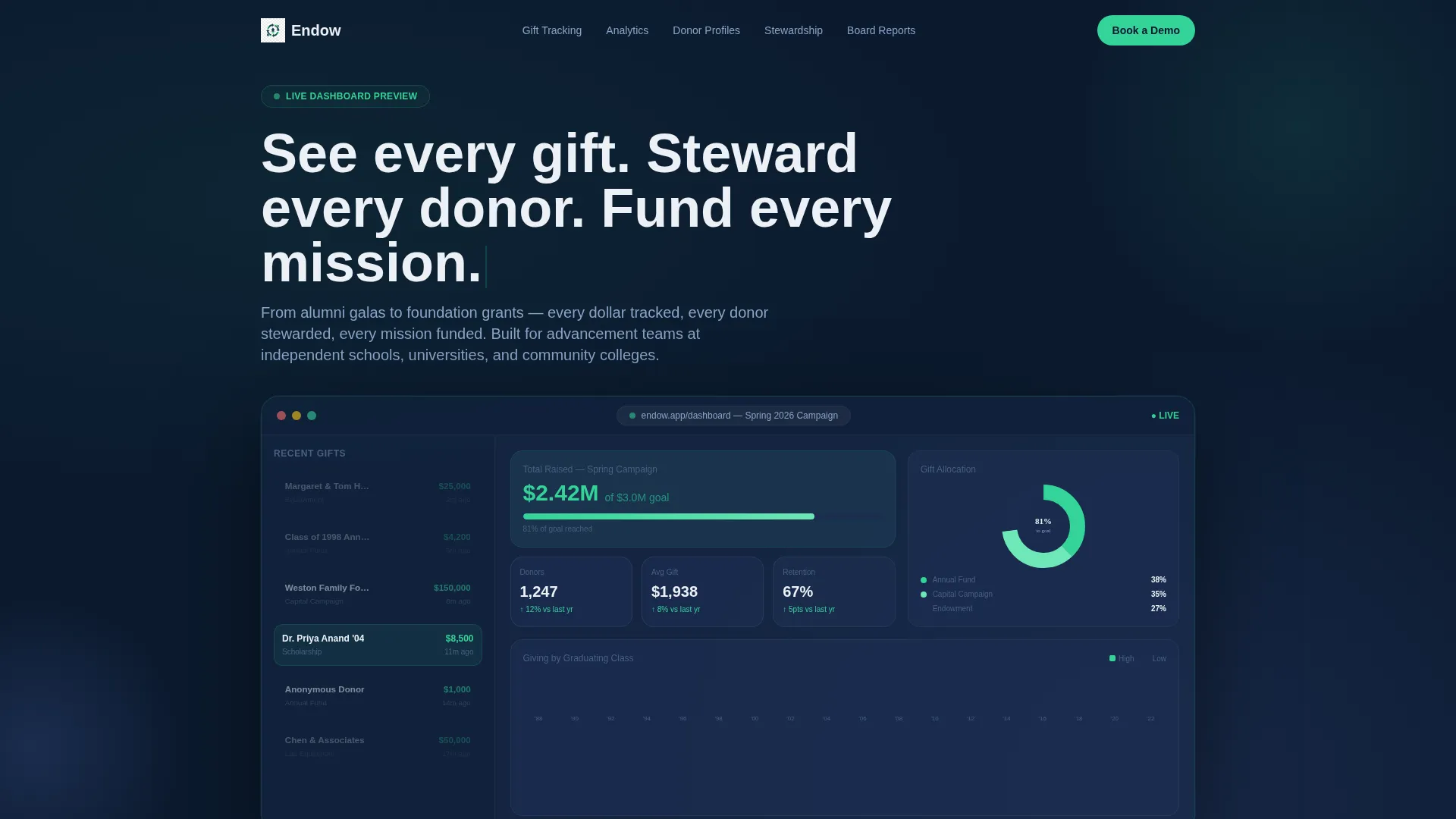
- A full-viewport dashboard header with animated gift counters, a donut chart, a class heat map, and a live donor feed
- Five interactive spoke modules covering Gift Tracking, Campaign Analytics, Donor Profiles, Stewardship Workflows, and Board Reporting
- A persistent bottom bar with a two-step demo booking form and a secondary gated PDF download path for early-stage visitors
Feature list
This template is built around six tightly integrated components that work together to turn a product page into a guided product experience.
Animated Dashboard Header
The header fills the entire viewport with a mock command screen. A gift ticker counts past $2.4 million, a donut chart splits contributions across Annual Fund, Capital Campaign, and Endowment categories, a heat map shows giving by graduating class, and a sidebar feed animates recent donor names and gift amounts as the page loads. Numbers count up on entry, making the platform feel alive before a visitor reads a single word.
Hub and Spoke Anchor Navigation
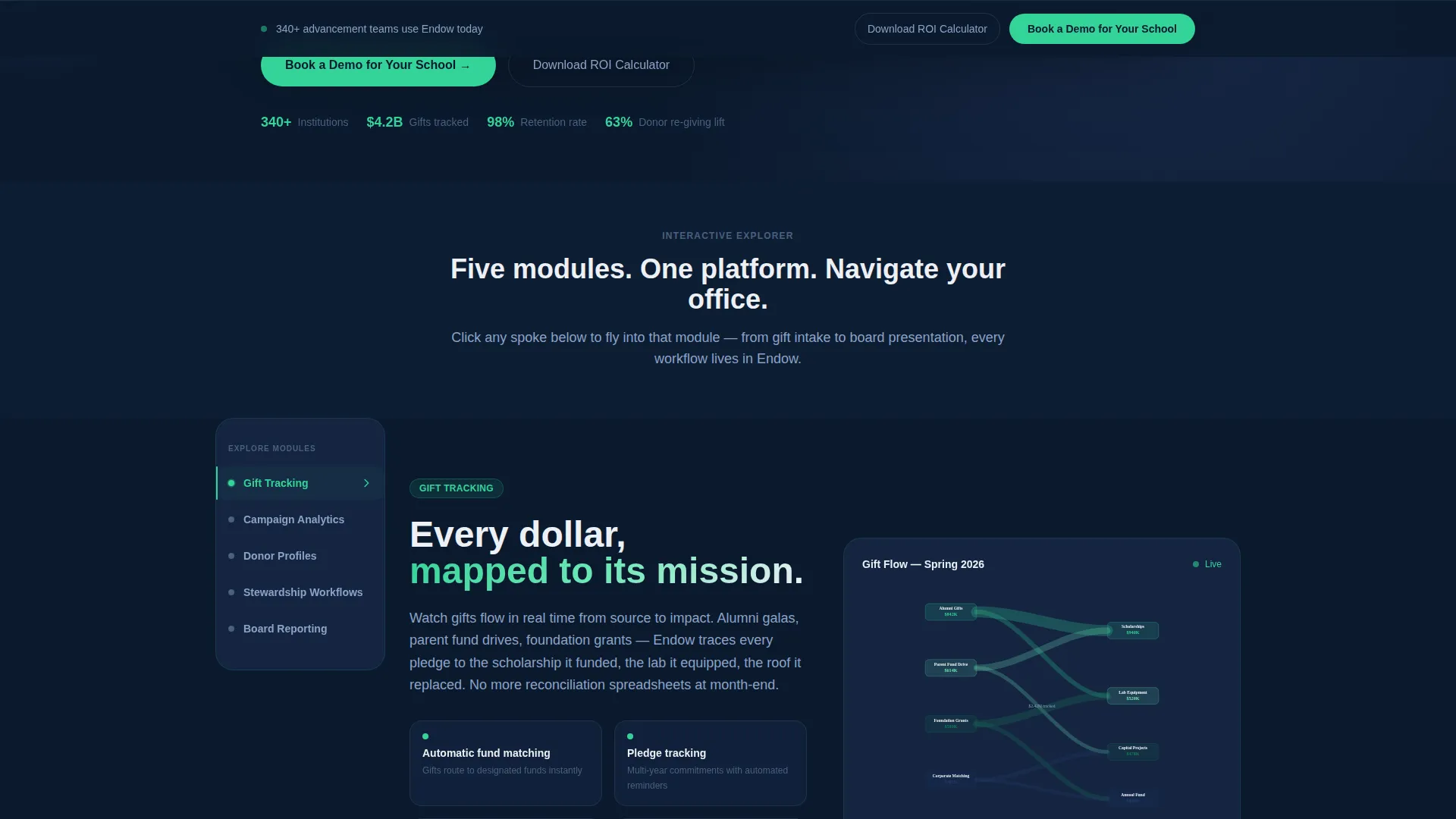
Five spoke labels sit fixed on the left rail: Gift Tracking, Campaign Analytics, Donor Profiles, Stewardship Workflows, and Board Reporting. Each label pulses gently until clicked. Scrolling or clicking a spoke transitions the visitor into that module using a smooth zoom-and-fade effect, replicating the feeling of navigating inside the software itself.
Interactive Module Visuals
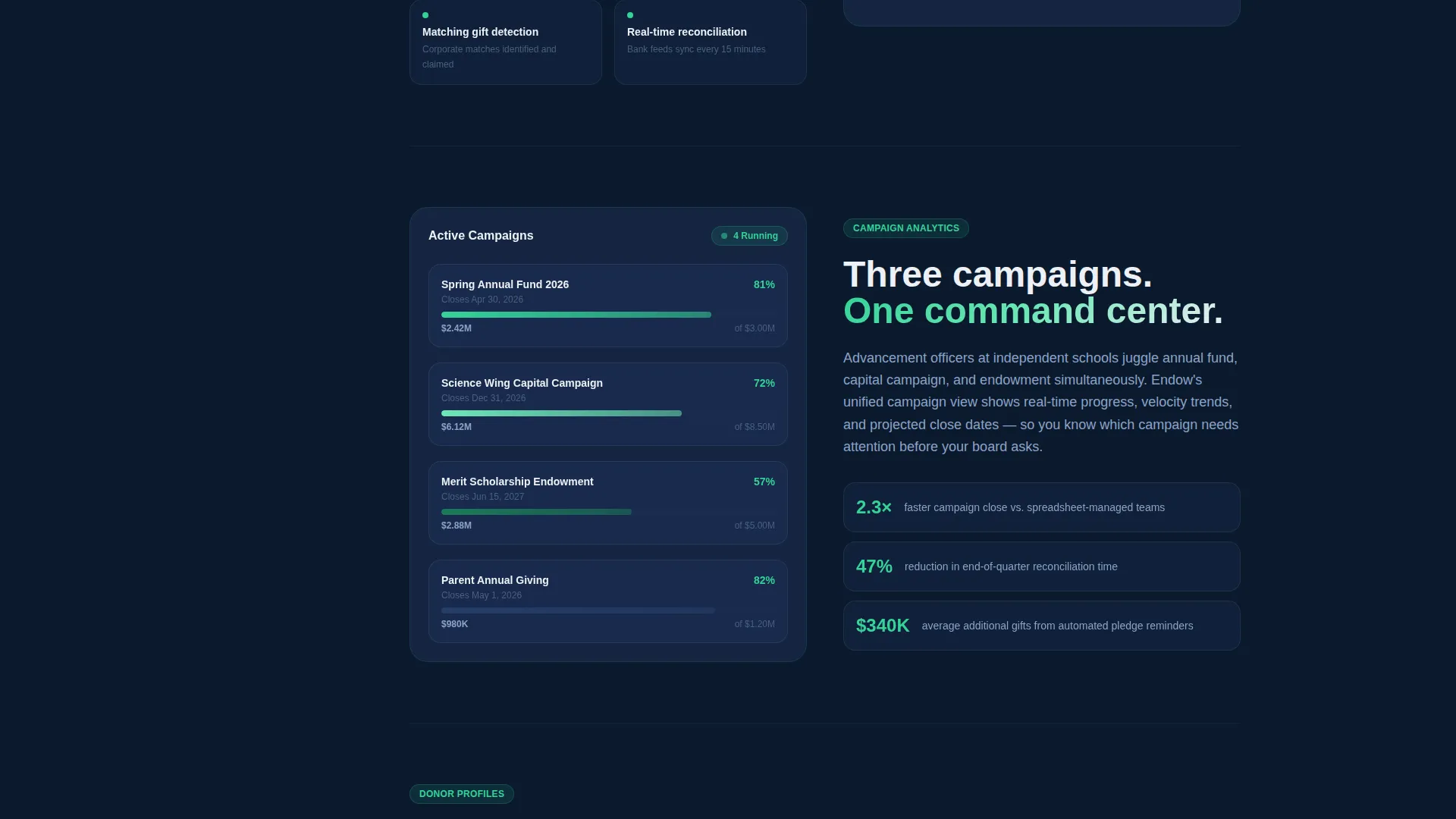
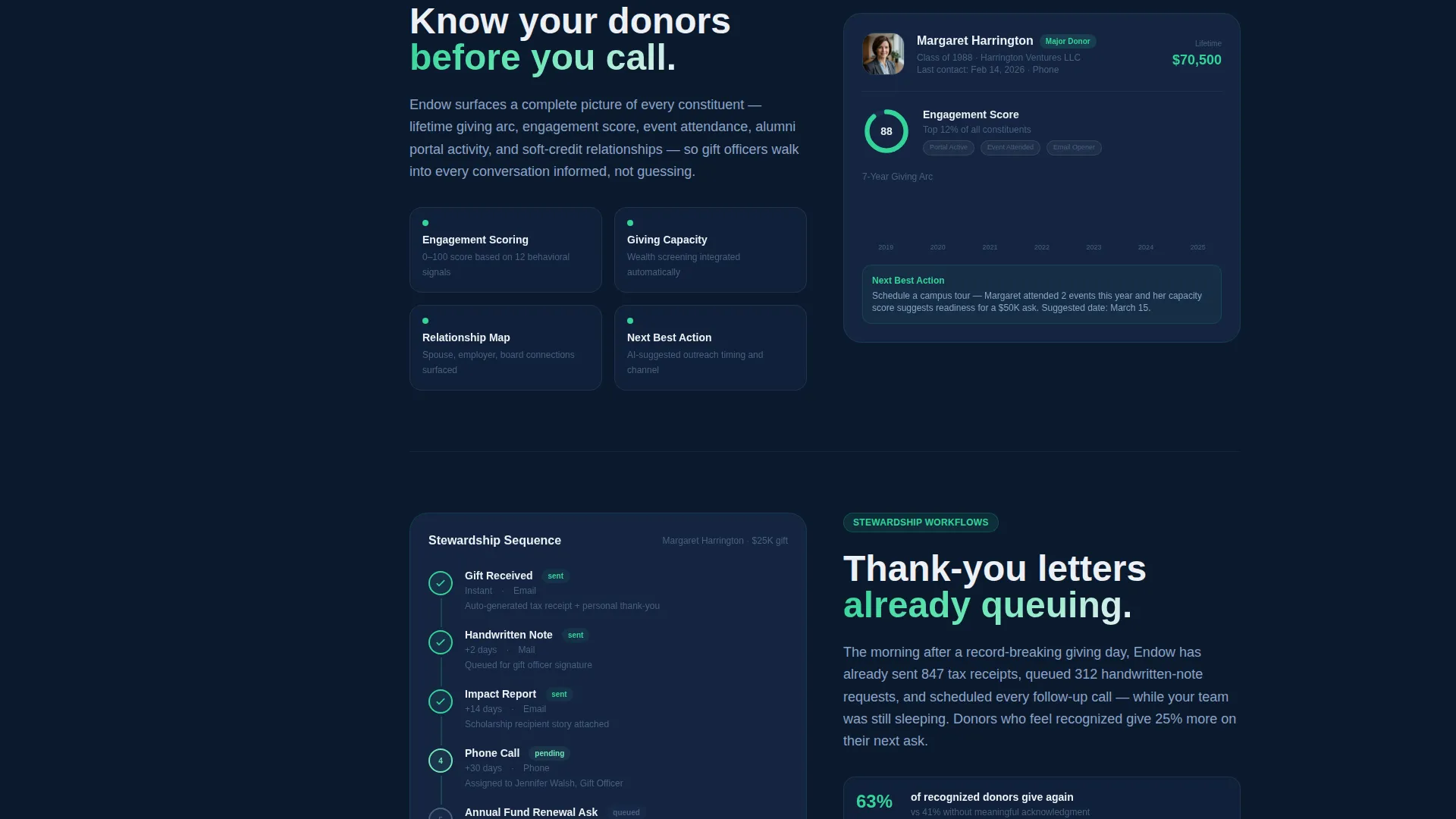
Each spoke reveals a distinct visual treatment. Gift Tracking displays an animated Sankey diagram mapping dollars from source to impact. Campaign Analytics unfolds a thermometer bar filling in real time. Donor Profiles opens a mock contact card showing lifetime giving arc and engagement score. Each module builds confidence through context-specific animation rather than generic imagery.
Two-Step Demo Request Form
The form appears after the fifth spoke, placed deliberately so visitors arrive having already explored the full platform. Step one collects institution name, role, and donor count range. Step two asks for the visitor's biggest reporting pain point and a preferred demo date. The sequencing makes the request feel natural rather than premature.
Gated ROI Calculator Download
A secondary conversion path offers a downloadable return-on-investment calculator as a gated PDF. Visitors who are not yet ready to book a demo can access it by entering their email address and institution name. This path captures contacts for follow-up nurture without requiring a live commitment.
Persistent Bottom Bar call to action
A fixed bottom bar carries the call to action "Book a Demo for Your School" in donor-green throughout the entire page. The button brightens subtly on hover, maintaining visibility without disrupting the reading experience. It gives returning scrollers an immediate path to convert at any point.
Page sections overview
| Section | Purpose |
|---|---|
| Dashboard Header | Animate platform data on load to establish credibility instantly |
| Anchor Nav Rail | Fix spoke labels on screen to keep module navigation always accessible |
| Gift Tracking Module | Show dollar flow from source to funded impact via Sankey diagram |
| Campaign Analytics Module | Display live-filling thermometer bar for campaign progress |
| Donor Profiles Module | Present mock contact card with giving history and engagement score |
| Stewardship Workflows Module | Illustrate automated thank-you and pledge follow-up sequences |
| Board Reporting Module | Demonstrate dashboard-style output built for governance audiences |
| Demo Request Form | Capture qualified leads through a two-step, sequenced form |
| ROI Calculator Download | Offer gated PDF as a secondary path for nurture-stage visitors |
| Persistent call to action Bar | Keep demo booking action visible across the full page scroll |
Design & branding system
The visual identity follows a Dynamic Motion theme anchored in a Midnight Blue color system. The palette is built to feel like a university campus at dusk, authoritative and quietly electric.
- Deep command-center navy (#0B1A2E) covers primary backgrounds; twilight indigo (#1B2D4F) surfaces cards and section breaks; crisp chalk white (#EDF0F5) carries body text and data labels
- Donor-green (#34D399) is reserved for live counters, progress bars, and call-to-action buttons, creating a consistent visual signal for action and momentum
- Layered parallax depth and smooth zoom-and-fade transitions give every module change a sense of physical navigation inside the product
Mobile & speed optimization
The template is designed to preserve the immersive dashboard experience across device sizes without sacrificing the animation-driven storytelling that makes it effective.
- Parallax layers and spoke transitions are structured to scale gracefully from desktop command-center layouts to compact mobile viewports
- Animated elements such as the gift ticker, donut chart, and Sankey diagram are built to render progressively, so the page remains engaging even as components load in sequence
How this template helps you convert
Every structural decision in this template is built to move a skeptical advancement professional from curiosity to demo request through earned confidence.
- The animated dashboard header creates immediate product credibility before the visitor reads a headline, setting a high standard for the rest of the page and reducing early bounce.
- The five progressive spoke modules escalate stakes naturally, moving from seeing data to understanding patterns to automating actions, so the demo form arrives after the visitor has mentally onboarded.
- The two-conversion-path model captures both action-ready visitors through the demo form and nurture-stage visitors through the gated ROI calculator, maximizing lead capture across different decision stages.
Other information about this template
This template is categorized under Technology and Education Software, and it is purpose-built for the education donor management niche. It is an excellent fit for teams evaluating platforms in a competitive procurement environment where a strong first impression can determine which vendor gets the meeting.
- The template style is Hub and Spoke with Anchor Navigation, making it well-suited for platforms with multiple distinct feature areas that each deserve dedicated visual attention
- The header concept is a Dashboard Preview, a proven format for software products because it shows the tool in action rather than describing it in abstraction
- The Interactive Explorer creative direction and Dynamic Motion theme are paired to deliver an experience that mirrors the confidence and fluidity buyers expect from modern institutional software
- The lead generation direction is reinforced by two distinct conversion paths, keeping the template useful across different buyer readiness levels
Theme
Dynamic Motion
Creative direction
Interactive Explorer
Color system
Midnight Blue
Style
Hub & Spoke (Anchor Nav)
Direction
Lead Generation
Page Sections
Animated Dashboard Header
Hub and Spoke Anchor Navigation
Interactive Module Visuals
Two-step Demo Request Form
Gated ROI Calculator Download
Persistent Bottom Bar Call to Action
Related questions
Who is this template designed for?
Can I customize the spoke module labels and content?
Do I need design or coding experience to use this template?
How does the two-step demo form work?
What is the gated ROI calculator download for?



