API-First PLM Platform Landing Page Template
The Endpoint API-first PLM landing page template is a modular card-grid layout built for developer-focused hardware teams. It leads with animated performance metrics, a browser-chrome hero dashboard, and a terminal-first call to action. The page guides firmware leads, sourcing managers, and systems engineers from proof of scale straight to CLI install or sandbox signup.
by Rocket studio
Quick summary
This template gives you a high-impact, single-page landing experience for an API-first Product Lifecycle Management (PLM) platform. It opens with a live dashboard preview, builds trust through scroll-triggered metrics, and closes with a developer-ready install path. Every section is structured to communicate the API's purpose clearly and move technical buyers toward action.
Who this template is for
This landing page is designed for API-first development teams shipping developer tools in the hardware and PLM space. It speaks directly to the people who feel the daily pain of legacy systems and want a faster, structured alternative.
- Firmware leads and systems engineers at robotics and aerospace companies who need real-time bill of materials (BOM) data without CSV exports.
- Sourcing managers at contract electronics manufacturers who need fast, reliable access to supplier cost and revision data across different systems.
- Developer tool founders and product teams who want a landing page that earns trust through evidence before it asks for a signup.
What problem this template solves
Legacy PLM monoliths force hardware teams to export, reformat, and re-import data every time they need to answer a simple question. That process is slow, error-prone, and expensive. This template is built to explain that problem clearly and position an API-first alternative as the obvious fix.
- Teams stuck on legacy systems spend hours reconciling spreadsheets instead of shipping products.
- Without a clear, structured landing page, even the best API loses deals to confusion and friction.
- A weak landing page fails to keep technical buyers on the same page as business decision-makers.
What you get with this template
You get a fully structured, modular card-grid landing page ready to customize for your API-first PLM platform. The layout is built around a scroll rhythm that delivers evidence first and invitation last. Every section has a defined role in moving the visitor toward the primary call to action.
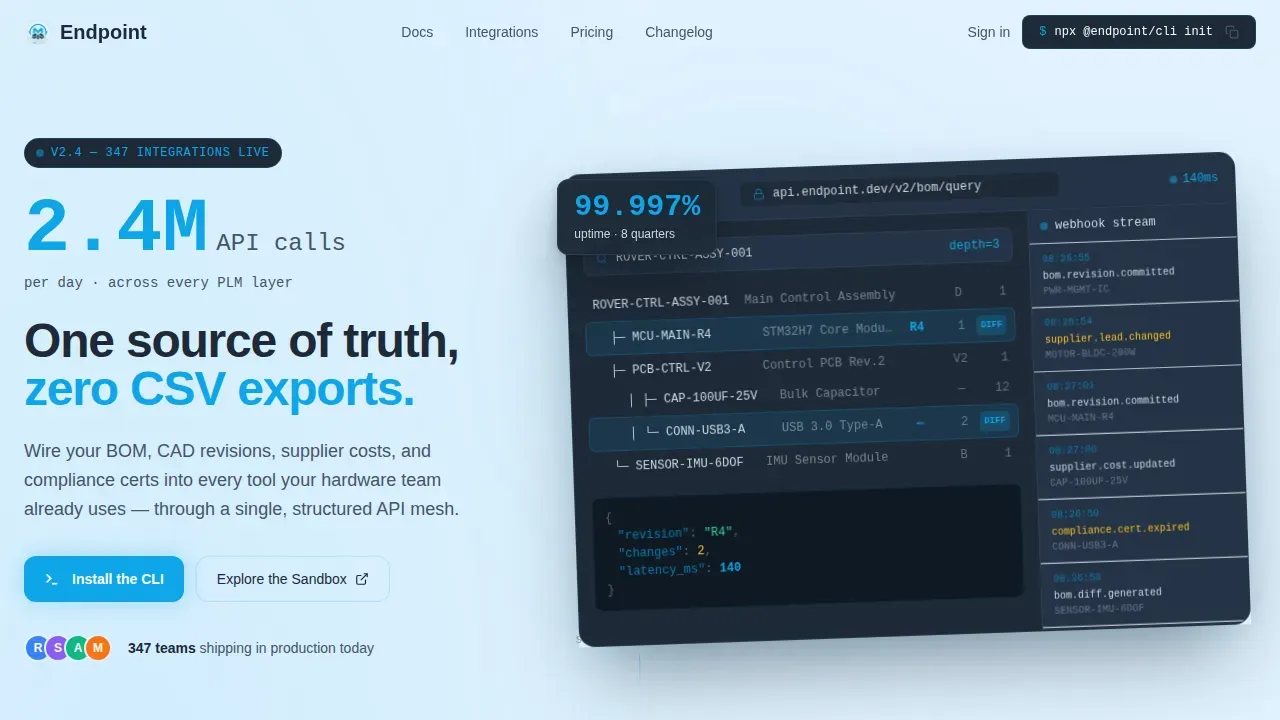
- A parallax hero section with a browser-chrome dashboard image, a 72-pixel animated stat overlay, and a subline that anchors the value proposition.
- A two-column integration category grid, a three-column customer proof grid, and a single-column developer experience section with a terminal call to action.
- Platform toggle pills for macOS, Linux, and Windows, a one-click clipboard copy command, and a secondary sandbox path requiring only a GitHub OAuth tap.
Feature list
This landing page template includes a focused set of capabilities built directly from the project brief. Each feature is designed to support the development process and move technical visitors toward conversion.
Parallax Hero with Dashboard Preview
The hero section frames a browser-chrome product screenshot showing a live BOM explorer mid-query. A part tree is expanded three levels deep, with a revision diff highlighted in cerulean. A sidebar streams webhook event log entries with recent timestamps. A large animated stat sits at the top left, and the screenshot floats on a subtle parallax layer above the pale sky background.
Stats-First Animated Card Grid
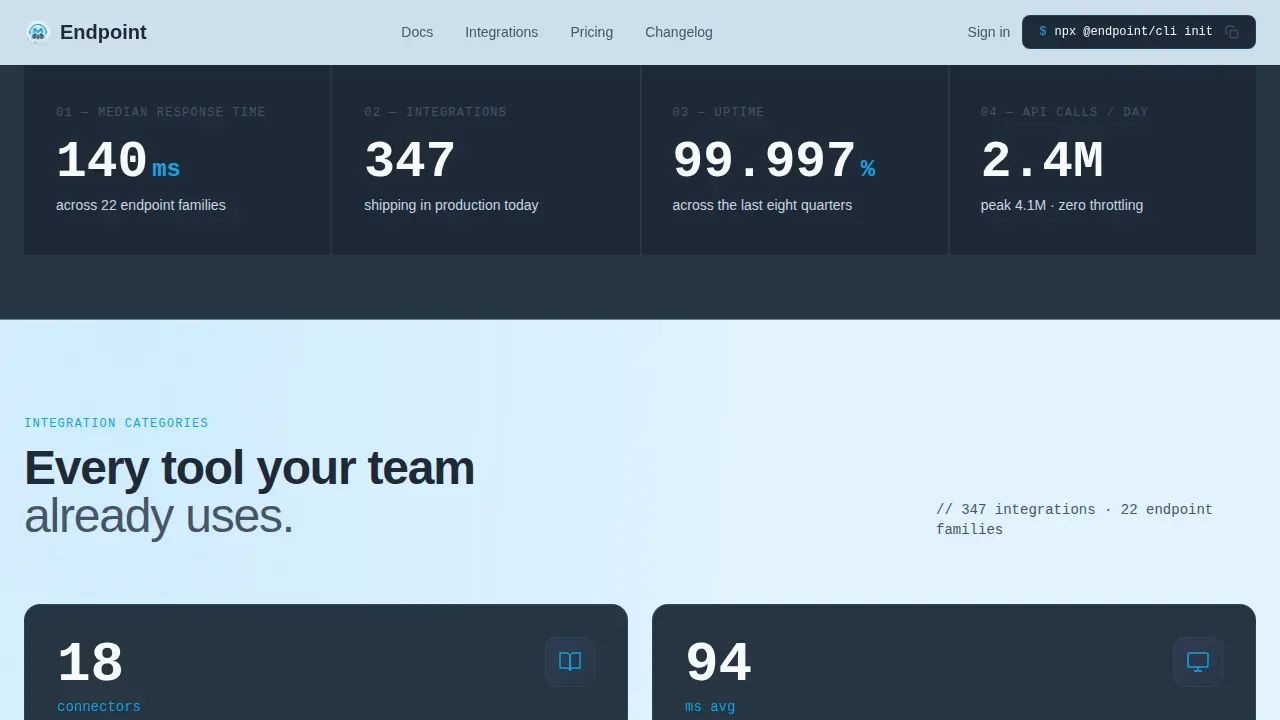
Every card in the integration category grid leads with a large metric that animates into view on scroll. The number lands first, then the label follows, for example: "140ms" then "median response time across 22 endpoint families." This sequence builds credibility before asking users to read a single line of marketing copy. The grid narrows to two columns for integration categories, widens to three for customer proof, then collapses to a single column for the developer experience section.
Terminal Call to Action with Platform Pills
The developer experience section centers on a terminal-style code block displaying the CLI install command. Users can toggle between macOS, Linux, and Windows using pill-shaped selector buttons. A one-click copy-to-clipboard interaction makes the install process feel immediate. This section is where the page earns the install by making the first step trivially easy.
Integration Category Cards
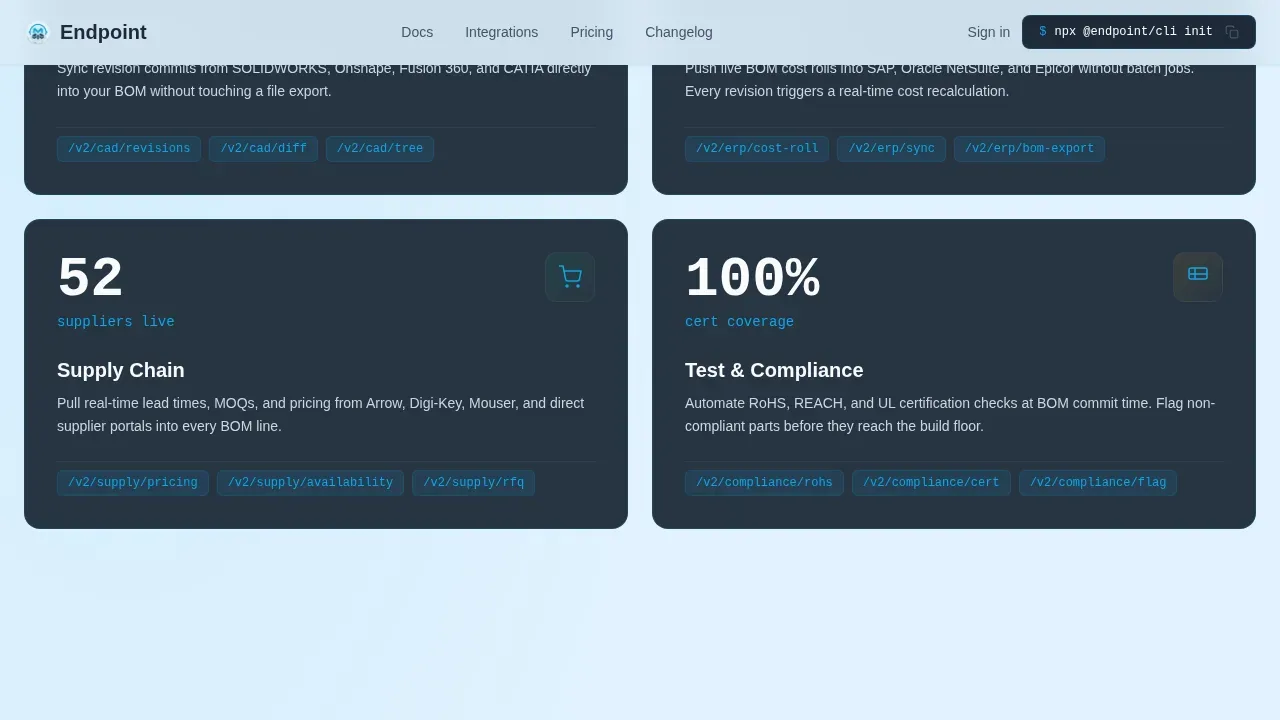
Four integration category cards organize the API's coverage into clear buckets: Mechanical CAD, ERP, Supply Chain, and Test and Compliance. Each card leads with its metric, then names its endpoints and what they connect. This helps sourcing managers and systems engineers quickly identify the integrations relevant to their role, without needing to read detailed documentation upfront.
Sandbox Access Path
A secondary conversion path offers visitors a hosted API playground. Access requires only a GitHub OAuth tap, which lowers the barrier significantly. Developers can test real API responses, review status codes, explore parameters, and understand incoming requests without setting up a local environment first. This lets external clients evaluate the platform before committing to a full install.
Performance Stats Bar
A horizontal performance stats bar sits between the customer proof grid and the developer experience section. It displays three animated metrics: median response time, total integrations shipping in production, and uptime across the last eight quarters. These metrics animate on scroll, reinforcing the platform's reliability just before the page asks for the install.
Page sections overview
| Section | Purpose |
|---|---|
| Hero Dashboard Preview | Opens with animated stat, parallax dashboard image, and core value proposition |
| Integration Category Grid | Two-column cards for CAD, ERP, Supply Chain, and Test endpoints |
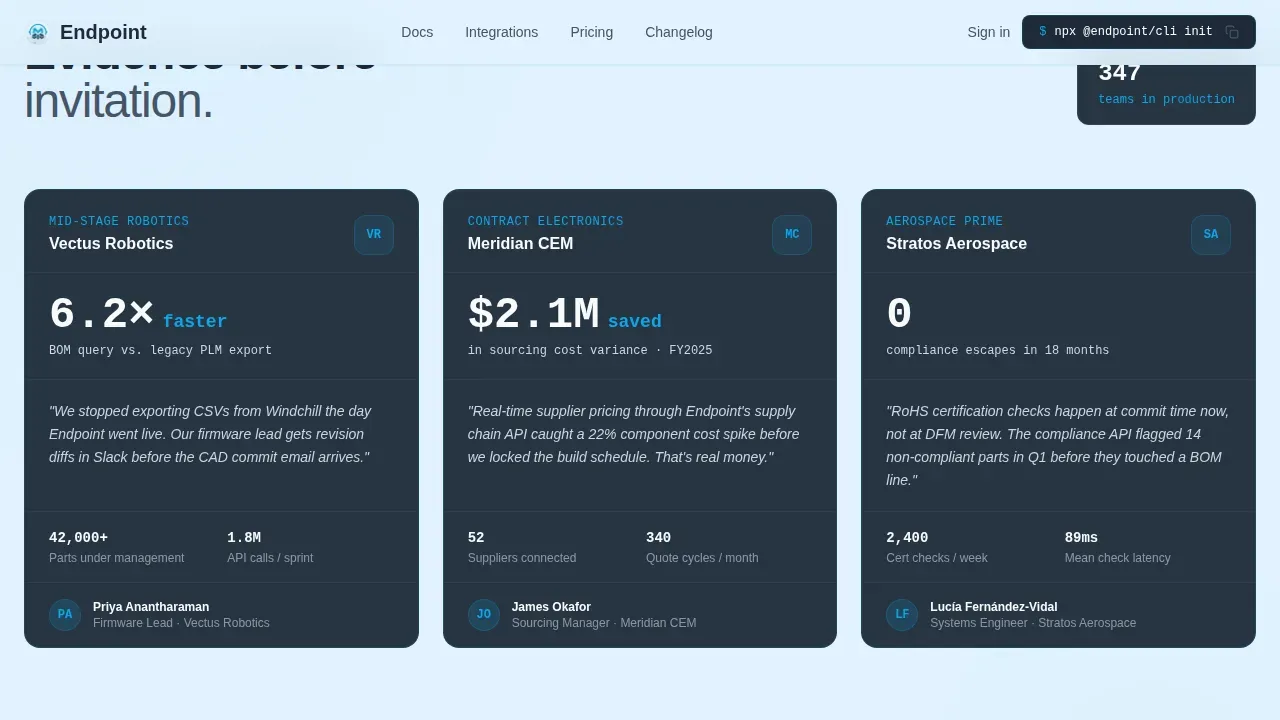
| Customer Proof Grid | Three-column deployment stats from real customer verticals |
| Developer Experience Column | Terminal call to action, platform pills, clipboard copy, sandbox link |
| Performance Stats Bar | Scroll-animated latency, uptime, and integration count metrics |
| Minimal Developer Footer | Single-row footer with essential links and legal note |
Design & branding system
The visual identity follows a Directory and Discovery theme using a Slate and Sky color system. The palette feels like an IDE set to a light theme at 6 AM, with code sharp against a soft morning monitor glow. Text never competes with data for attention.
- Deep graphite (#1E2A38) for card backgrounds, mid-slate (#475569) for secondary surfaces, pale sky (#E0F2FE) as the ambient page wash, and electric cerulean (#0EA5E9) for every interactive affordance including buttons, hover states, and linked endpoints.
- Near-white (#F8FAFC) text on dark cards and deep slate text on light surfaces, maintaining clear contrast across the full layout.
- DM Sans for body and display type, JetBrains Mono for code blocks, stats, and terminal elements, creating a clean separation between narrative and data.
Mobile & speed optimization
This template is desktop-first by design, reflecting the reality that its primary users work in IDE environments and terminal windows. The card grid is structured to reflow cleanly on narrower viewports. Animations are scroll-triggered and built to load progressively.
- Scroll-triggered stat counters, stagger grid animations, beam SVG effects, and parallax float are all managed with minimal client-side JavaScript.
- Server components handle static sections to keep the page load lean, while interactive elements like the clipboard copy and platform toggle are isolated to small client bundles.
- The card grid layout adapts from two columns to a single column on smaller screens, preserving readability without losing the visual hierarchy.
How this template helps you convert
This landing page is built around the principle that technical buyers need evidence before they need a pitch. The scroll rhythm is structured as: evidence, evidence, evidence, then invitation. Every section earns the next one.
- The hero section front-loads the biggest proof point with a 72-pixel animated metric and a live-feeling dashboard image, so visitors understand the API's scale within seconds of arriving on the page.
- The integration grid and customer proof cards let firmware leads, sourcing managers, and systems engineers self-identify within their vertical and see deployment numbers from teams like theirs, making the platform feel proven rather than experimental.
- The terminal call to action section makes the first step feel trivial: one command, one clipboard tap, one GitHub OAuth click, and the visitor is inside the platform, which is the fastest path from landing page to active user.
Other information about this template
This template is particularly well-suited for teams adopting an API-first development approach, where the API contract is defined before the user interface is built. Because the API contract is established early, developers can build integrations and front-end tools simultaneously, reducing time-to-market. The landing page design reflects this philosophy at every level.
- The page is structured to communicate the API's purpose clearly to both technical buyers and business decision-makers, covering use cases, documentation links, and support resources in a single scroll.
- Documentation is a critical component of any effective API landing page. This template includes dedicated space for a quick-start guide, code examples, and versioning information so users always know which API version they are working with.
- Security is represented honestly: the template includes section space to explain authentication flows, API key management, and OAuth-based access so that security-conscious buyers understand the platform's approach before they install anything.
- The template supports an api saas platform positioning strategy, where the page functions as the primary web presence for the product, covering all the information a developer needs to evaluate, access, and integrate the service.
- Effective API documentation should include a quick-start guide, versioning details, and code snippets showing real-life usage. This template provides the layout structure to present all this documentation clearly and keep it easy to maintain as the API evolves.
- Pre-built connector cards can reference major systems to help developers understand compatibility with their existing stack. The integration category grid is the right place to define which systems connect and explain what each group of endpoints makes possible.
- The endpoint api first plm platform landing page template is designed to serve both the immediate conversion goal and the longer-term goal of making the developer community feel at home on the page.
- Using OpenAPI specification patterns, teams can write detailed and structured API documentation that integrates cleanly with the documentation sections this template provides.
- Mock APIs let front-end developers work independently from the backend team during the development process, and the template's sandbox path section is the ideal place to explain this capability to visiting developers.
- The github repo link in the sandbox call to action section gives developers a direct path to explore the codebase, review automated tests, and understand how to implement the API in their own environment.
- HTTP methods, status codes, and parameters are the building blocks of any REST API. The template's code examples section and documentation link area are the right places to write out these details so developers can access them without leaving the landing page.
- API interfaces designed with scalability in mind can handle increasing loads. This template helps you demonstrate that scalability through the performance stats bar and customer proof grid, turning uptime numbers and response times into visible, credible proof.
Theme
Directory & Discovery
Creative direction
Stats-First Impact
Color system
Slate & Sky
Style
Card Grid (Modular)
Direction
App Download
Page Sections
Parallax Hero with Animated Stat Overlay
Stats-first Scroll-animated Card Grid
Terminal Install Block with Platform Toggle
Customer Proof Grid with Deployment Stats
Performance Stats Bar
Sandbox Access with Github Oauth Path
Related questions
Who is this landing page template designed for?
Can I adapt the integration category cards for my own API endpoints?
Does this template include the terminal copy-to-clipboard interaction?
How does the sandbox access path work in this template?
Is this template suitable for presenting API documentation and code examples?



