Endpoint - Powerful API Landing Page Template
Endpoint is a scroll-reveal landing page template built for API documentation platforms targeting Shopify developers. It features a glassmorphic dark dashboard aesthetic, a three-tab Feature Tab Switcher for REST, GraphQL, and Webhooks content, progressive metric reveals, a live sandbox console, and a two-step lead generation form, all designed to convert developer visitors into registered API key holders.
by Rocket studio
Quick summary
Endpoint is a single-page, scroll-reveal landing page template purpose-built for developer tool platforms and API documentation products. It combines a terminal-inspired glassmorphic design with high-interactivity components, including a three-tab code switcher, progressive stat reveals, a schema explorer grid, and a two-step lead capture form, to turn browsing developers into active API users.
Who this template is for
This template is built for teams shipping developer-facing products that need to communicate technical depth without losing the reader. It works best when your audience lives inside code editors and expects documentation to feel as sharp as the tools they use.
- Solo Shopify app developers who need a fast, trustworthy API reference during late-night OAuth debugging sessions
- Agency backend teams wiring up fulfillment logic or managing enterprise merchant integrations
- Integration architects evaluating whether an API surface can replace legacy middleware in their stack
What problem this template solves
Most API landing pages either look like marketing afterthoughts or read like raw technical dumps. Neither earns developer trust. Endpoint solves the credibility gap between documentation quality and product perception.
- Developers leave pages that feel slow, cluttered, or visually mismatched with the tools they already use
- Teams lose potential sign-ups because there is no low-friction entry point before a full registration form
- Generic SaaS templates do not account for the code-first expectations of a technical audience
What you get with this template
Endpoint delivers a complete, ready-to-customize landing page structured around the developer decision journey, from first impression through sandbox exploration to form submission. Every section is pre-wired for scroll-linked animation and high-density technical content.
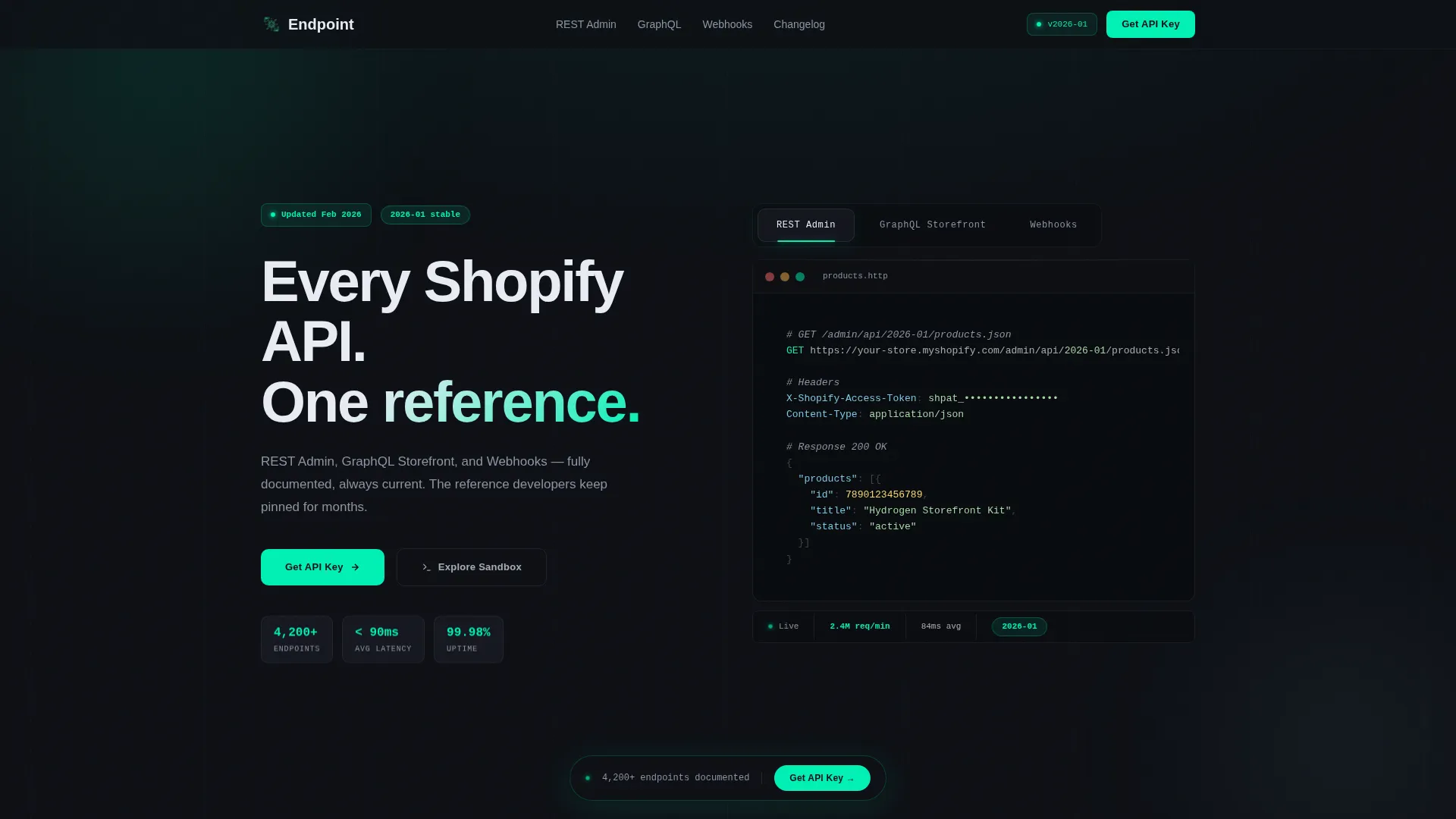
- A Feature Tab Switcher hero with three syntax-highlighted code panels and a live-stats bar showing request count, latency, and API version
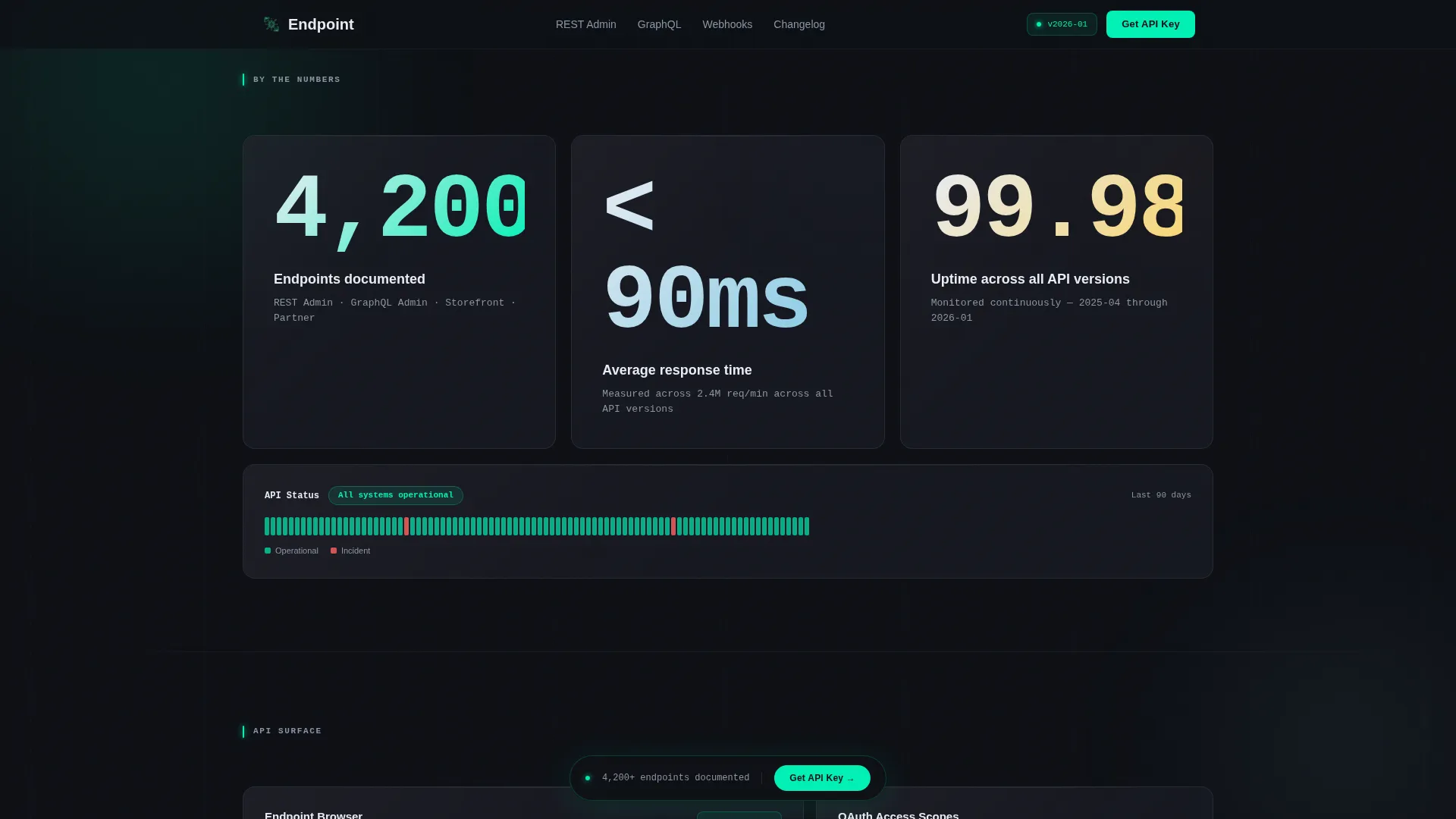
- A Stats-First Impact section with progressive oversized metric reveals followed by supporting context panels
- A two-step lead generation form plus a no-form sandbox entry point for visitors who prefer to explore before committing
Feature list
This section walks through the core built-in components and capabilities that make Endpoint work as a developer-audience landing page.
Three-Tab Feature Switcher Hero
The header presents three glass-panel tabs labeled for REST Admin, GraphQL Storefront, and Webhooks content. Each tab reveals a different live-formatted code snippet with syntax highlighting in mint and slate. A real-time stats bar beneath the tabs displays request count, average latency in milliseconds, and current API version. The active tab glows with a mint underline and a frosted-glass elevation shift.
Progressive Scroll Reveal Sections
Each section materializes out of the dark background as the visitor scrolls. An oversized performance metric appears first, landing with full typographic weight. Supporting context and panel components then fade in around it. This sequencing builds credibility incrementally, moving from raw numbers to interactive components as the reader descends.
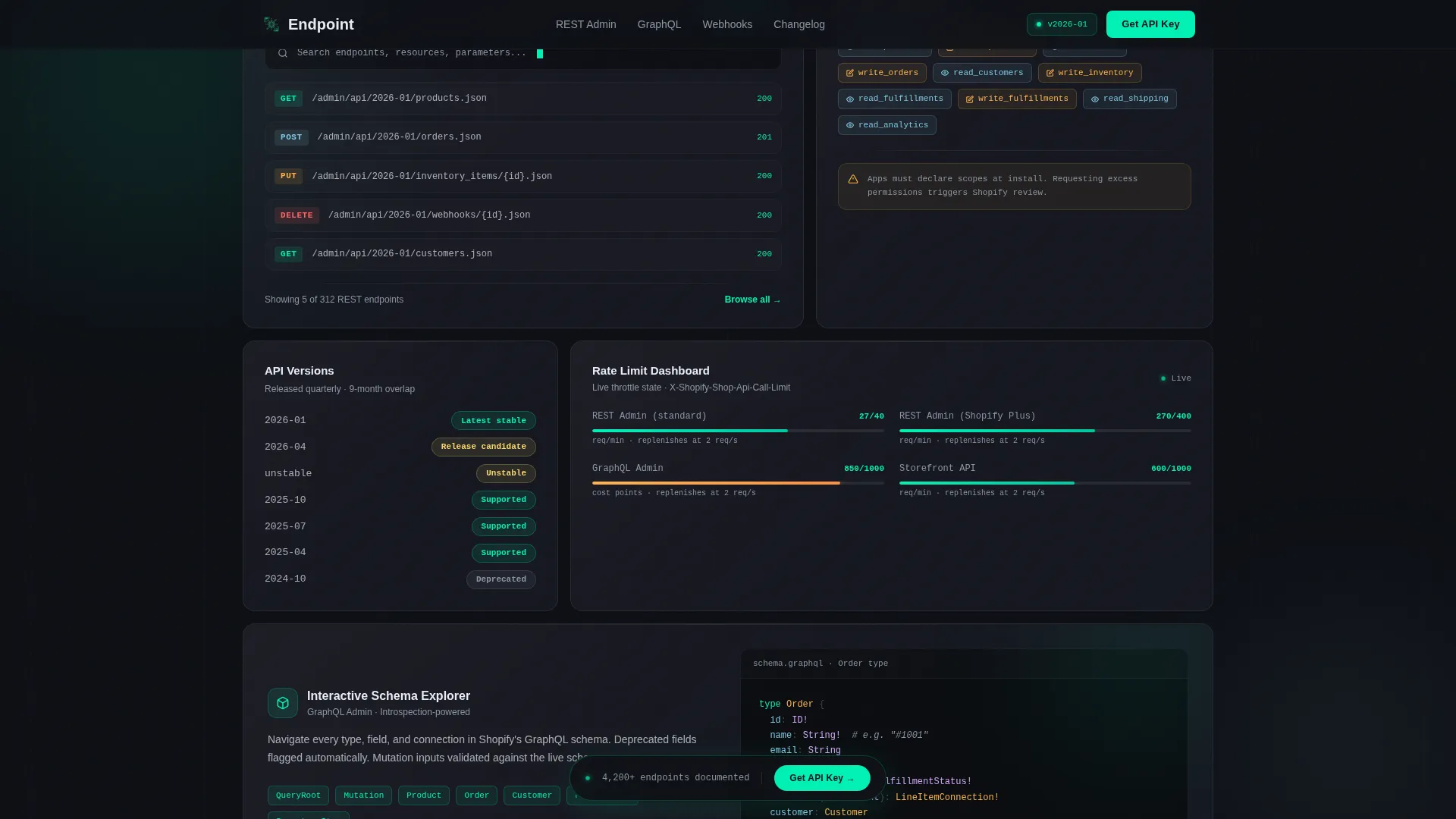
Bento Explorer Grid
An asymmetric grid section presents a schema explorer, versioning information, OAuth scope reference, and rate limit data side by side. The layout is designed for dense technical content without visual overload. Panels use the frosted translucent glass treatment to maintain visual depth across the grid.
Two-Step Lead Generation Form
The primary call-to-action form is a progressive two-step flow. Step one collects email and a primary use-case selection from a dropdown including custom app, public app, integration, and migration options. Step two, revealed inline after the first submission, requests company name and estimated monthly API call volume.
Sandbox Console Entry Point
A secondary conversion path labeled "Explore the Sandbox" gives visitors immediate access to a rate-limited demo endpoint without requiring form submission. This captures developer intent through direct usage rather than fields. It functions as a low-friction first step for visitors who are evaluating before committing.
Persistent Frosted-Glass Call-to-Action Bar
After the second scroll reveal, a frosted-glass bar anchors the primary "Get Your API Key" call to action persistently in the page flow. The same call to action reappears anchoring the final section. This dual placement ensures the conversion prompt is visible at both mid-page and end-page decision moments.
Page sections overview
| Section | Purpose |
|---|---|
| Hero Tab Switcher | Introduces REST, GraphQL, and Webhooks panels with syntax-highlighted code and a live stats bar |
| Stats Impact Reveal | Delivers oversized performance metrics progressively, building technical credibility on scroll |
| Bento Explorer Grid | Displays schema explorer, versioning, OAuth scopes, and rate limits in an asymmetric panel layout |
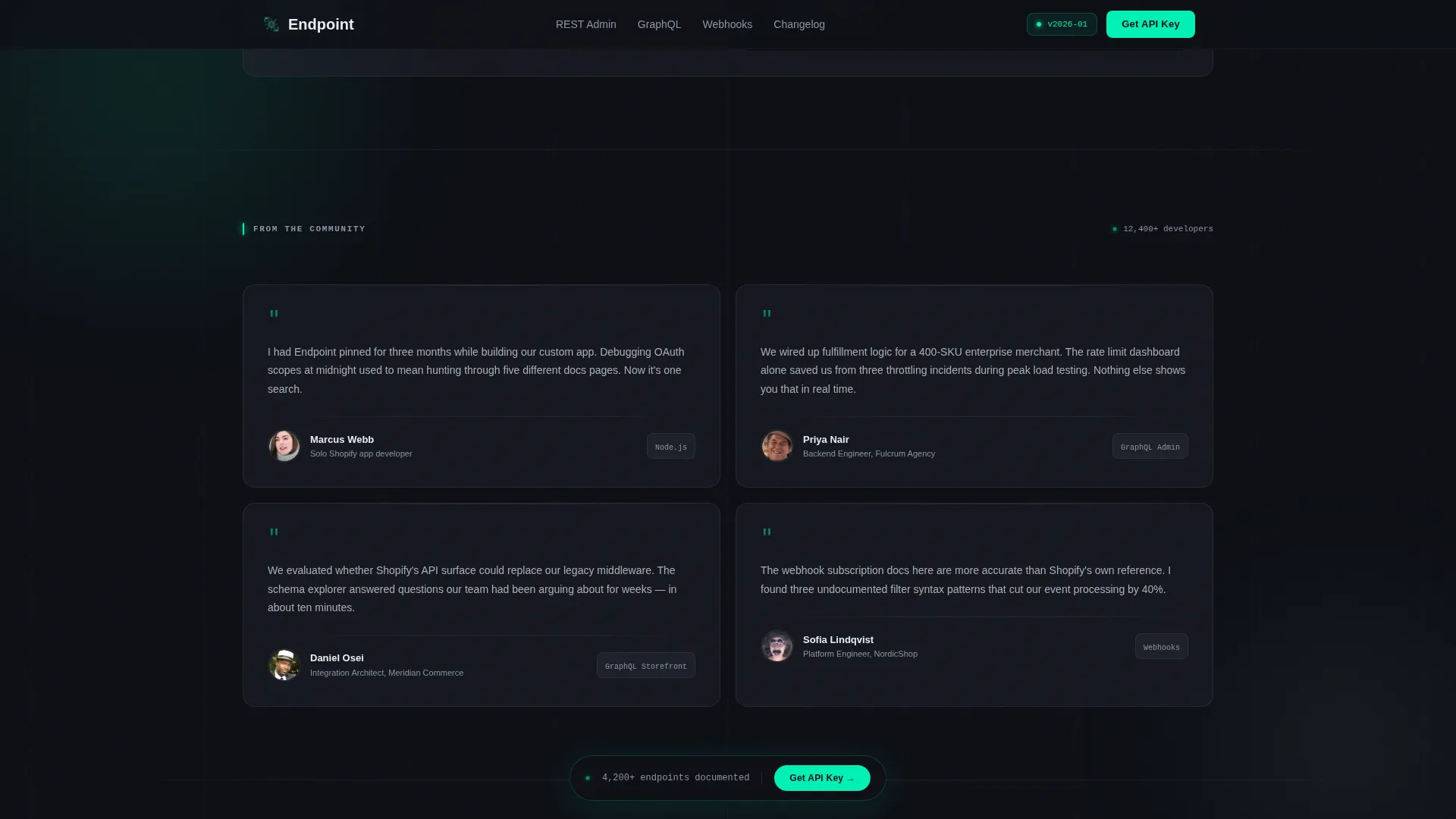
| Developer Testimonials | Presents developer-voice quotes with role and stack context to reinforce social proof |
| API Key Call to Action | Hosts the two-step lead form and the sandbox entry point as parallel conversion paths |
| Footer | Provides a developer-minimal footer following a GitHub-style minimal pattern |
Design & branding system
The visual identity follows a Terminal HUD approach executed through a glassmorphic dark dashboard. The palette is built to feel like a heads-up display projected onto smoked glass, with information floating in layered translucent panes.
- Core colors: void black (#0D0F14) for the primary background, frosted panels at #1A1D27 with 60% opacity and backdrop blur, electric mint (#00F0B5) for live-state accents and interactive highlights, and cool slate (#8B95A5) for secondary type and divider lines
- Typography: JetBrains Mono for all code and terminal content, DM Sans for interface text and body copy
- Visual details include luminous rim highlights on panel edges, mint underline glows on active states, and frosted-glass elevation shifts for depth layering, no stock imagery used anywhere in the layout
Mobile & speed optimization
This template is designed desktop-first to match the large-monitor workflow of its primary developer audience. A mobile fallback is included to ensure the page remains functional and readable on smaller screens.
- Animation is scroll-linked and progressive, using high-interactivity tab switching, typing effects, and panel reveal sequences optimized for desktop rendering
- The template uses a Server Components approach for static content sections and client-side rendering for interactive panels, keeping initial load performant while preserving full interactivity where needed
How this template helps you convert
The conversion architecture in Endpoint is layered intentionally, offering multiple entry points suited to different developer decision styles.
- The persistent frosted-glass call-to-action bar appears after the second scroll reveal, catching visitors at the moment of first demonstrated interest without interrupting the reading flow
- The two-step progressive form reduces friction by splitting data collection across two lightweight steps, making the initial ask feel smaller and increasing the likelihood of completion
- The sandbox entry point captures intent from developers who resist forms, turning direct endpoint interaction into a tracked conversion signal
Other information about this template
Endpoint is designed specifically for the Shopify API reference niche, where developer trust is earned through technical precision and interface quality rather than marketing language. The template fits API documentation platforms, developer tool products, and B2B SaaS tools targeting technical buyers.
- The template category sits within Documentation and Support, specifically for Shopify documentation and Shopify API reference use cases
- Developer testimonials with specific use cases, real API version numbers, and uptime metrics are built into the social proof section to reinforce credibility with a technical audience
- Timestamps follow ISO format and the layout uses English-language defaults with no currency formatting, matching a developer-audience convention
- The template is built on a Dashboard Pro theme with a Glassmorphic color system, a Stats-First Impact creative direction, and a Feature Tab Switcher header concept under the Scroll Reveal progressive template style
Theme
Dashboard Pro
Creative direction
Stats-First Impact
Color system
Glassmorphic
Style
Scroll Reveal (Progressive)
Direction
Lead Generation
Page Sections
Three-tab Feature Switcher Hero
Progressive Scroll Reveal Sections
Bento Schema Explorer Grid
Two-step Progressive Lead Form
No-form Sandbox Entry Point
Persistent Call-to-action Bar
Related questions
Is this template suitable for non-Shopify API documentation products?
Does the sandbox console require a real backend to function?
How does the two-step lead capture form work?
Is the page desktop-first or fully responsive?
What animation and interactivity level should I expect?



