Enforce — Compliance Management Landing Page Template
Comply is a compliance automation landing page template built for financial services teams that need to replace manual processes with a clear, credible case for their software. It features an animated metrics dashboard header, an interactive comparison table with expandable rows and a framework toggle, and dual conversion paths designed to qualify leads and capture early-stage researchers.
by Rocket studio
Quick summary
Comply is a single-page compliance automation landing page template designed for financial services software. It opens with a live-stats header showing ticking transaction and filing metrics, then guides visitors through an interactive comparison table. A framework selector and dual conversion paths make it purpose-built for converting compliance buyers who need evidence before they commit.
Who this template is for
This template is built for teams selling compliance automation software into regulated financial institutions. It speaks directly to the people who carry the weight of regulatory pressure every day.
- Chief Compliance Officers at mid-market banks managing high-volume SAR filings and audit preparation
- Fintech operations leads preparing for their first regulatory examination and needing a credible software pitch
- Compliance consultants running multiple client portfolios across Anti-Money Laundering (AML), Know Your Customer (KYC), and Bank Secrecy Act (BSA) frameworks
What problem this template solves
Most compliance software landing pages rely on feature bullets and vague trust signals. That approach fails when your buyer is a seasoned compliance professional who needs proof, not promises. The template replaces passive reading with active discovery.
- Buyers cannot see the real gap between manual processes and automated compliance without a structured, side-by-side comparison
- Generic landing pages lose high-intent visitors who are building an internal business case and need a downloadable artifact to share
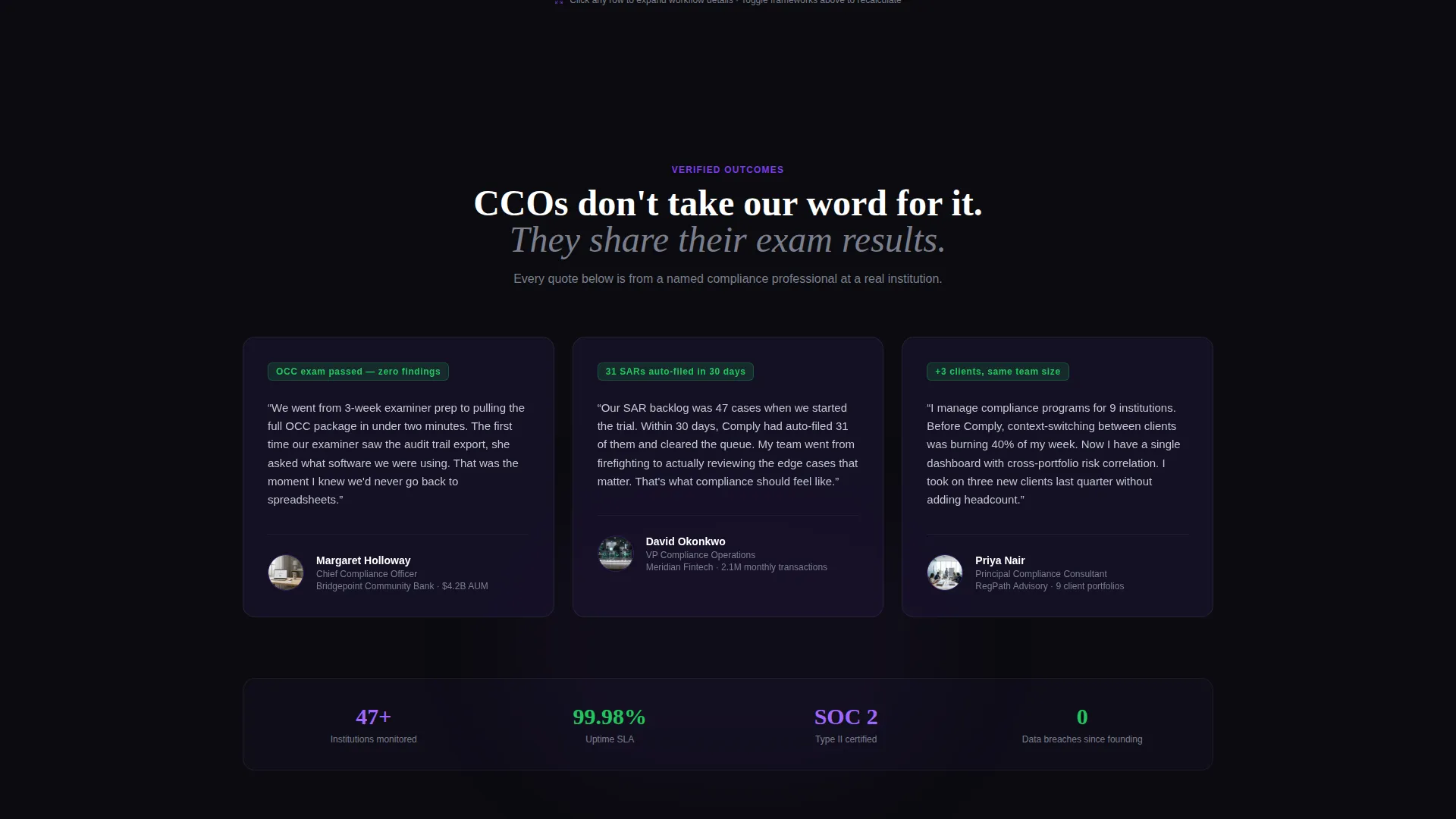
- Compliance audiences distrust hype; this template earns credibility by letting visitors interrogate the data themselves
What you get with this template
You get a complete, conversion-focused landing page template ready to customize for your compliance automation product. Every section is designed around the way compliance buyers actually evaluate software.
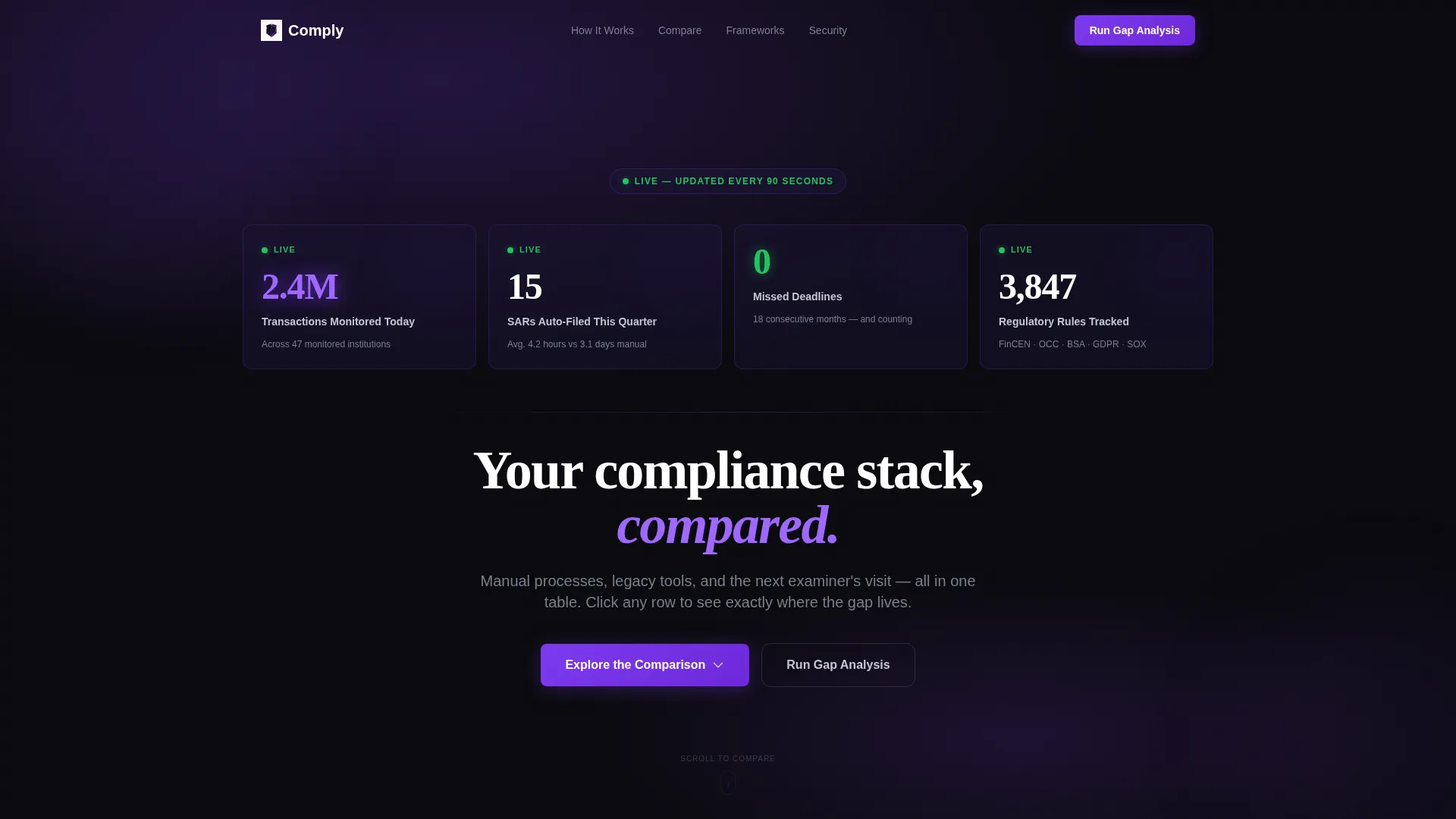
- An animated header panel with live-incrementing metrics covering transactions monitored, filings auto-completed, and deadlines tracked
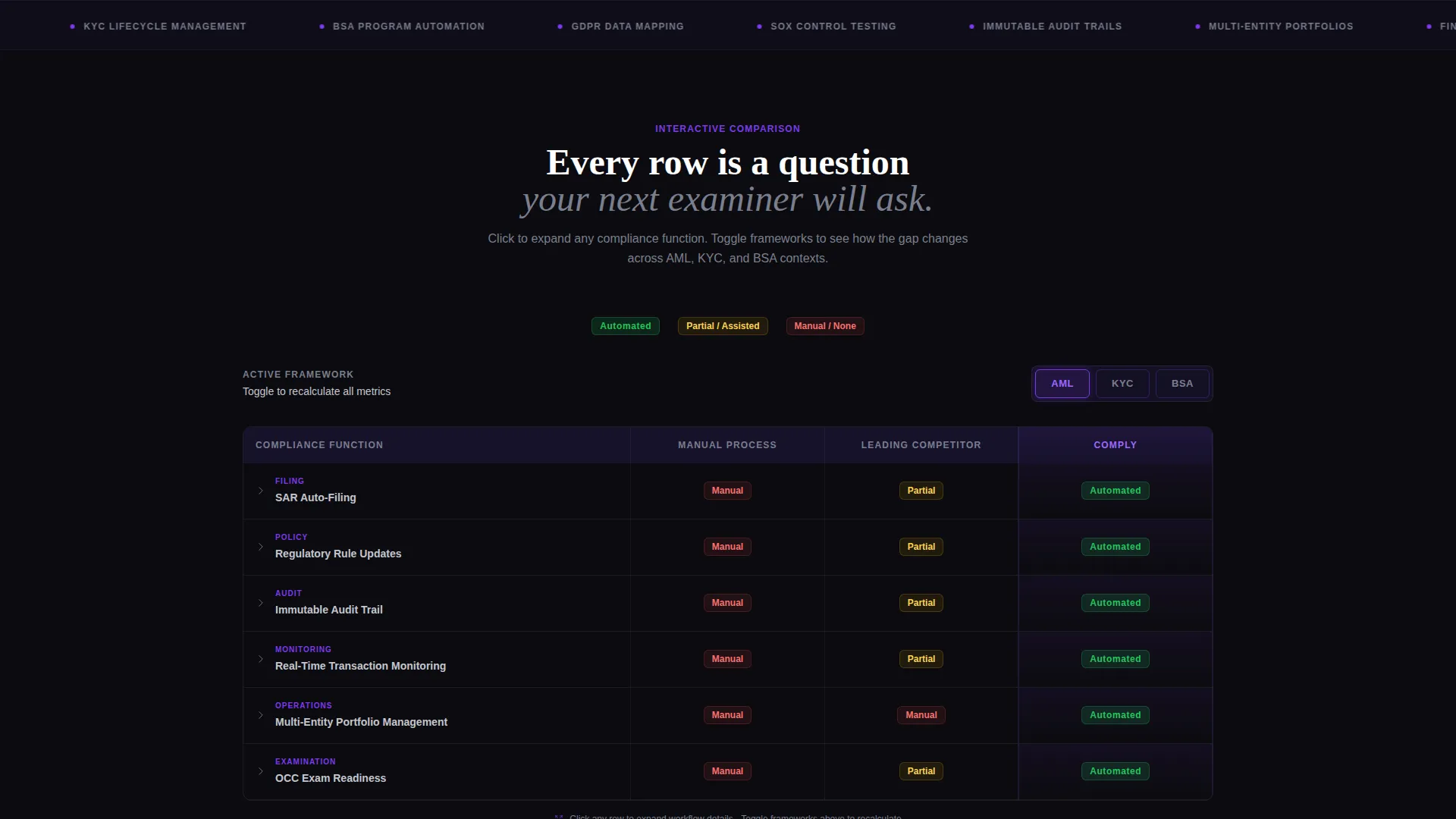
- An interactive three-column comparison table with expandable rows, workflow detail views, and a framework toggle between AML, KYC, and BSA contexts
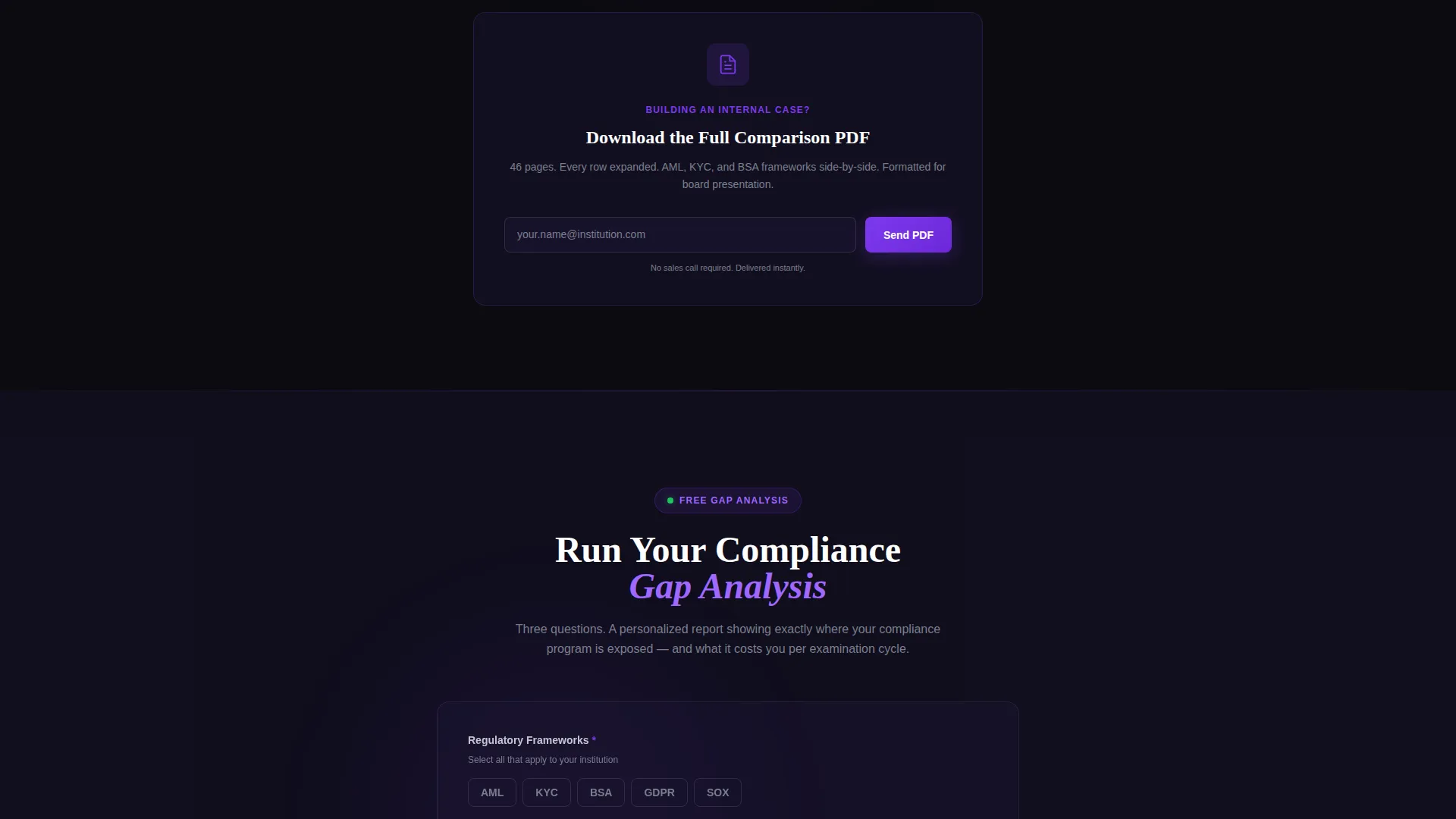
- Two distinct conversion paths: a lead-qualification form with regulatory framework and transaction volume fields, and a gated PDF download for early-stage researchers
Feature list
This template includes purpose-built components that work together to move a skeptical compliance buyer from curiosity to conversion.
Animated Stats Dashboard Header
The header is a live metrics panel, not a static image. Numbers increment in real time against a void-black background, with each metric glowing in electric violet as it updates. Visitors land on movement and authority before they read a single word.
Interactive Expandable Comparison Table
The three-column table compares a manual process, a named competitor, and the featured product side by side. Each row is clickable, fanning open to reveal workflow steps, time-to-completion figures, and error rates. Visitors build their own case by exploring only the rows relevant to their situation.
Regulatory Framework Toggle
A midpage selector lets visitors switch the entire comparison table between AML, KYC, and BSA contexts. Every metric recalculates on toggle, so the page stays relevant regardless of which regulatory framework the visitor works within.
Dual Conversion Path Design
The primary call to action is a compliance gap analysis form that collects regulatory framework, current tooling, and institution size by transaction volume. A secondary path offers a gated PDF download requiring only an email address, capturing visitors who are not yet ready to speak with sales.
Sticky Call-to-Action Bar
After the first table interaction, a sticky bar appears with the primary call to action. It keeps the conversion option visible throughout the rest of the scroll without interrupting the comparison experience.
Void and Violet Design System
The visual system uses absolute void black as the base, deep space indigo for layered surfaces, electric violet for active states and data highlights, and compliance-green reserved exclusively for passed-status indicators. The palette creates immediate authority and guides the eye to the most important data points.
Page sections overview
| Section | Purpose |
|---|---|
| Animated Metrics Header | Open with live transaction, filing, and deadline stats |
| Primary Headline Block | Anchor visitor attention with a single focused message |
| Three-Column Comparison Table | Compare manual, competitor, and product side by side |
| Expandable Row Detail Views | Show workflow steps, completion time, and error rates per row |
| Regulatory Framework Toggle | Recalculate all metrics for AML, KYC, or BSA context |
| Sticky call to action Bar | Keep the gap analysis form accessible throughout scroll |
| Gap Analysis Form Block | Qualify leads with framework, tooling, and volume fields |
| PDF Download Gate | Capture early-stage researchers with a single email field |
| Final call to action Block | Full-width close with the primary conversion action |
Design & branding system
The template uses the Dashboard Pro theme with a Void and Violet color system. Every color choice has a defined role, so the visual hierarchy stays clear across the entire page.
- Background and surface colors: absolute void black (#0B0B0F) as the primary background, deep space indigo (#1A1432) for layered card and panel surfaces
- Accent and action colors: electric violet (#7C3AED) for active states, data highlights, and animated metric glows; compliance-green (#22C55E) used only on passed-status indicators; cool silver (#C4C7D0) for body text and table borders
Mobile & speed optimization
The template is structured to render cleanly on smaller screens without sacrificing the interactive comparison experience. Key components adapt to touch-based navigation naturally.
- The expandable table rows collapse into a vertically scrollable accordion layout on mobile, keeping the comparison readable without horizontal scrolling
- The framework toggle and sticky call-to-action bar reflow into full-width touch targets on smaller viewports, maintaining usability throughout the page
How this template helps you convert
The page is built around one insight: compliance buyers convert when they convince themselves. Every structural decision supports that process.
- The animated header immediately signals credibility with real operational metrics, setting a data-forward tone before any feature claim appears
- The interactive comparison table lets visitors explore the rows most relevant to their pain, building a personal case for switching rather than reading a generic pitch
- The dual conversion paths meet buyers at two different stages: the gap analysis form captures ready buyers with a qualified lead flow, while the PDF download catches researchers who need more time and an internal artifact to share
Other information about this template
This template is categorized under Financial Services Software and SaaS within the Technology category. It is designed specifically for the financial services compliance software niche, where buyer trust is hard-won and evidence-based marketing outperforms traditional feature lists.
- The Dashboard Pro theme and Void and Violet color system are matched to the visual language compliance and fintech audiences associate with authoritative data tools
- The Comparison Table template style and Interactive Explorer creative direction are intentional: they reflect how compliance professionals actually evaluate vendors, through structured investigation rather than passive reading
- The landing page direction is Comparison/Versus, meaning the entire page architecture is built to make the switching case visible and undeniable by the time a visitor reaches the final call to action
Theme
Dashboard Pro
Creative direction
Interactive Explorer
Color system
Void & Violet
Style
Comparison Table
Direction
Comparison/Versus
Page Sections
Animated Live Metrics Header
Interactive Expandable Comparison Table
Regulatory Framework Toggle
Dual Conversion Path Architecture
Sticky Post-interaction Call to Action Bar
Related questions
Can I customize the comparison table rows for my specific product?
What does the regulatory framework toggle actually change on the page?
What fields does the lead qualification form include?
Is there a lower-commitment conversion option for visitors not ready to speak with sales?
What type of business is this template best suited for?



