Virtual Charter School Enrollment Landing Page
The Enroll landing page template is built for virtual charter schools that need to convert cautious parents into registered families. A grade-selection form opens the experience, dynamically revealing curriculum previews and schedules. A comparison table, day-in-the-life timeline, and milestone gallery build trust before the primary call to action, reserving a seat at a live virtual open house.
by Rocket studio
Quick summary
Enroll is a single-page landing page template designed for accredited virtual charter schools. It opens with an interactive multi-step enrollment card that personalizes the experience by grade level. Scroll sections guide families through a structured narrative, from comparison table to daily schedule to student milestones, before inviting them to register for a live virtual open house.
Who this template is for
This template is built for virtual charter schools and online education programs that serve families who need flexibility without sacrificing academic credibility. It speaks directly to the decision-makers: parents.
- Military families stationed overseas who need consistent, transferable transcripts
- Rural parents seeking accredited instruction without long commutes
- Co-parents in separate households who need one shared, accessible school
What problem this template solves
Most virtual school pages overwhelm parents with dense text or generic claims. Families arrive with real doubts: Is this accredited? Will my child actually learn? How does a virtual day even work? This template answers those questions in the right order, before asking for anything in return.
- Parents can not easily compare virtual schools against local district programs or private academies
- Skeptical visitors leave before reaching the call to action because trust is not established early
- Families need to see a real school day before they feel confident enough to register
What you get with this template
You get a full single-page layout that takes a parent from curious visitor to registered open house attendee. Every section earns the next one, and the call to action only appears after legitimacy has been demonstrated.
- A multi-step grade-selection form that dynamically shifts the page content behind it
- A structured comparison table, day-in-the-life timeline, and student milestone gallery
- Two conversion paths: open house registration and a parent handbook download for undecided families
Feature list
This template includes purpose-built sections and interaction patterns designed specifically for virtual charter school enrollment pages.
Grade-Responsive Multi-Step Form
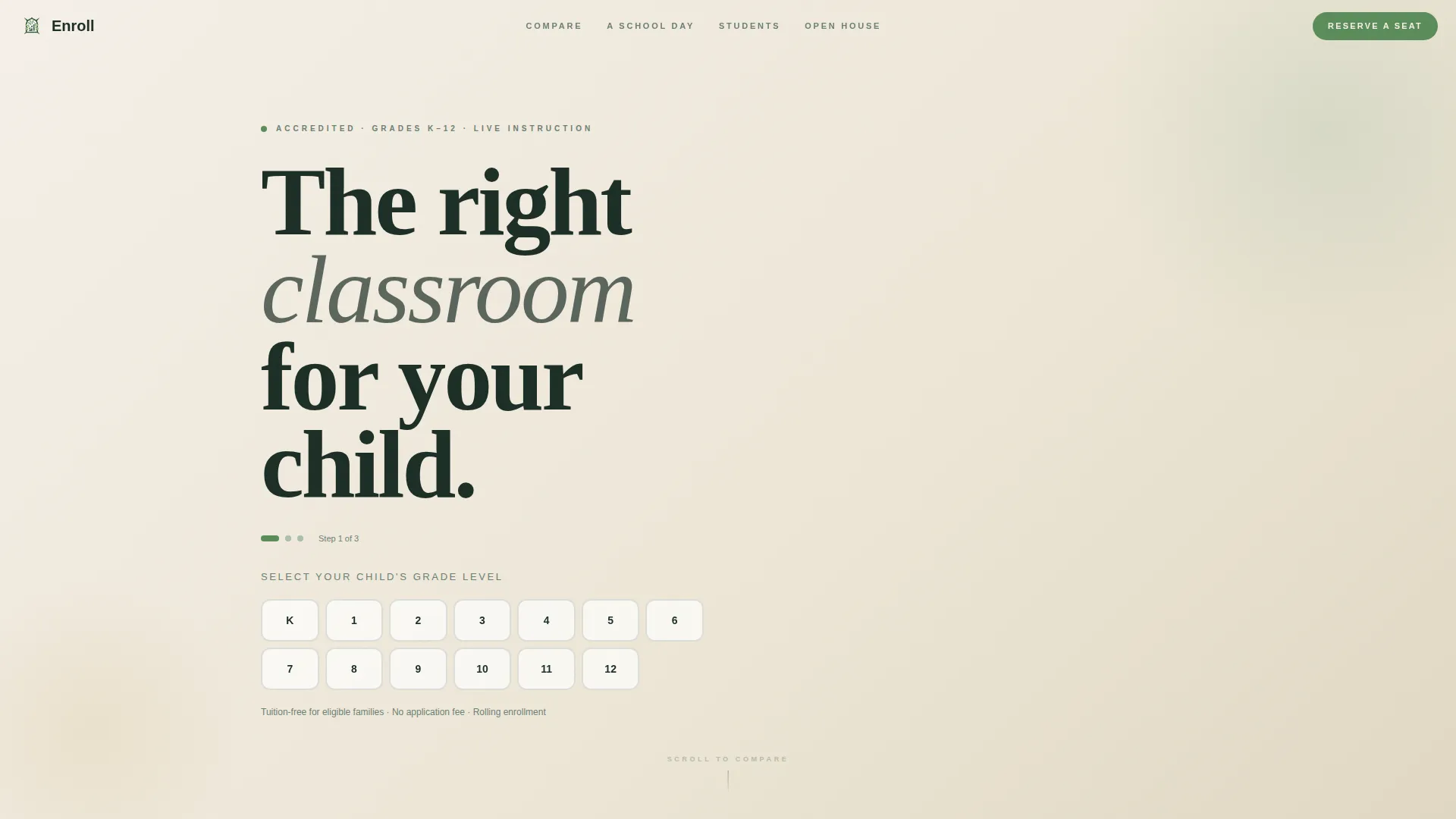
The header opens with a student enrollment card asking the child's grade level using large, clearly labeled buttons for kindergarten through grade 12. Once a grade is selected, the page behind the form updates to display curriculum previews, teacher introductions, and daily schedule snapshots matched to that grade band. The form itself is the first meaningful experience on the page.
School Comparison Table
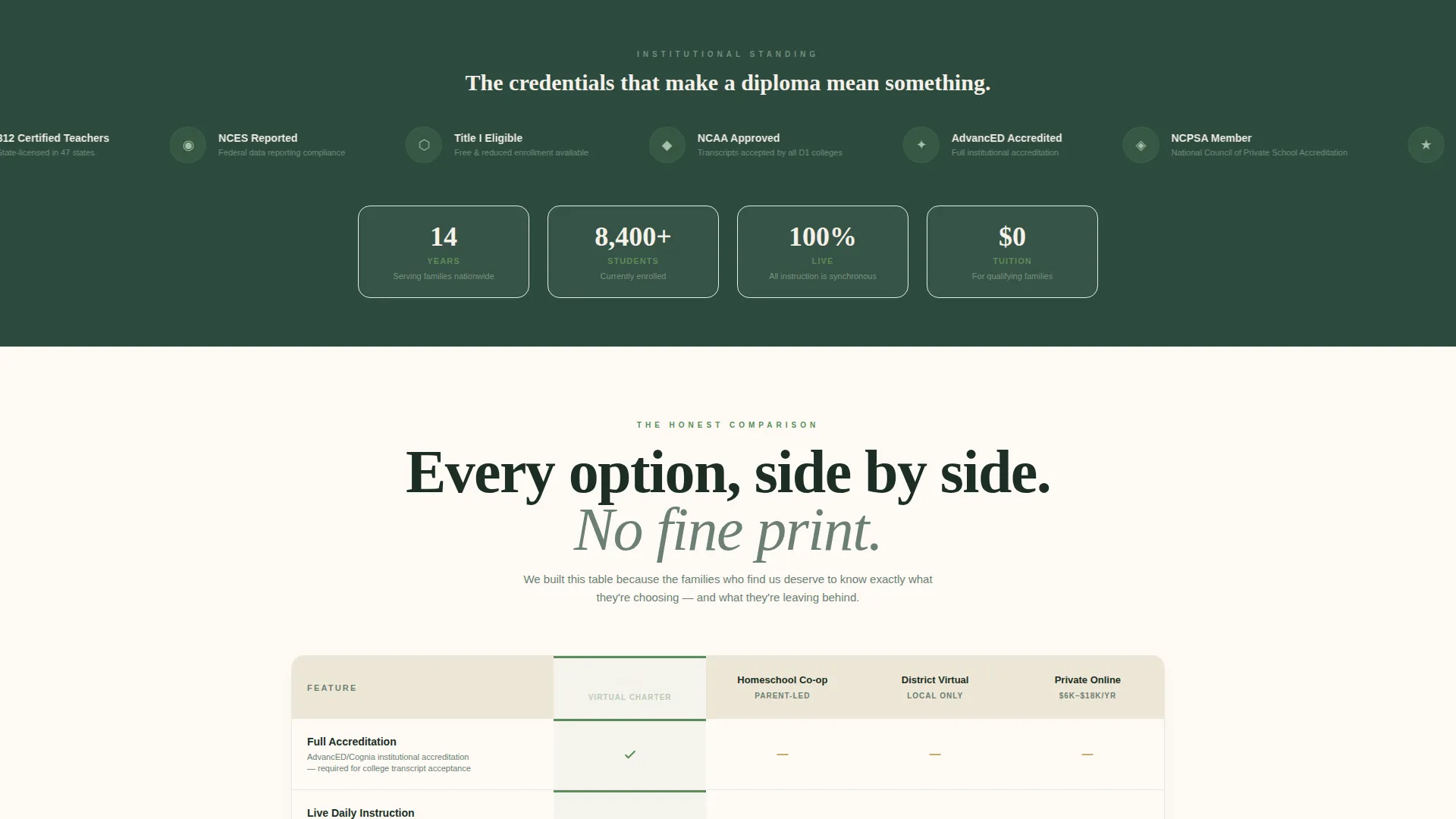
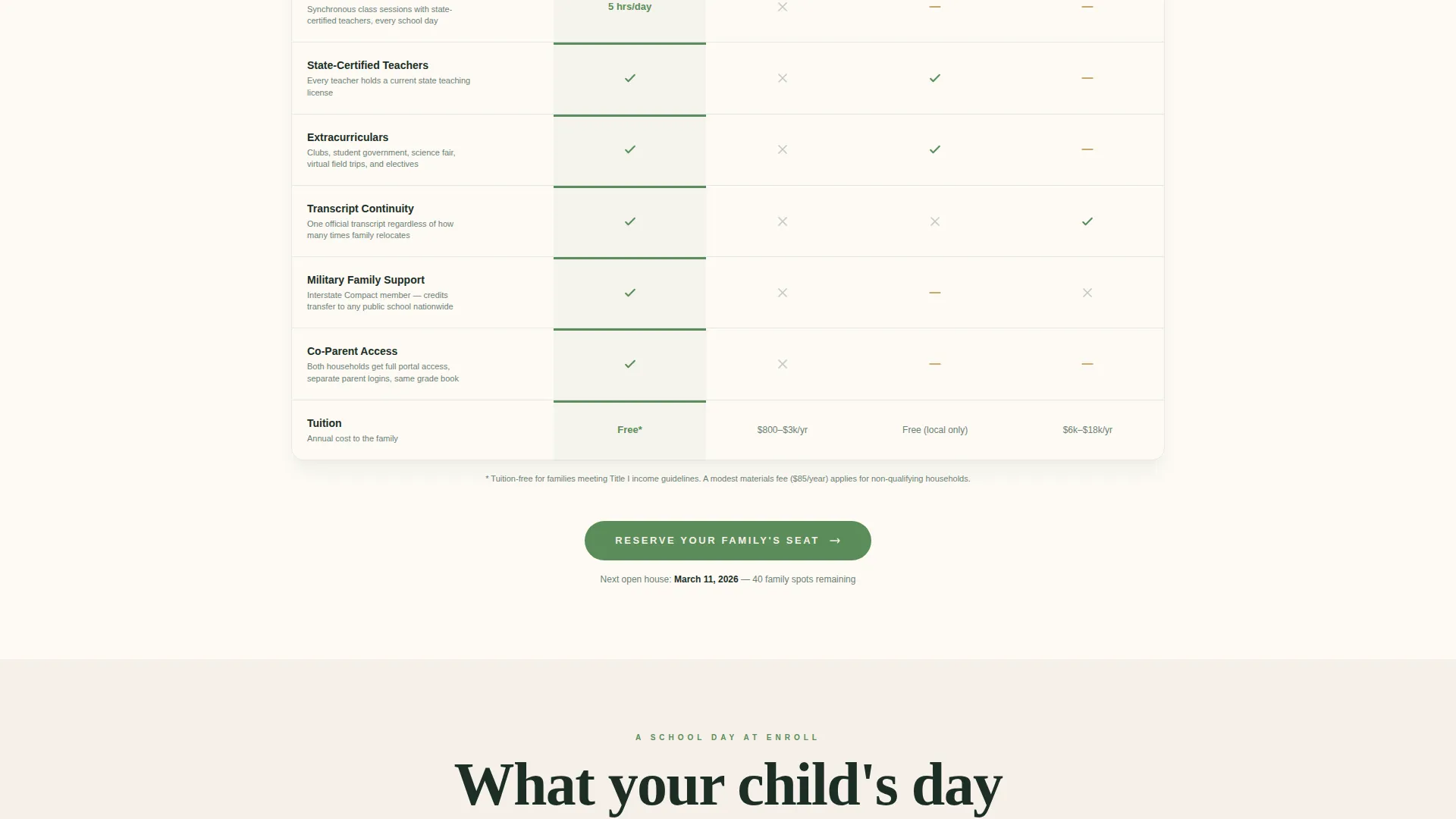
A structured comparison table stacks this virtual charter school against traditional homeschool co-ops, local district virtual programs, and private online academies. Columns cover accreditation status, live instruction hours, extracurricular offerings, and tuition. The table gives parents a clear, side-by-side view so they can make an informed decision without leaving the page.
Day-in-the-Life Schedule Timeline
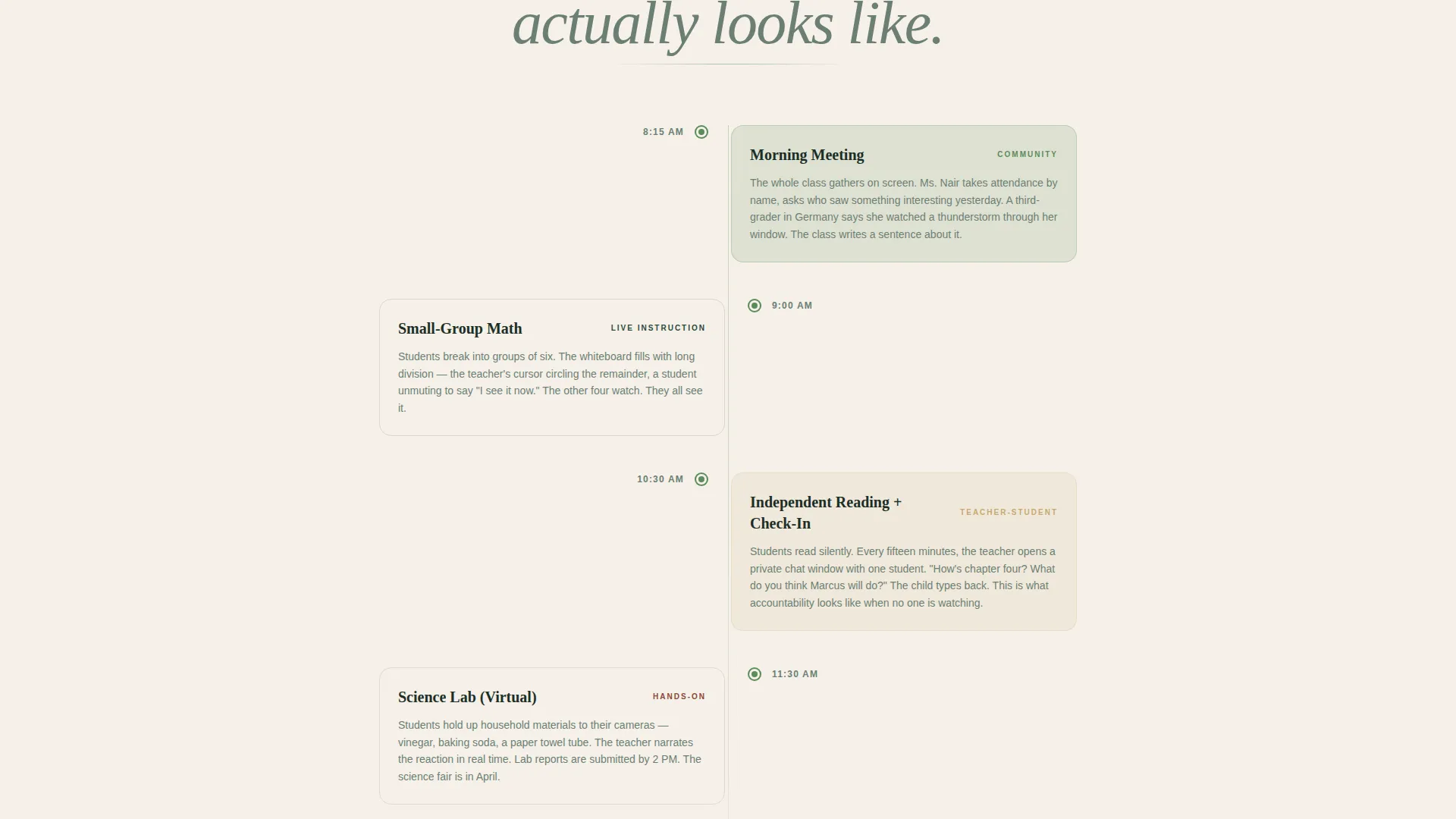
A scrollable timeline walks families through a real school day: morning meeting at 8:15, small-group math at 9:00, and independent reading with a teacher check-in at 10:30. Each entry is specific and believable. This section answers the question most parents never feel comfortable asking directly: what will my child actually do all day?
Student Milestone Gallery
Near the bottom of the page, a gallery surfaces real-feeling student achievements: science fair trophies held up to laptop cameras and acceptance letters pinned to bedroom walls. This section closes the emotional arc of the page, showing families what the outcome of enrollment looks like.
Dual Conversion Path Design
The primary call to action, "Reserve Your Family's Seat," appears first inside the final step of the grade form and again anchored at the bottom of the comparison table. A secondary path offers a parent handbook download for families who are not yet ready to register, capturing an email address in exchange.
Institutional Trust Signals
Accreditation seals, teacher credential counts, and state approval badges appear before the call to action is repeated. This sequencing ensures that by the time a parent sees the registration button a second time, the school has already demonstrated its credentials.
Page sections overview
| Section | Purpose |
|---|---|
| Grade Selection Form | Opens enrollment experience by grade band |
| Curriculum Preview Panel | Shows grade-matched content after selection |
| Teacher Introduction Block | Introduces certified instructors by grade |
| Daily Schedule Snapshot | Displays grade-appropriate timetable |
| School Comparison Table | Compares key metrics across school types |
| Day-in-the-Life Timeline | Walks through a real virtual school day |
| Trust Signal Bar | Displays accreditation seals and credentials |
| Student Milestone Gallery | Shows real-feeling learner achievements |
| Open House Registration | Collects parent name, grade, and date choice |
| Handbook Download Path | Captures email for undecided families |
Design & branding system
The visual identity follows an Institutional Authority theme built on a Botanical color system. The palette feels like an ivy-covered brick building: deeply rooted, credentialed, and still breathing.
- Deep schoolhouse evergreen (#2D4A3E) anchors headers and navigation for a grounded, serious tone
- Chalk-dust sage (#A8BFA8) and parchment cream (#F5F0E8) provide warm, readable backgrounds that feel like aged paper and classroom walls
- Living-vine accent (#5B8C5A) is used exclusively for buttons and progress indicators, drawing the eye to action points naturally
Mobile & speed optimization
The layout is structured to work cleanly on smaller screens, which matters for the families this template targets. Military parents abroad, rural households, and co-parents on the go are all likely to view this page from a phone.
- The multi-step grade form uses large tap-friendly buttons sized for mobile interaction
- Scroll sections are stacked vertically so the narrative flow works as well on a phone as it does on a desktop
- The comparison table is designed to remain legible and usable at smaller viewport widths
How this template helps you convert
This template does not ask for a commitment before it has earned one. The conversion strategy follows a clear sequence tied to the Hero's Journey creative direction.
- The grade-selection form opens with low commitment and immediately delivers personalized value, pulling the parent deeper into the page before any registration request appears.
- The comparison table and day-in-the-life timeline neutralize doubt and answer practical objections, so the "Reserve Your Family's Seat" call to action feels like a logical next step rather than a sales push.
- The handbook download offers a second conversion path for families who need more time, ensuring that undecided visitors still enter a follow-up channel rather than leaving empty-handed.
Other information about this template
This template is categorized under Education and Training, specifically within Specialized Certification and Programs, with a niche focus on virtual charter schools.
- The template style is a Comparison Table landing page, meaning the comparison section is a structural anchor rather than a secondary element
- The creative direction follows a Hero's Journey arc in which the visitor's child is framed as the hero moving through a meaningful transformation
- The header concept is a Multi-Step Form designed to feel like filling out a real student enrollment card
- The landing page direction is Event Registration, with the open house as the primary conversion goal
Theme
Institutional Authority
Creative direction
Hero's Journey
Color system
Botanical
Style
Comparison Table
Direction
Event Registration
Page Sections
Grade-responsive Multi-step Form
School Comparison Table
Day-in-the-life Timeline
Student Milestone Gallery
Dual Conversion Path Design
Institutional Trust Signal Layout
Related questions
What type of school is this template designed for?
How does the grade-selection form work with the registration step?
What are the two conversion paths included in this landing page?
How is the comparison table structured?
Is this template suitable for families with children in different grade levels?



