Enroll - Dynamic Academy Landing Page Template
Enroll is a single-page school and academy contact landing page built on a Scroll Reveal progressive structure. It surfaces every campus contact point, phone numbers, admissions email, office hours, and a self-assembling campus map, in one fast, organized scroll. The Slate and Sky color system and Code Snippet header give it a clean, system-like feel that earns trust instantly.
by Rocket studio
Quick summary
Enroll is a contact-focused landing page template for schools and academies. It uses a progressive scroll reveal to surface department cards one by one, starting with a syntax-highlighted Code Snippet header and ending with a pin-by-pin campus map. Every element points parents, guardians, and transfer staff toward the right contact without friction.
Who this template is for
This template is built for schools and academies that need a clear, always-available contact page. It works equally well for new institutions launching their first web presence and established campuses replacing a cluttered contact section.
- Admissions teams who need parents to reach them without phone tag
- School administrators managing multiple departments and contact lines
- Transfer counselors who need department-specific contact details fast
What problem this template solves
School contact pages are often buried in navigation menus or scattered across multiple PDFs. Parents in the carpool lane and guardians comparing tuition deadlines at night need answers in seconds, not minutes.
- Critical contact details like phone numbers and admissions email are hard to find on most school sites
- Visitors have to dig through multiple pages to locate the right department or office
- No clear call to action means inquiries get lost before they ever start
What you get with this template
You get a fully structured, single-page contact landing page with a strong visual identity and a conversion-focused layout. Every section is designed to reveal itself progressively as the visitor scrolls, rewarding attention with more specific information the deeper they go.
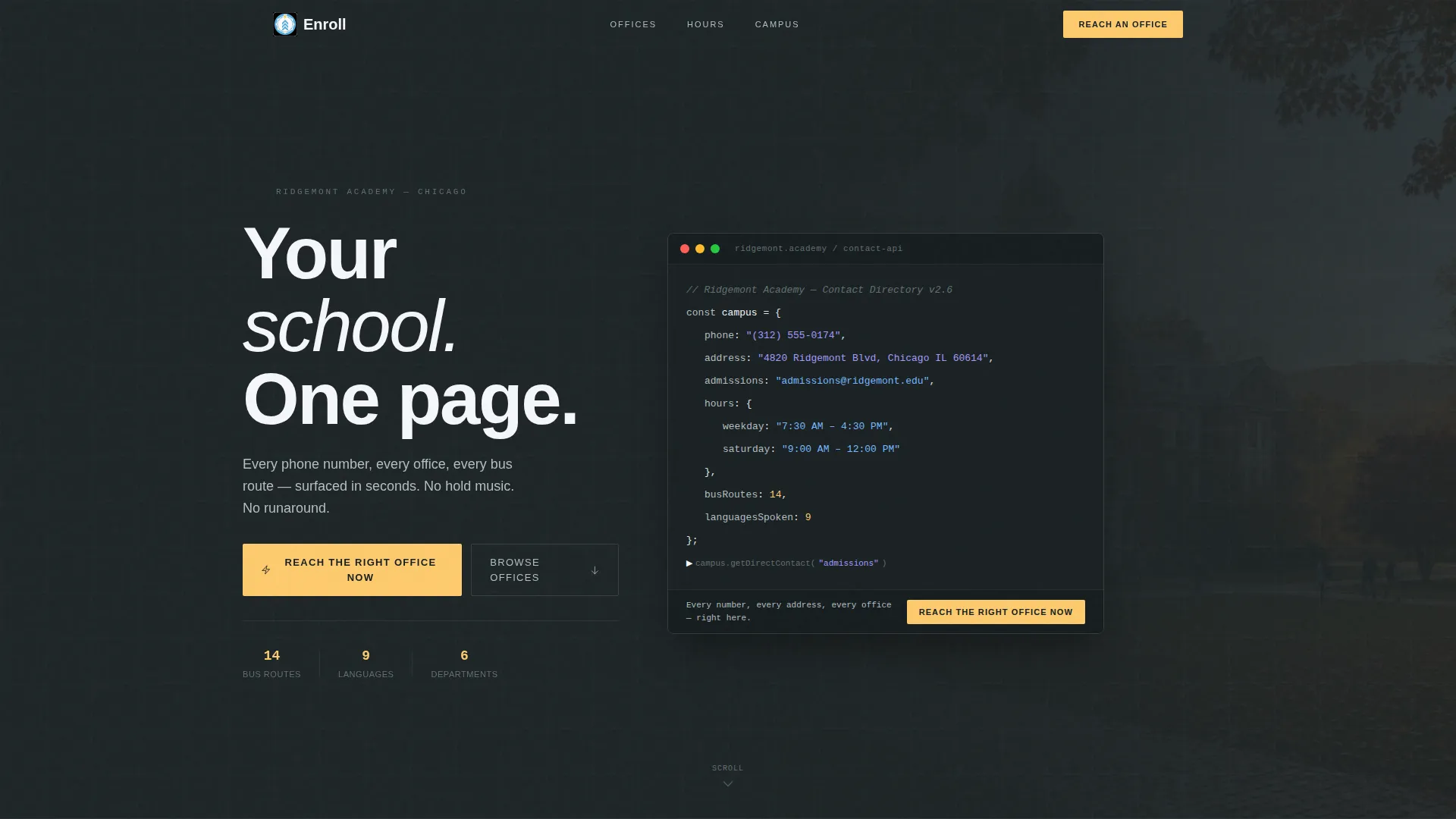
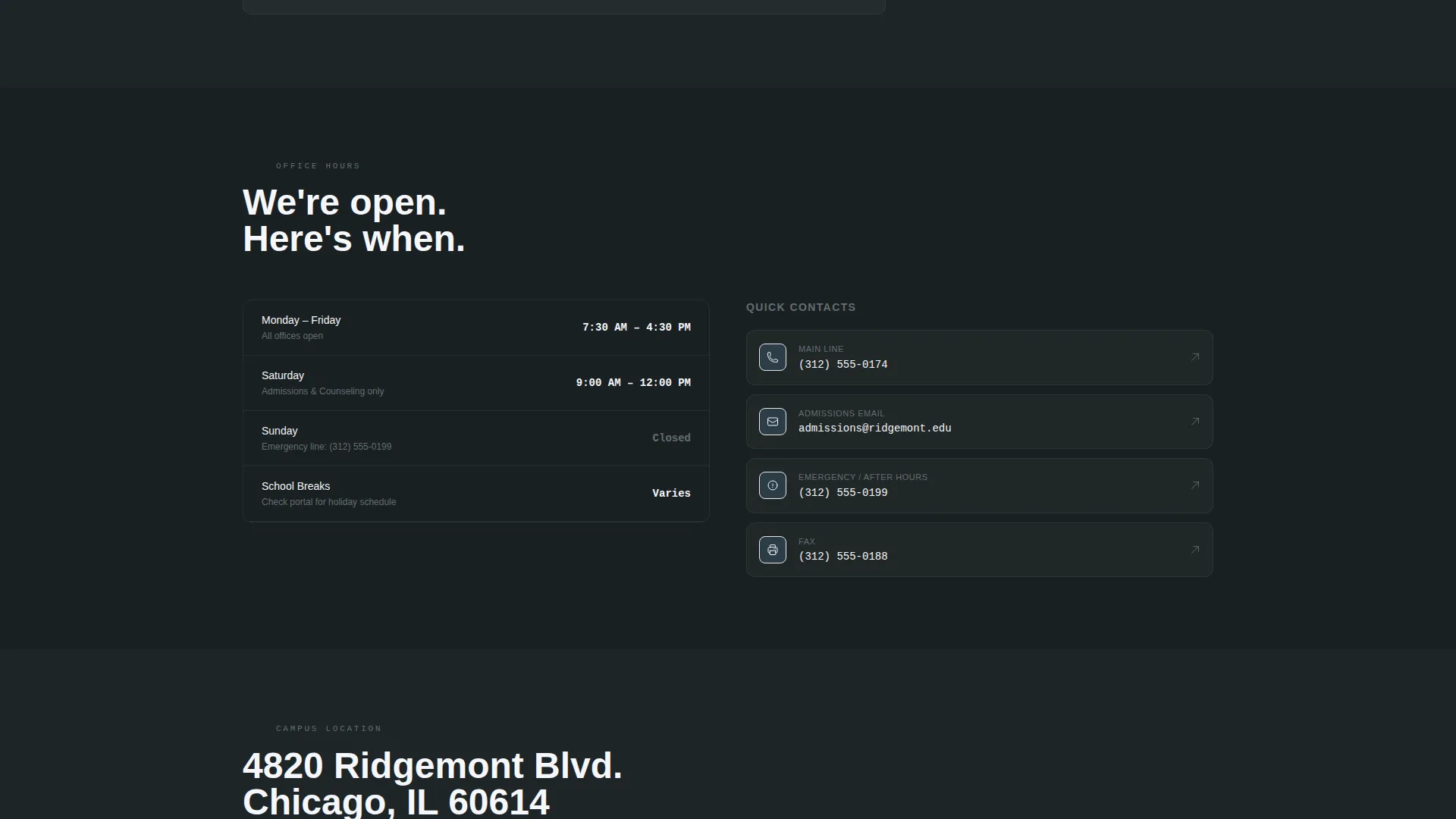
- A Code Snippet header block displaying campus phone, admissions email, and weekday hours in styled terminal format
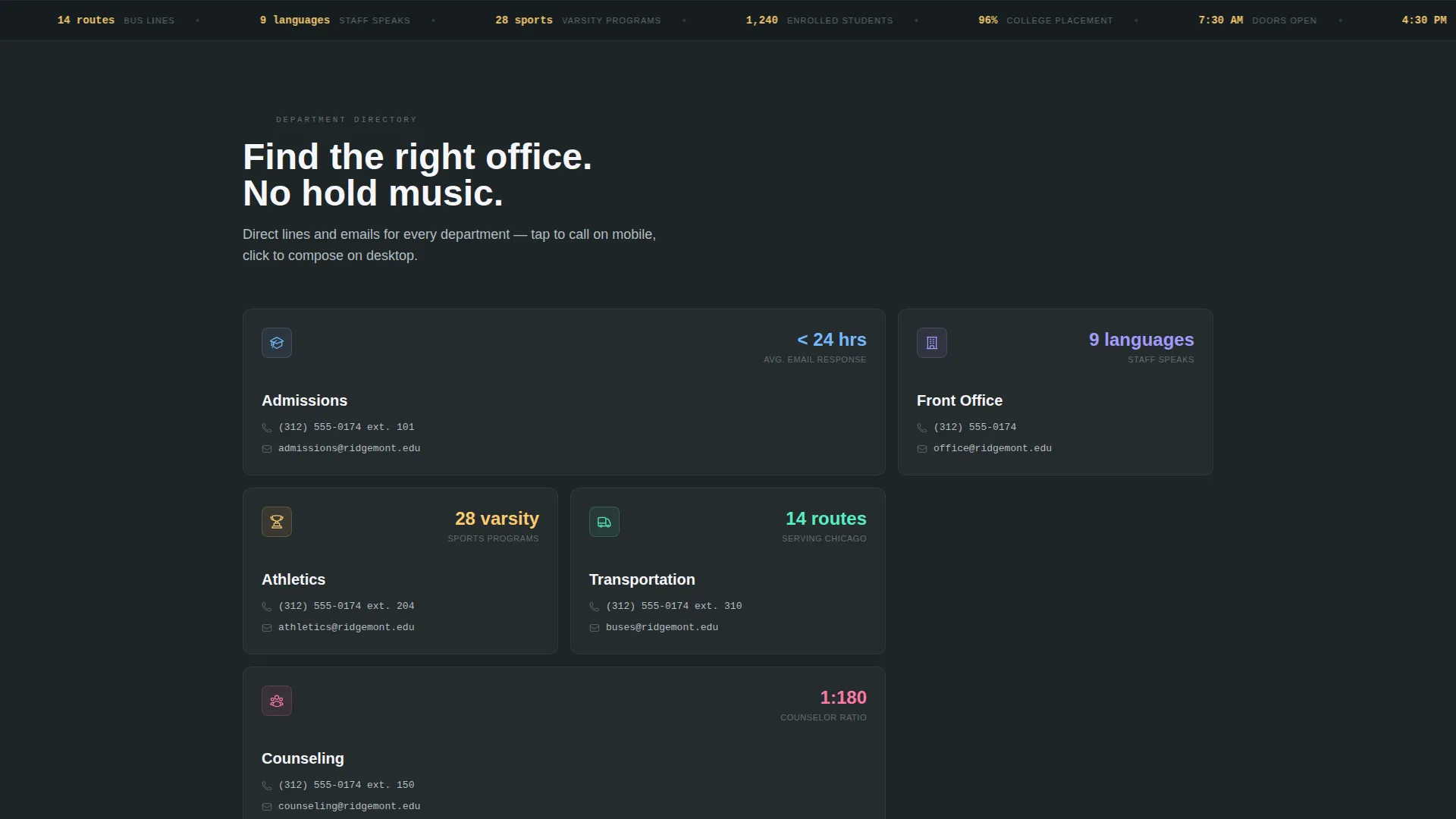
- Progressive department cards for Admissions, Athletics, Transportation, and Front Office, each anchored by a micro-stat
- A sticky bottom call-to-action bar and a directory modal with six department buttons that trigger tap-to-call or pre-filled email actions
Feature list
This section covers the key functional and design capabilities built into the Enroll landing page template.
Code Snippet Header Block
The header presents contact data styled as a syntax-highlighted terminal block. Fields like campus.phone, admissions.email, and hours.weekday appear in sky blue against dark slate, communicating that this school operates with clarity and precision. A plain-English translation line sits directly below the snippet.
Progressive Scroll Reveal Layout
Each section fades upward into view as the visitor scrolls. The rhythm mimics flipping through a well-designed annual report, rewarding the visitor with denser, more specific information at every stage. This keeps attention moving without overwhelming the screen on load.
Department Cards with Micro-Stats
Each department card surfaces a single anchor stat, such as average response time, number of languages spoken, or bus routes served. Cards cover Admissions, Athletics, Transportation, and Front Office, making the page feel like a living campus directory rather than a static list.
Sticky Call-to-Action Bar
After the second scroll reveal, a sticky bottom bar appears with the primary call to action: "Reach the Right Office Now." This keeps the conversion path visible throughout the entire scroll without interrupting the content flow above it.
Directory Modal with Six Department Buttons
Clicking the call to action opens a lightweight directory modal. Each of the six department buttons either pre-fills a subject line in the visitor's default email client or reveals a tap-to-call number on mobile. No form, no friction, no dead ends.
Self-Assembling Campus Map
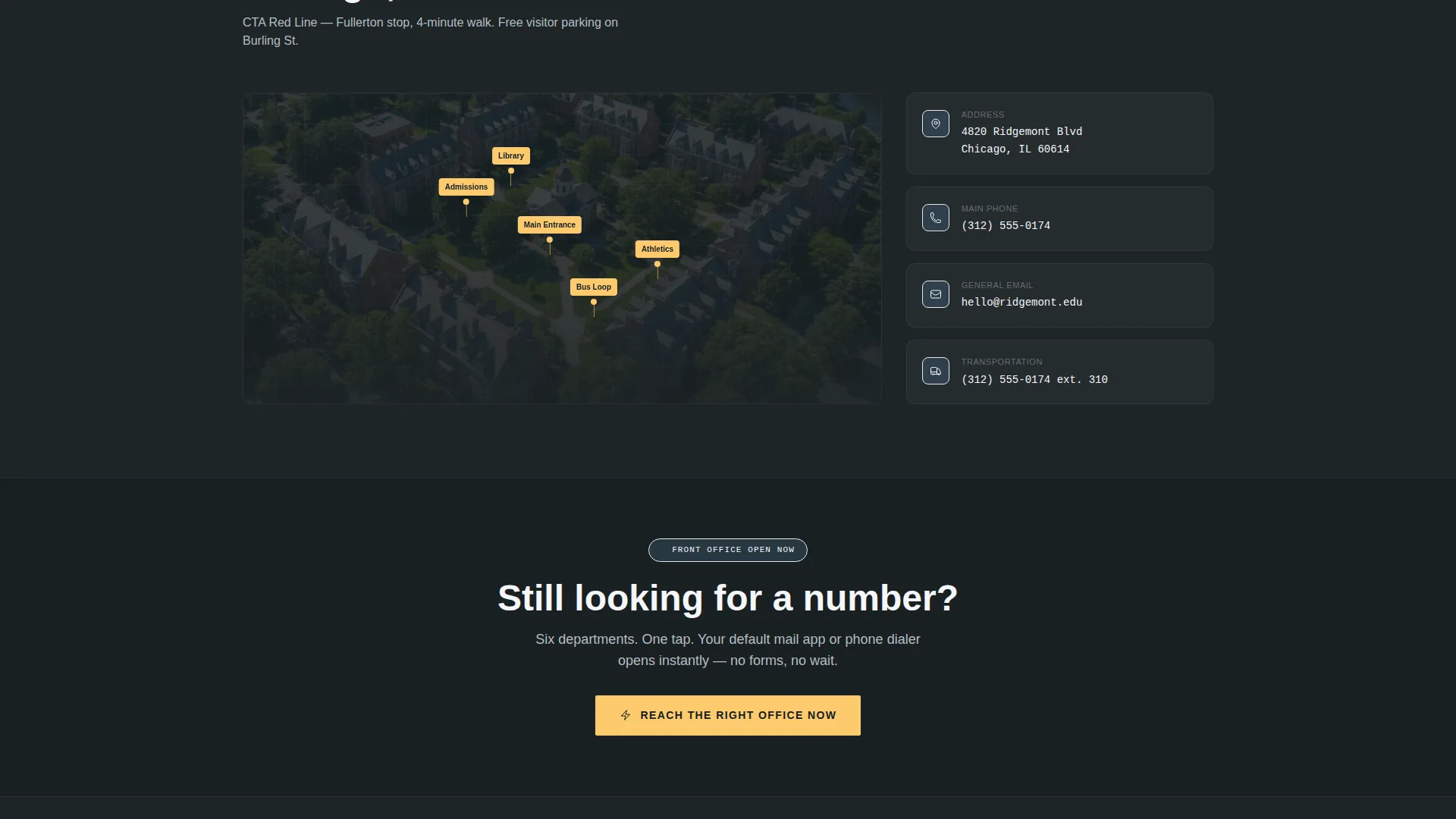
The page closes with a campus map that assembles itself pin by pin as it enters the viewport. It serves as a satisfying visual payoff after the scroll and gives first-time visitors a spatial sense of the campus before they ever arrive.
Page sections overview
| Section | Purpose |
|---|---|
| Code Snippet Header | Displays campus phone, email, and hours in terminal style |
| Plain English Tagline | Translates the snippet into a single human-readable line |
| Admissions Department Card | Surfaces admissions contact details with a micro-stat |
| Athletics Department Card | Presents athletics contact and relevant department metric |
| Transportation Department Card | Shows bus route count and transportation contact line |
| Front Office Card | Delivers direct front office contact and response stat |
| Sticky call to action Bar | Keeps "Reach the Right Office Now" visible after scroll two |
| Directory Modal | Opens six pre-configured department contact buttons |
| Self-Assembling Map | Builds the campus map pin by pin on scroll entry |
Design & branding system
The visual identity follows a Slate and Sky color system guided by a Startup Velocity theme. The palette feels like a brand-new notebook opened under clean fluorescent light: organized, optimistic, and purposeful.
- Chalkboard slate (#2D3436) and pencil graphite (#636E72) dominate backgrounds and body text, while open-sky blue (#74B9FF) marks section transitions and icon strokes
- Highlighter accent (#FDCB6E) is reserved exclusively for buttons, active links, and hover states, creating an immediate visual signal for every clickable element
- The overall aesthetic is clean and system-like, channeling the precision of a well-run institution without feeling cold or institutional
Mobile & speed optimization
The template is structured with mobile visitors in mind. Parents checking contact details from a carpool lane or a phone at midnight need a layout that loads and responds immediately.
- Tap-to-call functionality is built into the directory modal, so phone numbers activate directly on mobile without copy-paste friction
- The sticky call-to-action bar adapts to the bottom of the mobile screen, keeping the conversion action within thumb reach at all times
- The progressive reveal structure loads section content as it enters the viewport, avoiding a heavy all-at-once render on smaller devices
How this template helps you convert
The Enroll template is optimized as a click-through landing page. Every design and layout decision moves the visitor toward one clear action rather than spreading attention across multiple goals.
- The Code Snippet header establishes credibility immediately, signaling that this school has its contact information organized and accessible before the visitor scrolls a single pixel.
- Department cards with micro-stats build confidence section by section, showing that each office is staffed, responsive, and ready to help, so visitors arrive at the call to action already convinced.
- The directory modal removes all remaining friction by delivering pre-filled email actions and tap-to-call numbers in a single click, making "Reach the Right Office Now" the easiest possible next step.
Other information about this template
This landing page template belongs to the School and Academy Contact Page niche within the broader School and Academy Website Templates subcategory. It sits at the intersection of Technology and education-focused web design.
- The template style is Scroll Reveal (Progressive), meaning sections animate into view sequentially as the visitor scrolls rather than all loading at once
- The creative direction follows an Industry Report approach, treating the contact page like a data-backed campus directory with verified stats and structured department entries
- The header concept is a Code Snippet, a design pattern common in technology-themed templates that makes contact data feel organized and authoritative
- The landing-page direction is Click-Through, meaning the entire page is engineered to deliver one decisive action rather than capturing form data directly on the page
- This template is part of the Startup Velocity theme family, which combines clean typographic systems with high-contrast accent colors for a modern, energetic feel
Theme
Startup Velocity
Creative direction
Industry Report
Color system
Slate & Sky
Style
Scroll Reveal (Progressive)
Direction
Click-Through
Page Sections
Code Snippet Header with Contact Data
Progressive Scroll Reveal Sections
Department Cards with Micro-stats
Sticky Bottom Call to Action Bar
Frictionless Directory Modal
Pin-by-pin Campus Map
Related questions
Does this template include a contact form?
Can I update the department cards with my school's real contact details?
Is this template suitable for a small private academy or only large campuses?
How does the sticky call-to-action bar behave on mobile devices?
What happens when a visitor clicks the primary call-to-action button?



