AI for Higher Education Directory Website Template
Enroll is a dark-themed, dashboard-style landing page template built for higher education AI customer service platforms. It features a live-feel tab switcher, semester inquiry heatmaps, integration diagrams, and a two-step deployment flow. Designed for registrars, IT directors, and provosts, the template proves platform competence through data before asking for a commitment.
by Rocket studio
Quick summary
Enroll is a single-page, data-command landing page template for a higher education AI customer service platform. It guides institutional buyers from visible pain to confident deployment. The layout uses dark steel tones, animated charts, and live-feel dashboard mockups to build trust with registrars, IT directors, and institutional leadership before the first click.
Who this template is for
This template targets decision-makers at colleges and universities who manage student inquiry volume at scale. It speaks directly to buyers who evaluate platforms on efficiency metrics, not marketing language.
- Registrars and VP Enrollment leaders focused on resolution speed and ticket deflection rates
- IT directors looking for clean integrations with existing Student Information Systems
- Provosts and Chief Financial Officers tracking satisfaction scores and cost-per-ticket trends
What problem this template solves
Admissions and registrar offices face predictable, seasonal surges in student questions. These spikes strain call centers, drain budgets, and leave students waiting. The template makes that institutional pain visible before presenting a structured solution.
- Repeat inquiries during add/drop periods and financial aid deadlines overwhelm staff and inflate support costs
- Legacy Student Information System platforms require manual stitching that slows down IT teams
- Declining satisfaction scores and rising call center budgets make the status quo unsustainable for leadership
What you get with this template
You get a fully structured, single-page layout that moves a buyer through problem recognition, platform proof, and deployment commitment. Every section serves a specific persuasion purpose, and every visual element is functional rather than decorative.
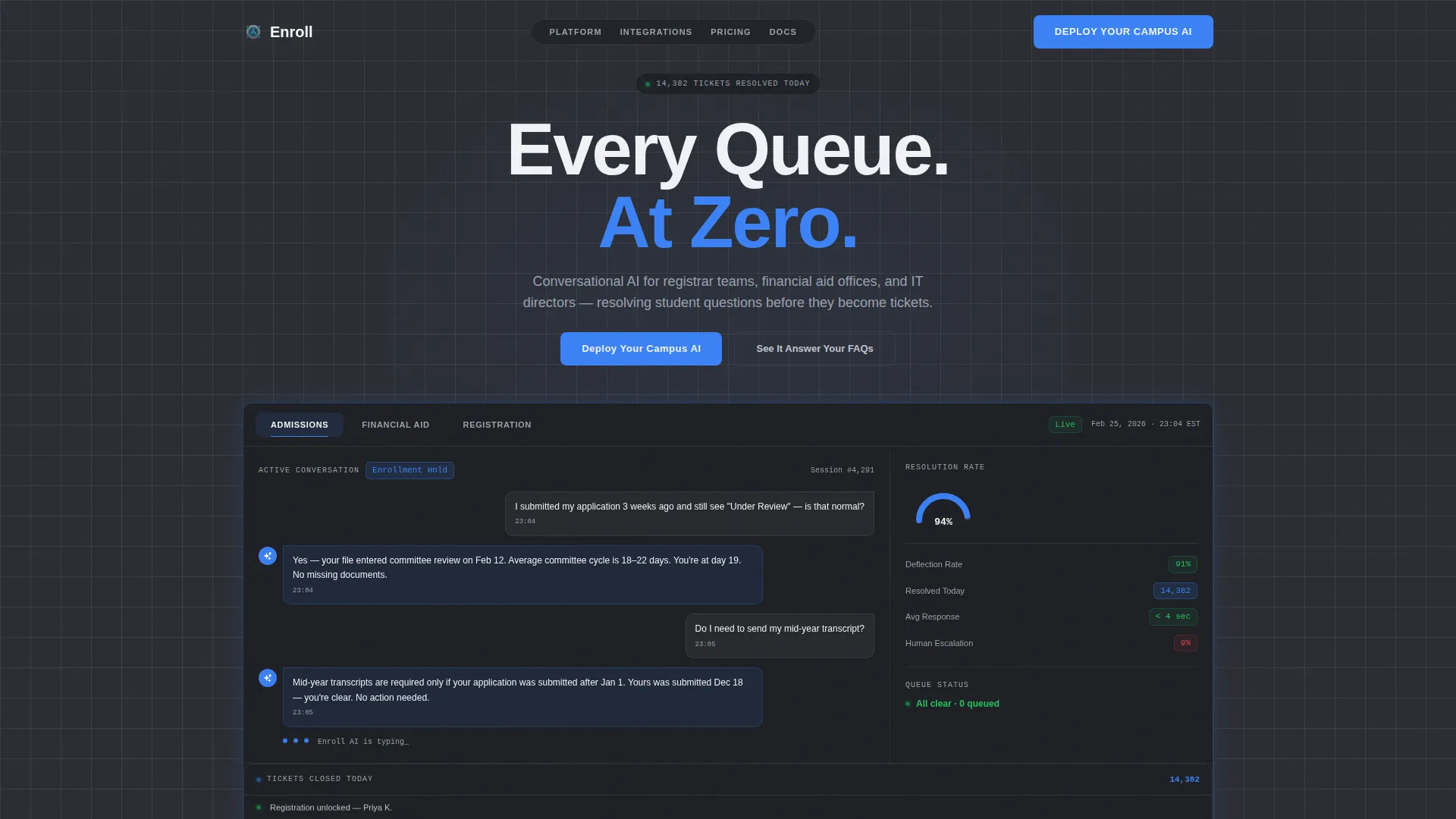
- A feature tab switcher hero with live-feel chat transcripts, resolution-time gauges, and deflection-rate counters
- A problem-to-solution scroll arc built from semester heatmaps, annotated automation charts, and a connector integration diagram
- A two-step deployment call-to-action flow with a Student Information System selector grid and email provisioning field
Feature list
The Enroll template ships with six purpose-built components that reflect the buying journey of institutional technology leaders.
Feature Tab Switcher Dashboard
The hero section displays a live-feel dashboard mockup with three clickable tabs: Admissions, Financial Aid, and Registration. Each tab animates a new set of chat transcripts, resolution-time gauges, and deflection-rate counters into view. A sidebar ticker counts tickets closed today, starting at 14,000 and rising.
Semester Inquiry Heatmap
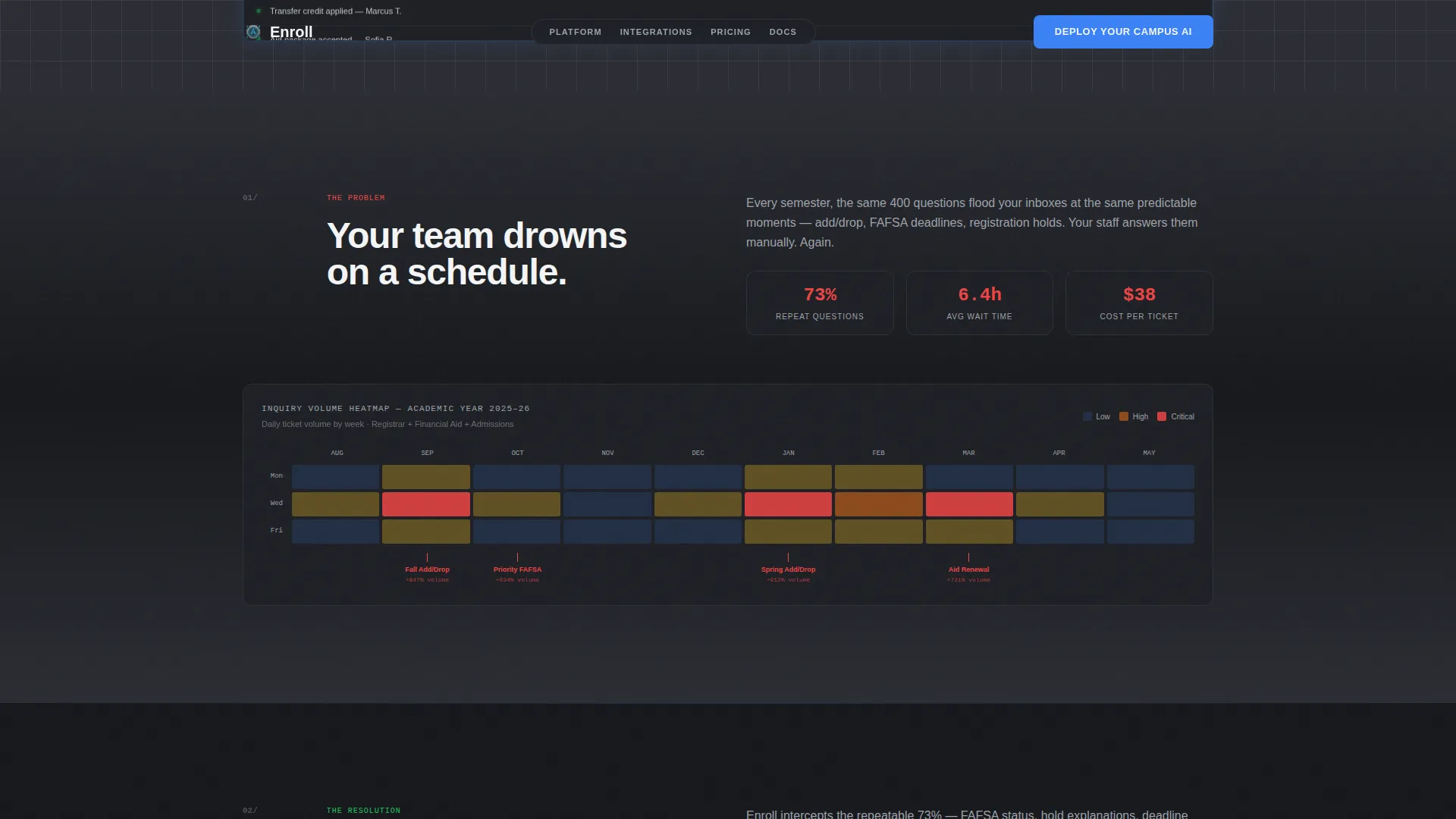
A full-width heatmap visualizes peak inquiry volume across an academic semester. Spikes glow red during add/drop windows and financial aid deadlines, translating institutional pain from a feeling into a data point. This section sets up the solution arc that follows.
Annotated Automation Chart
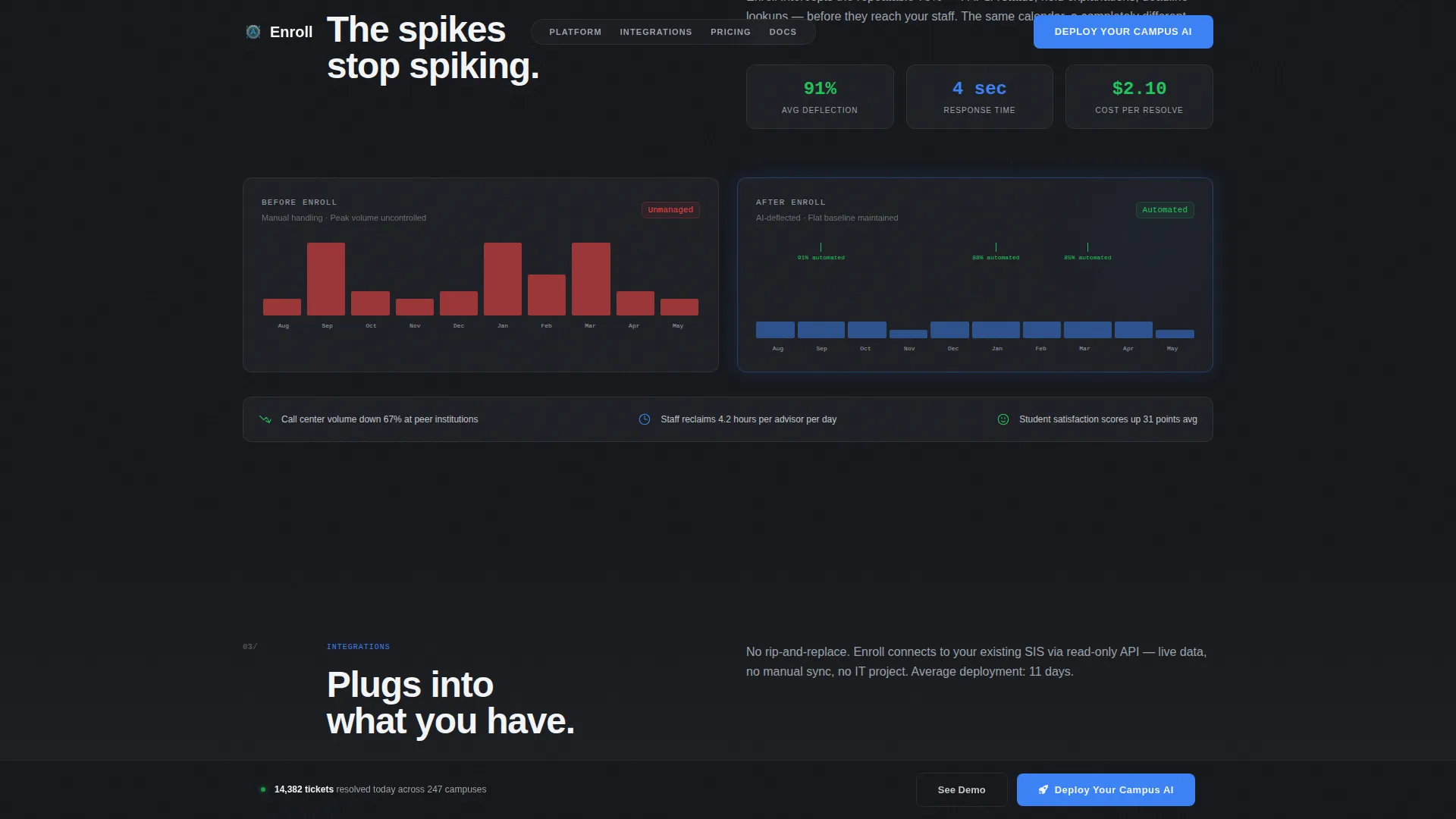
Directly below the heatmap, a mirrored "after" chart shows those same spikes flattening. Automation percentages are annotated on the chart at key points in the semester. The side-by-side visual contrast makes the platform's impact immediately readable.
Live Integration Connector Diagram
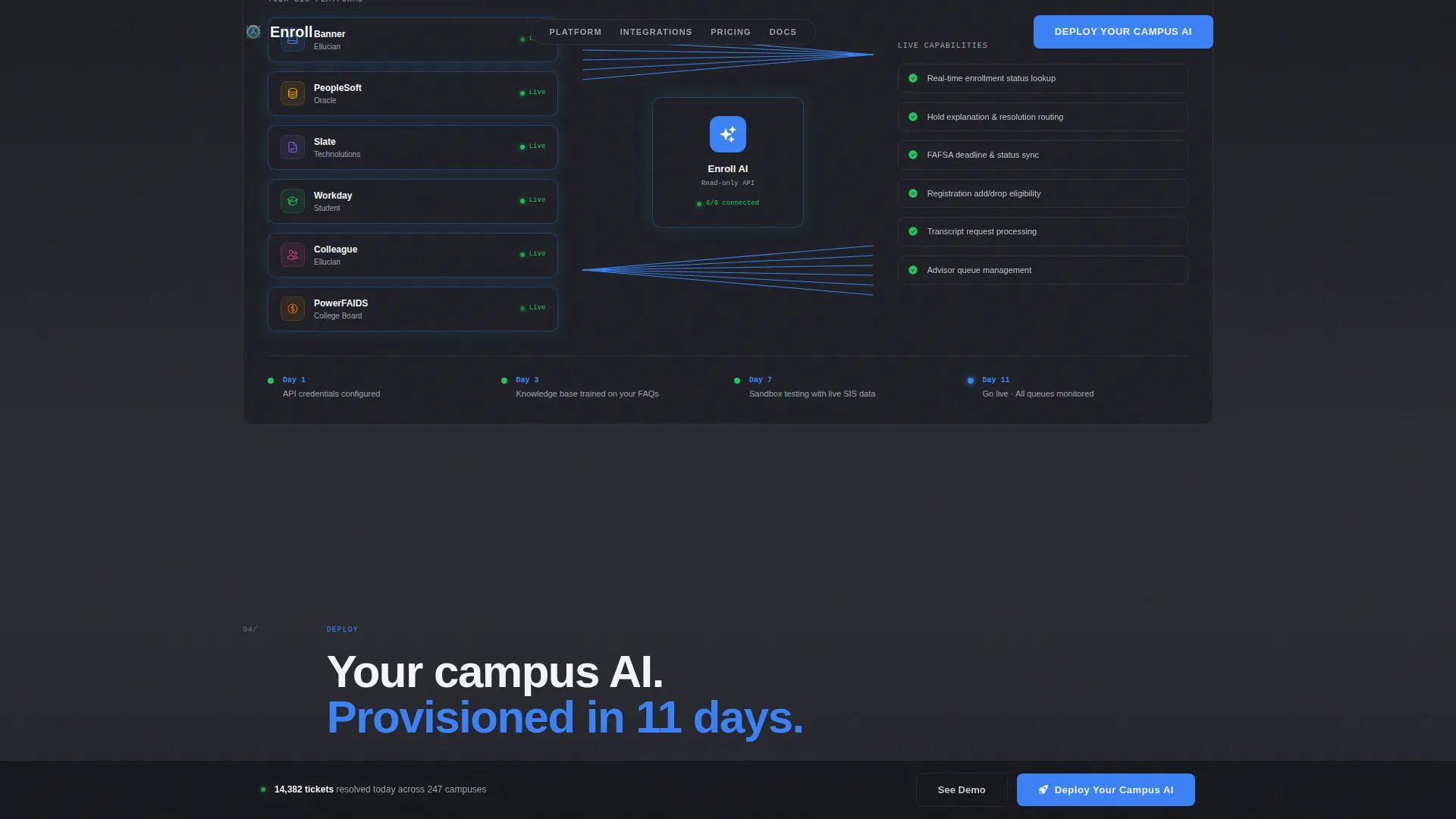
An animated diagram shows platform connectors snapping into place with major Student Information Systems used across higher education. The visual communicates zero-stitching deployment for IT buyers without requiring a single line of explanatory text.
Embedded Demo Chat
A secondary call-to-action labeled "See It Answer Your FAQs" launches an embedded demo chat trained on generic university data. Prospects can experience resolution speed directly on the page before committing to a provisioning link. This lowers the barrier between curiosity and conversion.
Two-Step Deployment Flow
The primary call-to-action, "Deploy Your Campus AI," opens a two-step flow: first a visual grid for selecting a Student Information System platform, then a field for entering an institutional email address to receive a provisioning link and sandbox environment. This flow appears in the hero and again as a sticky bottom bar after the second scroll section.
Page sections overview
| Section | Purpose |
|---|---|
| Hero Tab Switcher | Prove platform capability through a live-feel dashboard with animated tabs and a ticket counter |
| Inquiry Heatmap | Make seasonal inquiry volume visible as data to establish the scale of the problem |
| Automation Results | Show the same data post-deployment with annotated deflection percentages |
| Integration Diagram | Demonstrate connector-ready compatibility with major Student Information Systems |
| Deploy Call to Action | Guide buyers through a two-step flow to select a platform and request a sandbox environment |
| Footer | Provide a clean single-row linear footer for navigation and contact |
Design & branding system
The visual identity follows a Data Command theme that references the precision of a network operations center environment. Every color choice carries functional meaning, and no decorative imagery is used anywhere on the page.
- Color system: gunmetal base at #2B2D33, brushed aluminum mid-tone at #9EA2AB, interface white at #F4F5F7, and signal blue at #3B82F6 reserved for live data points and interactive elements
- Typography: DM Sans for user interface copy and JetBrains Mono for data and code display elements
- No stock photography is used; all visual elements are functional user interface components including charts, transcripts, gauges, and counters
Mobile & speed optimization
The template is designed desktop-first, reflecting the registrar and IT buyer context where platform evaluation happens on a workstation. A mobile-responsive fallback ensures the layout holds for any device.
- GSAP ScrollTrigger drives chart reveals, counter animations, and tab switcher transitions for a high-interactivity experience
- Interactive components including the demo chat, Student Information System selector, and sticky call-to-action bar are built as client components
- Static content sections use server-component rendering for a clean separation between interactive and non-interactive parts of the page
How this template helps you convert
The page is structured as an analyst-style presentation to institutional leadership. It earns trust through evidence before asking for action.
- The problem arc raises the stakes across multiple scroll steps, moving from individual student frustration to institutional cost inefficiency, so buyers feel the weight of inaction before seeing the solution.
- The embedded demo chat lets prospects experience the platform's resolution speed firsthand, removing doubt before they reach the deployment call-to-action.
- The two-step provisioning flow reduces friction at the moment of commitment by letting buyers self-select their Student Information System and receive a sandbox environment immediately.
Other information about this template
The Enroll template is built specifically for business-to-business sales cycles in higher education technology. It is designed for teams that need to demonstrate platform value to multiple stakeholders before a procurement decision is made.
- The sticky bottom bar call-to-action appears after the second scroll section and stays visible through the remainder of the page
- Social proof is embedded in the layout through resolution metrics, deflection counters, and peer institution benchmark references
- Localization defaults are set to English (US), United States Dollar currency, and MM/DD/YYYY date formatting
- The footer follows a linear single-row pattern for a clean, minimal close to the page
Theme
Data Command
Creative direction
Problem→Solution Arc
Color system
Monochrome Steel
Style
Dashboard/Data Grid
Direction
App Download
Page Sections
Feature Tab Switcher Hero Dashboard
Semester Inquiry Heatmap
Annotated Automation Results Chart
Live Integration Connector Diagram
Embedded Prospect Demo Chat
Two-step Deployment Call to Action
Related questions
Who is this landing page template designed for?
Does the template include a working demo chat component?
What Student Information Systems does the integration diagram reference?
Can the tab content in the hero dashboard be customized?
Is this template optimized for a desktop-first buyer audience?



