Cloud-Native Enterprise Software Cost Calculator Website Template
Provision is a scroll-reveal landing page template built for cloud-native mobile device management platforms. It opens with a live-typed terminal enrollment command, walks visitors through an interactive Fleet Cost Calculator, then progressively reveals every capability. The design uses a Glassmorphic, deep-space palette to feel technical, trustworthy, and immediately credible to IT buyers.
by Rocket studio
Quick summary
Provision is a high-converting landing page template for cloud-native mobile device management (MDM) platforms. It combines a live-coded terminal header, an interactive Fleet Cost Calculator, and a scroll-reveal section flow to build technical credibility layer by layer. The result is a page that feels as precise and controlled as the product it represents.
Who this template is for
This template is built for technical and enterprise software teams who need to earn trust fast with a demanding, detail-oriented audience. It is not a generic software template; every design decision speaks directly to the people who run IT infrastructure at scale.
- Sysadmins and IT operations teams managing large device fleets across multiple locations
- Managed service providers (MSPs) handling many client tenants simultaneously
- Security engineers responsible for device compliance, encryption, and remote access control
What problem this template solves
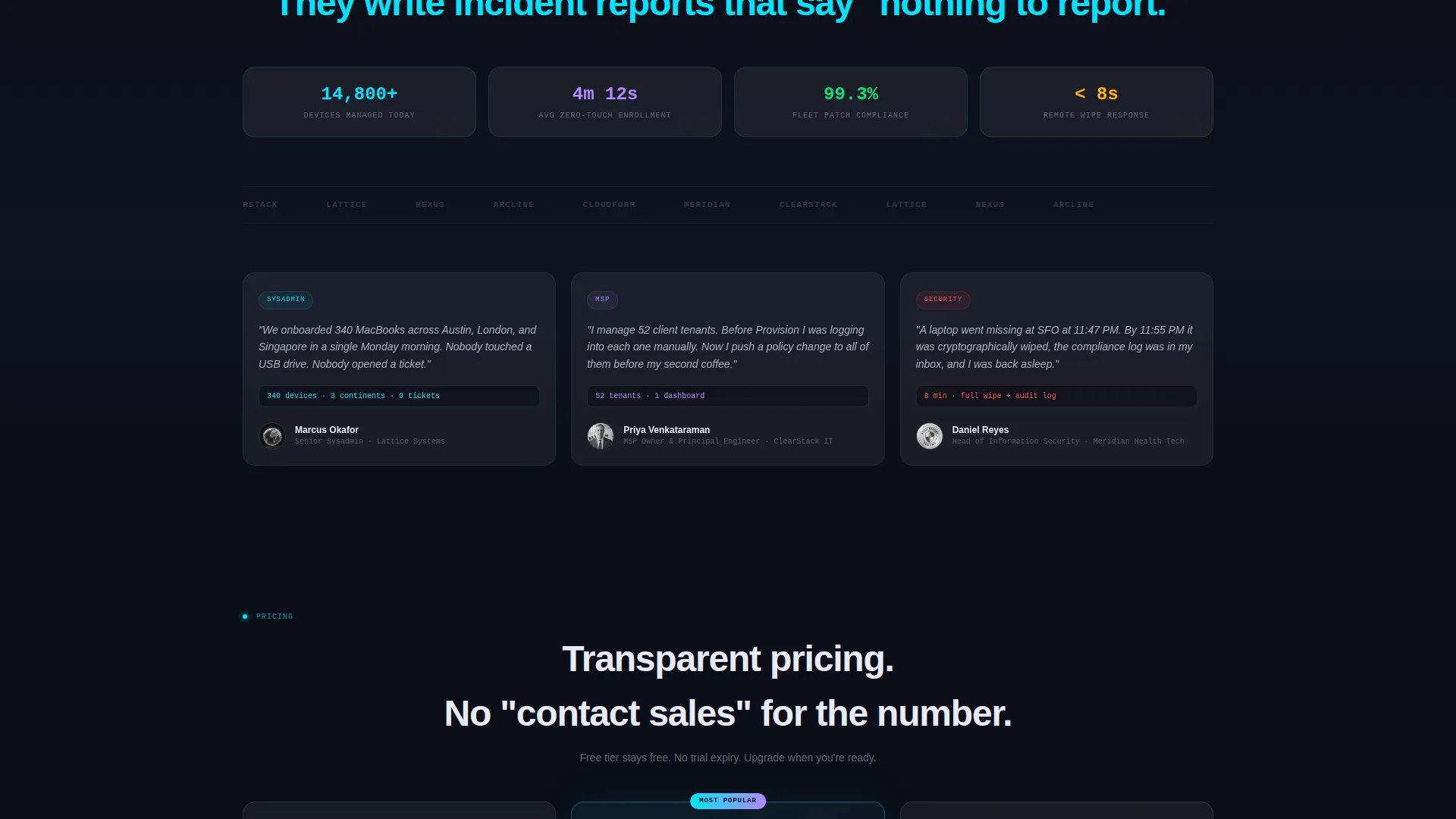
Selling a cloud-native MDM platform to technical buyers requires more than polished visuals. Sysadmins and security engineers expect proof, not promises. Generic software landing pages fail because they lead with marketing language instead of demonstrating competence.
- Visitors leave before they understand what the platform actually does or how it works
- There is no interactive way for buyers to calculate whether switching is worth their time
- Free trial offers get ignored when the signup process asks for too much upfront
What you get with this template
You get a fully structured, single-page scroll-reveal layout designed to move technical buyers from skeptical to enrolled. Every section earns its place by adding a specific piece of evidence or removing a specific objection.
- A live-typed terminal code block in the header that demonstrates the enrollment command in real time
- An interactive Fleet Cost Calculator placed immediately below the fold for instant engagement
- A sticky glassmorphic call-to-action (call to action) bar that appears after calculator interaction and pins the free-tier offer throughout the scroll
Feature list
This template was built around a set of deliberate design and interaction decisions. Each feature below is present in the template as described in the source brief.
Live-Typed Terminal Header
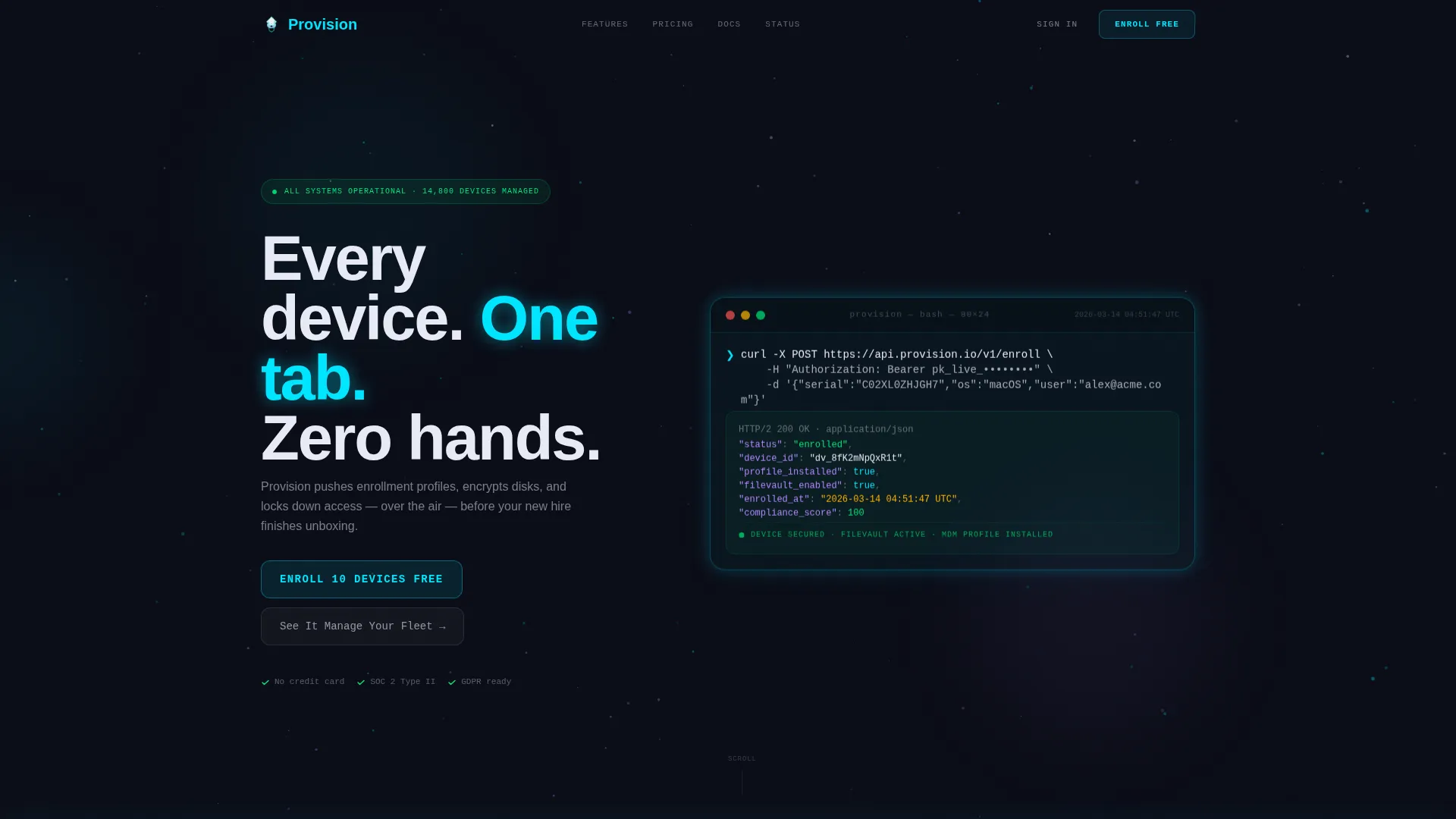
The header centers a frosted terminal card on a dark, subtly animated particle field. A real curl enrollment command types itself out character by character, then returns a JSON response showing device enrolled, profile installed, FileVault enabled, and timestamps ticking in real time. No stock imagery is needed because the code itself is the product demonstration.
Interactive Fleet Cost Calculator
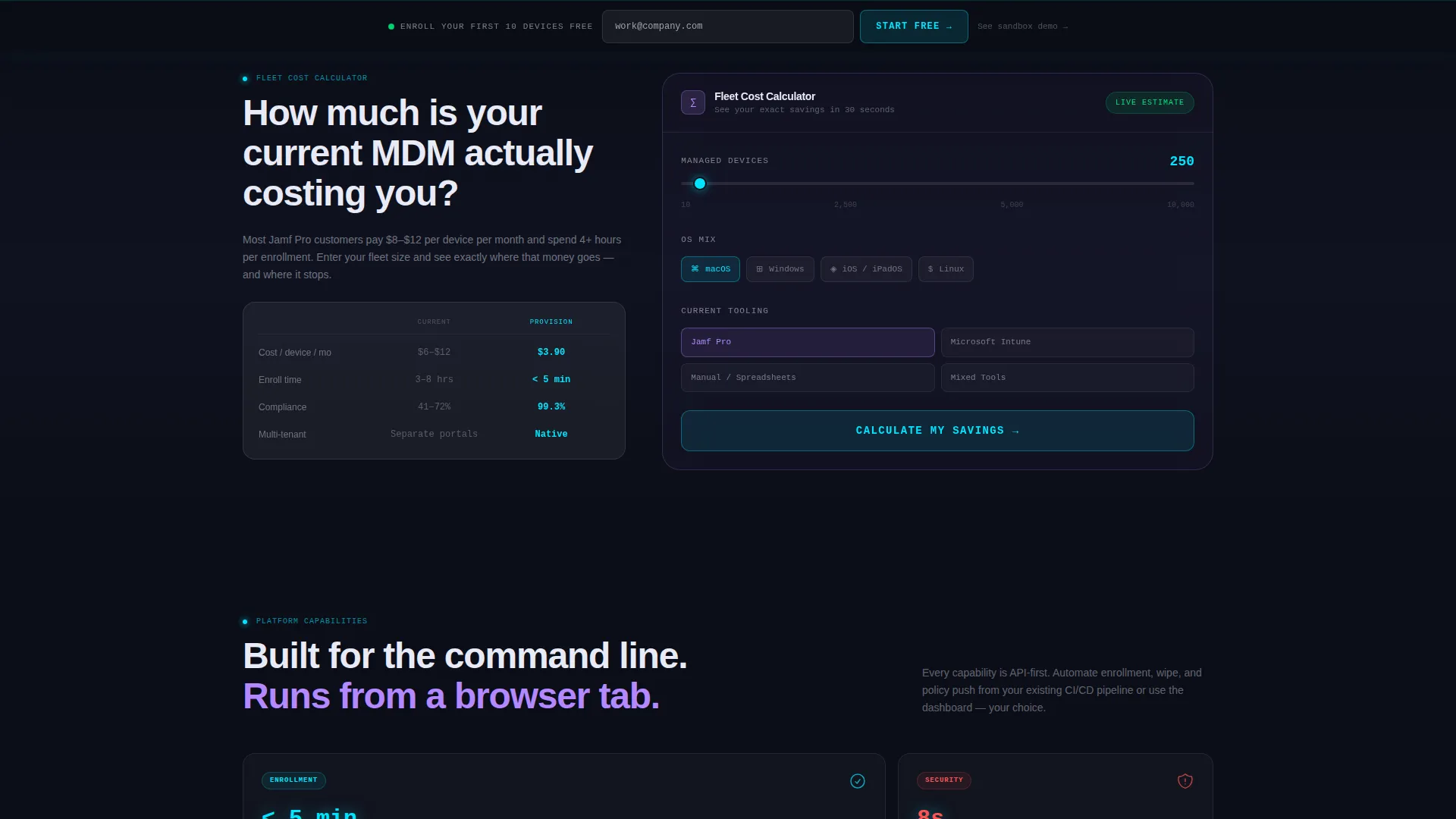
Immediately below the fold, visitors input their device count, operating system mix, and current tooling. The calculator instantly returns projected savings, deployment time reduction, and compliance coverage percentage. This section does the selling before a single marketing claim is made.
Scroll-Reveal Progressive Layout
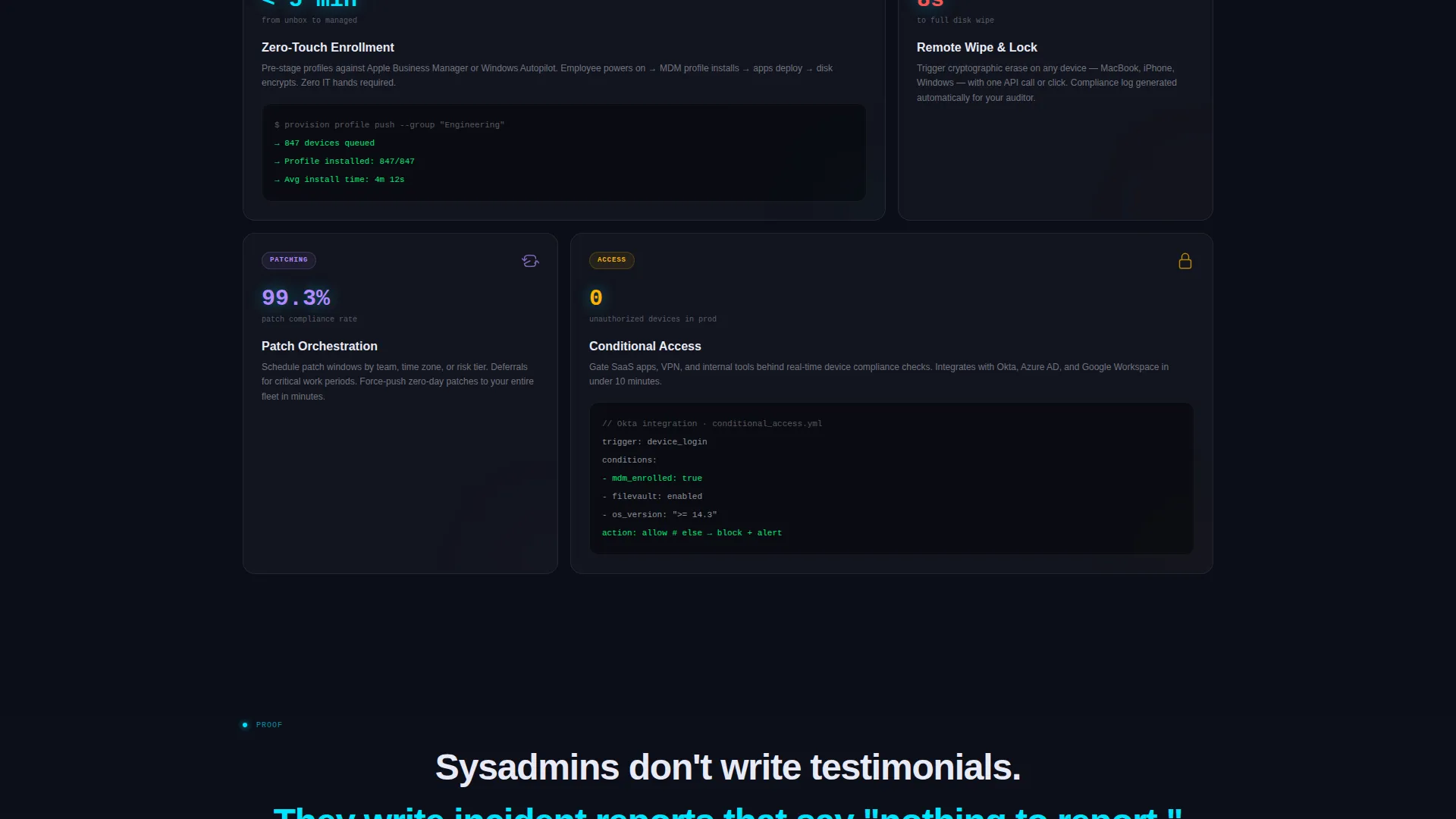
Each capability section slides into view only as the visitor reaches it. Zero-touch enrollment, remote wipe, patch orchestration, and conditional access each get their own panel. The progressive reveal builds the case like evidence presented in sequence, with each section more specific and technical than the one before it.
Sticky Freemium call to action Bar
After the calculator interaction, a glassmorphic sticky bar appears and stays pinned for the remainder of the scroll. The primary call to action is "Enroll Your First 10 Devices Free," requiring only a work email with no credit card and no sales call required.
Glassmorphic Component System
Cards appear to hover on glass shelves with a 1px luminous border. Frosted panels layer over depth using blur and subtle grain backgrounds. Electric cyan highlights active states and command prompts. Soft lavender appears on hover and selection rings. Every glow is functional, not decorative.
Guided Sandbox Demo call to action
A secondary call to action, "See It Manage Your Fleet," offers a guided sandbox demo for teams not ready to connect production devices. This gives hesitant buyers a lower-commitment path without removing them from the conversion flow.
Page sections overview
| Section | Purpose |
|---|---|
| Terminal Header | Demonstrates enrollment command live via animated code snippet |
| Fleet Cost Calculator | Lets visitors calculate savings, time reduction, and compliance coverage |
| Zero-Touch Enrollment | Explains over-the-air profile delivery before device unboxing |
| Remote Wipe Panel | Covers lost-device and off-boarding security use cases |
| Patch Orchestration | Details scheduled and conditional patch deployment capability |
| Conditional Access | Shows policy-based device access control in context |
| Sticky call to action Bar | Pins free-tier signup offer after calculator interaction |
| Sandbox Demo call to action | Provides a guided demo path for teams not ready for production |
Design & branding system
The visual identity follows a Dynamic Motion theme with a Glassmorphic color system. The palette is built around depth, translucency, and purposeful glow, evoking a floating heads-up display (HUD) rather than a conventional software marketing page.
- Core colors: deep void black (#0B0D17) as the base, frosted panel white at 12% opacity (#FFFFFF1F) for card surfaces, electric cyan (#00E5FF) for active states and command prompts, and soft lavender (#B388FF) for hover states and selection rings
- Backgrounds use layered blur and subtle grain textures; cards carry a 1px luminous border and appear to hover on glass shelves
- Motion is purposeful: the particle field animation in the header and the scroll-reveal entrance transitions reinforce the sense of a live, responsive system rather than a static page
Mobile & speed optimization
The scroll-reveal architecture and glassmorphic layers are structured to remain readable and functional across device sizes. Interaction elements like the Fleet Cost Calculator are designed to work on touch screens, keeping the conversion path intact on mobile.
- The sticky call to action bar and calculator remain accessible on smaller viewports, preserving the primary conversion flow on mobile devices
- Layered blur and grain backgrounds are applied in a way that supports legibility of terminal text and card content at all screen widths
How this template helps you convert
The conversion strategy is built into the page structure itself. Every section removes a specific reason to leave or hesitate, moving the visitor steadily toward the free-tier signup.
- The live terminal header establishes technical credibility in the first three seconds, which is the window where a sysadmin or security engineer decides whether the page is worth reading.
- The Fleet Cost Calculator turns an abstract purchase decision into a concrete number, giving the visitor a personal reason to continue scrolling and a data point to share with their team.
- The sticky "Enroll Your First 10 Devices Free" bar, combined with the one-field signup flow, removes every procedural reason to delay, making the cost of trying the product effectively zero.
Other information about this template
This section covers additional context that helps buyers understand where and how this template fits into a broader tooling and market landscape.
- The template is designed for cloud-native MDM platforms competing in a market where buyers may be evaluating tools such as Jamf or Microsoft Intune before making a switch
- The calculator interaction is specifically structured to contextualize savings against common incumbent tooling, making it useful for teams coming from manual processes or legacy platforms
- The freemium conversion path reflects current enterprise software buying behavior, where self-serve trials and sandbox environments have replaced demo-request forms as the preferred first step for technical evaluators
Theme
Dynamic Motion
Creative direction
Calculator/Tool First
Color system
Glassmorphic
Style
Scroll Reveal (Progressive)
Direction
Freemium/Trial
Page Sections
Live-typed Terminal Header
Interactive Fleet Cost Calculator
Scroll-reveal Progressive Layout
Sticky Freemium Call to Action Bar
Glassmorphic Component System
Guided Sandbox Demo Path
Related questions
Who is the Provision template designed for?
Can I customize the Fleet Cost Calculator inputs and outputs?
What makes the header different from a typical hero section?
Is the sticky call to action bar visible throughout the entire page scroll?
Does this template include a secondary conversion path for undecided buyers?



