Fab - Realtime Semiconductor Landing Page Template
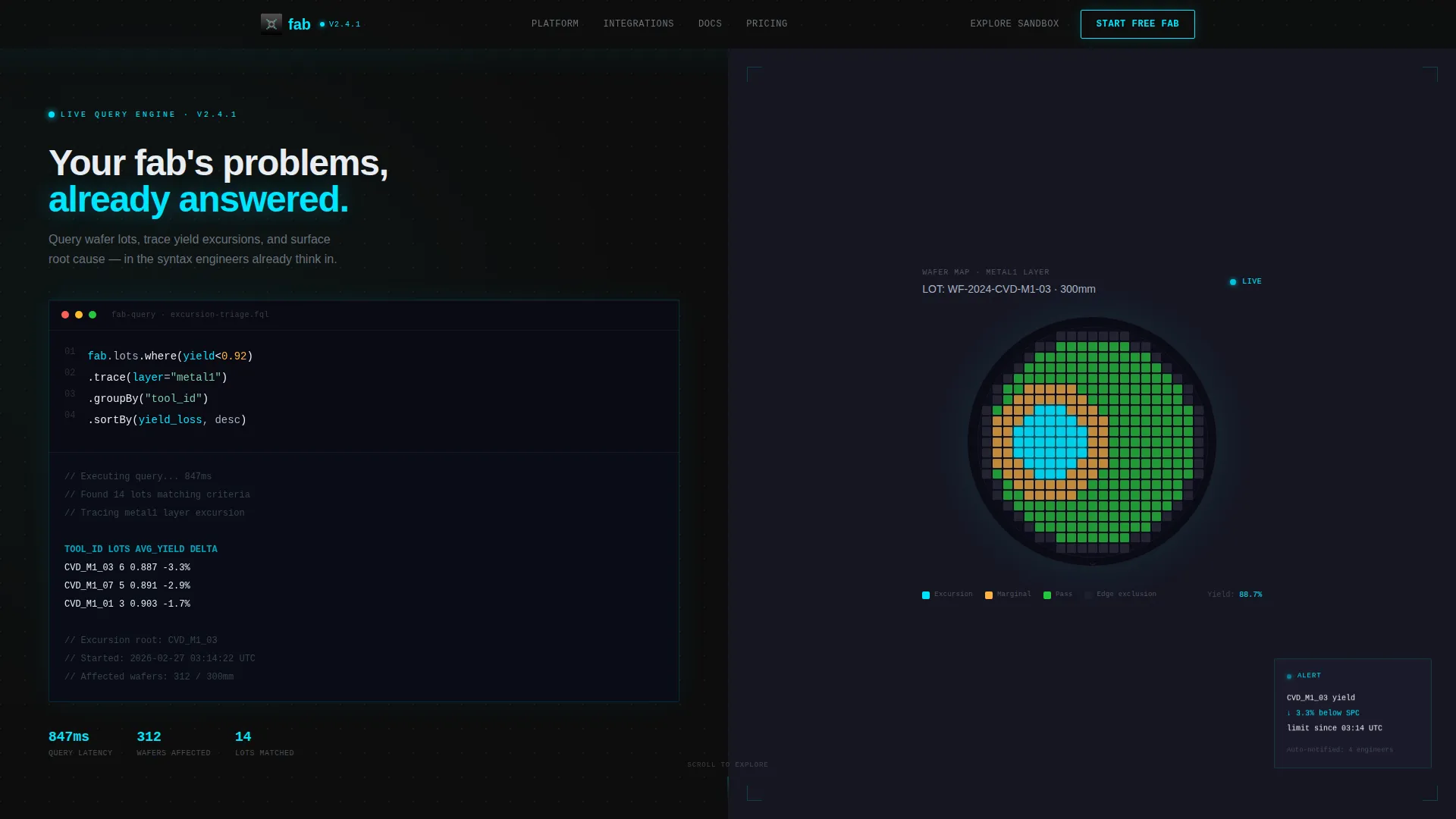
Fab is a split-screen landing page template built for semiconductor management software teams. It combines a live-typed code snippet header with an interactive scroll-driven explorer, letting process engineers, operations managers, and VP-level leaders experience real-time wafer lot visibility, yield curve tracking, and fab workflow intelligence before they ever sign up.
by Rocket studio
Quick summary
Fab is a single-page landing page template designed for semiconductor vertical software. It opens with a syntax-highlighted code block that animates live on the left half of the screen, while a wafer map heatmap renders simultaneously on the right. The scroll experience doubles as a product sandbox, guiding technical buyers from a single lot scenario all the way to a fab-wide capacity view.
Who this template is for
This template is built for software teams selling into semiconductor manufacturing environments. It speaks directly to the technical buyers who evaluate and purchase this category of tool.
- Process engineers who monitor excursion events and need to trust the software before they commit
- Operations managers juggling capacity across multiple fabs who need proof of real-time workflow visibility
- VP-level leaders who present yield-to-revenue traceability data to quarterly board meetings
What problem this template solves
Semiconductor management software is a hard sell. Buyers are skeptical, technically rigorous, and tired of generic dashboards. A standard marketing landing page gets ignored. This template replaces passive reading with active product simulation.
- Legacy spreadsheet workflows and outdated manufacturing execution system dashboards still dominate billion-dollar production lines, and buyers need to feel the contrast immediately
- Visitors who cannot interact with the product during evaluation drop off before reaching a conversion form
- Generic software landing pages do not reflect the precision and urgency that fab teams operate under every shift
What you get with this template
You get a fully structured, single-page layout that positions your semiconductor management software as the obvious replacement for outdated fab tooling. Every section is built around the buyer's workflow, not a generic feature checklist.
- A split-screen (50/50) header with an animated code snippet on the left and a live wafer map heatmap output on the right
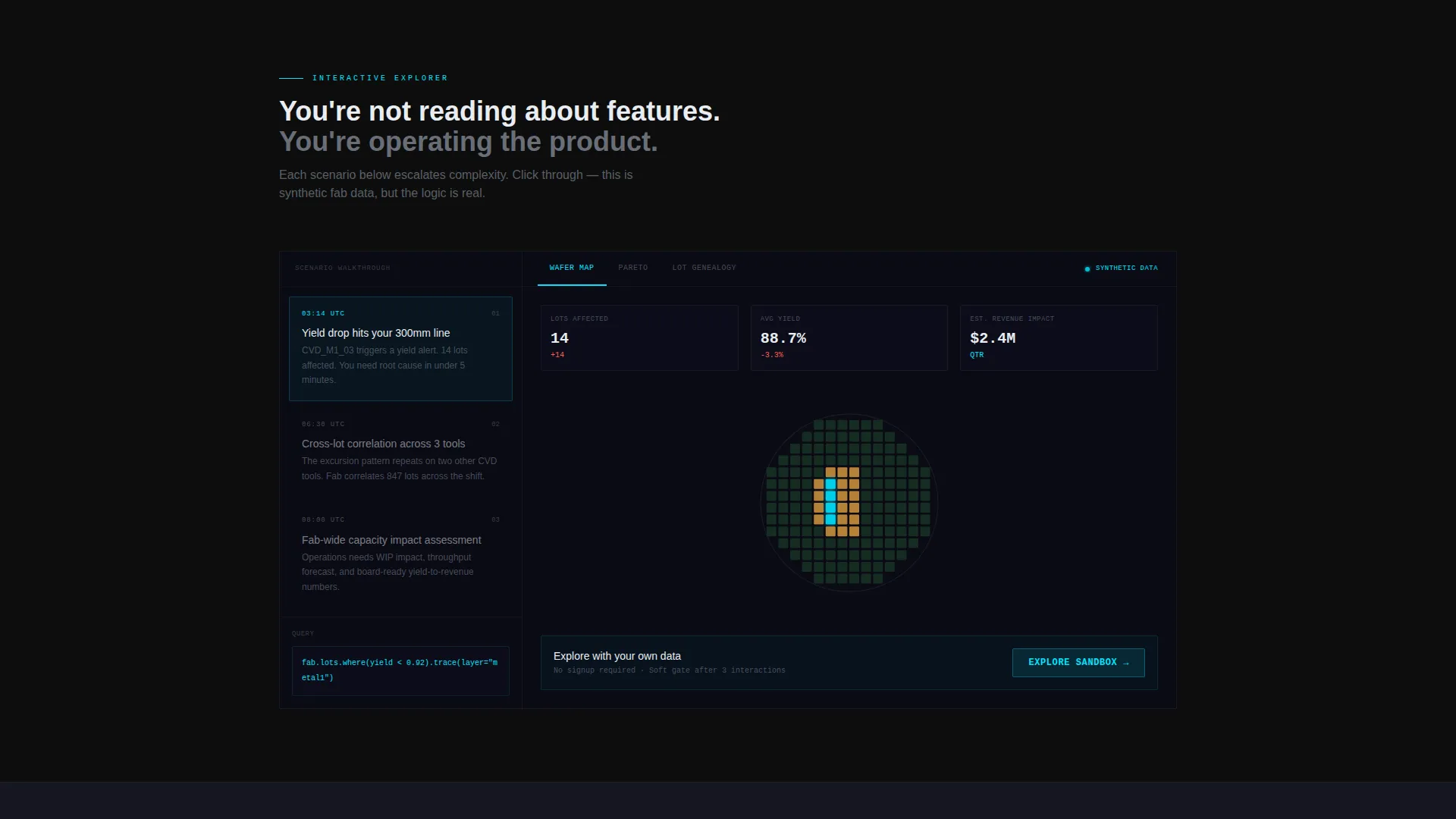
- A scroll-driven interactive explorer with three escalating scenario panels: single lot, cross-lot correlation, and fab-wide capacity view
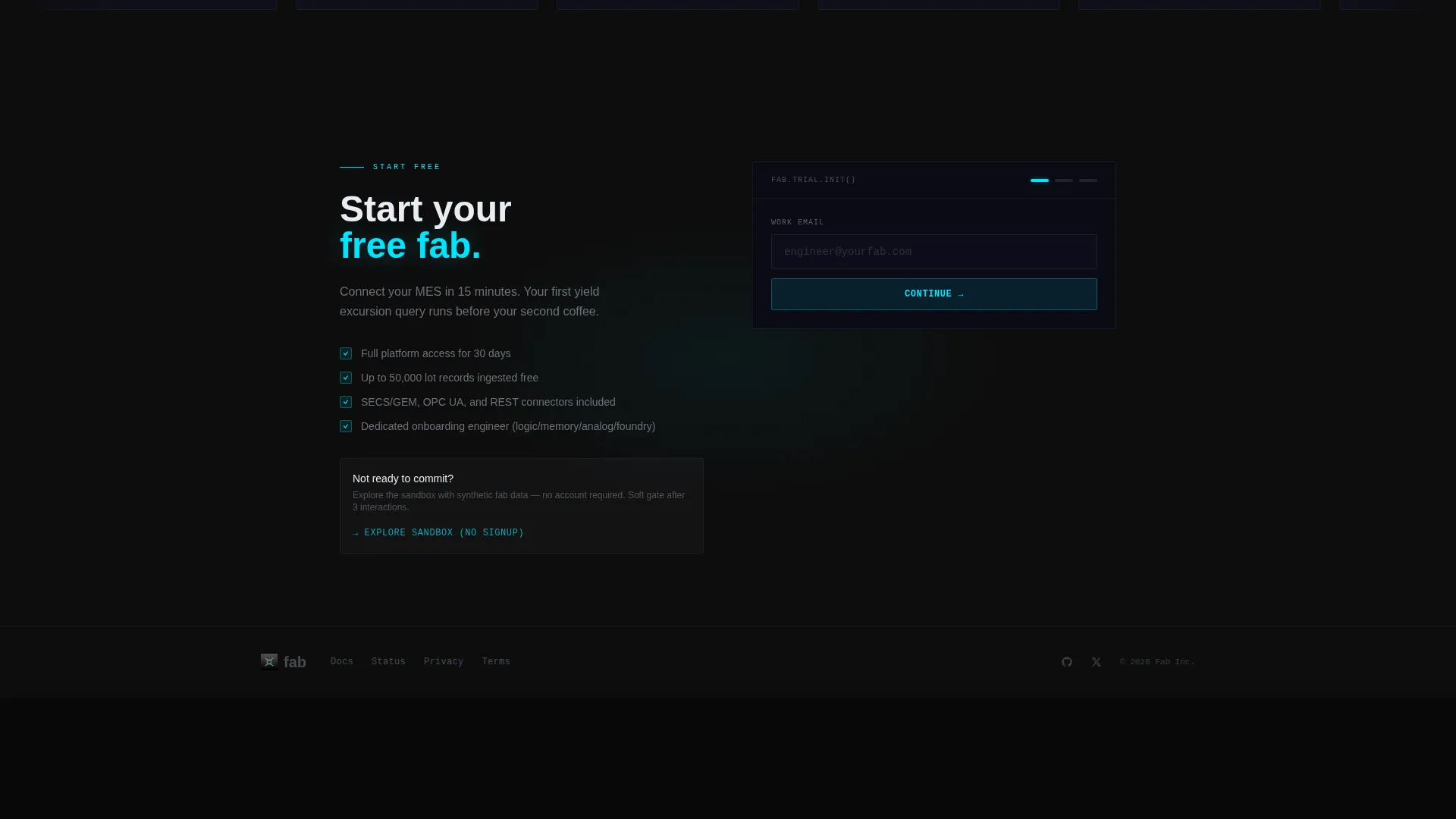
- A dual conversion path with a primary "Start Your Free Fab" call to action and a secondary "Explore the Sandbox" no-signup demo entry point
Feature list
This template ships with purpose-built components that reflect how semiconductor buyers actually evaluate software tools.
Animated Code Snippet Header
The header opens with a realistic, syntax-highlighted query block that types itself live on the left panel. A sample query such as fab.lots.where(yield < 0.92).trace(layer="metal1") animates line by line. The right panel renders the output simultaneously, making the product the hero from the first second.
Wafer Map Heatmap Output
The right half of the split-screen header displays a die-level wafer map heatmap. Bins light up in defect-alert cyan as the animated query executes. This component communicates real-time yield curve data visually, without any text explanation needed.
Scroll-Driven Product Explorer
Below the header, each scroll section presents a new scenario on the left panel and a clickable, animated product interface on the right. Visitors can toggle between wafer maps, Pareto charts, and lot genealogy trees. The sequence escalates from a single wafer lot to a full fab-wide capacity view.
Dual Conversion Path
The primary call to action, "Start Your Free Fab," appears twice: once as a persistent cyan navigation button and once anchoring the final section. A secondary path, "Explore the Sandbox," routes visitors into a hosted demo environment with synthetic fab data and a soft email gate after three interactions.
Pre-Qualifying Sign-Up Form
The conversion form collects work email first, then fab type (logic, memory, analog, or foundry), then team size via a simple slider. This structure qualifies leads at the point of capture without creating friction for serious buyers.
Carbon Fiber Visual Identity
The entire layout uses a Carbon Fiber color system: deep substrate black for backgrounds, cleanroom gray for surface layers, wafer-edge silver for typography and dividers, and defect-alert cyan reserved for interactive highlights, hover states, and live data indicators.
Page sections overview
| Section | Purpose |
|---|---|
| Split-Screen Header | Introduces the platform via a live-typed code query and simultaneous wafer heatmap output |
| Persistent Nav Button | Keeps the primary call to action visible throughout the entire scroll experience |
| Scenario Explorer Panel 1 | Walks visitors through a single wafer lot excursion at 2 AM |
| Scenario Explorer Panel 2 | Demonstrates cross-lot yield correlation with toggleable chart views |
| Scenario Explorer Panel 3 | Expands to a fab-wide capacity view across multiple facilities |
| Freemium Sign-Up Form | Captures work email, fab type, and team size to qualify conversion intent |
| Sandbox Secondary call to action | Offers a no-signup demo path with a soft email gate after three interactions |
Design & branding system
The visual identity is built around the Startup Velocity theme expressed through a Carbon Fiber color system. Every color decision is functional, not decorative. The palette feels engineered: tactile, precise, and built for dark equipment bay environments.
- Background and surface layers use deep substrate black (#0D0D0D) and cleanroom gray (#1E1E2E), keeping the interface feeling like a live terminal window
- Wafer-edge silver (#A8B2C1) handles all typography, structural dividers, and supporting user interface elements to maintain legibility against dark surfaces
- Defect-alert cyan (#00E5FF) appears only on interactive elements: buttons, hover states, active data path tracers, and the wafer map bins that light up during query execution
Mobile & speed optimization
The split-screen layout and animated components are designed with responsive behavior in mind so the template remains usable across device sizes. Technical buyers often evaluate tools across desktop, tablet, and mobile environments.
- The 50/50 split-screen structure adapts gracefully, stacking panels vertically on smaller screens so the code snippet and heatmap remain readable
- Interactive explorer panels are built to preserve the toggle functionality for wafer maps, Pareto charts, and lot genealogy trees on touch devices
- Lightweight animation framing keeps the typed code and heatmap reveal effects from creating layout instability during the initial page load sequence
How this template helps you convert
This template is structured to move skeptical technical buyers from curiosity to signup by letting them experience the product rather than read about it. Every section builds trust through simulation, not persuasion.
- The animated code header creates immediate product credibility. Buyers see a real query running against real-looking fab data in the first three seconds, which earns attention from engineers who distrust marketing copy.
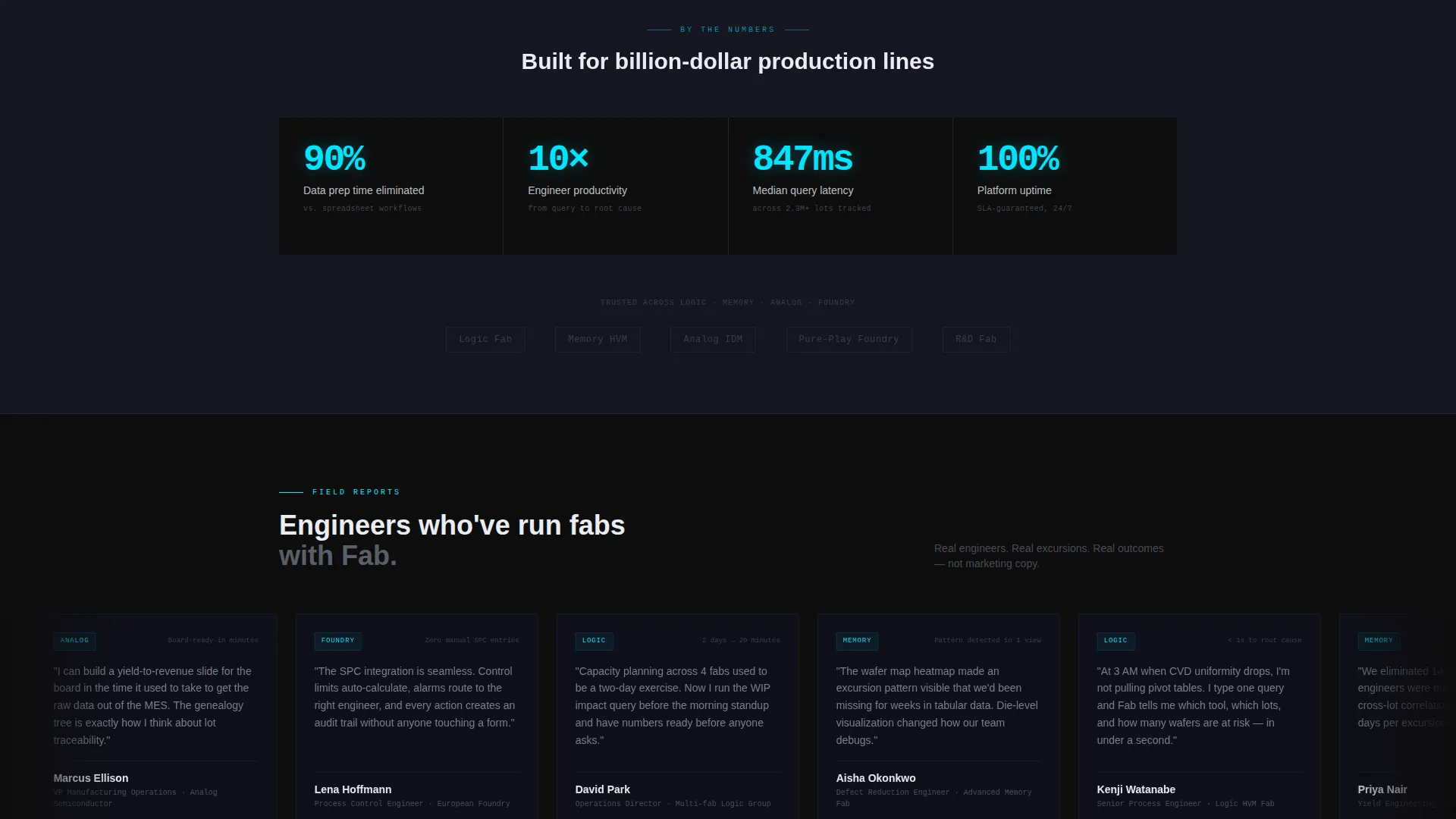
- The interactive scroll explorer escalates complexity in a way that mirrors actual buyer evaluation. Each scenario panel shows the software solving a problem the visitor already recognizes, building confidence before the conversion form appears.
- The dual conversion path removes the all-or-nothing friction. Buyers ready to commit hit "Start Your Free Fab." Buyers who need more proof enter the sandbox. Either path keeps them engaged and captures intent.
Other information about this template
This template sits at the intersection of Semiconductor Vertical SaaS and the broader Technology category. It is purpose-built for teams selling semiconductor management software into manufacturing environments where technical credibility is the primary purchase driver.
- The Interactive Explorer creative direction means this template functions as a live product demonstration, not a brochure
- The Freemium/Trial landing page direction is baked into the layout, with conversion architecture designed around a free-tier entry point rather than a hard sales gate
- The Code Snippet header concept is a deliberate choice for this niche: it signals that the software speaks the language of the engineer evaluating it
- The Startup Velocity theme ensures the layout feels modern and precise without the visual noise of consumer-facing design trends
Theme
Startup Velocity
Creative direction
Interactive Explorer
Color system
Carbon Fiber
Style
Split Screen (50/50)
Direction
Freemium/Trial
Page Sections
Animated Live Code Snippet Header
Wafer Map Heatmap Visualization
Scroll-driven Interactive Explorer
Dual Conversion Path Architecture
Pre-qualifying Lead Capture Form
Carbon Fiber Color System
Related questions
Who is this landing page template designed for?
Can I customize the code snippet and wafer map in the header?
What does the Explore the Sandbox secondary path do?
How does the sign-up form qualify leads?
Does the interactive scroll explorer work on mobile devices?



