Sign & Banner Digital Presence Specialist Cost Calculator Website Template
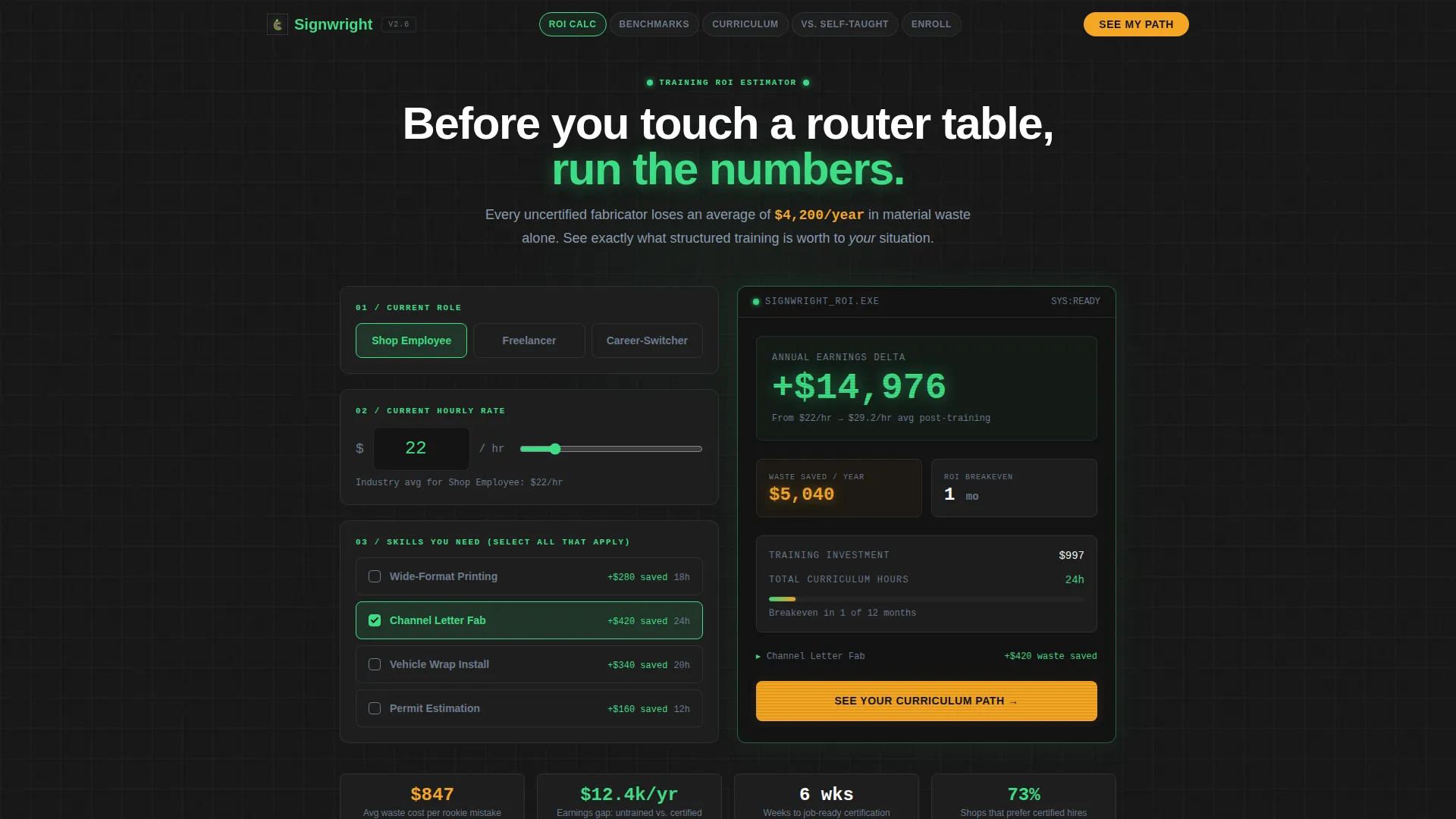
Fabricator is a hub-and-spoke landing page template built for sign and banner training platforms. It opens with an interactive Training ROI Estimator, then guides visitors through industry-benchmarked sections that compare self-taught versus structured-training outcomes. The Carbon Fiber color system and Data Command visual theme give every number and call-to-action the authority of a CNC control panel.
by Rocket studio
Quick summary
Fabricator is a single-page, anchor-nav landing page template designed for sign industry training platforms. It leads with a Training ROI Estimator that delivers personalized earnings and waste-reduction projections. Each spoke section below the header builds a data-backed case for structured fabrication training, guiding visitors toward a curriculum-path form or a free downloadable skills benchmark report.
Who this template is for
This template is built for training platform founders and course creators who serve the sign and wide-format print industry. It suits operators who need a conversion-focused page that speaks the language of shop-floor professionals, not generic e-learning audiences.
- Sign shop owners who need to re-skill their teams on channel letter fabrication and vehicle wrap installation
- Print operators and vinyl cutters moving into full fabrication roles who are comparing training options
- Career-switchers and freelancers who want structured sign industry curriculum before committing to equipment
What problem this template solves
Most training platforms lead with generic course lists and testimonial carousels. That approach fails with experienced shop professionals who need proof before they spend time or money. This template replaces soft social proof with hard numbers.
- Visitors arrive skeptical and leave without converting because the page never quantifies what the training is worth
- Shop employees and freelancers cannot see how their current skill gaps translate into lost hourly earnings or substrate waste
- There is no clear path from "I'm interested" to "here is my curriculum" without a structured comparison framework
What you get with this template
You get a fully structured, single-page landing page layout built around a hub-and-spoke anchor navigation. Every section is designed to deepen the case for enrollment using an industry-report content cadence.
- An interactive Training ROI Estimator in the header that renders personalized projected earnings and waste-reduction figures
- Four comparison-driven spoke sections covering speed-to-competency, material waste rates, earning trajectories, and employer hiring preferences
- Two conversion paths: a "See Your Curriculum Path" primary form and a gated free download for a Sign Industry Skills Benchmark Report
Feature list
This section covers the core built-in components and layout features included in the Fabricator template.
Training ROI Estimator Header
The header houses an interactive estimator tool. Visitors select their current role, input their hourly rate or salary, and toggle the skill modules they lack. The tool instantly displays a projected earnings delta and a waste-reduction dollar figure rendered in laser-registration green on deep cockpit black, styled to read like a machine readout.
Hub-and-Spoke Anchor Navigation
A persistent anchor navigation bar sits at the top of the page throughout scrolling. It links directly to each spoke section so visitors can jump to the comparison topic most relevant to them, reducing drop-off from visitors who want specific evidence without reading from top to bottom.
Industry-Report Section Cadence
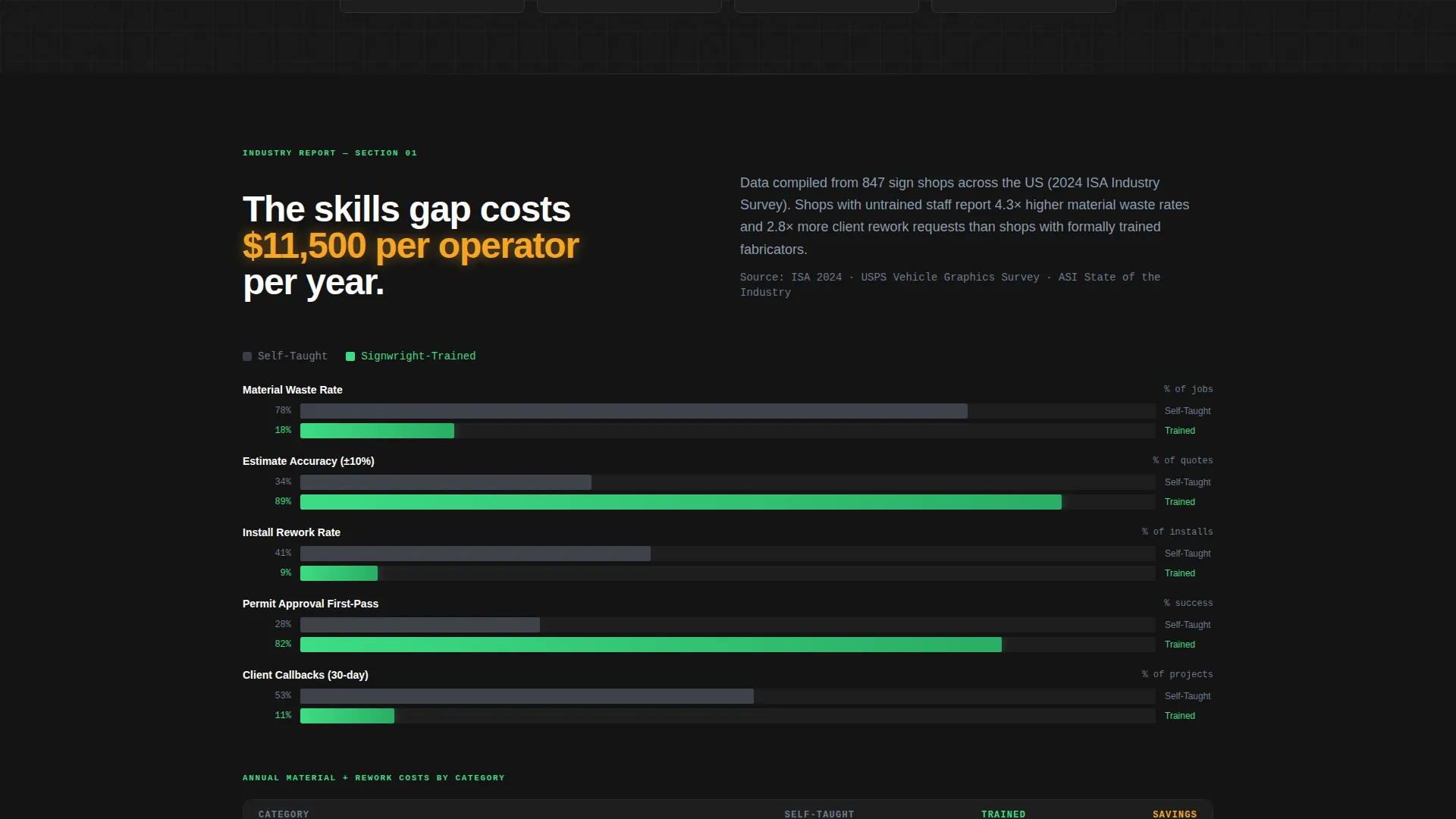
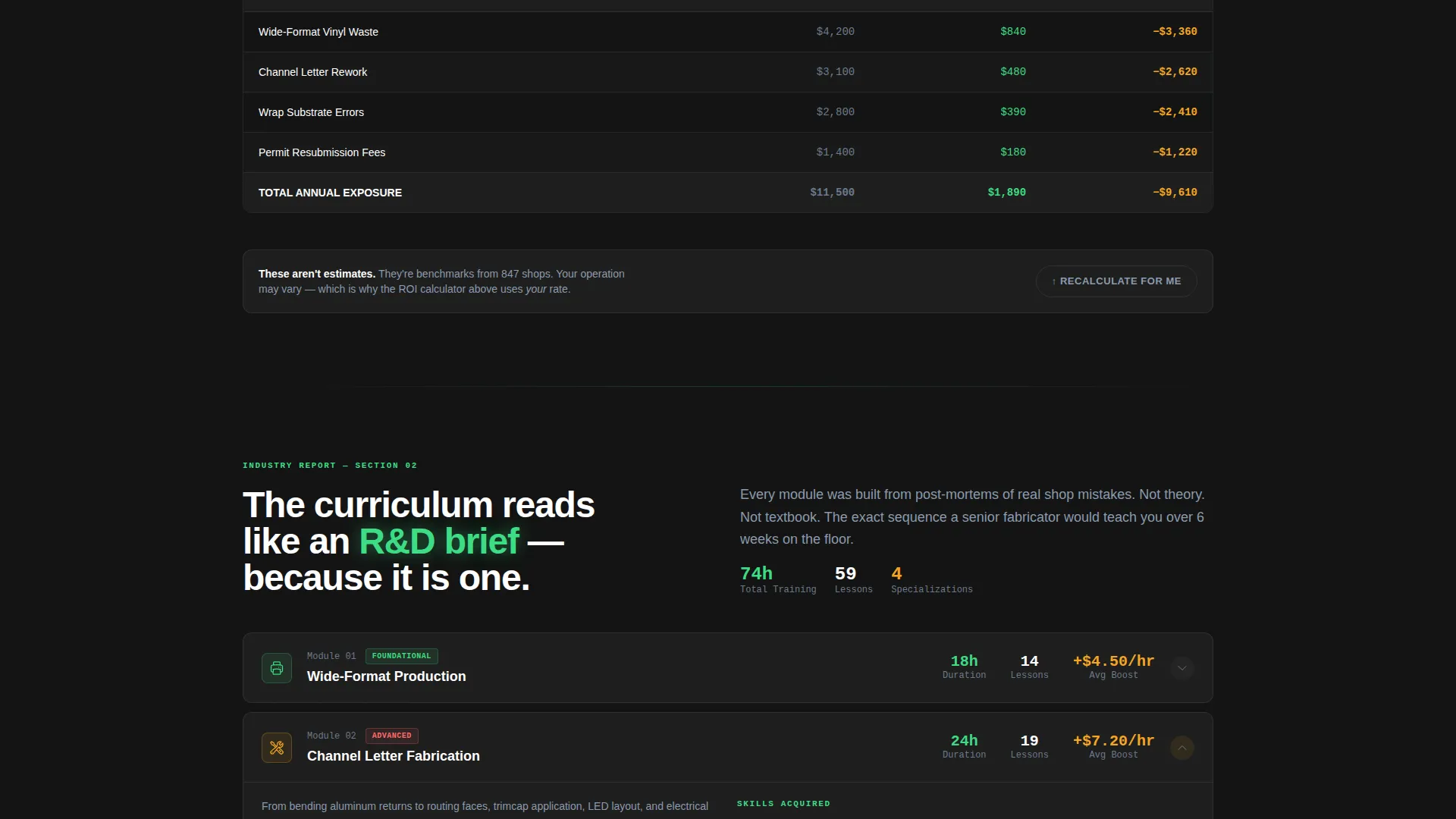
Each spoke section follows a white-paper structure. Section one benchmarks average sign shop error rates and material waste costs. Section two maps the competency gap between entry-level operators and experienced fabricators. Section three presents curriculum modules as research findings, complete with completion-time estimates and skill-acquisition framing.
Self-Taught versus. Trained Comparison Framework
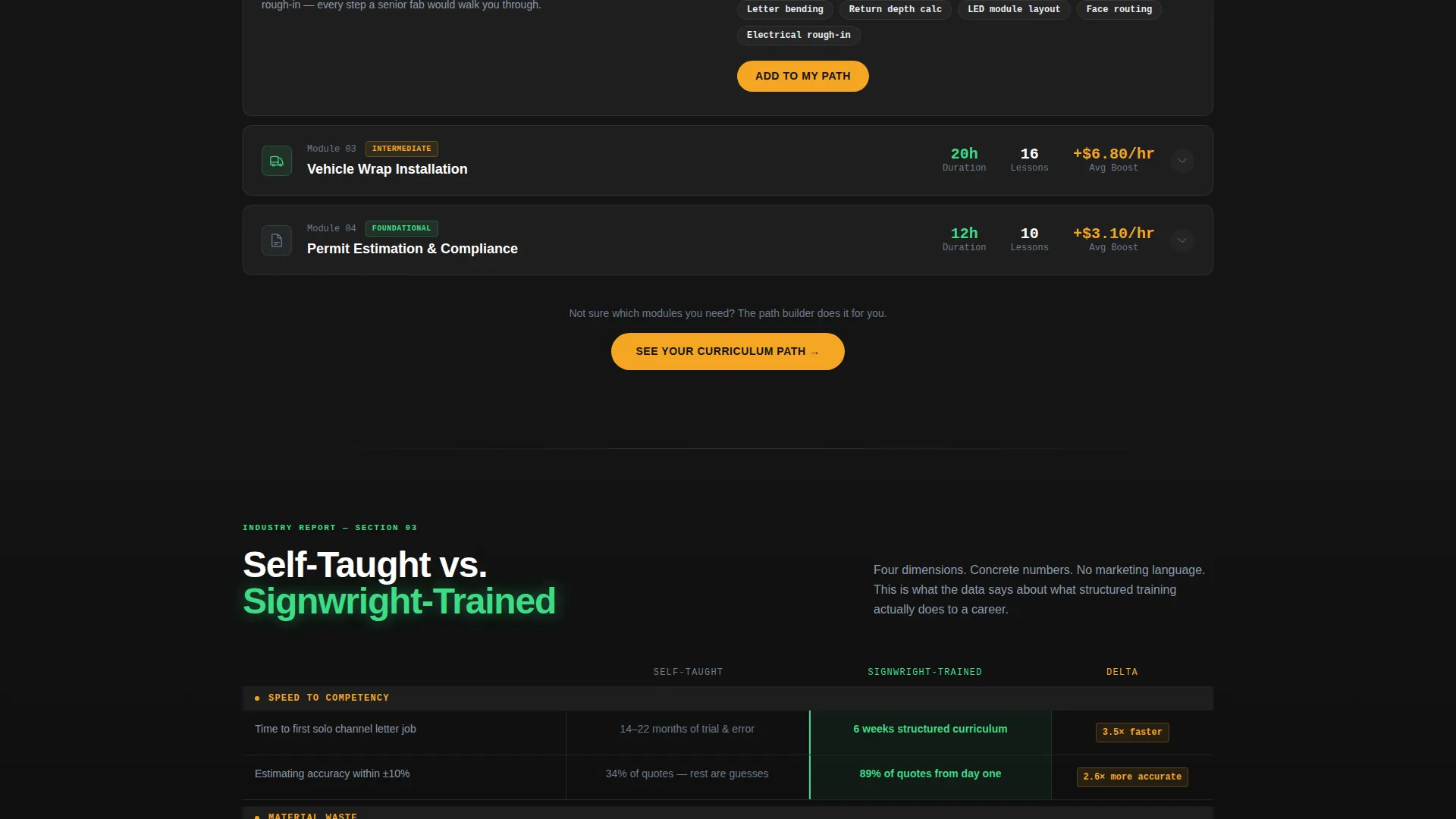
The page is structured around a Comparison/Versus conversion model. Each spoke contrasts the outcomes of self-directed learning against structured curriculum across four dimensions: speed to competency, material waste rates, earning trajectories, and employer hiring preferences.
Dual Conversion Path Layout
The template includes two clearly separated conversion paths. The primary call-to-action, "See Your Curriculum Path," appears after the estimator interaction and recurs at every spoke section. A secondary path offers a gated free download of the Sign Industry Skills Benchmark Report to capture visitors who are not yet ready to enroll.
Carbon Fiber Data Command Visual System
The layout uses a matte dark surface design with purposeful color assignments. Deep cockpit black forms the base, brushed aluminum mid-tone handles supporting text and borders, laser-registration green highlights live data outputs and key metrics, and caution-tape amber marks alerts, badges, and call-to-action pulses.
Page sections overview
| Section | Purpose |
|---|---|
| ROI Estimator Header | Delivers personalized earnings and waste projections to hook the visitor immediately |
| Anchor Nav Bar | Lets visitors jump between spoke sections without losing their place |
| Error Rate Benchmark | Benchmarks industry-average sign shop mistake costs to establish the training need |
| Skills Gap Map | Visualizes the competency divide between low-wage operators and high-wage fabricators |
| Curriculum Module Breakdown | Presents training modules with completion times and skill-acquisition framing |
| Self-Taught Comparison | Contrasts self-directed and structured training across four measurable outcomes |
| Primary call to action Spoke | Repeating "See Your Curriculum Path" form prompt tied to role and pace inputs |
| Benchmark Report Gate | Secondary email-gated download offer for the Sign Industry Skills Benchmark Report |
Design & branding system
The visual identity follows a Data Command theme built on a Carbon Fiber color palette. Every design decision prioritizes functional contrast over decoration, so each illuminated element on the page carries meaning.
- Color roles: deep cockpit black (#141414) as base, brushed aluminum mid-tone (#6B7B8D) for supporting elements, laser-registration green (#3DDC84) for live data and key metrics, and caution-tape amber (#F5A623) for alerts, badges, and call-to-action pulses
- No stock photography or lifestyle imagery; visual language relies on data outputs, machine-readout typography, and matte dark surfaces
- Typography and layout follow a control-panel aesthetic where spacing and contrast signal hierarchy, not decoration
Mobile & speed optimization
The template is structured for responsive display across screen sizes. The hub-and-spoke layout and anchor navigation are designed to remain functional and readable on smaller screens without losing the data-forward visual hierarchy.
- The anchor nav collapses cleanly for mobile viewports so visitors can still jump between spoke sections on a phone or tablet
- The ROI Estimator inputs and output display are laid out to remain usable on touch screens without requiring a desktop environment
- Section widths and typography scale are set to maintain the matte dark surface aesthetic and color contrast across device sizes
How this template helps you convert
The Fabricator template is built around a deliberate conversion architecture that moves skeptical, experienced shop professionals from curiosity to action using evidence, not enthusiasm.
- The ROI Estimator creates a personalized financial case in the first interaction, replacing generic headline claims with numbers the visitor calculated themselves, which increases the credibility of every section that follows.
- The hub-and-spoke anchor navigation lets high-intent visitors skip to the comparison data most relevant to their situation, reducing friction for buyers who already understand the problem and only need to verify the solution.
- The dual conversion path captures visitors at two different readiness levels: those ready to commit go to the curriculum-path form, and those still evaluating can give their email for the free benchmark report, keeping them inside the funnel.
Other information about this template
The Fabricator template is a strong fit for sign and banner course creators who want a page that positions their training platform as the authoritative, data-backed choice in a market where most competitors rely on testimonials and course catalogs.
- The template style is Hub and Spoke with Anchor Navigation, making it well-suited to platforms that offer multiple training tracks or module categories under one unified offer
- The Industry Report creative direction means the copy and layout framework are pre-structured for content that cites data, benchmarks, and skill-gap evidence rather than lifestyle claims
- The Comparison/Versus landing-page direction makes this template particularly effective for markets where the prospect is actively comparing self-teaching, YouTube tutorials, or trade school against a structured online program
- The page is designed to support Signwright-style platforms and similar sign industry training brands that need a professional, credibility-first digital presence
Theme
Data Command
Creative direction
Industry Report
Color system
Carbon Fiber
Style
Hub & Spoke (Anchor Nav)
Direction
Comparison/Versus
Page Sections
Training ROI Estimator Tool
Persistent Hub-and-spoke Anchor Nav
Industry-report Section Architecture
Self-taught Versus. Trained Comparison Layout
Dual Conversion Path Design
Carbon Fiber Data Command Visual Theme
Related questions
Who is the primary audience for this landing page template?
What makes the Training ROI Estimator different from a standard hero section?
Can I use this template if I offer only one course or module?
Do I need to supply my own industry data for the benchmark sections?
Is this template suitable for platforms selling to shop owners rather than individual learners?



