Complete Cloud & DevOps Professional Website Template
Failover is a split-screen landing page template built for backup and disaster recovery platforms. It pairs a bold, urgency-driven headline with a live-styled recovery dashboard mockup, a three-step lead capture form, and a secondary gated asset path. The Tech Glass visual identity and Acid Digital color system make infrastructure resilience feel immediate, credible, and worth acting on right now.
by Rocket studio
Quick summary
Failover is a single-page lead generation template for backup and disaster recovery platforms. It uses a 50/50 split-screen layout, a Tech Glass visual identity, and a Launch Energy scroll structure to push IT decision-makers from awareness to action. Every section escalates proof until the cost of inaction is impossible to ignore.
Who this template is for
This template is built for teams selling or promoting backup and disaster recovery solutions. It speaks directly to the people responsible when things go wrong.
- IT directors and infrastructure managers who respond to outage alerts and need to prove recovery readiness
- Chief Technology Officers presenting recovery time objectives (RTOs) and recovery point objectives (RPOs) to executive boards
- Managed service providers (MSPs) managing multiple client environments where a single service-level agreement breach is unacceptable
What problem this template solves
Most recovery platform pages bury the urgency under feature lists and product screenshots. Buyers arrive already stressed, already behind, and already skeptical. A generic page loses them fast.
- Visitors cannot immediately visualize their own recovery gap, so they leave without engaging
- Lead forms ask for commitment before delivering enough proof, creating friction that kills conversions
- The tone feels too polished and corporate for an audience that lives inside incident response workflows
What you get with this template
The template delivers a fully structured, single-page layout designed around one goal: turning infrastructure anxiety into a qualified lead. Every section is intentional, every visual choice is functional.
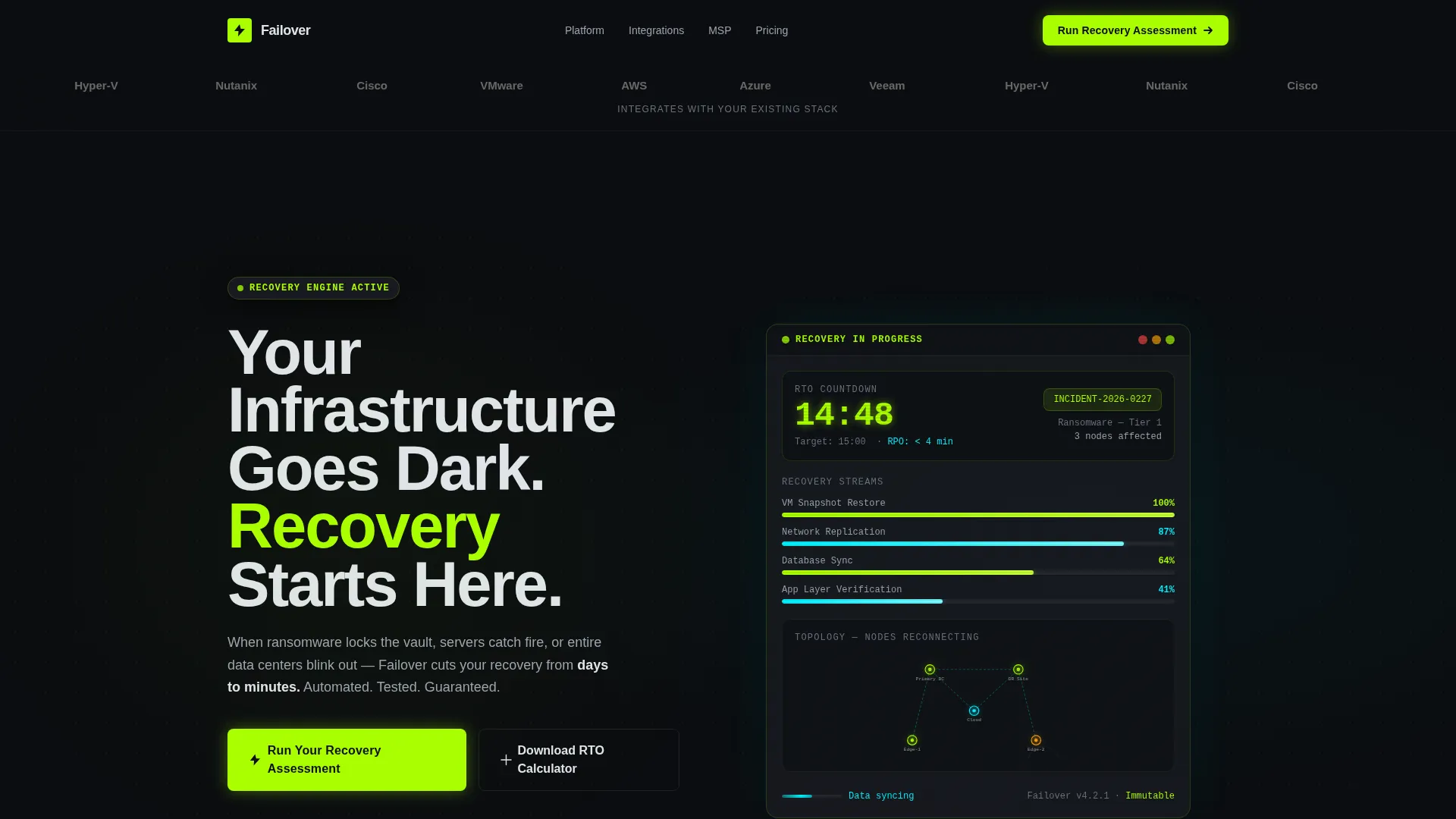
- A 50/50 split-screen header with a bold headline on the left and a live-styled RTO countdown dashboard mockup on the right
- A progressive three-step lead capture form and a secondary gated PDF download path for lower-intent visitors
- A full scroll sequence including a chaos-versus-recovery comparison split, animated capability cards, and incident-report-style testimonials
Feature list
This section covers the core capabilities built into the Failover template.
Split-Screen Header with Live Dashboard Mockup
The header viewport divides into two equal halves. The left holds an oversized headline with a load-time glitch effect on the word "Dark." The right displays a recovery dashboard mockup complete with an RTO countdown timer ticking from 00:14:59, acid lime progress bars, and a topology map reconnecting nodes in simulated real time.
Horizontal Logo Bar with Parallax Refraction
A ribbon of enterprise and infrastructure brand logos sits above the fold, rendered in monochrome glass with a subtle cursor-reactive light refraction effect. It signals platform compatibility instantly, before a single word of body copy is read.
Chaos versus. Recovery Comparison Section
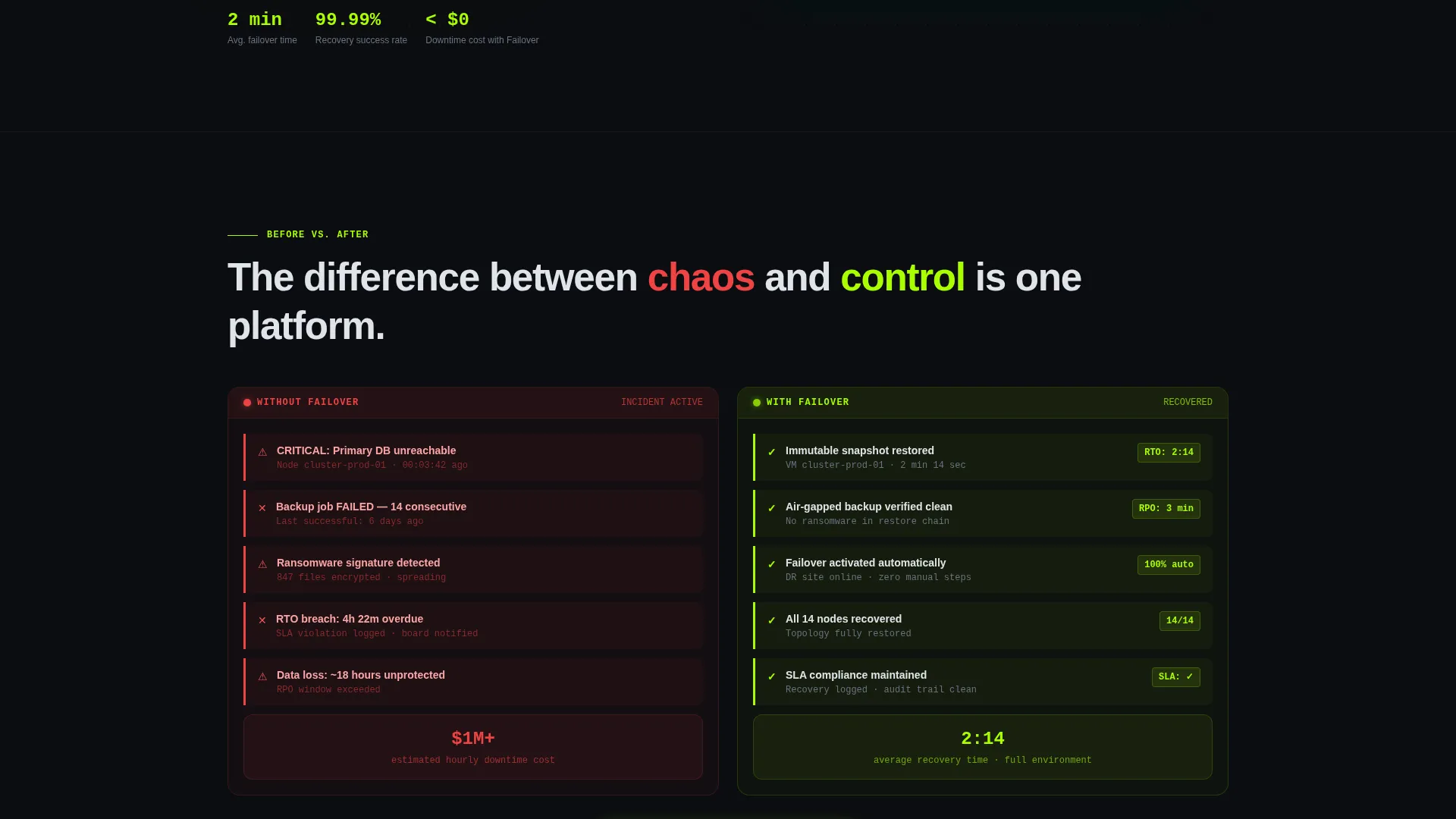
The first below-fold split shows two states side by side. The left panel displays red alerts, failed nodes, and data loss tickers. The right panel shows green status checks, restored snapshots, and a clean topology view. The visual contrast makes the value proposition undeniable.
Rapid-Deploy Capability Cards
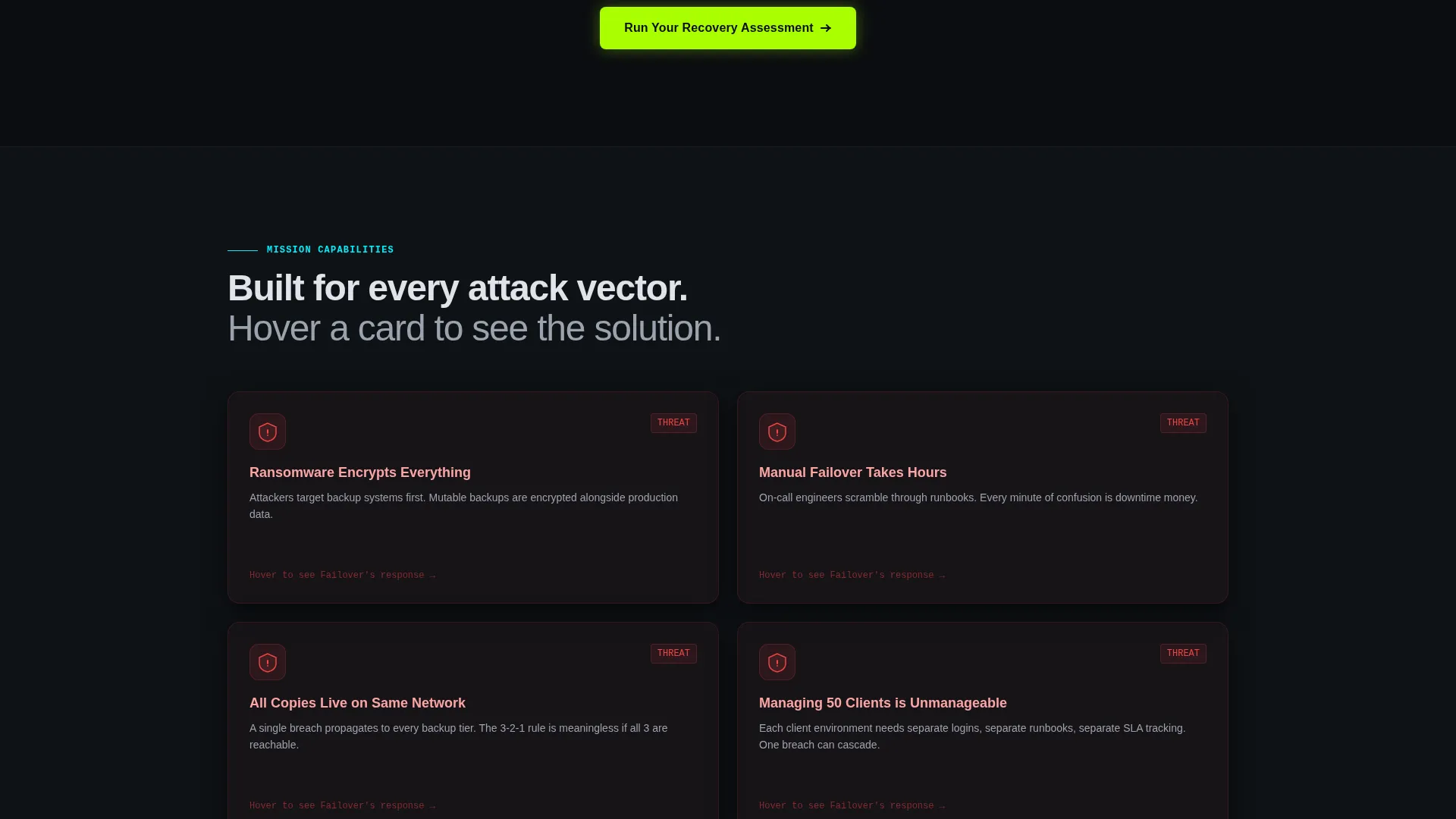
Platform capabilities are presented as flip-animation cards that load in sequence like mission briefings. Each card transitions from a threat framing to a solution framing, covering capabilities such as immutable backups, one-click failover, and air-gapped replication.
Progressive Three-Step Lead Form
The primary conversion path is a three-step form sequence. Step one uses an icon selector for infrastructure type. Step two captures backup frequency and acceptable downtime via interactive sliders. Step three collects name, company email, and environment size.
Incident-Report Style Testimonials
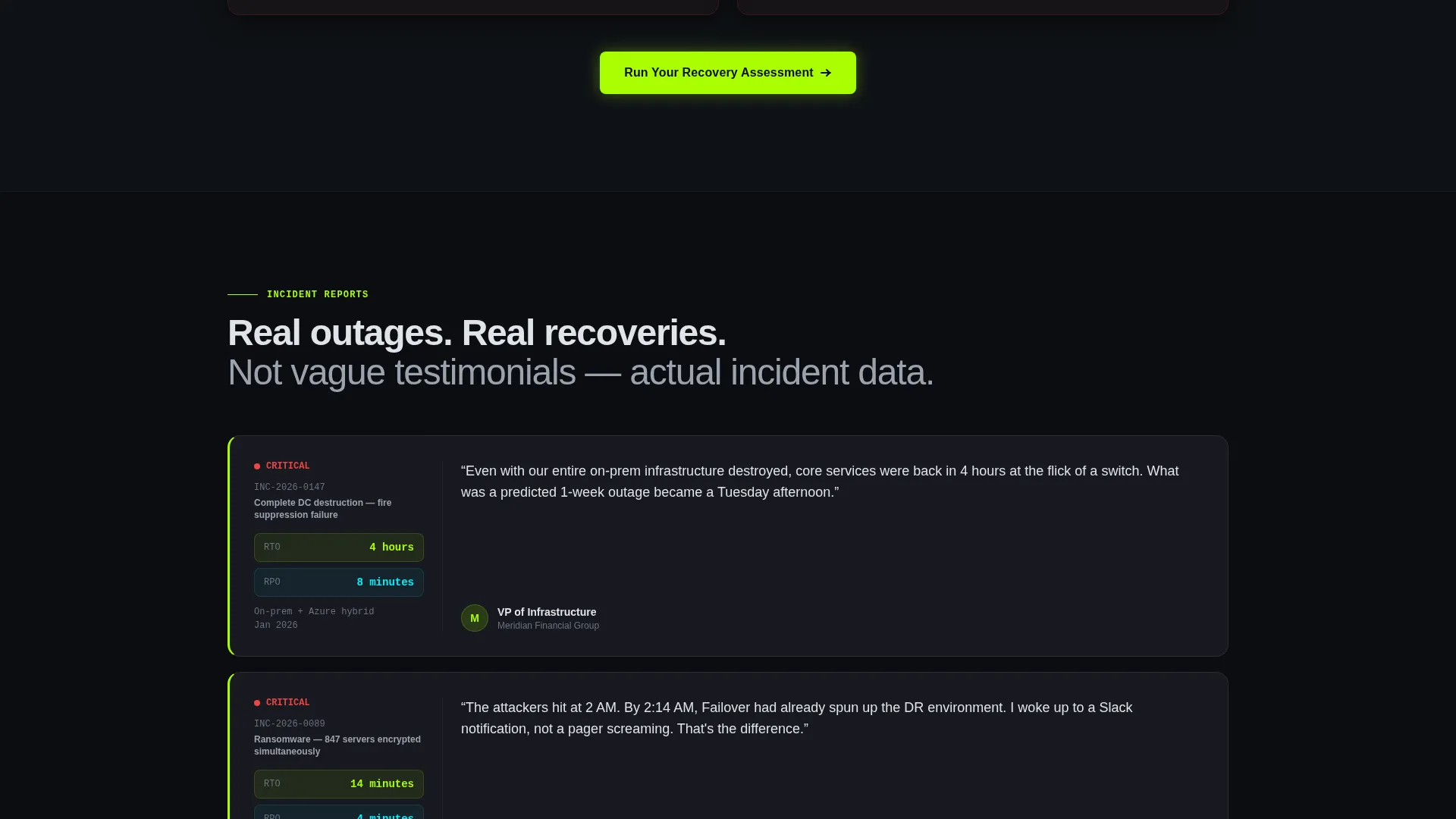
Social proof appears as formatted incident reports rather than standard quote blocks. Each testimonial names a real recovery scenario with specific RTO and RPO figures, giving credibility the weight of a post-incident review rather than a marketing blurb.
Page sections overview
| Section | Purpose |
|---|---|
| Logo Bar | Establish integration credibility above the fold |
| Split-Screen Header | Deliver headline impact alongside live dashboard mockup |
| RTO Countdown Timer | Create urgency with a ticking recovery clock visual |
| Chaos versus. Recovery Split | Contrast failure state against restored state visually |
| Capability Card Grid | Communicate platform features as animated mission cards |
| Incident Report Testimonials | Build trust with scenario-specific RTO and RPO proof |
| Primary Lead Form | Capture qualified leads through a three-step progressive form |
| Gated PDF Download | Convert lower-intent visitors with the RTO Calculator offer |
| Repeated call to action Blocks | Reinforce the recovery assessment offer after each proof section |
Design & branding system
The visual identity uses a Tech Glass theme with the Acid Digital color system. The palette feels clinical, electric, and alive, like staring into a dark server rack lit only by activity indicators.
- Core colors: void black (#0B0D10) for backgrounds, translucent panel gray (#1A1D23 at 80% opacity) for frosted glass card layers, electric lime (#AAFF00) for buttons, toggles, and progress bars, cool white (#E0E4EA) for body text, and cyan pulse (#00F0FF) reserved for data-in-motion animations
- Typography uses oversized white headlines against void black for the hero, with cool white body text maintaining high legibility across all frosted glass card surfaces
- Interactive elements and status indicators consistently use electric lime, keeping the visual language coherent and urgent across every section
Mobile & speed optimization
The layout is designed to maintain its split-screen impact and scroll energy across device sizes. Visual intensity is preserved without sacrificing readability on smaller viewports.
- The 50/50 split-screen reflows gracefully so headline copy and dashboard mockup remain legible on mobile screens
- Frosted glass card layers and animation effects are structured to avoid layout instability as the page scrolls and loads
- The progressive form steps are sized and spaced for touch interaction, reducing friction for mobile visitors completing the lead capture sequence
How this template helps you convert
Failover is engineered so that every scroll creates more pressure to act. It does not ask for commitment before earning it.
- The RTO countdown timer and chaos-versus-recovery comparison force visitors to confront their own vulnerability before they reach a single form field, making the ask feel earned rather than premature
- The progressive three-step form reduces perceived effort by breaking a detailed qualification process into three short, visually guided steps, lowering drop-off at the most critical conversion point
- The secondary gated PDF path ensures that visitors who are not ready to book a call still enter a capture flow, so no traffic leaves the page without an engagement option
Other information about this template
This template is part of a focused niche within cloud infrastructure and disaster recovery tooling, where buyer trust must be established fast and the cost of inaction is measurable in minutes of downtime.
- The template's header concept, logo bar, is specifically designed to front-load integration proof for enterprise buyers who evaluate compatibility before reading any marketing copy
- The creative direction, Launch Energy, means scroll momentum never plateaus; each section compounds urgency rather than repeating it
- The lead generation direction is reflected in every structural decision, from the pinned primary call-to-action to the two-path capture model
- This template fits platforms operating across on-premises, hybrid, and multi-cloud environments, which aligns with step one of the progressive form's infrastructure selector
- The incident-report testimonial format is a deliberate choice for an audience that reads post-mortems and root-cause analyses as part of their daily workflow
Theme
Tech Glass
Creative direction
Launch Energy
Color system
Acid Digital
Style
Split Screen (50/50)
Direction
Lead Generation
Page Sections
Split-screen Header with Dashboard Mockup
Horizontal Logo Bar with Cursor Refraction
Chaos Versus. Recovery Comparison Layout
Animated Rapid-deploy Capability Cards
Progressive Three-step Lead Capture Form
Gated RTO Calculator Download Path
Related questions
Who is the Failover template designed for?
Can I adapt the three-step form to match my own qualification criteria?
How does the secondary PDF download path work?
Does the template include live countdown timer functionality?
Is this template suitable for a managed service provider promoting recovery services?



