FAQ & Support Page FAQ Website Template
Faqglass is a bento grid landing page template for building a product FAQ page that feels alive. Built on a glassmorphic dark theme with frosted panels and lilac interaction states, it guides visitors through animated answer discovery and drives free trial signups with a two-field form and a live preview experience.
by Rocket studio
Quick summary
Faqglass is a single-page bento grid template designed for product FAQ pages. It combines a glassmorphic dark visual system with kinetic scroll animations and a freemium conversion flow. The result is a support page that feels like a product demo rather than a documentation dump.
Who this template is for
This template is built for people who field the same support questions repeatedly and need a better answer than "check our docs." It fits teams and founders who want a polished FAQ experience without a full help desk setup.
- SaaS product managers dealing with a high volume of repetitive support tickets
- Support leads who want to reduce inbound questions while keeping the experience warm
- Solo founders who need a professional-looking FAQ page without a dedicated support team
What problem this template solves
Most FAQ pages feel like a punishment. They are long, unstyled lists buried in a footer link. Customers who land on them at odd hours leave without answers. This template replaces that experience with an interactive, searchable layout that actually encourages exploration.
- Static FAQ lists offer no visual hierarchy, making it hard to scan for the right answer
- Generic support pages fail to build trust or reflect the product's quality
- Founders and small teams lack the time to build a custom FAQ experience from scratch
What you get with this template
You get a complete single-page bento grid layout ready to populate with your product's real questions and answers. Every visual and interactive element described below is built into the template structure.
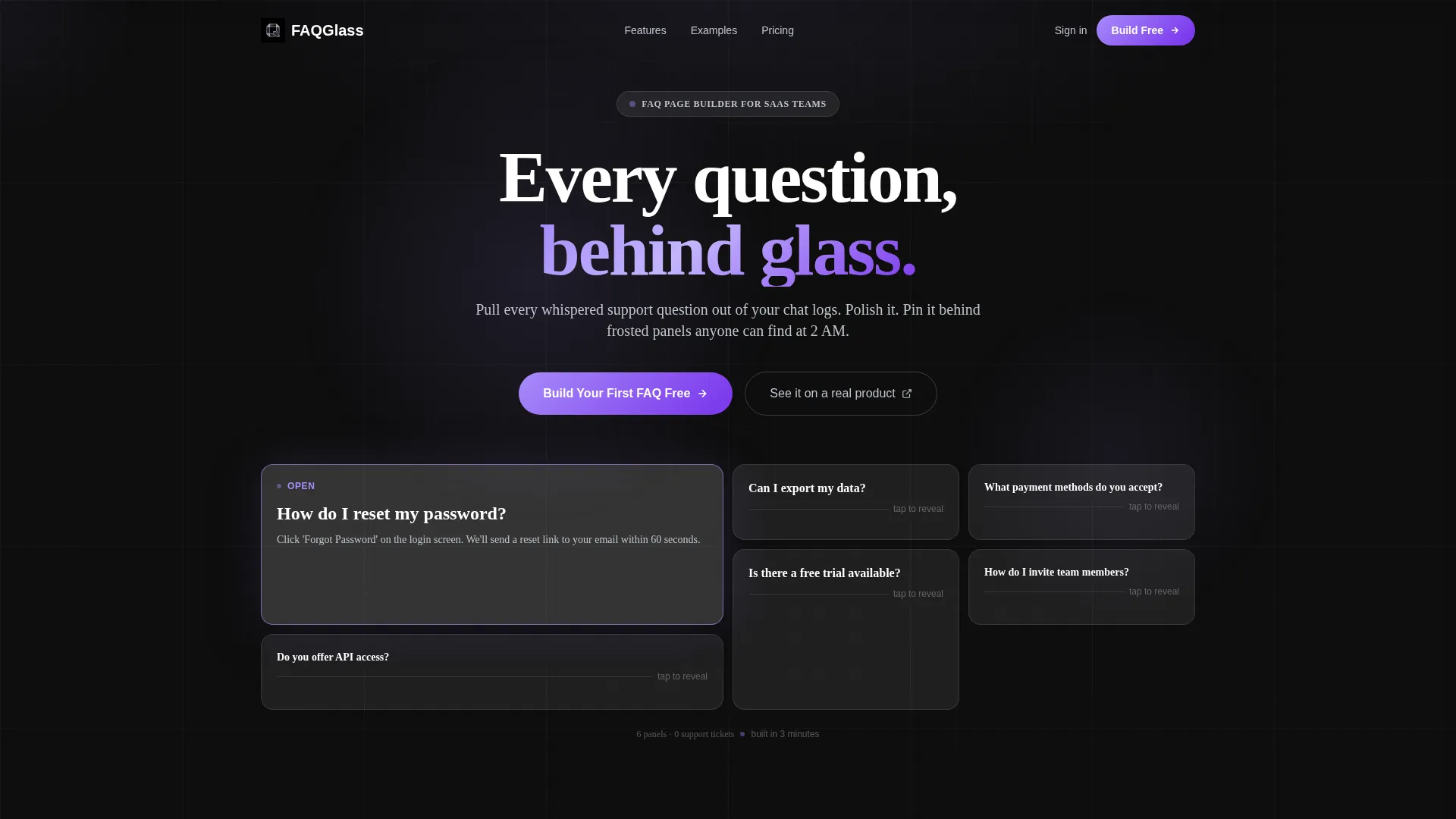
- A dark glassmorphic bento grid header with six to seven frosted panel tiles and staggered load animations
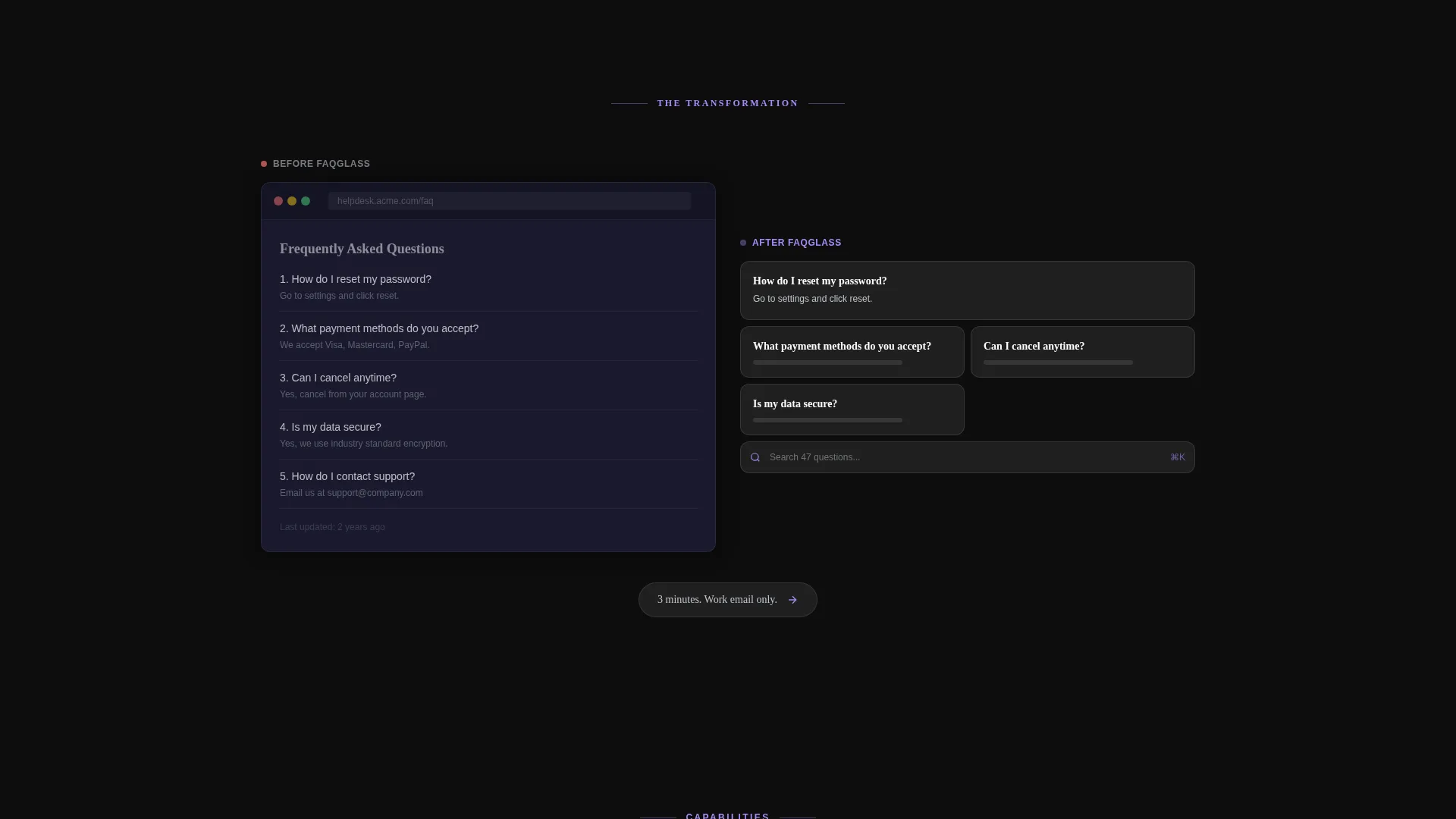
- A before-and-after transformation section showing a raw FAQ page shattering and reassembling as a bento layout
- Two conversion touchpoints: a floating call-to-action after the header and an anchored final section with a live question-input preview
Feature list
A single paragraph introduces the features below. Each feature is drawn directly from the template brief and represents a discrete, built-in capability you can use immediately.
Asymmetric Bento Grid Header
Six or seven frosted glass tiles of varying sizes arrange asymmetrically against a pure black background. Each tile holds a single FAQ question in clean white type. One panel loads already open, showing both question and answer to prove the concept before any copy is read.
Staggered Panel Load Animation
As the page loads, each header panel materializes with a staggered fade and a micro-scale animation. Glass edges catch lilac light as each tile appears, creating the feeling of screens powering on one by one.
Before-and-After Transformation Section
A dedicated scroll section shows a raw, unstyled FAQ page that shatters into glass shards and reassembles as a polished bento layout. This moment of visual storytelling communicates the product's core value without a single word of explanation.
Live Question-Input Preview
The final conversion section includes a live preview where visitors can type a question directly into the layout. This lets skeptical users experience the product behavior before committing to a signup.
Dual Conversion Touchpoints
The primary call-to-action "Build Your First FAQ Free" appears twice. Once as a floating element after the header transformation section, and once anchored in the final section beside the live preview. Both instances use a two-field form asking only for work email and product URL.
Secondary Trust Path
A secondary call-to-action reads "See it on a real product" and links to a public FAQ page built with the tool. This gives cautious visitors a way to verify the output before signing up.
Page sections overview
| Section | Purpose |
|---|---|
| Dark Glass Header | Display FAQ panels with staggered load animation |
| Before-and-After Section | Show raw-to-bento transformation visually |
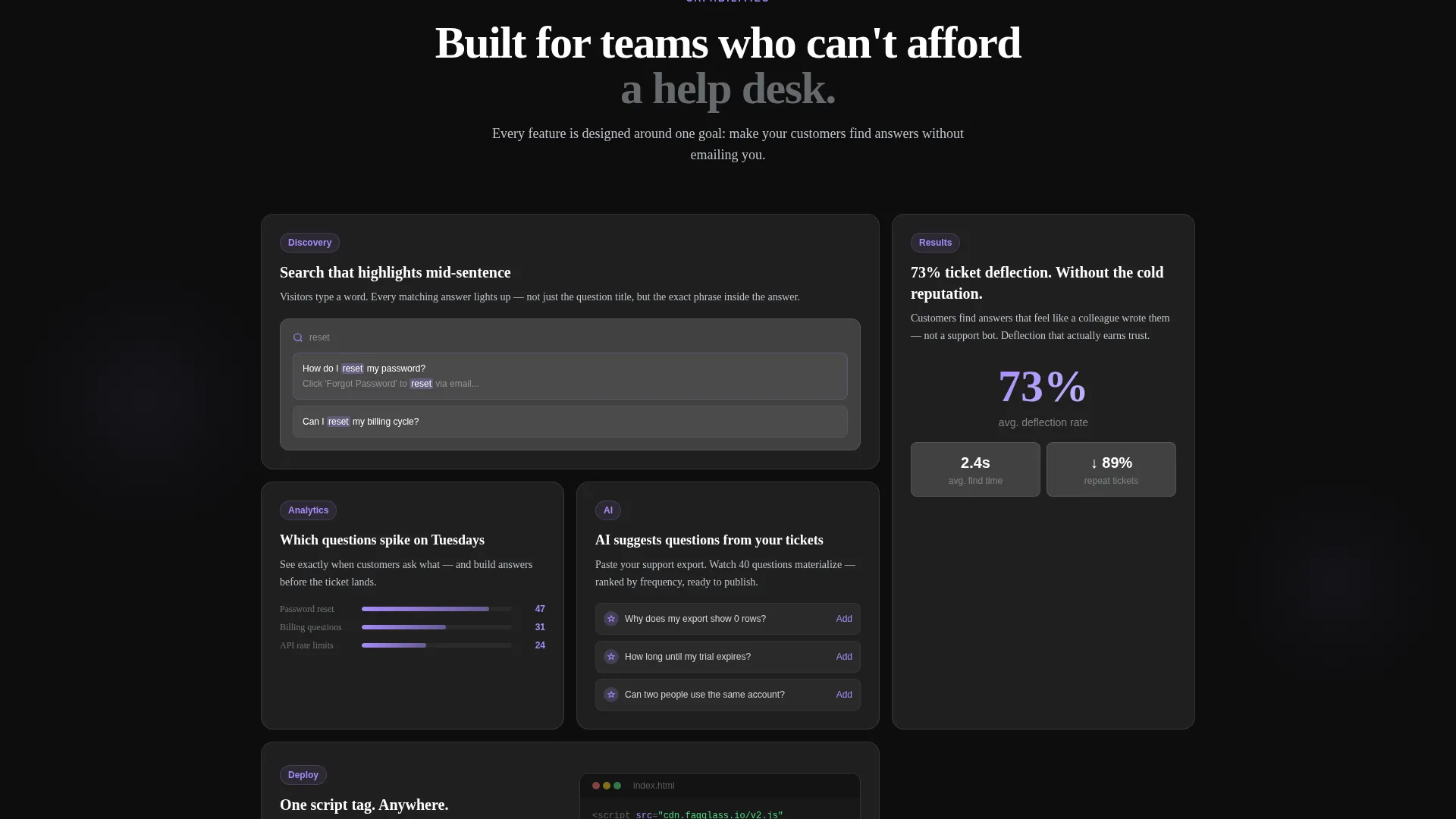
| Search Feature Panel | Demonstrate mid-sentence answer highlighting |
| Analytics Feature Panel | Show question spike data by day |
| AI Suggestions Panel | Surface AI-generated questions from tickets |
| Floating call to action Block | First conversion touchpoint after transformation |
| Live Preview Section | Let visitors type a question before signing up |
| Anchored call to action Block | Final signup form with two-field friction-free entry |
Design & branding system
The visual identity follows a Directory and Discovery theme expressed through a glassmorphic color system. The palette is built to feel like holding a lit smartphone in a dark room, where glass catches light at its edges while content floats above deep black.
- Base layer: deep obsidian (#0D0D0D); card surfaces: frosted translucent white (#FFFFFF at 8% opacity); interactive states: electric lilac (#A78BFA); secondary text: cool chrome (#C0C5CE)
- Cards stack in a bento grid with visible blur-through, 1px lilac border glow on interaction, and subtle gradient background shifts as the cursor moves
- Typography uses clean white type on dark surfaces for maximum legibility against the frosted panel aesthetic
Mobile & speed optimization
The bento grid layout is structured to reflow across screen sizes, keeping the glass panel aesthetic intact on smaller viewports. The staggered animations and gradient shifts are applied in a way that supports a coherent experience on mobile without overwhelming the layout.
- Bento grid columns condense gracefully, maintaining the asymmetric panel feel on narrow screens
- Kinetic panel animations are sequenced to avoid layout shift during the load sequence
- The two-field signup form is touch-friendly and easy to complete on a mobile device
How this template helps you convert
Every section of this template is designed to reduce hesitation and move visitors toward the free trial. The page earns the click by demonstrating the product before asking for anything.
- The live header panels act as an immediate product demo, showing real FAQ answers inside real glass tiles the moment the page loads.
- The before-and-after shatter sequence creates a memorable emotional contrast, making the value of the tool viscerally clear within the first scroll.
- The dual call to action structure with a two-field form and a "see it live" secondary path reduces commitment anxiety and captures both ready and cautious visitors.
Other information about this template
This template sits within the Documentation and Support category, specifically the FAQ and Support Page subcategory. It is designed for the product FAQ page niche and carries a high intersection match score of 13, meaning its design system, conversion direction, and visual theme are tightly aligned.
- Template style: Bento Grid; Theme: Directory and Discovery; Color system: Glassmorphic
- Creative direction: Launch Energy, delivering scroll momentum that mirrors a product keynote presentation
- Landing page direction: Freemium and Trial conversion, optimized for low-friction email capture
- Header concept: Dark Glass Panels with constellation-style asymmetric tile arrangement
Theme
Directory & Discovery
Creative direction
Launch Energy
Color system
Glassmorphic
Style
Bento Grid
Direction
Freemium/Trial
Page Sections
Asymmetric Bento Grid Header
Staggered Panel Load Animations
Before-and-after Transformation Section
Live Question-input Preview
Dual Conversion Touchpoints
Secondary Trust Path Link
Related questions
Can I edit the FAQ questions and answers inside this template?
Do I need design experience to use Faqglass?
What does the two-field signup form collect?
Is the before-and-after shatter animation included in the template?
Who is this template best suited for?



