Advanced Architecture Firm Software Cost Estimator Website Template
Archsurvey is a glassmorphic bento grid landing page built for architecture firms that run stakeholder feedback programs. The page leads with a live Survey Cost and Response Estimator, then unpacks filterable survey templates, response heatmap visualization, and a three-step integration flow. Visitors can launch their first survey free using only a work email and firm name.
by Rocket studio
Quick summary
This template gives architecture firms a tool-first landing page that converts stakeholder feedback chaos into structured design intelligence. A live estimator sits at the hero, surrounded by bento cells covering templates, response data, and integration steps. The freemium conversion path asks only for a work email and firm name, keeping friction low and trust high from the first scroll.
Who this template is for
Architecture and construction firms need survey software that understands their workflow. Generic feedback tools miss the language of AIA phases, post-occupancy evaluation, and LEED documentation. This template was designed for teams who collect stakeholder responses at every stage of a building project and need a web page that communicates that specialization instantly.
- Project architects drowning in contradictory client revision threads who need structured feedback to replace scattered email chains
- Facilities managers who must present hard data to justify renovation budgets and require documented survey report outputs
- Urban planners running community engagement sessions where every respondent voice needs capturing and every answer needs to matter
What problem this template solves
Gathering feedback from stakeholders in architecture is rarely clean. Responses arrive across email, sticky notes, and meeting minutes. There is no consistent format, no single place where satisfaction scores, open ended questions, and multiple choice answers live together as useful data. Many organizations in the architecture, engineering, and construction sector struggle to scale their stakeholder engagement efforts because their tools were built for a different kind of business.
- Fragmented feedback loops that produce contradictory client answers and create risk in design decisions
- No structured report format for sharing survey results with leadership, clients, or facilities teams in a documented, credible way
- Lost respondent data when community engagement sessions end without a system to track responses, analyze trends, or export to csv and Excel
What you get with this template
This landing page template delivers a complete, conversion-ready web page built around a hero estimator tool. Every bento cell is interactive and communicates a specific layer of the platform's value. The design keeps whitespace intentional so that the primary call to action and key benefit statements always hold visual priority. Users get a page that feels like the product itself.
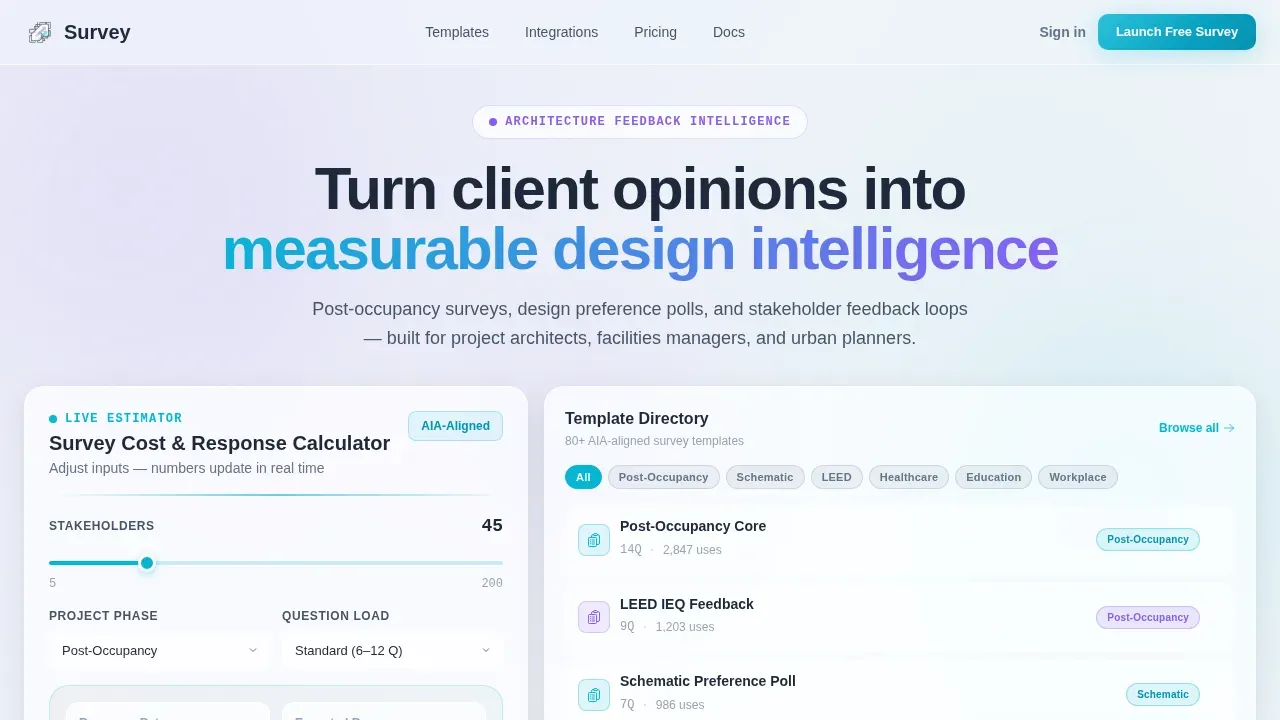
- Live Survey Cost and Response Estimator displayed as a double-height bento hero cell where visitors input stakeholder count, project phase, and question complexity to see animated response rate and cost-per-insight projections
- Filterable template directory showing 80-plus survey templates tagged by AIA phase, LEED category, and project type, with search and filter controls built into the bento grid cell
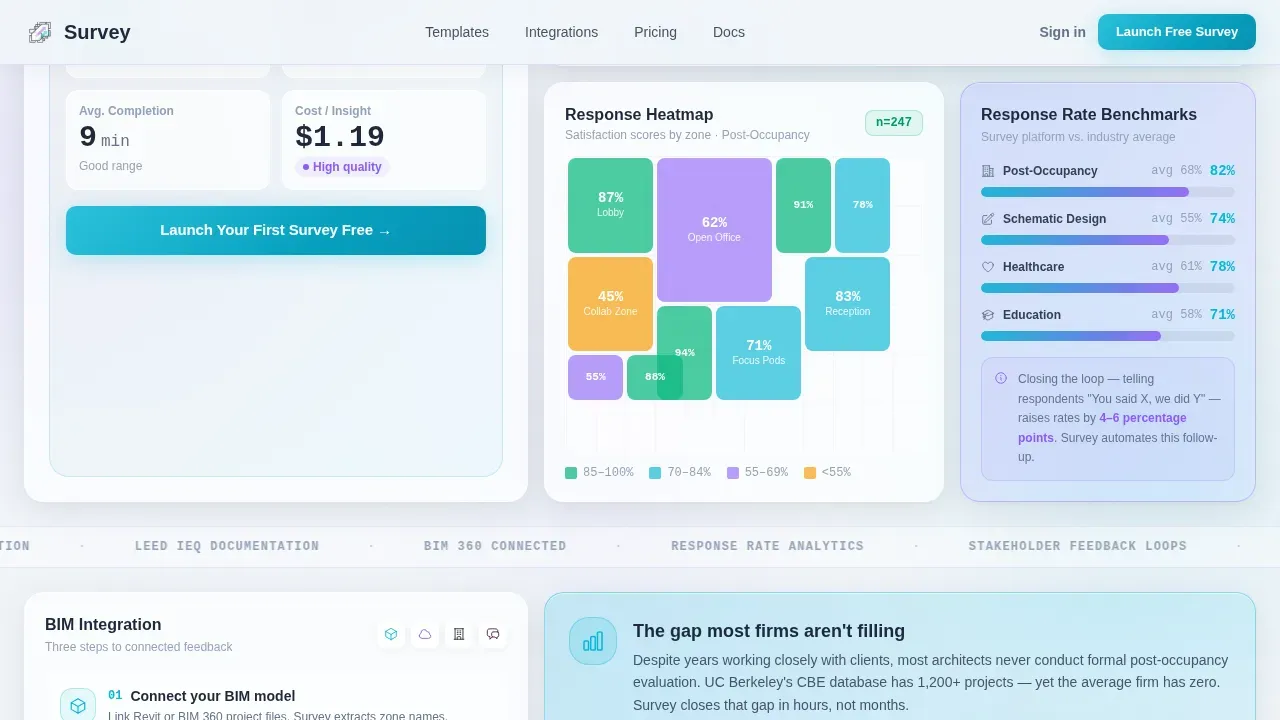
- Response heatmap and three-step integration section that visualizes stakeholder answers over a floor plan and shows how the platform connects with industry tools in a clear, sequential flow
Feature list
This template includes a carefully structured set of interactive sections and visual components. Each bento cell is purposeful, and every design decision supports the platform's tool-first identity.
Live Survey Cost and Response Estimator
The hero cell is the product in miniature. Visitors input the number of stakeholders, select a project phase from schematic design through post-occupancy, and choose question complexity. The glassmorphic card then animates projected response rates, estimated completion times, and cost-per-insight figures upward in real time. By the time visitors read their results, they have already experienced the platform's analysis logic and want to see it work on real data. This is the trust engine that makes the primary call to action feel earned rather than premature.
Filterable Survey Template Directory
The template directory cell lets visitors search and filter across 80-plus ready-made survey templates. Templates are tagged by AIA phase, LEED category, and project type so architects can find the right starting format instantly. Using templates simplifies the process of creating survey questions because the layouts are professionally structured and include the right mix of rating scales, multiple choice questions, and open ended questions for each project context. This section demonstrates the platform's depth before a visitor signs up.
Response Intelligence Heatmap
One bento cell visualizes stakeholder responses as a heatmap overlaid on a floor plan. This format helps facilities managers and project architects see where satisfaction scores cluster spatially, turning abstract survey data into a visual document that is easy to present to clients and leadership. Real-time charts are displayed inside the cell, giving visitors a live preview of the kind of report the platform can generate from completed surveys.
Three-Step Integration Flow
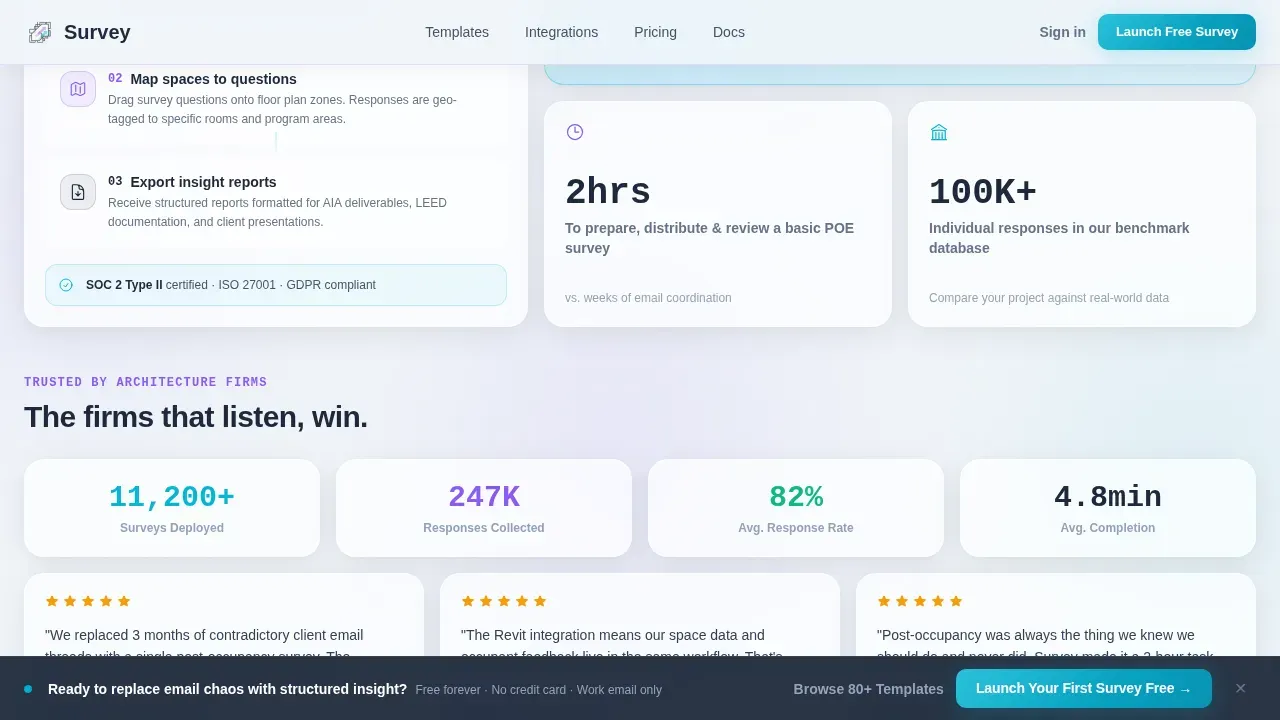
A dedicated bento cell walks through the three-step connection process between the survey platform and industry tools. The flow is shown sequentially so that any architect or facilities manager can understand how stakeholder feedback data moves from a completed survey into a documented project file. This section addresses a common concern: that a new survey tool will sit separately from the rest of a firm's workflow rather than contributing to it.
Freemium Conversion Path
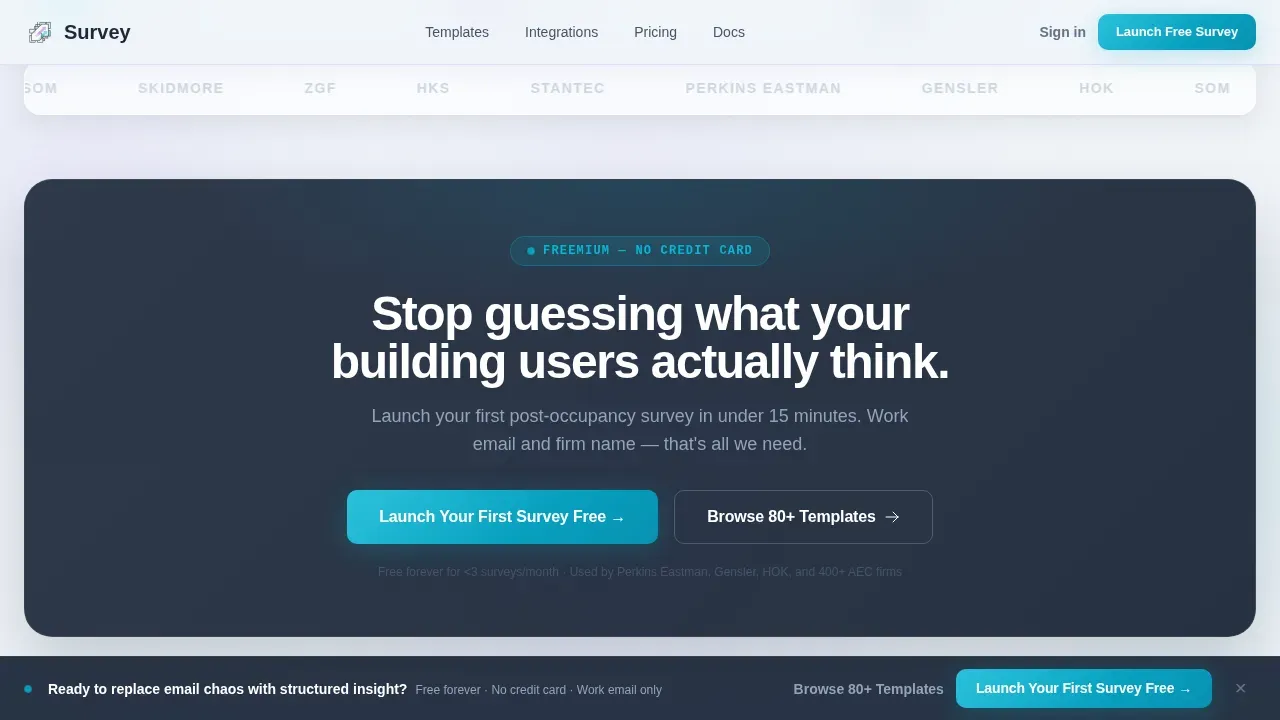
The primary call to action, "Launch Your First Survey Free," appears inside the estimator results card and again as a sticky bottom bar after the second scroll fold. The signup form collects only a work email and firm name, following the principle that forms should start with no more than three essential fields to minimize barriers. A secondary path lets visitors browse the full template library without signing up, building familiarity before they commit. This dual-path structure serves both ready-to-convert visitors and those who need more time with the product.
Glassmorphic Bento Grid Layout
The page is built on a bento grid where every card floats above a blurred depth field. The grid rearranges subtly on scroll to reveal deeper layers of capability, and each card responds to hover with a depth shift. Charts, data outputs, and filter controls are all displayed inside their own frosted panel cells, keeping the interface clean and the information hierarchy obvious. The layout is intentionally tool-first: no stock imagery, no decorative illustration, just interactive components doing real work.
Page sections overview
| Section | Purpose |
|---|---|
| Hero Estimator Cell | Live cost and response projection tool with animated number outputs |
| Estimator Results Card | Displays projected data with primary "Launch Your First Survey Free" call to action |
| Template Directory Cell | Filterable survey template library tagged by AIA phase and LEED category |
| Response Heatmap Cell | Visualizes stakeholder feedback spatially over a floor plan with live charts |
| Integration Flow Cell | Three-step connection walkthrough for linking survey data to project tools |
| Social Proof Section | Firm logos, response rate benchmarks, and project count metrics |
| Sticky call to action Bar | Persistent "Launch Your First Survey Free" bar active after second scroll fold |
| Footer | Horizontal flow footer with navigation, legal links, and secondary access paths |
Design & branding system
The visual identity follows a Directory and Discovery theme expressed through a glassmorphic color system. Every panel is a frosted surface floating above a blurred background layer. The palette feels like looking through a rain-spotted glass partition in a modern studio: soft, layered, and slightly luminous. Typography choices reinforce the tool-first energy by pairing structured heading fonts with monospaced number rendering.
- Color palette: frosted panel white at 40% opacity over a light blue-gray base, structural charcoal for text and structural elements, translucent lilac for dividers, and interactive teal for buttons, progress indicators, and animated estimator outputs
- Typography system: DM Sans for headings, JetBrains Mono for all numerical data and estimator outputs, and Manrope for body text, creating a clear hierarchy between interface data and explanatory copy
- Motion and interactivity: number count-up animations in the estimator, subtle grid rearrangement on scroll, card hover depth shifts, and sticky call-to-action bar activation on scroll, all contributing to a page that behaves like a working product demo rather than a static brochure
Mobile & speed optimization
The template is built desktop-first to give the estimator tool the screen space it needs. At the same time, the page maintains content parity so that all critical sections remain fully visible and functional on smaller devices. Nearly 83% of users access landing pages from mobile devices, so every bento cell stacks cleanly at smaller breakpoints without losing interactive capability.
- Desktop-first layout with responsive stacking: the bento grid is designed for large monitors where architects typically work, but each cell reflows cleanly for tablet and mobile device viewing so that respondents can also complete surveys on any device
- Static and client-side rendering split: server components handle static sections for reliable load behavior, while the estimator and filterable directory run as client components to keep interactivity fast and smooth without blocking the initial page render
How this template helps you convert
This template is built around a single conversion goal: getting architecture professionals to launch their first survey free. Every structural choice on the page, from the hero estimator to the secondary browse path, is designed to move visitors toward that action at whatever pace they are ready for.
- The estimator earns trust before the call to action appears: visitors input their own stakeholder data and watch the platform reason through response rates and cost projections. By the time they see the "Launch Your First Survey Free" button inside the results card, they have already experienced the product's logic and value firsthand, making the decision feel low-risk.
- The dual conversion path removes pressure: visitors who are not ready to sign up can browse 80-plus survey templates without creating an account. This secondary path keeps them on the page, building familiarity and confidence with the platform's range and quality before they decide to commit.
Other information about this template
This template is part of a broader set of solutions designed for the architecture, engineering, and construction sector. It reflects best practices from research into what makes stakeholder feedback platforms succeed as both software products and conversion-focused landing pages.
- The archsurvey smart stakeholder feedback intelligence landing page template is structured to demonstrate platform value through interaction rather than description, keeping the tool itself as the primary evidence of capability
- Survey forms in the platform support a wide range of question types including rating scales, multiple choice questions, and open ended questions, giving organizations the ability to collect both quantitative and qualitative answers from any audience
- Advanced logic features allow survey builders to create branching paths based on respondent answers, so each stakeholder only sees questions that are relevant to their role, whether they are employees, creditors, directors, or community members
- Data collected through the platform can be exported in formats including csv and Excel files, and the platform is designed to keep data safe throughout collection, storage, and report generation
- Survey responses can be connected to a contact list for follow-up, and the platform's analysis tools allow teams to track satisfaction trends over time, generate automated report outputs, and present findings to leadership without manual effort
- Google Sheets integration is noted as a compatible export path, giving organizations easy access to raw response data in a familiar file format for further analysis
- The platform is scalable to suit firms of many sizes, and the template is built to scale visually and functionally as a company's survey volume and respondent base grow
- Real-time dashboards display charts and metrics as responses come in, giving stakeholders and project leads a single view of current satisfaction status without waiting for a completed report cycle
- Security considerations are addressed through the template's messaging, which includes trust signals and documented data handling references to reassure users and other users within a firm that their respondent data is treated responsibly
- The page is designed so that above-the-fold content is visible without scrolling on desktop, and the sticky call-to-action bar ensures the primary conversion action remains accessible at every point in the scroll journey
- Testimonials and social proof displayed in the Social Proof section are structured to include firm names, response rate benchmarks, and project count metrics, following the principle that credibility claims should be specific and number-driven to enhance trust
- The word "free" in the primary call to action is intentional: it signals that visitors can experience real value before any business commitment is required, which matters especially to firms evaluating new software for the first time
- Collaboration between project teams and client stakeholders is supported by the platform's shared report format, which allows survey results to be distributed to any relevant audience without requiring recipients to have platform access
Theme
Directory & Discovery
Creative direction
Calculator/Tool First
Color system
Glassmorphic
Style
Bento Grid
Direction
Freemium/Trial
Page Sections
Live Survey Cost and Response Estimator
Filterable Survey Template Directory
Response Intelligence Heatmap
Three-step Integration Flow
Dual-path Freemium Conversion
Glassmorphic Bento Grid Interface
Related questions
What kind of survey templates does this platform include?
Do respondents need to create an account to complete a survey?
How does the live estimator tool work?
Can survey data be exported for use in reports?
Is the platform suitable for large community engagement sessions?



