Premium Directory & Marketplace Platforms Appointment Booking Website Template
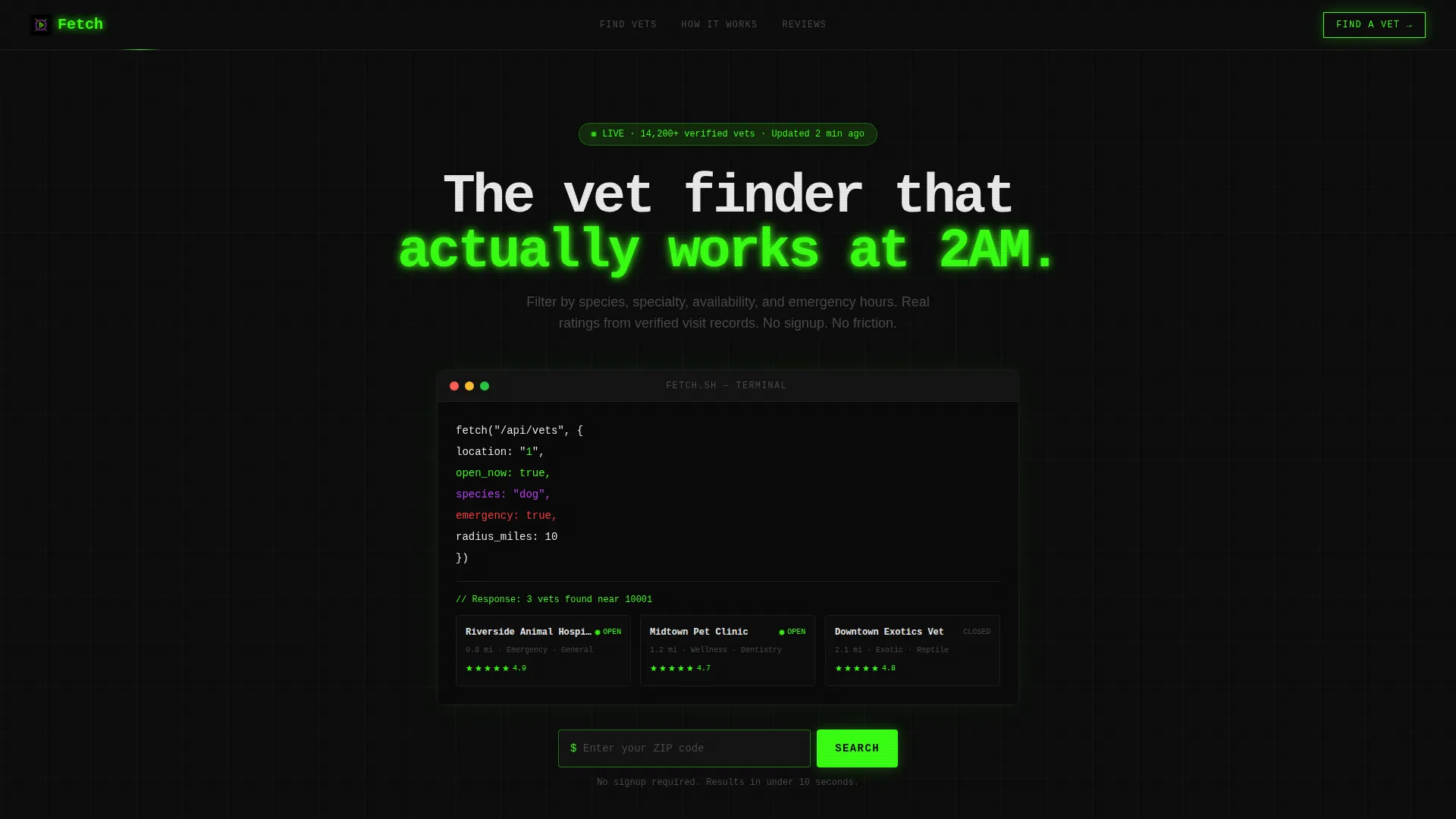
Fetch is a dark-mode veterinarian finder landing page template built for speed and clarity. It pairs a theatrical code-snippet header with a live filter bar, animated data grid, map view, and side-by-side comparison panel. Every vet card links directly to a clinic profile and booking page, making the first search interaction the first conversion step.
by Rocket studio
Quick summary
Fetch is a single-page veterinarian finder template that turns a panicked search into a clear, confident next step. The code-snippet header animates a live query, results cascade into a filterable data grid, and every card points straight to open appointment slots. No signup wall, no friction, just fast answers for pet owners who need them now.
Who this template is for
This template is built for founders, developers, and product teams launching a veterinarian directory or pet-care marketplace. It is equally suited to local pet-services startups and established platforms adding a vet-search feature.
- Pet-care directory builders who need a polished, conversion-ready starting point
- Startup teams in the animal health space who want a credible, high-energy product feel
- Developers or designers prototyping a vet-finder tool for investors or early users
What problem this template solves
Finding the right vet under pressure is genuinely hard. Pet owners face a wall of unfiltered search results when every second counts. This template removes that friction by presenting filtered, relevant vet profiles the moment a visitor lands.
- No more sifting through generic listings that lack specialty or availability data
- No confusing forms standing between a worried pet owner and a clinic phone number
- No cold, clinical layouts that feel out of step with the urgency of the moment
What you get with this template
You get a fully structured, single-page layout that covers the entire search-to-click journey in one scroll. The design system is pre-built, the interaction logic is clearly mapped, and every section serves a specific conversion purpose.
- An animated code-snippet header with a functional zip code input that kicks off the search flow
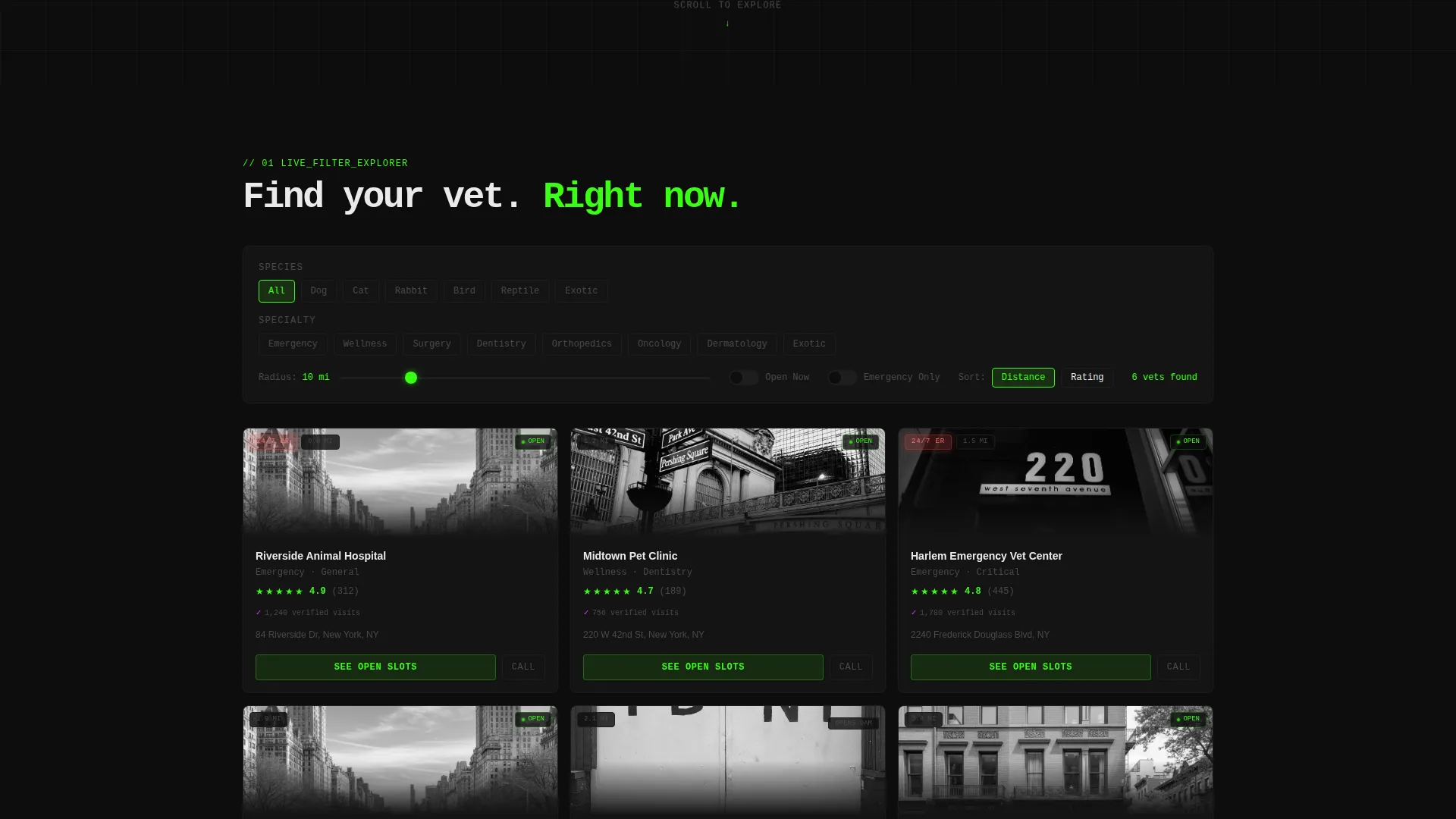
- A live filter bar, animated vet card grid, map view with clustered pins, and a side-by-side comparison panel
- Pre-styled vet profile cards with ratings, distance badges, availability indicators, and dual call-to-action buttons
Feature list
This section details the core components built into the Fetch template and what each one does for your visitors.
Animated Code-Snippet Header
The header opens with a pseudo-code block that live-types a vet-search query across the viewport. As the query resolves, vet profile cards cascade into the grid in real time. The sequence doubles as a visual demo and the visitor's first functional interaction.
Live Filter Bar
A persistent filter bar lets visitors toggle by species, select specialty chips, adjust a radius slider, and flip an "Open Now" switch. Every filter interaction instantly reshuffles the data grid with animated card transitions, keeping engagement high.
Animated Vet Profile Grid
Each card in the data grid displays a clinic name, specialty tags, a distance badge, a star rating sourced from verified visit records, and a green availability indicator. Primary and secondary call-to-action buttons sit on every card for immediate action.
Map View with Clustered Pins
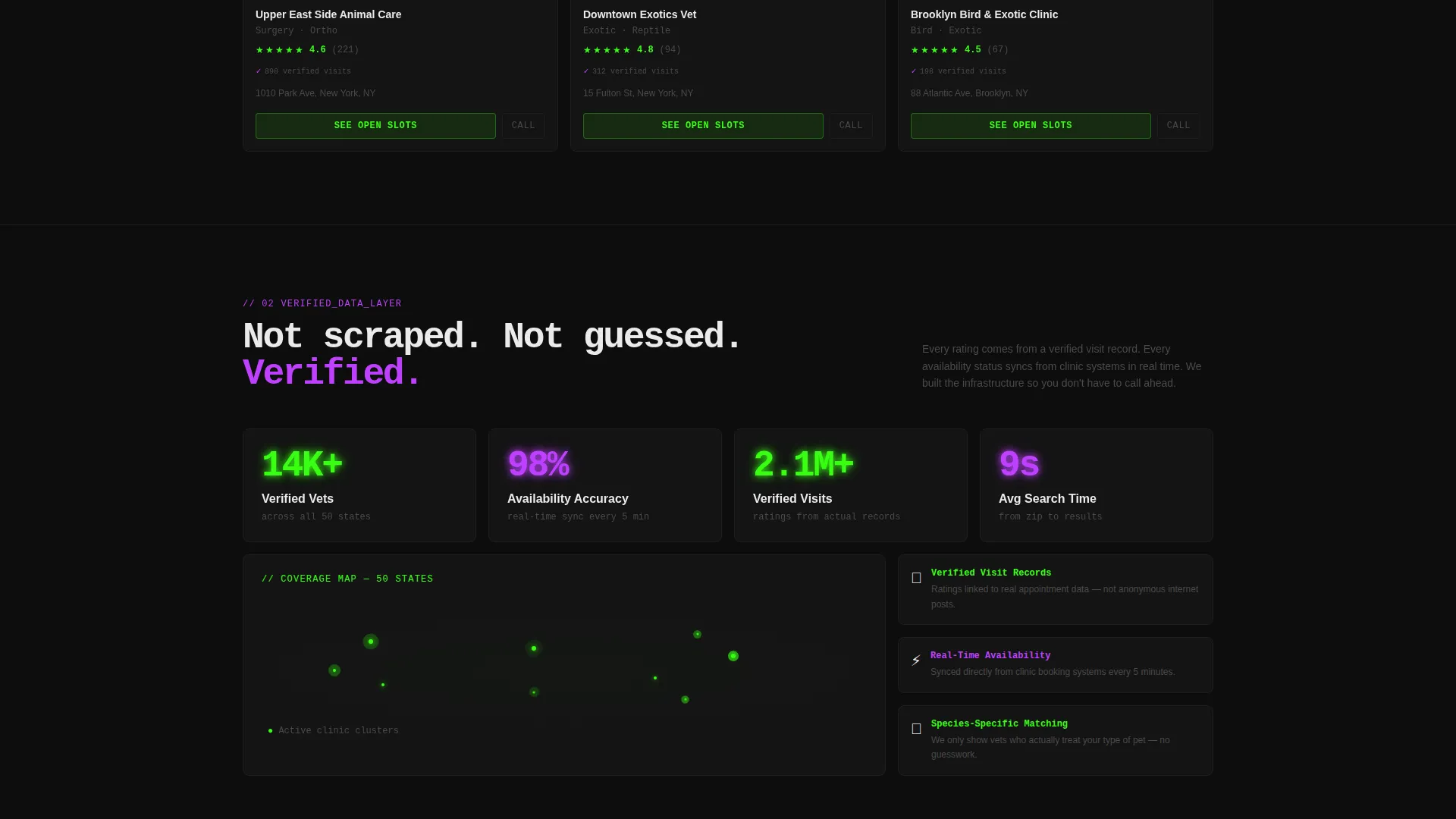
Scrolling past the grid reveals a geographic map view. Clinic locations are marked with clustered pins so visitors can orient their search spatially before clicking through to a profile.
Side-by-Side Comparison Panel
A dedicated comparison panel lets visitors evaluate two or more vet profiles simultaneously. Key details sit in aligned columns, making it easy to weigh options without jumping between pages.
Review Snippet Highlights
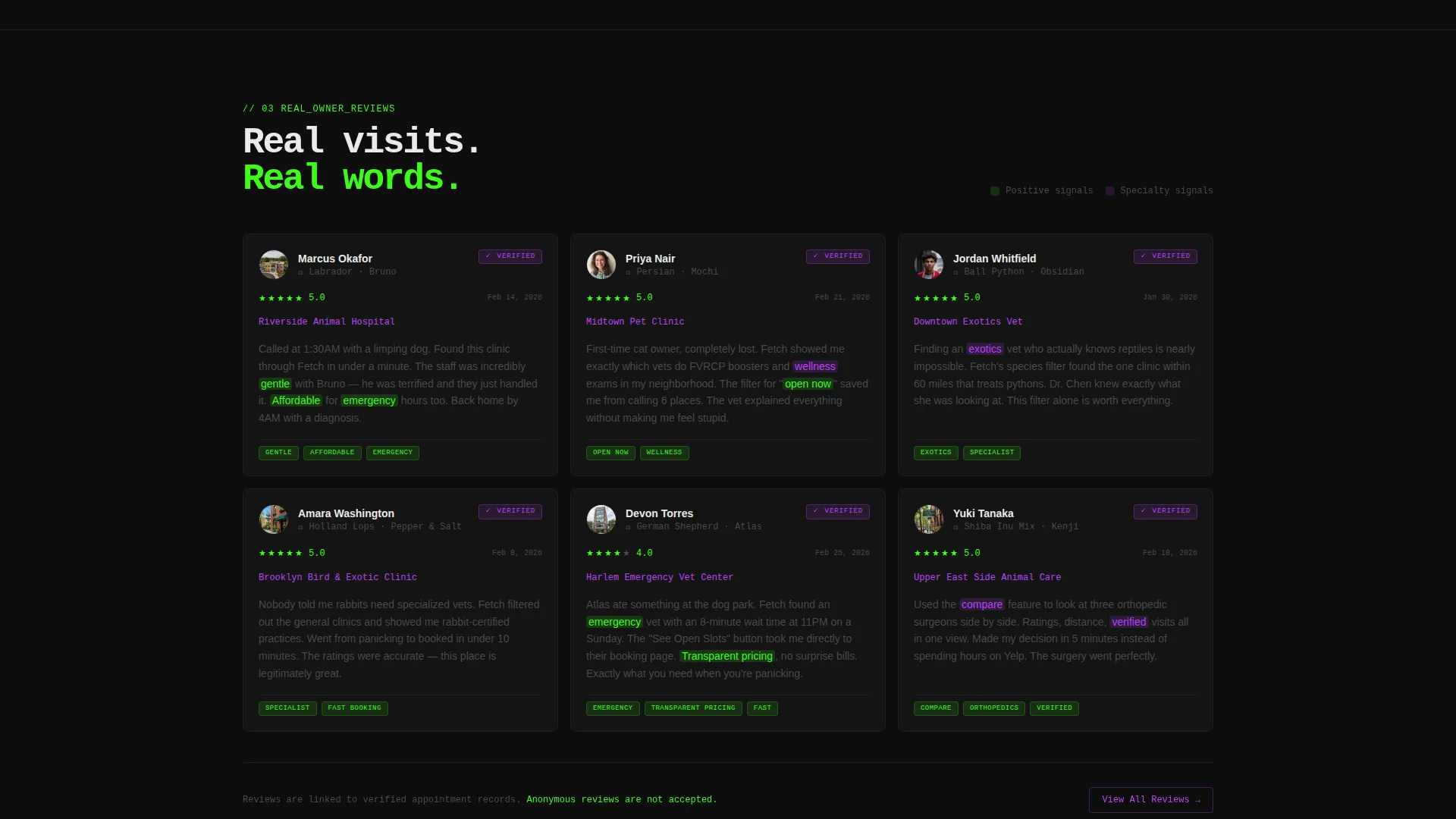
Real owner review snippets appear with keyword highlights such as "gentle," "affordable," and "emergency." These surface social proof at the point where a visitor is close to committing to a clinic.
Page sections overview
| Section | Purpose |
|---|---|
| Code Snippet Header | Animates a live search query and resolves into the first real zip code input |
| Live Filter Bar | Lets visitors filter by species, specialty, radius, and open hours instantly |
| Animated Vet Grid | Displays filterable clinic cards with ratings, distance, and availability |
| Map View | Shows clinic locations as clustered geographic pins for spatial context |
| Compare Vets Panel | Places two or more vet profiles side by side for direct comparison |
| Review Highlights | Surfaces verified owner snippets with keyword callouts for social proof |
Design & branding system
The template runs on an Acid Digital color system with a dark-mode default. The palette is deliberately high-contrast and tech-forward, projecting speed and precision from the first pixel.
- Void black (#0D0D0D) forms the background, making every card and data point appear to float like a heads-up display element
- Terminal green (#39FF14) drives all primary call-to-action buttons, live data highlights, and availability indicators
- Electric violet (#BF40FF) marks interactive hover states and filter tag selections, while interface white (#EAEAEA) handles typography and card borders
Mobile & speed optimization
The template layout is structured to work cleanly across viewport sizes, keeping the filter bar, data grid, and map view accessible on smaller screens without losing visual hierarchy.
- The data grid reflows into a single-column card stack on mobile, preserving card readability and button tap targets
- Filter chips and the radius slider are sized for touch interaction, reducing mis-taps on narrow screens
- The code-snippet header scales its animation to the available viewport width so the effect reads clearly on any device
How this template helps you convert
Every section of Fetch is designed to shorten the distance between a visitor's first anxiety and their first click on a clinic card. The layout earns trust through speed and specificity rather than through persuasive copy.
- The zip code input at the header makes the visitor's first action a search, not a scroll, so engagement begins immediately and intent is captured at the top of the page.
- Filters, ratings, distance badges, and availability dots give visitors enough data to feel confident choosing a vet, reducing hesitation before the "See Open Slots" click.
- The "Call Now" secondary button on each card provides an emergency exit ramp, meeting the highest-urgency visitor need and turning the template into a safety net, not just a directory.
Other information about this template
Fetch belongs to the Startup Velocity theme family and uses the Acid Digital color system, both of which are designed for technology products that need to project credibility and energy at a glance. The template style is a Dashboard and Data Grid layout, which is well suited to directory and marketplace platforms in the pet-care and animal health space.
- The header concept is a Code Snippet, a pattern that resonates with technically literate audiences and signals product quality to investors or early adopters reviewing a demo
- The creative direction is Interactive Explorer, meaning the page rewards scrolling with new layers of control rather than repeating the same pitch
- The landing page direction is Click-Through, built so that every search result and vet card is a gateway to a full clinic profile and booking page with no intermediate signup wall
Theme
Startup Velocity
Creative direction
Interactive Explorer
Color system
Acid Digital
Style
Dashboard/Data Grid
Direction
Click-Through
Page Sections
Animated Code-snippet Header
Live Filter Bar with Instant Grid Reshuffling
Animated Vet Profile Data Grid
Map View with Clustered Pins
Side-by-side Vet Comparison Panel
Verified Review Snippet Highlights
Related questions
Can I customize the filter categories and species options?
Does the template include real vet data or is it placeholder content?
Is the zip code search input functional out of the box?
Can the template support both general-practice and exotic-animal vet listings?
What is the best use case for this template?



