Transfer Learning Technology Professional Website Template
The Finetune landing page template is a dark, terminal-aesthetic, modular card-grid layout built for open-source transfer learning frameworks. It front-loads benchmark data, adapter-method comparisons, and real deployment stories to earn developer trust before asking for anything. The result is a frictionless adoption page that converts skepticism into a single clipboard paste.
by Rocket studio
Quick summary
This is a single-page, card-grid landing page template designed for open-source transfer learning and fine tuning projects. It uses an Industry Report creative direction inside a Monochrome Steel color system. Every section is engineered to demonstrate value through hard metrics, real code, and comparison data, moving ML engineers from discovery to pip install without friction.
Who this template is for
This template is built for teams and individuals who work at the intersection of deep learning research and production engineering. It suits anyone launching an open-source machine learning tool where the audience reads benchmarks before they read marketing copy.
- ML engineers at early-stage startups who need to fine tune the model quickly without burning through compute budgets
- Research labs benchmarking parameter efficient fine tuning methods and comparing adapter approaches across foundation models
- Solo data scientist practitioners who run experiments on shared or free gpu resources and need state-of-the-art accuracy on small datasets
What problem this template solves
Building a landing page for a transfer learning framework is harder than it looks. Generic templates bury the evidence developers actually need. They lead with headlines and hide the numbers. A data-driven audience, one that understands the key differences between full fine tuning and parameter efficient fine tuning, will leave the moment the page feels like marketing rather than proof.
- Developers distrust pages that show no benchmarks, no code, and no honest comparison between a trained model and a baseline generic model
- Open-source projects lose potential contributors when the page fails to communicate practical trade offs between training time, compute cost, and accuracy
- Projects targeting ML engineers need to show how much data is required, what adapter methods are supported, and what the real-world validation loss looks like, before asking for a star or an install
What you get with this template
You get a fully structured, dark-theme card-grid landing page that communicates technical credibility from the first scroll. The layout is modular, meaning each row of cards is independently purposeful and can be updated without touching the rest of the page.
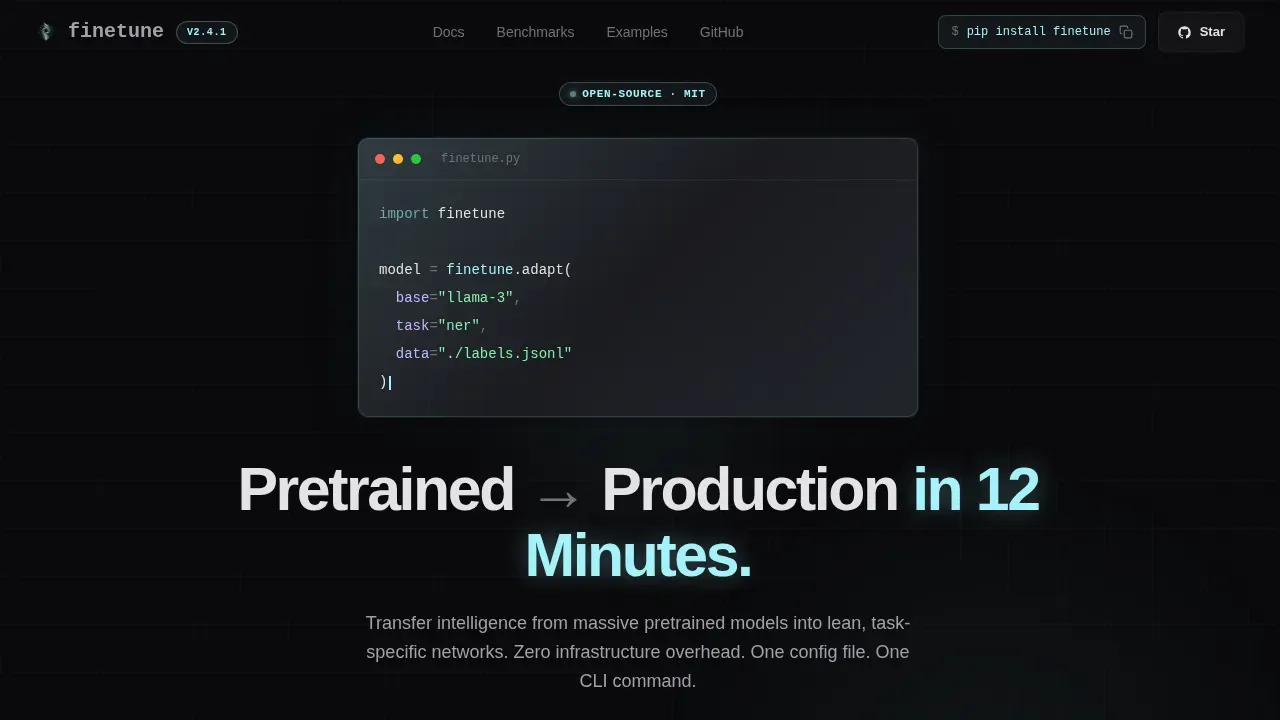
- A terminal-style hero section with a monospaced code block, a radial glow effect, and live-updating counters for GitHub stars and PyPI downloads
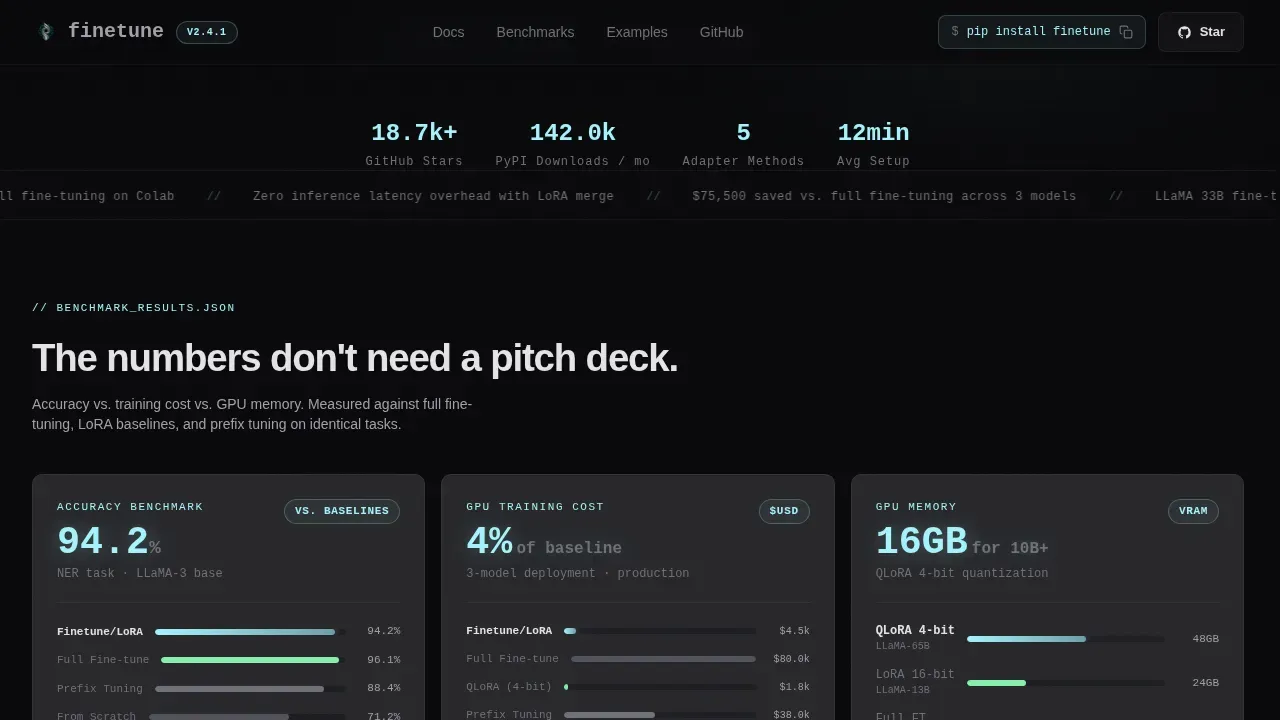
- Three benchmark card rows covering accuracy versus training time versus gpu resources cost, adapter method support matrices, framework compatibility badges, lines-of-code comparisons, and real user case studies
- A sticky bottom call-to-action bar with a click-to-copy
pip install finetunesnippet, a GitHub star button, and a "Try in Colab" link, no email gate, no signup form
Feature list
This template delivers a focused set of components, each justified by the transfer learning framework's conversion goals.
Terminal Hero with Radial Glow
The header is a full-bleed void background with a soft radial glow pulsing behind a three-line monospaced code block. The code demonstrates finetune.adapt() with real arguments. Below it, a tight grotesque headline reads "Pretrained to Production in 12 Minutes." This section establishes the framework's value proposition without a single illustration or stock image. The code itself is the hero.
Live Metric Counters
Two live-updating counters display GitHub stars and PyPI downloads ticking upward in real time. These counters use client-side rendering while the rest of the page uses server components for static delivery. For a transfer learning open-source project, social proof expressed as live adoption numbers carries more weight than any testimonial quote.
Benchmark Card Grid
The first row of the card grid presents three side-by-side comparison cards. Each card shows a hard metric: accuracy, training time, and compute cost, each measured against fine tuning from scratch, full fine tuning, and LoRA baseline approaches. The layout scrolls like a research briefing, surfacing the kind of evidence that makes a data scientist stop and read.
Adapter Method and Compatibility Grid
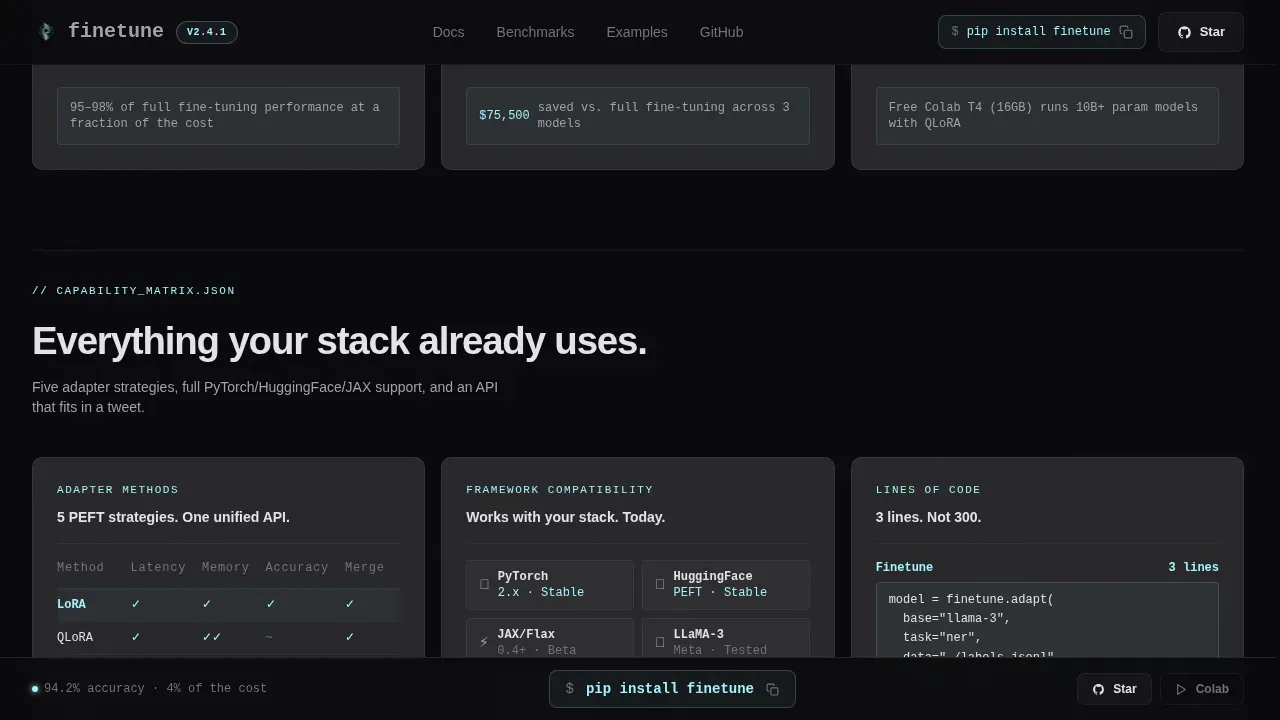
The second card row presents an adapter method support matrix showing which approaches the framework handles. Framework compatibility badges for PyTorch, JAX, and HuggingFace appear alongside a lines-of-code comparison card. This row answers the practical questions engineers ask before installing any new machine learning tool.
Case Study Cards with Pull-Quotes
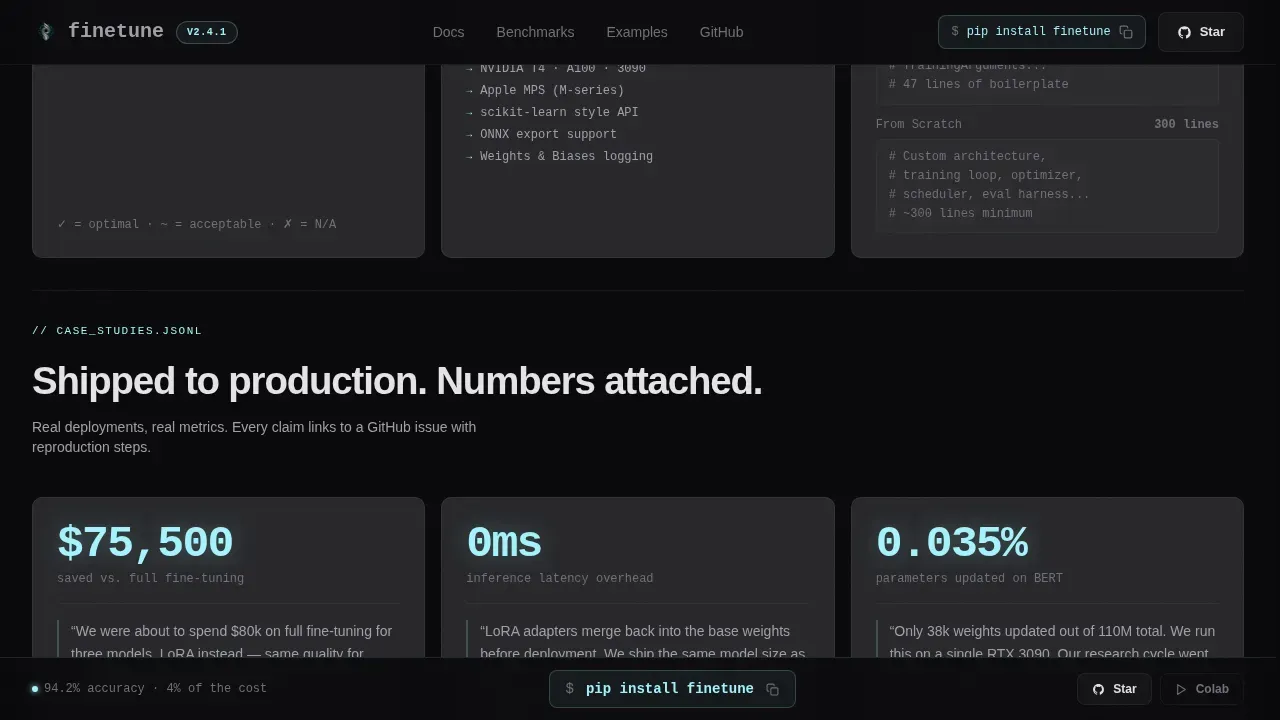
The third row contains real deployment story cards. Each card includes a latency reduction figure, a model size saving, a deployment detail, and a linked GitHub issue. Pull-quotes from real users give the page the weight of a technical white paper rather than a product brochure.
Sticky Install Call-to-Action Bar
After the second scroll fold, a sticky bottom bar appears with the pip install finetune snippet rendered as a click-to-copy code block. Secondary buttons link to the GitHub repo and the pre-loaded Colab notebook. The bar stays visible during scroll without obscuring card content, reducing friction to a single keypress.
Page sections overview
| Section | Purpose |
|---|---|
| Hero Terminal Block | Introduce the framework with live code and real-time adoption counters |
| Benchmark Row Cards | Compare accuracy, training time, and compute cost against baseline approaches |
| Capability Matrix Row | Show adapter method support, framework badges, and lines-of-code comparison |
| Case Study Row | Present real deployment stories with latency reductions and pull-quotes |
| Sticky call to action Bar | Deliver persistent pip install, GitHub star, and Colab access after scroll fold two |
| Developer Minimal Footer | Link to GitHub, docs, and license with zero visual noise |
Design & branding system
The visual language is deliberately cold and engineered. Every color choice follows function, not decoration. The palette is Monochrome Steel: void black at #09090B forms the page background, brushed gunmetal at #1C1C22 lifts section backgrounds slightly, card surfaces sit at #27272A, and body text lives at #A1A1AA. The single electric cyan accent at #A5F3FC fires only on interactive elements, code highlights, and metric callouts, rare enough to read as signal.
- Typography uses JetBrains Mono for all code blocks and metric figures, and Manrope for body copy, headings, and interface labels, the combination reads like a machined aluminum chassis: no warmth, no decoration
- Animation is scroll-linked: cards reveal on entry, the glow pulses continuously behind the hero code block, counters tick upward on load, and the sticky bar staggers in after the second fold, all medium intensity, never distracting from the data
Mobile & speed optimization
The template is desktop-first by design, reflecting the reality that ML engineers work on workstations and laptops. The card grid collapses cleanly to single-column layout on smaller viewports without losing benchmark readability.
- Static sections use server components for fast initial paint; live counters and the click-to-copy interaction use client components, isolating interactivity to only the elements that require it
- The sticky call-to-action bar repositions gracefully on mobile so it does not obstruct the card grid content during scroll
How this template helps you convert
The page earns the install before it asks for it. Every design and content decision reduces the distance between a developer's first visit and their first pip install.
- Front-loading benchmarks and real code means a skeptical ML engineer sees hard evidence in the first viewport, not a headline and a stock photo, this directly addresses the trust deficit that kills open-source adoption pages
- The click-to-copy pip install snippet in both the hero and the sticky bar means the conversion action is always one tap away, whether the visitor is at the top of the page or deep inside the case study cards
Other information about this template
This template is built specifically for the transfer learning open-source niche, where the audience is technical, benchmark-driven, and deeply skeptical of unsubstantiated claims. Understanding how transfer learning and fine tuning work together helps inform why every section of this page is structured the way it is.
Transfer learning is a technique in machine learning where a model trained on one task is reused as the starting point for another, often related, task. Fine tuning is the process of taking a pre trained model and updating its parameters on a new dataset so it can perform well on a specific task. The core idea of transfer learning is efficiency: rather than relearning general features, you focus only on the parts specific to your problem. Transfer learning and fine tuning together allow ML engineers to build on large foundation models trained on diverse datasets while adapting only the layers that matter for the target task.
The key differences between transfer learning and full fine tuning matter to this audience. Transfer learning generally requires less data and training time compared to full fine tuning. Full fine tuning allows some or all layers of a pre trained model to continue learning during training, making the model more adaptable to new tasks. Choosing between transfer learning and fine tuning depends on how much data is available, the gpu resources accessible, and the specific requirements of the task. Transfer learning is often more efficient and works well when the target task is similar to the pre-training domain.
A pre trained model can be used in two main modes. In feature extraction, you freeze all convolutional layers and treat the pre trained features as fixed representations, adding only a new classifier head or dense layer on top. In fine tuning mode, you unfreeze some or all of the pre trained weights and continue the training loop with a lower learning rate to avoid overwriting what the base model already learned. Using a lower learning rate is essential: it prevents the training process from destroying pre trained weights that took tens of thousands of GPU hours to build.
Parameter efficient fine tuning methods like LoRA (Low-Rank Adaptation) and prefix tuning reduce the number of model's parameters that need updating, making fine tuning accessible even on constrained gpu resources. These approaches update only a small subset of parameters rather than all the parameters in the entire model, which can make a huge difference in compute cost for teams working with large language model architectures. Other parameter efficient fine tuning techniques include discriminative learning rates, where different layer groups receive different learning rates during the training loop, and prefix tuning, which prepends trainable tokens to the input data without modifying pre trained weights directly.
Domain adaptation is a common use case across this template's target audience. Whether the target task is named entity recognition on legal documents, image classification in medical imaging workflows, or intent detection in customer support systems, the framework supports domain adaptation through a unified config interface. Medical imaging is a particularly important domain where fine tuning on small datasets of grayscale or RGB scans requires careful handling of the input format. Pre trained models are typically trained on RGB images with three channels; grayscale images use a single channel. To adapt a pre trained model for grayscale images, you can either duplicate the grayscale channel to create a three-channel input or modify the first of the convolutional layers to accept single-channel input data. Using grayscale images without this adaptation can lead to suboptimal performance.
For computer vision tasks, convolutional neural networks built on models trained on the ImageNet dataset remain a strong starting point. The ImageNet dataset contains millions of labeled images, and convolutional layers pre trained on it can detect features across a wide range of visual world tasks. Vision models pre trained on large image corpora extract meaningful features that transfer well even to narrow downstream tasks. When you extract meaningful features from a pre trained model and attach a new classification head, you can reach strong accuracy on a new dataset with far less training data than training from scratch.
The template's case study cards reflect real practical trade offs. One user reduced inference latency by running the fine tuned model in inference mode after stripping adapter weights. Another saved significantly on compute cost by using a smaller base model with LoRA adapters rather than full fine tuning a larger model. These stories demonstrate that the choice between smaller models and larger models depends heavily on the target task, available training data, and acceptable latency.
Data management matters as much as model architecture. Noisy labels or class imbalances in the training data can significantly hinder performance even when the pre trained model and fine tuning strategy are well chosen. Data augmentation techniques such as rotation and flipping help improve performance on small datasets. Monitoring validation loss across a few epochs of the training loop is essential to catch overfitting early. Using early stopping based on validation loss prevents the model from memorizing the specific dataset at the cost of generalization.
For teams considering this template for a production AI model landing page: trust signals matter. The page is structured so that benchmark evidence and real code appear before any call to action, which builds trust with a technical audience. Licensing for pre trained models should allow for commercial use to avoid legal issues when deploying a fine tuned model in a product setting. Projects operating in regulated industries should also consider noting relevant data privacy and compliance context, such as GDPR or HIPAA relevance, as trust signals for enterprise adopters.
- This template suits the Finetune pretrained to production transfer learning landing page template use case and works equally well for similar open-source machine learning framework pages
- The card grid style means you can swap benchmark data, update compatibility badges, or add new case study cards without restructuring the page layout
- The developer minimal footer follows Pattern 8: GitHub link, documentation link, license badge, and nothing else, no newsletter, no cookie consent banner, no distracting links
Theme
Startup Velocity
Creative direction
Industry Report
Color system
Monochrome Steel
Style
Card Grid (Modular)
Direction
Freemium/Trial
Page Sections
Terminal Hero with Radial Glow Effect
Modular Benchmark Card Grid
Adapter Method Support Matrix
Case Study Cards with Pull-quotes
Sticky Click-to-copy Install Bar
Startup Velocity Dark Theme System
Related questions
What types of ML projects is this landing page template suited for?
Does the template include real benchmark data or placeholder content?
How does the sticky call-to-action bar work?
Can this template represent both computer vision and large language model projects?
Is there a signup form or email gate included in this template?



