Nuclear Vertical SaaS Professional Website Template
Fission is a dashboard-style landing page template built for nuclear facility scheduling software. It features an interactive micro-dashboard header, a Problem-to-Solution narrative arc, and a Slate and Sky color system that feels like a control room at steady state. The design guides outage managers and health physics teams toward a self-serve product tour with zero friction.
by Rocket studio
Quick summary
Fission is a single-page landing page template designed for nuclear outage scheduling software. It opens with a live, interactive dashboard preview and walks visitors through a clear Problem-to-Solution story. Every section resolves a real scheduling failure mode. The primary call to action drives outage managers into a self-serve sandbox before asking for anything in return.
Who this template is for
This template is purpose-built for teams selling vertical software into the nuclear power industry. It speaks directly to the people who live inside outage schedules and regulatory requirements every day.
- Outage managers coordinating 2,000 or more contractor arrivals within a 30-day refueling window
- Health physics supervisors tracking radiation worker access authorizations and dosimetry badge assignments
- Plant schedulers currently running a $200-million outage from color-coded spreadsheets
What problem this template solves
Nuclear outage scheduling is one of the most operationally dense challenges in industrial software. A generic SaaS landing page cannot communicate the stakes to a buyer who measures idle crew time at $40,000 an hour. This template is built to close that gap.
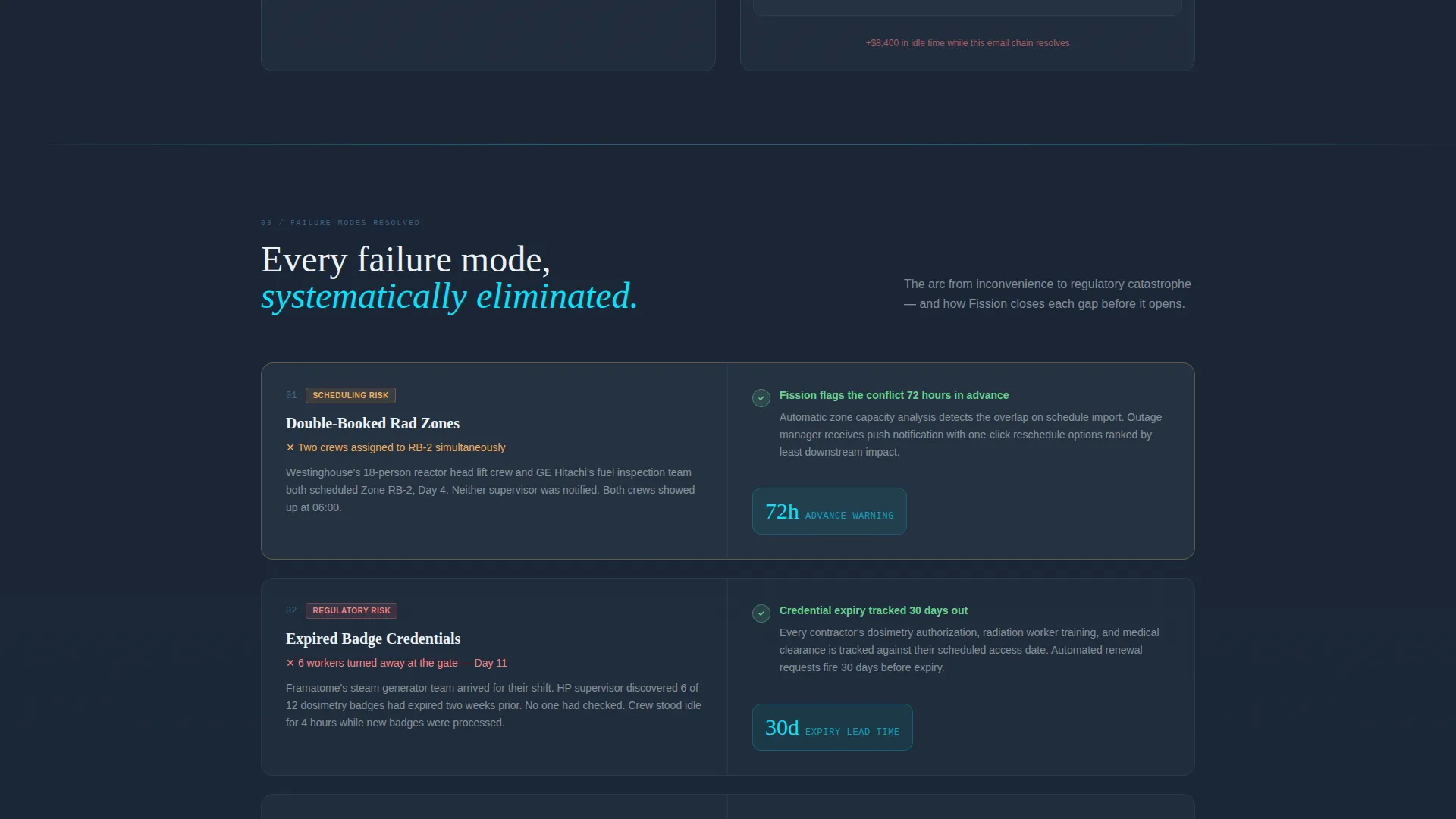
- Double-booked radiation zones, expired badge credentials, and missed regulatory hold points all appear as solved scenarios inside the page flow
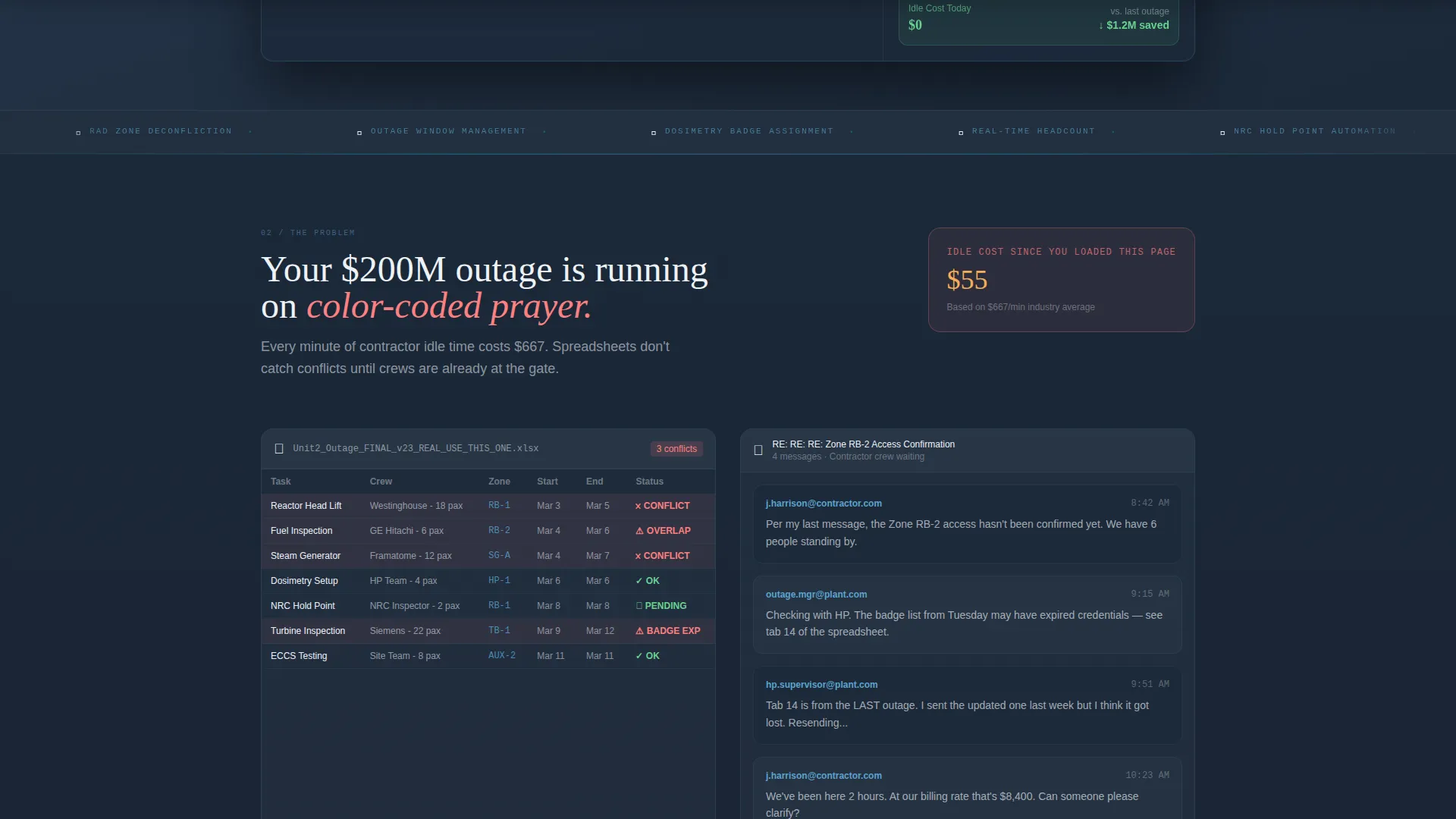
- A cost-of-delay counter running at $667 per minute makes the financial risk of the status quo impossible to ignore
- The page earns the click by letting the product demonstrate itself before asking for any commitment
What you get with this template
You get a fully structured landing page that mirrors the visual language and narrative logic of a nuclear control room. Every layout decision serves the Product-to-Solution arc described in the brief.
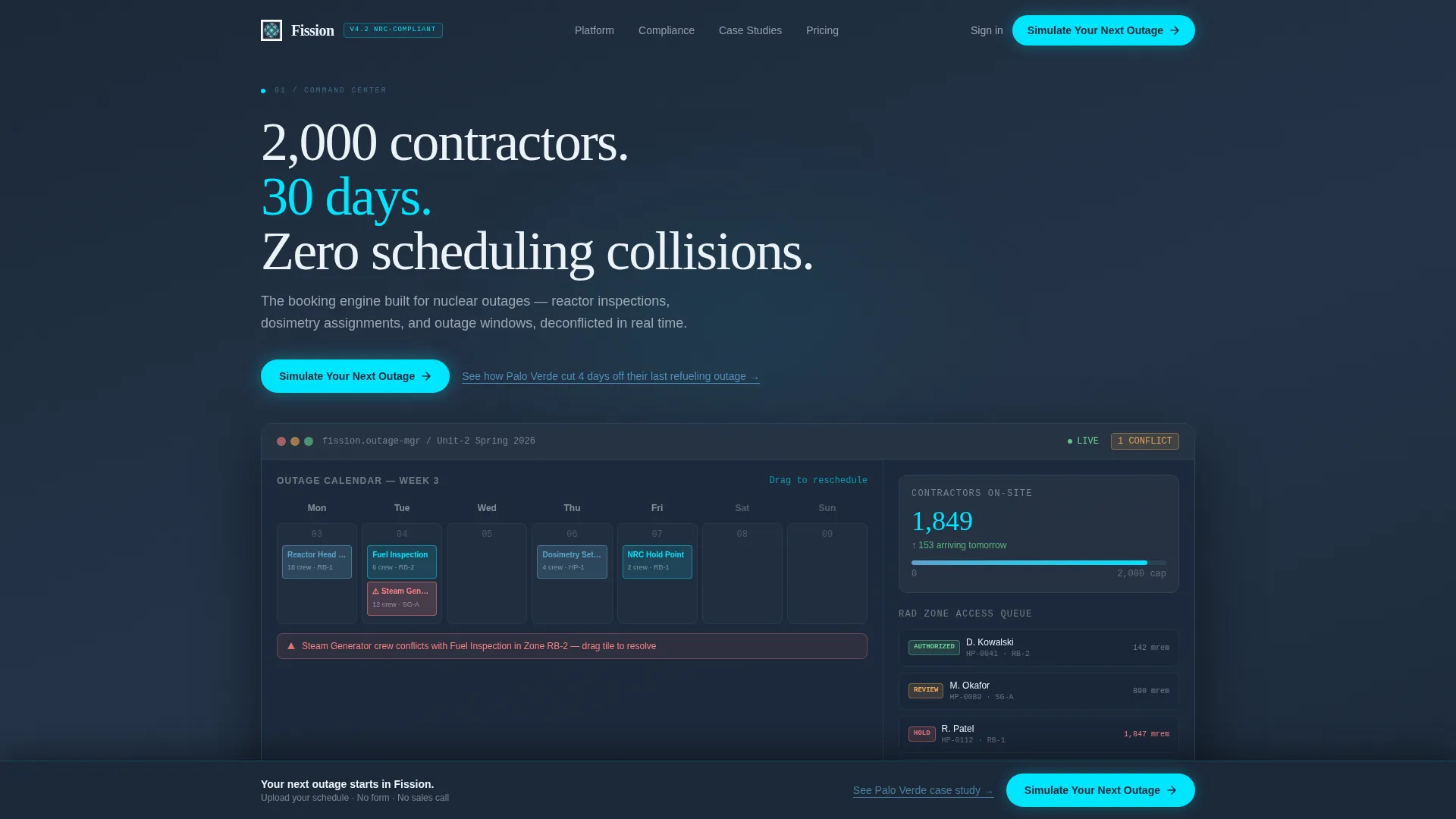
- An interactive header micro-dashboard with a simulated outage calendar, live contractor headcount tickers, and a radiation zone access queue showing green, amber, and red authorization badges
- A scrolling Problem-to-Solution arc that recreates spreadsheet failure artifacts and resolves each one inside the Fission interface
- A sticky bottom call-to-action bar that activates after the third scroll section, plus a secondary case study text link for visitors not yet ready to interact
Feature list
This template delivers a specific set of layout components and interactive behaviors grounded in the source brief.
Interactive Header Dashboard
The above-the-fold section embeds a functioning micro-dashboard. Visitors see a simulated outage calendar with drag-to-reschedule booking tiles. A resource conflict indicator resolves in real time when a tile is moved. Contractor headcounts tick upward as a live data accent.
Radiation Zone Access Queue
The header dashboard includes a visual access queue showing authorization badge states in green, amber, and red. This component communicates the core product capability, rad-worker access control, before any scroll occurs.
Problem-to-Solution Scroll Arc
Each scroll section begins in a documented pain state and ends with a resolved view inside the Fission interface. Specific failure modes covered include double-booked radiation zones, expired badge credentials caught at the gate, and missed Nuclear Regulatory Commission hold points.
Cost-of-Delay Counter
A live-style counter ticks upward at $667 per minute inside the spreadsheet nightmare section. It converts an abstract scheduling risk into a specific, visible financial consequence that resonates with outage managers and plant controllers.
Compliance Dashboard Section
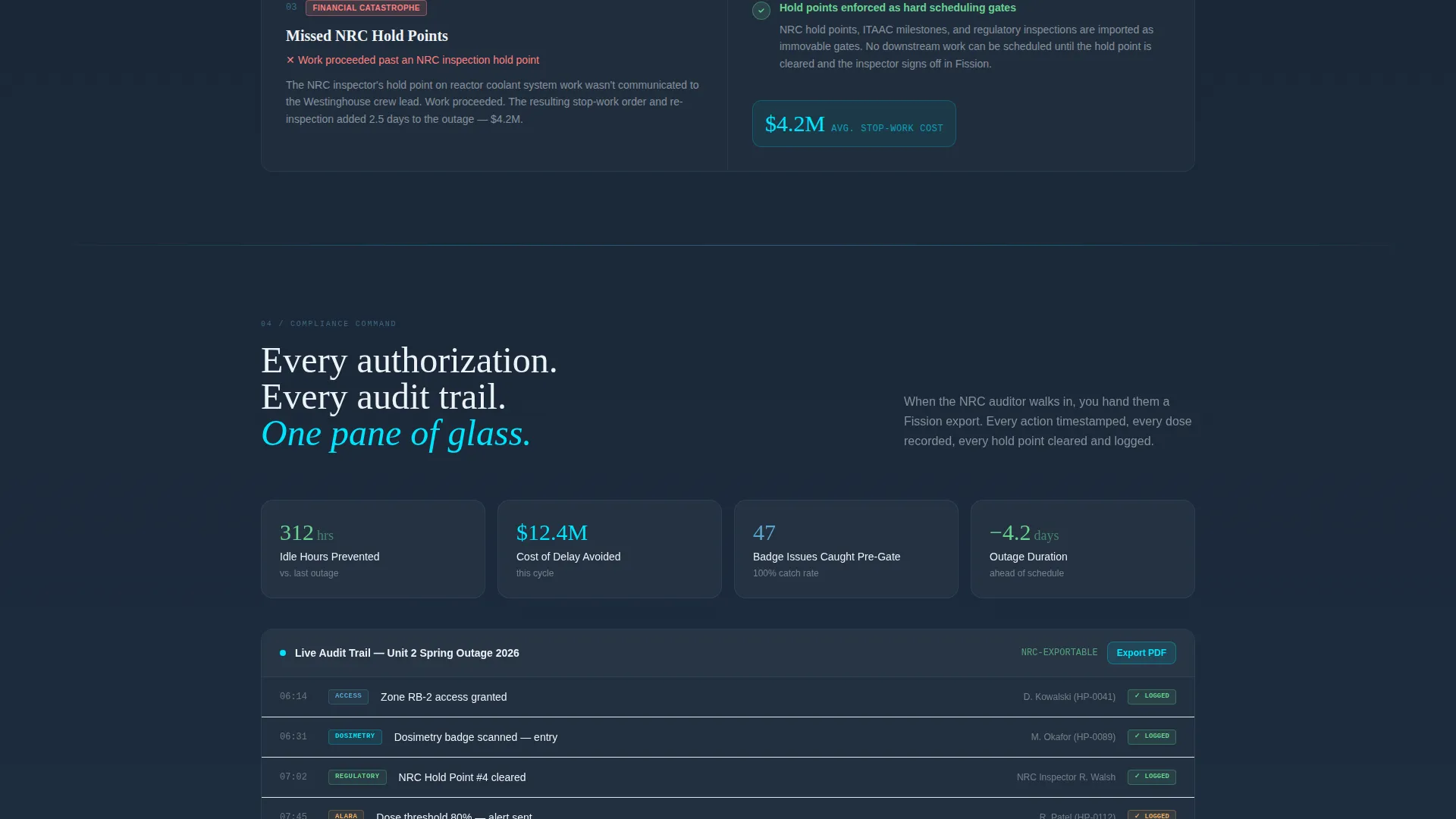
The arc lands on a compliance pane showing every audit trail, every access authorization, and a summary of financial savings, all in one view. This section closes the narrative and validates the product's regulatory value proposition.
Sticky Call-to-Action Bar
After the third scroll section, a sticky bottom bar persists with the primary call to action in critical-path cyan against deep slate. It keeps the conversion path visible without interrupting the scroll experience.
Page sections overview
| Section | Purpose |
|---|---|
| Interactive Header Dashboard | Demonstrates the product live above the fold with drag-and-drop scheduling |
| Headline Fade-In | Anchors the value proposition over the active dashboard |
| Spreadsheet Nightmare | Recreates real outage scheduling pain with a live cost-of-delay counter |
| Double-Booked Zones | Shows the rad zone conflict resolved inside the Fission interface |
| Expired Badge Credentials | Illustrates badge expiry caught at the gate versus missed in a spreadsheet |
| NRC Hold Point Failure | Presents a missed regulatory hold point and its resolution |
| Compliance Dashboard | Displays the full audit trail, authorizations, and savings summary |
| Sticky call to action Bar | Persists the primary conversion action after the third scroll section |
| Secondary Case Study Link | Offers a softer exit path for visitors not yet ready to interact |
Design & branding system
The visual identity uses a Tech Glass theme built on the Slate and Sky color system. The palette evokes a clean-room environment viewed through leaded glass, cool, controlled, and purposefully calm.
- Core background tones sit in the slate range: deep reactor-hall slate (#1B2838) and instrument-panel charcoal (#2D3A4A) provide the structural layer
- Data cards float on dosimeter-white (#EDF2F7) for typographic contrast, while clearance-sky blue (#5BA4CF) carries interactive and informational elements
- Critical-path cyan (#00E5FF) is used sparingly as a live data accent and hover state, functioning the way a single blinking annunciator draws the eye across an otherwise steady board
Mobile & speed optimization
The template layout is structured to maintain visual hierarchy and dashboard legibility across device sizes. Interactive components are designed to remain usable on smaller screens without losing the control-room clarity of the desktop experience.
- The micro-dashboard header scales proportionally, keeping the outage calendar and authorization queue readable on mobile viewports
- The sticky call-to-action bar is positioned to remain accessible on touch devices without obscuring critical content
- Section transitions and live data accents are kept lightweight so the interactive feel does not compromise load responsiveness
How this template helps you convert
Every design and content decision on this page is built to move an outage manager or plant scheduler toward the primary call to action before they have to trust a sales pitch.
- The interactive header lets visitors drag a booking tile and watch a conflict resolve in real time, making the product's core value tangible before a single word of copy is read
- The Problem-to-Solution arc escalates from everyday inconvenience to regulatory risk to financial catastrophe, so the visitor arrives at the compliance dashboard section already convinced the status quo is unsustainable
- The "Simulate Your Next Outage" call to action routes to a self-serve sandbox where visitors upload their own schedule and see results, removing the psychological barrier of a sales conversation entirely
Other information about this template
This template is part of a broader family of vertical SaaS landing page templates designed for high-stakes industrial and regulated-industry software. It is built under the Tech Glass theme using the Slate and Sky color system, consistent with the dashboard and data grid template style category.
- The template style is classified as Dashboard and Data Grid, making it suitable for any nuclear vertical SaaS product that needs to communicate situational awareness at a glance
- The creative direction follows the Problem-to-Solution Arc structure, a narrative format well suited to buyers who need to justify a six-figure software purchase to plant leadership
- The lp-direction is optimized for Click-Through to a self-serve sandbox, meaning no lead capture form appears on the page itself
- This template can support products positioned in the nuclear booking system niche, including outage scheduling, reactor inspection coordination, and dosimetry badge management workflows
Theme
Tech Glass
Creative direction
Problem→Solution Arc
Color system
Slate & Sky
Style
Dashboard/Data Grid
Direction
Click-Through
Page Sections
Interactive Micro-dashboard Header
Radiation Zone Access Queue
Problem-to-solution Scroll Arc
Live Cost-of-delay Counter
Compliance Dashboard Close
Sticky Conversion Bar
Related questions
Does this template include the interactive dashboard as a working component?
Is there a lead capture form on this landing page?
Who is this template built for?
What creative direction does this template follow?
Can the color system be customized for a different brand?



