Fitness & Gym Software Advanced Cost Calculator Website Template
Reps is a fitness and gym order management landing page template built for boutique gym owners, franchise operators, and personal trainers. It features a live cost-savings calculator, an animated comparison table with Free, Pro, and Franchise tiers, and interactive explorables like a drag-to-reorder supplier list and a clickable sample purchase order. The design uses a Slate and Sky color system with a Dynamic Motion theme.
by Rocket studio
Quick summary
Reps is a single-page template for a fitness and gym order management platform. It opens with a working cost-savings calculator, flows into an animated tier comparison table, and closes the loop with a "See It With Your Numbers" secondary call to action. Every section invites interaction before it asks for commitment.
Who this template is for
This template is built for fitness and gym software products that serve operations-heavy buyers. If your platform handles equipment ordering, supplement restocking, or membership kit logistics, this layout matches your audience precisely.
- Boutique gym owners managing multiple supplier spreadsheets at once
- Franchise operations managers rolling out equipment across many locations on a deadline
- Personal trainers who bulk-order resistance gear and need to protect their margins
What problem this template solves
Gym and fitness business operators lose time and money when orders, suppliers, and inventory live in disconnected spreadsheets. They need a single place to see everything. This template makes that value proposition feel immediate and credible before a visitor even scrolls past the header.
- Duplicate shipments and wasted spend are hard to quantify without a live tool
- Visitors cannot self-identify which tier fits them without a visual comparison
- Conventional landing pages ask for commitment before demonstrating value
What you get with this template
You get a fully structured, interaction-led landing page designed around a Freemium and Trial conversion flow. The layout guides visitors from curiosity to action through progressive disclosure and real-time feedback.
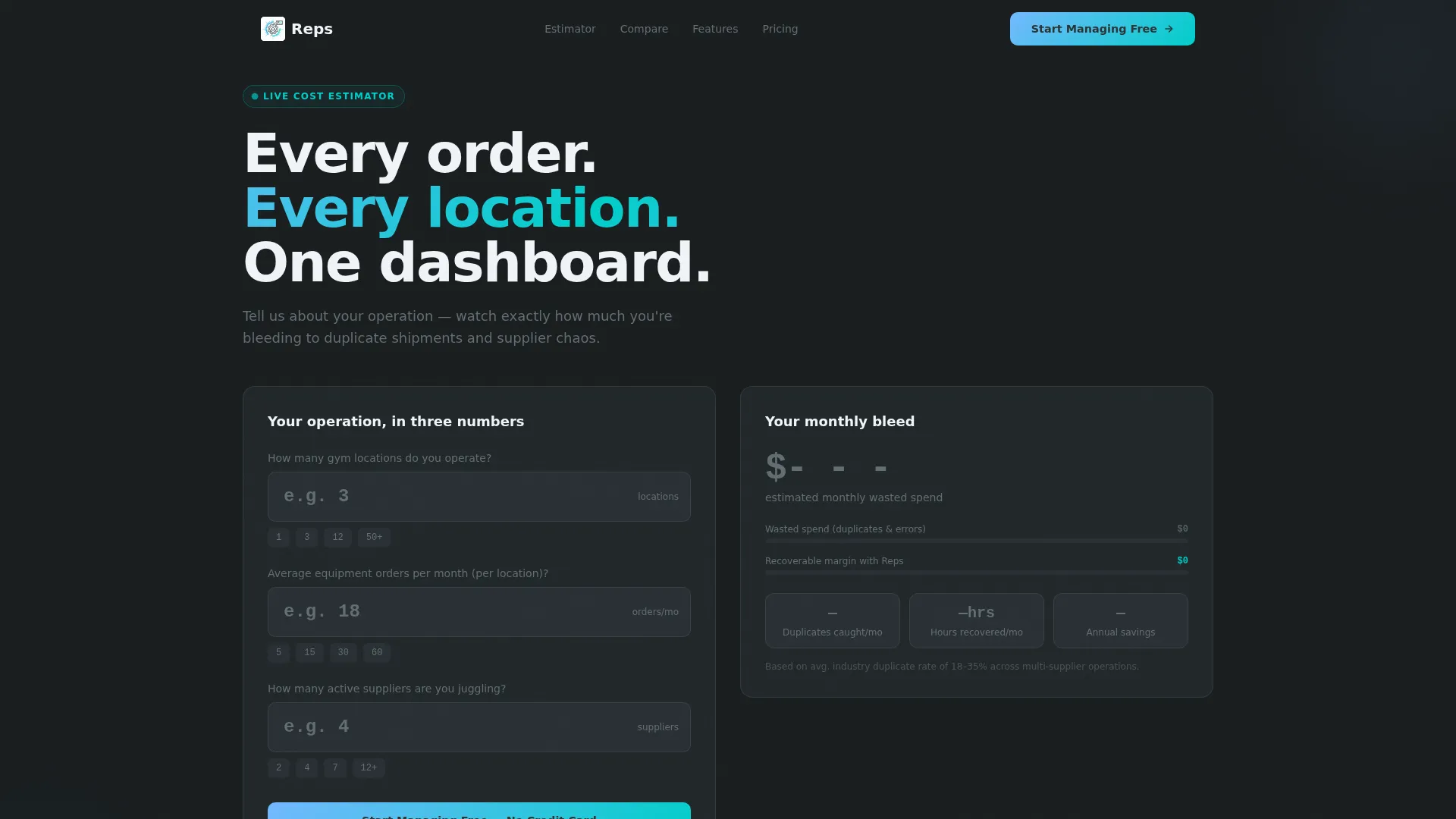
- A header calculator that estimates cost savings based on locations, order volume, and supplier count
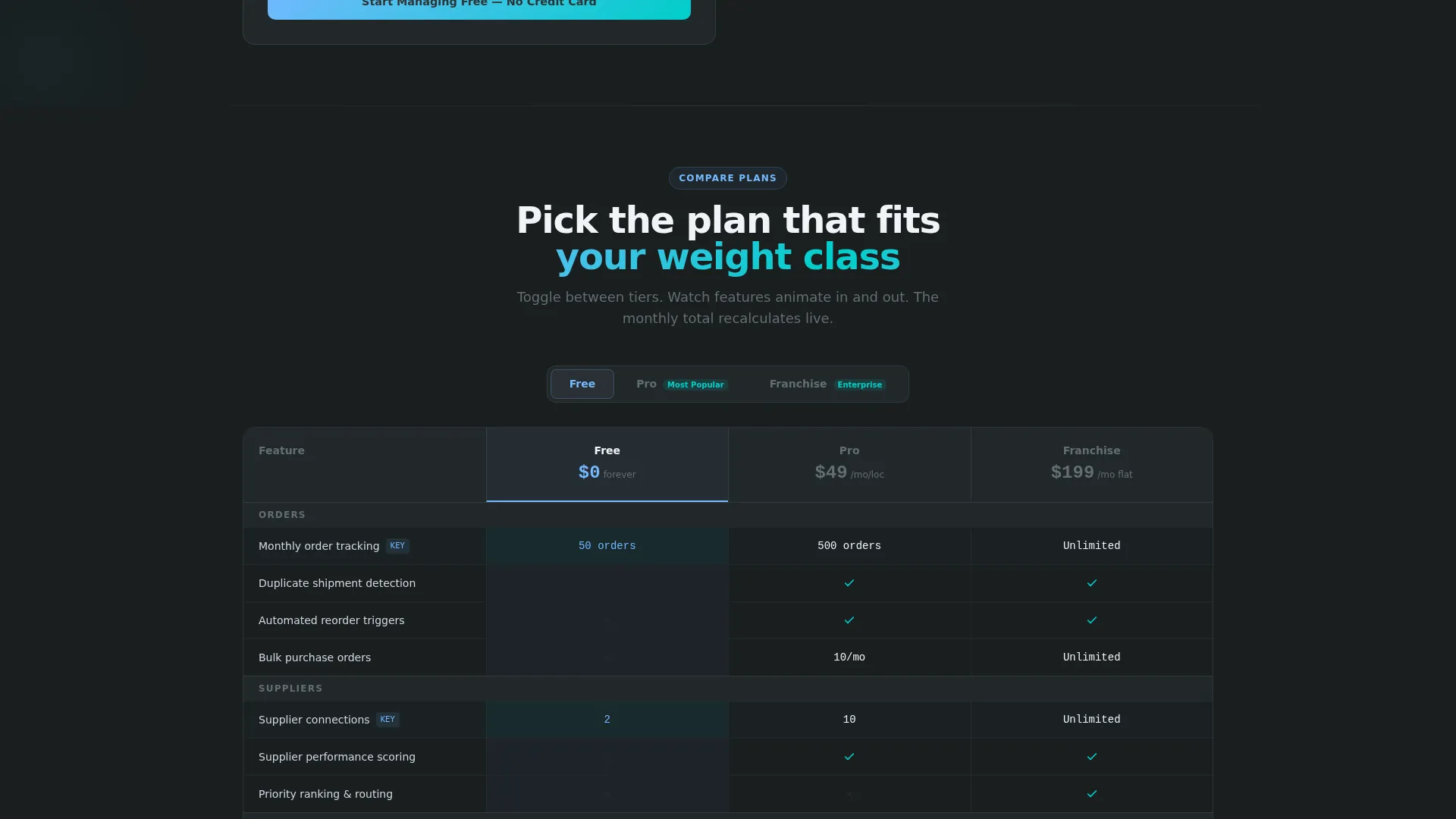
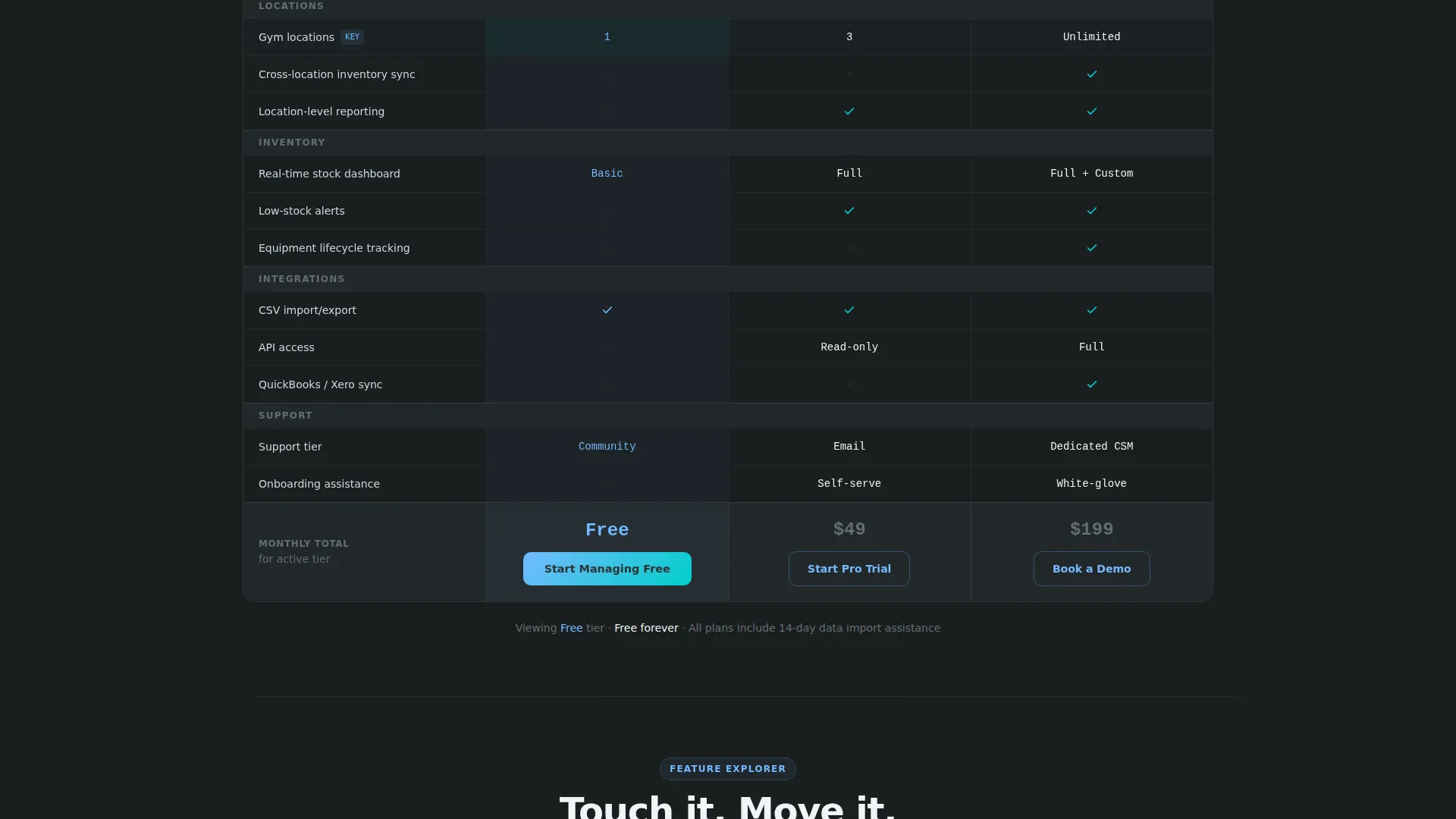
- An animated three-tier comparison table with toggling feature rows and a live monthly total
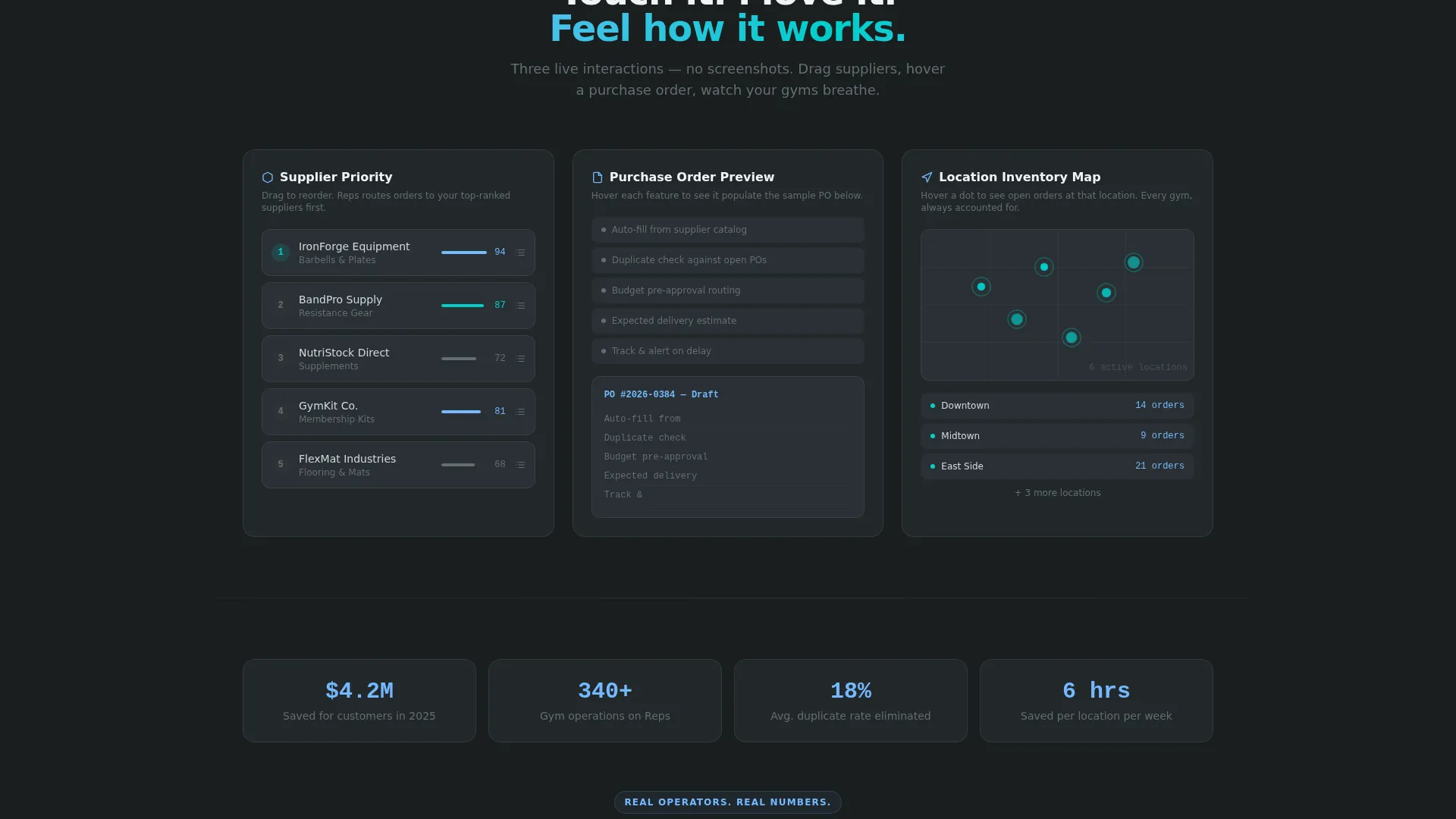
- Interactive explorables including a drag-to-reorder supplier list, a hoverable sample purchase order, and a pulsing mini inventory map
Feature list
This template ships with a set of purpose-built interactive components. Each one is designed to reduce hesitation and build confidence in the platform before signup.
Live Cost-Savings Calculator
The header tool asks three inline questions: number of locations, average monthly equipment orders, and current supplier count. As visitors type, an animated estimate builds on the right side of the screen. Wasted spend shrinks in slate tones while recovered margin grows in electric cyan, making the value case visual and personal.
Animated Tier Comparison Table
Visitors toggle between Free, Pro, and Franchise tiers. Feature rows animate in and out, quantities shift, and a running monthly total recalculates at the table footer. The primary call to action "Start Managing Free" is pinned inside the Free column for constant visibility.
Drag-to-Reorder Supplier Priority List
A tactile interactive section lets visitors drag suppliers into their preferred order. This mimics real platform behavior and gives prospects a hands-on sense of how the tool works before they commit.
Clickable Sample Purchase Order
Visitors hover over features in the comparison table and watch a sample purchase order populate in real time. It connects feature names to concrete workflow outcomes without requiring a demo call.
Pulsing Mini Inventory Map
A visual map shows dots pulsing at fictional gym locations. It communicates multi-location capability in a glanceable format without requiring any real data from the visitor.
Progressive Signup Form
The first click asks only for email and gym name. After account creation, the form expands to collect number of locations and primary supplier. This two-step approach lowers the barrier to entry for Freemium conversion.
Page sections overview
| Section | Purpose |
|---|---|
| Header Calculator | Estimate cost savings from supplier consolidation |
| Tier Comparison Table | Compare Free, Pro, and Franchise feature sets |
| Supplier Priority List | Drag-to-reorder interaction demonstrating platform feel |
| Sample Purchase Order | Hoverable order that populates as features are explored |
| Mini Inventory Map | Pulsing map showing multi-location order tracking |
| Floating call to action Button | Persistent "Start Managing Free" trigger after the estimator |
| Progressive Signup Form | Two-step email and gym name form expanding post-signup |
| Secondary call to action Loop | "See It With Your Numbers" path looping back to calculator |
Design & branding system
The visual identity follows a Dynamic Motion theme built on a Slate and Sky color system. The palette is inspired by an early-morning outdoor bootcamp, where iron-gray ground sits beneath a wide, brightening sky.
- Base tones: gym-floor charcoal (#2D3436) and rubber-mat dark slate (#636E72) anchor data-heavy table rows and keep content readable
- Accent tones: open-air blue (#74B9FF) draws the eye to key columns, and high-rep electric cyan (#00CEC9) is reserved for hover states, toggle switches, and active table-row highlights
- No stock photography or hero illustrations are used; the calculator tool serves as the hero element, and motion is the primary visual language throughout
Mobile & speed optimization
The template is structured to keep interactions accessible on smaller screens without sacrificing the motion-led experience. Tap targets and toggle controls are sized for touch use.
- The header calculator stacks vertically on mobile, placing the animated savings estimate below the input fields for a clear read
- Comparison table columns are swipeable on touch devices so visitors can move between tiers without zooming
- Interactive elements like the supplier list and inventory map are designed to respond to touch as naturally as they respond to a trackpad
How this template helps you convert
The conversion architecture treats exploration as a warm-up. Each interaction builds familiarity and reduces the perceived risk of signing up.
- The header calculator makes the value proposition personal before any pitch copy appears, so visitors arrive at the comparison table already primed with a number they recognize as their own potential savings.
- The "Start Managing Free" call to action is visible inside the comparison table at all times, catching visitors at peak intent right after they see the feature delta between tiers.
- The "See It With Your Numbers" secondary path re-uses data the visitor already entered, so the final click to sign up feels like a natural continuation rather than a cold decision.
Other information about this template
This template is designed specifically for the fitness and gym software category. It suits platforms in the gym order management and fitness operations space where multiple buyer types need to self-qualify through the same page.
- The template style is a Comparison Table layout, making it well suited for platforms offering tiered pricing or feature-gated plans
- The creative direction is Interactive Explorer, meaning the page rewards engagement and keeps visitors on screen longer through progressive interactivity
- The header concept is a Calculator and Estimator, a proven format for software-as-a-service products where the value proposition depends on a buyer's specific numbers
- The Freemium and Trial landing-page direction is reflected in every call-to-action placement, from the pinned Free column button to the progressive signup form
- The Dynamic Motion theme and Slate and Sky color system are defined in the template and can be adapted to match an existing brand identity
Theme
Dynamic Motion
Creative direction
Interactive Explorer
Color system
Slate & Sky
Style
Comparison Table
Direction
Freemium/Trial
Page Sections
Live Cost-savings Calculator Hero
Animated Tier Comparison Table
Drag-to-reorder Supplier List
Hoverable Sample Purchase Order
Pulsing Mini Inventory Map
Progressive Two-step Signup Form
Related questions
Who is this landing page template designed for?
Can I change the tier names in the comparison table?
Does the cost-savings calculator use real data?
What does the progressive signup form collect?
Is this template suitable for a single-product fitness platform?



