Flavor — Smart Restaurant Ops Landing Page Template
Pulse is a split-screen landing page template built for food and beverage review management platforms. It pairs a live Calculator/Estimator header with scrolling Spec Sheet feature cards, all wrapped in a Glassmorphic Dashboard Pro visual system. The design pulls visitors in with their own restaurant data, then builds the ROI case one metric at a time before pushing them into a free trial.
by Rocket studio
Quick summary
Pulse is a single-page, click-through landing page template designed for restaurant review management software. The 50/50 split-screen layout opens with a live estimator that shows visitors their own reputation data. Frosted-glass spec cards carry the scroll, each one pairing a sharp metric with a feature interface to build a compelling case by the final call to action.
Who this template is for
This template is built for software and platform teams serving the restaurant industry. It speaks directly to the pain points of high-volume review management, making it a natural fit for products with a clear free trial funnel.
- Multi-location franchise operators managing hundreds of reviews weekly
- Independent restaurant owners who monitor feedback around the clock
- Regional food hall managers overseeing multiple vendor reputations at once
What problem this template solves
Restaurant operators are buried in fragmented feedback spread across multiple review platforms. Checking each source manually wastes time and lets negative sentiment go unanswered for hours. This template gives a software product the right first impression: fast, data-led, and built for people who need answers at a glance.
- No single place to see all review activity across platforms in real time
- Response delays that stretch well past a practical window for damage control
- Difficulty proving platform value to prospects before asking for a sign-up
What you get with this template
The template delivers a fully structured, single-page layout with every section purpose-built for conversion. The design leans on the visitor's own restaurant data as the primary hero element, removing the need for stock photography or illustration.
- A working Calculator/Estimator header that populates a live frosted-glass dashboard mockup using the visitor's input
- Scrolling Spec Sheet feature cards that pair single metrics with feature interface mockups
- A sticky frosted-glass call-to-action bar and a primary "See Your Reviews Live" button that carries the entered URL to the next screen
Feature list
This template is built around a small number of high-impact components. Each one serves a specific role in the conversion flow.
Live Reputation Estimator Header
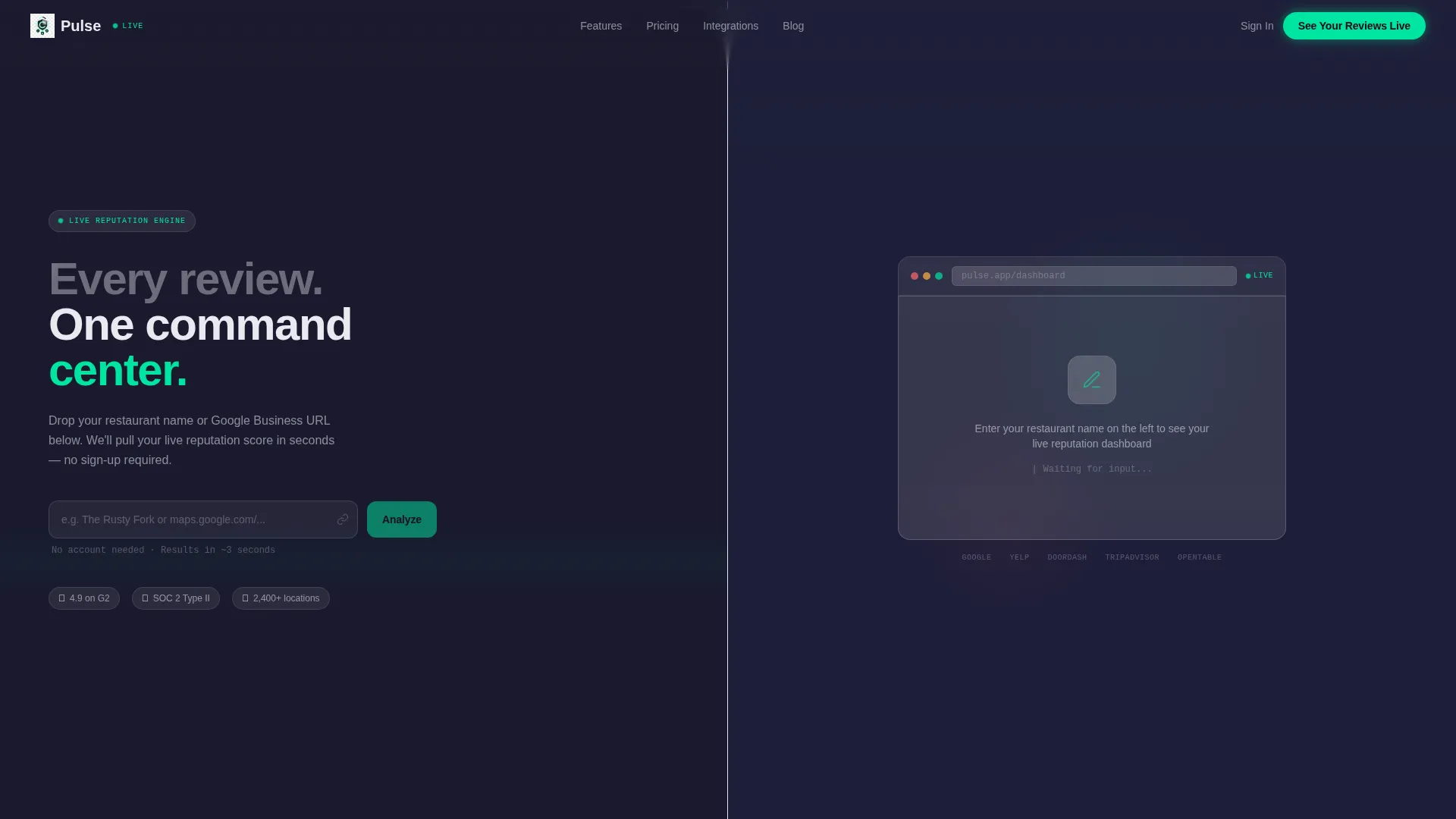
The left panel accepts a restaurant name or Google Business URL. The right panel instantly renders a frosted-glass dashboard mockup showing the visitor's real star average, estimated monthly review volume, and a projected reputation score displayed as a radial gauge with an electric mint sweep. The visitor's own data becomes the hero image within seconds of landing.
Spec Sheet Scroll Sections
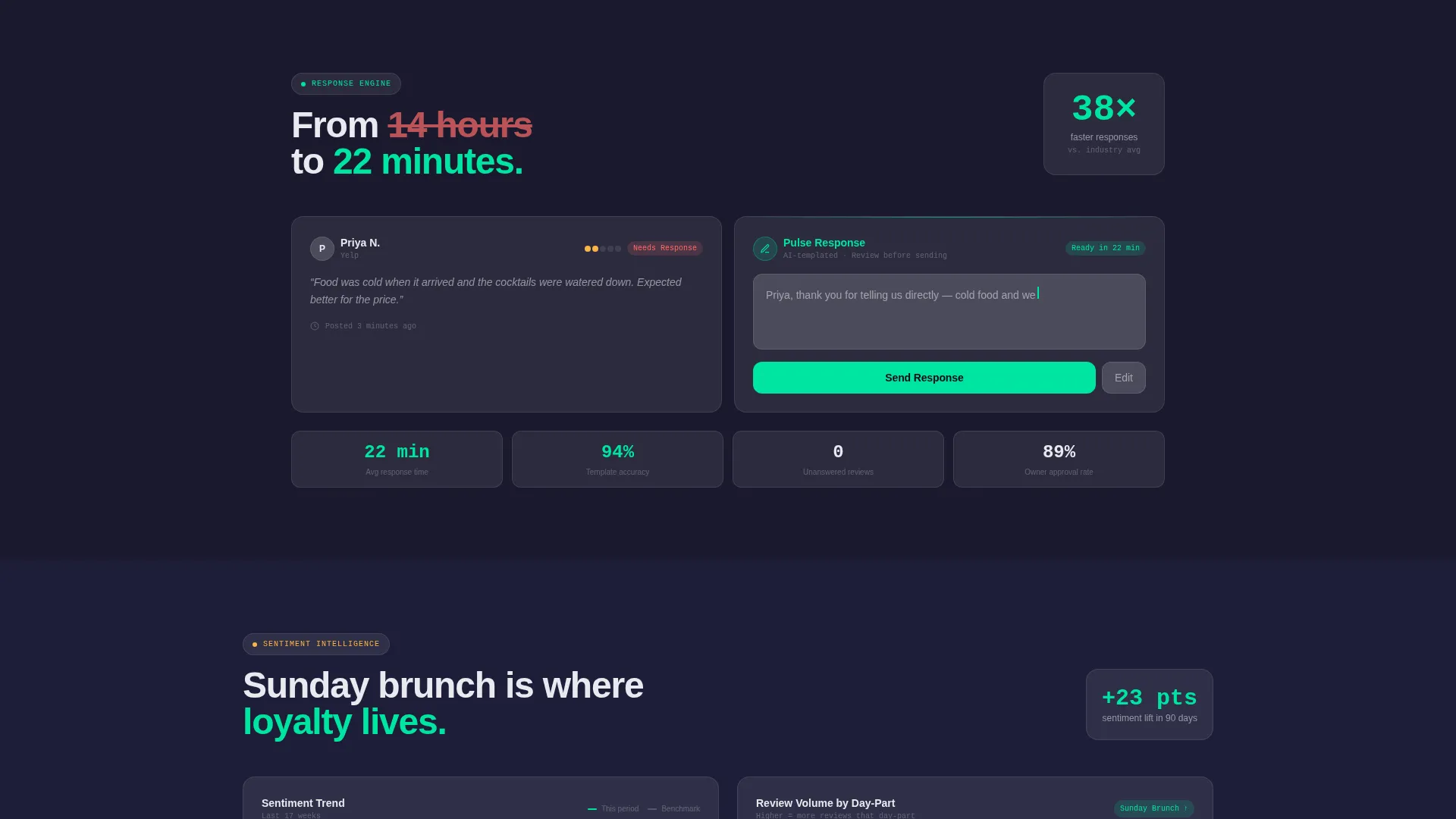
Each scroll section is a frosted card that isolates one platform capability. The left side shows a single, specific metric such as response time dropping from 14 hours to 22 minutes. The right side displays the matching feature interface. As the visitor scrolls, the numbers compound and the ROI argument builds itself naturally.
Sticky Click-Through Call to Action
The primary call to action reads "See Your Reviews Live" and appears first inside the estimator after results render. A sticky frosted-glass bar then carries this button throughout the scroll. No form fields appear on this page. The click passes the already-entered restaurant URL to the next screen, reducing sign-up friction to a single email-and-password step.
Sentiment and Trend Visuals
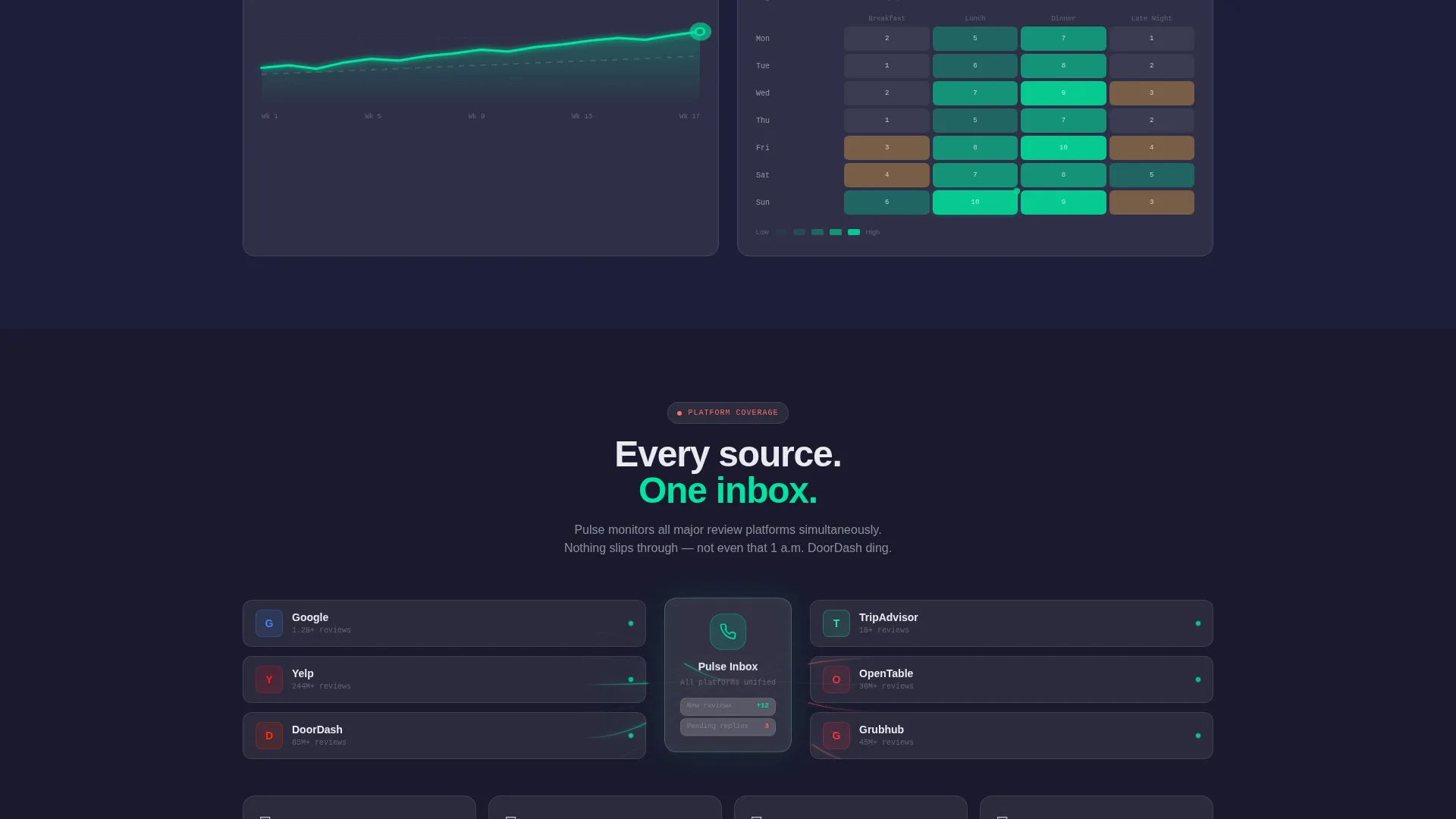
The template includes interface mockups showing upward-bending sentiment trend lines and review volume clusters broken down by day-part. These visuals reinforce the platform's analytical depth without requiring the visitor to sign up before seeing value.
Dashboard Pro Glassmorphic user interface System
The visual system uses a deep charcoal substrate, frosted translucent card overlays, electric mint for positive sentiment indicators, and warm coral for alerts and negative flags. The layered aesthetic creates a sense of real-time situational awareness that matches the product's positioning.
Page sections overview
| Section | Purpose |
|---|---|
| Estimator Header | Renders live reputation data from visitor input |
| Star Rating Display | Shows real average pulled from entered URL |
| Monthly Volume Estimate | Gives context on review load and scale |
| Reputation Score Gauge | Visualizes projected score as a radial meter |
| Response Time Card | Highlights speed improvement from 14 hours to 22 minutes |
| Sentiment Trend Card | Shows upward-bending sentiment line mockup |
| Day-Part Volume Card | Clusters review activity by time of day |
| Sticky call to action Bar | Keeps "See Your Reviews Live" accessible on scroll |
Design & branding system
The visual identity follows a Dashboard Pro theme expressed through a Glassmorphic color system. The result feels like looking through a rain-streaked restaurant window at night, where shapes stack with luminous edges and neon bleeds softly across every surface.
- Deep charcoal substrate (#1A1A2E) as the base, frosted card white (#FFFFFF at 12% opacity) for layered glass cards, electric mint (#00E5A0) for positive indicators, and warm coral (#FF6B6B) for alerts
- No stock photography or illustration; the visitor's own live data serves as the hero visual
- 50/50 split-screen layout maintained across the header and each Spec Sheet scroll card
Mobile & speed optimization
The template is structured for clean rendering across screen sizes, with the split-screen layout adapting to narrower viewports. The Glassmorphic card system is designed to stay legible and layered even at smaller sizes.
- Frosted-glass cards stack vertically on mobile without losing the layered visual depth
- The sticky call-to-action bar remains accessible throughout the scroll on all device sizes
- The estimator interaction is designed to feel fast and responsive, with results rendering within seconds of input
How this template helps you convert
The conversion logic is built into the page structure itself. Every design and copy decision points toward one outcome: getting the visitor to click "See Your Reviews Live."
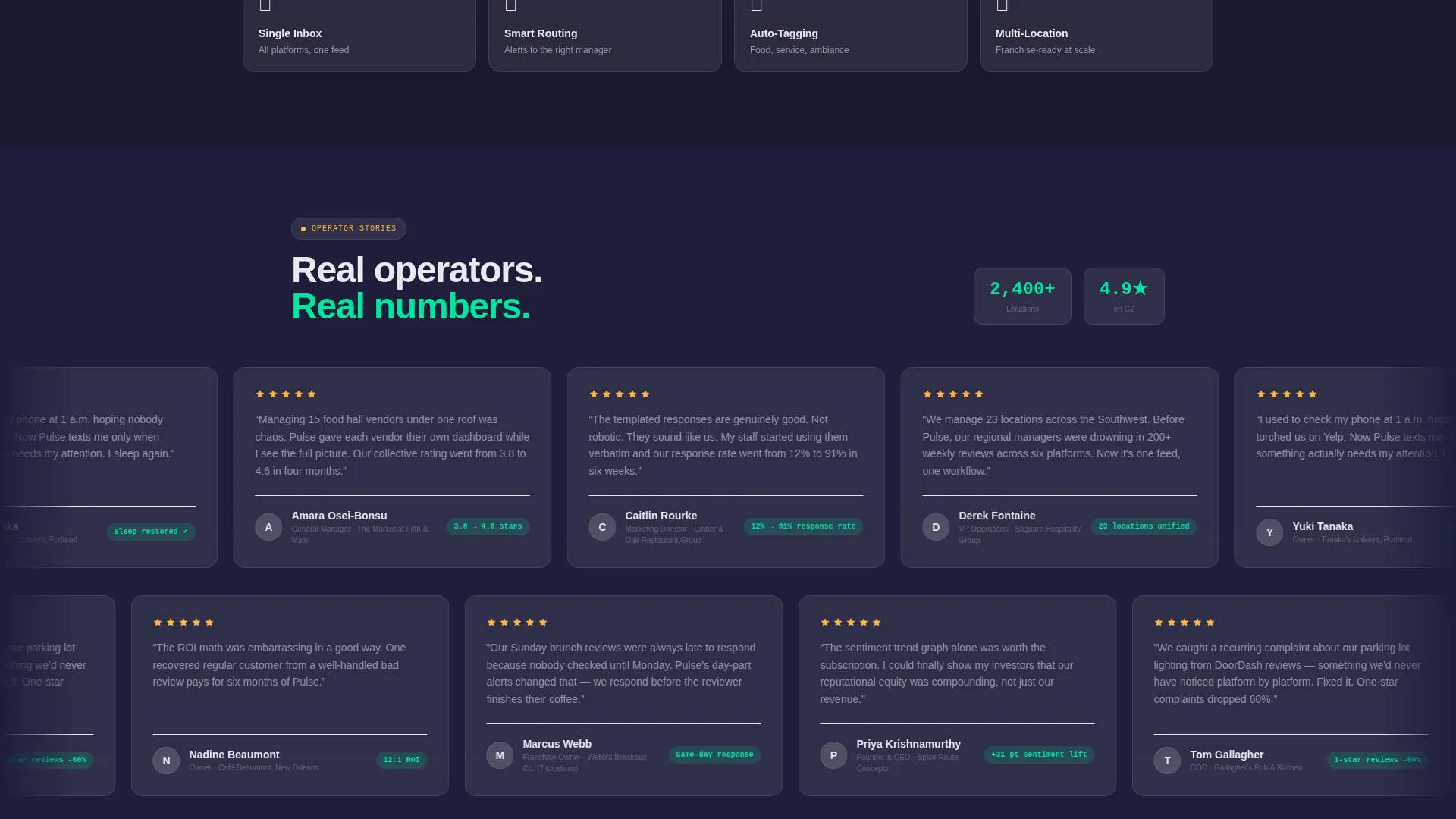
- The estimator shows the visitor their own reputation data before asking for anything, establishing trust through personal relevance rather than marketing claims.
- Each Spec Sheet card adds a new metric to a compounding ROI argument, so by the final scroll position the case for signing up has already been made.
- The no-form-on-page approach and URL-carry mechanic reduce the sign-up barrier to a single step on the next screen, keeping drop-off low at the critical handoff moment.
Other information about this template
This template is categorized under Technology, specifically within the Food and Beverage Software and Software as a Service (SaaS) subcategory, with a niche focus on food and beverage review management. It is built as a click-through landing page, meaning its sole job is to move a qualified visitor to the next step rather than complete a transaction on the page itself.
- The template style is Split Screen (50/50), making it well-suited to side-by-side input-and-output interactions like the live estimator
- The creative direction follows a Spec Sheet cadence, a format that suits technical or data-driven products where proof points matter more than lifestyle imagery
- The header concept is a Calculator/Estimator, a high-engagement format that personalizes the experience without requiring a login or account
Theme
Dashboard Pro
Creative direction
Spec Sheet
Color system
Glassmorphic
Style
Split Screen (50/50)
Direction
Click-Through
Page Sections
Live Reputation Estimator Header
Spec Sheet Scroll Cards
Sticky Click-through Call to Action Bar
Sentiment and Day-part Visuals
Dashboard Pro Glassmorphic User Interface
Related questions
What kind of product is this template designed for?
Do I need custom photography or hero images for this template?
How does the estimator header work in this template?
Can the call to action pass data to the sign-up page?
Who are the target users this template is designed to speak to?



