Agency Vehicle Tracking Dashboard Landing Page Template
Fleet is a dark-themed, dashboard-style landing page built for marketing agencies that manage branded vehicles across activations, mobile billboards, and client deliveries. It leads with a live animated city map, stat-first scroll sections, and a direct app download call to action. Operations managers get real time visibility into every vehicle, route, and maintenance alert from a single screen.
by Rocket studio
Quick summary
Fleet is a single-page, mission-control landing page template built for marketing agency fleet management platforms. It opens with an interactive micro-dashboard showing live vehicle positions, then walks visitors through route intelligence, fuel tracking, and predictive maintenance sections before driving them toward an app download. The design runs on a void black and electric violet color system that feels purposeful and urgent.
Who this template is for
This dashboard template is built for B2B SaaS products targeting operations managers at mid-size marketing agencies. It suits teams running anywhere from a small fleet of ten vehicles to a large fleet of sixty branded vans across simultaneous client campaigns.
- Operations managers juggling event activations, mobile billboard routes, and client deliveries
- Agency owners and account directors who need activation accountability across all fleet vehicles
- Fleet managers replacing spreadsheets and driver texts with a centralized fleet management dashboard
What problem this template solves
Managing fleet operations across multiple simultaneous activations is chaotic without a real time command center. Dispatchers lose time on manual entry, route deviations go unnoticed, and maintenance schedules slip through cracks until a vehicle misses a critical activation. This template presents a fleet management system that replaces those blind spots with live data and automated alerts.
- Route deviations and delivery performance gaps that only surface hours after they happen
- Rising fuel costs and idle time that are invisible without fuel consumption tracking
- Maintenance costs that accumulate when service reminders are missed and vehicle condition deteriorates
What you get with this template
You get a full single-page layout structured to communicate fleet efficiency from the first scroll to the final call to action. Every section is built around a stat-first rhythm: a hard number lands first, then the dashboard module behind it expands with animated proof.
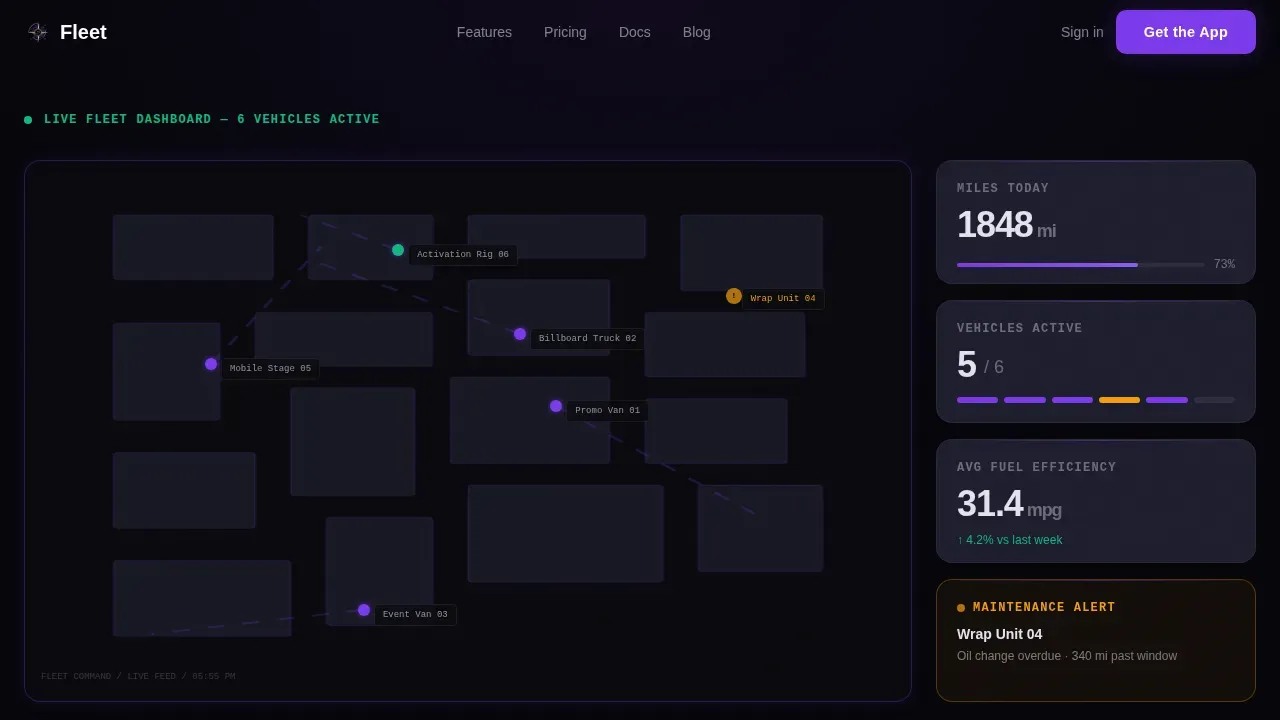
- An interactive hero with a live animated city map, hoverable vehicle dots, and live-updating counters for total miles, vehicles active, and fuel efficiency
- Four scroll sections covering route intelligence, fuel and idle tracking, predictive maintenance, and an app download call to action with App Store, Google Play, and SMS input
- A Vercel Horizontal Flow footer pattern completing the page structure
Feature list
This template includes several key features designed to communicate fleet management value clearly and drive conversions.
Animated Live Map Hero
The header embeds a functioning micro-dashboard directly in the viewport. Six branded agency vans crawl across a stylized city map in real time. Visitors can hover any vehicle to see its current route, estimated arrival time, and driver name. A pulsing amber alert on "Wrap Unit 04" and a completed-delivery notification slide-in show the fleet management system at its most credible.
Stats-First Scroll Architecture
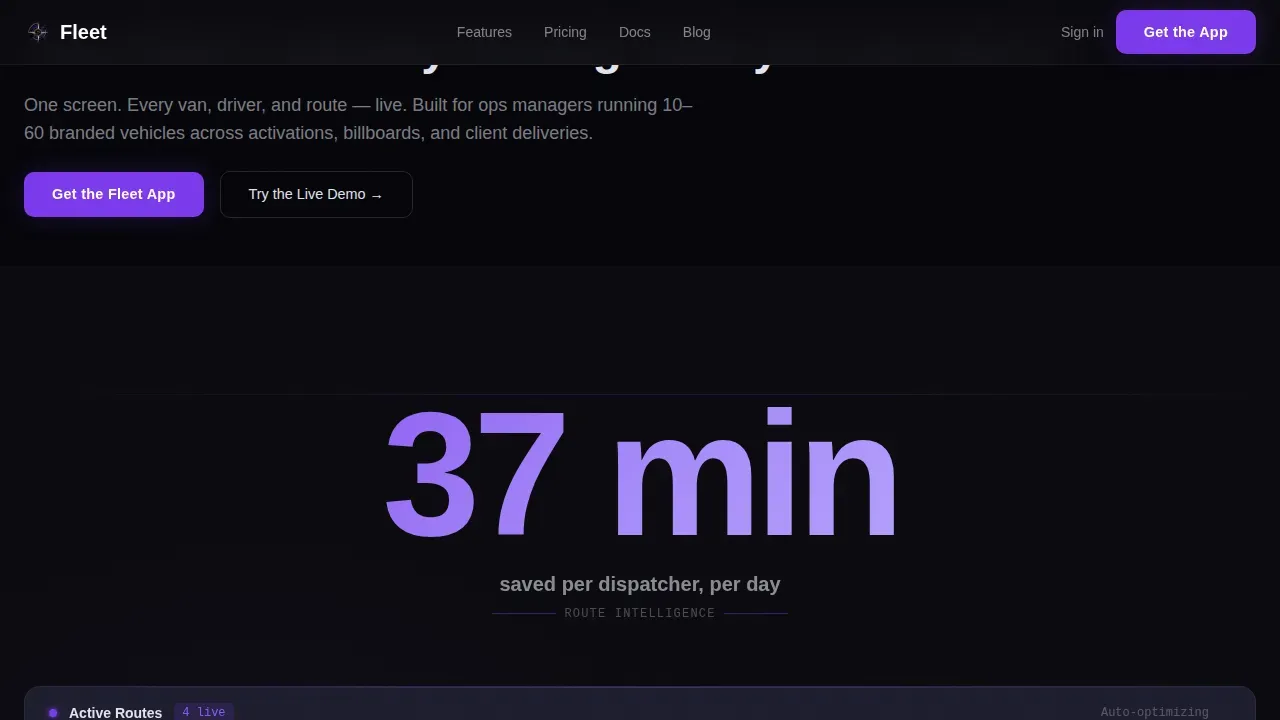
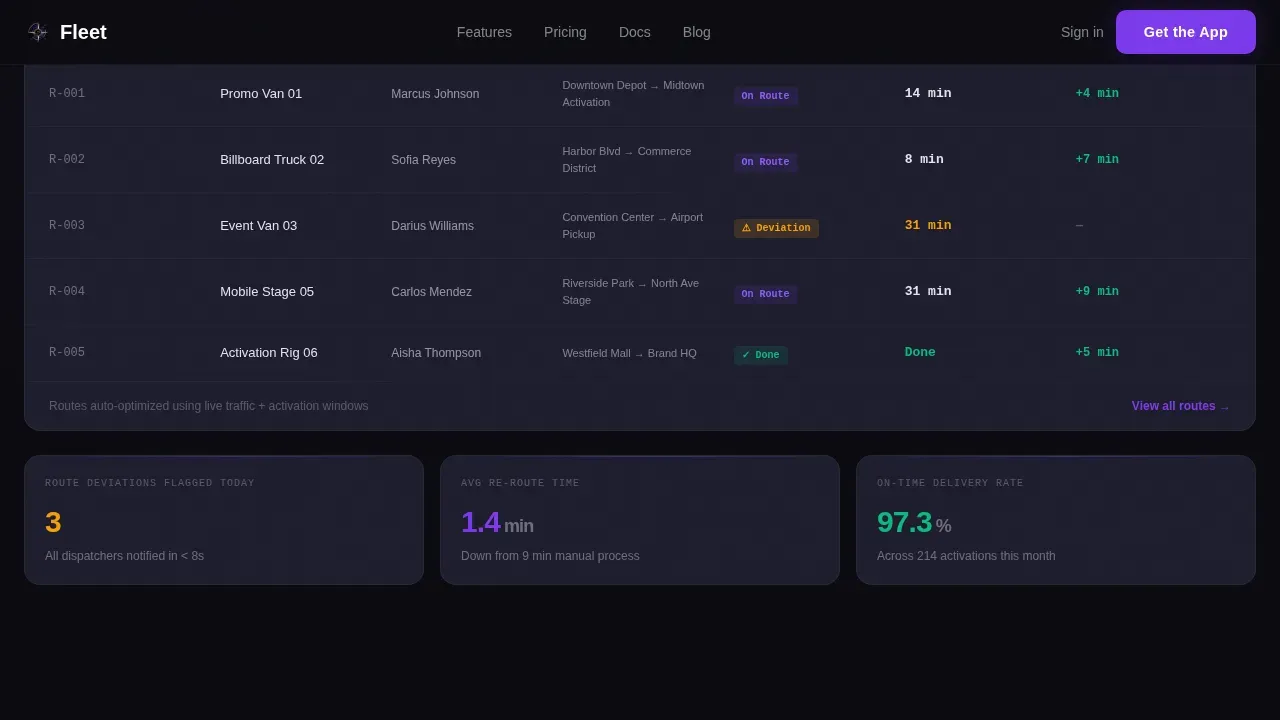
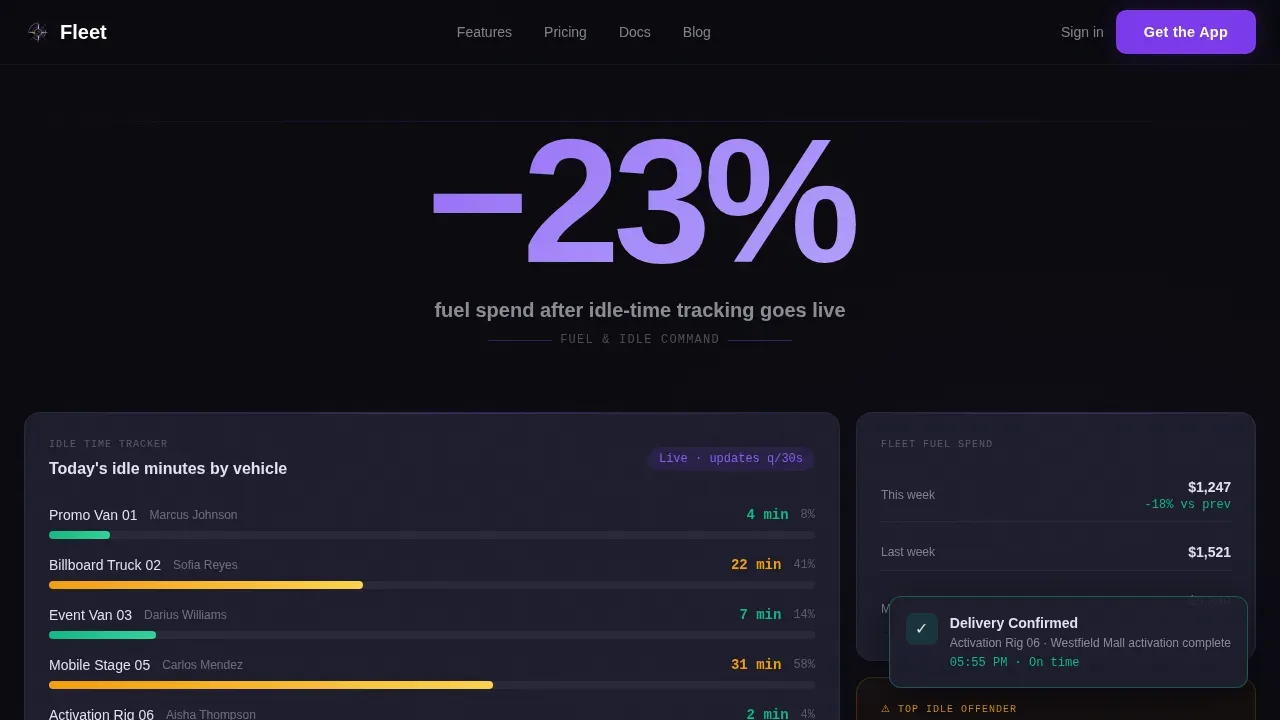
Each content section opens with a large violet numeral on void black before the supporting module builds around it. "37 minutes" saved per dispatcher per day introduces the route optimization panel. "−23% fuel spend" precedes the idle time bento grid. "$0 missed activations last quarter" unfolds the predictive maintenance calendar. This rhythm keeps decision makers engaged without filler.
Predictive Maintenance Calendar
The maintenance section visualizes service schedules, maintenance logs, and automated alerts triggered by mileage or engine diagnostics. Fleet managers can see upcoming maintenance windows before a vehicle condition issue becomes a missed activation. This directly addresses how maintenance costs and reduce downtime goals connect to real fleet health outcomes.
Fuel and Idle Time Tracking Grid
A bento-style card grid surfaces fuel consumption trends, idle time by vehicle, and fuel usage patterns across the fleet. Fuel efficiency is measured per trip and displayed alongside fuel levels and fuel costs so decision makers can identify inefficiencies and control costs without digging through separate reports.
App Download Call to Action
The conversion section leads with "Get the Fleet App" paired with App Store and Google Play badges. A single field accepts a mobile number to text the download link directly. A secondary path, "Try the Live Demo," opens the full interactive dashboard with no signup required, letting visitors experience live data before committing.
Role-Based Data Panels
The dashboard template supports role-based views that cater to dispatchers, fleet managers, and finance teams differently. Interactive widgets let each user drill down into specific vehicle status, driver behavior scores, vehicle utilization rates, and delivery performance without switching tools.
Page sections overview
| Section | Purpose |
|---|---|
| Animated hero map | Live fleet activity preview with hoverable vehicle dots and real time stats |
| Route intelligence panel | "37 minutes" stat punch leading into route optimization module |
| Fuel and idle grid | "−23% fuel spend" stat leading into idle time and fuel consumption bento cards |
| Maintenance command | "$0 missed activations" stat leading into predictive maintenance calendar |
| App download call to action | App Store, Google Play badges, SMS input field, and live demo path |
| Footer pattern | Vercel Horizontal Flow footer closing the page |
Design & branding system
The visual identity runs on a Void and Violet palette designed to read like a mission control room. Every color carries meaning: active data glows, card surfaces recede, and typography stays sharp against the dark background. Color-coded indicators guide attention to important information without overwhelming the viewer.
- Void black (#0B0B0F) primary background, graphite (#1E1E2E) card surfaces, electric violet (#7C3AED) active data points and interactive elements, platinum (#E2E2EF) for typography and axis labels
- DM Sans for headings, JetBrains Mono for data and stat numerals, Manrope for body copy
- High animation density: crawling vehicle dots, typewriter headline, stat counter reveals, pulsing maintenance alert, and notification slide-ins
Mobile & speed optimization
The template is built desktop-first to match the primary audience of operations managers working at a desk, with a mobile-responsive fallback ensuring the dashboard adapts to tablets and smartphones. Performance is kept tight so the page loads fast and the animated hero does not cause abandonment.
- CSS animations and requestAnimationFrame power the city map crawl, keeping the interactive preview smooth without heavy dependencies
- Intersection Observer triggers stat counter animations only when sections enter the viewport, reducing unnecessary processing
- Responsive grid layout adapts card-based panels across screen sizes so fleet performance data stays readable on any device
How this template helps you convert
This template earns the app download by letting visitors interact with the product before they ever see a signup form. The page is structured so every scroll deepens trust.
- The interactive map hero gives visitors a comprehensive view of live vehicle tracking before any copy explains the product, making fleet management value immediately tangible.
- Each stat-first section presents a hard, quantitative metric that proves fleet efficiency gains, then builds the supporting dashboard module around it, so informed decisions about downloading the app feel natural.
- The "Try the Live Demo" path removes signup friction entirely, letting visitors play with real data before the "Get the Fleet App" call to action appears, improving conversion for both app downloads and demo engagement.
Other information about this template
This template is built specifically for the marketing agency fleet management niche, where fleet operators face different pressures than traditional logistics companies. The stat-first creative direction and mission-control aesthetic are calibrated for this audience. Several additional details are worth noting.
- The dashboard template supports integration context for data sources such as GPS tracking, maintenance records, and driver behavior analytics, giving finance teams and operations staff a comprehensive view across time periods
- Fleet management key performance indicators (KPIs) displayed include utilization rate, average delivery time, fuel consumption, vehicle utilization, and maintenance costs, covering the relevant KPIs that help organizations identify areas for improvement and make data driven decisions
- The fleet management KPI dashboard layout places high-level KPIs at the top of each section, consistent with best practices for fleet management KPI presentation and fleet overview readability
- This is the fleet real time agency vehicle tracking dashboard landing page template designed for the Dashboard Pro theme, using the Void and Violet color system to optimize fleet management visualization
- The template suits both small fleet operations and large fleet environments, and the role-based panel structure supports access controls so different users see the data most relevant to their function
- Vehicle type filtering and vehicle tracking panels help fleet managers spot inefficiencies across specific vehicle classes, improve productivity, and improve safety by surfacing driver behavior and critical faults before they escalate
Theme
Dashboard Pro
Creative direction
Stats-First Impact
Color system
Void & Violet
Style
Dashboard/Data Grid
Direction
App Download
Page Sections
Animated Live Map Hero
Stats-first Scroll Sections
Predictive Maintenance Calendar
Fuel and Idle Time Bento Grid
App Download Conversion Section
Role-based Interactive Panels
Related questions
What kind of business is this template built for?
Does the interactive map hero require a live backend to function?
Can the stat sections be customized with different numbers?
Is this template suitable for a large fleet operation or only smaller agencies?
How does the app download section work?



