Fleet - Powerful Autodealer Landing Page Template
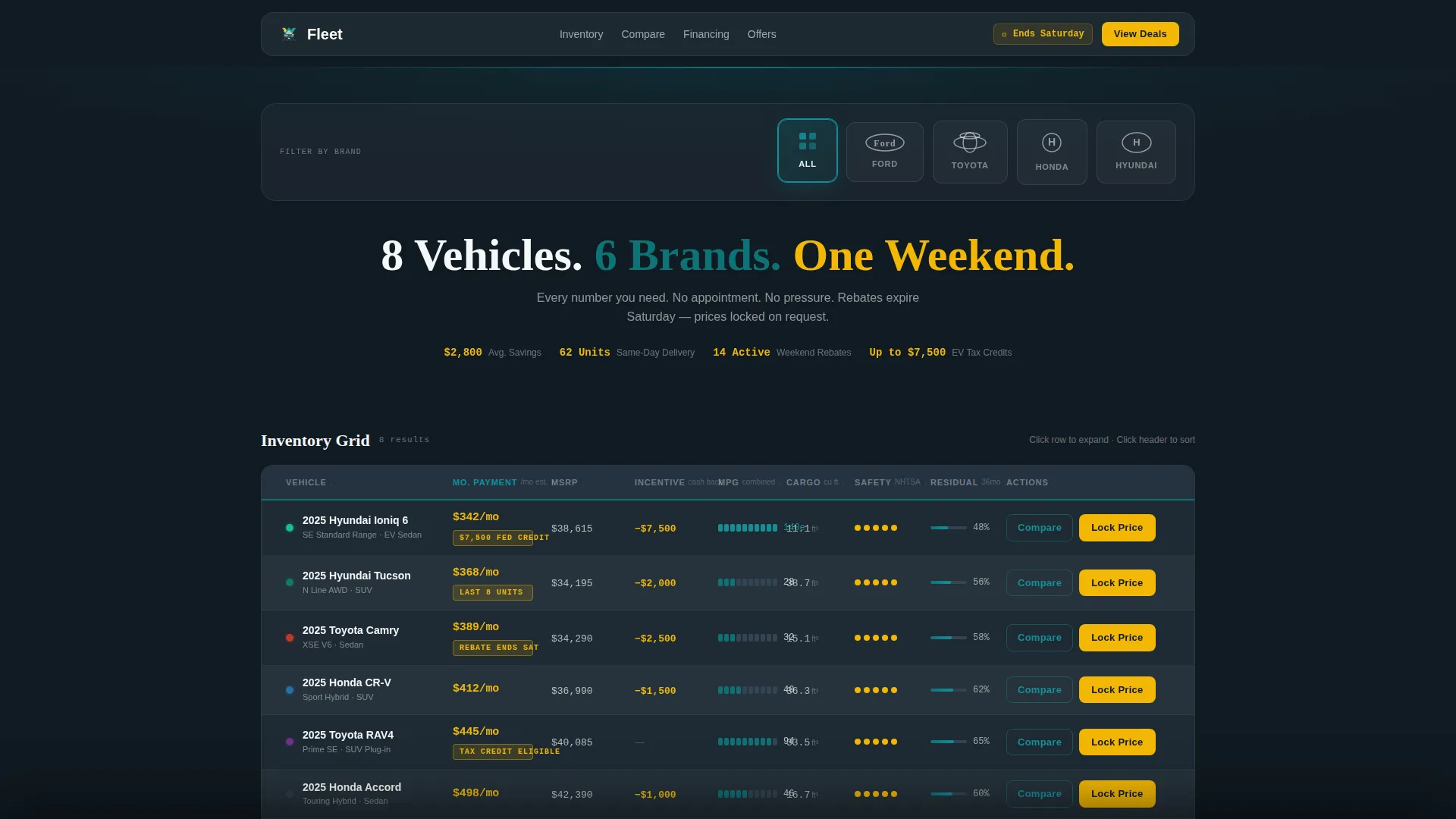
Fleet is a dashboard-style auto dealer promotional landing page built around a sortable inventory grid. It combines a brand logo filter bar, an interactive vehicle comparison matrix, and dual call-to-action buttons into one scannable, high-urgency layout. The Teal Catalyst color system keeps the page sharp and deal-focused from the first scroll to the final price lock.
by Rocket studio
Quick summary
Fleet compresses an entire showroom into a single, grid-driven landing page. Shoppers scan vehicle rows, compare specs side by side, and lock a quoted price before the promotion window closes. The layout is built for speed and decision-making, not reading. Every element exists to move a visitor from browsing to committing.
Who this template is for
Fleet is designed for auto dealers running time-sensitive promotional campaigns. It works equally well for weekend sales events, end-of-month clearance pushes, and lease-return conquest offers.
- Weekend researchers cross-shopping multiple vehicles across multiple tabs
- Lease-return loyalists scanning for their next monthly payment
- First-time buyers whose credit has recently crossed the approval threshold
What problem this template solves
Most dealer landing pages bury the numbers under hero images and vague copy. Shoppers leave before they find what they need. Fleet solves this by putting every decision point front and center in a scannable grid format.
- Shoppers can compare payment, fuel economy, cargo space, safety rating, and available incentive without scrolling through walls of text
- The urgency of a closing promotion window is communicated immediately through the layout and badge system
- Friction between browsing and converting is reduced by keeping the price-lock form to just two fields
What you get with this template
Fleet delivers a complete, ready-to-customize promotional landing page structured around an interactive inventory grid. The layout is modular and visually coherent right out of the box.
- A logo filter bar, sortable data grid, and expandable vehicle mini-cards
- Dual call-to-action buttons per vehicle row, including a comparison tray and a price-lock form
- A persistent comparison tray that holds up to three vehicles and generates a shareable PDF spec sheet
Feature list
Fleet includes a focused set of interactive and visual components built specifically for auto dealer promotional campaigns.
Logo Filter Bar
A horizontal band of monochrome manufacturer icons sits at the top of the page. Each icon is clickable and filters the inventory grid below to show only matching vehicles. The bold white headline beneath the bar communicates total inventory count and sale window at a glance.
Sortable Inventory Grid
The core of the page is a comparison grid where each row represents a vehicle and each column covers a key decision point. Columns include monthly payment, miles per gallon (MPG), cargo volume, safety rating, and available incentive. Teal row highlights follow the cursor to make scanning feel active and intentional.
Expandable Vehicle Mini-Card
Clicking any vehicle row opens an expanded card with a hero photo, three trim options displayed side by side, and a residual value chart. The card gives shoppers just enough depth to narrow their choice without leaving the page.
Dual Call-to-Action Buttons
Every vehicle row carries two action buttons. "Compare Side-by-Side" pins the vehicle to the persistent comparison tray at the bottom of the viewport. "Lock This Price" opens a two-field form capturing zip code and preferred contact method, then timestamps the quoted price against the active promotion window.
Persistent Comparison Tray
A fixed tray at the bottom of the page holds up to three pinned vehicles simultaneously. Shoppers can tap one button to generate a shareable PDF spec sheet. An email address is captured as the delivery mechanism, making lead collection feel like a useful service rather than a gate.
Signal Yellow Urgency Badges
Price callouts and time-sensitive offer badges use signal yellow exclusively. This reserved color treatment makes rebate deadlines and special pricing impossible to miss without cluttering the rest of the layout.
Page sections overview
| Section | Purpose |
|---|---|
| Logo Filter Bar | Filter inventory grid by manufacturer brand |
| Inventory Count Headline | Communicate total vehicles and sale urgency |
| Sortable Data Grid | Display all vehicles with key decision columns |
| Expandable Vehicle Card | Show trim options, photo, and residual value chart |
| Dual call to action Row | Offer comparison pinning and price-lock action |
| Persistent Comparison Tray | Hold up to three vehicles for side-by-side review |
| Price Lock Form | Capture zip code and contact method with timestamp |
| PDF Spec Sheet Prompt | Deliver shareable sheet and collect email address |
Design & branding system
Fleet uses the Teal Catalyst color system, which draws visual cues from a dealership lot at dusk. The palette balances legibility, energy, and brand authority across every grid row and badge.
- Showroom teal (#0D7377) is the primary action color used for buttons, row highlights, and interactive elements
- Asphalt charcoal (#1E2A33) fills data grid backgrounds for strong contrast and a premium feel
- Lot-light white (#F4F7F9) alternates on row stripes to improve row separation and readability
- Signal yellow (#F2B705) is reserved exclusively for price callouts and urgency badges to maximize attention
Mobile & speed optimization
The grid-first layout is built to remain navigable on smaller screens without sacrificing the comparison functionality that makes it useful.
- Vehicle rows and columns reflow for vertical scrolling on mobile viewports
- The persistent comparison tray anchors to the bottom of the screen on all device sizes
- The price-lock form stays minimal at two fields to reduce input friction on touch keyboards
How this template helps you convert
Fleet removes the typical friction points that cause shoppers to leave dealer pages before taking action. The layout is engineered to move visitors through three stages: browsing, comparing, and committing.
- The sortable grid qualifies buyer interest without requiring a salesperson. Shoppers self-select based on payment, MPG, and incentive columns, arriving at their shortlist faster.
- The comparison tray and PDF spec sheet give shoppers a reason to share their contact information willingly, turning a passive visit into a warm lead.
- The two-field price-lock form with a promotion timestamp creates a clear, low-effort action tied to a real deadline, converting urgency into a completed form submission.
Other information about this template
Fleet is categorized under the Technology category on the marketplace, specifically within the Auto Dealer Email Templates subcategory. It is designed for the auto dealer promotional email niche and carries a Directory and Discovery theme with a Feature Matrix creative direction.
- The template style is Dashboard and Data Grid, making it well-suited for campaigns with large inventory counts
- The header concept is a Logo Bar, which aligns with multi-brand dealership groups and large franchise operations
- The landing page direction is Comparison and Versus, matching the cross-shopping behavior of today's informed car buyer
- This template is a single-page promotional layout, not a multi-page website



Theme
Directory & Discovery
Creative direction
Feature Matrix
Color system
Teal Catalyst
Style
Dashboard/Data Grid
Direction
Comparison/Versus
Page Sections
Logo Filter Bar with Brand Icons
Sortable Comparison Data Grid
Expandable Vehicle Mini-card
Dual Call-to-action Buttons
Persistent Comparison Tray and PDF Output
Signal Yellow Urgency Badge System
Related questions
How many vehicles can the inventory grid display?
Can I customize the column headers in the data grid?
How does the price-lock form work?
What does the comparison tray do with collected email addresses?
Is this template suitable for a single-brand dealership?



