Delivery App Landing Page Template | Bento Grid
Fleet is a bento grid landing page template built for delivery app platforms. It uses a dark Dashboard Pro aesthetic with a Carbon Fiber color system to present live-looking operational data. The template guides visitors through a Problem-to-Solution narrative, features an ROI calculator section, and closes with a competitor comparison grid, all designed to convert logistics decision-makers.
by Rocket studio
Quick summary
Fleet is a single-page bento grid template designed for delivery app platforms. It opens with a full-viewport stats wall, moves through a Problem-to-Solution arc, and closes with a comparison grid and ROI calculator. The Carbon Fiber color system gives every section the feel of a live operations cockpit, built to earn trust from logistics professionals on first scroll.
Who this template is for
Fleet is built for founders, operators, and coordinators who manage real delivery volume and need to convince their audience fast. It speaks the language of people who live inside dashboards.
- Operations managers at mid-size restaurant groups juggling multiple delivery zones during peak hours
- Logistics coordinators at e-commerce warehouses tracking failed-delivery rates and driver utilization
- Startup founders who have outgrown manual dispatching and need a platform presence that reflects that growth
What problem this template solves
Delivery app platforms often struggle to communicate their value quickly to a skeptical, data-literate audience. A generic landing page with stock photography and vague promises will not hold the attention of an operations manager mid-shift.
- Visitors leave before reaching the key differentiators because the page feels too slow or too generic
- The gap between "what the tool does" and "what it saves me" is never made concrete for the visitor
- Competitors are never addressed directly, leaving the buyer to make comparisons on their own
What you get with this template
You get a fully structured bento grid landing page built around a deliberate narrative arc. Every section is designed to move a logistics buyer from recognition of pain to readiness to act.
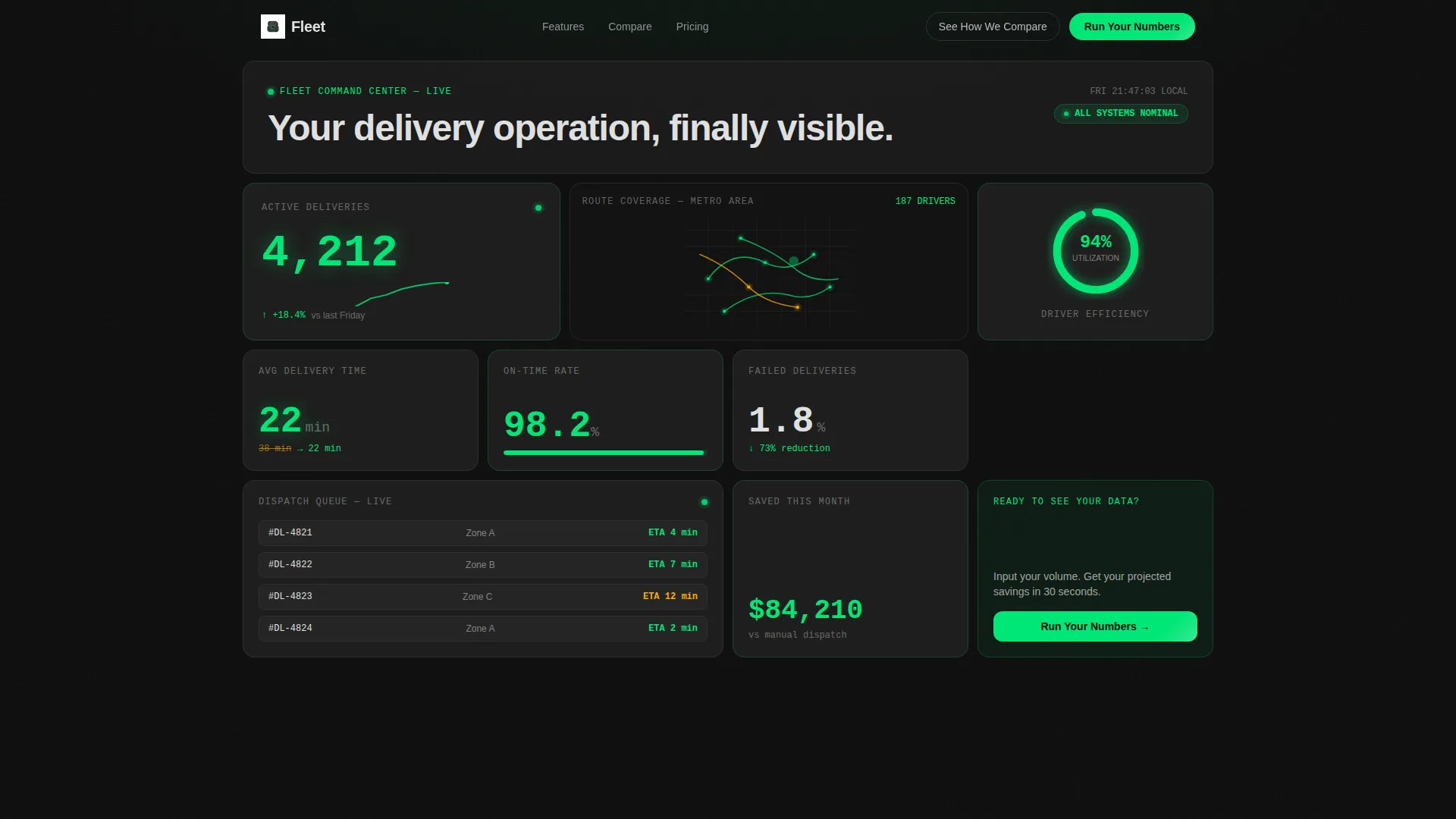
- A viewport-filling stats and metrics header with live-looking dashboard tiles and micro-animation placeholders
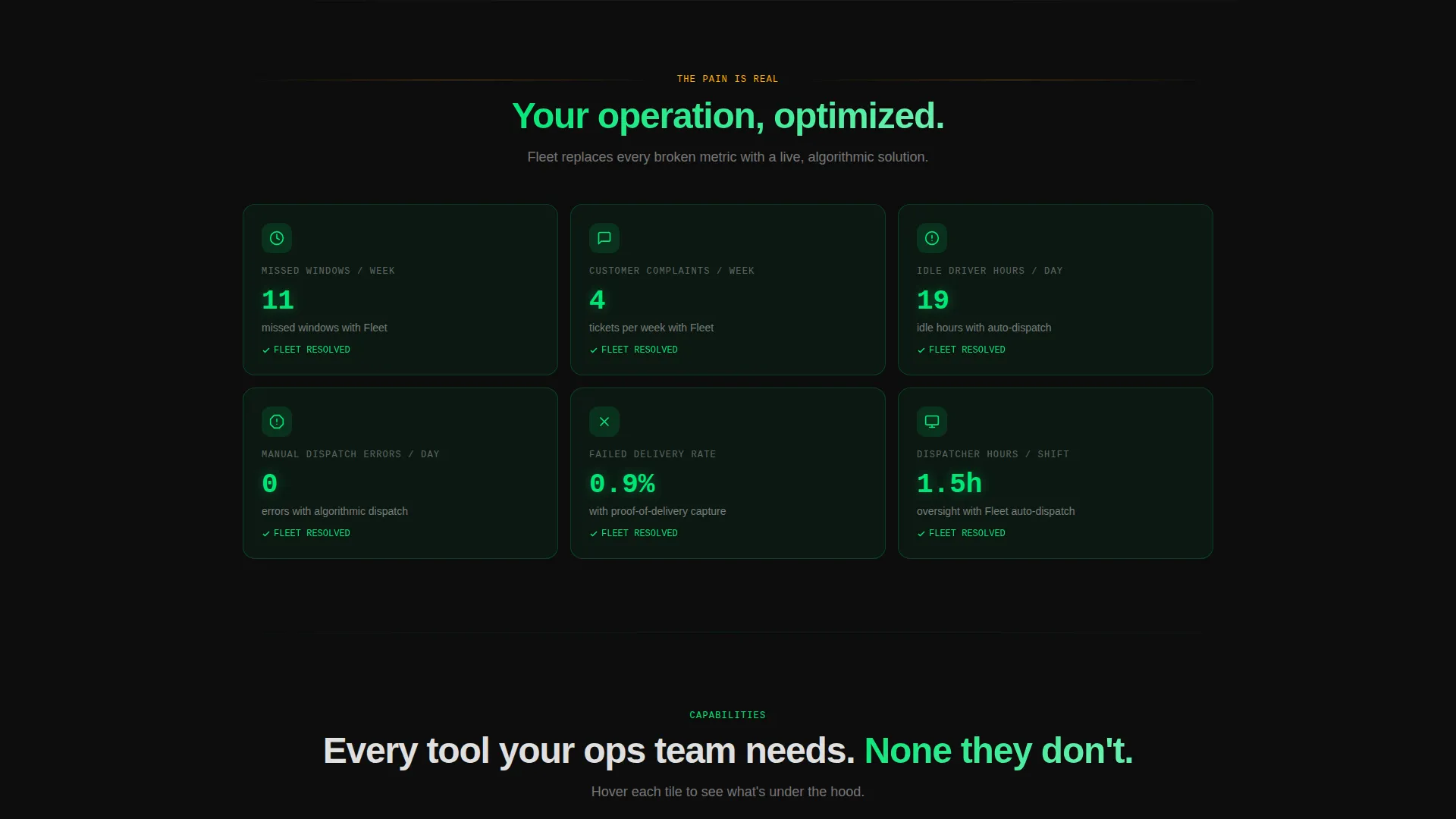
- A scrolling Problem-to-Solution section where amber problem tiles visually transform into green resolved-state tiles
- A feature walkthrough with hover-expand bento cells, a competitor comparison grid, and an ROI calculator section with a conversion-focused form
Feature list
The Fleet template packs its persuasion into a tightly sequenced set of purpose-built sections and visual components.
Bento Grid Layout System
Every section of the page uses a bento grid structure. Tiles vary in size to create visual hierarchy, and the grid keeps the page scannable without requiring long blocks of text. Each cell carries a specific data point or capability.
Live-State Metrics Header
The header fills the full viewport with dashboard tiles showing operational numbers: active deliveries, average delivery time, driver utilization, and a city heat map with route lines. Micro-animation placeholders give the section the feel of a live shift in progress.
Problem-to-Solution Scroll Arc
The page opens with a set of broken-metric tiles rendered in caution amber. As the visitor scrolls, each tile transitions to a resolved state in telemetry green. The visual transformation makes the platform's impact immediately legible without a single word of explanation.
Hover-Expand Feature Walkthrough
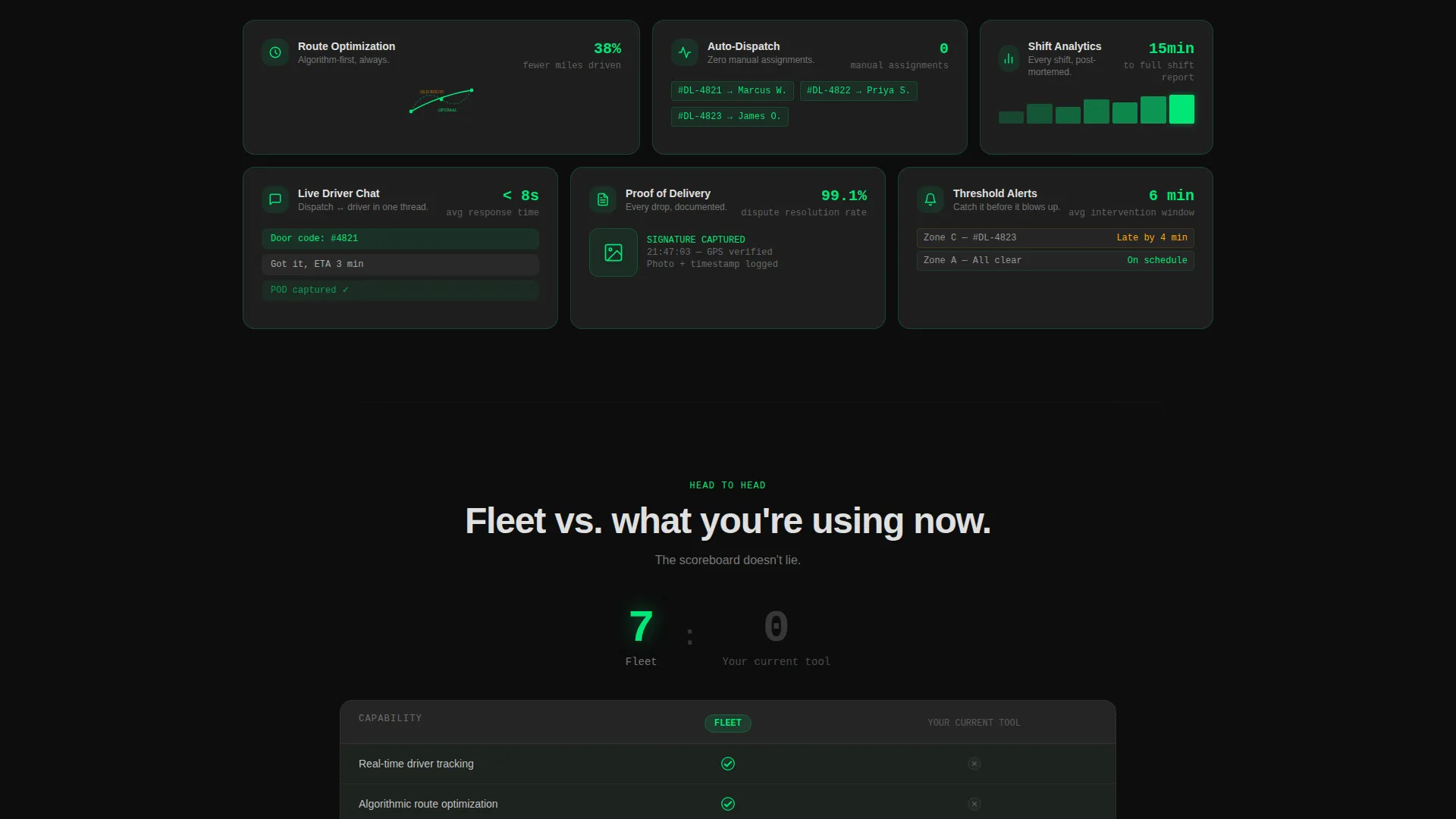
The mid-page feature section uses bento cells that expand on hover to surface individual platform capabilities such as route optimization, auto-dispatch, live driver chat, and proof-of-delivery capture. Each cell reveals its content at the right moment.
ROI Calculator Section
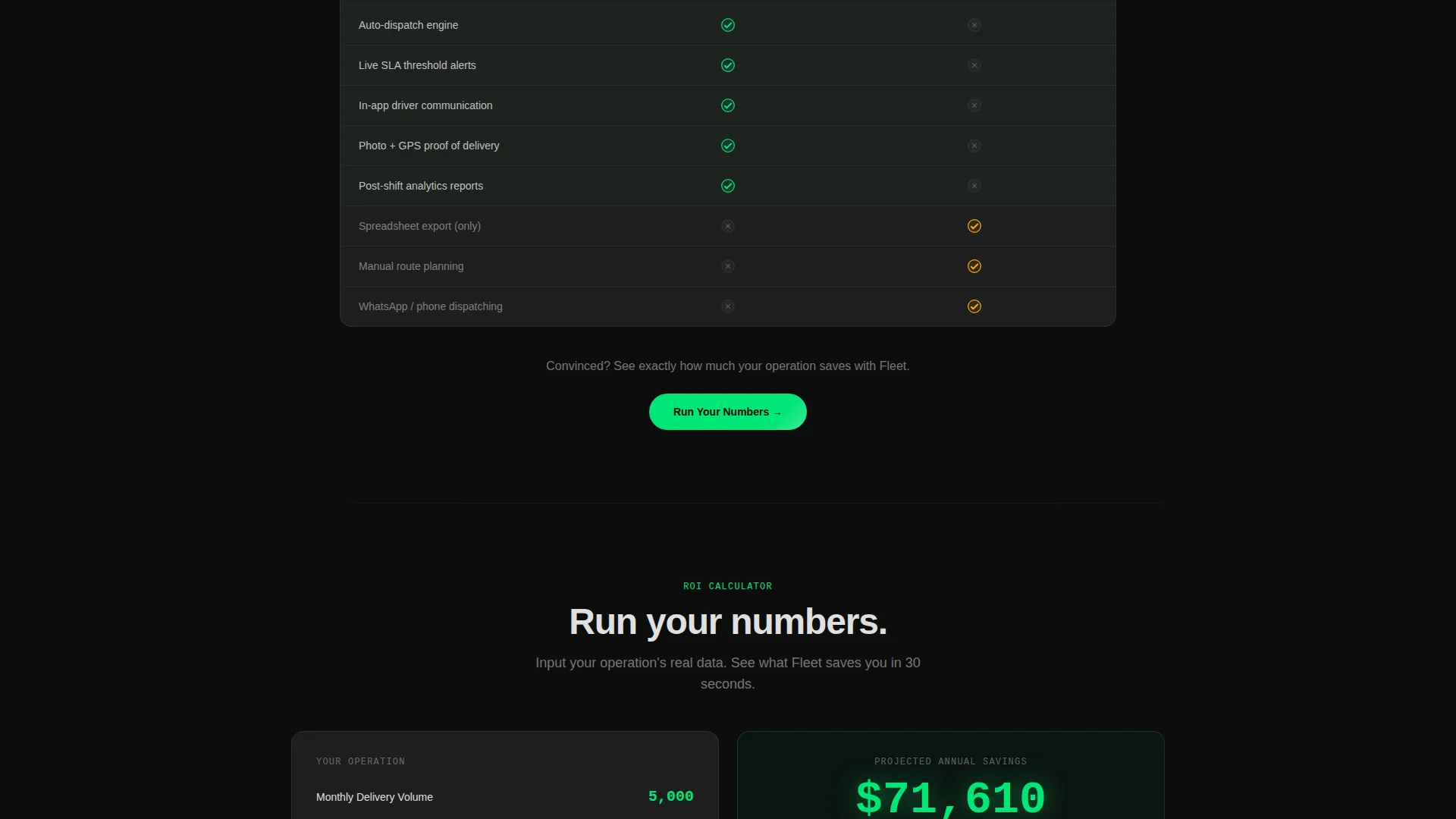
The primary call-to-action leads to a calculator where the visitor inputs their monthly delivery volume, driver count, and current failed-delivery rate. A projected savings figure animates into view before the form requests a work email and company name.
Competitor Comparison Grid
A two-column grid places the visitor's current tool against Fleet row by row. Green checkmarks accumulate on Fleet's side as the visitor reads down, functioning as a visual scoreboard that closes the argument without aggressive copy.
Page sections overview
| Section | Purpose |
|---|---|
| Stats Metrics Header | Opens with a viewport-filling bento grid of live-looking operational tiles to establish platform credibility immediately |
| Problem Tiles Section | Displays broken delivery metrics in caution amber to create emotional recognition of the visitor's current pain |
| Solution Transition | Animates each problem tile into a resolved green state to show the platform's direct impact visually |
| Feature Walkthrough Grid | Hover-expand bento cells reveal individual platform capabilities in context |
| Comparison Grid | Two-column table pits the visitor's current tool against Fleet row by row |
| ROI Calculator | Visitor inputs their own data to generate a personalized projected savings figure |
| Conversion Form | Captures work email and company name after the savings figure has been revealed |
Design & branding system
Fleet uses the Carbon Fiber color system within a Dashboard Pro theme. Every color choice is functional, not decorative. The palette reads like the interior of a high-end electric vehicle at night.
- Core backgrounds stay in the deep black to graphite range: cockpit black (#0D0D0D) and graphite panel gray (#1E1E1E), with cards appearing as slightly lighter floating panels edged by 1px borders
- Telemetry green (#00E676) appears only where data is live or a metric is positive; caution amber (#FFAB00) marks warnings, threshold breaches, and the problem-state tiles
- Signal white (#E0E0E0) handles all primary typography on dark surfaces, keeping text legible without breaking the dark immersive feel
Mobile & speed optimization
The bento grid layout is structured to reflow cleanly across screen sizes. Visual weight and hierarchy are maintained at smaller viewports without losing the dashboard character of the design.
- Grid cells are sized and spaced to remain readable and tappable on mobile screens without requiring horizontal scrolling
- Micro-animations and counter effects are scoped to meaningful data points, keeping the page performant rather than visually cluttered
- The dark background palette reduces rendering load compared to image-heavy designs, keeping the page feeling fast on slower mobile connections
How this template helps you convert
Fleet is built around a conversion architecture that earns the click before it asks for it. The page does the convincing through data and visual proof, so the form feels like a natural next step.
- The stats header anchors credibility in the first three seconds by showing real operational numbers in a live dashboard format, giving data-literate visitors an immediate reason to keep reading.
- The Problem-to-Solution arc makes the visitor see their own operation in the broken-metric tiles, creating recognition before the solution is presented, which shortens the persuasion distance considerably.
- The ROI calculator makes the value personal by letting the visitor input their own numbers, so the projected savings figure they see belongs to their operation, not a generic case study.
Other information about this template
Fleet is a single landing page template built in a bento grid style. It is part of a broader template library covering technology and mobile app niches. A few additional details worth knowing before you use it:
- The template style is Bento Grid, the theme is Dashboard Pro, and the creative direction follows a Problem-to-Solution Arc with a Comparison and Versus landing-page direction
- The header concept is a Stats and Metrics wall, which means the first impression is driven entirely by data visualization rather than hero imagery or tagline copy
- This template is positioned within the Technology category under the Mobile App subcategory, with a specific focus on the delivery app platform niche
Theme
Dashboard Pro
Creative direction
Problem→Solution Arc
Color system
Carbon Fiber
Style
Bento Grid
Direction
Comparison/Versus
Page Sections
Bento Grid Layout System
Live-state Metrics Header
Problem-to-solution Scroll Arc
Hover-expand Feature Walkthrough
ROI Calculator with Conversion Form
Competitor Comparison Grid
Related questions
Who is the Fleet template built for?
Can I customize the color system and metrics shown in the header?
What makes the bento grid layout effective for a delivery app landing page?
How does the ROI calculator section work in the template?
Does the template include a competitor comparison section?



