Dental Software Site Maintenance Website Template
Fleet is a scroll-reveal landing page template built for dental fleet management platforms targeting multi-location dental group operations. It opens with a live-data stats dashboard, then guides visitors through predictive maintenance alerts, procurement savings, and app download calls to action. The design uses a void-black and electric-cyan palette to make every data point feel urgent and actionable.
by Rocket studio
Quick summary
Fleet is a single-page, scroll-reveal landing page template designed for dental fleet management software. It opens with an animated command center header showing real-time asset counts, uptime metrics, and location data. Progressive scroll layers build momentum toward a clear app download call to action, making the platform feel essential before the visitor ever reaches a sign-up prompt.
Who this template is for
This template is built for dental software companies and platforms serving large, multi-location dental group organizations. If your product helps operations teams stay ahead of equipment failure, this page speaks their language precisely.
- DSO (Dental Service Organization) operations directors managing forty or more office locations
- Procurement managers handling equipment warranties and replacement cycles across a large fleet
- Regional dental managers who need a fast, confident answer when a critical device goes offline
What problem this template solves
Managing dental equipment across dozens of locations is a coordination problem that spreadsheets and reactive maintenance calls cannot solve fast enough. Teams waste time chasing repair status, miss warranty windows, and absorb costly chair downtime that disrupts patient flow. This template frames your platform as the solution that ends those scrambles.
- Equipment failures go undetected until a hygienist is already mid-procedure and the session has to stop
- Procurement teams lack a unified view of asset health, warranty status, and replacement timelines
- Leadership has no real-time visibility into which locations are at risk on any given morning
What you get with this template
You get a fully structured, scroll-reveal landing page that leads with data and earns the download before asking for it. Every section is built to demonstrate platform capability through motion and live-looking metrics rather than stock images or generic headlines.
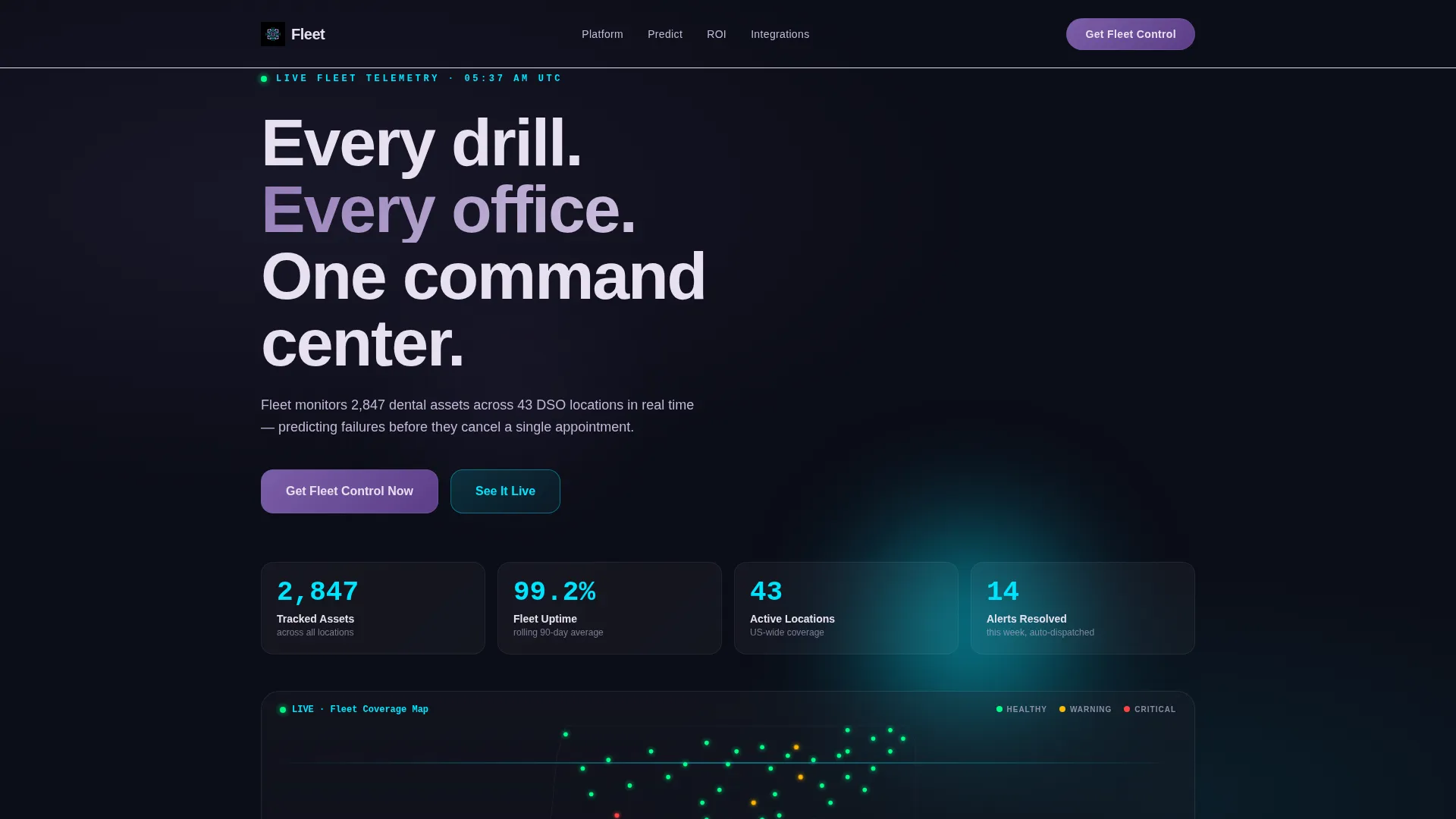
- An animated header dashboard showing asset counts, uptime percentages, location dots, and equipment health score pulses
- Four progressive scroll reveal sections that each introduce a distinct platform capability with upward motion and iridescent shimmer
- A conversion-focused footer section with app download badges, an SMS link field, and a secondary enterprise audit booking path
Feature list
This section describes the core built-in components of the Fleet landing page template.
Animated Stats Command Center Header
The header fills the full viewport with a live-feeling fleet overview. Numbers count up on load, location dots bloom across a stylized US map, and a handpiece icon pulses to signal a replacement already in transit. The data is the hero, and it moves.
Progressive Scroll Reveal Engine
Each scroll layer enters with upward motion and a subtle iridescent shimmer, and each reveal fires slightly faster than the last. The sequence builds a sense of momentum, making the platform feel like it is already running at full speed before the visitor reaches the call to action.
Predictive Alert Animation Flow
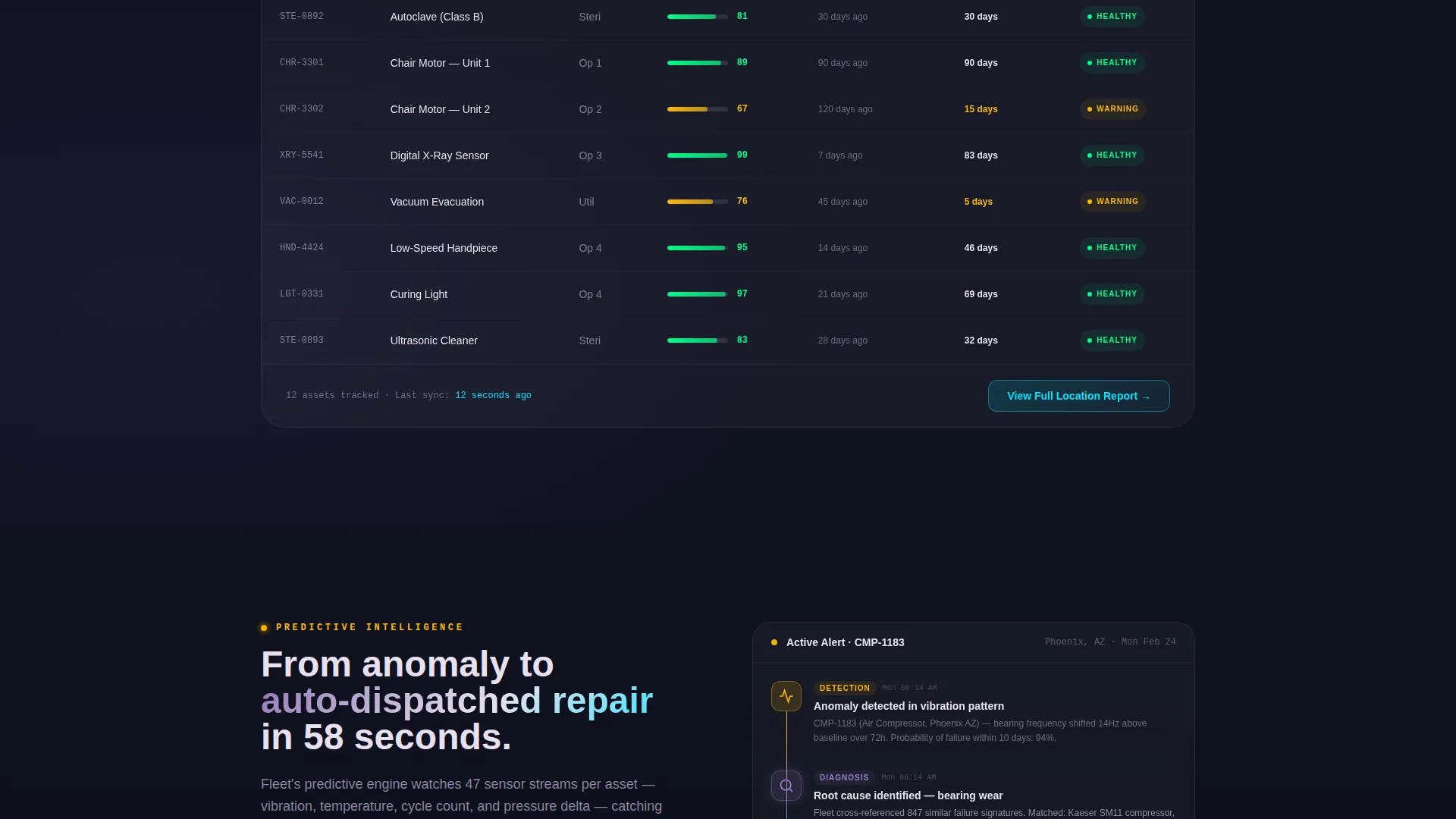
One dedicated scroll section animates a predictive failure event from initial detection all the way through to an auto-dispatched repair confirmation. This shows the platform's core value in motion rather than in bullet points.
Procurement Savings Calculator Section
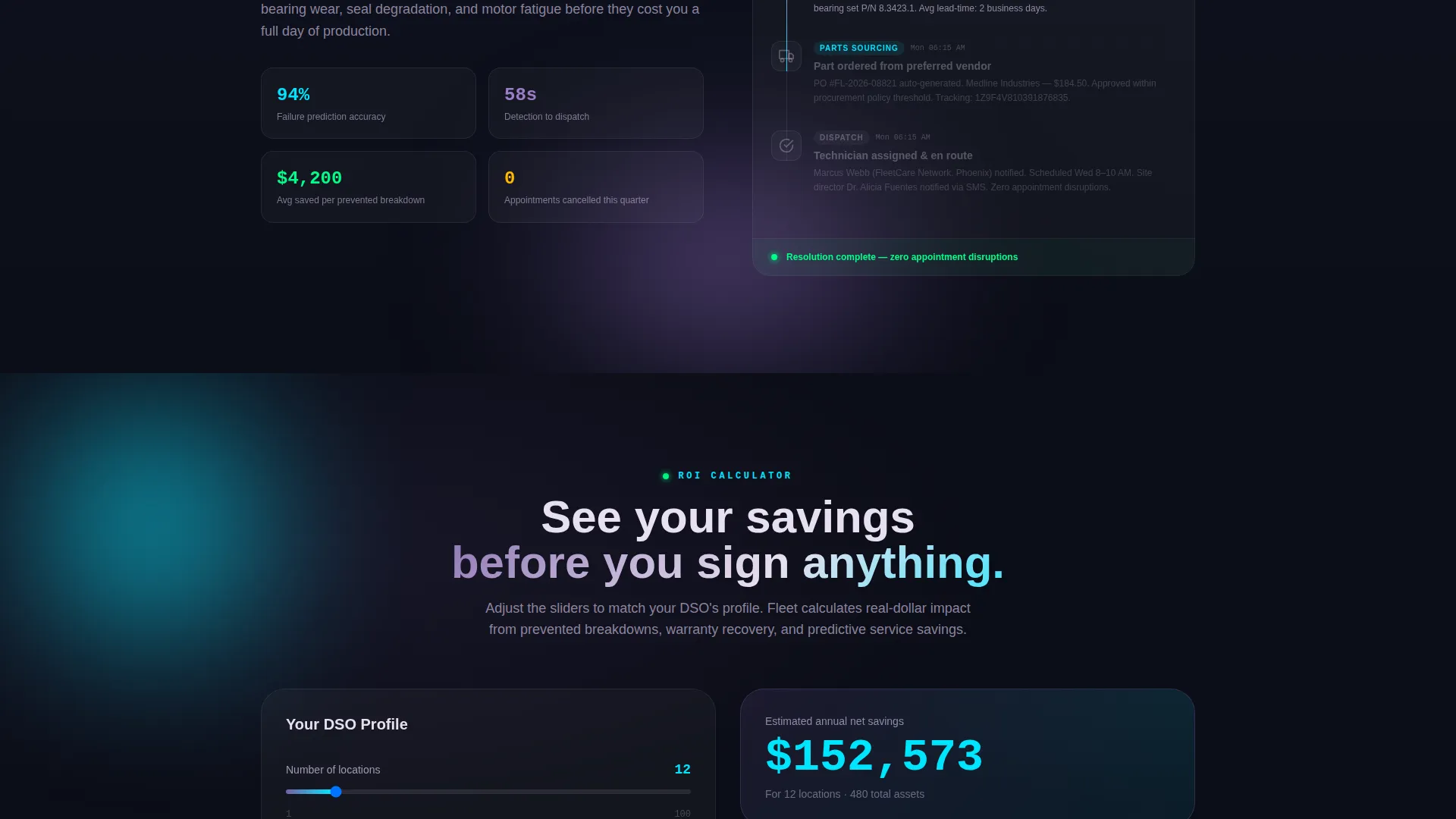
A real-time tallying calculator section lets visitors watch cost savings accumulate as the numbers animate on screen. It turns an abstract ROI claim into a visible, dynamic proof point.
App Download call to action with SMS Option
The primary call to action presents "Get Fleet Control Now" alongside App Store and Google Play badges. A single-field SMS option labeled "Text me the download link" serves operations managers browsing on desktop between site visits.
Enterprise Audit Booking Path
A secondary conversion path below the primary call to action offers "Book a Fleet Audit" for larger dental group organizations that need a white-glove onboarding experience before committing to a full rollout.
Page sections overview
| Section | Purpose |
|---|---|
| Hero Stats Dashboard | Opens with animated fleet metrics, uptime figures, and a live equipment health ticker |
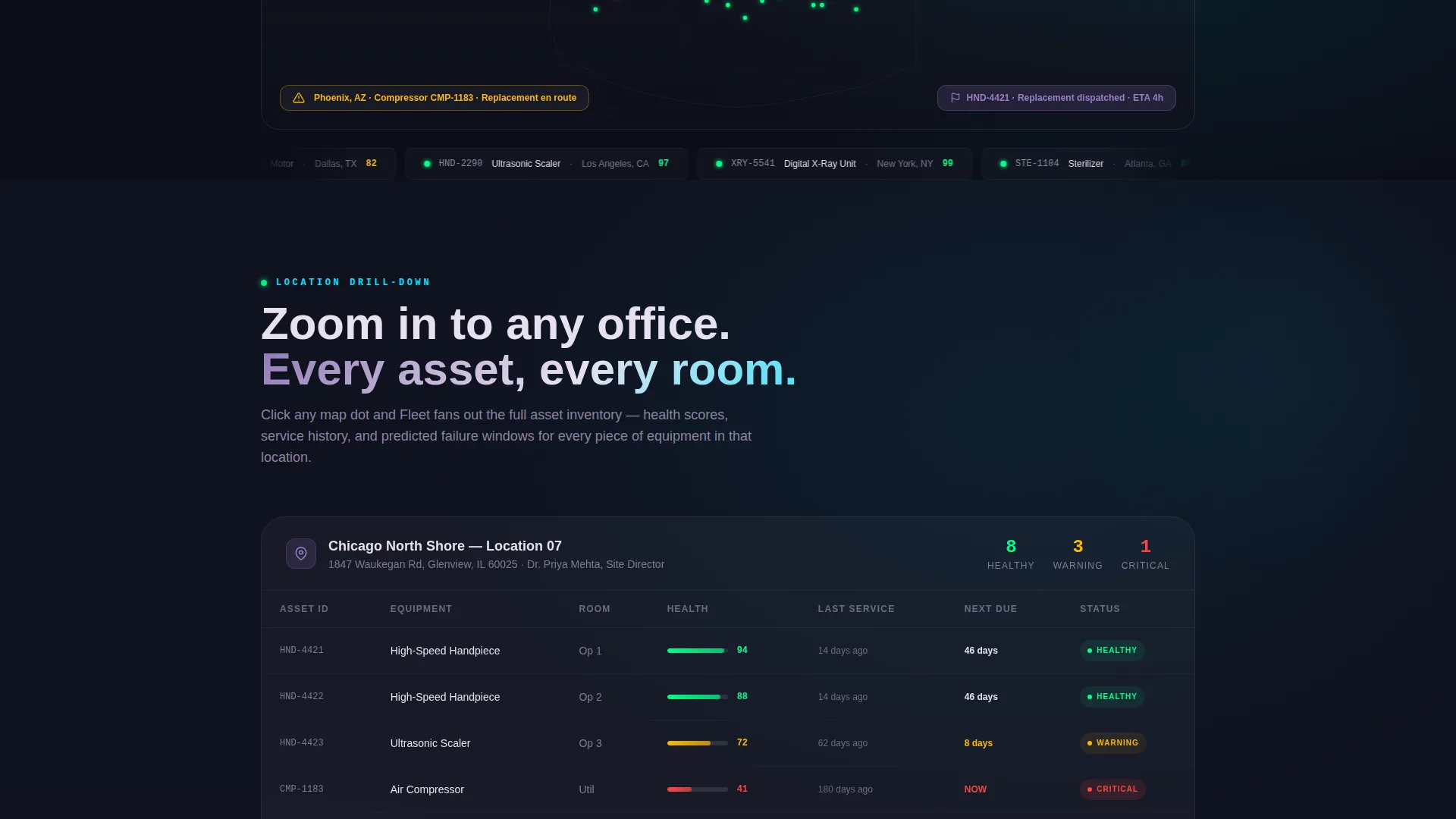
| Location Map Reveal | Zooms into a single office and fans out its full asset inventory on first scroll |
| Predictive Alert Flow | Animates a failure detection event through to an auto-dispatched repair confirmation |
| Savings Calculator | Tallies procurement cost savings in real time as the visitor scrolls into view |
| Integration Dock | Shows practice management software logos locking into the dashboard like spacecraft modules |
| App Download call to action | Presents primary download badges, SMS link field, and enterprise audit booking option |
Design & branding system
The visual identity is built around an AI Iridescent color system that feels clinical and futuristic at the same time. Every color has a specific role, and the system holds visual discipline across all scroll layers.
- Void black (#0B0D17) anchors all backgrounds, keeping the focus entirely on data and motion
- Electric cyan (#00E5FF) fires on live data pulses, status indicators, and health score tickers throughout the page
- Holographic violet (#7B5EA7) anchors primary headlines and navigation elements
- Iridescent pearl (#E8E0F0) lifts card surfaces and data containers just enough to float above the dark field
Mobile & speed optimization
The template is structured to maintain its scroll-reveal momentum and data-forward visual identity across screen sizes. Operations managers often check fleet status from a mobile device, and the layout accounts for that browsing context.
- Scroll reveal animations and count-up number sequences are designed to work within a mobile viewport without losing their impact
- The SMS download link field is prominently placed for desktop visitors who want to hand off the app link to their phone immediately
- The app download call to action section is structured to render cleanly on smaller screens where badge taps are the primary conversion action
How this template helps you convert
The Fleet template earns the conversion before it asks for one. By the time a visitor reaches the download prompt, they have watched the platform solve three real operational problems in motion.
- The header dashboard creates immediate credibility by showing scale. Seeing 2,847 tracked assets and 99.2% uptime across 43 locations signals that this is a platform built for serious operations, not a single-clinic tool.
- Three full scroll layers of platform capability come before any call to action. The predictive alert animation, savings calculator, and integration dock section each add a layer of trust, so the download tap feels like a logical next step rather than a cold ask.
- The dual call to action structure captures both immediate and deliberate decision-makers. Self-serve operations managers get a frictionless app download path, while enterprise procurement leads get a direct route to a dedicated fleet audit conversation.
Other information about this template
The Fleet template is built with the Startup Velocity theme and Launch Energy creative direction, which means every design decision prioritizes forward motion and urgency over decoration. The template style is Scroll Reveal (Progressive), and the header concept is a Stats and Metrics dashboard.
- The integration dock section is designed to visually accommodate practice management software logos, allowing your team to present ecosystem compatibility as a confidence signal
- The iridescent shimmer effect on each scroll layer uses the AI Iridescent color system to create a sense of light refracting through a prism, reinforcing a futuristic but controlled clinical atmosphere
- The template is category-matched to the Technology and Dental Software intersection, making it immediately relevant for dental fleet management platform marketing teams
- No stock photography is used anywhere in the template. The animated data visualizations, map, and equipment health indicators serve as the full visual narrative
Theme
Startup Velocity
Creative direction
Launch Energy
Color system
AI Iridescent
Style
Scroll Reveal (Progressive)
Direction
App Download
Page Sections
Animated Fleet Command Center Header
Progressive Scroll Reveal Sequence
Predictive Maintenance Alert Animation
Real-time Procurement Savings Calculator
Dual-path App Download Call to Action Block
Integration Dock Visual Section
Related questions
Who is the Fleet landing page template designed for?
What call-to-action options does the template include?
Can I customize the animated dashboard metrics shown in the header?
Does the template include the integration dock section?
How many scroll sections appear before the call to action prompt?



